1
Page 60 of 75
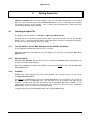
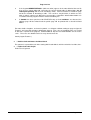
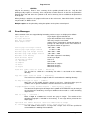
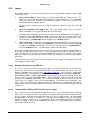
All the special characters used above can be customised to use other characters, by editing the
SET file or using the HotPlot Settings File Editor. The characters referred to above are the defaults.
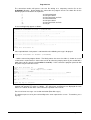
The sample file TUTORIAL.TXT supplied with the program contains the text of this discussion and
will print a profile demonstrating all of the techniques. Run the program and select hole number
TUT002. Read the discussion on SYMBOLS FOR IGNEOUS ROCKS directly below for further
information on the use of compound symbols.
6.3
The Symbols for the Igneous Rocks
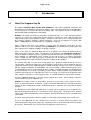
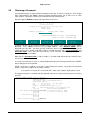
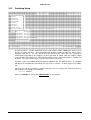
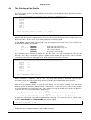
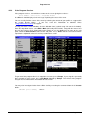
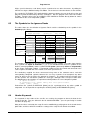
The table shows the classification of Igneous Rocks and the relationship to the symbols in the
dot6000 graphics library.
< Leucocratic....Melanocratic...Hypermelanic >
< Light Coloured
grading to
Very Dark >
44
FREE
QUARTZ
+
x
V
+
(empty
)
x
(symbol)
V
+
45 OLIVINE
OR
FELS- x
PATHOID
V
SYENITE
FAMILY
44
17
44
18
44
19
17
18
19
45
17
45
18
DIORITE
FAMILY
44 41 17
44 41 18
44 41 19
41 17
41 18
41 19
45 41 17
45 41 18
GABBRO
FAMILY
44 42 17
44 42 18
44 42 19
42 17
42 18
42 19
45 42 17
45 42 18
PYROXENITE
FAMILY
44 43 17
44 43 18
44 43 19
43 17
43 18
43 19
45 43 17
45 43 18
45
45 41 19
45 42 19
45 43 19
DIORITE
FAMILY
GABBRO
FAMILY
PYROXENITE
FAMILY
41
42
43
19
SYENITE
FAMILY
(empty
symbol)
PLUTONIC
HYPABYSS
VOLCANIC
PLUTONIC
HYPABYSS
VOLCANIC
PLUTONIC
HYPABYSS
17
18
19
17
18
19
17
18
+
+
+
+
+
+
+
+
VOLCANIC 19 +
The numbers in the table are the [SA CODE NUMBERS] of the symbols. The table shows how the
three symbols for depth of formation (+) (x) (v) are combined with the three symbols for the
families (conveying colour), and the symbol for free quartz (alternatively olivine or felspathoids)
to give unique compound symbols. A compound symbol can thus be viewed and construed in the
same sequence and with the same criteria as the rock specimen itself.
The vocabulary supplied has been constructed using most of the common names and their
corresponding compound symbols; however the user may customise it to incorporate any other
names or phrases that he wishes the program to recognise. The program will also function if the
text file specifies the constituent symbols of a rock type, although it must surely be harder work.
The following three descriptions are equivalent and will produce the same compound symbol:
:A ~quartz dolerite.
:A ~hypabyssal rock, ~gabbro family with ~free quartz visible.
:[SA18] [SA42] [SA44].
Furthermore the symbol for BRECCIA [SA46] can be superimposed on any other symbol or
compound. It is also possible to superimpose SCHIST [SA47] or METAMORPHIC [SA16].
6.4
Header Keywords
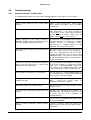
The keywords in the header of the text file are used by the program to detect the data for the
header of the job. They are defined in the file CONVOCAB.ENG. (See the part listing in Section
5.5 above on page 49).
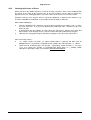
Many of the values carried by the setup file can be modified by specifying them in the header for the
job or hole, and these will then override the settings of the setup file for all holes that follow.
dot6000 User Manual
©Winston Jones & Software Africa
19 August 2010