1
Create your own presets and banks
Of course the possibilities don't stop here. The provided banks are just a good starting
point and a well chosen collection of usable presets for immediate use.
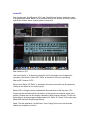
With a bit of skill you can also create your own custom presets and banks. OP-X comes
with 128 internal presets, so the v-machine bank only uses half of them already. Take
some time and try them out by switching them in a dry preset. It's recommended to
remove and reload OP-X first (in the vfx application) because the first internal patch
always is overwritten by the current chunk file otherwise.
Of course you can also tweak the patches to your liking or create your own ones from
scratch. Also have a look at our site, since we plan to provide further „ready to play“
banks and presets in vfx format in the future.
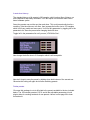
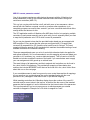
A very welcome function for creating own new presets is the „Preset -> Clone Preset
from“ in the top menu of vfx. This will overtake all settings of the cloned preset, including
all channel and volume settings, which normally won't be changed. Unload and reload
the plugin once to have the clean patches list again without the first patch being
overwritten by the current chunk file.
You of course also can combine presets of several banks to new banks, the plugins
don't have to be separated in banks. For a gig, you probably will prefer to have the
needed sounds in the order of your set in one bank.
You can arrange banks in the vfx application, but also can copy presets around
manually in the vfx library. You however need to re-number the items then.
Don't try to use two instances of OP-X or Stringer in one preset, nor both combined. The
v-machine simply has not enough CPU power for this. Upgrade to the V-Rack to use
multible instances and more sophisticated send or insert effects.
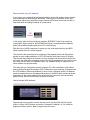
If you should have imported OP-X and Stringer into the V-Machine's internal disk (see
page 11) then it would suffice to send the new banks and presets to the V-Machine
using cable SYNC. To transfer a bank by usb cable connect your V-Machine (running)
and click on „SYNC“, choose the banks to transfer, and then confirm. Of course you can
also load them into the machine by usb stick as usual which is faster, or do all of the
preset work directly from the stick. It's all up to you.
Final Note:
This guide was written based on the vfx software version 20101204. Details or functions
of the vfx software and the v-machine may change, so always refer to the current vfx
and v-machine docs, since things described here may get obsolete or outdated.
It's always recommended to have the most up to date vfx software version and vmachine firmware installed. Keep yourself informed on the SM-Pro Audio website. We
only can do support for our plugins. Contact us at:
http://www.sonicprojects.ch/