1
CHAPTER 23. WEB SERVICES INTERFACE
xmlns:xsd="http://www.w3.org/2001/XMLSchema"
xmlns:soap12="http://www.w3.org/2003/05/soap-envelope">
<soap12:Body>
<LocationGetSublocations xmlns="http://www.digsilent.de/psms/webservice/">
<AuthTicket>string</AuthTicket>
<LocationId>string</LocationId>
<FilterByDate>boolean</FilterByDate>
<EffectivityDate>dateTime</EffectivityDate>
</LocationGetSublocations>
</soap12:Body>
</soap12:Envelope>
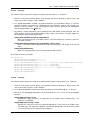
The “LocationGetSublocations” XML tag lists the required input parameters that must be passed to the
function. In this case, the following parameters are required:
AuthTicket The StationWare AuthTicket string that is generated after a successful login.
LocationId A string of the location ID where the sub-locations will be retrieved from.
FilterByDate A “True” or “False” value indicating whether the results should be limited to only those
objects that were in the system prior to the “EffectivityDate”
EffectivityDate A datetime value that will be used to filter the sub-locations if “FilterByDate” is “True”.
The response of the query will yield a XML file that contains any error messages, and also a list of
sub-locations. The response XML form shows the format of this response.
All other web services method use a similar approach, and their functionality can be determined by
accessing the web services information page for each specific function.
23.2
An example web service query using Python
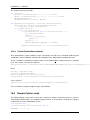
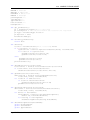
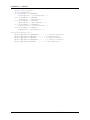
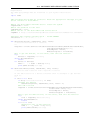
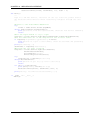
The following source code is an example of a Python script that can be used to call the StationWare
web services. Assuming that web services is enabled on your StationWare system, and that you have
Python 3 installed on your system, you should be able to run this script as an example.
If you would like to obtain a copy of this script, contact your DIgSILENT representative.
Prior to running the script, you need to update the following variables:
reqUsername Set this to the user that you want the script to login to StationWare as. Note that if the
script does not have appropriate read-only access to all parts of the StationWare tree, it may not
work correctly.
reqPassword Set this to the password of the above user.
reqSWurl Set this to the url of the StationWare web service that you want to connect to.
The script will connect to StationWare and retrieve the entire tree including all devices and print the
results to the terminal window.
'''Demonstrates the usage of web services for the StationWare manual.
The script will retrieve the StationWare tree, and print it the standard output.
Each level of the tree will be indented by two spaces.
172
DIgSILENT StationWare 4, User Manual