1
Web Management Tool
l
l
l
l
l
d-COLOR MF2
d-COLOR MF22/d-COLOR MF2
d-COLOR MF452/d-COLOR MF552
Code: 576202
PUBLICATION ISSUED BY:
Olivetti S.p.A.
Gruppo Telecom Italia
Via Jervis, 77 - 10015 Ivrea (ITALY)
www.olivetti.com
Copyright © 2012, Olivetti
All rights reserved
The mark affixed to the product certifies that the
product satisfies the basic quality requirements.
The manufacturer reserves the right to carry out modifications to the product described in this manual at any time
and without any notice.
ENERGY STAR is a U.S. registered mark.
The ENERGY STAR program is an energy reduction plan introduced by theUnited States Environmental Protection
Agency in response to environmental issues and for the purpose of advancing the development and utilization of
more energy efficient office equipment.
Your attention is drawn to the following actions which could compromise the conformity attested to above, as well as
the characteristics of the product:
• incorrect electrical power supply;
• incorrect installation, incorrect or improper use or use not in compliance with the warnings provided in the
User’s Manual supplied with the product;
• replacement of original components or accessories with others of a type not approved by the manufacturer, or
performed by unauthorised personnel.
All rights reserved. No part of this material may be reproduced or transmitted in any form or by any means,
electronic or mechanical, including photocopying, recording or by any information storage and retrieval
system, without permission in writing from the Publisher.
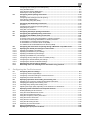
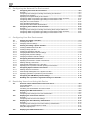
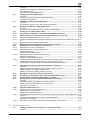
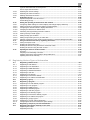
Table of contents
1
Web Connection
Web Connection ................................................................................................................................ 1-3
Operating environment ...................................................................................................................... 1-3
2
3
4
Operations Required to Use Web Connection
2.1
Configuring network environment settings.................................................................................. 2-3
Overview ............................................................................................................................................ 2-3
Assigning an IP address .................................................................................................................... 2-3
Confirming the IP address ................................................................................................................. 2-4
2.2
Confirming Web browser settings................................................................................................. 2-5
Basic Usage
3.1
3.2
3.3
How to access................................................................................................................................. 3-3
Layout of Web Connection screen ................................................................................................ 3-4
Login methods................................................................................................................................. 3-6
Login screen ...................................................................................................................................... 3-6
Login mode ........................................................................................................................................ 3-7
Switching login modes....................................................................................................................... 3-8
Logging in to the administrator mode................................................................................................ 3-9
Logging in to the user mode ............................................................................................................ 3-11
3.4
3.4.1
3.4.2
User Mode Overview .................................................................................................................... 3-12
Main Menu ....................................................................................................................................... 3-12
Each mode in the user mode ........................................................................................................... 3-13
[Information] ..................................................................................................................................... 3-13
[Job] ................................................................................................................................................. 3-14
[Box] ................................................................................................................................................. 3-14
[Direct Print] ..................................................................................................................................... 3-15
[Store Address] ................................................................................................................................ 3-16
[Favorite Setting] .............................................................................................................................. 3-17
[Customize] ...................................................................................................................................... 3-17
3.5
Using the Shortcut Function ........................................................................................................ 3-18
Registering a function in Bookmarks of the Web browser .............................................................. 3-18
Creating a shortcut for a specific page............................................................................................ 3-18
3.6
Using the Help function ................................................................................................................ 3-19
Using the online help ....................................................................................................................... 3-19
Displaying the meaning of the setting in the popup window........................................................... 3-19
Using the wizard when configuring function settings ...................................................................... 3-20
3.7
Restricting use of Web Connection ............................................................................................ 3-22
Configuring Basic Information Settings of this Machine
4.1
4.2
4.3
5
Registering information of this machine ...................................................................................... 4-3
Registering support information ................................................................................................... 4-4
Setting the date and time for the machine ................................................................................... 4-5
Manually configuring settings ............................................................................................................ 4-5
Automatically configuring settings using NTP ................................................................................... 4-6
Configuring Network Settings of this Machine
5.1
Using in the IPv4 environment ....................................................................................................... 5-3
Overview ............................................................................................................................................ 5-3
Assigning an IP address .................................................................................................................... 5-4
Registering the DNS server used by this machine ............................................................................ 5-5
d-Color MF552/452/362/282/222
Contents-1
Registering the host name ................................................................................................................. 5-6
Registering the domain name ............................................................................................................ 5-7
5.2
5.3
5.4
5.5
6
Setting up the Operating Environment of Web Connection
6.1
6.2
6.3
6.4
6.5
6.5.1
6.5.2
7
8
Using in the IPv6 environment ....................................................................................................... 5-8
Using in the IPX environment ...................................................................................................... 5-11
Displaying this machine on the network map ............................................................................ 5-12
Displaying the network error code.............................................................................................. 5-13
Encrypting communication using Web Connection .................................................................... 6-3
Changing the administrator password ......................................................................................... 6-4
Customizing the initial screen ....................................................................................................... 6-5
Changing the time period until automatic log out ....................................................................... 6-6
Configuring flash view settings ..................................................................................................... 6-7
Configuring settings for display in flash view..................................................................................... 6-7
Restricting the flash view ................................................................................................................... 6-8
Configuring the Scan Environment
7.1
Configuring the Scan to E-mail environment ............................................................................... 7-3
Overview ............................................................................................................................................ 7-3
Configuring basic settings for Scan to E-mail ................................................................................... 7-4
Using SSL/TLS communication......................................................................................................... 7-6
Using the SMTP authentication ......................................................................................................... 7-8
Using the POP Before SMTP Authentication................................................................................... 7-10
Using S/MIME .................................................................................................................................. 7-13
7.2
Configuring the SMB transmission environment ....................................................................... 7-14
Overview .......................................................................................................................................... 7-14
Configuring basic settings for the SMB transmission...................................................................... 7-15
Using the WINS server..................................................................................................................... 7-16
Using the direct hosting SMB service.............................................................................................. 7-17
Resolving the name using LLMNR................................................................................................... 7-18
Using in the DFS environment ......................................................................................................... 7-19
7.3
Configuring the FTP transmission environment ........................................................................ 7-20
Overview .......................................................................................................................................... 7-20
Configuring basic settings for the FTP transmission ....................................................................... 7-20
Using the proxy server ..................................................................................................................... 7-21
7.4
Configuring the WebDAV transmission environment ................................................................ 7-22
Overview .......................................................................................................................................... 7-22
Configuring basic settings for the WebDAV transmission ............................................................... 7-23
Using the proxy server ..................................................................................................................... 7-24
Using SSL communication .............................................................................................................. 7-25
7.5
Configuring the WS scan environment ....................................................................................... 7-27
Overview .......................................................................................................................................... 7-27
Configuring the basic settings for the WS scan transmission ......................................................... 7-28
Using the proxy server ..................................................................................................................... 7-30
Using SSL communication .............................................................................................................. 7-31
7.6
Configuring the TWAIN scan environment ................................................................................. 7-32
Overview .......................................................................................................................................... 7-32
Configuring the basic settings for the TWAIN scan ......................................................................... 7-32
Changing the Control Panel lock time ............................................................................................. 7-33
7.7
Searching for a destination using the LDAP server................................................................... 7-34
Overview .......................................................................................................................................... 7-34
Configuring basic settings for the LDAP search .............................................................................. 7-34
Using SSL communication .............................................................................................................. 7-37
Configuring the Printing Environment
8.1
Contents-2
Configuring the LPR printing environment................................................................................... 8-3
Overview ............................................................................................................................................ 8-3
Enabling LPD ..................................................................................................................................... 8-3
d-Color MF552/452/362/282/222
9
8.2
Configuring the Port9100 printing environment........................................................................... 8-4
Overview ............................................................................................................................................ 8-4
Changing the RAW port number........................................................................................................ 8-4
8.3
Configuring the SMB printing environment.................................................................................. 8-5
Overview ............................................................................................................................................ 8-5
Configuring basic settings for the SMB printing................................................................................ 8-6
Using the WINS server....................................................................................................................... 8-7
Using the direct hosting SMB service................................................................................................ 8-8
Resolving the name using LLMNR..................................................................................................... 8-9
8.4
Configuring the IPP printing environment .................................................................................. 8-10
Overview .......................................................................................................................................... 8-10
Configuring basic settings for the IPP printing ................................................................................ 8-10
Using the IPP authentication ........................................................................................................... 8-12
Communicating using SSL (IPPS).................................................................................................... 8-13
8.5
Configuring the WS printing environment .................................................................................. 8-14
Overview .......................................................................................................................................... 8-14
Configuring basic settings for the WS printing ................................................................................ 8-15
Using the proxy server ..................................................................................................................... 8-17
Using SSL communication .............................................................................................................. 8-18
8.6
8.7
8.8
Configuring the Bonjour printing environment .......................................................................... 8-19
Configuring the AppleTalk printing environment ....................................................................... 8-20
Configuring the NetWare printing environment ......................................................................... 8-21
Overview .......................................................................................................................................... 8-21
In Remote Printer mode using the NetWare 4.x Bindery Emulation ................................................ 8-21
In Print Server mode using the NetWare 4.x Bindery Emulation ..................................................... 8-23
In the NetWare 4.x Remote Printer mode (NDS).............................................................................. 8-24
In the NetWare 4.x/5.x/6 Print Server mode (NDS).......................................................................... 8-26
For NetWare 5.x/6 Novell Distributed Print Service (NDPS) ............................................................ 8-27
8.9
8.10
8.10.1
8.10.2
8.10.3
8.10.4
8.10.5
8.10.6
8.10.7
8.11
8.12
Configuring the environment for printing through a Bluetooth-compatible device ............... 8-28
Specifying the default print settings for this machine............................................................... 8-30
Specifying the default print settings ................................................................................................ 8-30
Specifying the default PCL print settings ........................................................................................ 8-32
Specifying the default PS print settings........................................................................................... 8-33
Specifying the default TIFF print settings ........................................................................................ 8-34
Configuring security settings for XPS or OOXML printing ............................................................... 8-35
Configuring the default OOXML print settings................................................................................. 8-36
Configuring the default combination settings .................................................................................. 8-37
Specifying the time-out time by interface .................................................................................. 8-38
Restricting users from obtaining device information using password.................................... 8-39
Configuring the Fax Environment
9.1
9.1.1
9.1.2
9.1.3
9.2
9.2.1
9.2.2
9.2.3
9.2.4
9.3
9.3.1
9.3.2
9.3.3
9.3.4
9.3.5
9.3.6
9.3.7
Configuring basic fax settings ....................................................................................................... 9-3
Configuring the line usage settings.................................................................................................... 9-3
Configuring connection settings for a PBX environment................................................................... 9-4
Registering the sender information.................................................................................................... 9-5
Specifying operations when sending and receiving a fax........................................................... 9-6
Specifying how to print the sender name/reception information....................................................... 9-6
Changing print settings when receiving a fax .................................................................................... 9-7
Canceling stamp setting when sending a fax .................................................................................... 9-8
Adjusting the image quality depending on the resolution of a received fax ...................................... 9-9
Specifying useful transmission and reception functions .......................................................... 9-10
Enabling/disabling the fax functions ................................................................................................ 9-10
Using the Closed Network RX function ........................................................................................... 9-11
Using the Fax Retransmit function................................................................................................... 9-12
Using the compulsory memory RX function .................................................................................... 9-13
Using the Forward TX function ........................................................................................................ 9-14
Using the PC-Fax RX function ......................................................................................................... 9-16
Using the TSI Routing function ........................................................................................................ 9-18
d-Color MF552/452/362/282/222
Contents-3
9.3.8
9.4
9.5
10
11
Configuring the Network Fax Environment
10.1
Configuring the Internet fax environment................................................................................... 10-3
Overview .......................................................................................................................................... 10-3
Configuring basic settings for sending and receiving an Internet fax.............................................. 10-4
Checking a fax reception ................................................................................................................. 10-8
Specifying the reception ability of this machine .............................................................................. 10-9
Configuring default compression type setting for transmission in black and white ...................... 10-10
Configuring default compression type setting for transmission in color ....................................... 10-11
Using SSL/TLS communication..................................................................................................... 10-12
Using the SMTP authentication ..................................................................................................... 10-14
Using the POP Before SMTP Authentication................................................................................. 10-16
10.2
Configuring the IP address fax environment............................................................................ 10-18
Overview ........................................................................................................................................ 10-18
Configuring basic settings for sending and receiving faxes using IP address fax ........................ 10-19
Configuring default compression type setting for transmission in black and white ...................... 10-22
Configuring default compression type setting for transmission in color ....................................... 10-23
Configuring User Box Environment
11.1
11.1.1
11.1.2
11.2
11.2.1
11.2.2
11.2.3
11.2.4
11.2.5
11.2.6
11.3
11.3.1
11.3.2
11.3.3
11.3.4
11.4
11.4.1
11.4.2
11.4.3
11.5
11.6
12
Restricting PC-FAX transmission..................................................................................................... 9-21
Using an additional line ................................................................................................................ 9-22
Specifying fax report print conditions......................................................................................... 9-23
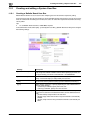
Creating and editing a User Box.................................................................................................. 11-3
Creating a User Box......................................................................................................................... 11-3
Changing User Box settings ............................................................................................................ 11-4
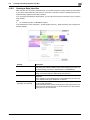
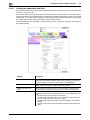
Creating and editing a System User Box.................................................................................... 11-6
Creating a Bulletin Board User Box ................................................................................................. 11-6
Creating a Relay User Box............................................................................................................... 11-7
Creating an Annotation User Box .................................................................................................... 11-8
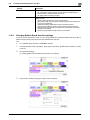
Changing Bulletin Board User Box settings .................................................................................... 11-9
Changing Relay User Box settings ................................................................................................ 11-10
Changing Annotation User Box settings........................................................................................ 11-11
Configuring User Box environment ........................................................................................... 11-13
Specifying the maximum number of User Boxes .......................................................................... 11-13
Deleting all empty User Boxes....................................................................................................... 11-13
Automatically deleting files from a User Box ................................................................................. 11-14
Specifying how to process a file after printing or transmission ..................................................... 11-15
Configuring System User Box environment ............................................................................. 11-16
Deleting all secure documents....................................................................................................... 11-16
Automatically deleting files from a System User Box .................................................................... 11-16
Specifying operations of printed ID & print documents................................................................. 11-17
Configuring the USB Memory Device settings......................................................................... 11-18
Disabling user's operation of registration/change of a User Box .......................................... 11-19
Restricting Users from Using this Device
12.1
Overview of User Authentication and Account Track ............................................................... 12-3
User Authentication ......................................................................................................................... 12-3
Account Track.................................................................................................................................. 12-4
Combining user authentication and account track.......................................................................... 12-5
12.2
Employing the MFP authentication ............................................................................................. 12-6
Overview .......................................................................................................................................... 12-6
Configuring basic settings for the user authentication .................................................................... 12-7
12.3
Employing the account track function...................................................................................... 12-10
Overview ........................................................................................................................................ 12-10
Configuring basic account track settings ...................................................................................... 12-11
12.4
Employing the Active Directory authentication........................................................................ 12-13
Contents-4
d-Color MF552/452/362/282/222
Overview ........................................................................................................................................ 12-13
Configuring basic settings for the Active Directory authentication................................................ 12-14
Sending to Your Computer (Scan to Home) .................................................................................. 12-17
Using the single sign-on ................................................................................................................ 12-18
12.5
Employing the NTLM authentication......................................................................................... 12-20
Overview ........................................................................................................................................ 12-20
Configurig basic settings for the NTLM authentication ................................................................. 12-21
Using the WINS server................................................................................................................... 12-24
Using the direct hosting SMB service............................................................................................ 12-25
12.6
Employing the LDAP authentication ......................................................................................... 12-26
Overview ........................................................................................................................................ 12-26
Configuring basic settings for the LDAP authentication ................................................................ 12-27
Using SSL communication ............................................................................................................ 12-30
12.7
Installing the NDS over IPX authentication .............................................................................. 12-31
Overview ........................................................................................................................................ 12-31
Configure basic settings for the NDS over IPX authentication ...................................................... 12-32
12.8
Employing the NDS over TCP/IP authentication...................................................................... 12-36
Overview ........................................................................................................................................ 12-36
Configuring basic settings for the NDS over TCP/IP authentication ............................................. 12-37
12.9
12.10
12.11
12.11.1
12.11.2
Sending to your address (Scan to Me)...................................................................................... 12-40
Constructing a single sign-on environment for the SMB transmission................................. 12-41
Setting privileges to use the functions of this machine by user or account ......................... 12-43
Restricting available functions by user or account ........................................................................ 12-43
Specifying the default function permission setting when the external server authentication
is used.............................................................................................................................................12-44
Restricting functions available to public users .............................................................................. 12-45
Managing the maximum number of copies by user or account............................................. 12-46
Limiting the access to destinations for each user................................................................... 12-47
Methods to limit access to destinations ........................................................................................ 12-47
Managing based on the access allowed level ............................................................................... 12-47
Access Allowed Level .................................................................................................................... 12-47
Setting the access allowed level.................................................................................................... 12-48
12.11.3
12.12
12.13
12.13.1
12.13.2
12.13.3
Managing based on the reference allowed group ......................................................................... 12-50
Reference Allowed Group .............................................................................................................. 12-50
Assigning a reference allowed group............................................................................................. 12-50
12.13.4
Combining the access allowed level with the reference allowed group for management............. 12-53
Combining the access allowed level with the reference allowed group ........................................ 12-53
Simultaneously setting an access allowed level and reference allowed group ............................. 12-54
12.14
Changing the function key display pattern by user or account.............................................. 12-57
Overview ........................................................................................................................................ 12-57
Allowing changing the function key display pattern by user or account ....................................... 12-57
Selecting a function key display pattern by user ........................................................................... 12-58
Selecting a function key display pattern by account ..................................................................... 12-59
12.15
12.16
12.17
12.18
Specifying the operations of the ID & Print function ............................................................... 12-60
Configuring common settings when using the authentication function ............................... 12-61
Restricting print jobs without authentication information ...................................................... 12-62
Printing without a password (Quick Authentication for Printing)........................................... 12-63
Overview ........................................................................................................................................ 12-63
Permitting the Quick Authentication for Printing function ............................................................. 12-63
Registering the quick authentication for printing server ................................................................ 12-64
Using SSL communication ............................................................................................................ 12-66
12.19
12.19.1
Using the authentication unit..................................................................................................... 12-68
Setting operations of the authentication unit................................................................................. 12-68
Authentication Unit (IC card type) ................................................................................................. 12-68
Authentication Unit (biometric type)............................................................................................... 12-69
12.19.2
Authenticating in the LDAP server using the authentication card (LDAP-IC Card Authentication) 12-69
Overview ........................................................................................................................................ 12-69
Configuring basic settings for the LDAP-IC card authentication................................................... 12-70
Using SSL communication ............................................................................................................ 12-72
12.19.3
Recording the authentication card ID in counter information of this machine .............................. 12-73
d-Color MF552/452/362/282/222
Contents-5
13
14
Reinforcing security
13.1
Creating a certificate for this machine to communicate via SSL............................................. 13-3
Overview .......................................................................................................................................... 13-3
Using the certificate registered upon shipment ............................................................................... 13-4
Self-creating a certificate ................................................................................................................. 13-5
Requesting the Certificate Authority for issuing a certificate........................................................... 13-6
13.2
13.2.1
13.2.2
13.2.3
13.2.4
13.3
13.3.1
13.3.2
Managing the certificates for this machine................................................................................ 13-8
Using different certificates depending on the application ............................................................... 13-8
Exporting a certificate ...................................................................................................................... 13-9
Importing a certificate .................................................................................................................... 13-10
Deleting a certificate ...................................................................................................................... 13-10
Configuring certificate verification settings ............................................................................. 13-11
Verifying a certificate for peer ........................................................................................................ 13-11
Importing external certificates used for validating the chain ......................................................... 13-12
Types of external certificates that can be imported ...................................................................... 13-12
How to import ................................................................................................................................ 13-13
13.4
13.5
13.6
13.7
13.8
Registering user's certificates automatically on this machine .............................................. 13-14
Controlling the access to this machine by IP address ............................................................ 13-16
Using IPsec communication ...................................................................................................... 13-17
Using the IEEE802.1X authentication........................................................................................ 13-23
Sending data to the authenticated share folder (Scan to Authorized Folder)....................... 13-25
Scan to Authorized Folder ............................................................................................................. 13-25
Limiting the direct input of addresses ........................................................................................... 13-26
13.9
13.10
13.11
Disabling user's operation of registration/change .................................................................. 13-27
Using the copy security function............................................................................................... 13-28
Saving the operation log of the control panel .......................................................................... 13-29
Managing the Machine Status
14.1
14.1.1
14.1.2
14.2
14.3
14.3.1
14.3.2
14.3.3
14.3.4
14.3.5
Managing the machine power for power saving........................................................................ 14-3
Setting the Power key/Power save function .................................................................................... 14-3
Switching to Power Save mode at specified time (Weekly Timer)................................................... 14-5
Configuring the daylight saving time settings............................................................................ 14-7
Customizing the Control Panel environment ............................................................................. 14-8
Changing a Function to be Assigned to a Register Key .................................................................. 14-8
Selecting functions to be arranged in the main menu ..................................................................... 14-9
Changing the theme of the main menu.......................................................................................... 14-11
Selecting function keys to be displayed on the main screen (using a display pattern) ................. 14-12
Selecting function keys to be displayed on the main screen (Individual specification) ................. 14-13
Overview ........................................................................................................................................ 14-13
Allowing the change of functions keys in each mode.................................................................... 14-14
Changing function keys in copy mode .......................................................................................... 14-15
Changing function keys in Fax/Scan mode ................................................................................... 14-17
14.3.6
14.4
Allowing the change of display language on the Touch Panel ...................................................... 14-19
Notifying of the machine status via E-mail............................................................................... 14-20
Overview ........................................................................................................................................ 14-20
Configuring the machine status notification settings..................................................................... 14-20
14.5
Notifying of the machine counter via E-mail ............................................................................ 14-22
Overview ........................................................................................................................................ 14-22
Configuring the counter notification settings................................................................................. 14-23
14.6
Managing the machine via SNMP.............................................................................................. 14-25
Overview ........................................................................................................................................ 14-25
Configuring the settings for using SNMP ...................................................................................... 14-26
14.7
14.7.1
14.7.2
14.8
14.8.1
Checking the printer information .............................................................................................. 14-30
Checking the counter of this machine ........................................................................................... 14-30
Checking the ROM version ............................................................................................................ 14-31
Managing the setting information ............................................................................................. 14-32
Writing the setting information to this machine (Import)................................................................ 14-32
Contents-6
d-Color MF552/452/362/282/222
Types of information that can be imported.................................................................................... 14-32
How to import ................................................................................................................................ 14-32
15
14.8.2
Saving the setting information of this machine (Export) ................................................................ 14-33
Types of information that can be exported.................................................................................... 14-33
How to export the information ....................................................................................................... 14-33
14.8.3
14.8.4
14.8.5
14.9
Resetting the network settings ...................................................................................................... 14-34
Restarting the network interface.................................................................................................... 14-34
Deleting all address information .................................................................................................... 14-35
Outputting job logs ..................................................................................................................... 14-36
Operations required to use this function ....................................................................................... 14-36
Downloading job logs .................................................................................................................... 14-37
14.10
14.10.1
14.10.2
14.10.3
14.10.4
14.10.5
14.10.6
14.10.7
14.10.8
14.10.9
14.11
14.11.1
14.11.2
Setting the operating environment for this machine ............................................................... 14-38
Configuring default settings for Normal Display and Enlarge Display collectively ........................ 14-38
Setting the action for switching the display to Enlarge Display..................................................... 14-38
Configuring the default method to display destinations ................................................................ 14-39
Changing the default scan data file name ..................................................................................... 14-40
Previewing the original being scanned in realtime......................................................................... 14-41
Printing a stamp on blank pages ................................................................................................... 14-41
Setting the skip job conditions ...................................................................................................... 14-42
Setting the processing accuracy of outline PDF............................................................................ 14-43
Allowing transmission of the machine usage frequency or function settings information............. 14-44
Using an advanced function by registering the license .......................................................... 14-45
Issuing the request code................................................................................................................ 14-45
Enabling the advanced function .................................................................................................... 14-46
Enabling the function using the function and license codes ......................................................... 14-46
Enabling the function using the token number .............................................................................. 14-47
14.12
Updating the firmware of this machine..................................................................................... 14-48
Overview ........................................................................................................................................ 14-48
Preparing for downloading a firmware........................................................................................... 14-48
Updating the firmware automatically at the specified time ........................................................... 14-50
Updating the firmware manually .................................................................................................... 14-51
Registering Various Types of Information
15.1
15.1.1
15.1.2
15.1.3
15.1.4
15.1.5
15.1.6
15.1.7
15.1.8
15.2
15.3
15.3.1
15.3.2
15.3.3
15.3.4
15.3.5
15.3.6
15.3.7
15.3.8
15.3.9
15.3.10
15.3.11
15.4
Registering address books .......................................................................................................... 15-3
Registering E-mail address .............................................................................................................. 15-3
Registering an FTP destination ........................................................................................................ 15-4
Registering an SMB destination ...................................................................................................... 15-6
Registering a WebDAV destination .................................................................................................. 15-7
Registering a User Box .................................................................................................................... 15-8
Registering a fax address ................................................................................................................ 15-9
Registering an Internet fax address ............................................................................................... 15-11
Registering an IP address fax destination ..................................................................................... 15-12
Registering a group .................................................................................................................... 15-14
Registering a program................................................................................................................ 15-15
Registering an E-mail address program ........................................................................................ 15-15
Registering an FTP program .......................................................................................................... 15-16
Registering an SMB program ........................................................................................................ 15-18
Registering a WebDAV program .................................................................................................... 15-19
Registering a User Box program ................................................................................................... 15-20
Registering a fax address program................................................................................................ 15-21
Registering an Internet fax address program ................................................................................ 15-22
Registering an IP address fax program ......................................................................................... 15-23
Registering a group program ......................................................................................................... 15-25
Registering a program without destination.................................................................................... 15-26
Configuring the fax/scan transmission option settings ................................................................. 15-27
Registering a temporary one-touch destination ...................................................................... 15-30
d-Color MF552/452/362/282/222
Contents-7
16
17
15.5
Registering the subject and body of an E-mail ........................................................................ 15-31
Registering the subject .................................................................................................................. 15-31
Registering the body...................................................................................................................... 15-31
15.6
15.7
15.8
15.9
15.10
15.10.1
15.10.2
15.10.3
15.10.4
Registering a prefix and suffix of each destination ................................................................. 15-32
Registering the information to be added to header/footer..................................................... 15-33
Adding a font/macro................................................................................................................... 15-35
Registering a paper name and paper type ............................................................................... 15-36
Using data management utility .................................................................................................. 15-38
Data Management Utility ............................................................................................................... 15-38
Managing the copy protect data.................................................................................................... 15-39
Managing the stamp data .............................................................................................................. 15-40
Managing the font/macro data ...................................................................................................... 15-41
Associating with External Application
16.1
Associating via TCP Socket ......................................................................................................... 16-3
Overview .......................................................................................................................................... 16-3
Configuring the basic TCP Socket settings ..................................................................................... 16-4
Using SSL communication .............................................................................................................. 16-5
16.2
Associating via OpenAPI .............................................................................................................. 16-6
Overview .......................................................................................................................................... 16-6
Configuring the basic OpenAPI settings.......................................................................................... 16-7
Using SSL communication .............................................................................................................. 16-9
16.3
Using the machine FTP server for association ........................................................................ 16-11
Overview ........................................................................................................................................ 16-11
Configuring the FTP server settings .............................................................................................. 16-11
16.4
Using the machine WebDAV server for association ................................................................ 16-12
Overview ........................................................................................................................................ 16-12
Configuring the WebDAV server settings ...................................................................................... 16-12
Using SSL communication ............................................................................................................ 16-13
16.5
16.6
Releasing the association with application.............................................................................. 16-14
Associating with the distributed scan server ........................................................................... 16-15
Overview ........................................................................................................................................ 16-15
Configuring the environment to use Distributed Scan Management............................................. 16-15
Enabling the Distributed Scan Management ................................................................................. 16-16
16.7
16.8
16.8.1
16.8.2
16.8.3
16.8.4
16.9
Allowing for upload of contents to this machine ..................................................................... 16-17
Associating with the remote diagnosis system ....................................................................... 16-18
Registering a proxy server used for remote diagnosis .................................................................. 16-18
Allowing acquisition of the machine counter ................................................................................. 16-19
Sending the machine operating status .......................................................................................... 16-19
Allowing read and write of the machine setting information.......................................................... 16-19
Associating with the fax server ................................................................................................. 16-20
Overview ........................................................................................................................................ 16-20
Registering applications................................................................................................................. 16-20
Application setting templates ........................................................................................................ 16-22
Associating with the fax server communicating in E-Mail format.................................................. 16-24
16.10
Operating the machine Control Panel remotely....................................................................... 16-25
Overview ........................................................................................................................................ 16-25
Using the dedicated software ........................................................................................................ 16-25
Accessing the machine directly ..................................................................................................... 16-27
Description of Setup Buttons (Administrator Settings)
[Administrator Settings].................................................................................................................... 17-3
[Network Settings]............................................................................................................................ 17-4
[TCP/IP Settings].............................................................................................................................. 17-5
[IPv4 Settings] .................................................................................................................................. 17-5
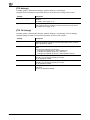
[IPv6 Settings] .................................................................................................................................. 17-6
[DNS Host] ....................................................................................................................................... 17-6
[DNS Domain] .................................................................................................................................. 17-6
Contents-8
d-Color MF552/452/362/282/222
[DNS Server Settings (IPv4)] ............................................................................................................ 17-7
[DNS Server Settings (IPv6)] ............................................................................................................ 17-7
[IPsec Settings] ................................................................................................................................ 17-7
[IKE Settings].................................................................................................................................... 17-8
[IPsec SA Settings]........................................................................................................................... 17-8
[Peer] ................................................................................................................................................ 17-9
[Protocol Setting] ............................................................................................................................. 17-9
[Enable IPsec] ................................................................................................................................ 17-10
[Communication Check]................................................................................................................. 17-10
[IP Filtering (Permit Access)] .......................................................................................................... 17-11
[IP Filtering (Deny Access)] ............................................................................................................ 17-11
[RAW Port Number]........................................................................................................................ 17-11
[LLMNR Setting]............................................................................................................................. 17-11
[NetWare Settings] ......................................................................................................................... 17-12
[IPX Settings].................................................................................................................................. 17-12
[NetWare Print Settings]................................................................................................................. 17-12
[User Authentication Setting (NDS)] ............................................................................................... 17-13
[HTTP Server Settings]................................................................................................................... 17-13
[FTP Settings]................................................................................................................................. 17-14
[FTP TX Settings] ........................................................................................................................... 17-14
[FTP Server Settings] ..................................................................................................................... 17-15
[SMB Settings] ............................................................................................................................... 17-15
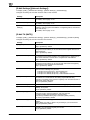
[Client Settings] .............................................................................................................................. 17-16
[Print Settings]................................................................................................................................ 17-17
[WINS Settings] .............................................................................................................................. 17-17
[Direct Hosting Setting] .................................................................................................................. 17-17
[LDAP Settings] .............................................................................................................................. 17-18
[E-Mail Settings] ([Network Settings]) ............................................................................................ 17-20
[E-Mail TX (SMTP)] ......................................................................................................................... 17-20
[E-Mail RX (POP)] ........................................................................................................................... 17-22
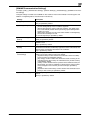
[S/MIME Communication Settings]................................................................................................ 17-23
[SNMP Settings]............................................................................................................................. 17-24
[AppleTalk Settings] ....................................................................................................................... 17-25
[Bonjour Setting] ............................................................................................................................ 17-25
[TCP Socket Settings] .................................................................................................................... 17-25
[TCP Socket] .................................................................................................................................. 17-26
[TCP Socket (ASCII Mode)]............................................................................................................ 17-26
[Network Fax Settings]................................................................................................................... 17-26
[Network Fax Function Settings].................................................................................................... 17-27
[SMTP TX Settings] ........................................................................................................................ 17-27
[SMTP RX Settings]........................................................................................................................ 17-27
[WebDAV Settings]......................................................................................................................... 17-28
[WebDAV Client Settings] .............................................................................................................. 17-28
[WebDAV Server Settings] ............................................................................................................. 17-29
[Proxy Setting for Remote Access] ................................................................................................ 17-30
[DPWS Settings]............................................................................................................................. 17-30
[DPWS Common Settings]............................................................................................................. 17-31
[DPWS Extension Settings]............................................................................................................ 17-31
[Printer Settings] ([DPWS Settings]) ............................................................................................... 17-32
[Scanner Settings].......................................................................................................................... 17-32
[Distributed Scan Settings] ............................................................................................................ 17-32
[SSDP Settings].............................................................................................................................. 17-33
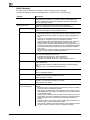
[Detail Settings] .............................................................................................................................. 17-33
[Device Setting] .............................................................................................................................. 17-34
[Time Adjustment Setting].............................................................................................................. 17-34
[Status Notification Setting] ........................................................................................................... 17-35
[Total Counter Notification Settings] .............................................................................................. 17-36
[PING Confirmation] ....................................................................................................................... 17-36
[SLP Setting] .................................................................................................................................. 17-36
[LPD Setting] .................................................................................................................................. 17-36
[Prefix/Suffix Setting] ..................................................................................................................... 17-37
[Error Code Display Setting]........................................................................................................... 17-37
[IEEE802.1x Authentication Settings]............................................................................................. 17-37
[Web Browser Setting] ................................................................................................................... 17-37
[Bluetooth Setting] ......................................................................................................................... 17-38
[Single Sign-On Setting]................................................................................................................. 17-38
d-Color MF552/452/362/282/222
Contents-9
[IWS Settings]................................................................................................................................. 17-38
[Remote Panel Settings]................................................................................................................. 17-39
[Server Settings] ([Remote Panel Settings]) ................................................................................... 17-39
[Client Settings] ([Remote Panel Settings]) .................................................................................... 17-39
[Internet ISW Settings] ................................................................................................................... 17-40
18
Index
18.1
18.2
Contents-10
Index by item ................................................................................................................................. 18-3
Index by button.............................................................................................................................. 18-6
d-Color MF552/452/362/282/222
1
Web Connection
1
1
Web Connection
Web Connection
Web Connection is a built in utility software product for management use.
By using a Web browser on your computer, you can simply confirm the status of this machine and configure
various machine settings.
Although character input such as address entry and network setting is a difficult process using the touch panel, it can be carried out easily if you use the computer.
Operating environment
Item
Specifications
Network
Ethernet (TCP/IP)
Web Browser
In Windows XP/Vista/7/Server 2003/Server 2008/Server 2008 R2
• Microsoft Internet Explorer 6/7/8/9
• Mozilla Firefox 3.5 or later
On Mac OS 9.x/Mac OS X
• Mozilla Firefox 3.5 or later
On Linux
• Mozilla Firefox 3.5 or later
JavaScript and Cookies must be enabled by your Web browser.
Flash Player
Adobe® Flash® Player
• Plug-in Ver.7.0 or later required to select Flash-based display.
• Plug-in Ver.9.0 or later is required to use the Data Management Utility
(font/macro data management).
d-Color MF552/452/362/282/222
1-3
1
1-4
d-Color MF552/452/362/282/222
2
Operations Required to Use
Web Connection
2.1
Configuring network environment settings
2
Operations Required to Use Web Connection
2.1
Configuring network environment settings
2
Overview
To connect this machine to the network (TCP/IP), follow the procedure below to configure settings.
1
Assigning an IP address to this machine
% If this machine has a fixed IP address, enter the IP address, subnet mask, and default gateway. For
details, refer to page 2-3.
% To automatically obtain the IP address of this machine using DHCP, enable the Auto Input function
for automatically obtaining an IP address from DHCP (default: enabled). For details, refer to
page 2-3.
% For details on how to use this machine in the IPv6 environment, refer to page 5-8.
2
Confirming the IP address assigned to this machine
% When you access Web Connection, you need the IP address of this machine. For the IP address
confirmation procedure, refer to page 2-4.
NOTICE
To enable changed network settings, turn the main power of this machine off and on again. When restarting
this machine, turn the main power off and on again after 10 or more seconds have passed. Not doing so may
result in an operation failure.
Assigning an IP address
If this machine has a fixed IP address, manually enter the IP address, subnet mask, and default gateway address.
In the Control Panel, press [Utility] - [Administrator Settings] - [Network Settings] - [TCP/IP Settings] - [IPv4
Settings], then configure the following setting.
Settings
Description
[IP Application Method]
To manually enter the IP address, select [Manual Input].
To automatically obtain the IP address using DHCP, select [Auto Input],
then specify the auto input method.
[Auto Input] is specified by default.
[IP Address]
Enter the fixed IP address assigned to the machine.
[Subnet Mask]
Enter the subnet mask.
[Default Gateway]
Enter the default gateway.
d-Color MF552/452/362/282/222
2-3
Configuring network environment settings
2
2.1
Confirming the IP address
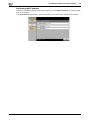
Confirm the IP address assigned to this machine When you access Web Connection, you need the IP address of this machine.
In the Control Panel, select [Utility] - [Device Information], then confirm the IP address of this machine.
2-4
d-Color MF552/452/362/282/222
2.2
2.2
Confirming Web browser settings
2
Confirming Web browser settings
The Web Connection page may not be displayed correctly or changed settings may not be applied depending on your Web browser settings.
Before using Web Connection, confirm the following settings in the Web browser.
JavaScript: Must be enabled.
Cookies: Must be enabled.
d Reference
For details on how to confirm and change settings, refer to the Help of your Web browser.
d-Color MF552/452/362/282/222
2-5
2
2-6
Confirming Web browser settings
2.2
d-Color MF552/452/362/282/222
3
Basic Usage
3.1
How to access
3
Basic Usage
3.1
How to access
3
This section describes how to access Web Connection.
1
Start the Web browser.
2
Enter the IP address of the machine in the URL field, then press [Enter].
% Example: When the IP address of this machine is 192.168.1.20, enter "http://192.168.1.20/".
The Web Connection screen appears.
Tips
If you use Internet Explorer 6 in the IPv6 environment, correct the hosts file, then enter the host name
in the URL field.
–
Example: When the IPv6 address of this machine is fe80::220:6bff:fe10:2f16, add
"fe80::220:6bff:fe10:2f16 IPv6_MFP_1" to the hosts file, and enter "http:// IPv6_MFP_1" in the URL
field.
If you use Internet Explorer 7/8/9 or a Web browser other than Internet Explorer in the IPv6 environment,
enclose the IPv6 address in [ ].
–
Example: When the IPv6 address of this machine is fe80::220:6bff:fe10:2f16, enter "http://
[fe80::220:6bff:fe10:2f16] /".
d-Color MF552/452/362/282/222
3-3
Layout of Web Connection screen
3
3.2
3.2
Layout of Web Connection screen
The Web Connection screen mainly consists of following three parts.
Top of the screen: Displays the name of login user and the status of the machine.
Left of the screen: Displays the function menu of Web Connection.
Right of the screen: Displays the contents of the selected menu.
This example shows the items in [Information] - [Device Information] to explain sections in each screen.
1
2
3
4
5
6
7
8
9
10
3-4
No.
Item
Description
1
Login user name
Displays the login mode and user name.
Click the user name when you log on as a registered user to confirm the user information.
2
Status display
Displays the status of this machine.
Displays the status of the printer and scanner sections of this machine with icons and messages.
If you click this icon when an error occurs, you can check the error
status such as consumables, paper trays, or user registration information.
3
Message display
You can check the operating status of this machine with the message.
4
[To Login Screen]/[Logout]
Click this button to log out of Web Connection.
5
[Change Password]
Changes the password of the registered user.
Click this button to jump to the user password change screen. This
button is enabled only when you log on as a registered user.
d-Color MF552/452/362/282/222
3.2
Layout of Web Connection screen
3
No.
Item
Description
6
Help
Displays the online help of Web Connection.
Detailed descriptions of the currently set functions can be viewed.
7
Refresh
Click this button to update the screen.
8
Menu category
Menu items are divided into some categories depending on each
content.
The available menu categories vary depending on which optional
units are installed on this machine.
9
Menu
Click the category of the menu to display the menu items of that
category.
10
Information and settings
Click the menu at the left of the screen, and the contents of that
menu will appear.
d-Color MF552/452/362/282/222
3-5
Login methods
3
3.3
3.3
Login methods
Login screen
When you access Web Connection, this screen appears first. Enter the required information such as a user
name, and log in to Web Connection.
Tips
If you have not configured authentication settings on this machine, the screen in the public user mode
appears instead of the Login screen.
The screen that appears differs depending on whether Authentication is enabled on this machine. Also,
operations available after you log in differ depending on the information you enter in this Login screen.
Item
Description
[Login]
Select a mode to log in. The login mode differs depending on the user type.
The user mode and administrator mode are available as login modes. For
details, refer to page 3-7.
[View Mode]
Select the view mode of Web Connection.
The flash view enables excellent expressive power for the following items.
• Status icons and messages
• Status of Paper Tray in [Information] - [Device Information] screen
• Status of [Job] screen
[User Assist]
Enables display of warning contents in the dialog box when a warning occurs while operating this machine after login.
[Language]
Select a language to be used in display of Web Connection.
Tips
The flash view enables the use of active screen effect. However, there are restrictions on the use of flash
view, for example, the plug-in must be installed. When you are in an environment where the flash view
is not available or you use a screen reader, we recommend you to select HTML.
The following are restrictions on the use of the flash view.
–
Flash Player must be installed.
–
The flash view is not available when you use Adobe Flash Player 9.0 or earlier in the IPv6 environment.
3-6
d-Color MF552/452/362/282/222
3.3
Login methods
3
Login mode
Web Connection has multiple login modes, and available operations differ depending on the mode.
Two login modes of Web Connection are provided: the "administrator mode" which is used to configure settings of this machine and the "user mode" which enables use of the functions of this machine.
Login mode
Description
Administrator Mode
Enables the administrator of this machine to log in to configure settings of
this machine.
To log in, you need to enter the administrator password of this machine.
Logging in as the administrator enables you to use the following category
menus.
• [Maintenance]
• [System Settings]
• [Security]
• [User Auth/ Account Track]
• [Network]
• [Box]
• [Printer Setting]
• [Store Address]
• [Fax Settings]
• [Wizard]
• [Customize]
User mode
Enables a user such as a registered user, public user, or User Box administrator to log in to this machine.
The user can confirm the status of this machine, use the files in the user
box, perform direct print, register an address, and other functions of this
machine.
The login method and operations available after login differ depending on
the login user type.
[Registered User]
Enables a user or account track registered to this machine to log in.
To log in, enable the authentication setting on this machine and register the
user or account track.
Logging in as a registered user enables you to use the following category
menus.
• Information
• Job
• User Box
• Direct Print
• Store Address
• Customize
[Administrator (User
Mode)]
Enables the administrator of this machine to log in as a user with administrator authority. When you log in to this machine in this mode, you cannot
change the settings of this machine.
To log in, you need to enter the administrator password of this machine.
In this mode, you can delete jobs.
[User Box Administrator]
Enables you to log in as the administrator dedicated to the user box. To log
in, you need to enter the box administrator password of this machine.
In this mode, you can use the box registered on this machine regardless of
the setting of box password.
To use the UserBoxAdmin.Setting mode, enable the box administrator on
this machine.
[Public User]
Enables a user not registered on this machine to log in as a public user.
When usage by public users is not allowed on this machine, this mode is
not available.
d-Color MF552/452/362/282/222
3-7
Login methods
3
3.3
Switching login modes
When changing to other login mode after logging in to Web Connection, log out of Web Connection once.
1
Log out of Web Connection.
% When you are in the public user mode, click [To Login Screen].
% When you are in the mode other than the public user mode, click [Logout].
The Login screen appears.
2
Select a login mode, and enter required information.
% To log in to the administrator mode, refer to page 3-9.
% To log in to the user mode, refer to page 3-11.
3
Click [Login].
The screen for the selected login mode appears.
Tips
If you do not operate this machine for a given period of time after you log in to Web Connection, you
will automatically be logged out.
If the authentication setting is changed on the Control Panel while you are logging in to the user mode
of Web Connection, you will automatically be logged out.
3-8
d-Color MF552/452/362/282/222
3.3
Login methods
3
Logging in to the administrator mode
Logging in to the administrator mode enables you to configure settings for this machine.
1
On the Login screen, select [Administrator] and click [Login].
2
Select [Administrator (Admin Mode)].
% When the administrator of this machine wants to log in to the user mode, select [Administrator (User
Mode)].
% The display of the password entry screen differs depending on the settings of this machine.
d-Color MF552/452/362/282/222
3-9
Login methods
3
3
3.3
Enter the administrator password, then click [OK].
The administrator mode window appears.
Tips
Logging in to the administrator mode locks the Control Panel of this machine, and you will not be able
to use it on the Control Panel.
Depending on the status of this machine, you may not be able to log in to the administrator mode.
3-10
d-Color MF552/452/362/282/222
3.3
Login methods
3
Logging in to the user mode
In the user mode, you can use the functions such as box operations and direct print. You can log in as a registered user or public user.
To log in as a registered user, select [Registered User] on the Login screen.
Enter the user name and password, then click [Login].
Tips
Displaying a list of user names enables you to select a login user. To display a list of user names, on
the Control Panel, press [Utility] - [Administrator Settings] - [User Authentication/ Account Track] - [User Authentication Setting] - [Administrative Settings], and set [User Name List] to [ON].
When an external authentication server is used, select the server.
To log in as a public user, select [Public User], then click [Login] on the Login screen.
d-Color MF552/452/362/282/222
3-11
User Mode Overview
3
3.4
User Mode Overview
3.4.1
Main Menu
3.4
Displaying the Main Menu enables you to display the menus available in Web Connection on a single screen.
By doing this, you can quickly access the screen to use to implement required operations.
To display the Main Menu, click the icon on the upper right of the screen (
3-12
).
d-Color MF552/452/362/282/222
3.4
3.4.2
User Mode Overview
3
Each mode in the user mode
[Information]
Enables you to confirm the information on the system configuration and settings of this machine.
Menu
Description
[Device Information]
Enables you to check the components, options, consumables, meter
counts, and eco information of this machine.
[Online Assistance]
Enables you to check the online assistance about this product.
[Change User Password]
Changes the password of the login user.
[Synchronize User Authentication & Account Track]
Enables the login user to change the settings for synchronizing your own
user authentication and account track.
[Function Permission Information]
Enables you to check the function permission information about the user
or account.
[Network Setting Information]
Enables you to check the network settings of this machine.
[Print Setting Information]
Enables you to confirm the information on the settings for the printer function of this machine.
[Print Information]
Prints font or configuration information.
d-Color MF552/452/362/282/222
3-13
User Mode Overview
3
3.4
[Job]
Enables you to check the job currently being performed and the job log.
Menu
Description
[Current Jobs]
Enables you to check the job currently being performed and the job to be
performed.
[Job History]
Enables you to check the log of jobs processed on this machine.
[Communication List]
Enables you to confirm the list of results of scan transmission, fax transmission, and fax reception.
[Box]
Enables you to create a user box on this machine, print a file from the user box, and send a file.
3-14
Menu
Description
[Open User Box]
Enables you to open a Public, Personal, or Group User Box, print, send, or
download a file saved in the User Box, and change the setting of the User
Box.
For details on how to use a file in a User Box, refer to [User's Guide: Box
Operations].
[Create User Box]
Enables to create a new User Box.
d-Color MF552/452/362/282/222
3.4
User Mode Overview
3
Menu
Description
[Open System User Box]
Opens the System User Box (Bulletin Board, Polling TX, Memory RX, or
Relay User Box) to enable you to use a file saved in the User Box or change
the settings of the User Box.
This item is available when the Fax Kit is installed.
[Create System User Box]
Allows you to create a new Bulletin Board User Box or Relay User Box.
This item is available when the Fax Kit is installed.
[Direct Print]
Enables you to send PDF or TIFF data on the computer directly to this machine and print it without using the
printer driver.
d Reference
For details on the direct print function, refer to [User's Guide: Print Operations].
d-Color MF552/452/362/282/222
3-15
User Mode Overview
3
3.4
[Store Address]
Enables you to register frequently-used destinations and edit the registration content.
3-16
Menu
Description
[Address Book]
Enables you to register frequently-used destinations on this machine. Also,
it enables you to confirm or edit the registered content of the destination
registered on this machine.
[Group]
Enables you to register multiple destinations as a group. Also, it enables
you to confirm or edit the registered content of the group destination registered on this machine.
[Program]
Enables you to register a combination of frequently-used option settings as
a recall key (program). Also, it enables you to confirm or edit the registered
content of the program registered on this machine.
[Temporary One-Touch]
Enables you to register a program used on a temporary basis. A temporary
one-touch destination is deleted once data is sent to the registered destination or when the machine is turned OFF.
[Subject]
Registers subjects when sending E-mails.
[Text]
Registers body messages when sending E-mails.
d-Color MF552/452/362/282/222
3.4
User Mode Overview
3
[Favorite Setting]
Collectively displays frequently used functions as a single tab.
[Favorite Setting] is displayed only when you log in to the flash view.
To register a function as [Favorite Setting], drag and drop its menu into the [Favorite Setting] tab.
[Customize]
Enables you to select a screen to be displayed after logging in to the user mode.
d-Color MF552/452/362/282/222
3-17
Using the Shortcut Function
3
3.5
3.5
Using the Shortcut Function
Registering a function in Bookmarks of the Web browser
Each Web Connection function page can be registered in Bookmarks of the Web browser.
Display a page of a function to be registered in Bookmarks, and register it in Bookmarks of the Web browser.
Tips
For details on how to register a function in Bookmarks, refer to your Web browser's Help function.
If a page of a registered user is registered in Bookmarks while user authentication is enabled, the page
used to log in to the user mode will be displayed when displaying a registered page.
If a page in Administrator mode is registered in Bookmarks, the page used to log in to Administrator
mode will be displayed when displaying a registered page.
Creating a shortcut for a specific page
You can create a shortcut to each Web Connection function page at any location such as the desktop of
your computer.
To create a shortcut, drag and drop the icon displayed in the address bar of the Web browser to any location
on your computer.
3-18
d-Color MF552/452/362/282/222
3.6
3.6
Using the Help function
3
Using the Help function
Using the online help
Log in to Web Connection and click
, and you will be able to display the online help. The online help
shows you the detailed descriptions of the function being set.
To display the online help, you must connect your computer to the Internet.
Displaying the meaning of the setting in the popup window
In the [Network] menu that appears after you log in to the administrator mode of Web Connection, you can
use the popup help.
Placing the mouse cursor over the item of the screen (On Mouse) or clicking the item (On Focus) displays the
description of that item in the pop-up window. While confirming the meaning of the item, you can configure
network settings.
In the screen to log in to the administrator mode, you can specify the method to display the popup help.
Settings
Description
[On Mouse]
If you select [ON], the popup help is displayed when you place the mouse cursor on an item of the screen.
[On Focus]
If you select [ON], the popup help is displayed when you click the entry area
or option of a setting item.
The popup help is displayed as shown below.
d-Color MF552/452/362/282/222
3-19
Using the Help function
3
3.6
Using the wizard when configuring function settings
Some settings can be simply configured by entering settings as instructed in the screen via a wizard.
Setting using the wizard is available for the following functions.
[TX Setting for scan documents.]
[Transmit the scanned data via E-mail]
[Transmit the scanned data via E-mail (attach Digital Signature)]
[Transmit the scanned data via E-mail (Public Key Encryption)]
[Network print settings.]
[LPR Print]
[Print using RAW port]
[Print using SMB]
[Restrict users from using this device.]
[Do Not Authenticate]
[User Authentication Only]
[Account Track Only]
[User Authentication & Account Track]
[External Authentication Server]
To configure settings using the wizard, log in to the administrator mode, then select [Wizard].
3-20
d-Color MF552/452/362/282/222
3.6
Using the Help function
3
The wizard screen is comprised of the following components.
2
3
1
No.
Item
Description
1
Flow
Displays the setting flow.
The current setting item is displayed in dark gray by which you can
confirm the setting flow step you are in.
Click one of the previous setting items to return to it and redo settings.
2
Purpose of the wizard
Displays the title of the wizard being set.
3
Check Job
Displays the setting item conforming to the flow.
Tips
If you return to one of the previous setting items in the flow, you must redo settings at that item. The
settings subsequent to the item to which you returned are not saved.
To finish the wizard during the setting process, click [Setup is completed.].
d-Color MF552/452/362/282/222
3-21
Restricting use of Web Connection
3
3.7
3.7
Restricting use of Web Connection
If you do not want other people to use Web Connection, you can restrict use of Web Connection on the
Control Panel.
On the Control Panel, press [Utility] - [Administrator Settings] - [Network Settings] - [HTTP Server Settings],
and set [ Settings] to [OFF] (Default: [ON]).
3-22
d-Color MF552/452/362/282/222
4
Configuring Basic Information
Settings of this Machine
4.1
Registering information of this machine
4
4
Configuring Basic Information Settings of this Machine
4.1
Registering information of this machine
Register device information of this machine such as the name, installed place, and information of the administrator.
Registering device information enables you to confirm it by selecting [Information] - [Device Information] [Configuration Summary] in the user mode of Web Connection.
In the administrator mode, select [System Settings] - [Machine Setting], then configure the following settings.
Settings
Description
[Device Location]
Enter the location where to install this machine (using up to 255 characters).
[Administrator Registration]
Register information on the administrator of this machine.
[Administrator Name]
Enter the administrator name of this machine (using up to 20 characters).
[E-mail Address]
Enter the E-mail address of the administrator of this machine (using up to
128 characters, excluding spaces).
This E-mail address is used as the sender's E-mail address. Therefore, to
use the E-mail TX function, you must configure settings.
[Extension No.]
Enter the extension number of the administrator of this machine (using up
to eight characters).
[Input Machine Address]
Register the name and E-mail address of this machine.
[Device Name]
Enter the name of this machine (using up to 80 characters).
The name specified in this item is used as a part of a file name given automatically, for example, when using a scan transmission.
[E-mail Address]
Enter the E-mail address of this machine with 320 characters, excluding
spaces.
This E-mail address is used as sender Internet fax address. Therefore, to
use the Internet fax function, you must configure settings.
d-Color MF552/452/362/282/222
4-3
Registering support information
4
4.2
4.2
Registering support information
Enter the support information of the machine such as contact name information for the machine and online
help URL.
Registering support information enables the user to confirm it by selecting [Information] - [Online Assistance]
in the user mode of Web Connection.
In the administrator mode, select [System Settings] - [Register Support Information], then configure the following settings.
4-4
Settings
Description
[Contact Name]
Enter the contact name of this machine (using up to 63 characters).
[Contact Information]
Enter the contact information of this machine such as the phone number
or URL (using up to 127 characters).
[Product Help URL]
Enter the Product Help URL of this machine (using up to 127 characters).
[Corporate URL]
Enter the URL of the Web page for the manufacturer of this machine (using
up to 127 characters).
[Supplies and Accessories]
Enter consumables supplier information (using up to 127 characters).
[Online Help URL]
If necessary, change the Web Connection online help URL (using up to
127 characters).
The online help appears when you click
on the upper right of the Web
Connection screen.
[Driver URL]
If necessary, enter the URL of the place where the driver of this machine is
stored (using up to 127 characters).
Enter an appropriate URL to suit your environment.
[Engine Serial Number]
Enables you to confirm the serial number of this machine.
d-Color MF552/452/362/282/222
4.3
4.3
Setting the date and time for the machine
4
Setting the date and time for the machine
Manually configuring settings
Manually specify the current date and time of this machine.
In the administrator mode, select [Maintenance] - [Date/Time Setting] - [Manual Setting], then configure the
following settings.
Settings
Description
[Date]
Specify the current date of this machine.
• [Year]: Enter the current year.
• [Month]: Enter the current month.
• [Day]: Enter the current day.
[Time]
Specify the current time of this machine.
• [Hour]: Enter the current hour.
• [Minute]: Enter the current minute.
• [Time Zone]: Select a time zone (time difference from the world standard
time) to suit your environment.
d-Color MF552/452/362/282/222
4-5
Setting the date and time for the machine
4
4.3
Automatically configuring settings using NTP
Using the NTP (Network Time Protocol) server allows you to automatically adjust the date and time of this
machine.
Register the NTP server used. To periodically adjust the date and time by connecting to the NTP server, specify an interval for adjusting the date and time.
0
To adjust the date and time using the NTP server, you must connect this machine to the network.
1
In the administrator mode, select [Maintenance] - [Date/Time Setting] - [Manual Setting], then configure
the [Time Zone] setting.
% For details on how to configure [Time Zone] setting, refer to page 4-5.
2
In the administrator mode, select [Maintenance] - [Date/Time Setting] - [Time Adjustment Setting], then
configure the following settings.
Settings
Description
[Time Adjustment Setting]
To automatically adjust the date and time of this machine via the NTP server, select [OFF].
[OFF] is specified by default.
[Auto IPv6 Retrieval]
Select [ON] to automatically specify the NTP server address.
In the IPv6 environment, the NTP server address can be automatically
specified by DHCPv6.
[ON] is specified by default.
[NTP Server Address]
Enter the NTP server address.
Use one of the following formats.
• Example of host name entry: "host.example.com"
• Example of IP address (IPv4) entry: "192.168.1.1"
• Example of IP address (IPv6) entry: "fe80::220:6bff:fe10:2f16"
[Port No.]
If necessary, change the NTP server port number.
Normally, you can use the original port number.
[123] is specified by default.
[Auto Time Adjustment]
To periodically adjust the date and time by connecting to the NTP server,
select [ON]. Also, specify an interval for adjusting the date and time at [Polling Interval].
[OFF] is specified by default.
[Polling Interval]
If you select [ON] for [Auto Time Adjustment], specify an interval to automatically adjust the date and time of this machine (unit: hours).
3
Click [Adjust].
Connect to the NTP server, and adjust the date and time of this machine.
4-6
d-Color MF552/452/362/282/222
5
Configuring Network Settings
of this Machine
5.1
Using in the IPv4 environment
5
Configuring Network Settings of this Machine
5.1
Using in the IPv4 environment
5
Overview
To use this machine by connecting it to the IPv4 network, follow the below procedure to configure the settings.
1
Setting the method to assign an IP address to this machine
% For details on how to assign an IP address, refer to page 5-4.
2
If you resolve the name using the host name when accessing a computer or server on the network from
this machine, register your DNS server address to this machine.
% For details on how to register the DNS server, refer to page 5-5.
% When you are using the DHCP server, information of the DNS server used for resolving the name
may be able to be obtained automatically.
3
If your DNS server supports the Dynamic DNS function, register the host name and domain name of
this machine and enable Dynamic DNS, if necessary.
% For details on how to register the host name of this machine, refer to page 5-6.
% For details on how to register the domain name, refer to page 5-7.
d-Color MF552/452/362/282/222
5-3
Using in the IPv4 environment
5
5.1
Assigning an IP address
To use this machine in the IPv4 network environment, assign an IP address to this machine.
In the administrator mode, select [Network] - [TCP/IP Setting] - [TCP/IP Setting], then configure the following
settings.
5-4
Settings
Description
[TCP/IP]
Select [ON] to use the TCP/IP.
[ON] is specified by default.
[Network Speed]
Select the network speed according to your environment.
The default is [Auto (10M/100Mbps)].
[IP Address Setting Method]
To manually enter the IP address, select [Manual Setting].
To automatically obtain the IP address, select [Auto Setting], then specify
the auto input method. In normal circumstances, select the [DHCP] check
box.
[Auto Setting] is specified by default.
[IP Address]
If you select [Manual Setting] for [IP Address Setting Method], enter the
fixed IP address assigned to the machine.
[Subnet Mask]
If you select [Manual Setting] for [IP Address Setting Method], enter the
subnet mask.
[Default Gateway]
If you select [Manual Setting] for [IP Address Setting Method], enter the default gateway.
d-Color MF552/452/362/282/222
5.1
Using in the IPv4 environment
5
Registering the DNS server used by this machine
If you resolve the name using the host name when accessing a computer or server on the network from this
machine, register your DNS server address to this machine.
In the administrator mode, select [Network] - [TCP/IP Setting] - [TCP/IP Setting], then configure the following
settings.
Settings
Description
[DNS Server Auto Obtain]
To manually enter the DNS server address, select [Disable].
When using the DHCP, select [Enable]. Then, the DNS server address is
automatically obtained from the DHCP server.
[Enable] is specified by default.
[Primary DNS Server]
Enter the address of your primary DNS server.
d-Color MF552/452/362/282/222
5-5
Using in the IPv4 environment
5
Settings
Description
[Secondary DNS Server1]
to [Secondary DNS
Server2]
When using multiple DNS servers, enter the address of your secondary
DNS server.
5.1
Registering the host name
If your DNS server supports the Dynamic DNS function, registering the host name to this machine enables
the DNS server to resolve the host name and IP address name dynamically. Doing this enables a computer
on the network to connect to this machine using the host name.
In the administrator mode, select [Network] - [TCP/IP Setting] - [TCP/IP Setting], then configure the following
settings.
5-6
Settings
Description
[DNS Host Name]
Enter the host name of this machine (using up to 63 characters, including
only - for symbol marks). Any symbol cannot be prefixed or suffixed to the
host name.
[Dynamic DNS Setting]
Select [Enable] to use the Dynamic DNS function.
If your DNS server supports the Dynamic DNS function, the set host name
can be automatically registered to the DNS server or changes can be automatically updated.
[Disable] is specified by default.
d-Color MF552/452/362/282/222
5.1
Using in the IPv4 environment
5
Registering the domain name
Register the name of a domain this machine joins.
In the administrator mode, select [Network] - [TCP/IP Setting] - [TCP/IP Setting], then configure the following
settings.
Settings
Description
[DNS Domain Auto Obtain]
When using the DHCP, the domain name can be automatically specified.
Select [Enable] to automatically configure setting.
[Enable] is specified by default.
[DNS Search Domain
Name Auto Retrieval]
When using the DHCP, the search domain name can be automatically
specified.
Select [Enable] to automatically configure setting.
[Enable] is specified by default.
[DNS Default Domain
Name]
When not automatically configuring setting using DHCP, enter the default
domain name of this machine (using up to 253 characters including the
host name. Only - and . are allowed for symbol marks).
[DNS Search Domain
Name1] to [DNS Search
Domain Name3]
When not automatically configuring setting using DHCP, enter the search
domain name (using up to 251 characters, including only - and . for symbol
marks).
d-Color MF552/452/362/282/222
5-7
Using in the IPv6 environment
5
5.2
5.2
Using in the IPv6 environment
This machine supports the IPv6 network environment.
To use this machine in the IPv6 network environment, assign an IPv6 address to this machine. It can be used
in the IPv4 and IPv6 environments simultaneously.
Tips
–
–
–
–
–
–
–
To use this machine in the IPv6 environment, note the following.
You cannot use the IP filtering function.
In Windows XP, you cannot use the installer of the printer driver.
Web Connection cannot be displayed in the flash view when you use Adobe Flash Player 9.0 or earlier.
The following SMB sharing functions are also available in the IPv6 environment by enabling the direct
hosting SMB service (enabled by default).
Printing on a SMB sharing printer
Transmission to a SMB sharing folder
Search of SMB sharing device
NTLM-based authentication
In the administrator mode, select [Network] - [TCP/IP Setting] - [TCP/IP Setting], then configure the following
settings.
5-8
d-Color MF552/452/362/282/222
5.2
Using in the IPv6 environment
5
Settings
Description
[TCP/IP]
Select [ON] to use the TCP/IP.
[ON] is specified by default.
[IPv6]
Select [ON] to use the IPv6.
[ON] is specified by default.
d-Color MF552/452/362/282/222
5-9
Using in the IPv6 environment
5
Settings
Description
[Auto IPv6 Setting]
Select [ON] to automatically specify the IPv6 global address.
The IPv6 global address is automatically specified based on the prefix
length notified from the router and the MAC address of this machine.
[ON] is specified by default.
[DHCPv6 Setting]
Select [ON] to automatically specify the IPv6 global address using the
DHCPv6.
[ON] is specified by default.
[Link-Local Address]
Displays the link-local address.
The link-local address is automatically specified from the MAC address of
this machine.
[Global Address]
Enter the IPv6 global address.
Enter this item to manually specify the address.
[Prefix Length]
Enter the prefix length of the IPv6 global address (using up to 128 characters).
Use this item to manually specify the address.
[Gateway Address]
Enter the gateway address.
Use this item to manually specify the address.
[DNS Server Setting (IPv6)]
5-10
5.2
Register the address of the IPv6-compatible DNS server.
[DNS Server Auto Obtain]
To manually enter the DNS server address, select [Disable].
When using the DHCPv6, select [Enable]. Then, the DNS server address is
automatically obtained from the DHCP server.
[Enable] is specified by default.
[Primary DNS Server]
Directly enter the address of your primary DNS server.
Use this item to manually specify the address.
[Secondary DNS
Server1] to [Secondary DNS Server2]
When using multiple DNS servers, enter the address of your secondary
DNS server.
d-Color MF552/452/362/282/222
5.3
5.3
Using in the IPX environment
5
Using in the IPX environment
This machine supports the IPX. IPX is the NetWare communication protocol, which is the network operating
system of Novell.
In the administrator mode, select [Network] - [NetWare Setting] - [NetWare Setting], then configure the following settings.
Settings
Description
[IPX Setting]
Select [ON] to connect to the IPX environment.
[OFF] is specified by default.
[Ethernet Frame Type]
Select the Ethernet frame type according to your environment.
[Auto Detect] is specified by default.
Tips
In the administrator mode, select [Network] - [NetWare Setting] - [NetWare Status] to confirm the NetWare connection status.
d-Color MF552/452/362/282/222
5-11
5
5.4
Displaying this machine on the network map
5.4
Displaying this machine on the network map
Using Windows Vista or later (Windows Vista, Windows 7, Server 2008, or Server 2008 R2) allows you to display this machine on the network map.
The network map is very useful for checking the location and information of this machine as well as for network troubleshooting. Also, when you click the icon of this machine on the network map, you can access
Web Connection.
To display this machine on the network map, enable LLTD (Link Layer Topology Discovery).
In the administrator mode, select [Network] - [LLTD Setting], and set [LLTD Setting] to [Enable] (Default: [Enable]).
5-12
d-Color MF552/452/362/282/222
5.5
5.5
Displaying the network error code
5
Displaying the network error code
If an error relating to the network occurs on this machine, the Touch Panel displays an error message with
a brief description. To view detailed information for troubleshooting purposes, you can configure settings so
that the error code is displayed simultaneously.
In the administrator mode, select [Maintenance] - [Network Error Code Display Setting], and set [Error Code
Display] to [ON] (Default: [OFF]).
d Reference
For details on the error codes, refer to [User's Guide: Troubleshooting].
d-Color MF552/452/362/282/222
5-13
5
5-14
Displaying the network error code
5.5
d-Color MF552/452/362/282/222
6
Setting up the Operating
Environment of Web
Connection
6.1
Encrypting communication using Web Connection
6
6
Setting up the Operating Environment of Web Connection
6.1
Encrypting communication using Web Connection
You can enhance security by encrypting communication between the computer and Web Connection with
SSL.
The SSL certificate is registered on this machine when it is shipped. Therefore, only enabling SSL/TLS on this
machine allows SSL encrypted communication immediately after the setup.
In the administrator mode, select [Security] - [PKI Settings] - [SSL Setting], then configure the following settings.
Settings
Description
[Mode using SSL/TLS]
Select a mode to perform SSL communication.
• [Admin. Mode]: Uses SSL communication in the administrator mode
only.
• [Admin. Mode and User Mode]: Uses SSL communication in both the
administrator mode and user mode.
• [None]: Does not use SSL communication.
[None] is specified by default.
[Encryption Strength]
Select the SSL encryption strength.
Select it according to your environment.
[AES-256, 3DES-168, RC4-128, DES-56, RC4-40] is specified by default.
Tips
When Internet Explorer is used in Windows XP/Server 2003, an SSL communication (https connection)
is disabled if the encryption strength is set to [AES-256].
d Reference
You can create a new certificate without using the certificate registered when it is shipped. For details, refer
to page 13-3.
d-Color MF552/452/362/282/222
6-3
Changing the administrator password
6
6.2
6.2
Changing the administrator password
You can change the administrator password of this machine from Web Connection.
0
To display this page, select [Security] - [PKI Settings] - [SSL Setting] in the administrator mode to encrypt communications between your computer and Web Connection using SSL. For details, refer to
page 6-3.
1
In the administrator mode, select [Security] - [Administrator Password Setting], and enter a new administrator password (using up to 64 characters, excluding ").
% For the administrator password, refer to the booklet manual [Quick Assist Guide].
% To enter (change) the password, select the [Password is changed.] check box, and then enter a new
password.
2
Click [OK].
The administrator password is changed.
Tips
If you change the administrator password in this screen, the administrator password on the Control
Panel of this machine is also changed.
6-4
d-Color MF552/452/362/282/222
6.3
6.3
Customizing the initial screen
6
Customizing the initial screen
You can specify the screen to be initially displayed when you log in to the user mode of Web Connection.
Setting an appropriate screen as the initial screen according to your operating environment improves work
efficiency of the user. For example, if you frequently use the direct print function on this machine, set [Direct
Print] as the initial screen.
In the administrator mode, select [System Settings] - [Customize], then configure the following settings.
Settings
Description
[No Selection]
If you select [No Selection], you can set the initial display screen.
[No Selection] is specified by default.
[Main Menu]
Displays the Main Menu after logging in.
[Information]
Displays the [Information] tab after logging in. In addition, select which
screen of the [Information] tab should be displayed.
[Job]
Displays the [Job] tab after logging in. In addition, select which screen of
the [Job] tab should be displayed.
[Box]
Displays the [Box] tab after logging in. In addition, select which screen of
the [Box] tab should be displayed. A specified user box can also be
opened.
[Direct Print]
Displays [Direct Print] after logging in.
[Store Address]
Displays the [Store Address] tab after logging in In addition, select which
screen of the [Store Address] tab should be displayed.
[Favorite Setting]
Displays [Favorite Setting] in the user mode after you have logged in to the
flash view.
Tips
Settings configured here are saved using the Cookies function of your Web browser. Therefore, the settings may not be saved when:
–
Deleting Web browser Cookies
–
Logging in to Web Connection from another Web browser
–
Logging in to Web Connection from another computer
–
Logging in to the computer using another user name
d-Color MF552/452/362/282/222
6-5
Changing the time period until automatic log out
6
6.4
6.4
Changing the time period until automatic log out
If you do not operate this machine for a given period of time after you log in to Web Connection, you will
automatically be logged out. If necessary, you can change the time period before you are automatically
logged out.
The time until automatically log out can be specified for the administrator mode and the user mode respectively. For example, if you set a short time for the administrator mode where settings can be changed, you
can decrease the likelihood of operation by a third party. On the other hand, if you set a long time for the user
mode, you can keep convenience of use of the Web browser such as address registration that is difficult to
perform on the Touch Panel.
In the administrator mode, select [Security] - [Auto Logout], then configure the following settings.
6-6
Settings
Description
[Admin. Mode Logout
Time]
Select a time period until the user is automatically logged out of the administrator mode.
[10] minutes is specified by default.
[User Mode Logout Time]
Select a time period until the user is automatically logged out of the user
mode.
[60] minutes is specified by default.
d-Color MF552/452/362/282/222
6.5
Configuring flash view settings
6
6.5
Configuring flash view settings
6.5.1
Configuring settings for display in flash view
To display Web Connection in the flash view, enable the TCP Socket (ASCII Mode) of this machine.
In the administrator mode, select [Network] - [TCP Socket Setting], then configure the following settings.
Settings
Description
[TCP Socket(ASCII Mode)]
Select this check box to use TCP Socket (ASCII Mode).
[ON] (selected) is specified by default.
[Port No.(ASCII Mode)]
If necessary, change the port number of TCP Socket (ASCII Mode).
Normally, you can use the original port number.
[59160] is specified by default.
d Reference
For details on how to enable the flash view, refer to page 3-6.
d-Color MF552/452/362/282/222
6-7
Configuring flash view settings
6
6.5.2
6.5
Restricting the flash view
You can restrict the flash view in Web Connection. Use this function when you do not allow the user to install
Flash Player.
If you restrict the flash view, Web Connection is displayed in HTML format.
In the administrator mode, select [System Settings] - [Flash Display Setting], and set [Flash Display] to [Restrict] (Default: [Allow]).
6-8
d-Color MF552/452/362/282/222
7
Configuring the Scan
Environment
7.1
Configuring the Scan to E-mail environment
7
Configuring the Scan Environment
7.1
Configuring the Scan to E-mail environment
7
Overview
The Scan to E-mail is a function that transmits original data scanned on this machine as E-mail attachment.
Since this machine supports S/MIME and SSL/TLS encryption, and POP before SMTP authentication, security can be assured.
When the LDAP server or Active Directory is used for user management, you can search for or specify E-mail
address from the server.
When using the Scan to E-mail, follow the below procedure to configure the settings.
1
Configure settings for connecting to the network such as setting of the IP address of this machine
% For details on configuring the setting, refer to page 2-3.
2
Configure basic settings for Scan to E-mail.
% For details on configuring the setting, refer to page 7-4.
3
Set the following options according to your environment
Purpose
Reference
Communicate with the E-mail server using SSL/TLS
page 7-6
Use of SMTP Authentication when sending E-mails
page 7-8
Use of POP Before SMTP Authentication when sending E-mails
page 7-10
Addition of a digital signature by encrypting E-mails with S/MIME
page 7-13
Search for an E-mail address using the LDAP server or Active Directory
page 7-34
d Reference
If user authentication is installed on this machine, the Scan to Me function is available with which the login
user can easily transmit E-mail to the login user's own address. For details, refer to page 12-40.
d-Color MF552/452/362/282/222
7-3
Configuring the Scan to E-mail environment
7
7.1
Configuring basic settings for Scan to E-mail
Register the E-mail server (SMTP) address and the administrator's E-mail address.
1
7-4
In the administrator mode, select [Network] - [E-mail Setting] - [E-mail TX (SMTP)], and configure the
following settings.
Settings
Description
[E-mail TX Setting]
Select this check box to transmit E-mails.
[ON] (selected) is specified by default.
[Scan to E-mail]
Select [ON] to use the Scan to E-mail.
[ON] is specified by default.
[SMTP Server Address]
Enter the address of your E-mail server (SMTP).
Use one of the following formats.
• Example of host name entry: "host.example.com"
• Example of IP address (IPv4) entry: "192.168.1.1"
• Example of IP address (IPv6) entry: "fe80::220:6bff:fe10:2f16"
[Port Number]
If necessary, change the port number of the E-mail server (SMTP).
Normally, you can use the original port number.
[25] is specified by default.
[Connection Timeout]
Change the timeout period for a communication with the E-mail server
(SMTP), as required.
[60] sec. is specified by default.
[Max Mail Size]
If you restrict the size of an E-mail to be sent in your environment, select
[Limit].
[No Limit] is specified by default.
d-Color MF552/452/362/282/222
7.1
Configuring the Scan to E-mail environment
7
Settings
Description
[Server Capacity]
If you select [Limit] at [Max Mail Size], enter the maximum E-mail size including attachment.
E-mails exceeding the specified size are discarded.
If you select [Binary Division] to divide an E-mail, this setting is invalid.
[Binary Division]
Select this check box to divide an E-mail. The E-mail is divided according
to the size specified at [Divided Mail Size]. This item is necessary if you occasionally send E-mails exceeding the maximum size specified on the Email server side.
To read a divided E-mail, the mail soft receiving E-mails must have a function to restore the divided E-mail. The mail soft without the restore function
may not read the divided E-mail.
[OFF] (not selected) is specified by default.
[Divided Mail Size]
Enter the size to divide an E-mail. This item is necessary when [Binary Division] is enabled.
2
In the administrator mode, select [System Settings] - [Machine Setting], and enter the E-mail address
of the administrator of this machine into [E-mail Address] (using up to 128 characters, excluding spaces).
% The E-mail address entered here is used as a sender address (From address) of E-mails to be sent
from this machine.
Tips
The sender E-mail address can be changed on the Touch Panel before sending the E-mail, if necessary.
If user authentication is installed on this machine, the E-mail address of the login user is used as the
sender's E-mail address.
d-Color MF552/452/362/282/222
7-5
Configuring the Scan to E-mail environment
7
7.1
Using SSL/TLS communication
Encrypt communications between this machine and the E-mail server (SMTP) using SSL or TLS. This machine supports the SMTP over SSL and Start TLS.
Configure the setting if your environment requires SSL/TLS encryption communication with the E-mail server.
In the administrator mode, select [Network] - [E-mail Setting] - [E-mail TX (SMTP)], and configure the following
settings.
Settings
Description
[Use SSL/TLS]
Select the method to encrypt communications with the E-mail server
(SMTP).
Select [SMTP over SSL] or [Start TLS] according to your environment.
[OFF] is specified by default.
[Port Number]
If you select [Start TLS] at [Use SSL/TLS], change the communication port
number, if necessary.
Normally, you can use the original port number.
[25] is specified by default.
[Port No. (SSL)]
If you select [SMTP over SSL] at [Use SSL/TLS], change the SSL communication port number, if necessary.
Normally, you can use the original port number.
[465] is specified by default.
[Certificate Verification
Level Settings]
7-6
To verify the certificate, select items to be verified.
If you select [Confirm] at each item, the certificate is verified for each item.
d-Color MF552/452/362/282/222
7.1
Configuring the Scan to E-mail environment
Settings
7
Description
[Validity Period]
Confirm whether the certificate is still valid.
[Confirm] is specified by default.
[CN]
Confirm whether CN (Common Name) of the certificate matches the server
address.
[Do Not Confirm] is specified by default.
[Key Usage]
Confirm whether the certificate is used according to the intended purpose
approved by the certificate issuer.
[Do Not Confirm] is specified by default.
[Chain]
Confirm whether there is a problem in the certificate chain (certificate path).
The chain is validated by referencing the external certificates managed on
this machine.
[Do Not Confirm] is specified by default.
[Expiration Date Confirmation]
Confirm whether the certificate has expired.
Confirm for expiration of the certificate in the following order.
• OCSP (Online Certificate Status Protocol) service
• CRL (Certificate Revocation List)
[Do Not Confirm] is specified by default.
d Reference
In the administrator mode, select [Security] - [Certificate Verification Settings], then configure whether to verify the certificate. The certificate is verified by default. For details, refer to page 13-11.
d-Color MF552/452/362/282/222
7-7
Configuring the Scan to E-mail environment
7
7.1
Using the SMTP authentication
Configure the setting if your environment requires the SMTP authentication for sending an E-mail.
If the SMTP authentication is used, the user ID and password is sent from this machine when sending an Email to perform authentication.
To use the SMTP authentication, enable the SMTP authentication on this machine. In addition, enter information required for authentication.
In the administrator mode, select [Network] - [E-mail Setting] - [E-mail TX (SMTP)], and configure the following
settings.
7-8
Settings
Description
[SMTP Authentication]
Select this check box to use the SMTP authentication.
As the authentication method of SMTP authentication, the highest level
method supported by your E-mail server (SMTP) is automatically selected
from the following methods.
• Digest-MD5
• CRAM-MD5
• PLAIN
• LOGIN
[OFF] (not selected) is specified by default.
[User ID]
Enter the user ID for SMTP authentication (using up to 64 characters).
[Password]
Enter the password of the user name you entered into [User ID] (using up
to 64 characters, excluding ").
To enter (change) the password, select the [Password is changed.] check
box, then enter a new password.
d-Color MF552/452/362/282/222
7.1
Configuring the Scan to E-mail environment
7
Settings
Description
[Domain Name]
Enter the domain name (realm) for SMTP authentication (using up to 253
characters).
This item is necessary when the SMTP authentication method is DigestMD5.
• Enter the domain name if two or more domains (realm) exist.
• When only one domain (realm) exists, no entry is required. The domain
name is notified from the E-mail server (SMTP) at the initial communication, and communication is automatically performed using that domain name.
[Authentication Setting]
Select whether to synchronize the SMTP authentication with the user authentication of this machine. This item is necessary when the user authentication is installed on this machine.
• [User Authentication]: Uses the user name and password of the registered user of this machine as [User ID] and [Password] for the SMTP authentication.
• [Set Value]: Uses values entered at [User ID] and [Password].
[Set Value] is specified by default.
d-Color MF552/452/362/282/222
7-9
Configuring the Scan to E-mail environment
7
7.1
Using the POP Before SMTP Authentication
Configure the setting if your environment requires the POP Before SMTP Authentication for sending an Email.
The POP Before SMTP authentication is a function that performs POP authentication using the E-mail server
(POP) before sending an E-mail and allows E-mail transmission only when the authentication is successful.
To use the POP Before SMTP authentication, enable the POP Before SMTP on this machine. In addition, configure settings for connecting to the E-mail server (POP) used for authentication.
1
7-10
In the administrator mode, select [Network] - [E-mail Setting] - [E-mail TX (SMTP)], and configure the
following settings.
Settings
Description
[POP before SMTP]
Select [ON] to use the POP Before SMTP.
[OFF] is specified by default.
[POP before SMTP Time]
If necessary, change the waiting time until starting E-mail transmission after the POP authentication is successful.
Depending on your environment, it may take time before the E-mail transmission is allowed after the POP authentication is successful. In that case,
if a time period that is too short is specified, E-mail transmission may fail.
[5] sec. is specified by default.
d-Color MF552/452/362/282/222
7.1
Configuring the Scan to E-mail environment
2
7
In the administrator mode, select [Network] - [E-mail Setting] - [E-mail RX (POP)], and configure the following settings.
Settings
Description
[E-mail RX Setting]
Select [ON] to use the POP Before SMTP.
[ON] is specified by default.
[POP Server Address]
Enter the address of your E-mail server (POP).
Use one of the following formats.
• Example of host name entry: "host.example.com"
• Example of IP address (IPv4) entry: "192.168.1.1"
• Example of IP address (IPv6) entry: "fe80::220:6bff:fe10:2f16"
[Login Name]
Enter the login name when receiving E-mails using the E-mail server (POP)
(using up to 63 characters).
[Password]
Enter the password of the user name you entered into [Login Name] (using
up to 15 characters).
To enter (change) the password, select the [Password is changed.] check
box, then enter a new password.
[Connection Timeout]
Change the timeout period for a communication with the E-mail server
(POP) as required.
[30] sec. is specified by default.
[Port Number]
If necessary, change the port number of the E-mail server (POP).
Normally, you can use the original port number.
[110] is specified by default.
d-Color MF552/452/362/282/222
7-11
Configuring the Scan to E-mail environment
7
3
7.1
Set the POP over SSL and APOP settings according to your environment. In the administrator mode,
select [Network] - [E-mail Setting] - [E-mail RX (POP)], and configure the following settings.
Settings
Description
[APOP Authentication]
If you use APOP in your E-mail server (POP), select [ON].
[OFF] is specified by default.
[Use SSL/TLS]
When using SSL to encrypt a communication with the E-mail server (POP),
select this check box.
[OFF] (not selected) is specified by default.
[Port No. (SSL)]
[Certificate Verification
Level Settings]
If necessary, change the SSL communication port number.
Normally, you can use the original port number.
[995] is specified by default.
To verify the certificate, select items to be verified.
If you select [Confirm] at each item, the certificate is verified for each item.
[Validity Period]
Confirm whether the certificate is still valid.
[Confirm] is specified by default.
[CN]
Confirm whether CN (Common Name) of the certificate matches the server
address.
[Do Not Confirm] is specified by default.
[Key Usage]
Confirm whether the certificate is used according to the intended purpose
approved by the certificate issuer.
[Do Not Confirm] is specified by default.
[Chain]
Confirm whether there is a problem in the certificate chain (certificate path).
The chain is validated by referencing the external certificates managed on
this machine.
[Do Not Confirm] is specified by default.
[Expiration Date Confirmation]
Confirm whether the certificate has expired.
Confirm for expiration of the certificate in the following order.
• OCSP (Online Certificate Status Protocol) service
• CRL (Certificate Revocation List)
[Do Not Confirm] is specified by default.
d Reference
In the administrator mode, select [Security] - [Certificate Verification Settings], then configure whether to verify the certificate. The certificate is verified by default. For details, refer to page 13-11.
7-12
d-Color MF552/452/362/282/222
7.1
Configuring the Scan to E-mail environment
7
Using S/MIME
The S/MIME is one of E-mail encryption methods. By using this function, you can add the E-mail encryption
and digital signature functions to avoid the risk such as interception of E-mails or spoofing other sender.
To use the S/MIME, register a certificate on this machine. In addition, enable S/MIME on this machine.
1
Register a certificate used for E-mail encryption to the destination of E-mail transmission.
% For details, refer to page 15-3.
2
Register the certificate of this machine to be added to E-mails as digital signature.
% For details, refer to page 13-3.
3
In the administrator mode, select [Network] - [E-mail Setting] - [S/MIME], then configure the following
settings.
Settings
Description
[S/MIME Comm. Setting]
Select [ON] to use the S/MIME.
To select [ON], the E-mail address of the certificate of this machine must
match the E-mail address of the administrator.
[OFF] is specified by default.
[Digital Signature]
To add digital signature when sending E-mails, select a method to add it.
• [Always add signature]: Always adds the signature. The digital signature is automatically added without performing special setting before
sending an E-mail.
• [Select when sending]: The user must select whether to add digital signature before sending an E-mail.
• [Do not add signature]: Does not add the signature.
[Do not add signature] is specified by default.
[Digital Signature Type]
To add digital signature when sending E-mails, select a digital signature
type.
[SHA-1] is specified by default.
[E-Mail Text Encrypt. Method]
Select an E-mail encryption method.
[3DES] is specified by default.
Tips
When using the S/MIME function, the E-mail address of the administrator (E-mail address of the certificate of this machine) is used as the sender address.
d-Color MF552/452/362/282/222
7-13
Configuring the SMB transmission environment
7
7.2
7.2
Configuring the SMB transmission environment
Overview
The SMB Send is a function that transmits original data scanned on this machine to a shared folder in a specified computer. The shared folder is shared using the SMB (Server Message Block) protocol.
If the WINS server is installed to resolve the name, register it.
Enabling the direct hosting SMB service allows communications using the IP address (IPv4/IPv6) or host
name. Enabling this service allows you to use the SMB Send function even in the IPv6 environment.
Using LLMNR (Link-local Multicast Name Resolution) enables you to resolve the name even in an environment with no DNS server. This function is supported in an operating system of Windows Vista or later (Windows Vista/7/Server 2008/Server 2008 R2). It is useful to resolve the name in the IPv6 environment.
When using the SMB Send function, follow the below procedure to configure the settings.
1
Configure settings for connecting to the network such as setting of the IP address of this machine
% For details on configuring the setting, refer to page 2-3.
2
Configure basic settings for the SMB transmission
% For details on configuring the setting, refer to page 7-15.
3
Set the following options according to your environment
Purpose
Reference
Resolve the name using the WINS server
page 7-16
Use the SMB Send function in the IPv6 environment
page 7-17
Specify a destination with a host name in an environment where the DNS server is
not running (supported in the computer loaded with Windows Vista or later)
page 7-18
Use the SMB Send function in the DFS environment
page 7-19
d Reference
If user authentication by Active Directory is installed, the Scan to Home function is available, which you can
easily send data to a shared folder on the server or that on the login user's computer. For details, refer to
page 12-17.
If the user authentication is installed, using the user authentication information (login name and password) as
SMB destination authentication information (host name and password) avoids the problem of having to specify SMB destination authentication information, allowing construction of a single sign-on environment for
SMB transmission. For details, refer to page 12-41.
7-14
d-Color MF552/452/362/282/222
7.2
Configuring the SMB transmission environment
7
Configuring basic settings for the SMB transmission
Enable the SMB Send function. In addition, select the authentication method for SMB transmission.
In the administrator mode, select [Network] - [SMB Setting] - [Client Setting], then configure the following settings.
Settings
Description
[SMB TX Setting]
Select [ON] to use the SMB transmission function.
[ON] is specified by default.
[SMB Authentication Setting]
Select an authentication method for SMB transmission according to your
environment.
• [NTLM v1]/[NTLM v2]/[NTLM v1/v2]: Select this to use the function in
the NT domain environment If you select [NTLM v1/v2], NTLMv1 authentication is performed when NTLMv2 authentication fails.
• [Kerberos]: Select this to use the function in the Active Directory domain environment.
• [Kerberos/NTLMv2/v1]: Select this to use the function in an environment both the Active Directory domain and NT domain exist. NTLMv2
authentication is performed when Kerberos authentication fails, and
NTLMv1 authentication is performed when NTLMv2 authentication
fails.
[NTLM v1] is specified by default.
Tips
In Mac OS X 10.7, set [SMB Authentication Setting] to [NTLM v1/v2].
d-Color MF552/452/362/282/222
7-15
Configuring the SMB transmission environment
7
7.2
Using the WINS server
If the WINS server is installed to resolve the name, set the WINS server address and the name resolution
method.
In the administrator mode, select [Network] - [SMB Setting] - [WINS Setting], then configure the following settings.
7-16
Settings
Description
[WINS]
Select [ON] to use the WINS server.
[ON] is specified by default.
[Auto Obtain Setting]
Select [Enable] to automatically obtain the WINS server address.
This item is necessary when DHCP is enabled.
[Enable] is specified by default.
[WINS Server Address1] to
[WINS Server Address2]
Enter the WINS server address.
This item is necessary when you do not automatically obtain the WINS
server address using the DHCP.
Use the following entry formats.
• Example of entry: "192.168.1.1"
[Node Type Setting]
Select the name resolution method.
• [B Node]: Query by broadcast
• [P Node]: Query the WINS server
• [M Node]: Query by broadcast, and then query the WINS server
• [H Node]: Query the WINS server, and then query by broadcast
[H Node] is specified by default.
d-Color MF552/452/362/282/222
7.2
Configuring the SMB transmission environment
7
Using the direct hosting SMB service
Enabling the direct hosting SMB service allows you to specify the destination using the IP address (IPv4/IPv6)
or host name.
In the administrator mode, select [Network] - [SMB Setting] - [Direct Hosting Setting], and then set [Direct
Hosting Setting] to [ON] (Default: [ON]).
d-Color MF552/452/362/282/222
7-17
Configuring the SMB transmission environment
7
7.2
Resolving the name using LLMNR
Using LLMNR (Link-local Multicast Name Resolution) enables you to resolve the name even in an environment with no DNS server. This function is supported in an operating system of Windows Vista or later (Windows Vista/7/Server 2008/Server 2008 R2). It is useful to resolve the name in the IPv6 environment.
In the administrator mode, select [Network] - [TCP/IP Setting] - [TCP/IP Setting], and set [LLMNR Setting] to
[Enable] (Default: [Disable]).
7-18
d-Color MF552/452/362/282/222
7.2
Configuring the SMB transmission environment
7
Using in the DFS environment
Configure setting when a DFS (Distributed File System) is installed in your environment.
In the administrator mode, select [Network] - [SMB Setting] - [Client Setting], and set [DFS Setting] to [Enable]
(Default: [Disable]).
d-Color MF552/452/362/282/222
7-19
Configuring the FTP transmission environment
7
7.3
7.3
Configuring the FTP transmission environment
Overview
The FTP transmission is a function that transmits original data scanned on this machine to a specified folder
in the FTP server.
When the proxy server is used, you can configure settings so that the FTP server is accessed via the proxy
server.
When using the FTP transmission, follow the below procedure to configure the settings.
1
Configure settings for connecting to the network such as setting of the IP address of this machine
% For details on configuring the setting, refer to page 2-3.
2
Configure basic settings for the FTP transmission
% For details on configuring the setting, refer to page 7-20.
3
Set the following options according to your environment
Purpose
Reference
Send files to the FTP server via the proxy server
page 7-21
Configuring basic settings for the FTP transmission
Enable the FTP transmission. In addition, configure settings for connecting to the FTP server.
In the administrator mode, select [Network] - [FTP Setting] - [FTP TX Setting], then configure the following
settings.
7-20
Settings
Description
[FTP TX]
Select [ON] to use the FTP transmission function.
[ON] is specified by default.
[Connection Timeout]
If necessary, change the time-out time to limit a communication with the
FTP server.
[60] sec. is specified by default.
[Port Number]
If necessary, change the FTP server port number.
Normally, you can use the original port number.
[21] is specified by default.
d-Color MF552/452/362/282/222
7.3
Configuring the FTP transmission environment
7
Using the proxy server
When the proxy server is used in your network environment, you can configure settings so that the FTP server
is accessed via the proxy server.
To use the proxy server, register the proxy server information on this machine.
In the administrator mode, select [Network] - [FTP Setting] - [FTP TX Setting], then configure the following
settings.
Settings
Description
[Proxy Server Address]
Enter the proxy server address.
Use one of the following formats.
• Example of host name entry: "host.example.com"
• Example of IP address (IPv4) entry: "192.168.1.1"
• Example of IP address (IPv6) entry: "fe80::220:6bff:fe10:2f16"
[Proxy Server Port Number]
If necessary, change the proxy server port number.
[21] is specified by default.
d-Color MF552/452/362/282/222
7-21
Configuring the WebDAV transmission environment
7
7.4
7.4
Configuring the WebDAV transmission environment
Overview
The WebDAV transmission is a function that transmits original data scanned on this machine to a specified
folder in the WebDAV Server.
WebDAV, which is an extension to the HTTP specification, provides the same security technologies as HTTP.
Use SSL to encrypt a communication with the WebDAV server; you can send a file more securely.
When using the WebDAV transmission, follow the below procedure to configure the settings.
1
Configure settings for connecting to the network such as setting of the IP address of this machine
% For details on configuring the setting, refer to page 2-3.
2
Configure basic settings for the WebDAV transmission
% For details on configuring the setting, refer to page 7-23.
3
7-22
Set the following options according to your environment
Purpose
Reference
Send files to the WebDAV server via the proxy server
page 7-24
Communicate with the WebDAV server using SSL
page 7-25
d-Color MF552/452/362/282/222
7.4
Configuring the WebDAV transmission environment
7
Configuring basic settings for the WebDAV transmission
Enable the WebDAV transmission. In addition, configure the settings for connecting to the WebDAV server.
In the administrator mode, select [Network] - [WebDAV Settings] - [WebDAV Client Settings], then configure
the following settings.
Settings
Description
[WebDAV TX Setting]
Select [ON] to use the WebDAV transmission function.
[ON] is specified by default.
[Chunk Transmission]
Select whether to transmit data by dividing it into some chunks.
Configure the setting if your WebDAV server supports chunk transmission.
[OFF] is specified by default.
[Connection Timeout]
If necessary, change the time-out time to limit a communication with the
WebDAV server.
[60] sec. is specified by default.
[Server Authentication
Character Code]
Select a character code to perform the authentication under the WebDAV
server.
You can use this setting when [Japanese] is specified for the language to
be displayed on the Touch Panel.
[UTF-8] is specified by default.
d-Color MF552/452/362/282/222
7-23
Configuring the WebDAV transmission environment
7
7.4
Using the proxy server
When the proxy server is used in your network environment, you can configure settings so that the WebDAV
server is accessed via the proxy server.
To use the proxy server, register the proxy server information on this machine. In addition, configure the settings for connection to the proxy server.
In the administrator mode, select [Network] - [WebDAV Settings] - [WebDAV Client Settings], then configure
the following settings.
7-24
Settings
Description
[Proxy Server Address]
Enter the proxy server address.
Use one of the following formats.
• Example of host name entry: "host.example.com"
• Example of IP address (IPv4) entry: "192.168.1.1"
• Example of IP address (IPv6) entry: "fe80::220:6bff:fe10:2f16"
[Proxy Server Port Number]
If necessary, change the proxy server port number.
[8080] is specified by default.
[User Name]
Enter the user name to log in to the proxy server (using up to 63 characters).
[Password]
Enter the password of the user name you entered into [User Name] (using
up to 63 characters).
To enter (change) the password, select the [Password is changed.] check
box, then enter a new password.
d-Color MF552/452/362/282/222
7.4
Configuring the WebDAV transmission environment
7
Using SSL communication
Communication between this machine and the WebDAV server is encrypted with SSL.
Configure the setting if your environment requires SSL encryption communication with the WebDAV server.
Enable SSL for WebDAV destinations registered on this machine. In addition, specify how to verify the certificate.
1
In the administrator mode, select [Store Address] - [Address Book] - [WebDAV], and set [SSL Settings]
to [ON] (Default: [OFF]).
% To directly enter a destination WebDAV server, configure SSL setting when entering the destination.
d-Color MF552/452/362/282/222
7-25
Configuring the WebDAV transmission environment
7
2
7.4
In the administrator mode, select [Network] - [WebDAV Settings] - [WebDAV Client Settings], then configure the certificate verification method.
Settings
Description
[Certificate Verification
Level Settings]
To verify the certificate, select items to be verified.
If you select [Confirm] at each item, the certificate is verified for each item.
[Validity Period]
Confirm whether the certificate is still valid.
[Confirm] is specified by default.
[CN]
Confirm whether CN (Common Name) of the certificate matches the server
address.
[Do Not Confirm] is specified by default.
[Key Usage]
Confirm whether the certificate is used according to the intended purpose
approved by the certificate issuer.
[Do Not Confirm] is specified by default.
[Chain]
Confirm whether there is a problem in the certificate chain (certificate path).
The chain is validated by referencing the external certificates managed on
this machine.
[Do Not Confirm] is specified by default.
[Expiration Date Confirmation]
Confirm whether the certificate has expired.
Confirm for expiration of the certificate in the following order.
• OCSP (Online Certificate Status Protocol) service
• CRL (Certificate Revocation List)
[Do Not Confirm] is specified by default.
d Reference
In the administrator mode, select [Security] - [Certificate Verification Settings], then configure whether to verify the certificate. The certificate is verified by default. For details, refer to page 13-11.
7-26
d-Color MF552/452/362/282/222
7.5
7.5
Configuring the WS scan environment
7
Configuring the WS scan environment
Overview
The WS scan transmission is a function that transmits original data scanned on this machine to the computer
on the network on the computer loaded with Windows Vista or later (Windows Vista/7/Server 2008/Server
2008 R2).
The computer uses the Web service function of Windows to automatically detect this machine connected to
the network and smoothly install this function as a Web service scanner.
HTTP is used for communication between this machine and the computer. Use SSL to encrypt a communication between the this machine and the computer; you can send a file more securely.
When using the WS scan transmission, follow the below procedure to configure the settings.
1
Configure settings for connecting to the network such as setting of the IP address of this machine
% For details on configuring the setting, refer to page 2-3.
2
Configure the basic settings for the WS scan transmission
% For details on configuring the setting, refer to page 7-28.
3
Set the following options according to your environment
Purpose
Reference
WS scan using the discovery proxy
page 7-30
Communicate with the computer using SSL
page 7-31
d Reference
For details on how to configure settings in the computer side, refer to [User's Guide: Scan Operations].
d-Color MF552/452/362/282/222
7-27
Configuring the WS scan environment
7
7.5
Configuring the basic settings for the WS scan transmission
Enable the scan using the Web service. In addition, configure settings used to detect this machine using the
Web service, information for this machine as a scanner, and the method to connect to this machine.
1
7-28
In the administrator mode, select [Network] - [DPWS Settings] - [DPWS Common Settings], then configure the following settings.
Settings
Description
[Friendly Name]
Enter the name of this machine to be displayed when searching for this machine using the Web service through a computer (using up to 62 characters, excluding spaces).
Use a name that helps you easily identify this machine.
[Publication Service]
When using this machine in one of the following environments, select [Enable].
• Environment where NetBIOS is disabled on the computer loaded with
Windows Vista or later
• Environment constructed so that only communications using IPv6 are
allowed.
Up to 512 destinations can be detected in Publication Service (including
detection counts by NetBIOS).
[Disable] is specified by default.
d-Color MF552/452/362/282/222
7.5
Configuring the WS scan environment
2
7
In the administrator mode, select [Network] - [DPWS Settings] - [Scanner Settings], then configure the
following settings.
Settings
Description
[Scan Function]
Select [ON] to use the WS scan transmission function.
[OFF] is specified by default.
[Scanner Name]
Enter the name of this machine when using it as a WS scanner (using up to
63 characters, excluding \, !, ,, and a space).
[Scanner Location]
If necessary, enter the location where to install the scanner (using up to 63
characters, excluding spaces).
[Scanner Information]
If necessary, enter scanner information (using up to 63 characters, excluding spaces).
[Connection Timeout]
Change the time-out time to limit a communication with the computer if
necessary.
[120] sec. is specified by default.
d-Color MF552/452/362/282/222
7-29
Configuring the WS scan environment
7
7.5
Using the proxy server
Configure settings for scanning through this machine in the environment where the multicast communication
is restricted using the discovery proxy defined by WS-Discovery. Configure the setting if your environment
requires the discovery proxy server.
In normal circumstances, to perform scan transmission through this machine using the Web service, the
computer must be connected at a location where multicast communication is available for this machine.
However, installing the discovery proxy server at a location where unicast communication is available for this
machine enables it to perform scan transmission.
In the administrator mode, select [Network] - [DPWS Settings] - [DPWS Extension Settings], then configure
the following settings.
7-30
Settings
Description
[Enable Proxy]
Select [ON] to use the discovery proxy.
[OFF] is specified by default.
[Proxy1] to [Proxy3]
Register the discovery proxy server used on this machine.
[Proxy Server Address]
Enter the discovery proxy server address.
Use one of the following formats.
• Example of host name entry: "host.example.com"
• Example of IP address (IPv4) entry: "192.168.1.1"
• Example of IP address (IPv6) entry: "fe80::220:6bff:fe10:2f16"
[File Path]
Enter the service name at the path of the URL where the WS-Discovery
service is published in the discovery proxy server (using up to 255 characters).
[Enable SSL]
When using SSL to encrypt a communication with the discovery proxy
server, select [ON].
[OFF] is specified by default.
[Proxy Server Port
Number]
If necessary, change the port number of the discovery proxy server.
Normally, you can use the original port number.
When [Enable SSL] is set to [OFF], [80] is specified by default.
When [Enable SSL] is set to [ON], [443] is specified by default.
d-Color MF552/452/362/282/222
7.5
Configuring the WS scan environment
7
Using SSL communication
Communication between this machine and the computer is encrypted with SSL.
To encrypt SSL communication between this machine and the computer, you must set the bidirectional SSL
communication between them. Before starting this procedure, confirm the following.
Name resolution must have been performed in the DNS server.
If the certificate of this machine is not the one issued by the Certificate Authority (CA), you must register
the certificate of this machine in [Trusted Root Certification Authorities] of the computer.
Create a certificate in the computer side in advance, and associate it with the TCP/IP communication
port (default port number: 5358).
To make SSL communications, enable SSL. In addition, specify how to verify the certificate.
In the administrator mode, select [Network] - [DPWS Settings] - [DPWS Common Settings], then configure
the following settings.
Settings
Description
[SSL Setting]
Select [ON] to make SSL communications.
[OFF] is specified by default.
This item is displayed when the device certificate is installed on this machine and SSL communication is enabled by selecting [Security] - [PKI Settings] - [SSL Setting] - [Mode using SSL/TLS] in Administrator mode.
[Certificate Verification
Level Settings]
To verify the certificate, select items to be verified.
If you select [Confirm] at each item, the certificate is verified for each item.
[Validity Period]
Confirm whether the certificate is still valid.
[Confirm] is specified by default.
[Key Usage]
Confirm whether the certificate is used according to the intended purpose
approved by the certificate issuer.
[Do Not Confirm] is specified by default.
[Chain]
Confirm whether there is a problem in the certificate chain (certificate path).
The chain is validated by referencing the external certificates managed on
this machine.
[Do Not Confirm] is specified by default.
[Expiration Date Confirmation]
Confirm whether the certificate has expired.
Confirm for expiration of the certificate in the following order.
• OCSP (Online Certificate Status Protocol) service
• CRL (Certificate Revocation List)
[Do Not Confirm] is specified by default.
d Reference
In the administrator mode, select [Security] - [Certificate Verification Settings], then configure whether to verify the certificate. The certificate is verified by default. For details, refer to page 13-11.
d-Color MF552/452/362/282/222
7-31
Configuring the TWAIN scan environment
7
7.6
7.6
Configuring the TWAIN scan environment
Overview
Using the TWAIN driver enables you to use this machine as a scanner by controlling it from a computer connected to the network.
When using the TWAIN scan, follow the below procedure to configure the settings.
1
Configure settings for connecting to the network such as setting of the IP address of this machine
% For details on configuring the setting, refer to page 2-3.
2
Configure the basic settings for the TWAIN scan
% For details on configuring the setting, refer to page 7-32.
3
If necessary, configure the following options.
Purpose
Reference
Change the time for locking the Control Panel while the TWAIN scan is running.
page 7-33
Configuring the basic settings for the TWAIN scan
On the computer on the network, configure settings necessary for controlling this machine.
1
7-32
In the administrator mode, select [Network] - [TCP/IP Setting] - [TCP/IP Setting], and set [SLP] to [Enable] (Default: [Enable]).
d-Color MF552/452/362/282/222
7.6
Configuring the TWAIN scan environment
2
7
In the administrator mode, select [Network] - [TCP Socket Setting], then configure the following settings.
Settings
Description
[TCP Socket]
Select this check box to use the TWAIN scan function.
[ON] (selected) is specified by default.
[Port Number]
If necessary, change the TCP Socket port number.
Normally, you can use the original port number.
[59158] is specified by default.
Changing the Control Panel lock time
While the TWAIN scan is running, the Control Panel of this machine is automatically locked. If necessary,
change the time period before the control panel is unlocked.
In the administrator mode, select [System Settings] - [Network TWAIN], and change the value of [TWAIN Lock
Time] (Default: [120] sec.).
d-Color MF552/452/362/282/222
7-33
Searching for a destination using the LDAP server
7
7.7
7.7
Searching for a destination using the LDAP server
Overview
When a directory server such as the LDAP server or Active Directory is used for user management, you can
search for a destination (E-mail address or fax number) from the server.
Use SSL to encrypt a communication with the server; you can make communications more securely.
When using the LDAP server to search for a destination, follow the below procedure to configure the settings.
0
0
1
To use the LDAP function of the Active Directory server, you must register the DNS server that synchronizes the Active Directory on this machine before starting the procedure. For details on how to register
the DNS server, refer to page 5-5.
To use the LDAP function of the Active Directory server, you must match the date and time of this machine and Active Directory. For details on how to set the date and time of this machine, refer to
page 4-5.
Configure settings for connecting to the network such as setting of the IP address of this machine
% For details on configuring the setting, refer to page 2-3.
2
Configure basic settings for the LDAP search
% For details on configuring the setting, refer to page 7-34.
3
Set the following options according to your environment
Purpose
Reference
Communicate with the LDAP server using SSL
page 7-37
Configuring basic settings for the LDAP search
Configure settings so that you can search for a destination from the LDAP server. In addition, register your
LDAP server, configure settings for connecting to the LDAP and search method.
1
7-34
In the administrator mode, select [Network] - [LDAP Setting] - [LDAP Setting], then configure the following settings.
Settings
Description
[Enabling LDAP]
Select [ON] to use the LDAP search.
[OFF] is specified by default.
[Default Search Result Display Setting]
Select which of the following must be preferentially displayed, the fax
number or E-mail address, as a result of LDAP search.
This item is available when the Fax Kit is installed.
[E-mail] is specified by default.
d-Color MF552/452/362/282/222
7.7
Searching for a destination using the LDAP server
2
7
In the administrator mode, select [Network] - [LDAP Setting] - [Setting Up LDAP] - [Edit], then configure
the following settings.
Settings
Description
[LDAP Server Name]
Enter the registered name of the LDAP server (using up to 32 characters).
Use a name that helps you easily identify the server.
[Server Address]
Enter your LDAP server address.
Use one of the following formats.
• Example of host name entry: "host.example.com"
• Example of IP address (IPv4) entry: "192.168.1.1"
• Example of IP address (IPv6) entry: "fe80::220:6bff:fe10:2f16"
[Port Number]
If necessary, change the LDAP server port number.
Normally, you can use the original port number.
[389] is specified by default.
[Search Base]
Specify the starting point to search for a destination (using up to 255 characters).
The range from the entered origin point, including the following tree structure, is searched.
Example of entry: "cn=users,dc=example,dc=com"
[Timeout]
If necessary, change the time-out time to limit a communication with the
LDAP server.
[60] sec. is specified by default.
d-Color MF552/452/362/282/222
7-35
Searching for a destination using the LDAP server
7
7.7
Settings
Description
[Max.Search Results]
Change the maximum number of destinations to be displayed as search
results, if necessary.
[100] is specified by default.
[Authentication Method]
Select the authentication method to log in to the LDAP server.
Select one appropriate for the authentication method used for your LDAP
server.
• [anonymous]: [Login Name], [Password], and [Domain Name] can be
omitted.
• [GSS-SPNEGO]: Log in to the server using the Kerberos authentication
method. Select this to use the Active Directory.
[anonymous] is specified by default.
[Login Name]
Log in to the LDAP server, and enter the login name to search for a destination (using up to 64 characters).
[Password]
Enter the password of the user name you entered into [Login Name] (using
up to 64 characters, excluding ").
To enter (change) the password, select the [Password is changed.] check
box, then enter a new password.
[Domain Name]
Enter the domain name to log in to the LDAP server (using up to 64 characters).
If [GSS-SPNEGO] is selected for [General Settings], enter the domain
name of Active Directory.
[Select Server Authentication Method]
Select the LDAP server authentication method.
• [Set Value]: Use the settings of [Login Name], [Password], and [Domain
Name].
• [User Authentication]: Synchronizes with the user authentication of this
machine. Uses the user name and password of the registered user of
this machine as [Login Name] and [Password].
• [Dynamic Authentication]: The system prompts you to enter the user
name and password at LDAP searching.
[Set Value] is specified by default.
[Use Referral]
Select whether to use the referral function, if necessary.
Make an appropriate choice to fit the LDAP server environment.
[ON] is specified by default.
[Search Condition Attributes]
Select attributes to be specified when performing the LDAP search.
The setting can be switched between [Name] (cn) and [Nickname] (displayName).
[Name] is specified by default.
[Search]
Select [ON] to display candidate destinations when entering a part of the
name to search for a destination via the LDAP server.
[OFF] is specified by default.
[Initial Setting for Search
Details]
Specify LDAP search conditions.
[Search Attributes Authentication]
Select this check box to enable the attribute-based authentication when
[Authentication Method] is set to [Simple] and [Select Server Authentication Method] to [Dynamic Authentication].
If this check box is selected, the user does not need to enter all of the DN
(Distinguished Name) when performing authentication via the LDAP server.
At [Search Attribute], enter the search attribute to be automatically added
before the user name. In normal circumstances, specify "uid" before the
user name, however, depending on your environment, you need to specify
other attribute such as "cn".
[uid] is specified by default.
Tips
Clicking [Check Connection] at [LDAP Server List] enables you to confirm whether you can connect to
the LDAP server according to the registered contents.
7-36
d-Color MF552/452/362/282/222
7.7
Searching for a destination using the LDAP server
7
Using SSL communication
Communication between this machine and the LDAP server is encrypted with SSL.
Configure the setting if your environment requires SSL encryption communication with the LDAP server.
To make SSL communications, enable SSL. In addition, specify how to verify the certificate.
In the administrator mode, select [Network] - [LDAP Setting] - [Setting Up LDAP] - [Edit], then configure the
following settings.
Settings
Description
[Enable SSL]
Select this check box to use SSL communication.
[OFF] (not selected) is specified by default.
[Port Number (SSL)]
[Certificate Verification
Level Settings]
If necessary, change the SSL communication port number.
Normally, you can use the original port number.
[636] is specified by default.
To verify the certificate, select items to be verified.
If you select [Confirm] at each item, the certificate is verified for each item.
[Validity Period]
Confirm whether the certificate is still valid.
[Confirm] is specified by default.
[CN]
Confirm whether CN (Common Name) of the certificate matches the server
address.
[Do Not Confirm] is specified by default.
[Key Usage]
Confirm whether the certificate is used according to the intended purpose
approved by the certificate issuer.
[Do Not Confirm] is specified by default.
[Chain]
Confirm whether there is a problem in the certificate chain (certificate path).
The chain is validated by referencing the external certificates managed on
this machine.
[Do Not Confirm] is specified by default.
d-Color MF552/452/362/282/222
7-37
Searching for a destination using the LDAP server
7
Settings
[Expiration Date Confirmation]
7.7
Description
Confirm whether the certificate has expired.
Confirm for expiration of the certificate in the following order.
• OCSP (Online Certificate Status Protocol) service
• CRL (Certificate Revocation List)
[Do Not Confirm] is specified by default.
d Reference
In the administrator mode, select [Security] - [Certificate Verification Settings], then configure whether to verify the certificate. The certificate is verified by default. For details, refer to page 13-11.
7-38
d-Color MF552/452/362/282/222
8
Configuring the Printing
Environment
8.1
Configuring the LPR printing environment
8
Configuring the Printing Environment
8.1
Configuring the LPR printing environment
8
Overview
LPR printing is performed via the network using the LPR protocol. It is mainly used in UNIX-based operating
systems.
When using the LPR printing function, follow the below procedure to configure the settings.
1
Configure settings for connecting to the network such as setting of the IP address of this machine
% For details on configuring the setting, refer to page 2-3.
2
Enable LPD
% For details on configuring the setting, refer to page 8-3.
Enabling LPD
In the administrator mode, select [Network] - [TCP/IP Setting] - [TCP/IP Setting], and set [LPD] to [Enable]
(Default: [Enable]).
d-Color MF552/452/362/282/222
8-3
Configuring the Port9100 printing environment
8
8.2
8.2
Configuring the Port9100 printing environment
Overview
The Port9100 printing function directly specifies the RAW port (Port9100) of this machine as a printing destination printer and prints data via the network.
When using the Port9100 printing function, follow the below procedure to configure the settings.
1
Configure settings for connecting to the network such as setting of the IP address of this machine
% For details on configuring the setting, refer to page 2-3.
2
If necessary, change the RAW port number.
% For details on how to change the setting, refer to page 8-4.
Changing the RAW port number
In the administrator mode, select [Network] - [TCP/IP Setting] - [TCP/IP Setting], and change the Raw pot
number (Default: [ON] (selected)) as required.
8-4
d-Color MF552/452/362/282/222
8.3
8.3
Configuring the SMB printing environment
8
Configuring the SMB printing environment
Overview
The SMB printing function is a function used to print data by directly specifying this machine on the computer. This machine is shared using the SMB (Server Message Block) protocol.
If the WINS server is installed to resolve the name, register it.
Enabling the direct hosting SMB service allows communications using the IP address (IPv4/IPv6) or host
name. Enabling the direct hosting SMB service allows you to use the SMB printing function even in the IPv6
environment.
Using LLMNR (Link-local Multicast Name Resolution) enables you to resolve the name even in an environment with no DNS server. This function is supported in an operating system of Windows Vista or later (Windows Vista/7/Server 2008/Server 2008 R2). It is useful to resolve the name in the IPv6 environment.
When using the SMB printing function, follow the below procedure to configure the settings.
1
Configure settings for connecting to the network such as setting of the IP address of this machine
% For details on configuring the setting, refer to page 2-3.
2
Configure basic settings for the SMB printing
% For details on configuring the setting, refer to page 8-6.
3
Set the following options according to your environment
Purpose
Reference
Resolve the name using the WINS server
page 8-7
Use the SMB printing function in the IPv6 environment
page 8-8
Specify a destination with a host name in an environment where the DNS server is
not running (supported in the computer loaded with Windows Vista or later)
page 8-9
d-Color MF552/452/362/282/222
8-5
Configuring the SMB printing environment
8
8.3
Configuring basic settings for the SMB printing
Enable the SMB printing. In addition, specify information to share this machine with SMB.
In the administrator mode, select [Network] - [SMB Setting] - [Print Setting], then configure the following settings.
8-6
Settings
Description
[SMB Print]
Select [ON] to use the SMB printing function.
[OFF] is specified by default.
[NetBIOS Name]
Enter the NetBIOS name to be displayed as a shared name in uppercase
letters (up to 15 characters, including a symbol mark "-" but not to be used
at the beginning and the end of the character string).
[Print Service Name]
Enter a print service name in uppercase letters (up to 12 characters, excluding / and \).
[Workgroup]
Enter a work group name or domain name in uppercase letters (using up
to 15 characters, excluding ", \, ;, :, ,, *, <, >, |, +, =, and ?).
[WORKGROUP] is specified by default.
d-Color MF552/452/362/282/222
8.3
Configuring the SMB printing environment
8
Using the WINS server
If the WINS server is installed to resolve the name, set the WINS server address and the name resolution
method.
In the administrator mode, select [Network] - [SMB Setting] - [WINS Setting], then configure the following settings.
Settings
Description
[WINS]
Select [ON] to use the WINS server.
[ON] is specified by default.
[Auto Obtain Setting]
Select [Enable] to automatically obtain the WINS server address.
This item is necessary when DHCP is enabled.
[Enable] is specified by default.
[WINS Server Address1] to
[WINS Server Address2]
Enter the WINS server address.
This item is necessary when you do not automatically obtain the WINS
server address using the DHCP.
Use the following entry formats.
• Example of entry: "192.168.1.1"
[Node Type Setting]
Select the name resolution method.
• [B Node]: Query by broadcast
• [P Node]: Query the WINS server
• [M Node]: Query by broadcast, and then query the WINS server
• [H Node]: Query the WINS server, and then query by broadcast
[H Node] is specified by default.
d-Color MF552/452/362/282/222
8-7
Configuring the SMB printing environment
8
8.3
Using the direct hosting SMB service
Enabling the direct hosting SMB service allows you to specify the destination using the IP address (IPv4/IPv6)
or host name.
In the administrator mode, select [Network] - [SMB Setting] - [Direct Hosting Setting], and then set [Direct
Hosting Setting] to [ON] (Default: [ON]).
8-8
d-Color MF552/452/362/282/222
8.3
Configuring the SMB printing environment
8
Resolving the name using LLMNR
Using LLMNR (Link-local Multicast Name Resolution) enables you to resolve the name even in an environment with no DNS server. This function is supported in an operating system of Windows Vista or later (Windows Vista/7/Server 2008/Server 2008 R2). It is useful to resolve the name in the IPv6 environment.
In the administrator mode, select [Network] - [TCP/IP Setting] - [TCP/IP Setting], and set [LLMNR Setting] to
[Enable] (Default: [Disable]).
d-Color MF552/452/362/282/222
8-9
Configuring the IPP printing environment
8
8.4
8.4
Configuring the IPP printing environment
Overview
IPP printing uses the Internet Printing Protocol (IPP) and prints information via the network.
IPP that is extended HTTP is used to forward printing data, enabling you to print data on a printer on a distance location via the Internet.
Using authentication when printing with IPP can prevent unauthorized use by a third party(s). In addition, using SSL to encrypt a communication between this machine and the computer enables more secure printing.
When using the IPP printing function, follow the below procedure to configure the settings.
1
Configure settings for connecting to the network such as setting of the IP address of this machine
% For details on configuring the setting, refer to page 2-3.
2
Configure basic settings for the IPP printing
% For details on configuring the setting, refer to page 8-10.
3
Set the following options according to your environment
Purpose
Reference
Perform authentication when performing IPP printing
page 8-12
Communicate with this machine using SSL (IPPS printing)
page 8-13
Configuring basic settings for the IPP printing
Enable the IPP printing. In addition, register the information of this machine used for IPP printing.
In the administrator mode, select [Network] - [IPP Setting], then configure the following settings.
8-10
d-Color MF552/452/362/282/222
8.4
Configuring the IPP printing environment
8
Settings
Description
[IPP Setting]
Select [ON] to use the IPP printing function.
[ON] is specified by default.
[Accept IPP job]
Select [ON] to use the IPP printing function.
[ON] is specified by default.
[Printer Name]
If necessary, enter a printer name of this machine (using up to 127 characters).
[Printer Location]
If necessary, enter the location where to install this machine (using up to
127 characters).
[Printer Information]
If necessary, enter printer information of this machine (using up to 127
characters).
[Printer URI]
Displays the URI of the printers that can print data using the IPP.
[Support Operation]
If necessary, select the operations to enable in IPP.
[Print Job]
Select this item to use the IPP printing.
Specify whether to allow a print job.
[ON] (selected) is specified by default.
[Valid Job]
Select this item to allow confirmation of a valid job.
[ON] (selected) is specified by default.
[Cancel Job]
Select this item to allow the cancel of a job.
[ON] (selected) is specified by default.
[Open Job Attributes]
Select this item to allow obtaining job attributes.
[ON] (selected) is specified by default.
[Open Job]
Select this item to allow obtaining a job list.
[ON] (selected) is specified by default.
[Open Printer Attributes]
Select this item to allow obtaining printer attributes.
[ON] (selected) is specified by default.
d-Color MF552/452/362/282/222
8-11
Configuring the IPP printing environment
8
8.4
Using the IPP authentication
To perform authentication during IPP printing, enable the IPP authentication. In addition, enter information
required for authentication.
In the administrator mode, select [Network] - [IPP Setting], then configure the following settings.
8-12
Settings
Description
[IPP Authentication Setting]
Select this item to use the IPP authentication.
[ON] (selected) is specified by default.
[Authentication Method]
Select the IPP authentication method.
[requesting-user-name] is specified by default.
[User Name]
Enter a user name (using up to 20 characters, excluding a colon (:)).
This entry is required if you have selected [basic] or [digest] for [Authentication Method].
[Password]
Enter the password of the user name you entered into [User Name] (using
up to 20 characters).
This entry is required if you have selected [basic] or [digest] for [Authentication Method].
To enter (change) the password, select the [Password is changed.] check
box, then enter a new password.
[realm]
If [digest] is selected for [Authentication Method], enter the domain (realm)
(using up to 127 characters).
d-Color MF552/452/362/282/222
8.4
Configuring the IPP printing environment
8
Communicating using SSL (IPPS)
You can enhance security by encrypting communication between the computer and this machine with SSL
when using IPP printing on this machine.
To use SSL communications, a certificate must be registered in advance. For details on configuring the setting, refer to page 13-3.
If you use IPPS printing in an operating system of Windows Vista or later (Windows Vista/7/Server 2008/Server 2008 R2), confirm the following.
When using the IPPS to print data on this machine, configure settings for this machine using the following procedure.
–
"https://host name.domain name/ipp "
For the host name and domain name, enter [DNS Host Name] and [DNS Default Domain Name] you
specified for [TCP/IP Setting] of this machine.
Confirm that the name resolution of this machine is possible using the DNS server from the computer.
Register this machine in the DNS server in advance. In addition, configure DNS settings on the computer.
If the certificate of this machine is not the one issued by the Certificate Authority (CA), you must register
the certificate of this machine in [Trusted Root Certification Authorities] of the computer.
d-Color MF552/452/362/282/222
8-13
Configuring the WS printing environment
8
8.5
8.5
Configuring the WS printing environment
Overview
The computer uses the Web service function of Windows Vista or later (Windows Vista/7/Server 2008/Server
2008 R2) to automatically detect this machine connected to the network and easily install this function as
Web service printer.
HTTP is used for communication between this machine and the computer. In addition, using SSL to encrypt
a communication between the this machine and the computer enables more secure printing.
When using the WS printing function, follow the below procedure to configure the settings.
1
Configure settings for connecting to the network such as setting of the IP address of this machine
% For details on configuring the setting, refer to page 2-3.
2
Configure basic settings for the WS printing
% For details on configuring the setting, refer to page 8-15.
3
Set the following options according to your environment
Purpose
Reference
WS print using the discovery proxy
page 8-17
Communicate with the computer using SSL
page 8-18
d Reference
For details on how to configure settings in the computer side, refer to [User's Guide: Print Operations].
8-14
d-Color MF552/452/362/282/222
8.5
Configuring the WS printing environment
8
Configuring basic settings for the WS printing
Enable printing using the Web service. Also, configure settings used to detect this machine using the Web
service, and define information of this machine used as a printer.
1
In the administrator mode, select [Network] - [DPWS Settings] - [DPWS Common Settings], then configure the following settings.
Settings
Description
[Friendly Name]
Enter the name of this machine to be displayed when searching for this machine using the Web service through a computer (using up to 62 characters, excluding spaces).
Use a name that helps you easily identify this machine.
[Publication Service]
When using this machine in one of the following environments, select [Enable].
• Environment where NetBIOS is disabled on the computer loaded with
Windows Vista or later
• Environment constructed so that only communications using IPv6 are
allowed.
Up to 512 connection destinations can be detected in Publication Service
(including detection counts by NetBIOS).
[Disable] is specified by default.
d-Color MF552/452/362/282/222
8-15
Configuring the WS printing environment
8
2
8-16
8.5
In the administrator mode, select [Network] - [DPWS Settings] - [Printer Settings], then configure the
following settings.
Settings
Description
[Print Function]
Select [ON] to use the WS printing function.
[OFF] is specified by default.
[Printer Name]
Enter the name of this machine when using it as a WS printer (using up to
63 characters, excluding \, !, and a space).
[Printer Location]
If necessary, enter the location where to install the printer (using up to 63
characters, excluding spaces).
[Printer Information]
If necessary, enter printer information (using up to 63 characters, excluding
spaces).
d-Color MF552/452/362/282/222
8.5
Configuring the WS printing environment
8
Using the proxy server
Configure settings for printing through this machine in the environment where the multicast communication
is restricted using the discovery proxy defined by WS-Discovery. Configure the setting if your environment
requires the discovery proxy server.
In normal circumstances, to print data through this machine using the Web service, the computer must be
connected at a location where multicast communication is available for this machine. However, installing the
discovery proxy server at a location where unicast communication is available for this machine enables printing through this machine.
In the administrator mode, select [Network] - [DPWS Settings] - [DPWS Extension Settings], then configure
the following settings.
Settings
Description
[Enable Proxy]
Select [ON] to use the discovery proxy.
[OFF] is specified by default.
[Proxy1] to [Proxy3]
Register the discovery proxy server used on this machine.
[Proxy Server Address]
Enter the discovery proxy server address.
Use one of the following formats.
• Example of host name entry: "host.example.com"
• Example of IP address (IPv4) entry: "192.168.1.1"
• Example of IP address (IPv6) entry: "fe80::220:6bff:fe10:2f16"
[File Path]
Enter the service name at the path part of the URL where the WS-Discovery service is published in the discovery proxy server (using up to 255 characters).
[Enable SSL]
When using SSL to encrypt a communication with the discovery proxy
server, select [ON].
[OFF] is specified by default.
[Proxy Server Port
Number]
If necessary, change the port number of the discovery proxy server.
Normally, you can use the original port number.
[80] is specified by default.
d-Color MF552/452/362/282/222
8-17
Configuring the WS printing environment
8
8.5
Using SSL communication
Communication between this machine and the computer is encrypted with SSL.
To encrypt SSL communication between this machine and the computer, you must set the bidirectional SSL
communication between them. Before starting this procedure, confirm the following.
Name resolution must have been performed in the DNS server.
If the certificate of this machine is not the one issued by the Certificate Authority (CA), you must register
the certificate of this machine in [Trusted Root Certification Authorities] of the computer.
Create a certificate in the computer side in advance, and associate it with the TCP/IP communication
port (default port number: 5358).
Enable the SSL communication. In addition, specify how to verify the certificate.
In the administrator mode, select [Network] - [DPWS Settings] - [DPWS Common Settings], then configure
the following settings.
Settings
Description
[SSL Setting]
Select [ON] to make SSL communications.
[OFF] is specified by default.
[Certificate Verification
Level Settings]
To verify the certificate, select items to be verified.
If you select [Confirm] at each item, the certificate is verified for each item.
[Validity Period]
Confirm whether the certificate is still valid.
[Confirm] is specified by default.
[Key Usage]
Confirm whether the certificate is used according to the intended purpose
approved by the certificate issuer.
[Do Not Confirm] is specified by default.
[Chain]
Confirm whether there is a problem in the certificate chain (certificate path).
The chain is validated by referencing the external certificates managed on
this machine.
[Do Not Confirm] is specified by default.
[Expiration Date Confirmation]
Confirm whether the certificate has expired.
Confirm for expiration of the certificate in the following order.
• OCSP (Online Certificate Status Protocol) service
• CRL (Certificate Revocation List)
[Do Not Confirm] is specified by default.
d Reference
In the administrator mode, select [Security] - [Certificate Verification Settings], then configure whether to verify the certificate. The certificate is verified by default. For details, refer to page 13-11.
8-18
d-Color MF552/452/362/282/222
8.6
8.6
Configuring the Bonjour printing environment
8
Configuring the Bonjour printing environment
This machine supports Bonjour used on Mac OS.
Bonjour technology runs based on TCP/IP, enabling you to automatically configure the network settings for
networked devices and find available services.
Enabling the Bonjour function on this machine enables the computer to automatically detect this networked
machine and display it as an addable printer in the list.
In the administrator mode, select [Network] - [Bonjour Setting], then configure the following settings.
Settings
Description
[Bonjour]
Select [ON] to use Bonjour.
[OFF] is specified by default.
[Bonjour Name]
Enter a Bonjour name that is to be displayed as the name of connected device (using up to 63 characters).
d-Color MF552/452/362/282/222
8-19
Configuring the AppleTalk printing environment
8
8.7
8.7
Configuring the AppleTalk printing environment
This machine supports AppleTalk used on Mac OS. AppleTalk connection is supported in Mac OS 9.2/OS X
10.2/10.3/10.4/10.5.
AppleTalk is the generic name of a group of network protocols that enables automatically configure file sharing settings and printing settings for networked devices.
Enabling the AppleTalk function on this machine enables the computer to automatically detect this networked
machine and display it as an addable printer in the list.
In the administrator mode, select [Network] - [AppleTalk Setting], then configure the following settings.
8-20
Settings
Description
[AppleTalk]
Select [ON] to use the AppleTalk.
[OFF] is specified by default.
[Printer Name]
Enter a printer name to be displayed on the selector (using up to 31 characters, excluding = and ~).
[Zone Name]
If necessary, enter the zone name of this machine (using up to 31 characters).
[Current Zone]
The current zone name is displayed.
d-Color MF552/452/362/282/222
8.8
8.8
Configuring the NetWare printing environment
8
Configuring the NetWare printing environment
Overview
This machine supports IPX, which is a communication protocol used in NetWare, enabling printing in IPXbased environment.
Setting items differ depending on the NetWare print mode. Configure the appropriate settings to suit your
environment.
Purpose
Reference
In Remote Printer mode using the NetWare 4.x Bindery Emulation
page 8-21
In Print Server mode using the NetWare 4.x Bindery Emulation
page 8-23
In the NetWare 4.x Remote Printer mode (NDS)
page 8-24
In the NetWare 4.x/5.x/6 Print Server mode (NDS)
page 8-26
For NetWare 5.x/6 Novell Distributed Print Service (NDPS)
page 8-27
In Remote Printer mode using the NetWare 4.x Bindery Emulation
0
When you use the Bindery Emulation, make sure that the Bindery Emulation has been enabled on the
NetWare server.
1
From the client, log in the NetWare file system as Bindery with the administrator authority.
2
Start Pconsole.
3
Select [Quick Setup] from [Available Option] list box, and press the Enter key.
4
Fill in [Print Server Name], [Printer Name], and [Print Queue Name]. Set the [Type] of the printer to [Other/Unknown], and save them.
5
Terminate Pconsole by pressing the Esc key.
6
Load the PSERVER.NLM file on the NetWare Server console.
7
Log in to the administrator mode of Web Connection.
d-Color MF552/452/362/282/222
8-21
Configuring the NetWare printing environment
8
8
8-22
8.8
In the administrator mode, select [Network] - [NetWare Setting] - [NetWare Setting], then configure the
following settings.
Settings
Description
[IPX Setting]
Select [ON] to use the IPX.
[OFF] is specified by default.
[Ethernet Frame Type]
Select the Ethernet frame type according to your environment.
[Auto Detect] is specified by default.
[NetWare Print Mode]
Select [Nprinter/ Rprinter].
[OFF] is specified by default.
[Print Server Name]
Enter a print server name to enable Nprinter/Rprinter (using up to 63 characters, excluding /, \, :, ;, ,, *, [, ], <, >, |, +, =, ?, and .).
Enter the print server name registered in the Pconsole.
[Printer Number]
Enter the Nprinter/Rprinter number.
[255] is specified by default.
d-Color MF552/452/362/282/222
8.8
Configuring the NetWare printing environment
8
In Print Server mode using the NetWare 4.x Bindery Emulation
0
0
When you use the Bindery Emulation, make sure that the Bindery Emulation has been enabled on the
NetWare server.
When you select the Print Server mode, the IPX protocol must already be loaded on the NetWare server.
1
From the client, log in the NetWare file system as Bindery with the administrator authority.
2
Start Pconsole.
3
Select [Quick Setup] from [Available Option] list box, and press the Enter key.
4
Fill in [Print Server Name], [Printer Name], and [Print Queue Name]. Set the [Type] of the printer to [Other/Unknown], and save them.
5
Terminate Pconsole by pressing the Esc key.
6
Log in to the administrator mode of Web Connection.
7
In the administrator mode, select [Network] - [NetWare Setting] - [NetWare Setting], then configure the
following settings.
Settings
Description
[IPX Setting]
Select [ON] to use the IPX.
[OFF] is specified by default.
[Ethernet Frame Type]
Select the Ethernet frame type according to your environment.
[Auto Detect] is specified by default.
[NetWare Print Mode]
Select [PServer].
[OFF] is specified by default.
d-Color MF552/452/362/282/222
8-23
Configuring the NetWare printing environment
8
Settings
8.8
Description
[Print Server Name]
Enter a print server name to enable Pserver (using up to 63 characters, excluding /, \, :, ;, ,, *, [, ], <, >, |, +, =, ?, and .).
Enter the print server name registered in the Pconsole.
[Print Server Password]
If necessary, enter a print server password (using up to 63 characters).
[Polling Interval]
Set a job inquiry interval.
[1] sec. is specified by default.
[Bindery/NDS Setting]
Select [NDS/Bindery Setting].
[NDS] is specified by default.
[File Server Name]
Enter the priority file server name to be used in the Bindery emulation mode
(using up to 47 characters, excluding /, \, :, ;, ,, *, [, ], <, >, |, +, =, ?, and .).
In the NetWare 4.x Remote Printer mode (NDS)
8-24
1
From the client, log in the NetWare file system with administrator authority.
2
Start NWAdmin.
3
Select an organization or department container for the print service, and select [Print Services Quick
Setup] from the Tools menu.
4
Fill in [Print Server Name], [Printer Name], [Print Queue Name], and [Print Queue Volume]. Then, set the
[Type] of the printer to [Other/Unknown] and save them.
5
Load the PSERVER.NLM file on the NetWare Server console.
6
Log in to the administrator mode of Web Connection.
d-Color MF552/452/362/282/222
8.8
Configuring the NetWare printing environment
7
8
In the administrator mode, select [Network] - [NetWare Setting] - [NetWare Setting], then configure the
following settings.
Settings
Description
[IPX Setting]
Select [ON] to use the IPX.
[OFF] is specified by default.
[Ethernet Frame Type]
Select the Ethernet frame type according to your environment.
[Auto Detect] is specified by default.
[NetWare Print Mode]
Select [Nprinter/ Rprinter].
[OFF] is specified by default.
[Print Server Name]
Enter a print server name to enable Nprinter/Rprinter (using up to 63 characters, excluding /, \, :, ;, ,, *, [, ], <, >, |, +, =, ?, and .).
Enter the print server name registered in the NWadmin.
[Printer Number]
Enter the Nprinter/Rprinter number.
[255] is specified by default.
d-Color MF552/452/362/282/222
8-25
Configuring the NetWare printing environment
8
8.8
In the NetWare 4.x/5.x/6 Print Server mode (NDS)
8-26
0
When you select the Print Server mode, the IPX protocol must already be loaded on the NetWare server.
1
From the client, log in the NetWare file system with administrator authority.
2
Start NWAdmin.
3
Select an organization or department container for the print service, and select [Print Services Quick
Setup (non-NDPS)] from the Tools menu.
4
Fill in [Print Server Name], [Printer Name], [Print Queue Name], and [Print Queue Volume]. Then, set the
[Type] of the printer to [Other/Unknown] and click [Create].
5
Log in to the administrator mode of Web Connection.
6
In the administrator mode, select [Network] - [NetWare Setting] - [NetWare Setting], then configure the
following settings.
Settings
Description
[IPX Setting]
Select [ON] to use the IPX.
[OFF] is specified by default.
[Ethernet Frame Type]
Select the Ethernet frame type according to your environment.
[Auto Detect] is specified by default.
[NetWare Print Mode]
Select [PServer].
[OFF] is specified by default.
d-Color MF552/452/362/282/222
8.8
Configuring the NetWare printing environment
Settings
8
Description
[Print Server Name]
Enter a print server name to enable Pserver (using up to 63 characters, excluding /, \, :, ;, ,, *, [, ], <, >, |, +, =, ?, and .).
Enter the print server name registered in the NWadmin.
[Print Server Password]
If necessary, enter a print server password (using up to 63 characters).
[Polling Interval]
Set a job inquiry interval.
[1] sec. is specified by default.
[Bindery/NDS Setting]
[NDS] should be selected.
[NDS] is specified by default.
[NDS Context Name]
Enter an NDS context name for print server connection (using up to 191
characters, excluding /, \, :, ;, ,, *, [, ], <, >, |, +, =, ?, and .).
[NDS Tree Name]
Enter an NDS tree name for print server connection (using up to 63 characters, excluding /, \, :, ;, ,, *, [, ], <, >, |, +, =, ?, and .).
For NetWare 5.x/6 Novell Distributed Print Service (NDPS)
0
0
0
Before starting the NDPS setting, make sure that an NDPS broker and NDPS manager have already
been created and loaded.
Check that TCP/IP protocol is configured in the NetWare server.
Check that this machine starts and an IP address is assigned.
1
From the client, log in the NetWare file system with administrator authority.
2
Start NWAdmin.
3
Right-click the [Organization] and [Organization unit] containers for printer agent creation, and select
[NDPS Printer] from Create.
4
Enter a [NDPS Printer Name] in the [Printer Name] field.
5
Select [Create a New Printer Agent] in the [Printer Agent Source] field, and click [Create].
6
Confirm the printer agent name, and browse and register the NDPS manager in the [NDPS Manager
Name] field.
7
Set the [Gateway Types] to [Novell Printer Gateway], and register it.
8
In the [Configure Novell NDPS for Printer Agent] screen, set the Printer to [(None)] and the port hander
to [Novell Port Handler], and register the settings.
9
Set [Connection type] to [Remote (LPR on IP)], and register the setting.
10
For the host address, enter the IP address of this machine you have configured. Enter [Print] for the
printer name, then press [Finish].
Display the registration window of the printer driver.
11
On the registration window for the printer driver, select [(None)] for both OS and finish registration.
d-Color MF552/452/362/282/222
8-27
Configuring the environment for printing through a Bluetooth-compatible device
8
8.9
8.9
Configuring the environment for printing through a Bluetoothcompatible device
The Bluetooth is the standard for near field communication that is used for connection between handheld
terminals or other devices several meters away each other.
By connecting a Bluetooth-compatible mobile phone, smartphone, tablet PC, or other terminal to this machine, you can print files saved in the terminal.
Tips
The Local Interface Kit EK-607 is required to use the Bluetooth function.
The settings by the service representative are required to use the Bluetooth function. For details, contact your service representative.
1
8-28
In the administrator mode, select [Network] - [Bluetooth Setting], and set [Bluetooth] to [Enable] (Default: [Enable]).
d-Color MF552/452/362/282/222
8.9
Configuring the environment for printing through a Bluetooth-compatible device
2
8
In the administrator mode, select [System Settings] - [System Connection Setting], and set [Bluetooth
Print Settings] to [ON] (Default: [ON]).
d-Color MF552/452/362/282/222
8-29
Specifying the default print settings for this machine
8
8.10
Specifying the default print settings for this machine
8.10.1
Specifying the default print settings
8.10
These settings are used for operations unless specified through the printer driver. You can configure default
settings for tray, finisher processing, and the number of copies.
In the administrator mode, select [Print Setting] - [Basic Setting], then configure the following settings.
8-30
Settings
Description
[PDL Setting]
Select the Page Description Language. When you select [Auto], this machine automatically switches between PCL and PS.
[Auto] is specified by default.
[Paper Tray]
Select the paper tray for the printing paper.
[Auto] is specified by default.
[Output Tray]
Select the primary output tray.
[Tray 2] is specified by default.
[2-Sided Print]
Select whether to print an original on both sides of paper when data containing multiple pages is printed.
[OFF] is specified by default.
[Bind Direction]
Select the binding position for 2-sided printing.
[Left Bind] is specified by default.
[Staple]
Select whether to staple printed sheets. To staple printed sheets, select
the number of staples.
[OFF] is specified by default.
[Punch]
Select whether to punch printed sheets. To punch printed sheets, select
the required number of punched holes.
[OFF] is specified by default.
d-Color MF552/452/362/282/222
8.10
Specifying the default print settings for this machine
8
Settings
Description
[Fold]
Select whether to fold the printed sheets. When you want to fold the printed sheets, select the folding mode.
[OFF] is specified by default.
[Half-Fold/Tri-Fold Operation Selection]
Select the unit by which the paper is folded from [By Copy Job(Multiple
Sheets)], [Sheet], and [By Page].
When you select [By Page], enter the number of pages to be folded at one
time at [Specified Page].
[By Copy Job(Multiple Sheets)] is specified by default.
[Number of Sets]
Enter the number of copies to be printed.
[1] is specified by default.
[Default Paper Size]
Select the size of paper for printing.
[8 1/2" e 11"] ([A4]) is specified by default.
[Original Direction]
Select the orientation of the image to be printed.
[Portrait] is specified by default.
[Spool Print Jobs in HDD
before RIP]
Select whether to save the next print job on the hard disk if the job is received while another print job is being executed.
[ON] is specified by default.
[Banner Sheet Setting]
Select whether to print a banner page (front cover) that contains the sender
or title of print data.
[OFF] is specified by default.
[Banner Sheet Paper Tray]
Select a paper tray to print a banner page (front cover).
[Auto] is specified by default.
[No Matching Paper in Tray
Setting]
Select the operation to be taken when there is no appropriate sized paper
in the specified paper tray.
• [Switch Trays(Tray Priority)]: Switches to the paper tray where paper of
the same size is loaded.
• [Stop Printing(Tray Fixed)]: Stops printing. Load paper to the specified
paper tray or switch to another paper tray manually.
[Stop Printing(Tray Fixed)] is specified by default.
[A4/A3<->LTR/LGR Auto
Switch]
Select whether to use paper of a size close to the size specified in [Default
Paper Size] if the specified paper is not loaded in the paper tray.
In normal circumstances, select [OFF]. When you select [ON], size conversion between A4 and Letter and between A3 and Ledger automatically occurs and images may be partially lost.
[OFF] is specified by default.
[Binding Direction Adjustment]
Select how the binding position is adjusted on two-sided printed sheets.
• [Finishing Priority]: After all pages are received, the binding position is
adjusted and printing is started.
• [Productivity Priority]: Each time a page is received, the binding position is adjusted and printing is started.
• [Control Adjustments]: The printing position is not adjusted. The pages
are printed according to the settings specified in the printer driver.
[Finishing Priority] is specified by default.
[Line Width Adjustment]
Select how the width of text or lines is adjusted.
• [Thin]: Select this option to draw letters and lines thinly. Details of letters and figures can be printed elaborately.
• [Std.]: Select this option to draw letters and lines with a normal thickness.
• [Thick]: Select this option to draw letters and lines thickly. Letters and
figures are printed clearly.
[Thin] is specified by default.
[Gray Background Text
Correction]
Select whether to prevent text or lines on a gray background from looking
thicker than they actually are.
[ON]: Select this option to make the text and lines against a gray background look as thought they have the same width as text and lines against
a non-gray background.
[ON] is specified by default.
[Minimal Print]
Select whether to slightly reduce the entire page when directly printing a
PDF, PPML, or OOXML (docx, xlsx, or pptx) file.
[OFF] is specified by default.
d-Color MF552/452/362/282/222
8-31
Specifying the default print settings for this machine
8
8.10.2
8.10
Settings
Description
[OOXML Print Mode]
Select whether to give priority to either the image quality or speed when
directly printing an OOXML (docx, xlsx, or pptx) file.
[Prioritize Speed] is specified by default.
Specifying the default PCL print settings
Configure the PCL settings. Specify the default values for PCL symbol set.
In the administrator mode, select [Print Setting] - [PCL Setting], then configure the following settings.
8-32
Settings
Description
[Symbol Set]
Select the font symbol set to be used.
[PC-8, Code Page 437] is specified by default.
[Typeface]
Select Resident Font or Download Font to specify the font to be used.
• [Resident Font]: Select a font from those installed on this machine.
• [Download Font]: Select a font from those downloaded to this machine.
This option is displayed when a download font exists.
[Courier] is specified by default.
[Font Size]
Specify the default font size value.
• [Scalable Font]: Enter the font size (in points) for scalable fonts (with different widths for each character).
[12.00 Point] is specified by default.
• [Bitmap Font]: Enter the font width (in pitches) for bitmap fonts (with the
same width for each character).
[10.00 Pitch] is specified by default.
[Line/Page]
Enter the number of lines of text data to be printed on one page.
[64] is specified by default.
[CR/LF Mapping]
Select whether to replace the line feed codes when printing text data.
When you want to replace the line feed codes, select the replacement
method.
[OFF] is specified by default.
d-Color MF552/452/362/282/222
8.10
8.10.3
Specifying the default print settings for this machine
8
Specifying the default PS print settings
Configure the PS print settings. Specify default settings for error information printing and the default settings
of various profiles.
In the administrator mode, select [Print Setting] - [PS Setting], then configure the following settings.
Settings
Description
[PS Error Print]
Specify whether to print error information when an error occurs during PS
rasterization.
[OFF] is specified by default.
[ICC Profile Settings]
Specify the default profile setting to be displayed in the printer driver.
[Photo]
Select the default setting for RGB color and output profile for photographs.
[RGB Color]: [Device Color]/[Output Profile]: [Auto] are selected by default.
[Text]
Select the default setting for RGB color and output profile for text.
[RGB Color]: [Device Color]/[Output Profile]: [Auto] are selected by default.
[Figure/Table/Graph]
Select the default setting for RGB color and output profile for figures, tables, and graphs.
[RGB Color]: [Device Color]/[Output Profile]: [Auto] are selected by default.
[Simulation Profile]
Select the default setting for simulation profile.
[None] is specified by default.
[Auto Trapping]
Select whether to superimpose neighboring colors to print so as to prevent
white space being generated around a picture.
Selecting [ON] prevents the generation of white lines at the boundaries of
colors in graphs or figures.
[OFF] is specified by default.
[Black Overprint]
Select whether to print so as to prevent white space being generated
around a black character or figure.
• [Text/Figure]: Adjacent portion between a text and figure is overprinted
with black. Use this setting when a white line appears around the black
portion in a graph or figure.
• [Text]: Black is overprinted on the adjacent colors in the text portion.
Use this setting when a white line appears around the text.
• [OFF]: The data is printed as is without overprinting with black.
[OFF] is specified by default.
d-Color MF552/452/362/282/222
8-33
Specifying the default print settings for this machine
8
8.10.4
8.10
Specifying the default TIFF print settings
Specify how to determine the size of print paper when directly printing TIFF or JPEG image data.
The settings are enabled when data is printed from a USB memory device or Bluetooth-compatible device
or directly printed using the Direct Print function of Web Connection.
In the administrator mode, select [Print Setting] - [TIFF Setting], then configure the following settings.
8-34
Settings
Description
[Auto Paper Select]
Select how the paper size used for printing is determined.
• [Auto]: Prints data on paper of the same size as for an image when handling a TIFF or JPEG (JFIF) file.
However, a JPEG (EXIF) image is enlarged or reduced for printing to fit
the paper size specified in [Print Setting] - [Basic Setting] - [Default Paper Size] in the administrator mode.
• [Priority Paper Size]: Images are enlarged or reduced to the paper size
specified before they are printed.
When they are printed from a Bluetooth device, the paper size specified
in [User Settings] - [Cellular Phone/PDA Setting] - [Print] - [Paper] on the
Control Panel is used. When they are printed from
Web Connection or a USB memory device, the paper size specified in
[Print Setting] - [Basic Setting] - [Default Paper Size] in the administrator
mode is used.
[Auto] is specified by default.
d-Color MF552/452/362/282/222
8.10
8.10.5
Specifying the default print settings for this machine
8
Configuring security settings for XPS or OOXML printing
Specify whether to perform the verification of a digital signature or printing of error information when directly
printing an XPS or OOXML (docx, xlsx, or pptx) file.
In the administrator mode, select [Print Setting] - [Security Setting], and configure the following settings.
Settings
Description
[Verify XPS/OOXML Digital
Signature]
Select whether to verify a digital signature when printing an XPS or OOXML
(docx, xlsx, or pptx) file with a digital signature added.
When [ON] is selected, the data is not printed if the signature is invalid.
[OFF] is specified by default.
[Print XPS/OOXML Errors]
Select whether to print error information when an error occurs while printing an XPS or OOXML (docx, xlsx, or pptx) file.
[ON] is specified by default.
d-Color MF552/452/362/282/222
8-35
Specifying the default print settings for this machine
8
8.10.6
8.10
Configuring the default OOXML print settings
Configure the default OOXML print settings for direct printing. An OOXML file is compatible with the file type
(*.docx, *.xlsx, or *.pptx) of Microsoft Office 2007 or later.
In the administrator mode, select [Print Setting] - [OOXML Print Settings], and configure the following settings.
8-36
Settings
Description
[Sheet/Book Print]
Select whether to print the currently selected sheet or the entire book when
handling an Excel file.
The [Current Sheet] is specified by default.
[Default Paper Size]
Select a paper size to print an OOXML (docx, xlsx, or pptx) file.
[Auto] is specified by default.
[Paper Type]
Select a paper type to print an OOXML (docx, xlsx, or pptx) file.
[Auto] is specified by default.
d-Color MF552/452/362/282/222
8.10
8.10.7
Specifying the default print settings for this machine
8
Configuring the default combination settings
Configure the default combination settings for direct printing.
In the administrator mode, select [Print Setting] - [Page Layout Settings], and configure the following settings.
Settings
Description
[Combination]
Select [ON] to reduce multiple pages onto one sheet for printing.
[OFF] is specified by default.
[Number of Page Combinations]
Enter the number of pages to be combined onto one sheet for [Line] and
[Row].
The default is [1] for [Line] and [Row].
[Combination Direction]
Select a method to arrange pages.
[Sideways from Upper-Left] is specified by default.
[Page Spacing]
Enter the page space in the row and column directions.
The default is [0] inch or mm.
[Margin]
Enter page margins at the top, bottom, right, and left sides.
The default is [0] inch or mm.
[Page Zoom]
Select whether to automatically adjust the zoom ratio or specify any zoom
ratio to enlarge or reduce a page.
[Auto] is specified by default.
[Page Frame]
Select to print a border line between pages.
[Do Not Print] is specified by default.
d-Color MF552/452/362/282/222
8-37
Specifying the time-out time by interface
8
8.11
8.11
Specifying the time-out time by interface
Change the time-out time to limit a communication between this machine and the computer if necessary. You
can change the time-out time to limit communications via a network and USB respectively.
In the administrator mode, select [Print Setting] - [Interface Setting], then configure the following settings.
8-38
Settings
Description
[Network Timeout]
When this machine is connected via a network to the computer, change
the communication time-out time if necessary.
[60] sec. is specified by default.
[USB Timeout]
When this machine is connected via a USB device to the computer, change
the communication time-out time if necessary.
[60] sec. is specified by default.
d-Color MF552/452/362/282/222
8.12
8.12
Restricting users from obtaining device information using password
8
Restricting users from obtaining device information using password
You can use a password to restrict the obtainment of device information from the printer driver.
When you attempt to obtain device information from the printer driver, this machine prompts you to enter the
password. This enables you to restrict users who can obtain device information.
In the administrator mode, select [Print Setting] - [Assign Account to Acquire Device Info], then configure the
following settings.
Settings
Description
[Assign Account to Acquire
Device Info]
Specify [ON] to restrict users from obtaining device information from the
printer driver using a password.
[OFF] is specified by default.
[Password]
Enter a password to restrict device information to be obtained (using up to
eight characters, excluding spaces and ").
To enter (change) the password, select the [Password is changed.] check
box, then enter a new password.
Inform users who obtain device information from the printer driver of the
password you have entered in this field.
d-Color MF552/452/362/282/222
8-39
8
8-40
Restricting users from obtaining device information using password
8.12
d-Color MF552/452/362/282/222
9
Configuring the Fax
Environment
9.1
Configuring basic fax settings
9
9
Configuring the Fax Environment
9.1
Configuring basic fax settings
9.1.1
Configuring the line usage settings
Configure the settings such as the telephone line type (dialing method) and fax receiving mode.
In the administrator mode, select [Fax Settings] - [Line Parameter Setting], then configure the following settings.
Settings
Description
[Dialing Method]
Select the line type according to your environment.
[Receive Mode]
Select a receive mode.
• [Auto RX]: Automatically start receiving a fax if the call is a fax call.
• [Manual RX]: Manually request the reception of a fax. Select this mode
if a phone is connected to this machine and you expect frequent voice
calls.
[Auto RX] is specified by default.
[Number of RX Call Rings]
If necessary, change the number of times the phone rings before automatically receiving a fax.
[2 x] is specified by default.
[Number of Redials]
If the machine fails to send a fax successfully, it automatically redials the
same destination after a certain period of time has elapsed. If necessary,
change the number of redials.
(The setting range varies according to the local standards.)
[Redial Interval]
If necessary, change the redial intervals when you specified a value in
[Number of Redials].
[3 min.] minutes is specified by default.
[Line Monitor Sound]
Select whether to play sounds on the telephone line from speakers during
fax communication.
[OFF] is specified by default.
[Line Monitor Sound Volume (Send)]
If necessary, adjust the volume of speakers when sending a fax if [Line
Monitor Sound] is set to [ON].
[10] is specified by default.
d-Color MF552/452/362/282/222
9-3
Configuring basic fax settings
9
9.1.2
Settings
Description
[Line Monitor Sound Volume (Receive)]
If necessary, adjust the volume of speakers when receiving a fax if [Line
Monitor Sound] is set to [ON].
[20] is specified by default.
9.1
Configuring connection settings for a PBX environment
You can connect this machine to a Private Branch Exchange (PBX) environment. Using PBX enables you to
connect multiple telephones and faxes of the organization to the public telephone network.
In the administrator mode, select [Fax Settings] - [PBX Connection Setting], then configure the following settings.
9-4
Settings
Description
[PBX Connection Setting]
Select this item to use this machine in a PBX environment.
[OFF] (not selected) is specified by default.
[Outside Line]
Enter an outside line number (using up to four digits).
The outside line number specified here is added to fax numbers registered
with the address book or program.
d-Color MF552/452/362/282/222
9.1
9.1.3
Configuring basic fax settings
9
Registering the sender information
Register the machine name, your company name (sender name), and the fax number that are to be printed
as sender information when faxes are transmitted.
TTI information is automatically added to a fax to be sent from this machine. Up to 20 sender names can be
registered. You can use different names for different purposes depending on the destination.
In the administrator mode, select [Fax Settings] - [Header Information], then configure the following settings.
Settings
Description
[Sender Fax No.]
Enter the fax number of this machine (using up to 20 digits, including symbols #, *, +, and spaces).
The fax number you entered is printed as a TTI.
[Default]
Select the default setting for the sender name.
The sender name, which is specified by default, is automatically added
when a fax is sent.
If an additional line is connected to your machine, you can select, in the administrator mode [Fax Settings] - [TX/RX Settings] - [Individual Sender Line
Setup] to configure default sender name setting by line.
[Sender Name]
Displays registered sender names.
[Edit]
You can register up to 20 sender names.
Use this option to use different sender names depending on the destination.
[No.]
Displays the registration number.
[Sender Name]
Enter a sender name (using up to 30 characters).
If an additional line is connected to your machine, you can select, in the administrator mode [Fax Settings] - [TX/RX Settings] - [Individual Sender Line
Setup] to use a sender name setting by line.
[Delete]
d-Color MF552/452/362/282/222
Click this button to delete the registered sender name.
9-5
Specifying operations when sending and receiving a fax
9
9.2
Specifying operations when sending and receiving a fax
9.2.1
Specifying how to print the sender name/reception information
9.2
Specify how to print sender information and reception information of a fax to be sent and received.
In the administrator mode, select [Fax Settings] - [Header/Footer Position], then configure the following settings.
9-6
Settings
Description
[Header Position]
Specify the position at which a Header Position is printed on a fax.
If you select [OFF], Header Position is not printed. If [Inside Body Text] is
selected, part of the original may be lost.
[Outside Body Text] is specified by default.
[OFF] is not available in the USA or Hong Kong model.
[TTI Print Position and
Character Size]
Select the size of characters to print a TTI. [Minimal] is the character height
that is half that of the characters in [Normal] size.
It is recommended that you select [Minimal] to prevent a fax image from
being cut off or to prevent a page from being divided when pages are printed at a receiving machine.
If [Normal] is selected for the scanning resolution for sending a fax, it is
converted into [Normal] to prevent characters from becoming corrupted
and unreadable.
[Minimal] is specified by default.
[Print Receiver's Name]
Select whether to print a destination fax number as a TTI.
If [OFF] is selected, the fax number of this machine is printed instead of the
fax number of the destination.
[ON] is specified by default.
This option is not displayed in the USA model.
[Footer Position]
Specify whether to print reception information (date, time, and reception
number) on faxes received on this machine. To print them, select the position to print the reception information. If you select [OFF], the reception information is not printed.
[OFF] is specified by default.
d-Color MF552/452/362/282/222
9.2
9.2.2
Specifying operations when sending and receiving a fax
9
Changing print settings when receiving a fax
Change print settings for faxes received on this machine In addition, specify how to handle files in a polling
transmission.
In the administrator mode, select [Fax Settings] - [TX/RX Settings], then configure the following settings.
Settings
Description
[Duplex Print (RX)]
Select whether to print an original on both sides of paper when multi-page
fax is received.
This option is not available if [Print Separate Fax Pages] is set to [ON].
[OFF] is specified by default.
[Letter/Ledger over A4/A3]
Select whether to preferentially print an original on inch-sized paper when
a fax is received.
The default differs depending on sales territories.
This item is not displayed for Taiwan models.
[Print Paper Selection]
Select the criterion of selecting paper for printing a fax.
• [Priority Size]: Prints a fax on paper specified in [Print Paper Size], If the
machine runs out of specified paper, paper of the next closest size is
used.
• [Fixed Size]: Always prints a fax on paper specified in [Print Paper Size],
• [Auto Select]: Prints a fax on paper that is automatically selected to suit
the fax received.
[Auto Select] is specified by default.
[Print Paper Size]
Select size of paper for printing received fax.
The initial value varies depending on the setting for [Letter/Ledger over
A4/A3].
[Incorrect User Box No. Entry]
Select the action taken by the machine if unregistered user box is specified
for receiving a fax using the machine's box.
• [Print]: Prints a received fax without saving it in a user box.
• [Show Error Message]: Handles the fax as a communication error. It is
neither saved nor printed.
• [Auto Create User Box]: Automatically creates a user box with a specified number and stores documents in it.
[Print] is specified by default.
[RX from Rejected Fax No.]
Select the action taken by the machine when a fax is sent from a blocked
fax number (blocked destination) if you are using Number Display Function.
[Disconnect] is specified by default.
[Tray Selection for RX Print]
Specify a paper tray if you want to fix the paper tray used to print a fax.
[Auto] is specified by default.
d-Color MF552/452/362/282/222
9-7
Specifying operations when sending and receiving a fax
9
9.2.3
9.2
Settings
Description
[Min. Reduction for RX
Print]
If necessary, change the reduction ratio that is used when printing a fax.
[96%] is specified by default.
[Print Separate Fax Pages]
Select whether to print a fax longer than the standard size on separate pages.
This option is not available if [Duplex Print (RX)] is set to [ON].
[OFF] is specified by default.
[File After Polling TX]
Select whether to delete a file after it is sent in response to a polling request
if Polling TX is used to register files for polling.
[Delete] is specified by default.
[No. of Sets (RX)]
If necessary, change the number of copies to print a fax.
[1] is specified by default.
[Individual Receiving Line
Setup]
Specify whether to receive faxes via respective lines separately if two lines
are operating.
In receiving faxes per line, you can use reception functions, such as TSI
Routing and Forward TX.
[OFF] is specified by default.
[Individual Sender Line
Setup]
Specify whether to use different sender names for the respective lines if
two lines are operating.
[OFF] is specified by default.
[Fax RX Print Setting]
Select whether to print a received network fax in color or black and white.
To restrict the print to only black and white print, select [Black Only].
[Full Color/Black] is specified by default.
Canceling stamp setting when sending a fax
You can automatically cancel stamp setting when sending a fax without a stamp.
In the administrator mode, select [System Settings] - [Stamp Settings] - [Fax TX Settings], then set [Cancel
Setting] to [Cancel].
9-8
d-Color MF552/452/362/282/222
9.2
9.2.4
Specifying operations when sending and receiving a fax
9
Adjusting the image quality depending on the resolution of a received fax
When printing a received fax, specify to give priority to the image quality or to the printing speed, according
to the resolution of the received fax.
In the administrator mode, select [Fax Settings] - [Fax Print Quality Settings], then configure the following settings.
Settings
Description
[Low Resolution]
Select whether to give priority to image or speed when printing a received
fax having a low resolution.
If [Prioritize Quality] is selected, an image is corrected.
[Prioritize Quality] is specified by default.
[High Resolution]
Select whether to give priority to image or speed when printing a received
fax having a high resolution.
If [Prioritize Quality] is selected, an image is corrected. Note that, for a high
resolution fax, image correction is less effective relative to a low resolution
fax.
[Prioritize Speed] is specified by default.
d-Color MF552/452/362/282/222
9-9
Specifying useful transmission and reception functions
9
9.3
Specifying useful transmission and reception functions
9.3.1
Enabling/disabling the fax functions
9.3
Enable or disable fax transmission and reception functions, such as Confirm Address that prevents wrong
fax transmission, F-Code TX, and Relay RX.
In the administrator mode, select [Fax Settings] - [Function Setting] - [Function ON/OFF Setting], then configure the following settings.
9-10
Settings
Description
[F-Code TX]
Select whether to use F-Code TX.
F-Code TX is a function that sends documents to a destination by entering
a SUB address and a sender ID (communication password) of a specific
user box. The remote machine must support the F-Code TX/RX. Faxing is
possible without specifying a sender ID (communication password). This
setting is used for Confidential Communication, Relay Distribution, or PCFax RX.
[ON] is specified by default.
[Relay RX]
Select whether to use this machine as a fax relaying station.
If this machine is used as a relaying station, it is possible to receive a fax
from a remote machine and automatically relay it to multiple programmed
destinations.
[ON] is specified by default.
[Relay Printing]
Select whether to distribute and print a received fax when this machine is
used as a fax relaying station.
[OFF] is specified by default.
[Destination Check Display
Function]
Select whether to show a list of specified destinations before sending a fax.
Select [ON] if you want to check destinations before sending a fax. Using
this function helps to prevent wrong transmission or not forget sending of
a fax.
[OFF] is specified by default.
[Confirm Address (TX)]
Select whether to require the user to enter a fax number twice to send a
fax by directly entering the fax number.
This is helpful to prevent a fax from being sent to an incorrect destination.
[OFF] is specified by default.
d-Color MF552/452/362/282/222
9.3
9.3.2
Specifying useful transmission and reception functions
9
Settings
Description
[Confirm Address (Register)]
Select whether to require the user enter a fax number twice to register it
when, for example, registering a destination or forwarding destination.
This is helpful to prevent the fax number from being incorrectly registered.
[OFF] is specified by default.
Using the Closed Network RX function
Closed Network RX is a function that restricts the peers by passwords. You can use this function only when
the remote machine is one of our models that have the Password TX function.
In the administrator mode, select [Fax Settings] - [Function Setting] - [Closed Network RX], and select the
[Password is changed.] check box (Default: [OFF] (not selected). Then, enter the password to restrict communication peers (using up to four digits).
Inform the peer of the password you entered here.
d-Color MF552/452/362/282/222
9-11
Specifying useful transmission and reception functions
9
9.3.3
9.3
Using the Fax Retransmit function
Fax Retransmit is a function that stores a fax that could not be sent by Redial in the machine's user box for
a given period of time.
A stored fax job can be resent later by recalling it from the box.
In the administrator mode, select [Fax Settings] - [Function Setting] - [Incomplete TX Hold], then configure
the following settings.
9-12
Settings
Description
[Incomplete TX Hold]
Select this option to use the Fax Retransmit function.
[OFF] (not selected) is specified by default.
[File Storage Duration]
Specify the time period during which a fax failed to be sent is stored in the
machine's user box.
[12] hours is specified by default.
d-Color MF552/452/362/282/222
9.3
9.3.4
Specifying useful transmission and reception functions
9
Using the compulsory memory RX function
Memory RX is a function to save a received fax in the Memory RX User Box of this machine without printing
it. You can check the contents of incoming faxes and print only those you need to print, by which you can
reduce the printing cost.
Tips
The compulsory memory RX function cannot be used together with the following functions.
–
TSI User Box, PC-Fax RX, Forward TX
When using two lines, you can select [Fax Settings] - [TX/RX Settings] - [Individual Receiving Line Setup] in the administrator mode to enable the Memory RX function for each line.
1
In the administrator mode, select [Fax Settings] - [Function Settings] - [RX Data Operation Settings] [Memory RX Setting], then click [OK].
2
At [Memory RX Setting], configure the following settings.
Settings
Description
[Fax Line 1]/[Fax Line 2]
When using two lines, select a line to assign the Memory RX function to.
This option is available when a fax can be received for each line in the twoline mode.
[OFF] is specified by default.
d-Color MF552/452/362/282/222
9-13
Specifying useful transmission and reception functions
9
9.3.5
9.3
Settings
Description
[Memory RX User Box
Password]
Enter the password to restrict accesses to the Memory RX User Box (using
up to eight digits).
To enter (change) the password, select the [Password is changed.] check
box, then enter a new password.
Using the Forward TX function
Forward TX transfers a received fax to a pre-specified destination.
Faxes can be forwarded to personal e-mail addresses or saved in a shared folder in a computer. Received
faxes can be converted to files that can be handled by a computer, which saves printing costs.
Tips
This function cannot be used together with the following functions.
–
PC-Fax RX, TSI Routing, Compulsory Memory RX,
When using two lines, you can select, in the administrator mode [Fax Settings] - [TX/RX Settings] - [Individual Receiving Line Setup] to use the Forward TX function by line.
1
In the administrator mode, select [Fax Settings] - [Function Setting] - [RX Data Operation Settings] [Forward TX Setting], then click [OK].
2
When using two lines, select the line for which the Forward TX function is set, and click [Edit].
% When using a single line, go to Step 3.
9-14
d-Color MF552/452/362/282/222
9.3
Specifying useful transmission and reception functions
3
9
At [Forward TX Setting], configure the following settings.
Settings
Description
[Fax Forwarding Settings]
Select [ON] to use the Forward TX function.
[OFF] is specified by default.
[Output Method]
Select whether to print a received fax on this machine when forwarding it.
• [Forward & Print]: A received fax is forwarded and printed on this machine.
• [Forward & Print (If TX Fails)]: A received fax is printed on this machine
if forwarding fails.
[Forward & Print] is specified by default.
[Forward Dest.]
Specify a forwarding destination for a received fax.
• [Select from Address]: Forwards a fax to a destination registered in the
address book on this machine.
• [Select from Group]: Forwards a fax to a group registered on this machine.
• [Direct Input]: Forwards a fax to the fax number you enter.
[Line Setting]
If two lines are used, select the line used to send a fax. If [No Selection] is
selected, either line, whichever is not busy, is used for transmission.
[No Selection] is specified by default.
[File Format]
Select a file type to forward a fax.
You can convert a fax into a file except when the destination is a fax.
[PDF] is specified by default.
[Page Setting]
Select a filing page unit when an original consists of multiple pages.
• [Multi Page]: Select this check box to convert all pages to a single file.
However, if [File Format] is set to [JPEG], you cannot select [Page Separation].
• [Page Separation]: Select this check box to convert each page to a separate file.
[Multi Page] is specified by default.
d-Color MF552/452/362/282/222
9-15
Specifying useful transmission and reception functions
9
9.3.6
9.3
Settings
Description
[E-mail Attachment Method]
You can select the E-mail attachment method when the forward destination is an E-mail address and [Page Setting] is set to [Page Separation].
• [All Files Sent as one (1) E-mail]: Attaches all files to one E-mail.
• [One (1) File per E-Mail]: Sends one E-mail for each file.
[All Files Sent as one (1) E-mail] is specified by default.
Using the PC-Fax RX function
PC-Fax RX is a function that automatically saves a received fax to the Compulsory Memory RX User Box or
a user box specified in F-Code (SUB Address).
A stored fax job can be read from the user box into a computer.
Tips
This function cannot be used together with the following functions.
–
Compulsory Memory RX, Forward TX, TSI Routing
When using two lines, you can select [Fax Settings] - [TX/RX Settings] - [Individual Receiving Line Setup] in the administrator mode to enable the PC-Fax RX function for each line.
1
In the administrator mode, select [Fax Settings] - [Function Settings] - [RX Data Operation Settings] [Fax RX Settings], then click [OK].
2
When using two lines, select the line for which the PC-Fax RX function is set, and click [Edit].
% When using a single line, go to Step 3.
3
9-16
At [PC-Fax RX Setting], configure the following settings.
d-Color MF552/452/362/282/222
9.3
Specifying useful transmission and reception functions
9
Settings
Description
[PC-Fax RX Setting]
Select [Allow] to use the PC-Fax RX function.
[Restrict] is specified by default.
[Receiving User Box Destination]
Select the location where you want to a received fax saved from [Memory
RX User Box] or [Specified User Box] (a User Box specified in F-Code (SUB
Address)).
[Memory RX User Box] is specified by default.
[Print]
Select whether to print a received fax after it has been received.
[ON] is specified by default.
[Communication Password]
If you select [Specified User Box] for [Receiving User Box Destination],
specify whether to check the communication password (Sender ID) for PCFax reception.
To confirm the communication password, select the [Password Check]
check box, then enter a communication password (using up to eight digits).
d-Color MF552/452/362/282/222
9-17
Specifying useful transmission and reception functions
9
9.3.7
9.3
Using the TSI Routing function
TSI (Transmitting Subscriber Identification) is a sender's fax number. TSI (Transmitting Subscriber Identification) Routing is a function that automatically sorts incoming faxes into preset boxes or redirects them to user
computers or E-mail addresses based on the fax numbers of the senders (TSIs).
Tips
This function cannot be used together with the following functions.
–
Forward TX, Compulsory Memory RX, PC-Fax RX
When using two lines, you can select, in the administrator mode [Fax Settings] - [TX/RX Settings] - [Individual Receiving Line Setup] to use the TSI Routing function by line.
1
In the administrator mode, select [Fax Settings] - [Function Settings] - [RX Data Operation Settings] [TSI User Box Settings], then click [OK].
2
When using two lines, select the line for which the TSI Routing function is set, and click [Edit].
% If no additional line is connected, go to Step 3.
9-18
d-Color MF552/452/362/282/222
9.3
Specifying useful transmission and reception functions
3
9
At [TSI User Box Settings], configure the following settings.
Settings
Description
[TSI User Box Setting]
Select [ON] to use the TSI Routing function.
[OFF] is specified by default.
[Action when TSI User
Box is not set.]
Select the action to be taken by the machine if a fax number (TSI) is not registered and no forwarding destination is received.
• [Automatically Print]: Prints a received fax without saving it in a box.
• [Memory RX User Box]: Saves received documents in a Memory RX User
Box.
• [Specified User Box]: Saves received documents in a specified box. Click
[Search from List], then select the box to save the received documents
from the list.
[Automatically Print] is specified by default.
[Print]
Select whether to print a received fax after it has been received.
[OFF] is specified by default.
4
Click [Register Forwarding Destination], then click [OK].
[TSI User Box Registration] is displayed.
d-Color MF552/452/362/282/222
9-19
Specifying useful transmission and reception functions
9
5
9-20
9.3
In the [TSI User Box List], click [Create], then configure the following settings.
Settings
Description
[Sender (TSI)]
Enter the fax number (TSI) of the sender you want to register the forwarding
destination in (using up to 20 digits, including symbols #, *, +, and spaces).
[Forwarding Destination]
Specify a forwarding destination when a fax is received from the fax number
entered at [Sender (TSI)].
• [Select from Address Book]: Forwards a fax to a destination registered in
the address book on this machine.
• [Select from Group]: Forwards a fax to a group registered on this machine.
• [Select from User Box No.]: Forwards a user box registered on this machine.
d-Color MF552/452/362/282/222
9.3
9.3.8
Specifying useful transmission and reception functions
9
Restricting PC-FAX transmission
Select whether to allow PC-Fax TX using the fax driver.
To restrict PC-FAX transmission, select, in the administrator mode, [Fax Settings] - [Function Settings] - [PCFax TX Setting] - [Restrict] (Default: [Allow]).
d-Color MF552/452/362/282/222
9-21
Using an additional line
9
9.4
9.4
Using an additional line
Set how you want to use a second line if any.
In the administrator mode, select [Fax Settings] - [Multi Line Settings], then configure the following settings.
Settings
Description
[Line Parameter Setting]
Configure your environment for using fax functions in multiple lines.
[Dialing Method]
Select the line type according to your environment.
[Number of RX Call
Rings]
If necessary, change the number of times the phone rings before automatically receiving a fax.
[2] is specified by default.
[Line Monitor Sound]
Select whether to play sounds on the telephone line from speakers during
fax communication.
[OFF] is specified by default.
[Function Setting]
[PC-Fax TX Line Setting]
[Multi Line Usage Setting]
[Line 2 Setting]
[Sender Fax No.]
9-22
Enable or disable functions that are used for multiple lines.
Select the line used for PC-Fax TX. If [No Selection] is selected, either line,
whichever is not busy, is used for transmission.
[No Selection] is specified by default.
Specify how to use the additional line.
Select one of [TX Only], [RX Only], and [TX and RX] as the multi line usage.
[TX and RX] is specified by default.
Enter the fax number of the additional line (using up to 20 digits, including
symbols #, *, +, and spaces).
The fax number you entered is printed as a TTI.
d-Color MF552/452/362/282/222
9.5
9.5
Specifying fax report print conditions
9
Specifying fax report print conditions
Specify the conditions for printing fax-related reports. There are some reports automatically printed and others to be printed manually.
In the administrator mode, select [Fax Settings] - [Report Settings], then configure the following settings.
Settings
Description
[Activity Report]
Select whether to print a report containing results of faxes sent and received.
To print it, select when to print it.
• [OFF]: Does not print an activity report.
• [Daily]: Prints an activity report at a specified time you entered at [Output
Time Settings] every day.
• [Every 100 Comm.]: Prints an activity report every 100 communications.
• [100/Daily]: Prints an activity report at a specified time you entered at
[Output Time Settings] every day. In addition, a report is printed every 100
communications.
[Every 100 Comm.] is specified by default.
[TX Result Report]
Select when to print a report containing the results of fax transmission.
• [Always]: The report is printed every time a fax has been transmitted.
• [If TX Fails]: The report is printed if a fax transmission has failed.
• [OFF]: The report is not printed.
[If TX Fails] is specified by default.
[Sequential TX Report]
Select whether to print a report containing results of faxes sent by polling and
broadcast.
[ON] is selected by default.
[Timer Reservation TX
Report]
Select whether to print a report when transmission is reserved using the Timer TX function.
[ON] is selected by default.
[Confidential Rx Report]
Select whether to print a report containing the results of confidential faxes
received.
[ON] is selected by default.
[Bulletin TX Report]
Select whether to print a report containing records of faxes registered with
the bulletin for being received by polling.
[ON] is selected by default.
d-Color MF552/452/362/282/222
9-23
Specifying fax report print conditions
9
9-24
9.5
Settings
Description
[Relay TX Result Report]
Select whether to print a report containing results of faxes sent by relay distribution.
[ON] is selected by default.
[Relay Request Report]
Select whether to print the report when the machine has received a fax (Relay
RX) as a relaying station.
[ON] is selected by default.
[PC-Fax TX Error Report]
Select whether to print a report if PC-Fax TX using the fax driver has failed.
[OFF] is specified by default.
[Broadcast Result Report]
Select whether to combine results of broadcast on all destinations involved
or list them for each destination.
[All Destinations] is specified by default.
[TX Result Report Check]
Select whether to display a screen that asks if you want to print a TX Result
Report each time a fax is sent.
[Not Specify] is specified by default.
[Remark Column Print
Setup]
Select whether to print user or account name in the remarks column of the
activity report if user authentication or account track is enabled for this machine.
• [Normal Printing]: The line status or sending setting will be printed.
• [User Name Printing]: The user name for user authentication will be printed.
• [Account Name Printing]: The account name for user authentication will
be printed.
[Normal Printing] is specified by default.
[Network Fax RX Error
Report]
Select whether to print a report if the machine has failed to receive an Internet fax or IP address fax.
[ON] is selected by default.
[MDN Message]
Select whether to print a report notifying that an Internet fax has been sent
to the recipient machine.
[ON] is selected by default.
[DSN Message]
Select whether to print a report notifying that an Internet fax has been sent
to the mail server of the recipient machine.
[OFF] is specified by default.
[Print E-mail Message
Body]
Select whether to print a report notifying that an Internet fax has been successfully received after it was received. The report has the subject and message body of an Internet fax.
[Print] is specified by default.
d-Color MF552/452/362/282/222
10
Configuring the Network Fax
Environment
10.1
Configuring the Internet fax environment
10
10
Configuring the Network Fax Environment
10.1
Configuring the Internet fax environment
Overview
Internet Fax is a function used to send and receive faxes via enterprise network and Internet. Internet fax is
sent or received via E-mail. The same network as computer network is used for fax transmission. Therefore,
you can send and receive faxes without having to worry about high communication costs to distant locations
or to send a large number of pages.
Since this machine supports SSL/TLS encryption, and POP before SMTP authentication, security can be assured.
When the LDAP server or Active Directory is used for user management, you can search for or specify E-mail
address from the server.
When using Internet Fax, follow the below procedure to configure the settings.
0
These items must be configured by your service representative in advance. For details, contact your
service representative.
1
Configure settings for connecting to the network such as the IP address of this machine
% For details on configuring the setting, refer to page 2-3.
2
Configure basic settings for sending and receiving an Internet fax
% For details on configuring the setting, refer to page 10-4.
3
Set the following options according to your environment
Purpose
Reference
Check of a fax reception
page 10-8
Change of the reception capability of this machine that is notified to a peer
page 10-9
Change of default compression type setting for transmission in black and white
page 10-10
Change of default compression type setting for transmission in color
page 10-11
Communicate with the E-mail server using SSL/TLS
page 10-12
Use of SMTP Authentication when sending E-mails
page 10-14
Use of POP Before SMTP Authentication when sending E-mails
page 10-16
Search for an E-mail address using the LDAP server or Active Directory
page 7-34
d-Color MF552/452/362/282/222
10-3
Configuring the Internet fax environment
10
10.1
Configuring basic settings for sending and receiving an Internet fax
Enable the Internet fax function. In addition, specify the information of this machine and settings required to
send and receive E-mail.
10-4
1
In the administrator mode, select [Network] - [Network Fax Setting] - [Network Fax Function Settings],
and then set [I-Fax Function Setting] to [ON] (Default: [OFF]).
2
In the administrator mode, select [System Settings] - [Machine Setting], then configure the following
settings.
Settings
Description
[Device Name]
Enter the name of this machine (using up to 80 characters, excluding spaces).
The name set here is used as a part of the subject of Internet fax.
[E-mail Address]
Enter the E-mail address of this machine (using up to 320 characters).
This E-mail address is used as sender Internet fax address.
d-Color MF552/452/362/282/222
10.1
Configuring the Internet fax environment
3
10
In the administrator mode, select [Fax Settings] - [Header Information], then configure the following settings.
Settings
Description
[Line 1], [Line 2]
Select the default setting for the sender name.
The sender name, which is specified by default, is automatically added
when a fax is sent.
[Sender Name]
Displays registered sender names.
[Edit]
You can register up to 20 sender names.
Use this option to use different sender names depending on the destination.
[No.]
Displays the registration number.
[Sender Name]
Enter a sender name (using up to 30 characters).
[Delete]
d-Color MF552/452/362/282/222
Click this button to delete the registered sender name.
10-5
Configuring the Internet fax environment
10
4
10-6
10.1
In the administrator mode, select [Network] - [E-mail Setting] - [E-mail TX (SMTP)], and configure the
following settings.
Settings
Description
[E-mail TX Setting]
Select this option to use the Internet fax function.
[ON] (selected) is specified by default.
[Scan to E-mail]
Select [ON] to use Internet fax.
[ON] is specified by default.
[SMTP Server Address]
Enter the address of your E-mail server (SMTP).
Use one of the following formats.
• Example of host name entry: "host.example.com"
• Example of IP address (IPv4) entry: "192.168.1.1"
• Example of IP address (IPv6) entry: "fe80::220:6bff:fe10:2f16"
[Port Number]
If necessary, change the port number of the E-mail server (SMTP).
Normally, you can use the original port number.
[25] is specified by default.
[Connection Timeout]
Change the timeout period for a communication with the E-mail server
(SMTP), as required.
[60] sec. is specified by default.
[Max Mail Size]
If you restrict the size of an E-mail to be sent in your environment, select
[Limit].
[No Limit] is specified by default.
[Server Capacity]
If you select [Limit] at [Max Mail Size], enter the maximum E-mail size including attachment.
E-mails exceeding the specified size are discarded.
If you select [Binary Division] to divide an E-mail, this setting is invalid.
d-Color MF552/452/362/282/222
10.1
Configuring the Internet fax environment
10
Settings
Description
[Binary Division]
Select this check box to divide an E-mail. The E-mail is divided according
to the size specified at [Divided Mail Size]. This item is necessary if you occasionally send E-mails exceeding the maximum size specified on the Email server side.
To read a divided E-mail, the mail soft receiving E-mails must have a function to restore the divided E-mail. The mail soft without the restore function
may not read the divided E-mail.
[OFF] (not selected) is specified by default.
[Divided Mail Size]
Enter the size to divide an E-mail. This item is necessary when [Binary Division] is enabled.
5
In the administrator mode, select [Network] - [E-mail Setting] - [E-mail RX (POP)], and configure the following settings.
Settings
Description
[E-mail RX Setting]
Select [ON] to use Internet fax.
[ON] is specified by default.
[POP Server Address]
Enter the address of your E-mail server (POP).
Use one of the following formats.
• Example of host name entry: "host.example.com"
• Example of IP address (IPv4) entry: "192.168.1.1"
• Example of IP address (IPv6) entry: "fe80::220:6bff:fe10:2f16"
[Login Name]
Enter the login name when receiving E-mails using the E-mail server (POP)
(using up to 63 characters).
[Password]
Enter the password of the user name you entered into [Login Name] (using
up to 15 characters).
To enter (change) the password, select the [Password is changed.] check
box, then enter a new password.
[Connection Timeout]
Change the timeout period for a communication with the E-mail server
(POP) as required.
[30] sec. is specified by default.
[Port Number]
If necessary, change the port number of the E-mail server (POP).
Normally, you can use the original port number.
[110] is specified by default.
d-Color MF552/452/362/282/222
10-7
Configuring the Internet fax environment
10
10.1
Settings
Description
[Check for New Messages]
Select this check box to check for incoming faxes by periodically connecting to the E-mail server (POP) on this machine. Also, enter an interval for
connecting the E-mail server (POP) at [Polling Interval].
[ON] (selected) is specified by default.
Checking a fax reception
Configure the settings for requesting or responding the Internet fax transmission result, and the setting regarding the exchange of capability information between machines.
In the administrator mode, select [Fax Settings] - [Network Fax Setting] - [I-Fax Advanced Setting], then configure the following settings.
10-8
Settings
Description
[MDN Request]
Select whether to request for fax reception result (MDN request) to the destination.
If a MDN request is sent, the recipient machine returns a response message upon reception of a fax, so that you can check that the fax is successfully received by the destination.
Also, by receiving a response message from the destination, you can obtain the reception capability information of the destination. When new response message is received from a destination registered in the address
book, the capability information is overwritten with new one.
[ON] is specified by default.
[DSN Request]
Select whether to request for fax reception result (DSN request) to the destination mail server.
If you select [ON] for [MDN Request], priority is given to the MDN request.
[OFF] is specified by default.
[MDN Response]
Select whether to return a response message when a sender requests for
fax reception result (MDN request).
[ON] is specified by default.
[MDN/DSN Response
Monitoring Setting]
Select this check box to specify the waiting time for a response from the
destination after a MDN request or DSN request is sent by this machine.
If necessary, change the waiting time for a response from the destination
at [Monitoring Time]. If a response message is received after the specified
waiting time, the machine ignores the message.
[24] hours is specified by default.
[Maximum Resolution]
If necessary, switch the maximum resolution that this machine can support.
[Ultra Fine] is specified by default.
d-Color MF552/452/362/282/222
10.1
Configuring the Internet fax environment
10
Settings
Description
[Add Content-Type Information]
Select whether to add Content-Type information to an Internet fax when
sending it.
[OFF] is specified by default.
Specifying the reception ability of this machine
This machine notifies its reception capability when returning a MDN response. Change the contents that are
notified upon return of an MDN response as necessary.
In the administrator mode, select [Fax Settings] - [Network Fax Setting] - [Internet Fax RX Ability], then configure the following settings.
Settings
Description
[Compression Type]
Select the check boxes of the compression types of a fax job the machine
can receive.
[Paper Size]
Select the check boxes of the paper sizes of a fax job the machine can receive.
[Fax Resolution]
Select the check box of the resolution of a fax job the machine can receive.
d-Color MF552/452/362/282/222
10-9
Configuring the Internet fax environment
10
10.1
Configuring default compression type setting for transmission in black and
white
If necessary, change the default compression type setting when sending a fax in black and white.
In the administrator mode, select [Fax Settings] - [Network Fax Setting] - [Black Compression Level], then
configure the following settings.
10-10
Settings
Description
[Black Compression Level]
Select the default compression type for transmission in black and white
• [MH]: The data size is larger than [MMR].
• [MR]: The data size is intermediate between [MH] and [MMR].
• [MMR]: The data size is the smallest.
[MMR] is specified by default.
d-Color MF552/452/362/282/222
10.1
Configuring the Internet fax environment
10
Configuring default compression type setting for transmission in color
If necessary, change the default compression type setting when sending a fax in full color or gray scale.
In the administrator mode, select [Fax Settings] - [Network Fax Setting] - [Color/Grayscale Multi-Value Compression Method], then configure the following settings.
Settings
Description
[Color/Grayscale Multi-Value Compression Method]
Select the default compression type for transmission in full color or gray
scale.
• [JPEG (Color)]: Compresses image data in color JPEG format.
• [JPEG (Gray Scale)]: Compresses image data in black and white JPEG
format.
• [Unset]: Compress data according to the compression type specified in
[Black Compression Level]. You cannot send data in color or gray
scale. Whichever file format you specify, data is converted to the TIFF
format.
[JPEG (Color)] is specified by default.
d-Color MF552/452/362/282/222
10-11
Configuring the Internet fax environment
10
10.1
Using SSL/TLS communication
Encrypt communications between this machine and the E-mail server (SMTP) using SSL or TLS. This machine supports the SMTP over SSL and Start TLS.
Configure the setting if your environment requires SSL/TLS encryption communication with the E-mail server.
In the administrator mode, select [Network] - [E-mail Setting] - [E-mail TX (SMTP)], and configure the following
settings.
Settings
Description
[Use SSL/TLS]
Select the method to encrypt communications with the E-mail server
(SMTP).
Select [SMTP over SSL] or [Start TLS] according to your environment.
[OFF] is specified by default.
[Port Number]
If you select [Start TLS] at [Use SSL/TLS], change the communication port
number, if necessary.
Normally, you can use the original port number.
[25] is specified by default.
[Port No.(SSL)]
If you select [SMTP over SSL] at [Use SSL/TLS], change the SSL communication port number, if necessary.
Normally, you can use the original port number.
[465] is specified by default.
[Certificate Verification
Level Settings]
10-12
To verify the certificate, select items to be verified.
If you select [Confirm] at each item, the certificate is verified for each item.
d-Color MF552/452/362/282/222
10.1
Configuring the Internet fax environment
Settings
10
Description
[Validity Period]
Confirm whether the certificate is still valid.
[Confirm] is specified by default.
[CN]
Confirm whether CN (Common Name) of the certificate matches the server
address.
[Do Not Confirm] is specified by default.
[Key Usage]
Confirm whether the certificate is used according to the intended purpose
approved by the certificate issuer.
[Do Not Confirm] is specified by default.
[Chain]
Confirm whether there is a problem in the certificate chain (certificate path).
The chain is validated by referencing the external certificates managed on
this machine.
[Do Not Confirm] is specified by default.
[Expiration Date Confirmation]
Confirm whether the certificate has expired.
Confirm for expiration of the certificate in the following order.
• OCSP (Online Certificate Status Protocol) service
• CRL (Certificate Revocation List)
[Do Not Confirm] is specified by default.
d Reference
In the administrator mode, select [Security] - [Certificate Verification Settings], then configure whether to verify the certificate. The certificate is verified by default. For details, refer to page 13-11.
d-Color MF552/452/362/282/222
10-13
Configuring the Internet fax environment
10
10.1
Using the SMTP authentication
Configure the setting if your environment requires the SMTP authentication for sending an E-mail.
If the SMTP authentication is used, the user ID and password is sent from this machine when sending an Email to perform authentication.
To use the SMTP authentication, enable the SMTP authentication on this machine. In addition, enter information required for authentication.
In the administrator mode, select [Network] - [E-mail Setting] - [E-mail TX (SMTP)], and configure the following
settings.
10-14
Settings
Description
[SMTP Authentication]
Select this check box to use the SMTP authentication.
As the authentication method of SMTP authentication, the highest level
method supported by your E-mail server (SMTP) is automatically selected
from the following methods.
• Digest-MD5
• CRAM-MD5
• PLAIN
• LOGIN
[OFF] (not selected) is specified by default.
[User ID]
Enter the user ID for SMTP authentication (using up to 64 characters).
[Password]
Enter the password of the user name you entered into [User ID] (using up
to 64 characters, excluding ").
To enter (change) the password, select the [Password is changed.] check
box, then enter a new password.
d-Color MF552/452/362/282/222
10.1
Configuring the Internet fax environment
10
Settings
Description
[Domain Name]
Enter the domain name (realm) for SMTP authentication (using up to 253
characters).
This item is necessary when the SMTP authentication method is DigestMD5.
• Enter the domain name if two or more domains (realm) exist.
• When only one domain (realm) exists, no entry is required. The domain
name is notified from the E-mail server (SMTP) at the initial communication, and communication is automatically performed using that domain name.
[Authentication Setting]
Select whether to synchronize the SMTP authentication with the user authentication of this machine. This item is necessary when the user authentication is installed on this machine.
• [User Authentication]: Uses the user name and password of the registered user of this machine as [User ID] and [Password] for the SMTP authentication.
• [Set Value]: Uses values entered at [User ID] and [Password].
[Set Value] is specified by default.
d-Color MF552/452/362/282/222
10-15
Configuring the Internet fax environment
10
10.1
Using the POP Before SMTP Authentication
Configure the setting if your environment requires the POP Before SMTP Authentication for sending an Email.
The POP Before SMTP authentication is a function that performs POP authentication using the E-mail server
(POP) before sending an E-mail and allows E-mail transmission only when the authentication is successful.
To use the POP Before SMTP authentication, enable the POP Before SMTP on this machine. In addition, configure settings for connecting to the E-mail server (POP) used for authentication.
1
10-16
In the administrator mode, select [Network] - [E-mail Setting] - [E-mail TX (SMTP)], and configure the
following settings.
Settings
Description
[POP before SMTP]
Select [ON] to use the POP Before SMTP.
[OFF] is specified by default.
[POP before SMTP Time]
If necessary, change the waiting time until starting E-mail transmission after the POP authentication is successful.
Depending on your environment, it may take time before the E-mail transmission is allowed after the POP authentication is successful. In that case,
if a time period that is too short is specified, E-mail transmission may fail.
[5] sec. is specified by default.
d-Color MF552/452/362/282/222
10.1
Configuring the Internet fax environment
2
10
Set the POP over SSL and APOP settings according to your environment. In the administrator mode,
select [Network] - [E-mail Setting] - [E-mail RX (POP)], and configure the following settings.
Settings
Description
[APOP Authentication]
If you use APOP in your E-mail server (POP), select [ON].
[OFF] is specified by default.
[Use SSL/TLS]
When using SSL to encrypt a communication with the E-mail server (POP),
select this check box.
[OFF] (not selected) is specified by default.
[Port No.(SSL)]
[Certificate Verification
Level Settings]
If necessary, change the SSL communication port number.
Normally, you can use the original port number.
[995] is specified by default.
To verify the certificate, select items to be verified.
If you select [Confirm] at each item, the certificate is verified for each item.
[Validity Period]
Confirm whether the certificate is still valid.
[Confirm] is specified by default.
[CN]
Confirm whether CN (Common Name) of the certificate matches the server
address.
[Do Not Confirm] is specified by default.
[Key Usage]
Confirm whether the certificate is used according to the intended purpose
approved by the certificate issuer.
[Do Not Confirm] is specified by default.
[Chain]
Confirm whether there is a problem in the certificate chain (certificate path).
The chain is validated by referencing the external certificates managed on
this machine.
[Do Not Confirm] is specified by default.
[Expiration Date Confirmation]
Confirm whether the certificate has expired.
Confirm for expiration of the certificate in the following order.
• OCSP (Online Certificate Status Protocol) service
• CRL (Certificate Revocation List)
[Do Not Confirm] is specified by default.
d Reference
In the administrator mode, select [Security] - [Certificate Verification Settings], then configure whether to verify the certificate. The certificate is verified by default. For details, refer to page 13-11.
d-Color MF552/452/362/282/222
10-17
Configuring the IP address fax environment
10
10.2
10.2
Configuring the IP address fax environment
Overview
The IP address fax function is a function used to send and receive faxes within a limited network such as
enterprise network. In addition to IP address, you can also use a host name and E-mail address to specify
the destination.
The SMTP protocol is used to send and receive IP address faxes. Because the SMTP server function of this
machine sends and receives data, no server is required when sending or receiving a fax by specifying the IP
address of the remote machine.
When using the IP address fax function, follow the below procedure to configure the settings.
0
0
These items must be configured by your service representative in advance. For details, contact your
service representative.
The Fax Kit is required to use this function.
1
Configure settings for connecting to the network such as setting of the IP address of this machine
% For details on configuring the setting, refer to page 2-3.
2
Configure basic settings for sending and receiving faxes using IP address fax
% For details on configuring the setting, refer to page 10-19.
3
10-18
Set the following options according to your environment
Purpose
Reference
Change of default compression type setting for transmission in black and white
page 10-22
Change of default compression type setting for transmission in color
page 10-23
d-Color MF552/452/362/282/222
10.2
Configuring the IP address fax environment
10
Configuring basic settings for sending and receiving faxes using IP address
fax
Enable the IP address fax function. In addition, configure settings for sending and receiving faxes, sender
information of this machine, and operation mode for IP address fax.
1
In the administrator mode, select [Network] - [Network Fax Setting] - [Network Fax Function Settings],
and then set [IP Address Fax Function Settings] to [ON] (Default: [OFF]).
2
In the administrator mode, select [Network] - [Network Fax Setting] - [SMTP TX Setting], then configure
the following settings.
d-Color MF552/452/362/282/222
10-19
Configuring the IP address fax environment
10
Settings
Description
[Port Number]
If necessary, change the port number of the E-mail server (SMTP).
Normally, you can use the original port number.
[25] is specified by default.
[Connection Timeout]
Change the timeout period for a communication with the E-mail server
(SMTP), as required.
[60] sec. is specified by default.
3
10-20
10.2
In the administrator mode, select [Network] - [Network Fax Setting] - [SMTP RX Setting], then configure
the following settings.
Settings
Description
[SMTP RX]
Select [ON] to use the IP address fax function.
[ON] is specified by default.
[Port Number]
If necessary, change the port number of the E-mail server (SMTP).
Normally, you can use the original port number.
[25] is specified by default.
[Connection Timeout]
Change the timeout period for a communication with the E-mail server
(SMTP), as required.
[300] sec. is specified by default.
d-Color MF552/452/362/282/222
10.2
Configuring the IP address fax environment
4
10
In the administrator mode, select [Fax Settings] - [Header Information], then configure the following settings.
Settings
Description
[Line 1], [Line 2]
Select the default setting for the sender name.
The sender name, which is specified by default, is automatically added
when a fax is sent.
[Sender Name]
Displays registered sender names.
[Edit]
You can register up to 20 sender names.
Use this option to use different sender names depending on the destination.
[No.]
Displays the registration number.
[Sender Name]
Enter a sender name (using up to 30 characters).
[Delete]
5
Click this button to delete the registered sender name.
In the administrator mode, select [Fax Settings] - [Network Fax Setting] - [IP Address Fax Operation Settings], then configure the following settings.
d-Color MF552/452/362/282/222
10-21
Configuring the IP address fax environment
10
10.2
Settings
Description
[Operating Mode]
Select an operation mode of IP address fax according to your environment.
• [Mode 1]: This mode allows communication between Olivetti models
capable of transmitting IP address faxes, and between models compatible with the Direct SMTP standard defined by CIAJ (Communications and Information Network Association of Japan). However,
because a unique method developed by Olivetti is used to send a color
fax, only the Olivetti models can receive such a color fax.
• [Mode 2]: This mode allows communication between Olivetti models
capable of transmitting IP address faxes, and between models compatible with the Direct SMTP standard defined by CIAJ (Communications and Information Network Association of Japan). The method
compatible with the Direct SMTP standard (Profile-C format) is used to
send a color fax.
[Mode 1] is specified by default.
[Sending Colored Documents]
Select whether or not to accept sending of color faxes when selecting
[Mode 2] for [Operating Mode].
To send a fax to a machine that does not support color reception based on
the Direct SMTP standard, select [Restrict].
[Allow] is specified by default.
Configuring default compression type setting for transmission in black and
white
If necessary, change the default compression type setting when sending a fax in black and white.
In the administrator mode, select [Fax Settings] - [Network Fax Setting] - [Black Compression Level], then
configure the following settings.
10-22
Settings
Description
[Black Compression Level]
Select the default compression type for transmission in black and white
• [MH]: The data size is larger than [MMR].
• [MR]: The data size is intermediate between [MH] and [MMR].
• [MMR]: The data size is the smallest.
[MMR] is specified by default.
d-Color MF552/452/362/282/222
10.2
Configuring the IP address fax environment
10
Configuring default compression type setting for transmission in color
If necessary, change the default compression type setting when sending a fax in full color or gray scale.
In the administrator mode, select [Fax Settings] - [Network Fax Setting] - [Color/Grayscale Multi-Value Compression Method], then configure the following settings.
Settings
Description
[Color/Grayscale Multi-Value Compression Method]
Select the default compression type for transmission in full color or gray
scale.
• [JPEG (Color)]: Compresses image data in color JPEG format.
• [JPEG (Gray Scale)]: Compresses image data in black and white JPEG
format.
• [Unset]: Compress data according to the compression type specified in
[Black Compression Level]. You cannot send data in color or gray
scale. Whichever file format you specify, data is converted to the TIFF
format.
[JPEG (Color)] is specified by default.
d-Color MF552/452/362/282/222
10-23
10
10-24
Configuring the IP address fax environment
10.2
d-Color MF552/452/362/282/222
11
Configuring User Box
Environment
11.1
Creating and editing a User Box
11
11
Configuring User Box Environment
11.1
Creating and editing a User Box
11.1.1
Creating a User Box
Create a Public, Personal, or Group User Box.
Personal User Box can be used when user authentication is employed.
Group User Box can be used when account track is employed.
In the administrator mode, select [Box] - [Create User Box], then configure the following settings.
Settings
Description
[User Box Number]
Registration number of the box. Select [Use opening number] to automatically assign the smallest available number. When specifying a number, select [Input directly], and enter a value between 1 and 999999999.
[User Box Name]
Enter the User Box name (using up to 20 characters).
Assign a name that helps you easily identify the User Box.
[Assign User Box Password]
When restricting usage of User Box using a password, select this check
box and then enter a password (using up to 64 characters, excluding ").
[Index]
Select a corresponding character so that a User Box can be index
searched with [User Box Name].
[Type]
Select [Public], [Personal], or [Group] depending on User Authentication or
Account Track settings.
• If [Personal] is selected, specify the owner user.
• If [Group] is selected, specify the owner account.
d-Color MF552/452/362/282/222
11-3
Creating and editing a User Box
11
11.1.2
11.1
Settings
Description
[Auto Delete Document]
Specify the period from the date/time when a file was saved in, last printed,
or sent form a User Box to the date/time when it is to be deleted automatically.
• [Do Not Delete]: Keeps the file in the User Box.
• [Specify days]: Select the number of days until the file is automatically
deleted.
• [Specify Time]: Enter the time period before the file is automatically deleted.
[User Box Expansion Function]
This item is available when the Fax Kit is installed.
Select whether to add the confidential RX function to the User Box. To add
the Confidential RX function, click [Display], then select the [Confidential
RX] check box. Also enter the password for confidential RX (using up to
eight characters).
The entered password is required for sending a fax using Confidential TX
to this machine. Inform the sender of the password you entered here.
Changing User Box settings
If you log in to the administrator mode, you can change settings for a registered User Box or delete it without
entering the password for the User Box.
1
In the administrator mode, select [Box] - [Open User Box], to select a user box.
2
Click [User Box Setting].
% Clicking [Delete User Box] deletes the User Box you selected.
3
11-4
Use [User Box Attribute Change] to change User Box settings.
d-Color MF552/452/362/282/222
11.1
Creating and editing a User Box
11
Settings
Description
[User Box Name]
Change the User Box name (using up to 20 characters).
[Index]
Change a character to index-search a target User Box using [User Box
Name].
[User Box Expansion Function is changed.]
This item is available when the Fax Kit is installed.
Select this check box to change the Confidential RX function using a User
Box.
To add the Confidential RX function, select [ON] for [Confidential RX]. Also
enter the password for confidential RX (using up to eight characters).
The entered password is required for sending a fax using Confidential TX
to this machine. Inform the sender of the password you entered here.
[User Box Password is
changed.]
To change the password of a User Box, select this check box, then enter
a new password (using up to 64 characters, excluding ").
[User Box Owner is
changed.]
Select this check box to change the type or owner user of a User Box.
Select [Public], [Personal], or [Group] depending on User Authentication or
Account Track settings.
• If [Personal] is selected, specify the owner user.
• If [Group] is selected, specify the owner account.
d-Color MF552/452/362/282/222
11-5
Creating and editing a System User Box
11
11.2
Creating and editing a System User Box
11.2.1
Creating a Bulletin Board User Box
11.2
Bulletin Board User Box is a box used to save multiple types of fax documents required for polling.
If announcement and other fax documents are stored in Bulletin Board User Boxes by purpose and if recipients are notified with the relating box numbers, the users can select the required fax documents and they
can be polled.
Tips
To use Bulletin Board User Box, an Fax Kit is required.
In the administrator mode, select [Box] - [Create System User Box] - [Bulletin Board User Box], then configure
the following settings.
11-6
Settings
Description
[User Box Number]
Registration number of the box. Select [Use opening number] to automatically assign the smallest available number. When specifying a number, select [Input directly], and enter a value between 1 and 999999999.
[User Box Name]
Enter the User Box name (using up to 20 characters).
Assign a name that helps you easily identify the User Box.
[Assign User Box Password]
When restricting usage of User Box using a password, select this check
box and then enter a password (using up to 64 characters, excluding ").
[Type]
Select [Public], [Personal], or [Group] depending on User Authentication or
Account Track settings.
• If [Personal] is selected, specify the owner user.
• If [Group] is selected, specify the owner account.
[Auto Delete Document]
Specify the period from the date/time when a file was saved in, last printed,
or sent form a User Box to the date/time when it is to be deleted automatically.
• [Do Not Delete]: Keeps the file in the User Box.
• [Specify days]: Select the number of days until the file is automatically
deleted.
• [Specify Time]: Enter the time period before the file is automatically deleted.
d-Color MF552/452/362/282/222
11.2
11.2.2
Creating and editing a System User Box
11
Creating a Relay User Box
Relay User Box is a box used to relay data when you use this machine as a relay machine to the facsimile.
If you use the Relay Distribution and when you send a fax to the relay machine, it distributes the fax to all
recipients being registered in the Relay User Box.
If you are using broadcasting to distant places, you can reduce the total communication cost by using the
relay machine.
Tips
To use Relay User Box, an Fax Kit is required.
In the administrator mode, select [Box] - [Create System User Box] - [Relay User Box], then configure the
following settings.
Settings
Description
[User Box Number]
Registration number of the box. Select [Use opening number] to automatically assign the smallest available number. When specifying a number, select [Input directly], and enter a value between 1 and 999999999.
[User Box Name]
Enter the User Box name (using up to 20 characters).
Assign a name that helps you easily identify the User Box.
[Relay Address]
Click [Search from List], and select a group in which fax destinations are
registered.
When registering a group destination as a relay destination, be sure to set
the fax address in the group destination in advance.
[Relay TX Password]/[Retype Relay TX Password]
To restrict the usage of User Box using password, enter the password (using up to eight characters).
The entered password is required when sending a relay request to this machine. Inform the sender who want to use this machine as a relay machine
of the password you entered here.
d-Color MF552/452/362/282/222
11-7
Creating and editing a System User Box
11
11.2.3
11.2
Creating an Annotation User Box
Annotation User Box is a box used to automatically add the date, time and filing number to a file saved in this
box when it is printed or sent.
When a file is read from the Annotation User Box and used for printout or transmission to a recipient, the date,
time and annotation (previously determined for management) are added to the header or footer of each image
automatically. You can prevent the unauthorized use of documents by creating a document that can identify
the creation date and time and the serial page number of each document.
In the administrator mode, select [Box] - [Create System User Box] - [Annotation User Box], then configure
the following settings.
11-8
Settings
Description
[User Box Number]
Registration number of the box. Select [Use opening number] to automatically assign the smallest available number. When specifying a number, select [Input directly], and enter a value between 1 and 999999999.
[User Box Name]
Enter the User Box name (using up to 20 characters).
Assign a name that helps you easily identify the User Box.
[Assign User Box Password]
When restricting usage of User Box using a password, select this check
box and then enter a password (using up to 64 characters, excluding ").
[Auto Delete Document]
Specify the period from the date/time when a file was saved in, last printed,
or sent form a User Box to the date/time when it is to be deleted automatically.
• [Do Not Delete]: Keeps the file in the User Box.
• [Do Not Keep]: Select this option to use a document to give an annotation only without saving or using it for copying.
• [Specify days]: Select the number of days until the file is automatically
deleted.
• [Specify Time]: Enter the time period before the file is automatically deleted.
d-Color MF552/452/362/282/222
11.2
11.2.4
Creating and editing a System User Box
11
Settings
Description
[Count Up]
Select the unit for adding a number to a file, By Job or By Page.
• [By Job]: Adds a number per file. Even if a file has multiple pages, a
same number is added to the file as one job.
• [By Page]: Adds a number per page.
[Stamp Elements]
As necessary, specify the fixed text, date and time, and print position to be
added to a file.
• [Primary Field]: Add any text (up to 40 characters).
• [Secondary Field]: Add any text at the beginning of the annotation (using up to 20 characters).
• [Date/Time Setting]: Select the format for the date and time.
• [Print Position]: Select a position in which the annotation is printed.
• [Density]: Select the density of characters of the date and time and annotation to be printed.
• [Number Type]: Select the digit number of annotation.
Changing Bulletin Board User Box settings
If you log in to the administrator mode, you can change settings for a registered Bulletin Board User Box or
delete it without entering the password for the Bulletin Board User Box.
Tips
To use Bulletin Board User Box, an Fax Kit is required.
1
In the administrator mode, select [Box] - [Open System User Box] - [Bulletin Board User Box], to select
a user box.
2
Click [User Box Setting].
% Clicking [Delete User Box] deletes the User Box you selected.
3
Use [User Box Attribute Change] to change User Box settings.
d-Color MF552/452/362/282/222
11-9
Creating and editing a System User Box
11
11.2.5
11.2
Settings
Description
[User Box Name]
Change the User Box name (using up to 20 characters).
[User Box Password is
changed.]
To change the password of a User Box, select this check box, then enter
a new password (using up to 64 characters, excluding ").
[User Box Owner is
changed.]
Select this check box to change the type or owner user of a User Box.
Select [Public], [Personal], or [Group] depending on User Authentication or
Account Track settings.
• If [Personal] is selected, specify the owner user.
• If [Group] is selected, specify the owner account.
Changing Relay User Box settings
If you log in to the administrator mode, you can change settings for a registered Relay User Box or delete it
without entering the password for the Relay User Box.
Tips
To use Relay User Box, an Fax Kit is required.
1
In the administrator mode, select [Box] - [Open System User Box] - [Relay User Box], to select a user
box.
2
Click [User Box Setting].
% Clicking [Delete User Box] deletes the User Box you selected.
3
11-10
Use [User Box Attribute Change] to change User Box settings.
Settings
Description
[User Box Name]
Change the User Box name (using up to 20 characters).
d-Color MF552/452/362/282/222
11.2
11.2.6
Creating and editing a System User Box
11
Settings
Description
[Relay Address]
To change a destination, click [Search from List], and select a group in
which fax destinations are registered.
When registering a group destination as a relay destination, be sure to set
the fax address in the group destination in advance.
[Relay TX Password is
changed]
To change the relay TX password, select this check box, then enter a new
password (using up to eight characters).
The entered password is required when sending a relay request to this machine. Inform the sender who want to use this machine as a relay machine
of the password you entered here.
Changing Annotation User Box settings
If you log in to the administrator mode, you can change settings for a registered Annotation User Box or delete it without entering the password for the Annotation User Box.
1
In the administrator mode, select [Box] - [Open System User Box] - [Annotation User Box], to select a
user box.
2
Click [User Box Setting].
% Clicking [Delete User Box] deletes the User Box you selected.
d-Color MF552/452/362/282/222
11-11
Creating and editing a System User Box
11
3
11-12
11.2
Use [User Box Attribute Change] to change User Box settings.
Settings
Description
[User Box Name]
Change the User Box name (using up to 20 characters).
[Auto Delete Document]
Change the period from the date/time when a file was saved in, last printed, or sent form a User Box to the date/time when it is to be deleted automatically.
• [Do Not Delete]: Keeps the file in the User Box.
• [Do Not Keep]: Select this option to use a document to give an annotation only without saving or using it for copying.
• [Specify days]: Select the number of days until the file is automatically
deleted.
• [Specify Time]: Enter the time period before the file is automatically deleted.
[User Box Password is
changed.]
To change the password of a User Box, select this check box, then enter
a new password (using up to 64 characters, excluding ").
[Change Count Up]
To change the Count Up method, select this check box, and change settings.
• [By Job]: Adds a number per file. Even if a file has multiple pages, a
same number is added to the file as one job.
• [By Page]: Adds a number per page.
[Change Stamp Elements]
To change Stamp Elements, select this check box, and change settings.
• [Primary Field]: Add any text (up to 40 characters).
• [Secondary Field]: Add any text at the beginning of the annotation (using up to 20 characters).
• [Date/Time Setting]: Select the format for the date and time.
• [Print Position]: Select a position in which the annotation is printed.
• [Density]: Select the density of characters of the date and time and annotation to be printed.
• [Number Type]: Select the digit number of annotation.
d-Color MF552/452/362/282/222
11.3
Configuring User Box environment
11.3
Configuring User Box environment
11.3.1
Specifying the maximum number of User Boxes
11
You can set the maximum number of Public User Boxes that can be registered on this machine by the user.
In the administrator mode, select [User Auth/Account Track] - [Public User Box Setting], and then select the
[Set the maximum number of User Boxes] check box (Default: [OFF] (not selected)).
In addition, enter the maximum number of Public User Boxes that can be registered in this machine by the
user (unit: box).
11.3.2
Deleting all empty User Boxes
A User Box in which no files are saved is recognized as an unnecessary User Box and deleted.
In the administrator mode, select [System Settings] - [User Box Setting] - [Delete Unused User Box], then
click [OK].
d-Color MF552/452/362/282/222
11-13
Configuring User Box environment
11
11.3.3
11.3
Automatically deleting files from a User Box
For all the Public User Boxes, Personal User Boxes, and Group User Boxes, the administrator specifies the
time to automatically delete files as the time from the date/time the file was last printed or sent.
This delete time is used as the time to delete files from an existing User Box and from a User Box you will
create.
In the administrator mode, select [System Settings] - [User Box Setting] - [Document Delete Time Setting],
then configure the following settings.
11-14
Settings
Description
[Delete Setting]
Allows the administrator to set the time to delete files from User Boxes automatically.
If you set to [ON], you cannot set a file delete time for each User Box when
the box is created by a user.
[OFF] is specified by default.
[Delete Time Setting]
Sets a time to automatically delete files from a User Box.
• [Do Not Delete]: Keeps the file in the User Box.
• [Specify days]: Select the number of days until the file is automatically
deleted.
• [Specify Time]: Enter the time period before the file is automatically deleted.
d-Color MF552/452/362/282/222
11.3
11.3.4
Configuring User Box environment
11
Specifying how to process a file after printing or transmission
Specify whether to keep the file in the Public User Box, Personal User Box, Group User Box, or Annotation
User Box after it is printed or sent.
In the administrator mode, select [System Settings] - [User Box Setting] - [Document Hold Setting], then configure the following settings.
Settings
Description
[Document Hold Setting]
You can specify to hold or clear a file from the box after file printing or
sending.
[Hold] is specified by default.
[Delete confirmation
screen.]
Select whether to display the deletion confirmation dialog box when keeping a file in a User Box.
If [ON] is set, the user can select to leave or not the file in the User Box after
printing or sending of the file.
[Not Specify] is specified by default.
d-Color MF552/452/362/282/222
11-15
Configuring System User Box environment
11
11.4
Configuring System User Box environment
11.4.1
Deleting all secure documents
11.4
All files saved in the Secure Document User Box are deleted.
In the administrator mode, select [System Settings] - [User Box Setting] - [Delete Secure Print File], then click
[OK].
11.4.2
Automatically deleting files from a System User Box
Specify the period from the date/time when a file was saved in or last printed from a Secure Print User Box
or ID & Print User Box to the date/time when it is to be deleted automatically.
In the administrator mode, select [System Settings] - [User Box Setting] - [Delete Time Setting], then configure the following settings.
11-16
d-Color MF552/452/362/282/222
11.4
11.4.3
Configuring System User Box environment
11
Settings
Description
[Auto Delete Secure Document]
Select this check box to specify the period from the date/time when a file
was saved in a Secure Print User Box to the date/time when it is to be deleted automatically. In addition, set a time to automatically delete files.
• [Specify days]: Select the number of days until the file is automatically
deleted.
• [Specify Time]: Enter the time period before the file is automatically deleted.
[1 day] is specified by default.
[ID & Print Delete Time]
Select this check box to specify the period from the date/time when a file
was saved in an ID & Print User Box to the date/time when it is to be deleted automatically. In addition, set a time to automatically delete files.
• [Specify days]: Select the number of days until the file is automatically
deleted.
• [Specify Time]: Enter the time period before the file is automatically deleted.
This option is available if user authentication has been adopted.
[1 day] is specified by default.
Specifying operations of printed ID & print documents
Select whether to ask the user if they want to delete the file from the ID & Print User Box after it is printed or
to always delete the file without making confirmation.
In the administrator mode, select [System Settings] - [User Box Setting] - [ID & Print Delete Time], then configure the following settings.
Settings
Description
[Delete after Print]
Select whether to always delete files in the ID & Print User Box without
checking with the user if they are to be deleted after printing them.
[Confirm with User] is specified by default.
d-Color MF552/452/362/282/222
11-17
Configuring the USB Memory Device settings
11
11.5
11.5
Configuring the USB Memory Device settings
Specify whether to allow users to print and read files from a USB memory device and to save files to a USB
memory device.
In the administrator mode, select [System Settings] - [User Box Setting] - [External Memory Function Settings], then configure the following settings.
Settings
Description
[Save Document]
Select whether to enable to save files on a USB memory.
[OFF] is specified by default.
[Print Document]
Select whether to enable to print files from USB memory.
[ON] is specified by default.
[USB to User Box]
Select whether to enable to save files from a USB memory into a User Box.
[OFF] is specified by default.
d Reference
If user authentication is enabled on this machine, you must set a permission for every user to save files in
USB Memory ([Save Document]) and read files from USB Memory ([USB to User Box]). For details, refer to
page 12-43.
11-18
d-Color MF552/452/362/282/222
11.6
11.6
Disabling user's operation of registration/change of a User Box
11
Disabling user's operation of registration/change of a User Box
You can enable or disable each user's ability to create, edit, and delete a user box.
In the administrator mode, select [System Settings] - [User Box Setting] - [User Box Operation], then configure the following settings.
Settings
Description
[Allow/Restrict User Box]
You can enable or disable each user's ability to create, edit, and delete a
user box.
If only the administrator creates, edits, and deletes User Boxes, select [Restrict].
[Allow] is specified by default.
d-Color MF552/452/362/282/222
11-19
11
11-20
Disabling user's operation of registration/change of a User Box
11.6
d-Color MF552/452/362/282/222
12
Restricting Users from Using
this Device
12.1
Overview of User Authentication and Account Track
12
Restricting Users from Using this Device
12.1
Overview of User Authentication and Account Track
12
User Authentication
Employing User Authentication enables you to manage users who can use this machine. It also enables security- and cost-conscious advanced operations of this machine. By employing User Authentication, you can
use the following functions to users of this machine.
STOP
Functions
Description
Identification
This function allows you to restrict users of this machine by identifying
them.
Allow
You can set privileges to use the functions of this machine by user.
• For example, you can set so that specific users can use the color printing function, but other users can use only the black and white printing
function. Also, you can set it up so that users unidentified by this machine (public users) are not allowed to print data.
• You can also limit access to destinations for each user. Based on the
degree of importance of the address and relation with users, you can
set it up so that specific users can access all destinations but other users can access only a part of destinations.
Configuring settings according to the business requirements of users provides you with security measures and cost reductions simultaneously.
Accounting
You can record the use status of this machine by user.
Analyzing it by user enables efficient operation of this machine.
For example, depending on the use status of this machine, you can manage the maximum number of sheets each user can print. This encourages
users to develop awareness of costs, contributing to cost reduction.
d-Color MF552/452/362/282/222
12-3
Overview of User Authentication and Account Track
12
12.1
The user authentication methods are classified into three types: MFP authentication, external server authentication, and MFP authentication + External Server Authentication.
Authentication Method
Description
MFP authentication
The method to manage users of this machine using the authentication
function of this machine.
Since user information is managed inside this machine, you can use it only
by registering it.
For details, refer to page 12-6.
External server authentication
The method to manage users of this machine by synchronizing it with Active Directory or LDAP server.
When Active Directory or LDAP server is used for user management in your
environment, you can use user information managed using the server.
This machine supports the following server types.
• Active Directory: For details, refer to page 12-13.
• NTLM: For details, refer to page 12-20.
• LDAP: For details, refer to page 12-26.
• NDS (NDS over IPX): For details, refer to page 12-31.
• NDS (NDS over TCP/IP): For details, refer to page 12-36.
MFP authentication + External server authentication
The method using a combination of the authentication function of this machine and authentication by an external server.
Even if some sort of problem occurs on the external authentication server,
you can use this machine using its authentication function.
Account Track
Employing the Account Track function enables you to manage multiple users by account. Account authentication information is managed internally by this machine.
A password can be set by account to restrict users from using this machine. Also, this function allows you to
restrict available functions or manage the use status of this machine by account.
For details on how to configure account track settings, refer to page 12-10.
STOP
12-4
d-Color MF552/452/362/282/222
12.1
Overview of User Authentication and Account Track
12
Combining user authentication and account track
You can use a combination of user authentication and account track for management of each user for each
department. To combine user authentication and account track, specify whether to synchronize account information with users according to your environment.
Relationship between users and accounts
Description
When the user and account
is in one-to-one relation
By synchronizing account information with a user, you can associate the
user with an account on a one-to-one basis.
For example, you can allow a company staff member belonging to a certain
department to use color printing and another member belonging to another
department to use black and white printing only. Also, you can count the
number of printed sheets by department to encourage each department to
develop awareness of costs.
If you specify the department of a user when registering him/her, you can
log in as the account only by logging in as the user.
When a user joins multiple
accounts
To manage the use status not only by actual department but also by
project, do not synchronize the user with an account.
For example, for a project across multiple departments, you can analyze
the use status of this machine by project as well as by company staff member or department.
To log in to this machine, enter the user name, then specify the account.
Tips
When switching between synchronization and non-synchronization of user authentication and account
authentication depending on the business status, configure the following settings to allow each user to
select whether to perform synchronization.
–
In the administrator mode, select [User Auth/Account Track] - [General Settings], then set [Synchronize
User Authentication & Account Track] to [Synchronize by User].
–
In the administrator mode, select [Security] - [Restrict User Access], then set [Synchronize User Authentication & Account Track By User] to [Allow].
d-Color MF552/452/362/282/222
12-5
Employing the MFP authentication
12
12.2
12.2
Employing the MFP authentication
Overview
Users of this machine can be restricted by the authentication function (ON (MFP)) of this machine. Authentication information of users are managed internally by this machine.
Employing the user authentication enables security- and cost-conscious advanced operations such as restricting users from accessing this machine, restricting users from using the functions by user, and managing
the use status of this machine.
When employing the MFP authentication, follow the below procedure to configure the settings.
1
Configure basic settings for the user authentication.
% For details on configuring the setting, refer to page 12-7.
2
12-6
Set the following options according to your environment
Purpose
Reference
Send original data scanned by this machine easily to the login user's own address
using E-mail (Scan to Me).
page 12-40
Construct a single sign-on environment for the SMB transmission
page 12-41
Restrict available functions by user
page 12-43
Restrict the access to destinations by user
page 12-47
Change function keys displayed in the Touch Panel by user
page 12-57
Specify the operations of the ID & Print function
page 12-60
Specify how to manage color printing and operations of this machine when you log
out
page 12-61
Restrict print jobs without authentication information
page 12-62
Print data from the printer driver without using the password
page 12-63
d-Color MF552/452/362/282/222
12.2
Employing the MFP authentication
12
Configuring basic settings for the user authentication
Enable user authentication. In addition, register the user on this machine.
1
In the administrator mode, select [User Auth/Account Track] - [General Settings], then configure the following settings.
Settings
Description
[User Authentication]
Select [ON(MFP)] to employ the MFP authentication.
[Public User Access]
Select whether to allow that public users (unregistered users) to use this
machine.
• [ON (With Login)]: Allows that public users to use this machine. When a
public user uses this machine, press [Public User] on the Login screen
to log in to this machine.
• [ON (Without Login)]: A public user can use this machine without logging in to this machine. Using this option, you do not need to log in to
this machine even when there are many public users.
• [Restrict]: Restricts public users from using this machine.
[Restrict] is specified by default.
When public users' accesses are allowed, you can restrict functions available for public users. For details, refer to page 12-45.
[When Number of Jobs
Reach Maximum]
Sets the maximum number of sheets that each user can print. Here, select
an operation if the number of sheets exceeds the maximum number of
sheets that can be printed.
• [Skip Job]: Stops the job currently running, and starts printing the next
job.
• [Stop Job]: Stops all jobs.
[Skip Job] is specified by default.
d-Color MF552/452/362/282/222
12-7
Employing the MFP authentication
12
2
12-8
12.2
In the administrator mode, select [User Auth/Account Track] - [User Authentication Setting] - [User Registration] - [New Registration], then register a user.
Settings
Description
[No.]
User registration number. Select [User opening number] to automatically
assign the smallest available number. When you want to specify a number,
select [Input directly] and then enter a number.
[User Name]
Enter the user name to log in to this machine (using up to 64 characters).
[E-mail Address]
If necessary, enter the E-mail address of the user (using up to 320 characters, excluding spaces).
If the E-mail address is registered, the Scan to Me function is available to
the user. For details, refer to page 12-40.
[User Password]/[Retype
User Password]
Enter the password to log in to this machine (using up to 64 characters, excluding ").
d-Color MF552/452/362/282/222
12.2
Employing the MFP authentication
12
Settings
Description
[Function Permission]
Restricts functions available to the user if necessary.
For details, refer to page 12-43.
[Max. Allowance Set]
Sets the maximum number of sheets the user can print and User Boxes
they can register.
For details, refer to page 12-46.
[Limiting Access to Destinations]
Restricts destinations the user can access if necessary.
For details, refer to page 12-47.
Tips
If you click [Continue Registration] after registering a user, you can register another user successively
without going back to the user list screen.
If you select [Stop Job] at [Temporarily stop use], you can temporarily disable the registered user.
If the user authentication and account track functions are synchronized, [Account Name] is displayed.
At [Account Name], you can specify the account name of the user.
d-Color MF552/452/362/282/222
12-9
Employing the account track function
12
12.3
12.3
Employing the account track function
Overview
Installing Account Track enables you to collectively manage multiple users on an account basis. Account authentication information is managed internally by this machine.
A password can be set by account to restrict users from using this machine. Also, this function allows you to
restrict available functions or manage the use status of this machine by account.
You can use a combination of user authentication and account track for management of each user for each
department. For example, you can allow a company staff member belonging to a certain department to use
color printing and another member belonging to another department to use black and white printing only.
Also, you can count the number of printed sheets by department to encourage each department to develop
awareness of costs. You can log in to this machine only by entering the user name. There is no need to specify the account.
When employing Account Track, follow the below procedure to configure the settings.
1
Configure basic account track settings
% For details on configuring the setting, refer to page 12-11.
2
12-10
Set the following options according to your environment
Purpose
Reference
Synchronize with User Authentication
page 12-6
Restrict available functions by account
page 12-43
Specify how to manage color printing and operations of this machine when you log
out
page 12-61
d-Color MF552/452/362/282/222
12.3
Employing the account track function
12
Configuring basic account track settings
Enable the account track function. Also register the account.
1
In the administrator mode, select [User Auth/Account Track] - [General Settings], then configure the following settings.
Settings
Description
[Account Track]
Select [ON] to employ the account track function.
[OFF] is specified by default.
[Account Track Input Method]
Select an account authentication method. This setting is required when
you only use the account track function.
[Account Name & Password] is specified by default.
[Synchronize User Authentication & Account Track]
When using user authentication and account track in conjunction, specify
whether to synchronize user authentication and account track.
• [Synchronize]: Select this option when the user and account is in oneto-one relation. If you specify the department of a user when registering
him/her, you can log in as the account only by logging in as the user.
• [Do Not Synchronize]: Select this option when the user joins multiple
accounts. To log in to this machine, enter the user name, then specify
the account.
• [Synchronize by User]: Enables the user to select whether to synchronize the user authentication and account authentication.
[Synchronize] is specified by default.
[Number of Counters Assigned for Users]
When using user authentication and account track in conjunction, enter the
number of counters to be assigned to the user.
Up to 1000 counters can be assigned to the user and account collectively.
For example, if you assign 950 user counters, you can assign up to 50 account track counters.
[When Number of Jobs
Reach Maximum]
Sets the maximum number of sheets that each account can print. Here, select an operation if the number of sheets exceeds the maximum number of
sheets that can be printed.
• [Skip Job]: Stops the job currently running, and starts printing the next
job.
• [Stop Job]: Stops all jobs.
[Skip Job] is specified by default.
d-Color MF552/452/362/282/222
12-11
Employing the account track function
12
2
12.3
In the administrator mode, select [User Auth/Account Track] - [Account Track Settings] - [New Registration], then register an account.
Settings
Description
[No.]
Account registration number. Select [Use opening number] to automatically assign the smallest available number. When you want to specify a
number, select [ Input directly] and then enter a number.
[Account Name]
Enter the account name to log in to this machine (using up to eight characters, excluding spaces and ").
This entry is required if you have selected [Account Name & Password] at
[Account Track Input Method] in Step 1.
[Password]/[Retype Password]
Enter the password to log in to this machine (using up to 64 characters, excluding ").
[Function Permission]
Restricts functions available to the account if necessary.
For details, refer to page 12-43.
[Max. Allowance Set]
Sets the maximum number of sheets the account can print and User Boxes
it can register.
For details, refer to page 12-46.
Tips
If you click [Continue Registration] after registering an account, you can register another account successively without going back to the account list screen.
If you select [Stop Job] at [Temporarily stop use], you can temporarily disable the registered account.
12-12
d-Color MF552/452/362/282/222
12.4
12.4
Employing the Active Directory authentication
12
Employing the Active Directory authentication
Overview
When you use Active Directory of Windows Server for user management, you can restrict users of this machine by authentication using Active Directory.
Employing the user authentication enables security- and cost-conscious advanced operations such as restricting users from accessing this machine, restricting users from using the functions by user, and managing
the use status of this machine.
When employing the Active Directory authentication, follow the below procedure to configure the settings.
1
Configure settings for connecting to the network such as setting of the IP address of this machine
% For details on configuring the setting, refer to page 2-3.
2
Set the date and time for the machine
% The date and time of this machine must match those of Active Directory. For details on how to set
the date and time of this machine, refer to page 4-5.
3
Configure basic settings for the Active Directory authentication
% For details on configuring the setting, refer to page 12-14.
4
Set the following options according to your environment
Purpose
Reference
Send original data scanned by this machine easily to the login user's own address
using E-mail (Scan to Me).
page 12-40
Send original data scanned by this machine easily to the login user's Home directory
(Scan to Home).
page 12-17
Use the single sign-on
page 12-18
Construct a single sign-on environment for the SMB transmission
page 12-41
Restrict available functions by user
page 12-43
Restrict the access to destinations by user
page 12-47
Change function keys displayed in the Touch Panel by user
page 12-57
Specify the operations of the ID & Print function
page 12-60
Specify how to manage color printing and operations of this machine when you log
out
page 12-61
Restrict print jobs without authentication information
page 12-62
Print data from the printer driver without using the password
page 12-63
d-Color MF552/452/362/282/222
12-13
Employing the Active Directory authentication
12
12.4
Configuring basic settings for the Active Directory authentication
Register your authentication server on this machine. In addition, change the authentication method of this
machine so that authentication is performed using the registered authentication server.
1
12-14
In the administrator mode, select [User Auth/Account Track] - [External Server Settings] - [Edit], then
configure the following settings.
Settings
Description
[External Server Name]
Enter the name of your Active Directory (using up to 32 characters).
Assign an easy-to-understand name to the Active Directory to be registered.
[External Server Type]
Select [Active Directory].
[Default Domain Name]
Enter the default domain name of your Active Directory (using up to 64
characters).
[Timeout]
Change the time-out time to limit a communication with the Active Directory if necessary.
[60] sec. is specified by default.
d-Color MF552/452/362/282/222
12.4
Employing the Active Directory authentication
2
12
In the administrator mode, select [User Auth/Account Track] - [General Settings], then configure the following settings.
Settings
Description
[User Authentication]
When performing authentication using an external authentication server,
select [ON (External Server)] or [ON (MFP + External Server)].
If you want to configure setting so that you can log in to this machine using
its authentication function in consideration of an occurrence of some sort
of problem on the external authentication server, select [ON (MFP + External Server)].
[Overwrite User Info]
When the external server authentication is used, authenticated user information is also managed on this machine. If the number of users who have
executed the external server authentication reaches the maximum number
of users this machine can manage, authentication of any new users will not
be permitted. Select whether to allow the user to overwrite registered user
information for that case.
If you select [Allow], the oldest authenticated user information is erased
and the new user is registered.
[Restrict] is specified by default.
[Default Authentication
Method]
If you have selected [ON (MFP + External Server)] at [User Authentication],
select the authentication method you use normally.
[ON (External Server)] is specified by default.
[Ticket Hold Time Setting
(Active Directory)]
Change the time to hold the Kerberos authentication ticket if necessary.
[600] minutes is specified by default.
[When Number of Jobs
Reach Maximum]
Sets the maximum number of sheets that each user can print. Here, select
an operation if the number of sheets exceeds the maximum number of
sheets that can be printed.
• [Skip Job]: Stops the job currently running, and starts printing the next
job.
• [Stop Job]: Stops all jobs.
[Skip Job] is specified by default.
d-Color MF552/452/362/282/222
12-15
Employing the Active Directory authentication
12
3
12-16
12.4
If you select [ON (MFP + External Server)] in Step 2, select [User Auth/Account Track] - [External Server
Settings] - [Temporarily Save Authentication Information] in the administrator mode, and configure the
following settings.
Settings
Description
[Temporarily Save Authentication Information]
To temporarily save authentication information in the main unit against a
case where an external authentication server shuts down, select [Enable].
[Disable] is specified by default.
[Reconnection Settings]
If necessary, change the time to reconnect to the authentication server.
• [Reconnect for every login]: Connects to the authentication server at
the time authentication is carried out on this machine. If the authentication server is in the shutdown state at the time authentication is carried
out on this machine, first confirm that the authentication server is down,
and use the temporarily saved authentication information to log in to
this machine.
• [Set Reconnect Interval]: Connect to the authentication server at the
time specified in [Reconnection Time], and check the status of the authentication server. If the authentication server is in the shutdown state,
use the authentication information temporarily saved in the main unit to
log in.
[Set Reconnect Interval] is specified by default.
d-Color MF552/452/362/282/222
12.4
Employing the Active Directory authentication
12
Sending to Your Computer (Scan to Home)
Scan to Home is a function that easily sends the original data scanned in this machine to a shared folder on
a server or that on your computer.
To use the Scan to Home function, the following settings are required.
Register the Home directory in Active Directory as registration information of the user (When using the
host name, enter it using uppercase letters).
Enable the Scan to Home function of this machine.
In the administrator mode, select [User Auth/Account Track] - [Scan to Home Settings], and then set [Scan
to Home Settings] to [Enable] (Default: [Disable]).
d Reference
For details on how to use the Scan to Home function, refer to [User's Guide: Scan Operations].
d-Color MF552/452/362/282/222
12-17
Employing the Active Directory authentication
12
12.4
Using the single sign-on
This machine supports the single sign-on of Active Directory.
If this machine joins the domain of Active Directory, the user authenticated by Active Directory can use the
functions of this machine transparently. For example, once you log in to your computer, you can print data
from this machine without setting authentication information in the printer driver.
1
In the administrator mode, select [Network] - [Single Sign-On Setting] - [Domain Login Setting], then
register the domain this machine joins.
Settings
Description
[Permission Setting]
Select [ON] to use the single sign-on function.
[OFF] is specified by default.
[Host Name]
Enter the host name of this machine (using up to 253 characters, including
only - and . for symbol marks).
In the administrator mode, select [Network] - [TCP/IP Setting] - [TCP/IP
Setting] - [DNS Host Name], to enter a host name.
[Domain Name]
Enter the domain name of Active Directory (using up to 64 characters).
[Account Name]
Enter the account name that has a privilege to participate users in the Active Directory domain (using up to 64 characters).
[Password]
Enter the password of the account you entered in [Account Name] (using
up to 64 characters, excluding spaces and ").
[Timeout]
Change the time-out time of domain joining processing if necessary.
[30] sec. is specified by default.
2
After entering required information in Step 1, click [Ok].
The domain joining processing is executed.
12-18
d-Color MF552/452/362/282/222
12.4
Employing the Active Directory authentication
3
12
In the administrator mode, select [Network] - [Single Sign-On Setting] - [Auto Log Out Time], then
change the time to hold authentication information on this machine.
% Since the user can reuse authentication information while it is held on this machine, they can use
the services of this machine without performing authentication again.
% [1 hour] is specified by default.
Tips
In the administrator mode, select [Network] - [Single Sign-On Setting] - [Applications and Settings] to
view the list of services of this machine that joins the domain of Active Directory. When this machine
joins the Active Directory domain, [PRINTER] appears.
d-Color MF552/452/362/282/222
12-19
Employing the NTLM authentication
12
12.5
12.5
Employing the NTLM authentication
Overview
When you use Active Directory of Windows Server (NT-compatible domain environment) or Windows NT 4.0
for user management, you can restrict users of this machine by authentication using NTLM.
Employing the user authentication enables security- and cost-conscious advanced operations such as restricting users from accessing this machine, restricting users from using the functions by user, and managing
the use status of this machine.
When employing the NTLM authentication function, follow the below procedure to configure the settings.
1
Configure settings for connecting to the network such as setting of the IP address of this machine
% For details on configuring the setting, refer to page 2-3.
2
Configure basic settings for the NTLM authentication
% For details on configuring the setting, refer to page 12-21.
3
12-20
Set the following options according to your environment
Purpose
Reference
Resolve the name using the WINS server
page 12-24
Use the NTLM authentication function in the IPv6 environment
page 12-25
Send original data scanned by this machine easily to the login user's own address
using E-mail (Scan to Me).
page 12-40
Construct a single sign-on environment for the SMB transmission
page 12-41
Restrict available functions by user
page 12-43
Restrict the access to destinations by user
page 12-47
Change function keys displayed in the Touch Panel by user
page 12-57
Specify the operations of the ID & Print function
page 12-60
Specify how to manage color printing and operations of this machine when you log
out
page 12-61
Restrict print jobs without authentication information
page 12-62
Print data from the printer driver without using the password
page 12-63
d-Color MF552/452/362/282/222
12.5
Employing the NTLM authentication
12
Configurig basic settings for the NTLM authentication
Register your authentication server on this machine. In addition, change the authentication method of this
machine so that authentication is performed using the registered authentication server.
1
In the administrator mode, select [User Auth/Account Track] - [External Server Settings] - [Edit], then
configure the following settings.
Settings
Description
[External Server Name]
Enter the name of your authentication server (using up to 32 characters).
Assign an easy-to-understand name to the authentication server to be registered.
[External Server Type]
Select [NTLM v1] or [NTLM v2].
NTLM v2 is applied on the Windows NT 4.0 (Service Pack 4) and later.
[Default Domain Name]
Enter the default domain name of your authentication server (using up to
64 characters). The default domain name cannot be prefixed by an asterisk
(*).
The default domain name must be uppercase letters.
d-Color MF552/452/362/282/222
12-21
Employing the NTLM authentication
12
2
12-22
12.5
In the administrator mode, select [User Auth/Account Track] - [General Settings], then configure the following settings.
Settings
Description
[User Authentication]
When performing authentication using an external authentication server,
select [ON (External Server)] or [ON (MFP + External Server)].
If you want to configure setting so that you can log in to this machine using
its authentication function in consideration of an occurrence of some sort
of problem on the external authentication server, select [ON (MFP + External Server)].
[Overwrite User Info]
When the external server authentication is used, authenticated user information is also managed on this machine. If the number of users who have
executed the external server authentication reaches the maximum number
of users this machine can manage, authentication of any new users will not
be permitted. Select whether to allow the user to overwrite registered user
information for that case.
If you select [Allow], the oldest authenticated user information is erased
and the new user is registered.
[Restrict] is specified by default.
[Default Authentication
Method]
If you have selected [ON (MFP + External Server)] at [User Authentication],
select the authentication method you use normally.
[ON (External Server)] is specified by default.
[When Number of Jobs
Reach Maximum]
Sets the maximum number of sheets that each user can print. Here, select
an operation if the number of sheets exceeds the maximum number of
sheets that can be printed.
• [Skip Job]: Stops the job currently running, and starts printing the next
job.
• [Stop Job]: Stops all jobs.
[Skip Job] is specified by default.
d-Color MF552/452/362/282/222
12.5
Employing the NTLM authentication
3
12
If you select [ON (MFP + External Server)] in Step 2, select [User Auth/Account Track] - [External Server
Settings] - [Temporarily Save Authentication Information] in the administrator mode, and configure the
following settings.
Settings
Description
[Temporarily Save Authentication Information]
To temporarily save authentication information in the main unit against a
case where an external authentication server shuts down, select [Enable].
[Disable] is specified by default.
[Reconnection Settings]
If necessary, change the time to reconnect to the authentication server.
• [Reconnect for every login]: Connects to the authentication server at
the time authentication is carried out on this machine. If the authentication server is in the shutdown state at the time authentication is carried
out on this machine, first confirm that the authentication server is down,
and use the temporarily saved authentication information to log in to
this machine.
• [Set Reconnect Interval]: Connect to the authentication server at the
time specified in [Reconnection Time], and check the status of the authentication server. If the authentication server is in the shutdown state,
use the authentication information temporarily saved in the main unit to
log in.
[Set Reconnect Interval] is specified by default.
d-Color MF552/452/362/282/222
12-23
Employing the NTLM authentication
12
12.5
Using the WINS server
If the WINS server is installed to resolve the name, set the WINS server address and the name resolution
method.
In the administrator mode, select [Network] - [SMB Setting] - [WINS Setting], then configure the following settings.
12-24
Settings
Description
[WINS]
Select [ON] to use the WINS server.
[ON] is specified by default.
[Auto Obtain Setting]
Select [Enable] to automatically obtain the WINS server address.
This item is necessary when DHCP is enabled.
[Enable] is specified by default.
[WINS Server
Address1]/[WINS Server
Address2]
Enter the WINS server address.
This item is necessary when you do not automatically obtain the WINS
server address using the DHCP.
Use the following entry formats.
• Example of entry: "192.168.1.1"
[Node Type Setting]
Select the name resolution method.
• [B Node]: Query by broadcast
• [P Node]: Query the WINS server
• [M Node]: Query by broadcast, and then query the WINS server
• [H Node]: Query the WINS server, and then query by broadcast
[H Node] is specified by default.
d-Color MF552/452/362/282/222
12.5
Employing the NTLM authentication
12
Using the direct hosting SMB service
Enabling the direct hosting SMB service allows you to specify the destination using the IP address (IPv4/IPv6)
or host name.
In the administrator mode, select [Network] - [SMB Setting] - [Direct Hosting Setting], and then set [Direct
Hosting Setting] to [ON] (Default: [ON]).
d-Color MF552/452/362/282/222
12-25
Employing the LDAP authentication
12
12.6
12.6
Employing the LDAP authentication
Overview
When you use the LDAP server for user management, you can restrict users of this machine by authentication
using LDAP.
Employing the user authentication enables security- and cost-conscious advanced operations such as restricting users from accessing this machine, restricting users from using the functions by user, and managing
the use status of this machine.
When employing the LDAP authentication function, follow the below procedure to configure the settings.
1
Configure settings for connecting to the network such as setting of the IP address of this machine
% For details on configuring the setting, refer to page 2-3.
2
Configure basic settings for the LDAP authentication
% For details on configuring the setting, refer to page 12-27.
3
12-26
Set the following options according to your environment
Purpose
Reference
Communicate with the LDAP server using SSL
page 12-30
Send original data scanned on this machine easily to the login user's own address
using E-mail (Scan to Me)
page 12-40
Construct a single sign-on environment for the SMB transmission
page 12-41
Restrict available functions by user
page 12-43
Restrict the access to destinations by user
page 12-47
Change function keys displayed in the Touch Panel by user
page 12-57
Specify the operations of the ID & Print function
page 12-60
Specify how to manage color printing and operations of this machine when you log
out
page 12-61
Restrict print jobs without authentication information
page 12-62
Print data from the printer driver without using the password
page 12-63
d-Color MF552/452/362/282/222
12.6
Employing the LDAP authentication
12
Configuring basic settings for the LDAP authentication
Register your authentication server on this machine. In addition, change the authentication method of this
machine so that authentication is performed using the registered authentication server.
1
In the administrator mode, select [User Auth/Account Track] - [External Server Settings] - [Edit], then
configure the following settings.
Settings
Description
[External Server Name]
Enter the name of your LDAP server (using up to 32 characters).
Assign an easy-to-understand name to the LDAP server to be registered.
[External Server Type]
Select [LDAP].
[Server Address]
Enter your LDAP server address.
Use one of the following formats.
• Example of host name entry: "host.example.com"
• Example of IP address (IPv4) entry: "192.168.1.1"
• Example of IP address (IPv6) entry: "fe80::220:6bff:fe10:2f16"
[Port No.]
If necessary, change the LDAP server port number.
Normally, you can use the original port number.
[389] is specified by default.
[Search Base]
Specify the starting point to search for a user (using up to 255 characters).
The range from the entered origin point, including the following tree structure, is searched.
Example of entry: "cn=users,dc=example,dc=com"
[Timeout]
If necessary, change the time-out time to limit a communication with the
LDAP server.
[60] sec. is specified by default.
d-Color MF552/452/362/282/222
12-27
Employing the LDAP authentication
12
Settings
Description
[General Settings]
Select the authentication method to log in to the LDAP server.
Select one appropriate for the authentication method used for your LDAP
server.
[Simple] is specified by default.
[Search Attribute]
Enter the search attribute to be used for search of user account (using up
to 64 characters, including a symbol mark -).
The attribute must start with an alphabet character.
[uid] is specified by default.
[Search Attribute]
Select this check box to enable the attribute-base authentication when
[Simple] is selected for [General Settings].
If this check box is selected, the user does not need to enter all of the DN
(Distinguished Name) when performing authentication via the LDAP server.
On this screen, enter authentication information to be used when you log
in to the LDAP server to search for the user ID ([Login Name] and [Password]).
[OFF] (not selected) is specified by default.
2
12-28
12.6
In the administrator mode, select [User Auth/Account Track] - [General Settings], then configure the following settings.
Settings
Description
[User Authentication]
When performing authentication using an external authentication server,
select [ON (External Server)] or [ON (MFP + External Server)].
If you want to configure setting so that you can log in to this machine using
its authentication function in consideration of an occurrence of some sort
of problem on the external authentication server, select [ON (MFP + External Server)].
[Overwrite User Info]
When the external server authentication is used, authenticated user information is also managed on this machine. If the number of users who have
executed the external server authentication reaches the maximum number
of users this machine can manage, authentication of any new users will not
be permitted. Select whether to allow the user to overwrite registered user
information for that case.
If you select [Allow], the oldest authenticated user information is erased
and the new user is registered.
[Restrict] is specified by default.
[Default Authentication
Method]
If you have selected [ON (MFP + External Server)] at [Public User Access],
select the authentication method you use normally.
[ON (External Server)] is specified by default.
d-Color MF552/452/362/282/222
12.6
Employing the LDAP authentication
12
Settings
Description
[When Number of Jobs
Reach Maximum]
Sets the maximum number of sheets that each user can print. Here, select
an operation if the number of sheets exceeds the maximum number of
sheets that can be printed.
• [Skip Job]: Stops the job currently running, and starts printing the next
job.
• [Stop Job]: Stops all jobs.
[Skip Job] is specified by default.
3
If you select [ON (MFP + External Server)] in Step 2, select [User Auth/Account Track] - [External Server
Settings] - [Temporarily Save Authentication Information] in the administrator mode, and configure the
following settings.
Settings
Description
[Temporarily Save Authentication Information]
To temporarily save authentication information in the main unit against a
case where an external authentication server shuts down, select [Enable].
[Disable] is specified by default.
[Reconnection Settings]
If necessary, change the time to reconnect to the authentication server.
• [Reconnect for every login]: Connects to the authentication server at
the time authentication is carried out on this machine. If the authentication server is in the shutdown state at the time authentication is carried
out on this machine, first confirm that the authentication server is down,
and use the temporarily saved authentication information to log in to
this machine.
• [Set Reconnect Interval]: Connect to the authentication server at the
time specified in [Reconnection Time], and check the status of the authentication server. If the authentication server is in the shutdown state,
use the authentication information temporarily saved in the main unit to
log in.
[Set Reconnect Interval] is specified by default.
d-Color MF552/452/362/282/222
12-29
Employing the LDAP authentication
12
12.6
Using SSL communication
Communication between this machine and the LDAP server is encrypted with SSL.
Configure the setting if your environment requires SSL encryption communication with the LDAP server.
In the administrator mode, select [User Auth/Account Track] - [External Server Settings] - [Edit], then configure the following settings.
12-30
Settings
Description
[Enable SSL]
Select this check box to use SSL communication.
[OFF] (not selected) is specified by default.
[Port No. (SSL)]
If necessary, change the SSL communication port number.
Normally, you can use the original port number.
[636] is specified by default.
d-Color MF552/452/362/282/222
12.7
12.7
Installing the NDS over IPX authentication
12
Installing the NDS over IPX authentication
Overview
When you use NDS (Novell Directory Service) of NetWare 5.1 or later for user management, you can restrict
users of this machine by authentication using NDS.
Employing the user authentication enables security- and cost-conscious advanced operations such as restricting users from accessing this machine, restricting users from using the functions by user, and managing
the use status of this machine.
This section describes how to use NDS authentication in the IPX environment (NDS over IPX) using NetWare
5.1 or later. Apply the latest service pack to each NetWare version.
When employing the NDS over IPX authentication, configure settings using the following procedure.
1
Configure basic settings for the NDS over IPX authentication.
% For details on configuring the setting, refer to page 12-32.
2
Set the following options according to your environment
Purpose
Reference
Send original data scanned by this machine easily to the login user's own address
using E-mail (Scan to Me).
page 12-40
Construct a single sign-on environment for the SMB transmission
page 12-41
Restrict available functions by user
page 12-43
Restrict the access to destinations by user
page 12-47
Change function keys displayed in the Touch Panel by user
page 12-57
Specify the operations of the ID & Print function
page 12-60
Specify how to manage color printing and operations of this machine when you log
out
page 12-61
Restrict print jobs without authentication information
page 12-62
Print data from the printer driver without using the password
page 12-63
d-Color MF552/452/362/282/222
12-31
Installing the NDS over IPX authentication
12
12.7
Configure basic settings for the NDS over IPX authentication
Register your authentication server on this machine. In addition, change the authentication method of this
machine so that authentication is performed using the registered authentication server.
1
12-32
In the administrator mode, select [User Auth/Account Track] - [External Server Settings] - [Edit], then
configure the following settings.
Settings
Description
[External Server Name]
Enter the name of your NDS server (using up to 32 characters).
Assign an easy-to-understand name to the NDS server to be registered.
[External Server Type]
Select [NDS over IPX].
[Default NDS Tree Name]
Enter the default NDS tree name (using up to 63 characters).
[Default NDS Context
Name]
Enter the default NDS context name (using up to 191 characters).
d-Color MF552/452/362/282/222
12.7
Installing the NDS over IPX authentication
2
12
In the administrator mode, select [User Auth/Account Track] - [General Settings], then configure the following settings.
Settings
Description
[User Authentication]
When performing authentication using an external authentication server,
select [ON (External Server)] or [ON (MFP + External Server)].
If you want to configure setting so that you can log in to this machine using
its authentication function in consideration of an occurrence of some sort
of problem on the external authentication server, select [ON (MFP + External Server)].
[Overwrite User Info]
When the external server authentication is used, authenticated user information is also managed on this machine. If the number of users who have
executed the external server authentication reaches the maximum number
of users this machine can manage, authentication of any new users will not
be permitted. Select whether to allow the user to overwrite registered user
information for that case.
If you select [Allow], the oldest authenticated user information is erased
and the new user is registered.
[Restrict] is specified by default.
[Default Authentication
Method]
If you have selected [ON (MFP + External Server)] at [User Authentication],
select the authentication method you use normally.
[ON (External Server)] is specified by default.
[When Number of Jobs
Reach Maximum]
Sets the maximum number of sheets that each user can print. Here, select
an operation if the number of sheets exceeds the maximum number of
sheets that can be printed.
• [Skip Job]: Stops the job currently running, and starts printing the next
job.
• [Stop Job]: Stops all jobs.
[Skip Job] is specified by default.
d-Color MF552/452/362/282/222
12-33
Installing the NDS over IPX authentication
12
3
12-34
12.7
If you select [ON (MFP + External Server)] in Step 2, select [User Auth/Account Track] - [External Server
Settings] - [Temporarily Save Authentication Information] in the administrator mode, and configure the
following settings.
Settings
Description
[Temporarily Save Authentication Information]
To temporarily save authentication information in the main unit against a
case where an external authentication server shuts down, select [Enable].
[Disable] is specified by default.
[Reconnection Settings]
If necessary, change the time to reconnect to the authentication server.
• [Reconnect for every login]: Connects to the authentication server at
the time authentication is carried out on this machine. If the authentication server is in the shutdown state at the time authentication is carried
out on this machine, first confirm that the authentication server is down,
and use the temporarily saved authentication information to log in to
this machine.
• [Set Reconnect Interval]: Connect to the authentication server at the
time specified in [Reconnection Time], and check the status of the authentication server. If the authentication server is in the shutdown state,
use the authentication information temporarily saved in the main unit to
log in.
[Set Reconnect Interval] is specified by default.
d-Color MF552/452/362/282/222
12.7
Installing the NDS over IPX authentication
4
12
In the administrator mode, select [Network] - [NetWare Setting] - [NetWare Setting], then configure the
following settings.
Settings
Description
[IPX Setting]
Select [ON] to use this machine in the IPX environment.
[OFF] is specified by default.
[Ethernet Frame Type]
Select the Ethernet frame type according to your environment.
[Auto Detect] is specified by default.
[User Authentication Setting]
Select [ON] to authenticate the users using the NDS server.
[ON] is specified by default.
d-Color MF552/452/362/282/222
12-35
Employing the NDS over TCP/IP authentication
12
12.8
12.8
Employing the NDS over TCP/IP authentication
Overview
When you use NDS (Novell Directory Service) of NetWare 5.1 or later for user management, you can restrict
users of this machine by authentication using NDS.
Employing the user authentication enables security- and cost-conscious advanced operations such as restricting users from accessing this machine, restricting users from using the functions by user, and managing
the use status of this machine.
This section describes how to use NDS authentication in the TCP/IP environment (NDS over TCP/IP) using
NetWare 5.1 or later. Apply the latest service pack to each NetWare version.
When employing the NDS over TCP/IP authentication, follow the below procedure to configure the settings.
1
Configure basic settings for the NDS over TCP/IP authentication
% For details on configuring the setting, refer to page 12-37.
% To use the authentication with NDS over TCP/IP, you must register the DNS server. When performing authentication, this machine inquires the DNS server about the tree name and context name to
obtain the IP address of the NDS server. For details on how to register the DNS server, refer to
page 5-5.
2
12-36
Set the following options according to your environment
Purpose
Reference
Send original data scanned by this machine easily to the login user's own address
using E-mail (Scan to Me).
page 12-40
Construct a single sign-on environment for the SMB transmission
page 12-41
Restrict available functions by user
page 12-43
Restrict the access to destinations by user
page 12-47
Change function keys displayed in the Touch Panel by user
page 12-57
Specify the operations of the ID & Print function
page 12-60
Specify how to manage color printing and operations of this machine when you log
out
page 12-61
Restrict print jobs without authentication information
page 12-62
Print data from the printer driver without using the password
page 12-63
d-Color MF552/452/362/282/222
12.8
Employing the NDS over TCP/IP authentication
12
Configuring basic settings for the NDS over TCP/IP authentication
Register your authentication server on this machine. In addition, change the authentication method of this
machine so that authentication is performed using the registered authentication server.
1
In the administrator mode, select [User Auth/Account Track] - [External Server Settings] - [Edit], then
configure the following settings.
Settings
Description
[External Server Name]
Enter the name of your NDS server (using up to 32 characters).
Assign an easy-to-understand name to the NDS server to be registered.
[External Server Type]
Select [NDS over TCP/IP].
[Default NDS Tree Name]
Enter the default NDS tree name (using up to 63 characters).
[Default NDS Context
Name]
Enter the default NDS context name (using up to 191 characters).
d-Color MF552/452/362/282/222
12-37
Employing the NDS over TCP/IP authentication
12
2
12-38
12.8
In the administrator mode, select [User Auth/Account Track] - [General Settings], then configure the following settings.
Settings
Description
[User Authentication]
When performing authentication using an external authentication server,
select [ON (External Server)] or [ON (MFP + External Server)].
If you want to configure setting so that you can log in to this machine using
its authentication function in consideration of an occurrence of some sort
of problem on the external authentication server, select [ON (MFP + External Server)].
[Overwrite User Info]
When the external server authentication is used, authenticated user information is also managed on this machine. If the number of users who have
executed the external server authentication reaches the maximum number
of users this machine can manage, authentication of any new users will not
be permitted. Select whether to allow the user to overwrite registered user
information for that case.
If you select [Allow], the oldest authenticated user information is erased
and the new user is registered.
[Restrict] is specified by default.
[Default Authentication
Method]
If you have selected [ON (MFP + External Server)] at [User Authentication],
select the authentication method you use normally.
[ON (External Server)] is specified by default.
[When Number of Jobs
Reach Maximum]
Sets the maximum number of sheets that each user can print. Here, select
an operation if the number of sheets exceeds the maximum number of
sheets that can be printed.
• [Skip Job]: Stops the job currently running, and starts printing the next
job.
• [Stop Job]: Stops all jobs.
[Skip Job] is specified by default.
d-Color MF552/452/362/282/222
12.8
Employing the NDS over TCP/IP authentication
3
12
If you select [ON (MFP + External Server)] in Step 2, select [User Auth/Account Track] - [External Server
Settings] - [Temporarily Save Authentication Information] in the administrator mode, and configure the
following settings.
Settings
Description
[Temporarily Save Authentication Information]
To temporarily save authentication information in the main unit against a
case where an external authentication server shuts down, select [Enable].
[Disable] is specified by default.
[Reconnection Settings]
If necessary, change the time to reconnect to the authentication server.
• [Reconnect for every login]: Connects to the authentication server at
the time authentication is carried out on this machine. If the authentication server is in the shutdown state at the time authentication is carried
out on this machine, first confirm that the authentication server is down,
and use the temporarily saved authentication information to log in to
this machine.
• [Set Reconnect Interval]: Connect to the authentication server at the
time specified in [Reconnection Time], and check the status of the authentication server. If the authentication server is in the shutdown state,
use the authentication information temporarily saved in the main unit to
log in.
[Set Reconnect Interval] is specified by default.
d-Color MF552/452/362/282/222
12-39
Sending to your address (Scan to Me)
12
12.9
12.9
Sending to your address (Scan to Me)
The Scan to Me function is a function that transmits original data scanned on this machine to your address
easily.
To use the Scan to Me function, the following preparation is required.
Configuring the Scan to E-mail environment
Installing the MFP authentication or external server authentication
Registering an E-mail address as user's registration information
In the administrator mode, select [User Auth/Account Track] - [User Authentication Setting] - [User Registration], and enter your E-mail address into [E-mail Address] (using up to 320 characters).
Tips
If Active Directory is used as an authentication server, register the user's E-mail address in Active Directory.
d Reference
For details on the E-mail transmission environment, refer to page 7-3.
For details on how to use the Scan to Me function, refer to [User's Guide: Scan Operations].
12-40
d-Color MF552/452/362/282/222
12.10
Constructing a single sign-on environment for the SMB transmission
12.10
12
Constructing a single sign-on environment for the SMB transmission
By using the user authentication information (login name and password) of this machine as SMB destination
authentication information (host name and password), you can avoid the problem of having to specify SMB
destination authentication information, allowing construction of a single sign-on environment for SMB transmission.
In the administrator mode, select [Network] - [SMB Setting] - [Client Setting], then configure the following settings.
Settings
Description
[SMB TX Setting]
Select [ON] to use the single sign-on function.
[OFF] is selected by default.
[SMB Authentication Setting]
Select [Kerberos/NTLM v1/v2] to use the single sign-on function.
NTLMv2 authentication is performed if Kerberos authentication fails, and
NTLMv1 authentication is performed if NTLMv2 authentication fails.
[NTLM v1] is selected by default.
[Default Domain Name]
Enter the default domain name to be added to the host name of the destination at SMB transmission (using up to 64 characters). The default domain name cannot be prefixed by an asterisk (*).
If the domain name of the destination is not specified by the user when
sending data using SMB, the domain name specified here is added.
This item is not required when Active Directory is used as an authentication
server.
[SMB User Credential Setting]
When using the user authentication information (login name and password)
of this machine as SMB destination authentication information (host name
and password), select [ON].
If Active Directory is used as an authentication server, the domain name of
Active Directory is added to the login name. When other authentication
method is used, the domain name entered at [Default Domain Name] is
added.
[OFF] is specified by default.
d-Color MF552/452/362/282/222
12-41
Constructing a single sign-on environment for the SMB transmission
12
12-42
12.10
Settings
Description
[Edit SMB User Credentials]
If you have selected [ON] at [SMB User Credential Setting], select whether
to allow registration of the SMB destination including authentication information same as that for user authentication.
When you want to allow only users whose authentication information for
user authentication matches that for SMB destination to access the SMB
destination, select [Restrict].
[Restrict] is specified by default.
[User Authentication
(NTLM)]
Select [ON] to use the single sign-on function.
[ON] is selected by default.
d-Color MF552/452/362/282/222
12.11
Setting privileges to use the functions of this machine by user or account
12.11
12
Setting privileges to use the functions of this machine by user or
account
12.11.1 Restricting available functions by user or account
Employing User Authentication or Account Track enables you to restrict available functions by user or account.
For example, you can set it up so that specific users or accounts can use the color printing function, but other
users or accounts can use only the black and white printing function. Configuring settings according to the
business requirements of users or accounts provides you with security measures and cost reductions simultaneously.
Tips
To use the MFP authentication, set restrictions of functions accessible by users or accounts when registering them.
To use the external authentication server, user information is registered once you execute authentication. To restrict functions accessible by users, edit user information registered on this machine.
The setting items are as follows.
Functions
Description
[Copy]
Select whether to allow use of the copy function.
[Black Only] allows black and white copy only.
[Full Color/Black] is specified by default.
[Scan]
Select whether to allow use of the scan function.
[Black Only] allows scan in black and white only.
[Full Color/Black] is specified by default.
[Save to External Memory]
Select whether to enable to save files on a USB memory.
This option is available when saving files in a USB memory device is enabled on this machine.
This option is disabled for an account.
[Restrict] is specified by default.
[External Memory Document Scan]
Select whether to allow to scan files from a USB memory device.
This option is available when scanning files from a USB memory device is
enabled on this machine.
This option is disabled for an account.
[Restrict] is specified by default.
[Fax]
Select whether to allow use of the fax and network fax functions.
[Black Only] allows black and white transmission only.
[Full Color/Black] is specified by default.
[Print]
Select whether to allow printing of the print function.
[Black Only] allows black and white printing only.
[Full Color/Black] is specified by default.
[User Box]
Select whether to allow to use files saved in the User Box.
This option is disabled for an account.
[Allow] is specified by default.
[Print Scan/Fax TX]
Select whether to allow to print scan data and fax TX data.
[Black Only] allows black and white printing only.
[Full Color/Black] is specified by default.
[Manual Destination Input]
Select whether to allow direct input of a destination.
[G3FAX/SIP-Fax Only] allows direct input of a fax number only.
This option is disabled for an account.
[Allow] is specified by default.
[Mobile/PDA]
Select whether to allow printing files from a Bluetooth-compatible device.
This option is available when printing of files from a Bluetooth-compatible
device is enabled on this machine.
This option is disabled for an account.
[Allow] is specified by default.
[Biometric/IC Card Information Registration]
Select whether to allow registration of bio authentication information and
IC card authentication information.
This option is disabled for a public user or account.
[Restrict] is specified by default.
d-Color MF552/452/362/282/222
12-43
Setting privileges to use the functions of this machine by user or account
12
12.11
d Reference
You can specify the default function permission setting applied to users who use an external authentication
server. For details, refer to page 12-44.
When public users' accesses are allowed, you can restrict functions available for public users. For details,
refer to page 12-45.
12.11.2 Specifying the default function permission setting when the external server
authentication is used
Specify the default function permission applied to users when an external authentication server is used.
Functions available to users who log in to this machine for the first time are limited according to the settings
configured here.
In the administrator mode, select [User Auth/Account Track] - [User Authentication Setting] - [Default Function Permission], then configure the default function permission setting when using an external authentication
server.
d Reference
To use the external authentication server, user information is registered once you execute authentication. To
restrict functions accessible by users, edit user information registered on this machine. For details, refer to
page 12-43.
12-44
d-Color MF552/452/362/282/222
12.11
Setting privileges to use the functions of this machine by user or account
12
12.11.3 Restricting functions available to public users
When public users' (unregistered users') accesses are allowed, you can restrict functions available for public
users. Also, you can restrict destinations public users can access.
In the administrator mode, select [User Auth/Account Track] - [User Authentication Setting] - [Public User],
then configure the following settings.
Settings
Description
[Function Permission]
Restricts functions available to public users if necessary.
For details, refer to page 12-43.
[Limiting Access to Destinations]
Restricts destinations public users can access if necessary.
For details, refer to page 12-47.
Tips
When a public user attempts to use a restricted function, the loin screen appears to switch the user.
For example, if color copying is restricted for a specific public user, the login screen appears when the
public user performs a color copying operation. In this case, the user can log in to this machine as another user for whom color copy is allowed, and use the color copy function. In the administrator mode,
select [User Auth/Account Track] - [Prohibited Function Login Setting], then set [Prohibited Function
Login Setting] to [Request].
d-Color MF552/452/362/282/222
12-45
Managing the maximum number of copies by user or account
12
12.12
12.12
Managing the maximum number of copies by user or account
Employing User Authentication or Account Track enables you to specify the maximum number of copies by
user or account. Also, you can set the upper limit of the number of User Boxes that can be registered.
Management of the upper limit of copies by user or account depending on the use status of this machine
encourages users and accounts to develop awareness of costs and also contributes to cost reduction.
Tips
To use the MFP authentication, set the upper limit when registering each user or account track.
To use the external authentication server, user information is registered once you execute authentication. To set the upper limit, edit user information registered on this machine.
The setting items are as follows.
12-46
Functions
Description
[Total Allowance]
To manage the upper limit according to a total number of copies in color
and black and white, select the [Total] check box, then enter the maximum
allowance.
[OFF] (not selected) is specified by default.
[Individual Allowance]
To manage the upper limit by color printing or black and white printing separately, select the check boxes of items to be managed, then enter the
maximum allowance.
[OFF] (not selected) is specified by default.
[Box Administration]
To manage the upper limit of User Boxes that can be registered, select the
[Box Count] check box, then enter the maximum allowance.
[OFF] (not selected) is specified by default.
d-Color MF552/452/362/282/222
12.13
Limiting the access to destinations for each user
12.13
12
Limiting the access to destinations for each user
12.13.1 Methods to limit access to destinations
You can limit access to destinations for each user on this machine. The following three methods are available
to limit access to destinations.
Method to limit access
Description
Managing based on the access allowed level
Sorts destinations depending on the importance level, and set the upper
limit of the access level for each user.
For details, refer to page 12-47.
Managing based on the
reference allowed group
Sorts destinations into groups. A user can only access permitted destinations in the group.
For details, refer to page 12-50.
Managing based on a combination of the access allowed level and the
reference allowed group
Set the access range based on a combination of the important level of a
destination and the relationship between the destination and the user.
For details, refer to page 12-53.
12.13.2 Managing based on the access allowed level
Access Allowed Level
This function sorts out destinations registered in this machine from Level 0 to Level 5 in order of importance
to set the upper limit of the access level (access allowed level) for each user.
For example, assume that Level 3 is set for a certain user as an access allowed level. In this case, that user
can access destinations in Access Allowed Level 1 to 3, but cannot access destinations in Access Allowed
Level 4 and 5.
Lv.3
Lv.1
Lv.2
Lv.3
Lv.4
Lv.5
Tips
The access allowed level set for the user is "Level 0" by default. Level-0 users can access only the destinations at level 0.
d-Color MF552/452/362/282/222
12-47
Limiting the access to destinations for each user
12
12.13
Setting the access allowed level
1
12-48
In the administrator mode, select [Store Address] - [Address Book] - [Edit], select [Set direct Reference
Allowed Level], then set the access allowed level for the address book.
d-Color MF552/452/362/282/222
12.13
Limiting the access to destinations for each user
2
12
In the administrator mode, select [User Auth/Account Track] - [User Authentication Setting] - [User Registration] - [Edit], then select the [Access Allowed Level] check box and set the access allowed level for
the registered user.
d-Color MF552/452/362/282/222
12-49
Limiting the access to destinations for each user
12
12.13
12.13.3 Managing based on the reference allowed group
Reference Allowed Group
This function sorts multiple destinations registered in this machine into a related group (reference allowed
group) such as a group of customers per department.
Set a reference allowed group for each user to limit access to destinations. For example, assume that Group
B is set for a certain user as a reference allowed group. In this case, that user can access destinations in
Group B, but cannot access destinations in other reference allowed groups.
Lv.1
Gr.B
Lv.2
Lv.3
Lv.4
Lv.5
Gr.A
Gr.B
Gr.C
Assigning a reference allowed group
Register a reference allowed group on this machine. In addition, assign a reference allowed group to the destination and user.
1
12-50
In the administrator mode, select [Security] - [Address Reference Setting] - [Edit], and enter the group
name into [Reference Allowed Group Name] (using up to 24 characters) to register the reference-allowed group.
d-Color MF552/452/362/282/222
12.13
Limiting the access to destinations for each user
2
12
In the administrator mode, select [Store Address] - [Address Book] - [Edit], select [Search from Reference Allowed Group], then assign the reference allowed group for the address book.
d-Color MF552/452/362/282/222
12-51
Limiting the access to destinations for each user
12
3
12-52
12.13
In the administrator mode, select [User Auth/Account Track] - [User Authentication Setting] - [User Registration] - [Edit], then select the [Reference Allowed Group] check box and assign a reference allowed
group to the registered user.
d-Color MF552/452/362/282/222
12.13
Limiting the access to destinations for each user
12
12.13.4 Combining the access allowed level with the reference allowed group for
management
Combining the access allowed level with the reference allowed group
A combination of the access allowed level and reference allowed group provides more flexible management.
For example, assume that Level 3 is set as an access allowed level and Group B is set as a reference allowed
group for a certain user.
In this case, destinations the user can access are as follows.
Destinations of Access Allowed Level 1 to 3: A1 to A3, B1 to B3, C1 to C3
Destinations belonging to Reference Allowed Group B: B1 to B5
Lv.1
Lv.3
Gr.B
Lv.2
Lv.3
Lv.4
Lv.5
Gr.A
Gr.B
Gr.C
Tips
You can specify the access allowed level of each reference allowed group. If you assign a reference
allowed group for which an access allowed level is set to the address book, you can manage destinations by using both the access allowed level and reference allowed group.
d-Color MF552/452/362/282/222
12-53
Limiting the access to destinations for each user
12
12.13
Simultaneously setting an access allowed level and reference allowed group
Set both an access allowed level and reference allowed group for a user.
To manage the address book by combining the access allowed level and reference allowed group, register
a reference allowed group for which an access allowed level is set, and assign it to the address book.
1
12-54
In the administrator mode, select [Security] - [Address Reference Setting] - [Edit], then register a reference allowed group.
Settings
Description
[Reference Allowed Group
Name]
Enter the name of the reference-allowed group (using up to 24 characters).
Assign a name that helps you easily identify the registered group.
[Access Allowed Level]
To manage the address book by combining the access allowed level and
reference allowed group, select an access allowed level of the reference allowed group.
d-Color MF552/452/362/282/222
12.13
Limiting the access to destinations for each user
2
12
In the administrator mode, select [Store Address] - [Address Book] - [Edit], then set a reference allowed
group or access allowed level for the address book.
% To manage the address book by combining the access allowed level and reference allowed group,
assign a reference allowed group for which an access allowed level is set to the address book.
d-Color MF552/452/362/282/222
12-55
Limiting the access to destinations for each user
12
3
12.13
In the administrator mode, select [User Auth/Account Track] - [User Authentication Setting] - [User Registration] - [Edit], then set a reference allowed group and access allowed level for the registered user.
% To specify a reference allowed group for a registered user means that you specify a reference allowed group itself. Therefore, even if an access allowed level has been set for the selected reference
allowed group, that setting of access allowed level is not applied here.
12-56
d-Color MF552/452/362/282/222
12.14
Changing the function key display pattern by user or account
12.14
12
Changing the function key display pattern by user or account
Overview
This machine provides three display patterns to display or hide function keys in each mode.
If user authentication or account track is installed on this machine, you can select a display pattern of function
keys to be displayed in each mode screen for each user or account track.
For example, you can configure settings so that only basic functions are normally displayed on the screen
and all functions are displayed on the screen when a specific user or account logs in to this machine. If you
select a display pattern according to your environment, you can increase productivity when using this machine.
To select a function key display pattern for each user or account, follow the below procedure to configure the
settings.
1
Allow changing the function key display pattern by user or account
% For details on configuring the setting, refer to page 12-57.
2
Selecting a function key display pattern by user or account
% To change the function key display pattern by user, refer to page 12-58.
% To change the function key display pattern by account, refer to page 12-59.
Allowing changing the function key display pattern by user or account
Configure setting to select a display pattern of the function keys to be displayed on the screen in each mode
for each user or account track.
In the administrator mode, select [System Settings] - [Custom Function Profile User/Account], set [Custom
Function Profile User/Account] to [Allow] (Default: [Restrict]).
d-Color MF552/452/362/282/222
12-57
Changing the function key display pattern by user or account
12
12.14
Selecting a function key display pattern by user
In the administrator mode, select [User Auth/Account Track] - [User Authentication Setting] - [User Registration] - [Edit], then configure the following settings.
Settings
Description
[Copy/Print Screen]
To select a display pattern of function keys to be displayed in the print settings screen in Copy or User Box mode, select [Allow].
• [Full]: Displays all function keys.
• [Standard]: Displays the standard function keys.
• [Basic]: Displays the more basic function keys than [Standard].
[Full] is specified by default.
[Standard] is not displayed in the USA model.
[Send/Save Screen]
To select a display pattern of function keys to be displayed on the send or
save settings screen in Fax/Scan or User Box mode, select [Allow].
• [Full]: Displays all function keys.
• [Standard]: Displays the standard function keys.
• [Basic]: Displays the more basic function keys than [Standard].
[Full] is specified by default.
[Standard] is not displayed in the USA model.
Tips
To check the functions available for each pattern setting, select, in the administrator mode, [System
Settings] - [Custom Function Pattern Selection], then click [Details].
A function key display pattern can be added to suit your environment. For details, contact your service
representative.
12-58
d-Color MF552/452/362/282/222
12.14
Changing the function key display pattern by user or account
12
Selecting a function key display pattern by account
In the administrator mode, select [User Auth/Account Track] - [Account Track Settings] - [Edit], then configure
the following settings.
Settings
Description
[Copy/Print Screen]
To select a display pattern of function keys to be displayed in the print settings screen in Copy or User Box mode, select [Allow].
• [Full]: Displays all function keys.
• [Standard]: Displays the standard function keys.
• [Basic]: Displays the more basic function keys than [Standard].
[Full] is specified by default.
[Standard] is not displayed in the USA model.
[Send/Save Screen]
To select a display pattern of function keys to be displayed on the send or
save settings screen in Fax/Scan or User Box mode, select [Allow].
• [Full]: Displays all function keys.
• [Standard]: Displays the standard function keys.
• [Basic]: Displays the more basic function keys than [Standard].
[Full] is specified by default.
[Standard] is not displayed in the USA model.
Tips
To check the functions available for each pattern setting, select, in the administrator mode, [System
Settings] - [Custom Function Pattern Selection], then click [Details].
A function key display pattern can be added to suit your environment. For details, contact your service
representative.
d-Color MF552/452/362/282/222
12-59
Specifying the operations of the ID & Print function
12
12.15
12.15
Specifying the operations of the ID & Print function
The ID & Print function saves print data in the ID & Print User Box of this machine in an environment where
user authentication is installed. Because the data is not printed soon, this function prevents printed materials
from being missing or left unattended.
Specify the operations of the ID & Print function. Also, specify the action that this machine takes when it receives a print job from a public user or a print job without authentication information.
In the administrator mode, select [User Auth/Account Track] - [User Authentication Setting] - [Administrative
Setting].
12-60
Settings
Description
[ID & Print]
Select whether to handle jobs normally printed from the printer driver as ID
& Print jobs.
• [ON]: Jobs that are normally printed are handled as ID & Print jobs.
• [OFF]: Only jobs for which ID & Print is set are handled as print jobs.
[OFF] is specified by default.
[Public User]
Select the process performed when a public user job or a job without user
authentication information is received.
• [Print Immediately]: Prints the job without saving it in the ID & Print User
Box.
• [Save]: Saves the job in the ID & Print User Box.
[Print Immediately] is specified by default.
[ID & Print Operation Settings]
When using the Authentication Unit function on an Authentication Unit,
select whether to request user authentication for printing each job or to allow the user to print all jobs once the user is authenticated.
• [Print All Jobs]: One successful authentication session allows the user
to print all jobs.
• [Print Each Job]: One successful authentication session allows the user
to print one job.
[Print All Jobs] is specified by default.
[Default Operation Selection]
Select the default value for the operation that is performed after authentication in the login window.
• [Print & Access Basic Screen]: The ID & Print job is executed and the
user is logged in to this machine.
• [Access]: The user is logged in to this machine. The ID & Print job is not
executed.
[Print & Access Basic Screen] is specified by default.
d-Color MF552/452/362/282/222
12.16
Configuring common settings when using the authentication function
12.16
12
Configuring common settings when using the authentication
function
Set how to manage color printing and the operation when logging out of this machine if user authentication
or account track is installed on this machine.
In the administrator mode, select [User Auth/Account Track] - [User/Account Common Setting], then configure the following settings.
Settings
Description
[Single Color > 2 Color
Output Management]
When necessary, select whether to handle single color and 2 colors as color
print or white-and-black print.
This option is required when color print is restricted or the maximum numbers
of color copies and black and white copies are managed.
When you treat single color or 2 color printing as black printing, you can manage only full color printing as color printing.
[Color] is specified by default.
[Logout Confirmation
Display Setting]
Select whether to display the logout confirmation screen on the Touch Panel
when you log out of the login mode (Recipient User or Public User) during operation of this machine.
[ON] is specified by default.
d-Color MF552/452/362/282/222
12-61
12
12.17
Restricting print jobs without authentication information
12.17
Restricting print jobs without authentication information
Select whether to allow print jobs without authentication information, which are jobs instructed without configuring the correct user authentication or account track settings using the printer driver.
In the administrator mode, select [User Auth/Account Track] - [Print without Authentication], and set [Print
without Authentication] to [Restrict] (Default: [Restrict]).
[Black Only] allows black and white printing only.
[Full Color/Black] allows both color printing and black and white printing.
Tips
If print jobs without authentication information are allowed, they are counted as public user jobs.
12-62
d-Color MF552/452/362/282/222
12.18
Printing without a password (Quick Authentication for Printing)
12.18
12
Printing without a password (Quick Authentication for Printing)
Overview
Configure settings so that authentication (without a password) based only on the user name is allowed when
the printer driver is used for printing in an environment where user authentication is employed. This function
is called the Quick Authentication for Printing function.
When using the Quick Authentication for Printing function, follow the below procedure to configure the settings.
1
Permit the Quick Authentication for Printing function
% For details on configuring the setting, refer to page 12-63.
2
Register information of the LDAP server for confirming the user name (quick authentication for printing
server) in an environment where external server authentication is employed
% For details on configuring the setting, refer to page 12-64.
3
Set the following options according to your environment
Purpose
Reference
Communicate with the LDAP server using SSL
page 12-66
Permitting the Quick Authentication for Printing function
Allow the Quick Authentication for Printing function. By this, you can print data from the printer driver only
based on user name authentication (without a password) in an environment where MFP authentication is employed.
In the administrator mode, select [User Auth/Account Track] - [Simple Print Authentication Setting] - [Simple
Print Authentication Setting], and then set [Simple Print Authentication Setting] to [Allow] (Default: [Restrict]).
d-Color MF552/452/362/282/222
12-63
Printing without a password (Quick Authentication for Printing)
12
12.18
Registering the quick authentication for printing server
You must inquire the LDAP server about the user name to obtain permission to access this machine in an
environment where external server authentication is employed. This LDAP server is called the quick authentication for printing server.
In the administrator mode, select [User Auth/Account Track] - [Simple Print Authentication Setting] - [Register
Simple Print Authentication Server] - [Edit], then register information of the quick authentication for printing
server.
12-64
Settings
Description
[Server Address]
Enter the LDAP server address.
Use one of the following formats.
• Example of host name entry: "host.example.com"
• Example of IP address (IPv4) entry: "192.168.1.1"
• Example of IP address (IPv6) entry: "fe80::220:6bff:fe10:2f16"
[Port No.]
If necessary, change the LDAP server port number.
Normally, you can use the original port number.
[389] is specified by default.
[Search Base]
Specify the starting point to search for a user to be authenticated (using up
to 255 characters).
The range from the entered origin point, including the following tree structure, is searched.
Example of entry: "cn=users,dc=example,dc=com"
[Timeout]
If necessary, change the time-out time to limit a communication with the
LDAP server.
[60] sec. is specified by default.
d-Color MF552/452/362/282/222
12.18
Printing without a password (Quick Authentication for Printing)
12
Settings
Description
[General Settings]
Select the authentication method to log in to the LDAP server.
Select one appropriate for the authentication method used for your LDAP
server.
• [Simple]
• [Digest-MD5]
• [GSS-SPNEGO]
• [NTLM v1]
• [NTLM v2]
[Simple] is specified by default.
[Login Name]
Log in to the LDAP server, and enter the login name to search for a user
(using up to 64 characters).
[Password]
Enter the password of the user name you entered into [Login Name] (using
up to 64 characters, excluding ").
To enter (change) the password, select the [Password is changed.] check
box, then enter a new password.
[Domain Name]
Enter the domain name to log in to the LDAP server (using up to 64 characters).
If [GSS-SPNEGO] is selected for [General Settings], enter the domain
name of Active Directory.
[Use Referral]
Select whether to use the referral function, if necessary.
Make an appropriate choice to fit the LDAP server environment.
[ON] is specified by default.
[Search Attribute]
Enter the search attribute to be used for search of user using the LDAP
server (using up to 64 characters, including a symbol mark -).
The attribute must start with an alphabet character.
[uid] is specified by default.
[External Server Connection]
Select the external server name to be used as a part of user information
when authentication using the quick authentication for printing server is
successfully completed from the external servers registered on this machine.
The external server selected here is used for the following purpose.
• Using as a part of authentication information saved on this machine
• Using for restricting the functions of this machine or managing the
maximum allowance
[No Selection] is specified by default.
d-Color MF552/452/362/282/222
12-65
Printing without a password (Quick Authentication for Printing)
12
12.18
Using SSL communication
Communication between this machine and the LDAP server is encrypted with SSL.
Configure the setting if your environment requires SSL encryption communication with the LDAP server.
In the administrator mode, select [User Auth/Account Track] - [Simple Print Authentication Setting] - [Register
Simple Print Authentication Server] - [Edit], then configure the following settings.
Settings
Description
[Enable SSL]
Select this check box to use SSL communication.
[OFF] (not selected) is specified by default.
[Port No. (SSL)]
[Certificate Verification
Level Settings]
12-66
If necessary, change the SSL communication port number.
Normally, you can use the original port number.
[636] is specified by default.
To verify the certificate, select items to be verified.
If you select [Confirm] at each item, the certificate is verified for each item.
[Expiration Date]
Confirm whether the certificate is still valid.
[Confirm] is specified by default.
[CN]
Confirm whether CN (Common Name) of the certificate matches the server
address.
[Do Not Confirm] is specified by default.
[Key Usage]
Confirm whether the certificate is used according to the intended purpose
approved by the certificate issuer.
[Do Not Confirm] is specified by default.
[Chain]
Confirm whether there is a problem in the certificate chain (certificate path).
The chain is validated by referencing the external certificates managed on
this machine.
[Do Not Confirm] is specified by default.
d-Color MF552/452/362/282/222
12.18
Printing without a password (Quick Authentication for Printing)
Settings
[Expiration Date Confirmation]
d-Color MF552/452/362/282/222
12
Description
Confirm whether the certificate has expired.
Confirm for expiration of the certificate in the following order.
• OCSP (Online Certificate Status Protocol) service
• CRL (Certificate Revocation List)
[Do Not Confirm] is specified by default.
12-67
Using the authentication unit
12
12.19
12.19
Using the authentication unit
12.19.1 Setting operations of the authentication unit
Authentication Unit (IC card type)
If you use the Authentication Unit (IC card type) , you can log in to this machine or execute a print job using
the IC card authentication function.
In the administrator mode, select [User Auth/Account Track] - [Authentication Device Settings], and then select how to log in to this machine (Default: [Card authentication]).
[Card authentication]: Allows the user to log in by simply placing the IC card.
[Card Authentication + Password]: Allows the user to log in by placing the IC card and entering the
password.
12-68
d-Color MF552/452/362/282/222
12.19
Using the authentication unit
12
Authentication Unit (biometric type)
If you use the Authentication Unit (biometric type), you can log in to this machine or execute a print job
using the bio authentication function.
In the administrator mode, select [User Auth/Account Track] - [Authentication Device Settings], then set the
operation of the bio authentication unit and how to log in to this machine.
Settings
Description
[Beep Sound]
Select whether to give a "blip" sound when the finger vein pattern is
scanned successfully.
[ON] is specified by default.
[Operation Settings]
Select how to log in to this machine.
• [1-to-many authentication]: Simply place his or her finger to log in.
• [1-to-1 authentication]: Enter the user name and place his or her finger
to log in. Bio information is used instead of the password.
[1-to-many authentication] is specified by default.
12.19.2 Authenticating in the LDAP server using the authentication card (LDAP-IC
Card Authentication)
Overview
You can configure settings so that authentication is performed in the LDAP server using the card ID registered
in the authentication card (LDAP-IC Card Authentication).
Authentication is completed only by placing the IC card. This enhances security without damaging users'
ability to easily operate the machine.
To perform authentication using the authentication card, follow the below procedure to configure the settings.
1
Enable the use of Authentication Unit (IC card type) in this machine
% Authentication Unit (IC card type) must be configured by your service representative. For details,
contact your service representative.
2
Configure basic settings for the LDAP-IC card authentication
3
Set the following options according to your environment
Purpose
Reference
Communicate with the LDAP server using SSL
page 12-72
d-Color MF552/452/362/282/222
12-69
Using the authentication unit
12
12.19
Configuring basic settings for the LDAP-IC card authentication
12-70
1
In the administrator mode, select [User Auth/Account Track] - [LDAP-IC Card Authentication Setting] [LDAP-IC Card Authentication Setting], set [LDAP-IC Card Authentication Setting] to [ON] (Default:
[OFF]).
2
In the administrator mode, select [User Auth/Account Track] - [LDAP-IC Card Authentication Setting] [Server Registration] - [Edit], then register information of the LDAP server to be used for authenticating
the user ID of the IC card.
d-Color MF552/452/362/282/222
12.19
Using the authentication unit
12
Settings
Description
[Server Address]
Enter the address of the LDAP server to be used for authenticating the user
ID of the IC card.
Use one of the following formats.
• Example of host name entry: "host.example.com"
• Example of IP address (IPv4) entry: "192.168.1.1"
• Example of IP address (IPv6) entry: "fe80::220:6bff:fe10:2f16"
[Port No.]
If necessary, change the LDAP server port number.
Normally, you can use the original port number.
[389] is specified by default.
[Search Base]
Specify the starting point to search for a user to be authenticated (using up
to 255 characters).
The range from the entered origin point, including the following tree structure, is searched.
Example of entry: "cn=users,dc=example,dc=com"
[Timeout]
If necessary, change the time-out time to limit a communication with the
LDAP server.
[60] sec. is specified by default.
[General Settings]
Select the authentication method to log in to the LDAP server.
Select one appropriate for the authentication method used for your LDAP
server.
• [Simple]
• [Digest-MD5]
• [GSS-SPNEGO]
• [NTLM v1]
• [NTLM v2]
[Simple] is specified by default.
[Login Name]
Log in to the LDAP server, and enter the login name to search for a user
(using up to 64 characters).
[Password]
Enter the password of the user name you entered into [Login Name] (using
up to 64 characters, excluding ").
To enter (change) the password, select the [Password is changed.] check
box, then enter a new password.
[Domain Name]
Enter the domain name to log in to the LDAP server (using up to 64 characters).
If [GSS-SPNEGO] is selected for [General Settings], enter the domain
name of Active Directory.
[Use Referral]
Select whether to use the referral function, if necessary.
Make an appropriate choice to fit the LDAP server environment.
[ON] is specified by default.
[Search Attribute]
Enter the search attribute to be used for search of user using the LDAP
server (using up to 63 characters, including a symbol mark -).
The attribute must start with an alphabet character.
[uid] is specified by default.
[User Name]
Select how to obtain the user name when logging in to this machine.
• [Use Card ID]: Uses the card ID in the IC card as user name.
• [Acquiring]: Uses the user name obtained from the server. Enter the attribute to be searched as the user name ("uid") at [User Name Attribute].
[Use Card ID] is specified by default.
[External Server Connection]
Select the name of the external server to be used as authentication information saved on this machine.
The authentication information is saved on this machine when the LDAPIC card authentication is successfully completed. This authentication information includes the user name and the external server name.
As authentication information to be saved on this machine, the name of external server registered on this machine can be registered.
[No Selection] is specified by default.
d-Color MF552/452/362/282/222
12-71
Using the authentication unit
12
12.19
Using SSL communication
Communication between this machine and the LDAP server is encrypted with SSL.
Configure the setting if your environment requires SSL encryption communication with the LDAP server.
In the administrator mode, select [User Auth/Account Track] - [LDAP-IC Card Authentication Setting] - [Server
Registration] - [Edit], then configure the following settings.
Settings
Description
[Enable SSL]
Select this check box to use SSL communication.
[OFF] (not selected) is specified by default.
[Port No. (SSL)]
[Certificate Verification
Level Settings]
12-72
If necessary, change the SSL communication port number.
Normally, you can use the original port number.
[636] is specified by default.
To verify the certificate, select items to be verified.
If you select [Confirm] at each item, the certificate is verified for each item.
[Expiration Date]
Confirm whether the certificate is still valid.
[Confirm] is specified by default.
[CN]
Confirm whether CN (Common Name) of the certificate matches the server
address.
[Do Not Confirm] is specified by default.
[Key Usage]
Confirm whether the certificate is used according to the intended purpose
approved by the certificate issuer.
[Do Not Confirm] is specified by default.
[Chain]
Confirm whether there is a problem in the certificate chain (certificate path).
The chain is validated by referencing the external certificates managed on
this machine.
[Do Not Confirm] is specified by default.
d-Color MF552/452/362/282/222
12.19
Using the authentication unit
Settings
[Expiration Date Confirmation]
12
Description
Confirm whether the certificate has expired.
Confirm for expiration of the certificate in the following order.
• OCSP (Online Certificate Status Protocol) service
• CRL (Certificate Revocation List)
[Do Not Confirm] is specified by default.
12.19.3 Recording the authentication card ID in counter information of this machine
You can configure settings so that the authentication card ID is recorded in counter information that collects
the use status of this machine.
In the administrator mode, select [User Auth/Account Track] - [Authentication Card ID Number], set [Authentication Card ID Number] to [Notify] (Default: [Not Notify]).
d-Color MF552/452/362/282/222
12-73
12
12-74
Using the authentication unit
12.19
d-Color MF552/452/362/282/222
13
Reinforcing security
13.1
Creating a certificate for this machine to communicate via SSL
13
13
Reinforcing security
13.1
Creating a certificate for this machine to communicate via SSL
Overview
Communication between this machine and the computer can be encrypted with SSL to enhance security.
A certificate for this machine is used for the SSL communication between the machine and the computer. As
a certificate was registered on this machine upon shipment, you can only enable SSL/TLS on the machine to
start the SSL encrypted communication immediately after setup.
This machine can manage multiple certificates and use different certificates depending on the application
(protocol). You can self-create a new certificate or install a certificate issued by the Certificate Authority (CA).
The following shows how to use the certificate on this machine.
Usage
Description
Using the certificate registered upon shipment
The certificate that was registered on this machine upon shipment can be
used as it is.
Using a self-created certificate
Create a certificate with this machine.
The Certificate Authority (CA) is not required for a self-created certificate,
and it can be used simply after entering necessary information for creating
the certificate.
Using a certificate issued
by the Certificate Authority
(CA)
Create certificate signing request data in this machine, and request a trusted Certificate Authority (CA) for issuing a certificate for the machine. When
the data is returned from the Certificate Authority after its review, register
the data with this machine.
d Reference
You can also use a certificate exported from other device by importing it on this machine. For details, refer
to page 13-10.
For details on how to use different certificates depending on the application (protocol), refer to page 13-8.
d-Color MF552/452/362/282/222
13-3
Creating a certificate for this machine to communicate via SSL
13
13.1
Using the certificate registered upon shipment
Select a login mode to enable SSL communication. Also select the SSL encryption strength.
In the administrator mode, select [Security] - [PKI Settings] - [SSL Setting], then configure the following settings.
13-4
Settings
Description
[Mode using SSL/TLS]
Select a mode to perform SSL communication.
• [Admin. Mode]: Uses SSL communication in the administrator mode
only.
• [Admin. Mode and User Mode]: Uses SSL communication in both the
administrator mode and user mode.
• [None]: Does not use SSL communication.
[None] is specified by default.
[Encryption Strength]
Select the SSL encryption strength.
Select it according to your environment.
[AES-256, 3DES-168, RC4-128, DES-56, RC4-40] is specified by default.
d-Color MF552/452/362/282/222
13.1
Creating a certificate for this machine to communicate via SSL
13
Self-creating a certificate
Create a certificate with this machine. The Certificate Authority (CA) is not required for a self-created certificate, and it can be used simply after entering necessary information for creating the certificate.
1
In the administrator mode, select [Security] - [PKI Settings] - [Device Certificate Setting] - [New Registration] - [Create and install a self-signed Certificate.], and enter information required for creating a certificate, then click [OK].
The certificate is created and installed on this machine. It may take several minutes to create a certificate.
Settings
Description
[Common Name]
Displays the IP address or domain name of this machine.
[Organization]
Enter an organization or association name (using up to 63 ASCII characters).
[Organizational Unit]
Enter the organization unit name (using up to 63 ASCII characters).
You can also specify a null.
[Locality]
Enter the locality name (using up to 127 ASCII characters).
[State/Province]
Enter the state or province name (using up to 127 ASCII characters).
[Country]
Enter the country name. As the country name, specify a country code defined in ISO03166 (using up to two ASCII characters).
United States: US, Great Britain: GB, Italy: IT, Australia: AU, The Netherlands: NL, Canada: CA, Spain: ES, Czech Republic: CZ, China: CN, Denmark: DK, Germany: DE, Japan: JP, France: FR, Belgium: BE, Russia: RU
[Admin. E-mail Address]
Enter the E-mail address of the administrator of this machine (using up to
128 characters, excluding spaces).
If the E-mail address of the administrator was already registered from [System Settings] - [Machine Setting] in the administrator mode, this field displays the registered E-mail address.
[Validity Start Date]
Displays the starting date of the certificate validity period.
Displays the date and time of this machine when this screen is displayed.
[Validity Period]
Enter the validity period of a certificate with the number of days that have
elapsed since the starting date.
[Encryption Key Type]
Select a type of encryption key.
2
When the certificate has been installed, enable SSL communication.
% For details, refer to page 13-4.
d-Color MF552/452/362/282/222
13-5
Creating a certificate for this machine to communicate via SSL
13
13.1
Requesting the Certificate Authority for issuing a certificate
Create certificate signing request data in this machine, and request a trusted Certificate Authority (CA) for
issuing a certificate for the machine. When the data is returned from the Certificate Authority after its review,
register the data with this machine.
1
In the administrator mode, select [Security] - [PKI Settings] - [Device Certificate Setting] - [New Registration] - [Request a Certificate], and enter information required for issuing a certificate, then click [OK].
The certificate signing request data to be sent to the Certificate Authority is created.
13-6
Settings
Description
[Common Name]
Displays the IP address or domain name of this machine.
[Organization]
Enter an organization or association name (using up to 63 ASCII characters).
[Organizational Unit]
Enter the organization unit name (using up to 63 ASCII characters).
You can also specify a null.
[Locality]
Enter the locality name (using up to 127 ASCII characters).
[State/Province]
Enter the state or province name (using up to 127 ASCII characters).
[Country]
Enter the country name. As the country name, specify a country code defined in ISO03166 (using up to two ASCII characters).
United States: US, Great Britain: GB, Italy: IT, Australia: AU, The Netherlands: NL, Canada: CA, Spain: ES, Czech Republic: CZ, China: CN, Denmark: DK, Germany: DE, Japan: JP, France: FR, Belgium: BE, Russia: RU
[Admin. E-mail Address]
Enter the E-mail address of the administrator of this machine (using up to
128 characters, excluding spaces).
If the E-mail address of the administrator was already registered from [System Settings] - [Machine Setting] in the administrator mode, this field displays the registered E-mail address.
[Encryption Key Type]
Select a type of encryption key.
d-Color MF552/452/362/282/222
13.1
Creating a certificate for this machine to communicate via SSL
2
13
Click [Save].
% Click this button to save certificate signing request data in your computer as a file.
3
Send the certificate signing request data to the Certificate Authority.
When the data is returned from the Certificate Authority after its review, register the data with this machine.
4
In the administrator mode, select [Security] - [PKI Settings] - [Device Certificate Setting] - [Setting] - [Install a Certificate], and paste the text data sent from the Certificate Authority (CA), and then click [Install].
5
When the certificate has been installed, enable SSL communication.
% For details, refer to page 13-4.
d-Color MF552/452/362/282/222
13-7
Managing the certificates for this machine
13
13.2
Managing the certificates for this machine
13.2.1
Using different certificates depending on the application
13.2
This machine can manage multiple certificates and use different certificates depending on the application
(protocol).
In the administrator mode, click [Security] - [PKI Settings] - [Protocol Setting] - [Create], then select a certificate to be used for the protocol.
13-8
Protocol1
Protocol2
Application
[SSL]
[http Server]
If this machine is used as an http server, it encrypts
transmission from a client to the machine. For example,
it is used for the following application.
• Accessing Web Connection via HTTPS
• Printing via IPPS
[SSL]
[E-Mail Transmission
(SMTP)]
If this machine is used as an SMTP client, it submits a
certificate of the machine according to a request from
the E-mail server (SMTP).
[SSL]
[E-mail RX (POP)]
If this machine is used as an POP client, it submits a
certificate of the machine according to a request from
the E-mail server (POP).
[SSL]
[TCP Socket]
If this machine is used as a TCP Socket client, it submits a certificate of the machine according to a request
by the TCP Socket server.
[SSL]
[LDAP]
If this machine is used as an LDAP client, it submits a
certificate of the machine according to a request by the
LDAP server.
[SSL]
[WebDAV Client]
If this machine is used as a WebDAV client, it submits
a certificate of the machine according to a request by
the WebDAV server.
[SSL]
[OpenAPI]
If this machine is used as an OpenAPI server, it encrypts transmission from an OpenAPI client to the machine.
[SSL]
[Web Service]
If this machine is used as a Web service server, it encrypts transmission from a client to the machine.
It is used when a computer running Vista or later Windows revision accesses the machine via HTTPS.
[SSL]
[IPsec]
Used to activate IPsec communication on this machine.
d-Color MF552/452/362/282/222
13.2
Managing the certificates for this machine
13
Protocol1
Protocol2
Application
[SSL]
[Remote Panel]
When the control panel on this machine is operated remotely with the dedicated software, it is used for the
following applications:
• Submitting a certificate of this machine, in the client
settings, according to a request by the server in
which the dedicated software installed.
• Encrypting communication, in the server settings,
from a client viewing the control panel of this machine to the machine.
[IEEE802.1X]
If this machine is used as an IEEE802.1X authentication
client, it is used for the following applications:
• Encrypting communication if this machine is authenticated by the IEEE802.1X server via EAP-TLS.
• Submitting a certificate of this machine upon request by the server via EAP-TTLS or EAP-PEAP.
[S/MIME]
When sending an S/MIME E-mail, it attaches a certificate of this machine to ensure the sender of the E-mail.
Tips
If the certificate to be used was registered, a "*" mark appears for the protocol.
Clicking [Edit] changes the registered certificate or check details of the certificate.
Clicking [Delete] deletes the registration information.
13.2.2
Exporting a certificate
A certificate for this machine can be exported. You can export the certificate if you wish to manage it on the
computer or transfer it to other device.
1
In the administrator mode, select [Security] - [PKI Settings] - [Device Certificate Setting] - [Setting] - [Export Certificate], and enter a password (using up to 32 characters), and click [OK].
% The entered password is required for importing the certificate.
2
Click [Download].
The certificate for this machine is saved to the computer.
d-Color MF552/452/362/282/222
13-9
Managing the certificates for this machine
13
13.2.3
13.2
Importing a certificate
The exported certificate can be imported on this machine.
1
In the administrator mode, select [Security] - [PKI Settings] - [Device Certificate Setting] - [Setting] - [Import Certificate], then click [Browse] to specify the certificated to be imported.
2
Enter the password (using up to 32 characters), and click [OK].
% Enter the password specified when exporting the certificate.
The import result is displayed.
13.2.4
Deleting a certificate
A certificate for this machine can be deleted if necessary.
In the administrator mode, select [Security] - [PKI Settings] - [Device Certificate Setting] - [Setting] - [Remove
a Certificate], then click [OK].
Tips
The certificate specified as default cannot be deleted. Before deleting it, specify another certificate as
default.
13-10
d-Color MF552/452/362/282/222
13.3
Configuring certificate verification settings
13.3
Configuring certificate verification settings
13.3.1
Verifying a certificate for peer
13
You can configure the settings for verifying reliability of the certificate (expiration date, CN, key usage, etc.).
To check the expiration of certificate, register the URL of the Online Certificate Status Protocol (OCSP) service.
In the administrator mode, select [Security] - [Certificate Verification Settings], then configure the following
settings.
Settings
Description
[Certificate Verification
Settings]
Select [ON] to verify reliability of the certificate for peer.
[ON] is specified by default.
[Timeout]
Change the time-out time of certificate expiration confirmation if necessary.
[15] sec. is specified by default.
[OCSP Service]
Using the Online Certificate Status Protocol (OCSP) enables you to check
online whether or not the certificate is expired.
Select this check box to use the OCSP service. Enter the URL of the OCSP
service (using up to 511 characters).
If [URL] is left blank, the URL of the OCSP service embedded in the certificate will be used.
[Proxy Settings]
To confirm the expiration date via a proxy server, register the proxy server
currently used.
[Proxy Server Address]
Enter the address of the proxy server you are using.
Use one of the following formats.
• Example of host name entry: "host.example.com"
• Example of IP address (IPv4) entry: "192.168.1.1"
• Example of IP address (IPv6) entry: "fe80::220:6bff:fe10:2f16"
[Proxy Server Port
Number]
If necessary, change the proxy server port number.
[8080] is specified by default.
[User Name]
Enter the user name to log in to the proxy server (using up to 63 characters).
[Password]
Enter the password of the user name you entered into [User Name] (using
up to 63 characters).
To enter (change) the password, select the [Password is changed.] check
box, then enter a new password.
d-Color MF552/452/362/282/222
13-11
Configuring certificate verification settings
13
Settings
[Address not using
Proxy Server]
13.3.2
13.3
Description
If necessary, enter the address that does not use the proxy server.
Use one of the following formats.
• Example of host name entry: "host.example.com"
• Example of IP address (IPv4) entry: "192.168.1.1"
• Example of IP address (IPv6) entry: "fe80::220:6bff:fe10:2f16"
Importing external certificates used for validating the chain
Types of external certificates that can be imported
Import external certificates used for validating the certificate chain (certificate path) in this machine.
The following certificates can be imported on this machine.
13-12
Type
Description
[Trusted CA Root Certificate]
You must import the certificate of the CA that issued the certificate in question on this machine in advance, if you wish to validate the chain of a submitted certificate.
[Trusted CA Intermediate
Certificate]
You must import the certificate of the intermediate certificate authority on
this machine in advance, if the submitted certificate is issued by an intermediate certificate authority.
You must also import the root certificate of the CA, which certifies the intermediate certificate authority, on this machine in advance.
[Trusted EE (End Entity)
Certificate]
"Trusted EE" refers to the certificate to be submitted.
By importing a certificate on this machine in advance, the certificate will be
identified as a trusted certificate when it is submitted.
If a certificate is registered as the trusted EE certificate in advance, this machine will skip validation of the certificate chain when it is submitted and
will recognize it as a trusted certificate.
[Non-Trusted Certificate]
Register non-trusted certificates on this machine.
d-Color MF552/452/362/282/222
13.3
Configuring certificate verification settings
13
How to import
Import external certificates used for validating the certificate chain (certificate path) in this machine.
1
In the administrator mode, select [Security] - [PKI Settings] - [External Certificate Setting], then click
[New Registration].
% To change certificates to be shown in the list, select a certificate you wish to change, and click
[Changes the display].
% To delete the registered certificate, click [Delete].
2
Click [Browse] to specify the certificate to be imported.
3
Click [OK].
The import result is displayed.
d-Color MF552/452/362/282/222
13-13
Registering user's certificates automatically on this machine
13
13.4
13.4
Registering user's certificates automatically on this machine
Register a user's certificate used for encrypting E-mail message with S/MIME.
The following two methods are available for registering a user's certificate:
Registering a user's certificate as destination registration information when the E-mail address is registered on this machine.
Sending an E-mail attached with a digital signature (user's certificate) to this machine to register the
certificate automatically in this machine using S/MIME function.
The following describes the method to send an E-mail attached with digital signature (user's certificate) to
this machine for automatic registration.
0
0
1
13-14
Before registering the certificate, you must register on this machine the E-mail address of the user
whose certificate you wish to register.
This machine must be able to receive E-mail messages.
In the administrator mode, select [Network] - [E-mail Setting] - [S/MIME], then configure the following
settings.
Settings
Description
[S/MIME Comm. Setting]
Select [ON] to use the S/MIME.
To select [ON], the E-mail address of the certificate of this machine must
match the E-mail address of the administrator.
[OFF] is specified by default.
[Automatically Obtain Certificates]
To register digital signature (user's certificate), select [ON].
[OFF] is specified by default.
[Print S/MIME information]
Select whether to print the S/MIME information, if necessary.
[OFF] is specified by default.
[Certificate Verification
Level Settings]
To verify the certificate, select items to be verified.
If you select [Confirm] at each item, the certificate is verified for each item.
[Validity Period]
Confirm whether the certificate is still valid.
[Confirm] is specified by default.
[Key Usage]
Confirm whether the certificate is used according to the intended purpose
approved by the certificate issuer.
[Do Not Confirm] is specified by default.
[Chain]
Confirm whether there is a problem in the certificate chain (certificate path).
The chain is validated by referencing the external certificates managed on
this machine.
[Do Not Confirm] is specified by default.
d-Color MF552/452/362/282/222
13.4
Registering user's certificates automatically on this machine
Settings
[Expiration Date Confirmation]
2
13
Description
Confirm whether the certificate has expired.
Confirm for expiration of the certificate in the following order.
• OCSP (Online Certificate Status Protocol) service
• CRL (Certificate Revocation List)
[Do Not Confirm] is specified by default.
Send the E-mail attached with digital signature from the computer to this machine.
The certificate received by this machine is automatically registered when the E-mail address registered
in that certificate matches the user's E-mail address registered on this machine.
d-Color MF552/452/362/282/222
13-15
Controlling the access to this machine by IP address
13
13.5
13.5
Controlling the access to this machine by IP address
The computers' access to this machine can be controlled via IP address. This is called "IP address filtering".
You can specify both IP addresses that are allowed to access this machine and those refused to access the
machine.
Tips
IP address filtering is not supported in the IPv6 environment.
In the administrator mode, select [Network] - [TCP/IP Setting] - [IP Filtering], then configure the following settings.
13-16
Settings
Description
[Permit Access]
Select [Enable] to specify IP addresses allowed to access. Also enter the
range of IP addresses allowed to access.
If a single IP address is allowed to access, you can only enter the address
in one side of the range.
• Example of entry: "192.168.1.1"
[Disable] is specified by default.
[Deny Access]
Select [Enable] to specify IP addresses refused to access. Also enter the
range of IP addresses.
If a single IP address is refused to access, you can only enter the address
in one side of the range.
• Example of entry: "192.168.1.1"
[Disable] is specified by default.
d-Color MF552/452/362/282/222
13.6
13.6
Using IPsec communication
13
Using IPsec communication
Configure the settings if IPsec is installed in your environment.
The IPsec technology prevents the falsification or leakage of data on the IP packet basis by using encryption
technology. As IPsec encrypts data in the network layer, secure communication is ensured even if you use
protocols in an upper layer or applications that do not support encryption.
1
In the administrator mode, select [Network] - [TCP/IP Setting] - [IPsec] - [IPsec Setting], then click [OK].
2
Click [Edit] from [IKEv1] or [IKEv2] in [IPsec Setting], then configure the following settings.
Settings
Description
[Encryption Algorithm]
Select the encryption algorithm used for generating a common key used in
communication.
[Authentication Algorithm]
Select the authentication algorithm used for generating a common key
used in communication.
[Encryption Key Validity
Period]
Enter a validation period of a common key used for encrypted communication.
When this period has expired, a new key is created. This can secure the
communication.
[Diffie-Hellman Group]
Select the Diffie-Hellman group.
[Negotiation Mode]
Select the method to securely generate a common key used for encrypted
communication.
d-Color MF552/452/362/282/222
13-17
Using IPsec communication
13
3
13.6
From [SA] in [IPsec Setting], click [Create] and register the Security Association (SA).
% Up to 10 groups can be registered for the SA.
13-18
Settings
Description
[Name]
Enter the SA name (1 to 10 characters).
[Encapsulation Mode]
Select an IPsec operation mode.
[Security Protocol]
Select a security protocol.
d-Color MF552/452/362/282/222
13.6
Using IPsec communication
13
Settings
Description
[IKE Setting]
Configure IKE settings used for this SA.
[Authentication Method]
Select an authentication method.
[ESP Encryption Algorithm]
[Security Protocol][ESP], configure the ESP encryption algorithm.
[ESP Authentication
Algorithm]
[Security Protocol][ESP], configure the ESP authentication algorithm.
[AH Authentication Algorithm]
[Security Protocol][AH], configure the AH authentication algorithm.
[Perfect Forward Secrecy]
Select this check box if you wish to increase the IKE strength.
Selecting this check box increases the time spent for communication.
[Diffie-Hellman
Group(IKEv1)]/[DiffieHellman
Group(IKEv2)]
Select the Diffie-Hellman group.
[Manual Key Settings]
4
When using a device that does not support automatic key exchange using
IKE, configure each parameter manually.
[Encryption Algorithm]
Select the algorithm to be used for encryption.
[Authentication Algorithm]
Select the algorithm to be used for authentication.
[SA Index]
Specify the SA Security Parameter Index to be added to the IPsec header.
[Common Key Encryption ]
Specify the common key used for encryption.
You can specify different common keys respectively for send and receive.
[Common Key Authentication]
Specify the common key used for authentication.
You can specify different common keys respectively for send and receive.
From [Peer] in [IPsec Setting], click [Create] and register peers of this machine.
% You can register up to 10 peers.
Settings
Description
[Name]
Enter a peer name (1 to 10 characters).
[Set IP Address]
Specify the IP address of the peer.
[Pre-Shared Key Text]
Enter the Pre-Shared Key text to be shared with the peer (using up to 128
characters).
Specify the same text as that for the peer.
d-Color MF552/452/362/282/222
13-19
Using IPsec communication
13
13.6
Settings
Description
[Key-ID String]
Enter the Key-ID to be specified for the Pre-Shared Key (using up to 128
characters).
5
From [Protocol Setting] in [IPsec Setting], click [Create] and specify the protocol used for IPsec communication.
% Up to 10 protocols can be specified.
Settings
Description
[Name]
Enter the protocol name (1 to 10 characters).
[Protocol Identification
Setting]
Select a protocol used for IPsec communication.
[Port Number]
If [TCP] or [UDP] has been selected in [Protocol Identification Setting],
specify the port number used for IPsec communication.
6
13-20
In the administrator mode, select [Network] - [TCP/IP Setting] - [IPsec] - [Enable IPsec], then click [OK].
d-Color MF552/452/362/282/222
13.6
Using IPsec communication
7
13
In [Enable IPsec], configure the following settings.
Settings
Description
[IPsec]
Select [ON] to use the IPsec.
[Dead Peer Detection]
If no response can be confirmed from the peer in a certain period, the SA
with the peer is deleted.
Select a time that elapses before sending survival confirmation information
to the peer how has not responded.
[Cookies]
Select whether to enable the defense using Cookies against denial-ofservice attacks.
[ICMP Pass]
Select whether to apply IPsec to the Internet Control Message Protocol
(ICMP).
Select [Enable] to allow the ICMP packets to pass without applying IPsec
to the ICMP.
[ICMPv6 Pass]
Select whether to apply IPsec to the Internet Control Message Protocol for
IPv6 (ICMPv6).
Select [Enable] to allow the ICMPv6 packets to pass without applying
IPsec to the ICMPv6.
[Default action]
Select an action to be taken if no settings meet the [IPsec Policy] while
IPsec communication is enabled.
Select [Deny] to discard IP packets that do not meet the [IPsec Policy] settings.
d-Color MF552/452/362/282/222
13-21
Using IPsec communication
13
8
13.6
From [IPsec Policy] in [Enable IPsec], click [Create], then configure the following settings.
% IP packet conditions can be specified to pass or allow the IP packets that meet each of the conditions.
13-22
Settings
Description
[Name]
Enter a name for the IPsec policy (1 to 10 characters).
[Peer]
Select a peer setting.
Select the setting from those registered in [Peer] in [IPsec Setting].
[Protocol Setting]
Select a protocol.
Select the setting from those registered in [Protocol Setting] in [IPsec Setting].
[IPsec Setting]
Select a peer setting.
Select the setting from those registered in [SA] in [IPsec Setting].
[Communication Type]
Select a direction of IPsec communication.
[Action]
Select an action to be taken for the IP packets that met [Peer], [Protocol
Setting], and [Communication Type].
• [Protected]: Protect the IP packets that met the conditions.
• [Allow]: Do not protect the IP packets that met the conditions.
• [Deny]: Discard the IP packets that met the conditions.
• [Cancel]: Refuse the IP packets that met the conditions.
d-Color MF552/452/362/282/222
13.7
13.7
Using the IEEE802.1X authentication
13
Using the IEEE802.1X authentication
If IEEE802.1X authentication is installed in your environment, configure the following settings.
Using IEEE802.1X authentication enables you to only connect devices authorized by administrators to the
LAN environment. Devices that are not authenticated will not be allowed to even join the network, and this
ensures rigid security.
In the administrator mode, select [Network] - [IEEE802.1X Authentication Setting] - [IEEE802.1X Authentication Setting], then configure the following settings.
Settings
Description
[IEEE802.1X Authentication Setting]
Select [ON] to use IEEE802.1X authentication.
[OFF] is specified by default.
[Supplicant Setting]
In IEEE802.1x authentication, this machine acts as a supplicant (client to
be authenticated).
Configure the settings required for authentication by the authentication
server.
[User ID]
Enter a user ID (using up to 128 characters).
This user ID is used for all EAP-Type options.
[Password]
Enter a password with 128 characters.
The password is used for all EAP-Type options other than [EAP-TLS].
To enter (change) the password, select the [Password is changed.] check
box, then enter a new password.
[EAP-Type]
Select an EAP authentication method.
• [Depend on Server]: The EAP-Type provided by the authentication
server will be used for authentication. Configure the supplicant settings
as required for this machine according to the EAP-Type provided by
the authentication server.
• Do not select [OFF].
[OFF] is specified by default.
d-Color MF552/452/362/282/222
13-23
Using the IEEE802.1X authentication
13
Settings
13.7
Description
[EAP-TTLS]
Configure the EAP-TTLS settings if [EAP-Type] is set to [EAP-TTLS] or [Depend on Server].
• [anonymous]: Enter the anonymous name used for EAP-TTLS authentication (using up to 128 characters).
• [Inner Authentication Protocol]: Select an internal authentication protocol for EAP-TTLS.
[Server ID]
To verify CN of the certificate, enter the server ID (using up to 64 characters).
[Client Certificates]
Select whether to encrypt the authentication information using a certificate
for this machine, if necessary.
This setting can be configured if the following conditions are satisfied:
• The certificate is registered on this machine
• [EAP-TLS], [EAP-TTLS], [PEAP], or [Depend on Server] is selected from
[EAP-Type].
[Encryption Strength]
If [EAP-TLS], [EAP-TTLS], [PEAP], or [Depend on Server] is selected from
[EAP-Type], select an encryption strength for encryption by TLS, if necessary.
• [Low]: Keys of any length are used for communication.
• [Mid]: Keys that are more than 56 bits in length are used for communication.
• [High]: Keys that are more than 128 bits in length are used for communication.
[Certificate Verification Level Settings]
To verify the certificate, select items to be verified.
If you select [Confirm] at each item, the certificate is verified for each item.
• [Validity Period]: Confirm whether the certificate is within the validity
period.
[Confirm] is specified by default.
• [CN]: Confirm whether CN (Common Name) of the certificate matches
the server address.
[Do Not Confirm] is specified by default.
• [Chain]: Confirm whether there is a problem in the certificate chain (certificate path). The chain is validated by referencing the external certificates managed on this machine.
[Do Not Confirm] is specified by default.
[Network Stop Time]
Specify the delay time between the start of an authentication process and
the end of network communication, if necessary.
If an authentication process does not succeed within the specified time, all
network communication will stop.
To specify the delay time, select the [Network Stop Time] check box, and
enter the delay (sec.) in [Stop Time].
To restart the authentication process after network communication
stopped, reboot this machine.
Tips
In the administrator mode, select [Network] - [IEEE802.1X Authentication Setting] - [IEEE802.1X Authentication Trial] to confirm the current authentication status. The authentication process can be activated for the authentication server.
13-24
d-Color MF552/452/362/282/222
13.8
13.8
Sending data to the authenticated share folder (Scan to Authorized Folder)
13
Sending data to the authenticated share folder (Scan to Authorized Folder)
Scan to Authorized Folder
Authentication information of the users who have logged in to this machine is used for accessing a shared
folder on the network, allowing them to send original data scanned on this machine. This function is called
Scan to Authorized Folder.
Using the Scan to Authorized Folder function allows you to limit destinations for each user. The function also
allows users to access the share folder using the authentication information generated when they logged on
this machine. This enhances security without damaging users' ability to easily operate the machine.
To use the Scan to Authorized Folder function, the following settings are required on this machine.
Settings
Description
User Authentication
Enable user authentication.
SMB Send
Enable the SMB send function.
SMB Registration
Register the SMB destinations.
• Addresses other than SMB cannot be used concurrently with Scan to
Authorized Folder. If address book, group, and program data other
than SMB are registered, delete all of them.
• The [User ID] of the registered SMB address must be left blank.
Limit user's registration/change of address
Disable user's registration/change of address.
Limit Public User Function
When public users' accesses are allowed, disable the scan function for
public users.
Delete LDAP server registration
If the LDAP server is not used, delete the registration information of the
LDAP server from this machine.
[Scan to Authorized Folder
Settings]
Limit the direct input of addresses. For details, refer to page 13-26.
The following restrictions are enabled when Scan to Authorized Folder is used:
Addresses cannot be specified by direct input for scan transmission.
Users cannot save files to User Boxes.
Users cannot send files from User Boxes.
Users cannot use annotation User Boxes
Users cannot select addresses from transmission log.
Users cannot use the URL notification function
d-Color MF552/452/362/282/222
13-25
13
Sending data to the authenticated share folder (Scan to Authorized Folder)
13.8
Limiting the direct input of addresses
In the administrator mode, select [User Auth/Account Track] - [Scan to Authorized Folder Settings], and set
[Scan to Authorized Folder Settings] to [ON ] (Default: [OFF]).
13-26
d-Color MF552/452/362/282/222
13.9
13.9
Disabling user's operation of registration/change
13
Disabling user's operation of registration/change
This machine can disable the following user's operations:
Registering/changing addresses
Registering the biometric/IC card information
Changing the sender address ("From" address) for E-mail transmissions
Synchronizing user authentication and account track for each user
In the administrator mode, select [Security] - [Restrict User Access], then configure the following settings.
Settings
Description
[Registering and Changing
Addresses]
Select [Restrict] to disable registering and changing addresses by users.
[Allow] is specified by default.
[Biometric/IC Card Information Registration]
Select [Restrict] to disable registering biometric/IC card information by users.
This item is available when the Authentication Unit is installed.
[Restrict] is specified by default.
[Changing the "From" Address]
To disable changing the sender's address ("From" address) by user for Email transmissions, select [Admin. E-mail Address] or [Login User Address].
• [Admin. E-mail Address]: Set the administrator's E-mail address to
"From" address.
• [Login User Address]: When user authentication is installed, set the user's E-mail address to "From" address. If the user's E-mail address is
not registered, Set the administrator's E-mail address to "From" address.
[Allow] is specified by default.
[Synchronize User Authentication & Account Track
By User]
Select [Restrict] to disable the user's synchronization setting between user
authentication and account track.
[Allow] is specified by default.
d-Color MF552/452/362/282/222
13-27
Using the copy security function
13
13.10
13.10
Using the copy security function
Enable the copy guard function and password copy function. To use the copy guard function and password
copy function, the Security Kit is required.
In the administrator mode, select [Security] - [Copy Security], then configure the following settings.
13-28
Settings
Description
[Copy Guard]
Select [ON] to use the copy guard function.
Copy Guard is a copy protection function that prints concealed security
watermarks such as "FOR INTERNAL USE" or a date in the background to
prevent unauthorized copying, and embeds a copy restriction pattern on
all printed sheets.
[OFF] is specified by default.
[Password Copy]
Select [ON] to use the password copy function.
Password Copy is a copy protection function that prints concealed security watermarks such as "FOR INTERNAL USE" or a date in the background to prevent unauthorized copying, and embeds a password for the
password copy function on all printed sheets.
[OFF] is specified by default.
d-Color MF552/452/362/282/222
13.11
Saving the operation log of the control panel
13.11
13
Saving the operation log of the control panel
The operation log on the Control Panel for scanning or sending faxes can be saved as a send operation log.
The Control Panel of this machine can be used to save the log information of when and what keys are
pressed. This helps to analyze a security issue if it occurs.
In the administrator mode, click [Security] - [TX Operation Log Setting], and select [Save] (Default: [Do Not
Save]).
Tips
To print the saved sending operation logs or save them in USB memory, select [Utility] - [Administrator
Settings] - [System Settings] - [List/Counter] - [TX Operation Log Output] on the Control Panel.
d-Color MF552/452/362/282/222
13-29
13
13-30
Saving the operation log of the control panel
13.11
d-Color MF552/452/362/282/222
14
Managing the Machine Status
14.1
Managing the machine power for power saving
14
Managing the Machine Status
14.1
Managing the machine power for power saving
14.1.1
Setting the Power key/Power save function
14
The usage of Power on the Control Panel and settings relevant to the power save function of this machine
can be changed.
In the administrator mode, select [Maintenance] - [Timer Setting] - [Power Settings], then configure the following settings.
Settings
Description
[Low Power Mode Setting]
Change the time required to automatically change to the Low Power mode
after you did not operate this machine.
In the Low Power mode, the display of the Touch Panel is turned off to reduce power consumption.
The default is [15] min. (allowable range: [2] to [240] min.).
[Sleep Mode Setting]
Change the time required to automatically change to the Sleep mode after
you did not operate this machine.
Sleep mode provides a greater power saving effect than the Low Power
mode. However, the time required to return to the normal mode is longer
than the time required to recover from the Low Power mode.
The default is [20] min. (allowable range: [2] to [240] min.).
[Power Consumption in
Sleep Mode]
Select whether to reduce the power consumption in the Sleep mode.
• [Enabled]: Further reduces the power consumption in the Sleep mode.
Select [Enabled] in normal conditions.
• [Disabled]: Select this option when a smooth network communication
is not established while [Enabled] is enabled.
[Enabled] is specified by default.
d-Color MF552/452/362/282/222
14-3
Managing the machine power for power saving
14
14.1
Settings
Description
[Power Save Settings]
If [Power Save] is selected for [Power Key Setting], select the type of the
Power Save mode you want to switch when pressing the Power key on the
Control Panel.
• [Low Power]: Switches to the Low Power mode. Turns off the display
of the Touch Panel to reduce power use.
• [Sleep]: Switches to the Sleep mode. Sleep mode provides a greater
power saving effect than the Low Power mode. However, the time required to return to the normal mode is longer than the time required to
recover from the Low Power mode.
[Low Power] is specified by default.
[Power Key Setting]
Select whether to use the Power key on the Control Panel as a sub power
off key or power save key.
• [Sub Power OFF]: Press the Power key to turn the sub power off. If the
Power key is held down, the power save mode shifts to the ErP Auto
Power Off mode (close to main power off mode), which offers a higher
power saving effect than sub power off mode.
• [Power Save]: Press the Power key to shift to the Power Save mode
(Low Power or Sleep mode). Hold down the Power key to shift to sub
power off mode.
[Sub Power OFF] is specified by default.
[Enter Power Save Mode]
When this machine receives a print job from a fax machine or computer in
the Power Save mode, select the timing to switch to the Power Save mode
after the print job has ended.
• [Normal]: Switches to the Power Save mode based on the time specified in [Low Power Mode Setting] or [Sleep Mode Settings].
• [Immediately]: Switches to the Power Save mode immediately after a
print job has ended.
[Immediately] is specified by default.
[Power Saving Fax/Scan]
Select whether to give priority to the power saving when returning from the
Sleep or sub power off mode to a mode other than the copy mode.
When returning to a mode without printing such as the scan/fax mode, do
not adjust the temperature of the Fusing Unit in this machine, reducing the
power consumption.
You can set this option when you have selected an option other than
[Copy] in [Priority Mode] that is selected by [Administrator Settings] - [System Settings] - [Reset Settings] - [System Auto Reset] on the Control Panel.
• [Power Save]: The temperature of Fusing Unit is not adjusted when the
machine returns to the normal mode.
• [Standard]: The temperature of Fusing Unit is adjusted when the machine returns to the normal mode.
[Standard] is specified by default.
[Awake from Power Save
Mode by Touching Control
Panel]
Select whether to return to the normal mode when you press the Touch
Panel in the Power Save mode.
If you select [OFF], the machine returns to the normal mode only using the
Power key.
[ON] is specified by default.
d Reference
For details on the Power key and Power Save functions, refer to [User's Guide: Control Panel].
14-4
d-Color MF552/452/362/282/222
14.1
14.1.2
Managing the machine power for power saving
14
Switching to Power Save mode at specified time (Weekly Timer)
You can use the weekly timer for automatic switching between normal and power save modes. Using the
weekly timer function enables you to save power efficiently according to your operating environment.
The following three methods are available to configure the weekly timer schedule.
Setting the switching schedule manually
Using the tracking function to automatically set On or Off time according to the operating status of this
machine
In the administrator mode, select [Maintenance] - [Timer Setting] - [Weekly Timer Setting], then configure the
following settings.
Settings
Description
[Use Weekly Timer]
Select this check box to use the weekly timer function. Also specify the
power save mode to be switched by the weekly timer, and the weekly timer
schedule.
The weekly timer schedule can be used with [Date Setting] and [Work Time
Setting].
If the [Enable Tracking Function] check box is selected, the schedule automatically set by the tracking function is specified by default for [Date Setting] and [Work Time Setting]. More flexible operation is possible by
changing the automatically set schedule as required.
[ON] (selected) is specified by default.
d-Color MF552/452/362/282/222
14-5
Managing the machine power for power saving
14
Settings
14-6
14.1
Description
[Power Save Mode
Setting]
Select a power save mode to which the machine enters based on the
weekly timer.
• [ErP Auto Power OFF]: A mode that provides a higher more effective
power saving effect. In this mode, you cannot receive all jobs.
• [Sleep]: This mode has a lower power saving effect than the [ErP Auto
Power OFF] mode; however, it allows you to receive print jobs from a
fax machine or computer. The received jobs are printed when the machine returns to the normal mode.
[Sleep] is specified by default.
[Date Setting]
Specify the date by day.
[Work Time Setting]
Specify the operating time for each day of the week. Select the check box
for a day of the week you wish to set the timer, and enter the time period
that power is turned on.
[Use Power Save]
Select this check box if you wish to turn the power off when the machine
is not used during lunch break. Also enter the range of time during which
the power is turned off.
[OFF] (not selected) is specified by default.
[Use Overtime Password]
Select this check box to restrict the use of this machine in the Power Save
mode using a password. Also enter the password (using up to eight characters, excluding + and ").
To enter (change) the password, select the [Password is changed.] check
box, then enter a new password.
[OFF] (not selected) is specified by default.
[Enable Tracking Function]
Select this check box to use the learning function that automatically sets
the weekly timer schedule to fit your office use status.
To use the learning function, select [Auto Standby Adjustment Level] to
specify the level at which it is judged that this machine is inactive. As the
level is higher, it is more easily judged that this machine is inactive. Therefore, the off time is set to a longer time.
Select the [Clear Usage Data] check box to delete data of the use status
learned in this machine and the schedule that is set automatically as the
learning result.
[ON] (selected) is specified by default.
d-Color MF552/452/362/282/222
14.2
14.2
Configuring the daylight saving time settings
14
Configuring the daylight saving time settings
Enable the daylight saving time function on this machine. You can also set the daylight saving time to be automatically enabled on this machine at the specified date.
In the administrator mode, select [Maintenance] - [Daylight Saving Time], then configure the following settings.
Settings
Description
[Daylight Saving Time]
Select [ON] to use the daylight saving time.
Also enter the time to be adjusted for the daylight saving time (in minutes).
[OFF] is specified by default.
[Specify Method]
Select the method to specify the date and time to start the daylight saving
time and the date and time to end it.
• [Weekly]: Specify the start date and end date by week and day of the
week.
• [Day]: Specify the start date and the end date by date.
[Start Date/Time]/[End
Date/Time]
Respectively select the date and time to start the daylight saving time and
the date and time to end it.
d-Color MF552/452/362/282/222
14-7
14
Customizing the Control Panel environment
14.3
Customizing the Control Panel environment
14.3.1
Changing a Function to be Assigned to a Register Key
14.3
Select a function to be assigned to a Register key on the Control Panel to suit your environment.
In the administrator mode, select [System Settings] - [Registered Key Settings] and, from [Copy], [Scan/Fax],
[User Box], [Web Browser], [Utility], [APP], and [10 Keypad], select the function to be assigned to each Register key.
The following shows the default settings for the inch area.
Register Key 1: [Scan/Fax]
Register Key 2: [Copy]
Register Key 3: [10 Keypad]
The following shows the default settings for the centimeter area.
Register Key 1: [User Box]
Register Key 2: [Scan/Fax]
Register Key 3: [Copy]
14-8
d-Color MF552/452/362/282/222
14.3
14.3.2
Customizing the Control Panel environment
14
Selecting functions to be arranged in the main menu
Press the Menu key on the Control Panel to display the main menu. In the main menu, shortcut keys can be
arranged to which you have assigned desired functions.
The main menu can be expanded to dual-screen, and you can freely select up to 23 shortcut keys according
to your operating environment.
1
In the administrator mode, select [System Settings] - [Main Menu Default Settings] to select [Assignment No.] for the main menu key arranging shortcut keys, then click [Edit].
% [Assignment No.] 1 to 11 are assigned to the first screen of the main menu. These keys should be
assigned to frequently used functions.
d-Color MF552/452/362/282/222
14-9
Customizing the Control Panel environment
14
2
14-10
14.3
Select a function to be assigned to a shortcut key.
Settings
Description
[Function Name]
Select a category of function to be assigned to a shortcut key.
• [Function]: Create a shortcut key to the main screen such as Copy
mode or Fax/Scan mode.
• [Copy Function Settings]: Create a shortcut key to the setting screen for
copy function.
• [Scan/Fax Function Settings]: Create a shortcut key to the setting
screen for fax/scan function.
• [System User Box]: Create a shortcut key to the System User Box.
• [Copy Program]: Create a shortcut key to a copy program. This category can be selected when a copy program is registered on this machine.
• [Scan/Fax Program]: Create a shortcut key to a fax/scan program. This
category can be selected when a fax/scan program is registered on this
machine.
• [Registered Application]: Creates a shortcut key to the registration application.
• [Not Set]: Does not create any shortcut key.
[Shortcut Key]
Select a function to be assigned to a shortcut key corresponding to the
category selected in [Function Name].
[Scan/Fax Program Shortcut Key]
Select a program to be displayed from the list when a shortcut key to a
scan/fax program is created.
[Specify Icon]
Select an icon to be displayed on the main menu, if necessary, when a
shortcut key is created for a copy program or fax/scan program.
d-Color MF552/452/362/282/222
14.3
14.3.3
Customizing the Control Panel environment
14
Changing the theme of the main menu
The background color, etc. of the main menu can be changed according to your preference.
In the administrator mode, select [System Settings] - [Main Menu Display Settings], and select your favorite
theme. (Default: [Theme 1])
d Reference
For details on the theme for the main menu, refer to [User's Guide: Control Panel].
d-Color MF552/452/362/282/222
14-11
Customizing the Control Panel environment
14
14.3.4
14.3
Selecting function keys to be displayed on the main screen (using a display
pattern)
This machine provides three display patterns to display or hide function keys in each mode.
The display pattern can be changed to any of the three types above depending on function key usage conditions.
In the administrator mode, select [System Settings] - [Custom Function Pattern Selection], then configure the
following settings.
Settings
Description
[Copy/Print Screen Pattern]
Select a display pattern of function keys to be displayed in the print settings screen in Copy or User Box mode.
• [Full]: Displays all function keys.
• [Standard]: Displays the standard function keys.
• [Basic]: Displays the more basic function keys than [Standard].
[Full] is specified by default.
[Standard] is not displayed in the USA model.
[Send/Save Screen Pattern]
Select a display pattern of function keys to be displayed on the send or
save settings screen in Fax/Scan or User Box mode.
• [Full]: Displays all function keys.
• [Standard]: Displays the standard function keys.
• [Basic]: Displays the more basic function keys than [Standard].
[Full] is specified by default.
[Standard] is not displayed in the USA model.
Tips
Click [Details] to check the functions that can be used in each display pattern.
14-12
d-Color MF552/452/362/282/222
14.3
14.3.5
Customizing the Control Panel environment
14
Selecting function keys to be displayed on the main screen (Individual specification)
Overview
Change the type or layout of function keys to be displayed on the main screen in each mode
You can arrange the commonly used function keys on the main menu or hide unused function keys depending on function key usage conditions.
To change function keys to be displayed on the screen in each mode, take the following procedure to configure the settings.
1
Allow the change of functions keys in each mode
% For details on configuring the setting, refer to page 14-14.
2
Change function keys to be displayed on the screen in each mode.
% For details on how to change the function keys to be displayed on the main screen in the copy mode
and the print settings screen in the User Box mode, refer to page 14-15.
% For details on how to change the function keys to be displayed on the main screen in the fax/scan
mode and the send or save setting screen in the User Box mode, refer to page 14-17.
d-Color MF552/452/362/282/222
14-13
Customizing the Control Panel environment
14
14.3
Allowing the change of functions keys in each mode
Allow a change of function keys to be displayed on the main screen in each mode.
In the administrator mode, select [System Settings] - [Function Display Key Permission Setting], then set
[Copy/Print] or [Send/Save] to [Allow].
14-14
Settings
Description
[Copy/Print]
Select whether or not to allow a change of function keys to be displayed
on the main screen in the copy mode and the print settings screen in the
User Box mode.
[Restrict] is specified by default.
[Send/Save]
Select whether or not to allow a change of function keys to be displayed
on the main screen in the fax/scan mode and the send or save settings
screen in the User Box mode.
[Restrict] is specified by default.
d-Color MF552/452/362/282/222
14.3
Customizing the Control Panel environment
14
Changing function keys in copy mode
Select the function keys to be displayed on the main screen in the copy mode and the print settings screen
in the User Box mode. You can register up to 14 function keys.
1
In the administrator mode, select [System Settings] - [Function Display Key] - [Copy/Print] to select the
number of the function key for which you wish to change the setting, then click [Edit].
% Keys No.1 to No.7 are assigned to basic function 1, and No.8 to No.14 are to basic function 2. It is
recommended that you assign frequently-used functions to No.1 to No.7.
d-Color MF552/452/362/282/222
14-15
Customizing the Control Panel environment
14
2
14.3
Select a function to be assigned to a shortcut key.
% Functions are grouped by category. Click [Display] to display the functions in each category, enabling you to select a target.
14-16
d-Color MF552/452/362/282/222
14.3
Customizing the Control Panel environment
14
Changing function keys in Fax/Scan mode
Select the function key to be displayed on the main screen in the fax/scan mode and the send or save settings
screen in the User Box mode. You can register up to 7 function keys.
1
In the administrator mode, select [System Settings] - [Function Display Key] - [Send/Save] to select the
number of the function key for which you wish to change the setting, then click [Edit].
d-Color MF552/452/362/282/222
14-17
Customizing the Control Panel environment
14
2
14.3
Select a function to be assigned to a shortcut key.
% Functions are grouped by category. Click [Display] to display the functions in each category, enabling you to select a target.
14-18
d-Color MF552/452/362/282/222
14.3
14.3.6
Customizing the Control Panel environment
14
Allowing the change of display language on the Touch Panel
Display the [Language] key on the Touch Panel to allow temporary change of the display language on the
Touch Panel of this machine.
In the administrator mode, select [System Settings] - [Temporarily Change Language], and set [Temporarily
Change Language] to [ON] (Default: [OFF]).
d-Color MF552/452/362/282/222
14-19
Notifying of the machine status via E-mail
14
14.4
14.4
Notifying of the machine status via E-mail
Overview
If a warning such as paper addition, toner replacement, or paper jam occurs on this machine, it can be sent
to a registered E-mail address.
To send the machine status via E-mail, follow the below procedure to configure the settings.
1
Configure settings for connecting to the network such as setting of the IP address of this machine
% For details on configuring the setting, refer to page 2-3.
2
Configure the Scan to E-mail environment
% For details on configuring the setting, refer to page 7-3.
% In the administrator mode, select [Network] - [E-mail Setting] - [E-mail TX (SMTP)], and set [E-mail
Notification] to [ON].
3
Configure the machine status notification settings
% For details on configuring the setting, refer to page 14-20.
Configuring the machine status notification settings
Register destination E-mail addresses. Up to 10 destination E-mail addresses can be registered. Also select
warnings to send a notification when any of them occurs.
In the administrator mode, select [Maintenance] - [Status Notification Setting] - [E-mail Address] - [Edit], then
configure the following settings.
14-20
Settings
Description
[Notification Address]
Enter the E-mail address of the destination with 320 characters, excluding
spaces.
[Replenish Paper Tray]
Select this check box to send a notification when paper on tray runs out.
[JAM]
Select this check box to send a notification when paper jam occurs.
d-Color MF552/452/362/282/222
14.4
Notifying of the machine status via E-mail
14
Settings
Description
[PM Call]
Select this check box to send a notification when periodic inspection is required.
[Replace Staples]
Select this check box to send a notification when staples run out.
[Replenish Toner]
Select this check box to send a notification when toner runs out.
[Finisher Tray Full]
Select this check box to send a notification when the finisher tray is full.
[Service Call]
Select this check box to send a notification when a service call occurs.
[Job Finished]
Select this check box to send a notification when a job is completed.
[Hole-Punch Scrap Box
Full]
Select this check box to send a notification when hole-punch scrap must
be removed.
[Waste Toner Box Full]
Select this check box to send a notification when the waste toner box must
be replaced.
[Drum Unit/Developing
Unit Life]
Select this check box to send a notification when replacing a drum unit or
development unit.
[Fusing Unit Yield]
Select this check box to send a notification when the finishing unit must be
replaced.
[Transfer Roller Yield]
Select this check box to send a notification when the transfer roller unit
must be replaced.
[Transfer Belt Unit Yield]
Select this check box to send a notification when the transfer belt unit must
be replaced.
[Ozone Filter Yield]
Select this check box to send a notification when replacing the ozone filter.
d-Color MF552/452/362/282/222
14-21
Notifying of the machine counter via E-mail
14
14.5
14.5
Notifying of the machine counter via E-mail
Overview
The counter information managed by this machine can be sent to the registered E-mail address. The information is useful for seeing the picture of the machine operating status.
To send the counter information via E-mail, follow the below procedure to configure the settings.
1
Configure settings for connecting to the network such as setting of the IP address of this machine
% For details on configuring the setting, refer to page 2-3.
2
Configure the Scan to E-mail environment
% For details on configuring the setting, refer to page 7-3.
% In the administrator mode, select [Network] - [E-mail Setting] - [E-mail TX (SMTP)], and set [Total
Counter Notification] to [ON].
3
Configure the counter notification settings
% For details on configuring the setting, refer to page 14-23.
14-22
d-Color MF552/452/362/282/222
14.5
Notifying of the machine counter via E-mail
14
Configuring the counter notification settings
Register destination E-mail addresses. Up to three destination E-mail addresses can be registered. Also set
the notification schedule.
In the administrator mode, select [Maintenance] - [Total Counter Notification Setting], then configure the following settings.
Settings
Description
[Model Name]
Enter a model name to be included in the notification mail message (using
up to 20 characters).
Assign a name that helps you easily identify the device.
[Schedule Setting]
Specify the notification schedule by day, week, or month.
Up to two schedules can be registered. You can use different schedules
for different purposes.
d-Color MF552/452/362/282/222
14-23
Notifying of the machine counter via E-mail
14
14.5
Settings
Description
[Register Notification Address]
Enter the E-mail address of the destination with 320 characters, excluding
spaces.
Select the notification schedule for each destination. Also select whether
to send eco-related information.
Tips
If [Send notice after setting complete] is set to [ON], a test notification is sent to the registered mail addresses when you click [OK].
14-24
d-Color MF552/452/362/282/222
14.6
14.6
Managing the machine via SNMP
14
Managing the machine via SNMP
Overview
If you manage network devices using Simple Network Management Protocol (SNMP), you can acquire the
information of this machine and monitor it via the network. This machine support the TCP/IP and IPX environments.
Using SNMP TRAP function enables you to notify the specified IP address or IPX address of a warning occurred on this machine.
To manage this machine via SNMP, follow the below procedure to configure the settings.
1
Configure the settings for using this machine in a TCP/IP or an IPX environment.
% To use it in a TCP/IP environment, refer to page 2-3.
% To use it in an IPX environment, refer to page 5-11.
2
Configure the settings for using SNMP
% For details on configuring the setting, refer to page 14-26.
d-Color MF552/452/362/282/222
14-25
Managing the machine via SNMP
14
14.6
Configuring the settings for using SNMP
Enable SNMP. Also specify whether to use the authentication setting or TRAP function of SNMP.
1
In the administrator mode, select [Network] - [SNMP Setting], then configure the following settings.
Settings
Description
[SNMP]
To enable SNMP, select [ON] and select the check box of SNMP version
you use.
Select [SNMP v1(IPX)] when you use SNMP in an IPX environment.
[UDP Port Setting]
If necessary, change the UDP port number.
Normally, you can use the original port number.
[SNMP v1/v2c Setting]
When you use SNMP v1/v2c, configure the settings relevant to SNMP
v1/v2c.
[Read Community
Name]
14-26
Enter a read-only community name (1 to 15 characters, excluding spaces,
\, ,' ,", and #).
d-Color MF552/452/362/282/222
14.6
Managing the machine via SNMP
Settings
[Write Community
Name]
[SNMP v3 Setting]
14
Description
Select this check box to allow read and write. Also enter a community
name used for reading and writing (1 to 15 characters, excluding spaces,
\, ,' ,", and #).
When you use SNMP v3, configure the settings relevant to SNMP v3.
[Context Name]
Enter the context name (using up to 63 characters, excluding spaces, \, ',
", and #).
[Discovery User
Name]
Select this check box if you allow a user for detection. Enter a user name
for detection (1 to 32 characters, excluding spaces, \, ', ", and #).
[Read User Name]
Enter a read-only user name (using up to 32 characters, excluding spaces,
\, ,' ,", and #).
[Security Level]
Select a security level for the read-only user.
[auth-password]
If [auth-password] or [auth-password/priv-password] is selected from [Security Level], enter an authentication password for the read-only user (using between 8 to 32 characters, excluding spaces and \).
To enter (change) the password, select the [Password is changed.] check
box, then enter a new password.
[priv-password]
If [auth-password/priv-password] is selected from [Security Level], enter a
password used for privacy (encryption) of the read-only user (using between 8 and 32 characters, excluding spaces, \, ', ", and #).
To enter (change) the password, select the [Password is changed.] check
box, then enter a new password.
[Write User Name]
Enter a user name used of the read and write user (using up to 32 characters, excluding spaces, \, ', ", and #).
[Security Level]
Select a security level of the read and write user.
[auth-password]
If [auth-password] or [auth-password/priv-password] is selected from [Security Level], enter an authentication password for the read and write user
(using between 8 and 32 characters, excluding spaces, \, ', ", and #).
To enter (change) the password, select the [Password is changed.] check
box, then enter a new password.
[priv-password]
If [auth-password/priv-password] is selected from [Security Level], enter a
password used for privacy (encryption) of the read and write user (using
between 8 and 32 characters, excluding spaces, \, ', ", and #).
To enter (change) the password, select the [Password is changed.] check
box, then enter a new password.
[Encryption Algorithm]
Select an encryption algorithm.
[Authentication Method]
Select an authentication method.
[TRAP Setting]
Set TRAP function to notify of the machine status using the SNMP TRAP
function.
[Allow Setting]
Select [Allow] to use the SNMP TRAP function.
[Trap Setting when
Authentication Fails]
Select whether to send TRAP when authentication fails.
[Administrator Information]
If necessary, enter the information of this machine.
[Device Name]
Enter the name of this machine (MIB sysName) (using up to 255 characters).
[Device Location]
Enter the location where to install this machine (MIB sysLocation) (using up
to 255 characters).
[Administrator Name]
Enter the administrator name (MIB sysContact) (using up to 255 characters).
d-Color MF552/452/362/282/222
14-27
Managing the machine via SNMP
14
2
14-28
14.6
To notify of the machine status using SNMP TRAP function, select in the administrator mode [Maintenance] - [Status Notification Setting] - [IP Address] or [IPX Address] - [Edit], then configure the following
settings.
Settings
Description
[Notification Address]
Specify the address to be notified of the machine status.
• If [IP Address] is used as the destination, enter the IP address (IPv4), IP
address (IPv6), or host name (using up to 253 characters).
• If the destination is an [IPX Address], enter the address by an 8-digit
hexadecimal number.
[Port Number]
If the destination is an [IP Address], change the port number if necessary.
Normally, you can use the original port number.
[Node Address]
If the destination is an [IPX Address], enter the node address by an 12-digit
hexadecimal number.
[Community Name]
Enter the community name (using up to 15 characters).
[Replenish Paper Tray]
Select this check box to send a notification when paper on tray runs out.
[JAM]
Select this check box to send a notification when paper jam occurs.
[PM Call]
Select this check box to send a notification when periodic inspection is required.
[Replace Staples]
Select this check box to send a notification when staples run out.
[Replenish Toner]
Select this check box to send a notification when toner runs out.
[Finisher Tray Full]
Select this check box to send a notification when the finisher tray is full.
[Service Call]
Select this check box to send a notification when a service call occurs.
[Job Finished]
Select this check box to send a notification when a job is completed.
[Hole-Punch Scrap Box
Full]
Select this check box to send a notification when hole-punch scrap must
be removed.
[Waste Toner Box Full]
Select this check box to send a notification when the waste toner box must
be replaced.
[Drum Unit/Developing
Unit Life]
Select this check box to send a notification when replacing a drum unit or
development unit.
d-Color MF552/452/362/282/222
14.6
Managing the machine via SNMP
14
Settings
Description
[Fusing Unit Yield]
Select this check box to send a notification when the finishing unit must be
replaced.
[Transfer Roller Yield]
Select this check box to send a notification when the transfer roller unit
must be replaced.
[Transfer Belt Unit Yield]
Select this check box to send a notification when the transfer belt unit must
be replaced.
[Ozone Filter Yield]
Select this check box to send a notification when replacing the ozone filter.
d-Color MF552/452/362/282/222
14-29
Checking the printer information
14
14.7
Checking the printer information
14.7.1
Checking the counter of this machine
14.7
You can check the information of various types of counters such as the total counter and counters for respective functions.
In the administrator mode, select [Maintenance] - [Meter Count] to check the information of various counters
of this machine.
14-30
d-Color MF552/452/362/282/222
14.7
14.7.2
Checking the printer information
14
Checking the ROM version
Check the ROM version of this machine.
To check the information of ROM version of this machine, select in the administrator mode [Maintenance] [ROM Version].
d-Color MF552/452/362/282/222
14-31
Managing the setting information
14
14.8
Managing the setting information
14.8.1
Writing the setting information to this machine (Import)
14.8
Types of information that can be imported
Various types of setting information, which are saved (exported) from this machine to the computer, can be
written (imported) to this machine. You can migrate setting information that is exported from other device of
the same model to exchange the device.
The following information can be imported on this machine.
Item
Description
[Device Setting]
Various settings of this machine.
[Authentication Information]
Authentication information to be managed by this machine.
To import the authentication information, enter the password that was
specified for export.
[Address]
The information of addresses registered on this machine.
To import the address information, enter the password that was specified
for export.
[Copy Protect/Stamp]
The registration information of copy protect or stamp.
[Restriction Code List]
This is a list of restriction codes for the OpenAPI connection application.
How to import
1
In the administrator mode, select [Maintenance] - [Import/Export] to select the information to be imported, then click [Import].
2
Specify the location of the file to be imported, and click [OK].
% To import the [Authentication Information] or [Address], enter the password that was specified for
export.
The import process starts.
Tips
The counter information cannot be imported.
For details on the list of inhibited codes, contact your service representative.
14-32
d-Color MF552/452/362/282/222
14.8
14.8.2
Managing the setting information
14
Saving the setting information of this machine (Export)
Types of information that can be exported
Various types of setting information of this machine can be saved (exported) to the computer. Use this function to back up various types of setting information of this machine.
The following information can be exported from this machine.
Item
Description
[Device Setting]
Various settings of this machine.
[Counter]
Information of various types of counters on this machine.
Select counter information to be exported from counters for respective users or accounts, and others.
[Authentication Information]
Authentication information to be managed by this machine.
Select whether to export all authentication information or only user registration information.
If necessary, the authentication information file to be exported can be encrypted using password.
[Address]
The information of addresses registered on this machine.
Select information to be exported from all address information, address
book, group. program, and E-mail subject/body.
If necessary, the address information file to be exported can be encrypted
using password.
[Copy Protect/Stamp]
The registration information of copy protect or stamp.
[Restriction Code List]
The restriction codes list of our depreciated the OpenAPI connection application.
How to export the information
1
In the administrator mode, select [Maintenance] - [Import/Export] to select the information to be exported, then click [Export].
2
Specify a location to save the exported file.
% When exporting the [Authentication Information] or [Address], enter the password if necessary.
The file is saved on the computer.
Tips
When an E-mail address with a registered certificate is exported, the certificate is not exported. Register the certificate again after importing the address on this machine.
For details on the list of inhibited codes, contact your service representative.
d-Color MF552/452/362/282/222
14-33
Managing the setting information
14
14.8.3
14.8
Resetting the network settings
The network settings of this machine can be reset to the factory default status.
In the administrator mode, select [Maintenance] - [Reset] - [Network Setting Clear], then click [Clear].
14.8.4
Restarting the network interface
Reset the controller of this machine and restart the network interface.
In the administrator mode, select [Maintenance] - [Reset] - [Reset], then click [Reset].
14-34
d-Color MF552/452/362/282/222
14.8
14.8.5
Managing the setting information
14
Deleting all address information
All of the address information registered on this machine can be deleted.
In the administrator mode, select [Maintenance] - [Reset] - [Format All Destination], then click [Format].
d-Color MF552/452/362/282/222
14-35
Outputting job logs
14
14.9
14.9
Outputting job logs
Operations required to use this function
You can download logs of the jobs executed on this machine. The job log allows you to check usage, paper
usage, operations and job history for each user or account.
For details on viewing the output job logs, contact your service representative.
On the Control Panel, press [Utility] - [Administrator Settings] - [Security Settings] - [Security Details] - [Job
Log Settings], and configure the following setting.
14-36
Settings
Description
[Yes]/[No]
To output job logs, select [Yes].
[No] is specified by default.
[Obtain Log Type]
Select whether to obtain job logs for each type.
• [Accounting Log]: Enables you to obtain information relevant to paper
consumption for each user or account.[On] is specified by default.
• [Counting Log]: Enables you to obtain information about paper consumption and the reduction rate of paper used for printing.[On] is specified by default.
• [Audit Log]: Enables you to obtain user operation or job history. Your
can track unauthorized actions or the leakage of information. [On] is
specified by default.
[Overwrite]
Select whether to allow the oldest job log to be overwritten by a new job
log when the hard disk space becomes full.
[Allow] is specified by default.
[Erase Job Log]
Select this to delete job logs saved on this machine.
d-Color MF552/452/362/282/222
14.9
Outputting job logs
14
Downloading job logs
1
In the administrator mode, select [Maintenance] - [Job Log] - [Create Job Log], then click [OK].
% If any job logs have not been obtained, download them before creating new job log data. The job
logs that have not been obtained are deleted when the new job log data is created,
This starts creating job log data.
2
In the administrator mode, select [Maintenance] - [Job Log] - [Download Job Log], then click [OK].
3
Click [Download].
This starts downloading the job log.
d-Color MF552/452/362/282/222
14-37
Setting the operating environment for this machine
14
14.10
14.10
Setting the operating environment for this machine
14.10.1 Configuring default settings for Normal Display and Enlarge Display collectively
Select whether to arrange a single setting key for [Default Copy Settings] and [Default Enlarge Display Settings], or [Default Scan/Fax Settings] and [Default Enlarge Display Settings].
If you wish to change the settings in Normal Display and Enlarge Display at the same time, select in the administrator mode [System Settings] - [Reset Settings], and then set [Default Basic/Enlarge Display Common
Setting] to [Apply to all] (Default: [Do not Apply]).
14.10.2 Setting the action for switching the display to Enlarge Display
The default display mode of the Touch Panel can be set to Enlarge Display mode. You can also set the action
to be taken when the display mode is switched to Enlarge Display.
In the administrator mode, select [System Settings] - [Enlarge Display Settings], then configure the following
settings.
14-38
Settings
Description
[Default Enlarge Display
Setting]
Select whether to use Enlarge Display mode as the initial display of the
Touch Panel.
[OFF] is specified by default.
d-Color MF552/452/362/282/222
14.10
Setting the operating environment for this machine
14
Settings
Description
[Enlarge Display Setting]
If you have set [Default Enlarge Display Setting] to [ON], select whether to
enable Enlarge Display mode when Reset is pressed.
If you wish to enable Enlarge Display mode when Reset is pressed, select
[Enlarge].
[Normal] is specified by default.
[Apply Basic Setting to Enlarge Display]
Select whether to inherit the settings configured on the normal screen display when switching the screen from Normal to Enlarge Display.
• [Mode 1]: Inherit all normal mode settings.
• [Mode 2]: In Copy mode, only inherit Normal mode settings that can be
set in Enlarge Display mode. In Fax/Scan mode, reset the settings.
[Mode 2] is specified by default.
14.10.3 Configuring the default method to display destinations
Configure the default method to display destinations in the fax/scan mode.
In the administrator mode, select [System Settings] - [Default Address Display Settings], and configure the
following settings.
Settings
Description
[Default Address Sort
Method]
Select the list order of destinations by registration number and registration
name.
If you select the registration name, destinations are sorted according to
[Sort Character] specified for the destinations.
[Registered No.] is specified by default.
d-Color MF552/452/362/282/222
14-39
Setting the operating environment for this machine
14
Settings
Description
[Default Address Display
Method]
Select the button or list type to display destinations.
[One-Touch Button Layout] is specified by default.
14.10
14.10.4 Changing the default scan data file name
Change the default file name of scanned original data when saving it.
The file name is:"initial of the function" + "text to be added" + "date" + "sequential number" + "page number"
+ "file extension".
In the administrator mode, select [System Settings] - [Scan File Name Settings], then configure the following
settings.
14-40
Settings
Description
[Function Mode Initial]
Select whether to use an initial of the relevant function as a prefix for the
file name. The following letters are used as a prefix for the file name.
C: Copy
S: Scan/Fax or User Box
P: Print
[Attach] is specified by default.
[Supplementary File Name]
Select whether to add a device name or desired text to the file name.
• [Device Name]: Use the name of this machine for the file name. The
name of this machine can be changed from, in the administrator mode,
[System Settings] - [Machine Setting] - [Device Name].
• [Arbitrary Characters]: Use any desired text for the file name. Enter a
text to be added to the [Arbitrary Characters] (using up to 10 characters).
[Device Name] is specified by default.
d-Color MF552/452/362/282/222
14.10
Setting the operating environment for this machine
14
14.10.5 Previewing the original being scanned in realtime
Display a preview image for each page of an original when it is scanned in Scan/Fax mode.
In the administrator mode, select [System Settings] - [Preview Settings], and set [Real time preview] to [ON]
(Default: [OFF]).
14.10.6 Printing a stamp on blank pages
Print date/time or stamp on blank pages inserted by the cover seat or inter sheet function.
In the administrator mode, select [System Settings] - [Blank Page Print Settings], and set [Print Setting] to
[Print] (Default: [Do Not Print]).
d-Color MF552/452/362/282/222
14-41
Setting the operating environment for this machine
14
14.10
14.10.7 Setting the skip job conditions
When a job being output is stopped by a warning such as shortage of paper, overloaded output tray, or unmatched paper, the subsequent job can be executed. This is called "Skip Job."
Whether to skip the current job can be selected for each case where the subsequent job is a fax job or it is
other than a fax job.
In the administrator mode, select [System Settings] - [Job Priority Operation Settings], then configure the following settings.
14-42
Settings
Description
[Fax RX Job Priority]
Select whether to give priority to the printing of a fax if it is received during
copying or printing.
[OFF] is specified by default.
[Skip Job (Fax)]
Select whether to handle the subsequent job as long as it is a printing job
for the received fax when printing has stopped because, for example, there
is no paper.
[ON] is specified by default.
[Skip Job (Copy, Print)]
Select whether to handle the subsequent job as long as it is not a printing
job for the received fax when printing has stopped because, for example,
there is no paper.
[ON] is specified by default.
d-Color MF552/452/362/282/222
14.10
Setting the operating environment for this machine
14
14.10.8 Setting the processing accuracy of outline PDF
When you save data in the Outline PDF format, the text is extracted from the original and converted into a
vector image. The following explains how to set the outline processing accuracy of images (figures).
In the administrator mode, select [System Settings] - [Outline PDF Setting], then configure the following settings.
Settings
Description
[Graphic Outlining]
Select the outline processing accuracy of images (graphics) when saving
data in the Outline PDF format.
The outline processing accuracy is improved in the order of [LOW], [MIDDLE], and [HIGH]. If you select [OFF], outline processing is not performed.
[OFF] is specified by default.
d-Color MF552/452/362/282/222
14-43
14
Setting the operating environment for this machine
14.10
14.10.9 Allowing transmission of the machine usage frequency or function settings
information
Information relevant to usage frequency of this machine and the machine function settings can be transmitted
to Olivetti. The information about this machine will be used by us for the improvement of service and functions
in future.
Tips
Information about IP address and others related to security as well as private information such as address books will not be transmitted.
In the administrator mode, select [System Settings] - [List/Counter], and set [Meter Count and Device Confirmation Tx Settings] to [Allow]. (Default: [Restrict])
14-44
d-Color MF552/452/362/282/222
14.11
Using an advanced function by registering the license
14.11
14
Using an advanced function by registering the license
14.11.1 Issuing the request code
To use an advanced function by registering the license kit with this machine, you must access the Licence
Management Server (LMS) to obtain the function and license codes. The following explains how to issue the
request code required for requesting LMS for function and license codes.
In the administrator mode, select [Maintenance] - [Licence Settings] - [Get Request Code], then click [OK].
Tips
This setting can be configured when the extension memory is installed that is included in the Upgrade
Kit.
d-Color MF552/452/362/282/222
14-45
14
Using an advanced function by registering the license
14.11
14.11.2 Enabling the advanced function
Enabling the function using the function and license codes
Register the function and license code, which were obtained from the Licence Management Server (LMS),
with this machine and enable the advanced function.
In the administrator mode, select [Maintenance] - [License Settings] - [Install License], and enter the function
and license codes, then click [OK].
Tips
To enable the advanced function, the extension memory included in the Upgrade Kit must be installed.
14-46
d-Color MF552/452/362/282/222
14.11
Using an advanced function by registering the license
14
Enabling the function using the token number
Automatically perform a procedure from a step to register a license in this machine via the Licence Management Server (LMS) on the Internet to a step to enable an advanced function on this machine.
This machine must be able to connect with the Internet because you must enter a token number included in
the token certificate and obtain information required for enabling the advanced function from LMS.
In the administrator mode, select [Maintenance] - [License Settings] - [Install License], and enter the token
number, then click [OK].
Tips
To enable the advanced function, the extension memory included in the Upgrade Kit must be installed.
d-Color MF552/452/362/282/222
14-47
Updating the firmware of this machine
14
14.12
14.12
Updating the firmware of this machine
Overview
A firmware for this machine can be downloaded from the Internet to update the machine firmware.
You can keep using the machine even while downloading a firmware.
To download a firmware for this machine from the Internet and update the machine firmware, follow the below
procedure.
0
The firmware must be updated by your service representative. For details, contact your service representative.
1
Prepare for downloading a firmware
% Configure the proxy server setting, and specify the time to automatically download a firmware.
% For details on configuring the setting, refer to page 14-48.
2
Update the firmware of this machine
% To update the firmware automatically by specifying the time, refer to page 14-50.
% To update the firmware manually, refer to page 14-51.
Preparing for downloading a firmware
Configure the settings for downloading a firmware to this machine.
You can download it either via FTP or HTTP. Configure the appropriate settings to suit your environment.
In the administrator mode, select [Network] - [Internet ISW Settings] - [Proxy Settings], then configure the following settings.
14-48
d-Color MF552/452/362/282/222
14.12
Updating the firmware of this machine
Settings
Description
[FTP Setting]
Configure the settings for downloading a firmware via FTP.
[Proxy Connection]
Select [ON] to connect with the Internet via a proxy.
[OFF] is specified by default.
[Proxy Server Address]
Enter the proxy server address.
Use one of the following formats.
• Example of host name entry: "host.example.com"
• Example of IP address (IPv4) entry: "192.168.1.1"
• Example of IP address (IPv6) entry: "fe80::220:6bff:fe10:2f16"
[Proxy Server Port
Number]
If necessary, change the proxy server port number.
[21] is specified by default.
[HTTP Settings]
14
Configure the settings for downloading a firmware via HTTP.
[Proxy Connection]
Select [ON] to connect with the Internet via a proxy.
[OFF] is specified by default.
[Proxy Server Address]
Enter the proxy server address.
Use one of the following formats.
• Example of host name entry: "host.example.com"
• Example of IP address (IPv4) entry: "192.168.1.1"
• Example of IP address (IPv6) entry: "fe80::220:6bff:fe10:2f16"
[Proxy Server Port
Number]
If necessary, change the proxy server port number.
[80] is specified by default.
[Proxy Authentication]
Select [ON] to use proxy authentication.
• [Login Name]: Enter the login name to perform proxy authentication.
• [Password]: Enter the password of the user you entered into [Login
Name]. To enter (change) the password, select the [Password is
changed.] check box, then enter a new password.
[OFF] is specified by default.
d-Color MF552/452/362/282/222
14-49
Updating the firmware of this machine
14
14.12
Updating the firmware automatically at the specified time
This machine can download a firmware automatically at the specified time and update the firmware.
In the administrator mode, select [Network] - [Internet ISW Settings] - [Update Firmware at Specified Time],
then configure the following settings.
14-50
Settings
Description
[Update Firmware at Specified Time]
Select [Enable] to enable this machine to automatically update the
firmware at the specified time.
[Disable] is specified by default.
[Firmware Update Start
Time]
Enter the time when this machine should update the firmware automatically.
d-Color MF552/452/362/282/222
14.12
Updating the firmware of this machine
14
Updating the firmware manually
Download a firmware from the Internet to this machine and update the firmware manually.
You can keep using the machine as usual while downloading a firmware.
However, you cannot use this machine while updating the machine firmware. When the firmware updating
process has been completed, this machine reboots automatically.
In the administrator mode, select [Network] - [Internet ISW Settings] - [Firmware Update Parameters], then
configure the following settings.
Settings
Description
[Firmware Download Status]
Displays the status of downloading a firmware.
Clicking [Refresh] refreshes the status.
[Firmware download]
Click this button to download a firmware via the Internet.
[Delete Firmware]
Click this button to delete the downloaded firmware.
[Firmware Update Parameters]
Click this button to update the firmware of this machine using the firmware
downloaded.
d-Color MF552/452/362/282/222
14-51
14
14-52
Updating the firmware of this machine
14.12
d-Color MF552/452/362/282/222
15
Registering Various Types of
Information
15.1
Registering address books
15
15
Registering Various Types of Information
15.1
Registering address books
15.1.1
Registering E-mail address
E-mail addresses can be registered or edited using Web Connection. Although character input is a difficult
process using the Touch Panel, it can be carried out easily if you use the computer.
When using S/MIME function, you can register a user certificate an the E-mail address.
In the administrator mode, select [Store Address] - [Address Book] - [New Registration] - [E-mail], then click
[OK] to configure the following settings.
Settings
Description
[No.]
Destination registration number. [Use opening number] is automatically
registered from a lower number that is not used. When specifying a
number, select [Direct Input], and enter a value between 1 and 2000.
[Name]
Enter the destination name using up to 24 characters.
Assign a name that helps you easily identify the destination.
[Index]
Select a corresponding character so that the destination can be index
searched by registration name.
• For a frequently used destination, select also the [Main] check box. If
the [Main] check box is selected, the destination will appear in the main
screen of the fax/scan mode, enabling the user to easily select a destination.
[E-mail Address]
Enter the E-mail address of the destination with 320 characters, excluding
spaces.
d-Color MF552/452/362/282/222
15-3
Registering address books
15
15.1.2
15.1
Settings
Description
[Registration Certification
Information]
To encrypt E-mail messages using S/MIME, select this check box and register a user's certificate. Click [Browse], and specify the location of the certificate to be registered.
• To register the certificate, the E-mail address must be matched between the certificate and the destination to be registered.
• Only the DER (Distinguished Encoding Rules) format is supported as a
file of certificate information.
[Limiting Access to Destinations]
Limit access to this destination, if necessary.
For details, refer to page 12-47.
Registering an FTP destination
An FTP destination can be registered or edited using Web Connection. Although character input is a difficult
process using the Touch Panel, it can be carried out easily if you use the computer.
In the administrator mode, select [Store Address] - [Address Book] - [New Registration] - [FTP], then click
[OK] to configure the following settings.
15-4
Settings
Description
[No.]
Destination registration number. [Use opening number] is automatically
registered from a lower number that is not used. When specifying a
number, select [Direct Input], and enter a value between 1 and 2000.
[Name]
Enter the destination name using up to 24 characters.
Assign a name that helps you easily identify the destination.
[Index]
Select a corresponding character so that the destination can be index
searched by registration name.
• For a frequently used destination, select also the [Main] check box. If
the [Main] check box is selected, the destination will appear in the main
screen of the fax/scan mode, enabling the user to easily select a destination.
d-Color MF552/452/362/282/222
15.1
Registering address books
15
Settings
Description
[Host Address]
Enter the host name or IP address of the destination FTP server (using up
to 253 characters).
• Example of host name entry: "host.example.com"
• Example of IP address (IPv4) entry: "192.168.1.1"
• Example of IP address (IPv6) entry: "fe80::220:6bff:fe10:2f16"
[File Path]
Enter the name of a destination folder in the FTP server specified in [Host
Address] (using up to 127 characters).
• Entry example: "scan"
[User ID]
If authentication is required in the destination FTP server, enter the available user name to log in (using up to 64 characters).
[Password]
Enter the password of the user you entered into [User ID] (using up to 64
characters, excluding ").
[anonymous]
When authentication is not required in the destination FTP server, select
[ON].
[OFF] is specified by default.
[PASV Mode]
When the PASV mode is used in your environment, select [ON].
[OFF] is specified by default.
[Proxy]
When a proxy server is used in your environment, select [ON].
[OFF] is specified by default.
[Port No.]
If necessary, change the port number.
Normally, you can use the original port number.
[21] is specified by default.
[Limiting Access to Destinations]
Limit access to this destination, if necessary.
For details, refer to page 12-47.
d-Color MF552/452/362/282/222
15-5
Registering address books
15
15.1.3
15.1
Registering an SMB destination
An SMB destination can be registered or edited using Web Connection. Although character input is a difficult
process using the Touch Panel, it can be carried out easily if you use the computer.
In the administrator mode, select [Store Address] - [Address Book] - [New Registration] - [SMB], then click
[OK] to configure the following settings.
15-6
Settings
Description
[No.]
Destination registration number. [Use opening number] is automatically
registered from a lower number that is not used. When specifying a
number, select [Direct Input], and enter a value between 1 and 2000.
[Name]
Enter the destination name using up to 24 characters.
Assign a name that helps you easily identify the destination.
[Index]
Select a corresponding character so that the destination can be index
searched by registration name.
• For a frequently used destination, select also the [Main] check box. If
the [Main] check box is selected, the destination will appear in the main
screen of the fax/scan mode, enabling the user to easily select a destination.
[Host Address]
Enter the destination computer name (host name) or IP address (using up
to 253 characters).
• Example of computer name (host name) entry: "HOME-PC"
• Example of IP address (IPv4) entry: "192.168.1.1"
• Example of IP address (IPv6) entry: "fe80::220:6bff:fe10:2f16"
To specify the host name, use uppercase letters.
[File Path]
Enter the shared folder name of the computer specified in [Host Address]
(using up to 255 characters). The shared folder name is generally referred
to as a share name.
• Entry example: "scan"
When specifying a folder in the shared folder, insert a symbol, "\", between
folder names.
• Entry example: "share\document"
[User ID]
Enter the name of a user who is authorized to access the folder specified
in [Host Address] (using up to 64 characters).
d-Color MF552/452/362/282/222
15.1
15.1.4
Registering address books
15
Settings
Description
[Password]
Enter the password of the user you entered into [User ID] (using up to
64 characters, excluding").
[Limiting Access to Destinations]
Limit access to this destination, if necessary.
For details, refer to page 12-47.
Registering a WebDAV destination
A WebDAV destination can be registered or edited using Web Connection. Although character input is a difficult process using the Touch Panel, it can be carried out easily if you use the computer.
In the administrator mode, select [Store Address] - [Address Book] - [New Registration] - [WebDAV], then
click [OK] to configure the following settings.
Settings
Description
[No.]
Destination registration number. [Use opening number] is automatically
registered from a lower number that is not used. When specifying a
number, select [Direct Input], and enter a value between 1 and 2000.
[Name]
Enter the destination name using up to 24 characters.
Assign a name that helps you easily identify the destination.
[Index]
Select a corresponding character so that the destination can be index
searched by registration name.
• For a frequently used destination, select also the [Main] check box. If
the [Main] check box is selected, the destination will appear in the main
screen of the fax/scan mode, enabling the user to easily select a destination.
[Host Address]
Enter the host name or IP address of the destination WebDAV server (using
up to 253 characters).
• Example of host name entry: "host.example.com"
• Example of IP address (IPv4) entry: "192.168.1.1"
• Example of IP address (IPv6) entry: "fe80::220:6bff:fe10:2f16"
d-Color MF552/452/362/282/222
15-7
Registering address books
15
15.1.5
15.1
Settings
Description
[File Path]
Enter the name of a destination folder in the WebDAV server specified in
[Host Address] (using up to 142 characters).
• Entry example: "scan"
[User ID]
Enter the name of a user who is authorized to access the folder specified
in [File Path] (using up to 64 characters).
[Password]
Enter the password of the user you entered into [User ID] (using up to 64
characters, excluding").
[SSL Settings]
When SSL is used in your environment, select [ON].
[OFF] is specified by default.
[Proxy]
When a proxy server is used in your environment, select [ON].
[OFF] is specified by default.
[Port No.]
If necessary, change the port number.
Normally, you can use the original port number.
[80] is specified by default.
[Limiting Access to Destinations]
Limit access to this destination, if necessary.
For details, refer to page 12-47.
Registering a User Box
A User Box can be registered or edited using Web Connection. Although character input is a difficult process
using the Touch Panel, it can be carried out easily if you use the computer.
In the administrator mode, select [Store Address] - [Address Book] - [New Registration] - [User Box], then
click [OK] to configure the following settings.
15-8
Settings
Description
[No.]
Destination registration number. [Use opening number] is automatically
registered from a lower number that is not used. When specifying a
number, select [Direct Input], and enter a value between 1 and 2000.
[Name]
Enter the destination name using up to 24 characters.
Assign a name that helps you easily identify the destination.
d-Color MF552/452/362/282/222
15.1
15.1.6
Registering address books
15
Settings
Description
[Index]
Select a corresponding character so that the destination can be index
searched by registration name.
• For a frequently used destination, select also the [Main] check box. If
the [Main] check box is selected, the destination will appear in the main
screen of the fax/scan mode, enabling the user to easily select a destination.
[User Box No.]
Click [Search from List], and select a User Box from the list to save data.
If the User Box is already known, you can manually enter the User Box
number.
[Limiting Access to Destinations]
Limit access to this destination, if necessary.
For details, refer to page 12-47.
Registering a fax address
A fax address can be registered or edited using Web Connection. Although character input is a difficult process using the Touch Panel, it can be carried out easily if you use the computer.
In the administrator mode, select [Store Address] - [Address Book] - [New Registration] - [Fax], then click [OK]
to configure the following settings.
Settings
Description
[No.]
Destination registration number. [Use opening number] is automatically
registered from a lower number that is not used. When specifying a
number, select [Direct Input], and enter a value between 1 and 2000.
[Name]
Enter the destination name using up to 24 characters.
Assign a name that helps you easily identify the destination.
[Index]
Select a corresponding character so that the destination can be index
searched by registration name.
• For a frequently used destination, select also the [Main] check box. If
the [Main] check box is selected, the destination will appear in the main
screen of the fax/scan mode, enabling the user to easily select a destination.
d-Color MF552/452/362/282/222
15-9
Registering address books
15
15-10
15.1
Settings
Description
[Destination]
Enter the destination fax number (using up to 38 digits, including symbols
#, *, _, T, P, and E).
• If your environment is Private Branch Exchange (PBX), entering "E-"
first inserts the registered outside line number automatically.
• If your environment is Private Branch Exchange (PBX), entering "P" following the outside line number ensures the dialing.
• If you wish to send out a push signal over the dial line, enter "T".
• Enter "-" to separate a dial number. It does not affect the dialing of the
number.
[Line Setting]
If two lines are used, select the line used to send a fax. If [No Selection] is
selected, either line, whichever is not busy, is used for transmission.
[Communication Setting]
As necessary, click [Display] and specify how to send a fax to a destination
you wish to register. You may change the settings you made here before
sending a fax.
• [V34 Off]: Generally, faxes are sent in the Super G3 mode. If it is not
possible to send faxes in the Super G3 mode, select this option.
• [ECM Off]: Generally, faxes are sent while checking that the fax data is
free of errors by using ECM (Error Correction Mode). To reduce the time
required to send a fax, select this option.
• [International Communication]: Select this option to send a fax to areas
where communication conditions are poor. Faxes are sent at a lower
speed.
• [Check Destination]: Select this option to use Check Dest. & Send. The
fax number specified for fax is checked against the remote fax number
(CSI) and the fax is sent only when they match.
[Limiting Access to Destinations]
Limit access to this destination, if necessary.
For details, refer to page 12-47.
d-Color MF552/452/362/282/222
15.1
15.1.7
Registering address books
15
Registering an Internet fax address
An Internet fax address can be registered or edited using Web Connection. Although character input is a
difficult process using the Touch Panel, it can be carried out easily if you use the computer.
In the administrator mode, select [Store Address] - [Address Book] - [New Registration] - [Internet Fax], then
click [OK] to configure the following settings.
Settings
Description
[No.]
Destination registration number. [Use opening number] is automatically
registered from a lower number that is not used. When specifying a
number, select [Direct Input], and enter a value between 1 and 2000.
[Name]
Enter the destination name using up to 24 characters.
Assign a name that helps you easily identify the destination.
[Index]
Select a corresponding character so that the destination can be index
searched by registration name.
• For a frequently used destination, select also the [Main] check box. If
the [Main] check box is selected, the destination will appear in the main
screen of the fax/scan mode, enabling the user to easily select a destination.
[E-mail Address]
Enter the E-mail address of the destination with 320 characters, excluding
spaces.
[Fax Resolution]
Select a resolution of the original data that the recipient machine can receive.
[Paper Size]
Select a paper size of the original data that the recipient machine can receive.
d-Color MF552/452/362/282/222
15-11
Registering address books
15
15.1.8
15.1
Settings
Description
[Compression Type]
Select a compression type of the original data that the recipient machine
can receive.
[Limiting Access to Destinations]
Limit access to this destination, if necessary.
For details, refer to page 12-47.
Registering an IP address fax destination
An IP address fax destination can be registered or edited using Web Connection. Although character input
is a difficult process using the Touch Panel, it can be carried out easily if you use the computer.
In the administrator mode, select [Store Address] - [Address Book] - [New Registration] - [IP Address Fax],
then click [OK] to configure the following settings.
15-12
Settings
Description
[No.]
Destination registration number. [Use opening number] is automatically
registered from a lower number that is not used. When specifying a
number, select [Direct Input], and enter a value between 1 and 2000.
[Name]
Enter the destination name using up to 24 characters.
Assign a name that helps you easily identify the destination.
[Index]
Select a corresponding character so that the destination can be index
searched by registration name.
• For a frequently used destination, select also the [Main] check box. If
the [Main] check box is selected, the destination will appear in the main
screen of the fax/scan mode, enabling the user to easily select a destination.
[Destination Type]
Select an address type of the destination.
[IP Address] is specified by default.
d-Color MF552/452/362/282/222
15.1
Registering address books
15
Settings
Description
[Address]
If [IP Address] or [Host Name] was selected for [Destination Type], enter the
destination IP address or host name.
• Example of IP address (IPv4) entry: "192.168.1.1"
• Example of IP address (IPv6) entry: "fe80::220:6bff:fe10:2f16"
• Example of host name entry: "host.example.com" (Also enter a domain
name.)
If [E-mail Address] was selected for [Destination Type], enter the destination mail address. To specify a destination by E-mail address, enter the
destination IP address or host name following "ipaddrfax@".
To enter an IP address following the @ symbol, put the IP address in brackets "[ ]".
• Example of IP address (IPv4) entry: "ipaddrfax@[192.168.1.1]"
To enter an IP address (IPv6), enter "IPv6:" following left bracket "[ ".
• Example of IP address (IPv6) entry: "ipaddrfax@[IPv6:fe80::220:6bff:fe10:2f16]"
To enter a host name following the @ symbol, brackets "[ ]" are unnecessary.
• Example of host name entry: "[email protected]"
To enter a host name or mail address, a DNS server must be specified on
this machine.
[Port No.]
If necessary, change the port number.
Normally, you can use the original port number.
[25] is specified by default.
[Destination Machine Type]
Select whether the recipient machine supports color print.
[Mono Model] is specified by default.
[Limiting Access to Destinations]
Limit access to this destination, if necessary.
For details, refer to page 12-47.
d-Color MF552/452/362/282/222
15-13
Registering a group
15
15.2
15.2
Registering a group
A group can be registered or edited using Web Connection. Although character input is a difficult process
using the Touch Panel, it can be carried out easily if you use the computer.
Multiple one-touch destinations can be grouped and managed as a single group.
In the administrator mode, select [Store Address] - [Group] - [New Registration], then configure the following
settings.
15-14
Settings
Description
[Name]
Enter the destination name using up to 24 characters.
Assign a name that helps you easily identify the destination.
[Index]
Select a corresponding character so that the destination can be index
searched by registration name.
• For a frequently used destination, select also the [Main] check box. If
the [Main] check box is selected, the destination will appear in the main
screen of the fax/scan mode, enabling the user to easily select a destination.
[Scan/Fax Address]
Click [Search from List], and select destinations you wish to include in the
registered group.
You can register up to 500 destinations in a group. You can also register
different types of destinations, such as E-mail address and fax number, in
a group.
[Check Destination]
If necessary, click [Check Destination] to check the registered address
books.
[Limiting Access to Destinations]
Limit access to this destination, if necessary.
For details, refer to page 12-47.
d-Color MF552/452/362/282/222
15.3
Registering a program
15
15.3
Registering a program
15.3.1
Registering an E-mail address program
A program can be registered or edited using Web Connection. Although character input is a difficult process
using the Touch Panel, it can be carried out easily if you use the computer.
A combination of address information and the fax/scan transmission option settings can be registered in a
program.
The following describes the E-mail address program.
In the administrator mode, select [Store Address] - [Program] - [Registration] - [E-mail], then click [OK] to configure the following settings.
Settings
Description
[Name]
Enter the program name (using up to 24 characters).
Assign a name that helps you easily identify the program.
[Destination Information]
Click [Search from List], and select a destination E-mail address from the
list. Click [Check Destination] to check registered address books.
If you wish to manually enter a destination E-mail address, select [Direct
Input] and enter the address. To register certificate information select the
[Registration of Certification Information] check box.
Only one destination can be specified.
[Basic Setting]/[Application
Setting]
Configure the Scan option settings.
For details, refer to page 15-27.
[Limiting Access to Destinations]
Limit access to this destination, if necessary.
For details, refer to page 12-47.
d-Color MF552/452/362/282/222
15-15
Registering a program
15
15.3.2
15.3
Registering an FTP program
A program can be registered or edited using Web Connection. Although character input is a difficult process
using the Touch Panel, it can be carried out easily if you use the computer.
A combination of address information and the fax/scan transmission option settings can be registered in a
program.
The following describes the FTP program.
In the administrator mode, select [Store Address] - [Program] - [Registration] - [FTP], then click [OK] to configure the following settings.
15-16
Settings
Description
[Name]
Enter the program name (using up to 24 characters).
Assign a name that helps you easily identify the program.
d-Color MF552/452/362/282/222
15.3
Registering a program
15
Settings
Description
[Destination Information]
Click [Search from List], and select a destination FTP from the list. Click
[Check Destination] to check registered address books.
If you wish to manually enter a destination FTP, select [Direct Input] and enter the FTP.
• [Host Address]: Select the [Please check to enter host name.] check
box, and enter the host name or IP address of a destination FTP server
(using up to 253 characters).
• [File Path]: Enter the name of a destination folder in the FTP server
specified in [Host Address] (using up to 127 characters).
• [User ID]: Enter the available user name to log in (using up to 64 characters) if authentication is required in the destination FTP server.
• [Password]: Enter the password of the user specified in [User ID].
• [anonymous]: When authentication is not required in the destination
FTP server, select [ON].
• [PASV Mode]: When the PASV mode is used in your environment, select [ON].
• [Proxy]: When a proxy server is used in your environment, select [ON].
• [Port No.]: If necessary, change the port number. Normally, you can use
the original port number.
Only one destination can be specified.
[Basic Setting]/[Application
Setting]
Configure the Scan option settings.
For details, refer to page 15-27.
[Limiting Access to Destinations]
Limit access to this destination, if necessary.
For details, refer to page 12-47.
d-Color MF552/452/362/282/222
15-17
Registering a program
15
15.3.3
15.3
Registering an SMB program
A program can be registered or edited using Web Connection. Although character input is a difficult process
using the Touch Panel, it can be carried out easily if you use the computer.
A combination of address information and the fax/scan transmission option settings can be registered in a
program.
The following describes the SMB program.
In the administrator mode, select [Store Address] - [Program] - [Registration] - [SMB], then click [OK] to configure the following settings.
15-18
Settings
Description
[Name]
Enter the program name (using up to 24 characters).
Assign a name that helps you easily identify the program.
[Destination Information]
Click [Search from List], and select a destination SMB from the list. Click
[Check Destination] to check registered address books.
If you wish to manually enter a destination SMB, select [Direct Input] and
enter the SMB.
• [Host Address]: Select the [Please check to enter host name.] check
box, and enter the destination computer name (host name) or IP address (using up to 253 characters).
• [File Path]: Enter the shared folder name of the computer specified in
[Host Address] (using up to 255 characters). The shared folder name is
generally referred to as a share name.
• [User ID]: Enter the name of a user who is authorized to access the folder specified in [File Path] (using up to 64 characters).
• [Password]: Enter the password of the user specified in [User ID].
Only one destination can be specified.
To specify the host name, use uppercase letters.
[Basic Setting]/[Application
Setting]
Configure the Scan option settings.
For details, refer to page 15-27.
[Limiting Access to Destinations]
Limit access to this destination, if necessary.
For details, refer to page 12-47.
d-Color MF552/452/362/282/222
15.3
15.3.4
Registering a program
15
Registering a WebDAV program
A program can be registered or edited using Web Connection. Although character input is a difficult process
using the Touch Panel, it can be carried out easily if you use the computer.
A combination of address information and the fax/scan transmission option settings can be registered in a
program.
The following describes the WebDAV program.
In the administrator mode, select [Store Address] - [Program] - [Registration] - [WebDAV], then click [OK] to
configure the following settings.
Settings
Description
[Name]
Enter the program name (using up to 24 characters).
Assign a name that helps you easily identify the program.
[Destination Information]
Click [Search from List], and select a destination WebDAV from the list.
Click [Check Destination] to check registered address books.
If you wish to manually enter a destination WebDAV, select [Direct Input]
and enter the WebDAV.
• [Host Address]: Select the [Please check to enter host name.] check
box, and enter the host name or IP address of a destination WebDAV
server (using up to 253 characters).
• [File Path]: Enter the name of a destination folder in the WebDAV server
specified in [Host Address] (using up to 142 characters).
• [User ID]: Enter the name of a user who is authorized to access the folder specified in [File Path] (using up to 64 characters).
• [Password]: Enter the password of the user specified in [User ID].
• [SSL Settings]: When SSL is used in your environment, select [ON].
• [Proxy]: When a proxy server is used in your environment, select [ON].
• [Port No.]: If necessary, change the port number. Normally, you can use
the original port number.
Only one destination can be specified.
[Basic Setting]/[Application
Setting]
Configure the Scan option settings.
For details, refer to page 15-27.
[Limiting Access to Destinations]
Limit access to this destination, if necessary.
For details, refer to page 12-47.
d-Color MF552/452/362/282/222
15-19
Registering a program
15
15.3.5
15.3
Registering a User Box program
A program can be registered or edited using Web Connection. Although character input is a difficult process
using the Touch Panel, it can be carried out easily if you use the computer.
A combination of address information and the fax/scan transmission option settings can be registered in a
program.
The following describes the User Box program.
In the administrator mode, select [Store Address] - [Program] - [Registration] - [User Box], then click [OK] to
configure the following settings.
15-20
Settings
Description
[Name]
Enter the program name (using up to 24 characters).
Assign a name that helps you easily identify the program.
[Destination Information]
Click [Search from List], and select a destination User Box from the list.
Click [Check Destination] to check registered address books.
If you wish to manually specify a destination User Box, select the [Direct
Input] option. Click [Search from List], and select a destination User Box
from the list.
Only one destination can be specified.
[Basic Setting]/[Application
Setting]
Configure the Scan option settings.
For details, refer to page 15-27.
[Limiting Access to Destinations]
Limit access to this destination, if necessary.
For details, refer to page 12-47.
d-Color MF552/452/362/282/222
15.3
15.3.6
Registering a program
15
Registering a fax address program
A program can be registered or edited using Web Connection. Although character input is a difficult process
using the Touch Panel, it can be carried out easily if you use the computer.
A combination of address information and the fax/scan transmission option settings can be registered in a
program.
The following describes the fax address program.
In the administrator mode, select [Store Address] - [Program] - [Registration] - [Fax], then click [OK] to configure the following settings.
Settings
Description
[Name]
Enter the program name (using up to 24 characters).
Assign a name that helps you easily identify the program.
[Destination Information]
Click [Search from List], and select a destination fax address from the list.
Click [Check Destination] to check registered address books.
If you wish to manually enter a destination fax address, select [Direct Input]
and enter the address.
• [Destination]: Enters the destination fax number.
• [Line Setting]: If two lines are used, select the line used to send a fax. If [No
Selection] is selected, either line, whichever is not busy, is used for transmission.
• [Communication Setting]: As necessary, specify how to send a fax to a
destination you wish to register.
Only one destination can be specified.
[Basic Setting]/[Application Setting]
Configure the fax transmission option settings.
For details, refer to page 15-27.
[Limiting Access to
Destinations]
Limit access to this destination, if necessary.
For details, refer to page 12-47.
d-Color MF552/452/362/282/222
15-21
Registering a program
15
15.3.7
15.3
Registering an Internet fax address program
A program can be registered or edited using Web Connection. Although character input is a difficult process
using the Touch Panel, it can be carried out easily if you use the computer.
A combination of address information and the fax/scan transmission option settings can be registered in a
program.
The following describes the Internet fax address program.
In the administrator mode, select [Store Address] - [Program] - [Registration] - [Internet Fax], then click [OK]
to configure the following settings.
15-22
Settings
Description
[Name]
Enter the program name (using up to 24 characters).
Assign a name that helps you easily identify the program.
[Destination Information]
Click [Search from List], and select a destination Internet fax address from
the list. Click [Check Destination] to check registered address books.
If you wish to manually enter a destination Internet fax, select [Direct Input]
and enter the FTP.
• [E-mail Address]: Enters the destination E-mail address.
• [Fax Resolution]/[Paper Size ]/[Compression Type]: Select the specifications of original data that the recipient machine can receive.
Only one destination can be specified.
[Basic Setting]/[Application
Setting]
Configure the Scan option settings.
For details, refer to page 15-27.
[Limiting Access to Destinations]
Limit access to this destination, if necessary.
For details, refer to page 12-47.
d-Color MF552/452/362/282/222
15.3
15.3.8
Registering a program
15
Registering an IP address fax program
A program can be registered or edited using Web Connection. Although character input is a difficult process
using the Touch Panel, it can be carried out easily if you use the computer.
A combination of address information and the fax/scan transmission option settings can be registered in a
program.
The following describes the IP address fax program.
In the administrator mode, select [Store Address] - [Program] - [Registration] - [IP Address Fax], then click
[OK] to configure the following settings.
Settings
Description
[Name]
Enter the program name (using up to 24 characters).
Assign a name that helps you easily identify the program.
d-Color MF552/452/362/282/222
15-23
Registering a program
15
15-24
15.3
Settings
Description
[Destination Information]
Click [Search from List], and select a destination IP address fax from the list.
Click [Check Destination] to check registered address books.
If you wish to manually enter a destination IP address fax, select [Direct Input]
and enter the IP address fax.
• [Destination Type]: Select an address type of the destination.
• [Address]: Enters the destination IP address or host name. You can also
specify a destination by E-mail address. To specify a destination by E-mail
address, enter the destination IP address or host name following "ipaddrfax@".
To enter an IP address following the @ symbol, put the IP address in brackets "[ ]".
Example of IP address (IPv4) entry: "ipaddrfax@[192.168.1.1]"To enter an
IP address (IPv6), enter "IPv6:" following left bracket "[ ".
Example of IP address (IPv6) entry: "ipaddrfax@[IPv6:fe80::220:6bff:fe10:2f16]"To enter a host name following the @
symbol, brackets "[ ]" are unnecessary.
Example of host name entry: "[email protected]"
• [Port No.]: If necessary, change the port number. Normally, you can use the
original port number.
• [Destination Machine Type]: Select whether the recipient machine supports color print.
[Basic Setting]/[Application Setting]
Configure the Scan option settings. For details, refer to page 15-27.
[Limiting Access to
Destinations]
Limit access to this destination, if necessary.
For details, refer to page 12-47.
d-Color MF552/452/362/282/222
15.3
15.3.9
Registering a program
15
Registering a group program
A program can be registered or edited using Web Connection. Although character input is a difficult process
using the Touch Panel, it can be carried out easily if you use the computer.
A combination of address information and the fax/scan transmission option settings can be registered in a
program.
The following describes the group program.
In the administrator mode, select [Store Address] - [Program] - [Registration] - [Group], then click [OK] to configure the following settings.
Settings
Description
[Name]
Enter the program name (using up to 24 characters).
Assign a name that helps you easily identify the program.
[Destination Information]
Click [Search from List], and select a destination group from the list. Click
[Check Destination] to check registered address books.
[Basic Setting]/[Application
Setting]
Configure the fax/scan transmission option settings.
For details, refer to page 15-27.
[Limiting Access to Destinations]
Limit access to this destination, if necessary.
For details, refer to page 12-47.
d-Color MF552/452/362/282/222
15-25
Registering a program
15
15.3
15.3.10 Registering a program without destination
A program can be registered or edited using Web Connection. Although character input is a difficult process
using the Touch Panel, it can be carried out easily if you use the computer.
The following describes the program that does not specify a destination. You can only register the fax/scan
transmission option settings with the program so that it can apply to various types of destinations.
In the administrator mode, select [Store Address] - [Program] - [New] - [No Destination], then click [OK] to
configure the following settings.
15-26
Settings
Description
[Name]
Enter the program name (using up to 24 characters).
Assign a name that helps you easily identify the program.
[Basic Setting]/[Application
Setting]
Configure the fax/scan transmission option settings.
For details, refer to page 15-27.
[Limiting Access to Destinations]
Limit access to this destination, if necessary.
For details, refer to page 12-47.
d-Color MF552/452/362/282/222
15.3
Registering a program
15
15.3.11 Configuring the fax/scan transmission option settings
A combination of address information and the fax/scan transmission option settings can be registered in a
program. The following describes details on the option settings.
In [Basic Setting], configure the basic option settings for the fax/scan mode.
Settings
Description
[Fax Resolution]/[Scan
Resolution]
Set a resolution to scan the original.
[Fine]/[200 e 200] is specified by default.
[File Type]
Select the file type used for saving the scanned data.
For the file type, select PDF, TIFF, JPEG, XPS, PPTX, and other types. We
recommend that an important original is converted to a PDF file that can
be encrypted.
[PDF] is specified by default.
[Outline PDF]
This can be configured when the [File Type] is set to [Compact PDF].
If you select [ON], the text is extracted from the original and converted into
a vector image.
[OFF] is specified by default.
[PDF Web Optimization]
This option is available when [File Type] is set to [PDF] or [Compact PDF]
while the PDF processing function is enabled.
Selecting [ON] linearizes a PDF file to quickly load the first page in the Web
browser.
[OFF] is specified by default.
[PDF/A]
This option is available when [File Type] is set to [PDF] or [Compact PDF]
while the PDF processing function is enabled.
Selecting [PDF/A-1a] or [PDF/A-1b] allows you to create a PDF file based
on PDF/A.
[OFF] is specified by default.
[Searchable PDF]
This option is available when [File Type] is set to [PDF] or [Compact PDF]
while the searchable PDF function is enabled.
Selecting [ON] creates a searchable PDF file using the OCR character recognition technology.
• [Language Selection]: Select a language for OCR processing. Select
the language used in the original to correctly recognize text data.
• [Adjust Rotation]: Select [Adjust] to automatically perform the rotation
adjustment for each page based on the direction of text data detected
by OCR processing.
• [Document Name Auto Extraction]: Select [ON] to automatically extract
a character string appropriate for a document name from the OCR
character recognition result, and specify it as a document name.
[OFF] is specified by default.
[Character Recognition]
This option is available when [File Type] is set to [PPTX] while the searchable PDF function is enabled.
Selecting [ON] creates a searchable file using the OCR character recognition technology.
• [Language Selection]: Select a language for OCR processing. Select
the language used in the original to correctly recognize text data.
• [Adjust Rotation]: Select [Adjust] to automatically perform the rotation
adjustment for each page based on the direction of text data detected
by OCR processing.
[OFF] is specified by default.
[File Name]
If necessary, change the file name of the scanned original.
[Page Setting]
Select a filing page unit when an original consists of multiple pages.
• [Multi Page]: Select this check box to convert all pages to a single file.
• [Page Separation]: Used to convert the specified number of pages as a
single file. However, if [File Type] is set to [JPEG], you cannot select
[Page Separation].
[Multi Page] is specified by default.
[Subject]
Click [Subject List] or select a fixed phrase used as the E-mail subject. If
you select [Not Specified], the subject specified by default will be inserted.
When necessary, it can be changed before transmission.
[Not Specified] is specified by default.
d-Color MF552/452/362/282/222
15-27
Registering a program
15
15.3
Settings
Description
[Text]
Click [Text List] or select a fixed phrase used as the E-mail body. If you select [Not Specified], the body specified by default will be inserted. When
necessary, it can be changed before transmission.
[Not Specified] is specified by default.
[File Attachment Setting]
You can select the E-mail attachment method when [Page Setting] is set to
[Page Separation].
• [All Files Sent as one (1) E-mail]: Attaches all files to one E-mail.
• [One (1) File per E-mail]: Sends one E-mail for each file.
[All Files Sent as one (1) E-mail] is specified by default.
[Simplex/Duplex]
Select whether to scan the front and back sides of an original automatically. You can only scan a single side of the first page and both sides of the
remaining pages automatically.
• [1-Sided]: Scan one side of an original.
• [2-Sided]: Scan both sides of an original.
• [Cover Sheet + 2-Sided]: Scans a single side of the first page, and
scans both sides of the remaining pages.
[1-Sided] is specified by default.
[Original Type]
Select the setting appropriate for the contents of the original, and scan the
original with the optimum image quality.
[Text Printed Photo] is specified by default.
[Color]
Select a color mode for scanning originals.
There are four color modes: [Auto] to scan based on the original color, [Full
Color], [Gray Scale], and [Black and White].
[Auto] is specified by default.
[Separate Scan]
When there are too many original sheets that cannot be loaded into the
ADF at the same time, if you load them in several batches and handle them
as one job, select [ON].
You can also scan the original using both ADF and Original Glass alternately.
[OFF] is specified by default.
[Density]
Adjust the density (Dark or Light) to scan the original.
[0(Standard)] is specified by default.
[Background Removal]
Adjust the density of the background area when printing originals with
colored background (newspaper, recycled paper, etc.) or originals that are
so thin that text or images on the back would be scanned.
• [Bleed Removal]: Select this option to prevent a back-side bleeding
when printing a double-sided original that is so thin that the contents of
the back side would be scanned.
• [Discoloration Adjust]: Select this option to scan an original with the
colored background such as a map.
[Bleed Removal] is specified by default.
[Scan Size]
Select a size of original to scan.
[Auto] is specified by default.
In [Application Setting], configure the application option settings for the fax/scan mode.
15-28
Settings
Description
[E-mail Notification]
Send an E-mail, which contains a destination where to save original data,
to a specified E-mail address after SMB transmission, FTP transmission,
WebDAV transmission, or User Box filing has been ended.
Click [Search from List], and select a destination E-mail address from the
list. You can manually enter an E-mail address.
[OFF] (not selected) is specified by default.
[Timer TX]
To set a time to start fax transmission, select [ON]. Also specify when to
start fax transmission.
[OFF] is specified by default.
[Password TX]
To send fax with a password to a destination for which fax destinations are
restricted by passwords (Closed Network RX enabled), select [ON]. Also
enter the password.
[OFF] is specified by default.
d-Color MF552/452/362/282/222
15.3
Registering a program
15
Settings
Description
[F-Code]
Select [Enable] to enable F-Code TX. Also enter [SUB Address] and [Password].
[Disable] is specified by default.
[Original Direction]
When scanning a double-sided original, you can specify the original loading direction so that the vertical direction is set correctly after scanning.
[Top] is specified by default.
[2-Sided Binding Direction]
Select the biding position of original when scanning both sides of the original.
[Auto] is specified by default.
[Special Original]
Select an original type when scanning special documents.
• [Same Width]/[Different Width]: Even for an original with pages of different sizes, by using ADF, you can scan data while detecting the size for
each page.
• [Z-Folded Original]: Even folded originals, the original size can be detected accurately.
• [Long Original]: Load the long original which cannot be placed on the
Original Glass and larger in the feeding direction than the full standard
size (11 e 17 or A3) on the ADF. There is no need of entering the original
size in advance but ADF will detect the size automatically.
[Normal] is specified by default.
[Skip Blank Page(s) During
Scan]
When scanning an original that contains blank pages, select whether to exclude blank pages from scanning.
[OFF] is specified by default.
[Thin Paper Original]
Reduce the original feed speed of the ADF to prevent thin paper from paper jam.
[OFF] is specified by default.
[Despeckle]
Selecting [ON] scans an original using the ADF while removing dusts on
the Slit Scan Glass.
[OFF] is specified by default.
[Book Original]
Select this option if you scan two-page spreads such as book and catalog
separately into the left and right pages, or scan a page spread as a single
page.
• [Method]: Select a method to scan two-page spreads from [Book
Spread], [Separation], [Front Cover], and [Font/Back Cover].
• [Center Erase]: Erases the shadow created in the center when the original cover cannot be closed properly due to the thickness of the original.
• [Bind Direction]: If [Separation], [Front Cover] or [Front/Back Cover] is
selected for [Method], select an output bind position of two-page
spreads to be scanned. Select [Left Bind] for originals of left binding,
and [Right Bind] for originals of right binding.
[OFF] (not selected) is specified by default.
[Frame Erase]
Erases an area of an identical specified width along the four sides of an
original. You can erase the four sides of the original to different widths.
[OFF] (not selected) is specified by default.
[Compose(Date/Time)]
Select this option to print on a specified page the date/time that the original
was scanned. You can select a print position in the page and format.
[OFF] (not selected) is specified by default.
[Compose(Page)]
Select this option to print all page numbers and chapter numbers. You can
select a print position and format.
[OFF] (not selected) is specified by default.
[Compose(Header/Footer)]
Select this option to print text or date/time on the top and bottom margins
in a specified page Select a content from previously registered ones.
[OFF] (not selected) is specified by default.
[Compose(Stamp)]
Select this check box to print a text such as "PLEASE REPLY" and "DO
NOT COPY" on the first page or all pages.
You can select the text to be printed from the registered fix stamps and arbitrary registered stamps.
[OFF] (not selected) is specified by default.
[Stamp Combine Method]
When combining date/time, page, header/footer, and stamp, select whether to combine them as text or an image.
[Image] is specified by default.
d-Color MF552/452/362/282/222
15-29
15
15.4
Registering a temporary one-touch destination
15.4
Registering a temporary one-touch destination
The temporary one-touch function registers a combination of address information and the fax/scan transmission option settings temporarily with this machine.
A temporary one-touch destination is deleted once data is sent to the registered destination or when the machine is turned OFF.
In the administrator mode, select [Address Book] - [Temporary One-Touch], then configure the settings. The
temporary one-touch destination to be registered is the same as the registered program address.
Tips
However, [Registration of Certification Information] and [Limiting Access to Destinations] are not available for temporary programs.
15-30
d-Color MF552/452/362/282/222
15.5
15.5
Registering the subject and body of an E-mail
15
Registering the subject and body of an E-mail
Registering the subject
Register the subject used for sending E-mail messages or Internet faxes. Up to 10 subjects can be registered,
and a subject can be selected from them before transmission.
In the administrator mode, select [Address Book] - [Subject] - [Edit], and enter a subject to be registered in
[Subject] (using up to 64 characters, excluding a symbol "•").
Registering the body
Register the body used for sending E-mail messages or Internet faxes. Up to 10 bodies can be registered,
and a body can be selected from them before transmission.
In the administrator mode, select [Address Book] - [Text] - [Edit], and enter a text to be registered in [Text]
(using up to 256 characters, excluding a symbol "•").
d-Color MF552/452/362/282/222
15-31
Registering a prefix and suffix of each destination
15
15.6
15.6
Registering a prefix and suffix of each destination
Register a prefix and suffix of an E-mail address.
If a domain contains many E-mail addresses, register a character string (domain name) following an at mark
@ as a suffix. This recalls the registered domain name when you enter an E-mail address, facilitating your
entry. You can also register a long domain name of an E-mail address to prevent entry mistakes.
Up to 8 prefixes/suffixes can be registered.
In the administrator mode, select [Address Book] - [Prefix/Suffix] - [Edit], and register prefixes and suffixes.
15-32
Settings
Description
[Prefix]
Enter a prefix (using up to 20 characters, excluding spaces).
[Suffix]
Enter a suffix (using up to 64 characters, excluding spaces).
d-Color MF552/452/362/282/222
15.7
15.7
Registering the information to be added to header/footer
15
Registering the information to be added to header/footer
When printing an original, you can recall the registered header/footer and print it at the top or bottom of a
page. Up to 20 headers/footers can be registered.
In the administrator mode, select [System Settings] - [Stamp Settings] - [Header/Footer Registration] - [Edit],
then configure the following settings.
Settings
Description
[Name]
Enter the name of the header or footer to be registered (using up to 16
characters).
When selecting a header or footer, give it a name that helps you easily
identify it.
[Color]
If necessary, select the print color of the text.
[Pages]
Select the range of pages on which the text is printed in the header/footer.
[Size]
If necessary, select the size of the text.
[Text Type]
If necessary, select the font type of the text.
[Date/Time Setting]
Select the display format of date and time if the [Date/Time Setting] of
[Header] or [Footer] is set to [Print].
[Distribution Number]
Specify the content of distribution number to be displayed if the [Distribution Number] of [Header] or [Footer] is set to [Print].
• [Text]: Enter a text to be added to the distribution number for printing
(using up to 20 characters).
• [Output Method]: Select the number of digits.
• [Start Number Specification]: Specify the number to start distribution
numbers.
d-Color MF552/452/362/282/222
15-33
Registering the information to be added to header/footer
15
15-34
15.7
Settings
Description
[Header]/[Footer]
Specify the items to be printed on header/footer
• [Header String]/[Footer String]: Enter a text to be printed (using up to
40 characters).
• Select whether to print [Date/Time Setting], [Distribution Number], [Job
Number], [Serial Number] (Engineering number of the machine), and
[User Name/Account Name].
d-Color MF552/452/362/282/222
15.8
15.8
Adding a font/macro
15
Adding a font/macro
Add a font or macro to this machine. Also delete the registered font or macro.
In the administrator mode, select [Maintenance] - [Edit Font/Macro] - [New Registration], then configure the
following settings.
Settings
Description
[Type]
Select a type of font or macro to be registered.
[ID]
Enter the ID of the font/macro.
This item cannot be configured if a PS font or PS macro is selected.
If you enter an ID that has already been used, the existing ID will be overwritten by it.
[Location]
Select the storage location of the font/macro.
d-Color MF552/452/362/282/222
15-35
Registering a paper name and paper type
15
15.9
15.9
Registering a paper name and paper type
Register a paper name and paper type as custom paper. Custom paper can be added to the paper type option.
15-36
1
In the administrator mode, select [System Settings] - [Set Paper Name by User], then set [Set Paper
Name by User] to [ON].
2
In the administrator mode, select [System Settings] - [Set Paper Name by User] - [Edit Paper Name] [Edit], then configure the following settings.
Settings
Description
[Paper Name]
Enter the paper name (using up to 12 characters).
Assign a name that helps you easily identify the registered paper.
d-Color MF552/452/362/282/222
15.9
Registering a paper name and paper type
Settings
Description
[Paper Type]
Select a paper type.
[Plain Paper] is specified by default.
d-Color MF552/452/362/282/222
15
15-37
Using data management utility
15
15.10
15.10
Using data management utility
15.10.1 Data Management Utility
Data Management Utility is a tool capable of managing copy protect data, stamp data, and font/macro data
of this machine from a computer on the network.
Start up Data Management Utility from the Web Connection login page.
Tips
Flash Player must be installed to use Data Management Utility.
To manage font or macro data, use Internet Explorer and install Flash Player Ver.9.0.
You cannot start up multiple Data Management Utilities at the same time.
Follow the below procedure to use Data Management Utility.
1
In the Web Connection login page, select the Data Management Utility to be started.
% For details on [Manage Copy Protect Data], refer to page 15-39.
% For details on [Manage Stamp Data], refer to page 15-40.
% For details on [Manage Font/Macro], refer to page 15-41.
2
Enter the administrator password of this machine.
Data Management Utility starts up.
15-38
d-Color MF552/452/362/282/222
15.10
Using data management utility
15
15.10.2 Managing the copy protect data
Copy Protect is a function that prints a text such as "Copy" and "Private" as a concealed text (concealed
security watermark) in all pages.
You can register or edit copy protect data using Data Managing Utility. Up to eight units of copy protect data
can be managed.
1
In the Web Connection login page, start the [Manage Copy Protect Data].
The copy protect data list registered on this machine appears.
2
To register or edit the copy protect data, click [Edit].
% Clicking [Delete] deletes the registered copy protect data. The copy protect data will not be deleted
until you click [Export to the device] and write it to this machine.
3
Register or edit the copy protect data, and click [OK].
% You can edit data while checking the result in the preview.
Settings
Description
[Copy Protect Name]
Enter the Copy Protect name using up to 16 characters.
[Copy Protect Text]
Enter a text to be printed (using up to 32 characters).
[Font Name]
Select the font type of the text.
[Font Size]
Select the size of the text.
[Bold]
Select this check box to display the text in bold.
[Italic]
Select this check box to display the text in italic.
[Rotation Angle]
Specify the rotation angle of the text. The angle can be adjusted in increments of one degree.
d-Color MF552/452/362/282/222
15-39
Using data management utility
15
4
15.10
Click [Export to the device].
% Clicking [Undo] returns to the state before the change.
The registered or edited copy protect data is written to this machine.
Tips
Clicking [System] displays the system menu. The following menu items are available in the system
menu.
–
[Auto Protect Setting]: Lock the computer screen if a specified amount of time has elapsed without the
machine being operated. You can change the time until the screen is locked.
–
[Export]: Save the data registered on this machine to the computer as a file.
–
[Import]: Write the data stored in a file to this machine.
–
[Exit]: Exit the utility.
15.10.3 Managing the stamp data
You can register or edit stamp data using Data Managing Utility. Up to eight units of stamp data can be managed.
0
You cannot edit or delete stamp data that was registered on this machine when it was shipped.
1
In the Web Connection login page, start the [Menage Stamp Data].
The stamp data list registered on this machine appears.
2
To register or edit the stamp data, click [Edit].
% Clicking [Delete] deletes the registered stamp data. The stamp data will not be deleted until you click
[Export to the device] and write it to this machine.
3
Register or edit the stamp data, and click [OK].
% You can edit data while checking the result in the preview.
15-40
d-Color MF552/452/362/282/222
15.10
Using data management utility
15
Settings
Description
[Stamp Name]
Enter the stamp name (using up to 16 characters).
[Stamp image file]
Click [Scan] and specify the location of the image (BMP) file used as a
stamp.
[Zoom Magnification]
Specify the zoom ratio of the stamp image. The ratio can be adjusted in increments of 1%.
[Preview]
Enlarges a stamp image. You can check the image details.
4
Click [Export to the device].
% Clicking [Undo] returns to the state before the change.
The registered or edited stamp data is written to this machine.
Tips
Clicking [System] displays the system menu. The following menu items are available in the system
menu.
–
[Auto Protect Setting]: Lock the computer screen if a specified amount of time has elapsed without the
machine being operated. You can change the time until the screen is locked.
–
[Export]: Save the data registered on this machine to the computer as a file.
–
[Import]: Write the data stored in a file to this machine.
–
[Exit]: Exit the utility.
15.10.4 Managing the font/macro data
You can add or delete font/macro data using Data Managing Utility.
0
To manage font or macro data, use Internet Explorer and install Flash Player Ver.9.0 or later.
1
In the Web Connection login page, start the [Manage Font/Macro].
The font/macro data list registered on this machine appears.
2
To add font or macro data, click [Add].
% The lists of font and macro can be switched by [Font/Macro].
% Clicking [Delete] deletes the selected font or macro data.
d-Color MF552/452/362/282/222
15-41
Using data management utility
15
3
15.10
Specify the font or macro to be added, and click [OK].
Settings
Description
[Type]
Select a type of font or macro to be added.
[Destination]
Select where to save font or macro.
• [HDD]: Save the font or macro to the hard disk on this machine.
• [RAM]: Save the font or macro to the memory on this machine. When
you turn off the power of the machine, the saved font/macro will be
erased.
To continuously use font or macro data, save it in the HDD.
[ID]
Enter a font or macro ID number for PCL font or PCL macro.
If it is not entered, the available ID is assigned automatically.
[Add File]
Click [Reference], and specify the location of a font file or macro file.
Tips
Clicking [System] displays the system menu. The following menu items are available in the system
menu.
–
[Auto Protect Setting]: Lock the computer screen if a specified amount of time has elapsed without the
machine being operated. You can change the time until the screen is locked.
–
[Exit]: Exit the utility.
15-42
d-Color MF552/452/362/282/222
16
Associating with External
Application
16.1
Associating via TCP Socket
16
Associating with External Application
16.1
Associating via TCP Socket
16
Overview
To use application software that communicates with this machine via TCP Socket, configure the TCP Socket
settings of this machine.
If a certificate for this machine is registered, you can encrypt communication between the machine and application software using SSL.
To perform the association via TCP Socket, follow the below procedure to configure the settings.
1
Configure settings for connecting to the network such as setting of the IP address of this machine
% For details on configuring the setting, refer to page 2-3.
2
Configure the basic TCP Socket settings
% For details on configuring the setting, refer to page 16-4.
3
Set the following options according to your environment
Purpose
Reference
Encrypting communication between this machine and application software with
SSL.
(If you installed user authentication using an external authentication server, relevant
settings are required.)
page 16-5
d-Color MF552/452/362/282/222
16-3
Associating via TCP Socket
16
16.1
Configuring the basic TCP Socket settings
Enable TCP Socket.
In the administrator mode, select [Network] - [TCP Socket Setting], then configure the following settings.
Settings
Description
[TCP Socket]
Select this option to use TCP Socket.
[ON] (selected) is specified by default.
[Port Number]
If necessary, change the port number.
Normally, you can use the original port number.
[59158] is specified by default.
Tips
If you click [OK] after changing multiple port numbers collectively in Web Connection or on the Control
Panel, a port number duplication error may appear. If a port number duplication error appears, change
multiple port numbers one by one instead of changing them collectively.
16-4
d-Color MF552/452/362/282/222
16.1
Associating via TCP Socket
16
Using SSL communication
Use SSL to encrypt communication between this machine and application software via TCP Socket.
1
Register a certificate for this machine and enable SSL communication.
% For details, refer to page 13-3.
2
In the administrator mode, select [Network] - [TCP Socket Setting], then configure the following settings.
Settings
Description
[Use SSL/TLS]
Select this check box to use SSL communication.
[OFF] (not selected) is specified by default.
[Port No.(SSL/TLS)]
If necessary, change the SSL communication port number.
Normally, you can use the original port number.
[59159] is specified by default.
d-Color MF552/452/362/282/222
16-5
Associating via OpenAPI
16
16.2
16.2
Associating via OpenAPI
Overview
To use application software that communicates with this machine via OpenAPI, configure the OpenAPI settings of this machine.
If a certificate for this machine is registered, you can use SSL to encrypt communication between this machine and a client when the machine acts as a server.
By using the Simple Service Discovery Protocol (SSDP) function of this machine, you can associate with
OpenAPI connection application software smoothly.
To perform the association via OpenAPI, follow the below procedure to configure the settings.
1
Configure settings for connecting to the network such as setting of the IP address of this machine
% For details on configuring the setting, refer to page 2-3.
2
Configure the basic OpenAPI settings
% For details on configuring the setting, refer to page 16-7.
3
16-6
Set the following options according to your environment
Purpose
Reference
Encrypting communication between this machine and application software with
SSL.
page 16-9
d-Color MF552/452/362/282/222
16.2
Associating via OpenAPI
16
Configuring the basic OpenAPI settings
Enable the SSDP function. If necessary, change the OpenAPI communication port number.
1
In the administrator mode, select [Network] - [SSDP Settings], then configure the following settings.
Settings
Description
[SSDP]
Select [ON] to use the OpenAPI.
This allows for the following actions:
• Notifying of OpenAPI service having started on this machine.
• Returning a response to a search for OpenAPI service.
[ON] is specified by default.
[Multicast TTL Setting]
Change TTL (Time To Live) for SSDP multi-cast packet if necessary.
The value is decremented by one each time a communication is established via the router. When the value reaches 0, packets are discarded.
[1] is specified by default.
d-Color MF552/452/362/282/222
16-7
Associating via OpenAPI
16
2
16.2
In the administrator mode, select [Network] - [OpenAPI Setting], and change the port number if necessary (Default: [50001]).
% Normally, you can use the original port number.
Tips
If you click [OK] after changing multiple port numbers collectively in Web Connection or on the Control
Panel, a port number duplication error may appear. If a port number duplication error appears, change
multiple port numbers one by one instead of changing them collectively.
16-8
d-Color MF552/452/362/282/222
16.2
Associating via OpenAPI
16
Using SSL communication
Use SSL to encrypt communication between this machine and application software via OpenAPI.
1
Register a certificate for this machine and enable SSL communication.
% For details, refer to page 13-3.
2
In the administrator mode, select [Network] - [OpenAPI Setting], then configure the following settings.
Settings
Description
[Use SSL/TLS]
To use SSL communication, select [SSL Only] or [SSL/Non-SSL].
[SSL Only] is specified by default.
[Port No. (SSL)]
If necessary, change the SSL communication port number.
Normally, you can use the original port number.
[50003] is specified by default.
[Certificate Verification
Level Settings]
To verify the certificate, select items to be verified.
If you select [Confirm] at each item, the certificate is verified for each item.
[Client Certificates]
Select whether to request a certificate from clients that connect to this machine.
[Do not request] (not request) is specified by default.
[Validity Period]
Confirm whether the certificate is still valid.
[Confirm] is specified by default.
[CN]
Confirm whether CN (Common Name) of the certificate matches the server
address.
[Do Not Confirm] is specified by default.
[Key Usage]
Confirm whether the certificate is used according to the intended purpose
approved by the certificate issuer.
[Do Not Confirm] is specified by default.
[Chain]
Confirm whether there is a problem in the certificate chain (certificate path).
The chain is validated by referencing the external certificates managed on
this machine.
[Do Not Confirm] is specified by default.
d-Color MF552/452/362/282/222
16-9
Associating via OpenAPI
16
Settings
[Expiration Date Confirmation]
16.2
Description
Confirm whether the certificate has expired.
Confirm for expiration of the certificate in the following order.
• OCSP (Online Certificate Status Protocol) service
• CRL (Certificate Revocation List)
[Do Not Confirm] is specified by default.
d Reference
In the administrator mode, select [Security] - [Certificate Verification Settings], then configure whether to verify the certificate. The certificate is verified by default. For details, refer to page 13-11.
16-10
d-Color MF552/452/362/282/222
16.3
16.3
Using the machine FTP server for association
16
Using the machine FTP server for association
Overview
To use application software with which the FTP server of this machine is used to communicate, configure the
FTP server.
To use the FTP server of this machine for the association, follow the below procedure to configure the settings.
1
Configure settings for connecting to the network such as setting of the IP address of this machine
% For details on configuring the setting, refer to page 2-3.
2
Configure the FTP server settings
% For details on configuring the setting, refer to page 16-11.
Configuring the FTP server settings
Enable the FTP server. Configure the security relevant settings.
In the administrator mode, select [Network] - [FTP Setting] - [FTP Server Setting], then configure the following
settings.
Settings
Description
[FTP Server]
Select [ON] to use the FTP server.
[ON] is specified by default.
[Deny Reception Command]
Select a command to deny a receiving job from an FTP client when using
the FTP server of this machine.
Set this option to return an error when a PORT/EPRT command or
PASV/EPSV command is sent from an FTP client to this machine.
[Allow] is specified by default.
[PORT Command Enhanced Security]
Select whether to enable the security of this machine against FTP bounce
attacks. This option is not available if [Deny Reception Command] is set to
[PORT/EPRT].
When a PORT/EPRT command is sent from an FTP client, the data connection is established only if both of the following conditions are satisfied:
• A port number less than 1024 is not specified.
• The IP address specified by the command is same as that specified
when a control connection is established.
[Enable] is specified by default.
d-Color MF552/452/362/282/222
16-11
Using the machine WebDAV server for association
16
16.4
16.4
Using the machine WebDAV server for association
Overview
To use application software with which the WebDAV server of this machine is used to communicate, configure the WebDAV server function.
If a certificate for this machine is registered, you can encrypt communication between the machine and application software using SSL.
To use the WebDAV server of this machine for the association, follow the below procedure to configure the
settings.
1
Configure settings for connecting to the network such as setting of the IP address of this machine
% For details on configuring the setting, refer to page 2-3.
2
Configure the WebDAV server settings
% For details on configuring the setting, refer to page 16-12.
3
Set the following options according to your environment
Purpose
Reference
Encrypting communication between this machine and application software with
SSL.
page 16-13
Configuring the WebDAV server settings
Enable the WebDAV server. Also set an access right to the WebDAV server.
In the administrator mode, select [Network] - [WebDAV Settings] - [WebDAV Server Settings], then configure
the following settings.
16-12
Settings
Description
[WebDAV Settings]
Select [ON] to use the WebDAV server.
[OFF] is selected by default.
d-Color MF552/452/362/282/222
16.4
Using the machine WebDAV server for association
16
Settings
Description
[Access Rights Settings]
Specify the password to restrict accesses to the WebDAV server of this
machine (using up to 64 characters).
To enter (change) the password, select the [Password is changed.] check
box, then enter a new password.
Clicking [Initial Password] resets the set password (Default: sysadm).
[OFF] (not selected) is specified by default.
Using SSL communication
Encrypt communication between this machine and the WebDAV client application with SSL.
1
Register a certificate for this machine and enable SSL communication.
% For details, refer to page 13-3.
2
In the administrator mode, select [Network] - [WebDAV Settings] - [WebDAV Server Settings], and set
[SSL Setting] to [SSL Only] or [SSL/Non-SSL] (Default: [Non-SSL Only]).
d-Color MF552/452/362/282/222
16-13
Releasing the association with application
16
16.5
16.5
Releasing the association with application
You can cancel the connection from this machine to the server when an error occurs on the server while My
Panel Manager or My Print Manager is running.
In the administrator mode, select [System Settings] - [System Connection Setting], then configure the following settings.
16-14
Settings
Description
[ My Panel Manager]
Select [OFF] to cancel the connection from this machine to My Panel Manager.
[ON] is specified by default.
[My Spool]
Select [OFF] to cancel the connection from this machine to My Print Manager.
[ON] is specified by default.
d-Color MF552/452/362/282/222
16.6
16.6
Associating with the distributed scan server
16
Associating with the distributed scan server
Overview
This machine can be integrated into the system using the Distributed Scan Management. The Distributed
Scan Management is a function of Windows Server2008 R2, integrating scanner devices supporting the function into the document workflow of an organization.
The function sends the original data scanned on this machine to the distributed scan server. When receiving
the file, the scan server carries out SMB Transmission or Scan to E-mail, or sending to Microsoft Office
SharePoint Server based on the registered PSP (POST-SCAN-PROCESS).
0
This machine must join the Active Directory domain in advance.
1
Enable WS scan and configure the SSL communication settings
% For details on configuring the setting, refer to page 7-27.
2
Enable the Distributed Scan Management
% For details on configuring the setting, refer to page 16-16.
Configuring the environment to use Distributed Scan Management
Enable WS scan and configure SSL communication settings.
1
Select [Network] - [DPWS Settings] - [Scanner Settings] in Administrator mode, and set [Scan Function]
to [ON] (default: [OFF]).
d-Color MF552/452/362/282/222
16-15
Associating with the distributed scan server
16
2
16.6
Select [Network] - [DPWS Settings] - [DPWS Common Settings] in Administrator mode, and set [SSL
Setting] to [ON] (default: [OFF]).
Enabling the Distributed Scan Management
Enable the Distributed Scan function.
In the administrator mode, select [Network] - [Distributed Scan Function Settings], and set [Distributed Scan
Function Settings] to [ON] (Default: [OFF]).
16-16
d-Color MF552/452/362/282/222
16.7
16.7
Allowing for upload of contents to this machine
16
Allowing for upload of contents to this machine
If the Internal Web Server (IWS) function is enabled, you can transfer Web page contents to this machine and
use the machine as a Web server.
Transfer the Web page contents to this machine using WebDAV. You can also use static content and scriptbase dynamic content to fit your environment.
Tips
To use the IWS function, ask your service representative to configure settings. For details, contact your
service representative.
In the administrator mode, select [Network] - [IWS Settings], then configure the following settings.
Settings
Description
[IWS Settings]
Select [ON] to use the IWS function.
[OFF] is specified by default.
[File Upload Password]
Enter the password of the WebDAV server for IWS of this machine (using
8 to 64 characters, excluding ").
To change the password, select the [Password is changed.] check box,
then enter a new password.
The entered password is required for uploading Web page contents to this
machine.
[Port Number]
If necessary, change the port number used for accessing the Web page
contents uploaded to this machine.
[8090] is specified by default.
[Connect IWS Apps to Network]
If Web page contents uploaded to this machine have dynamic contents,
such as scripts, select whether to enable external connection of the dynamic contents.
[Allow] is specified by default.
d-Color MF552/452/362/282/222
16-17
Associating with the remote diagnosis system
16
16.8
Associating with the remote diagnosis system
16.8.1
Registering a proxy server used for remote diagnosis
16.8
To use a proxy server for using a service that diagnoses the machine status remotely, register the proxy server information with this machine.
A proxy server used for WebDAV transmission can also be used as a proxy server for remote diagnosis. You
can also a different proxy server.
In the administrator mode, select [Network] - [WebDAV Settings] - [Proxy Setting for Remote Access], then
configure the following settings.
16-18
Settings
Description
[Proxy Setting for Remote
Access]
Select [ON] to use a proxy server for remote diagnosis.
[OFF] is specified by default.
[Proxy Settings]
Configure the proxy server used for remote diagnosis
[Synchronize WebDAV Client Setting]
Select whether to use the proxy server used for WebDAV transmission as
a proxy server for remote diagnosis.
To use a different proxy server for remote diagnosis, select [OFF] and enter
the proxy server information.
[ON] is specified by default.
[Proxy Server Address]
Enter the proxy server address.
Use one of the following formats.
• Example of host name entry: "host.example.com"
• Example of IP address (IPv4) entry: "192.168.1.1"
• Example of IP address (IPv6) entry: "fe80::220:6bff:fe10:2f16"
[Proxy Server Port
Number]
If necessary, enter the proxy server port number.
[User Name]
Enter the user name to log in to the proxy server (using up to 63 characters).
[Password]
Enter the password of the user name you entered into [User Name] (using
up to 63 characters).
To enter (change) the password, select the [Password is changed.] check
box, then enter a new password.
d-Color MF552/452/362/282/222
16.8
16.8.2
Associating with the remote diagnosis system
16
Allowing acquisition of the machine counter
When using a service that diagnoses the machine status remotely, the counter information managed by this
machine can be acquired from the remote diagnosis system.
In the administrator mode, select [User Authentication/Account Track] - [Counter Remote Control], and set
[Counter Remote Control] to [Allow] (Default: [Restrict]).
Tips
This setting is available if you use the remote diagnosis system, and user authentication and account
track is installed on this machine.
16.8.3
Sending the machine operating status
When using a service that diagnoses the machine status remotely, send the operating status of this machine
to the remote diagnosis system.
In the administrator mode, select [Maintenance] - [Call Remote Center], then click [Call Remote Center].
Tips
This setting is available if you use the remote diagnosis system.
16.8.4
Allowing read and write of the machine setting information
When using a service that diagnoses the machine status remotely, addresses (address book, group, and program) registered with this machine and authentication information (user authentication and account track)
can be imported or exported from/to the remote diagnosis system.
In the administrator mode, [Maintenance] - [Remote Access Setting], then set [Import/Export User Data] to
[Allow].
d-Color MF552/452/362/282/222
16-19
Associating with the fax server
16
16.9
16.9
Associating with the fax server
Overview
When using a fax server, you can configure the server for registering and using applications.
When using the fax server communicates in the E-mail format, you can configure settings to automatically
add a prefix and suffix to a destination number.
Tips
You can view and operate the registered application from the Control Panel of this machine. However,
the following conditions must be satisfied:
–
The Fax Kit is not installed
–
The Internet fax function is disabled
Registering applications
Register applications and configure a server for using the application.
0
This setting is not available when the Fax Kit is installed.
1
In the administrator mode, select [Store Address] - [Application Registration] to select the location
where you wish to register applications, and click [Registration/Edit].
2
Select [Use application template] and select a template to be used.
% If you do not use a template, select [Not use application template].
% For details on template that can be used on this machine, refer to page 16-22.
3
Click [Next].
4
Register applications and configure the server settings, then click [Next].
Settings
Description
[Application Setting]
Configure an application to be registered.
[Application Name]
[Server Setting]
16-20
Enter the application name (using up to 16 characters).
Configure a server for using the application
[Host Address]
Enter the host address of the server for using the application (using up to
15 characters, including a period).
[File Path]
Enter the destination file path (using up to 96 characters).
d-Color MF552/452/362/282/222
16.9
Associating with the fax server
Settings
16
Description
[User ID]
Enter the user ID used to log in to the server (using up to 47 characters).
[Password]
Enter the password of the user name you entered into [User ID] (using up
to 31 characters).
[anonymous]
When authentication is not required in the destination server, select [ON].
[PASV Mode]
When the PASV mode is used in your environment, select [ON].
[Proxy]
When a proxy server is used in your environment, select [ON].
[Port No.]
If necessary, change the port number.
Normally, you can use the original port number.
5
Select a custom item you wish to configure, and click [Edit].
6
In the [Function Setting] page of the selected custom item, configure the following settings.
Settings
Description
[Button Name]
Enter the button name (using up to 16 characters).
[Function Name]
Select a function name.
[Message on Panel]
Enter the name to be displayed on the Touch Panel (using up to 32 characters).
d-Color MF552/452/362/282/222
16-21
Associating with the fax server
16
16.9
Settings
Description
[Display Method]
Select a method to display on the Touch Panel.
[Default Value]
Enter the default value. The number of characters that can be entered differs depending on the function selected in [Function Name].
To hide the default value, select the [Input string shown as ****] check box.
[Keyboard Type]
Select a keyboard type displayed on the Touch Panel.
[Options]
Set the option according to the function selected in [Function Name].
7
Click [OK].
Application setting templates
Web Connection provides the following templates. Each template provides different custom items predefined for each application.
[WalkUp Fax]
[No.]
[Button Name]
[Function Name]
[Keyboard
Type]
[initial value]
[Options]
1
[Sender Name (CS)]
[Name]
[ASCII]
[Walkup]
-
2
[Fax Number (CS)]
[PersonalFaxNumber]
[ASCII]
-
-
3
[TEL Number (CS)]
[PersonalVoiceNumber]
[ASCII]
-
-
4
[Subject]
[Subject]
[ASCII]
-
-
5
[Billing Code 1]
[BillingCode1]
[ASCII]
-
-
6
[Billing Code 2]
[BillingCode2]
[ASCII]
-
-
[Fax with Account]
16-22
[No.]
[Button Name]
[Function Name]
[Keyboard
Type]
[initial value]
[Options]
1
[User ID]
[ID]
[ASCII]
[Walkup]
-
2
[Sender Name (CS)]
[Name]
[ASCII]
-
-
3
[Password]
[Password]
[ASCII]
-
-
4
[Password Auth#]
[Authentication]
-
-
[None]
5
[Subject]
[Subject]
[ASCII]
-
-
6
[Billing Code 1]
[BillingCode1]
[ASCII]
-
-
7
[Billing Code 2]
[BillingCode2]
[ASCII]
-
-
8
[CoverSheet Type]
[CoverSheet]
-
-
-
9
[Hold For Preview]
[HoldForPreview]
-
-
[No]
d-Color MF552/452/362/282/222
16.9
Associating with the fax server
16
[Secure Docs]
[No.]
[Button Name]
[Function Name]
[Keyboard
Type]
[initial value]
[Options]
1
[User ID]
[ID]
[ASCII]
[Walkup]
-
2
[Password]
[Password]
[ASCII]
-
-
3
[Password Auth#]
[Authentication]
-
-
[None]
4
[Delivery Method]
[Delivery]
-
-
[Secure]
5
[Subject]
[Subject]
[ASCII]
-
-
6
[Billing Code 1]
[BillingCode1]
[ASCII]
-
-
7
[Billing Code 2]
[BillingCode2]
[ASCII]
-
-
8
[CoverSheet Type]
[CoverSheet]
-
-
-
9
[Document PW]
[DocumentPassword]
[ASCII]
-
-
[Certified Delivery]
[No.]
[Button Name]
[Function Name]
[Keyboard
Type]
[initial value]
[Options]
1
[User ID]
[ID]
[ASCII]
[Walkup]
-
2
[Password]
[Password]
[ASCII]
-
-
3
[Password Auth#]
[Authentication]
-
-
[None]
4
[Delivery Method]
[Delivery]
-
-
[Certified]
5
[Subject]
[Subject]
[ASCII]
-
-
6
[Billing Code 1]
[BillingCode1]
[ASCII]
-
-
7
[Billing Code 2]
[BillingCode2]
[ASCII]
-
-
8
[CoverSheet Type]
[CoverSheet]
-
-
-
9
[Document PW]
[DocumentPassword]
[ASCII]
-
-
d-Color MF552/452/362/282/222
16-23
Associating with the fax server
16
16.9
Associating with the fax server communicating in E-Mail format
When using a fax server that communicates in the E-mail format, a prefix and a suffix can be automatically
added to the destination number.
In the administrator mode, select [System Settings] - [System Connection Setting], then configure the following settings.
Settings
Description
[Prefix/Suffix Automatic
Setting]
Select whether to automatically add a prefix and suffix to a destination
number.
If [ON] is selected, characters set in registration No.1 are automatically
added in the administrator mode [Store Address] - [Prefix/Suffix].
[OFF] is specified by default.
If [Prefix/Suffix Automatic Setting] is set to [ON], the following restrictions will be applied:
The [Fax Settings] are not available in the administrator mode (excluding [Destination Check Display
Function], [Confirm Address (TX)], [Confirm Address (Register)], and [PC-Fax Permission Setting]).
[Store Address] - [Application Registration] is not available in the administrator mode.
Bulletin Board User Box, Polling TX User Box, Compulsory Memory RX User Box, and Re-Transmission
User Box are not available.
Bulletin Board User Box and Relay User Box cannot be registered.
Confidential RX is not available.
The Off-Hook key is not available.
You cannot configure [Fax Header Settings], [Line Setting], [Quick Memory TX], [Polling TX], [Polling
RX], [Timer TX], [Password TX], and [F-Code TX] in the Scan/Fax mode.
The network fax function is not available.
[Outside], [Tone], [Pause], [-], and [Line Settings] are not available when registering a fax destination in
the address book.
You cannot print an activity report, TX report, and RX report from the job display screen of the Control
Panel.
Numbers excluding a prefix and suffix are displayed in job history.
Send job types are handled as E-mail.
The Fax TX in the counter is not updated.
16-24
d-Color MF552/452/362/282/222
16.10
Operating the machine Control Panel remotely
16.10
16
Operating the machine Control Panel remotely
Overview
The Control Panel of this machine can be operated remotely from a computer on the network.
The following two methods are available for operating the Control Panel.
Operation method
Description
Using the dedicated software
This method uses the dedicated software that collects screen information
of the Control Panel of this machine periodically, and operates the Control Panel from a computer on the network.
You must prepare a dedicated remote control software program and server. Despite the burden, this method enables you to control the machine remotely even from a computer located outside the router network.
Accessing the machine directly
This method accesses this machine directly from another computer on the
network, and operates the Control Panel of the machine using a Web
browser.
A dedicated remote control software program is not required, but the computer used for the remote control must be able to access this machine.
Using the dedicated software
Configure the settings for operating the Control Panel of this machine from a computer on the network using
a dedicated software program.
In the administrator mode, select [Network] - [Remote Panel Settings] - [Remote Panel Client Settings], then
configure the following settings.
d-Color MF552/452/362/282/222
16-25
Operating the machine Control Panel remotely
16
16.10
Settings
Description
[Client Setting]
To control the Control Panel of this machine remotely using the dedicated
software, select [ON].
[OFF] is specified by default.
[Server Address]
Enter the address of the server where the dedicated software was installed.
Use one of the following formats.
• Example of host name entry: "host.example.com"
• Example of IP address (IPv4) entry: "192.168.1.1"
• Example of IP address (IPv6) entry: "fe80::220:6bff:fe10:2f16"
[Port Number]
If necessary, change the port number of the server where the dedicated
software was installed.
[443] is specified by default.
[Connection Timeout]
If necessary, change the timeout time of communication with the server
where the dedicated software was installed.
[60] sec. is specified by default.
[Certificate Verification
Level Settings]
To verify the certificate, select items to be verified.
If you select [Confirm] at each item, the certificate is verified for each item.
[Validity Period]
Confirm whether the certificate is still valid.
[Do Not Confirm] is specified by default.
[CN]
Confirm whether CN (Common Name) of the certificate matches the server
address.
[Do Not Confirm] is specified by default.
[Key Usage]
Confirm whether the certificate is used according to the intended purpose
approved by the certificate issuer.
[Do Not Confirm] is specified by default.
[Chain]
Confirm whether there is a problem in the certificate chain (certificate path).
The chain is validated by referencing the external certificates managed on
this machine.
[Do Not Confirm] is specified by default.
[Expiration Date Confirmation]
Confirm whether the certificate has expired.
Confirm for expiration of the certificate in the following order.
• OCSP (Online Certificate Status Protocol) service
• CRL (Certificate Revocation List)
[Do Not Confirm] is specified by default.
[Synchronize WebDAV Client Setting]
Select whether to use the proxy server for WebDAV transmission as a
proxy server for the server where the dedicated software was installed.
To use a different proxy server, select [OFF] and enter the proxy server information.
[ON] is specified by default.
[Proxy Settings]
If you set the [Synchronize WebDAV Client Setting] to [OFF], register the
proxy server.
[Proxy Server Address]
Enter the proxy server address.
Use one of the following formats.
• Example of host name entry: "host.example.com"
• Example of IP address (IPv4) entry: "192.168.1.1"
• Example of IP address (IPv6) entry: "fe80::220:6bff:fe10:2f16"
[Proxy Server Port
Number]
If necessary, change the proxy server port number.
[8080] is specified by default.
[User Name]
Enter the user name to log in to the proxy server (using up to 63 characters).
[Password]
Enter the password of the user name you entered into [User Name] (using
up to 63 characters).
To enter (change) the password, select the [Password is changed.] check
box, then enter a new password.
d Reference
In the administrator mode, select [Security] - [Certificate Verification Settings], then configure whether to verify the certificate. The certificate is verified by default. For details, refer to page 13-11.
16-26
d-Color MF552/452/362/282/222
16.10
Operating the machine Control Panel remotely
16
Accessing the machine directly
Configure the settings for accessing this machine directly from another computer on the network and operating the Control Panel of the machine using a Web browser.
In the administrator mode, select [Network] - [Remote Panel Settings] - [Remote Panel Server Settings], then
configure the following settings.
Settings
Description
[Server Settings]
To access this machine directly and control the Control Panel of the machine remotely, select [ON].
[OFF] is specified by default.
[Port Number (SSL)]
If necessary, change the port number used when operating the Control
Panel of this machine.
[50443] is specified by default.
[Password Authentication]
Select whether to request password entry for connecting with this machine. To request for a password entry, select [ON], and enter the password (using up to 64 characters).
To enter (change) the password, select the [Password is changed.] check
box, and enter the current password and new password.
[IP Filtering(Permit Access)]
Select [Enable] to specify IP addresses allowed to access. Also enter the
range of IP addresses allowed to access.
If a single IP address is allowed to access, you can only enter the address
in one side of the range.
• Example of entry: "192.168.1.1"
[Disable] is specified by default.
d-Color MF552/452/362/282/222
16-27
16
16-28
Operating the machine Control Panel remotely
16.10
d-Color MF552/452/362/282/222
17
Description of Setup Buttons
(Administrator Settings)
17
17
Description of Setup Buttons (Administrator Settings)
[Administrator Settings]
To display: [Utility] - [Administrator Settings]
Press this button to display settings that can be configured only by the administrator. To configure settings,
you need to enter the administrator password for this machine.
You can specify the initial operations of the copy, print, fax, or User Box function, power saving function, and
network function to suit your environment. Also, you can manage the use status of this machine or inhibit an
information leakage by specifying the authentication or security function.
For the administrator password, refer to the booklet manual [Quick Assist Guide].
Settings
Description
[System Settings]
Configure the operating environment of this machine such as the date and
time of this machine, power saving function, functional operations, and
screen displays.
[Administrator/Machine
Settings]
Register information on the administrator and this machine.
[One-Touch/User Box
Registration]
Register destinations or User Boxes. Also, print an address list, or specify
the maximum number of User Boxes that can be created.
[User Authentication/Account Track]
Configure user authentication and account track.
This function allows you to restrict users who can use this machine or manage the use status of this machine. Specify the authentication method, or
register user information or account track information.
[Network Settings]
Configure the network function such as TCP/IP settings or Scan-to-Send
function operating environment.
[Copier Settings]
Configure each function used in the copy mode.
[Printer Settings]
Specify the time-out time to limit a communication between this machine
and a computer, or configure settings of a communication with the printer
driver.
[Fax Settings]
Configure the settings to use the fax or network fax function.
[System Connection]
Configure settings to establish the association of this machine and other
system.
[Security Settings]
Configure the security function of this machine such as password setting
or data management method.
[License Settings]
Issue a request code required to use an advanced function, or enable an
advanced function.
[OpenAPI Certification
Management Setting]
Specify a restriction code to prevent an OpenAPI connection application
from being registered in this machine.
[Remote Access Setting]
Specify whether to remotely import or export user data such as address information using the remote diagnosis system.
d-Color MF552/452/362/282/222
17-3
17
[Network Settings]
To display: [Utility] - [Administrator Settings] - [Network Settings]
Configure the network function such as setting up TCP/IP and configuring your environment for Scan TX.
17-4
Settings
Description
[TCP/IP Settings]
Configure the settings to use this machine in a TCP/IP environment.
[NetWare Settings]
Configure the settings for using this machine in a NetWare environment.
[HTTP Server Settings]
Select whether to restrict the use of Web Connection, and configure your
environment for IPP printing.
[FTP Settings]
Configure the FTP transmission environment and the FTP server function
setting of this machine.
[SMB Settings]
Set the SMB (Server Message Block) operating environment.
[LDAP Settings]
Configure the settings to search for destinations from the LDAP server or
Active Directory.
[E-Mail Settings]
Configure the settings for sending and receiving E-mail with this machine.
[SNMP Settings]
Configure the settings to obtain information of this machine or to monitor
the machine using Simple Network Management Protocol (SNMP).
[AppleTalk Settings]
Configure the AppleTalk operating environment if the machine is running
under Mac OS control.
[Bonjour Setting]
Configure the Bonjour operating environment if the machine is running under Mac OS control.
[TCP Socket Settings]
Configure the TCP Socket operating environment.
[Network Fax Settings]
Select whether to use Internet fax and IP address fax respectively. To use
IP address fax, configure the SMTP transmission environment.
[WebDAV Settings]
Configure the WebDAV transmission environment and the WebDAV server
function setting of this machine.
[DPWS Settings]
Configure the settings for print and scan using the Web services (such as
Devices Profile for Web Services (DPWS)).
[Distributed Scan Settings]
Select whether or not to use the Distributed Scan Management on this machine.
[SSDP Settings]
Select whether to use the SSDP (Simple Service Discovery Protocol) or
not. To use SSDP, change the multicast TTL as necessary.
[Detail Settings]
Configure the detailed network settings.
[IEEE802.1x Authentication
Settings]
Select whether to use IEEE802.1x authentication. To use IEEE802.1x authentication, check the authentication status and configure the certification
verification items.
[Web Browser Setting]
Select whether to enable a Web Browser.
[Bluetooth Setting]
Select whether to enable Bluetooth.
[Single Sign-On Setting]
Join the machine to the Active Directory domain and establish the single
sign-on environment.
[IWS Settings]
Set the operating environment of IWS (Internal Web Server) function.
[Remote Panel Settings]
Configure settings for remotely controlling the Control Panel of this machine from another computer.
[Internet ISW Settings]
Configure the settings to download the machine firmware via the Internet
and update the existing firmware.
d-Color MF552/452/362/282/222
17
[TCP/IP Settings]
To display: [Utility] - [Administrator Settings] - [Network Settings] - [TCP/IP Settings]
Configure the settings to use this machine in a TCP/IP environment.
Settings
Description
[ON]/[OFF]
Select whether to use TCP/IP.
[ON] is specified by default.
[IPv4 Settings]
Assign an IP address (IPv4) to this machine.
For details, refer to page 17-5.
[IPv6 Settings]
Assign an IP address (IPv6) to this machine.
For details, refer to page 17-6.
[DNS Host]
When connecting to this machine using the host name on the DNS server
environment, register the host name of this machine.
For details, refer to page 17-6.
[DNS Domain]
Register the name of a domain this machine joins.
For details, refer to page 17-6.
[DNS Server Settings
(IPv4)]
To resolve the name using the host name when accessing a computer or
server on the network from this machine, register your DNS server address
(IPv4) on this machine.
For details, refer to page 17-7.
[DNS Server Settings
(IPv6)]
To resolve the name using the host name when accessing a computer or
server on the network from this machine, register your DNS server address
(IPv6) on this machine.
For details, refer to page 17-7.
[IPsec Settings]
Configure settings to enable use of IPsec on this machine.
For details, refer to page 17-7.
[IP Filtering (Permit Access)]
Specify an IP address of a computer to which you want to allow access to
this machine.
For details, refer to page 17-11.
[IP Filtering (Deny Access)]
Specify an IP address of a computer to which you want to deny access to
this machine.
For details, refer to page 17-11.
[RAW Port Number]
Specify a RAW port number required for Port9100 printing.
For details, refer to page 17-11.
[LLMNR Setting]
Select whether to use LLMNR (Link-local Multicast Name Resolution).
For details, refer to page 17-11.
[IPv4 Settings]
To display: [Utility] - [Administrator Settings] - [Network Settings] - [TCP/IP Settings] - [IPv4 Settings]
Assign an IP address (IPv4) to this machine.
Settings
Description
[IP Application Method]
Select the method to assign the IP address to this machine according to
your environment.
[Auto Input] is specified by default.
[Manual Input]
Assign the fixed IP address to this machine.
Enter the IP address, subnet mask, and default gateway.
[Auto Input]
Automatically assigns the IP address using DHCP or other protocols.
Pressing [Auto Input] allows you to select an Auto Input option.
• [DHCP Settings]: [ON] is specified by default.
• [BOOTP Settings]: [OFF] is specified by default.
• [ARP/PING Settings]: [ON] is specified by default.
• [AUTO IP Settings]: [ON] is specified by default.
d-Color MF552/452/362/282/222
17-5
17
[IPv6 Settings]
To display: [Utility] - [Administrator Settings] - [Network Settings] - [TCP/IP Settings] - [IPv6 Settings]
Assign an IP address (IPv6) to this machine.
Settings
Description
[ON]/[OFF]
Select whether to use IPv6.
[ON] is specified by default.
[Auto IPv6 Settings]
Select whether to automatically assign the IPv6 global address of this machine.
[ON] is specified by default.
[ON]
Automatically assigns the IPv6 global address based on the prefix length
notified from the router and the MAC address of this machine.
[OFF]
Allows you to manually assign the IPv6 global address.
• [Global Address]: Enter the IPv6 global address.
• [Gateway Address]: Enter the gateway address.
• [Link-Local Address]: Displays the link-local address that is automatically specified from the MAC address of this machine.
[DHCPv6 Setting]
Select whether to automatically assign the IPv6 global address using
DHCPv6.
[ON] is specified by default.
[DNS Host]
To display: [Utility] - [Administrator Settings] - [Network Settings] - [TCP/IP Settings] - [DNS Host]
When connecting to this machine using the host name on the DNS server environment, register the host
name of this machine.
Settings
Description
[DNS Host Name]
Enter the host name of this machine (using up to 63 characters).
If your DNS server does not support the Dynamic DNS function, register
the host name of this machine on the DNS server.
[Dynamic DNS Settings]
Select whether to enable the Dynamic DNS function.
When your DNS server supports the Dynamic DNS function, the specified
host name can be automatically registered on the DNS server or changes
can be automatically updated as long as [Enable] is selected.
[Disable] is specified by default.
[DNS Domain]
To display: [Utility] - [Administrator Settings] - [Network Settings] - [TCP/IP Settings] - [DNS Domain]
Register the name of a domain this machine joins.
17-6
Settings
Description
[Domain Name Auto Retrieval]
When using the DHCP or other protocols, select whether to automatically
retrieve the domain name.
[Enable] is specified by default.
[Search Domain Name
Auto Retrieval]
When using the DHCP or other protocols, select whether to automatically
retrieve the search domain name.
[Enable] is specified by default.
[DNS Default Domain
Name]
When not automatically retrieving the default domain name, enter the default domain name of this machine (using up to 253 characters, including
the host name).
[DNS Search Domain
Name 1] to [DNS Search
Domain Name 3]
When not automatically retrieving the search domain name, select a
number to be registered, and enter the search domain name (using up to
251 characters).
d-Color MF552/452/362/282/222
17
[DNS Server Settings (IPv4)]
To display: [Utility] - [Administrator Settings] - [Network Settings] - [TCP/IP Settings] - [DNS Server Settings
(IPv4)]
To resolve the name using the host name when accessing a computer or server on the network from this machine, register your DNS server address (IPv4) on this machine.
Settings
Description
[DNS Server Auto Obtain]
Select whether to automatically obtain the address of the DNS server.
[Enable] is specified by default.
[Priority DNS Server]
Enter the address of your primary DNS server.
[Secondary DNS Server 1]
or [Secondary DNS Server
2]
When using multiple DNS servers, select a number to be registered, and
enter the address of your secondary DNS server.
[DNS Server Settings (IPv6)]
To display: [Utility] - [Administrator Settings] - [Network Settings] - [TCP/IP Settings] - [DNS Server Settings
(IPv6)]
To resolve the name using the host name when accessing a computer or server on the network from this machine, register your DNS server address (IPv6) on this machine.
Settings
Description
[DNS Server Auto Obtain]
Select whether to automatically obtain the address of the DNS server.
When using DHCPv6, the DNS server address can be specified automatically.
[Enable] is specified by default.
[Priority DNS Server]
Enter the address of your primary DNS server.
[Secondary DNS Server 1]
or [Secondary DNS Server
2]
When using multiple DNS servers, select a number to be registered, and
enter the address of your secondary DNS server.
[IPsec Settings]
To display: [Utility] - [Administrator Settings] - [Network Settings] - [TCP/IP Settings] - [IPsec Settings]
Configure settings to enable use of IPsec on this machine.
The IPsec technology prevents the falsification or leakage of data on the IP packet basis by using encryption
technology. As IPsec encrypts data in the network layer, secure communication is ensured even if you use
protocols in an upper layer or applications that do not support encryption.
Settings
Description
[IPsec Settings]
Specify parameters required for IPsec communication.
You can configure IKE (Internet Key Exchange), SA (Security Association),
IPsec peer, or IPsec protocol settings.
[IKE Settings]
Configure settings required to create a common key for IPsec.
For details, refer to page 17-8.
[IPsec SA Settings]
Configure SA (Security Association) required for encrypted communication.
For details, refer to page 17-8.
[Peer]
Register the peer of this machine to use IPsec.
For details, refer to page 17-9.
[Protocol Setting]
Specify a protocol used for IPsec communication.
For details, refer to page 17-9.
[Enable IPsec]
Configure settings to enable use of IPsec on this machine. Also, specify the
policy for IPsec communication.
For details, refer to page 17-10.
[Communication Check]
Select this option to confirm IPsec communication error logs.
For details, refer to page 17-10.
d-Color MF552/452/362/282/222
17-7
17
[IKE Settings]
To display: [Utility] - [Administrator Settings] - [Network Settings] - [TCP/IP Settings] - [IPsec Settings] - [IPsec
Settings] - [IKE Settings]
Configure settings required to create a common key for IPsec.
Settings
Description
[IKEv1 Settings] or [IKEv2
Settings]
Select [IKEv1 Settings] or [IKEv2 Settings] depending on your IKE version.
[Encryption Algorithm]
Select the encryption algorithm to create a common key used for communication.
[Authentication Algorithm]
Select the authentication algorithm to create a common key used for communication.
[Diffie-Hellman Group]
Select the Diffie-Hellman group.
[Group 2] is specified by default.
[Key Validity Period]
Specify the validity period of a common key to securely create a common
key used to encrypt communications. When this period has expired, a new
key is created. This can secure the communication.
[28800 sec.] is specified by default.
[Negotiation Mode]
Select the method to securely create a common key used to encrypt communications. This option is not available in [IKEv2 Settings].
[Main Mode] is specified by default.
[IPsec SA Settings]
To display: [Utility] - [Administrator Settings] - [Network Settings] - [TCP/IP Settings] - [IPsec Settings] - [IPsec
Settings] - [IPsec SA Settings] - [Edit]
Configure SA (Security Association) required for encrypted communication. Up to 10 groups can be registered for the SA.
Select a group, then press [Edit].
Settings
Description
[ON]/[OFF]
To register SA, select [ON].
[OFF] is specified by default.
[Group Name]
Enter the SA name (using up to 10 characters).
[Encapsulation Mode]
Select an IPsec operation mode.
[Transport Mode] is specified by default.
[Security Protocol]
Select a security protocol.
[Key Exchange Method]
Select the key replacement method to securely create a common key used
to encrypt communications.
When using a device that does not support the automatic key replacement
by IKE, select [Manual Key] to manually configure detailed parameters.
[IKEv1] is specified by default.
[Lifetime After Establishing
SA]
Enter the lifetime of a common key used to encrypt communications.
[3600] is specified by default.
Tips
To check the registered SA settings, select a group name, then press [Mode Check].
17-8
d-Color MF552/452/362/282/222
17
[Peer]
To display: [Utility] - [Administrator Settings] - [Network Settings] - [TCP/IP Settings] - [IPsec Settings] - [IPsec
Settings] - [Peer]
Register the peer of this machine to use IPsec. Up to 10 peers can be registered.
Select a group, then press [Edit].
Settings
Description
[ON]/[OFF]
To register a peer, select [ON].
[OFF] is specified by default.
[Group Name]
Enter a peer name (using up to 10 characters).
[Addressing Mode]
Select the method to specify the peer address. Specify the IP address of
the peer depending on the selected method.
[Pre-Shared Key Text]
Enter the Pre-Shared Key text to be shared with the peer (using up to 64
characters).
Specify the same text as that for the peer.
[Key-ID String]
Enter the Key-ID to be specified for the Pre-Shared Key (using up to 64
characters).
Tips
To check the registered peer settings, select a group name, then press [Mode Check].
[Protocol Setting]
To display: [Utility] - [Administrator Settings] - [Network Settings] - [TCP/IP Settings] - [IPsec Settings] - [IPsec
Settings] - [Protocol Setting]
Specify a protocol used for IPsec communication. Up to 10 protocols can be specified.
Select a group, then press [Edit].
Settings
Description
[ON]/[OFF]
To register protocol settings, select [ON].
[OFF] is specified by default.
[Group Name]
Enter the protocol name (using up to 10 characters).
[Protocol Identification
Setting]
Select a protocol used for IPsec communication.
[Do Not Set] is specified by default.
[Port Specification Method]
If [TCP] or [UDP] has been selected in [Protocol Identification Setting],
specify the port number used for IPsec communication.
Tips
To check the registered protocol settings, select a group name, then press [Mode Check].
d-Color MF552/452/362/282/222
17-9
17
[Enable IPsec]
To display: [Utility] - [Administrator Settings] - [Network Settings] - [TCP/IP Settings] - [IPsec Settings] - [Enable IPsec]
Configure settings to enable use of IPsec on this machine. Also, specify the policy for IPsec communication.
In [IPsec Settings], register items [IKE Settings], [IPsec SA Settings], [Peer], and [Protocol Setting].
Settings
Description
[ON]/[OFF]
Select whether to use IPsec.
[OFF] is specified by default.
[IPsec Policy]
Configure the policy to apply for IPsec communication.
IP packet conditions can be specified to pass or allow the IP packets that
meet each of the conditions.
Select a group, then press [Edit].
[ON]/[OFF]
Select whether to use the IPsec policy.
[OFF] is specified by default.
[Group Name]
Enter a name for the IPsec policy (using up to 10 characters).
[action]
Select an action to be taken for the IP packets that meet [Peer], [Protocol],
and [IPsec Settings].
• [Protected]: Protect the IP packets that met the conditions.
• [Allow]: Do not protect the IP packets that met the conditions.
• [Deny]: Discard the IP packets that met the conditions.
• [Refuse]: Refuse the IP packets that met the conditions.
[Select Group]
Select [Peer], [Protocol], and [IPsec Setting] from the registered settings.
[Communication
Type]
Select a direction of IPsec communication.
[Common Settings]
Configure common settings for IPsec policy.
• [Cookies]: Select whether to enable the defense using Cookies against
denial-of-service attacks. [Invalid] is specified by default.
• [ICMP Pass Settings]: Select whether to apply IPsec to the Internet
Control Message Protocol (ICMP). Select [Enable] to allow the ICMP
packets to pass without applying IPsec to the ICMP. [Invalid] is specified by default.
• [ICMPv6 Pass Settings]: Select whether to apply IPsec to the Internet
Control Message Protocol for IPv6 (ICMPv6). Select [Enable] to allow
the ICMPv6 packets to pass without applying IPsec to the ICMPv6.
[Invalid] is specified by default.
• [default action]: Select an action to be taken if no settings meet the
[IPsec Policy] while IPsec communication is enabled. Select [Deny] to
discard IP packets that do not meet the [IPsec Policy] settings. [Allow]
is specified by default.
• [Dead Peer Detection]: If no response can be confirmed from the peer
within a certain period, the SA with the peer is deleted. Select a time
that elapses before sending survival confirmation information to the
peer how has not responded. [15 sec.] is specified by default.
[Communication Check]
To display: [Utility] - [Administrator Settings] - [Network Settings] - [TCP/IP Settings] - [IPsec Settings] - [Communication Check]
Select this option to confirm IPsec communication error logs.
Pressing [Communication Error Log] displays a list of IP addresses at which a communication error occurred,
error details, and occurrence times. To confirm the details, select a target communication error, then press
[Details].
17-10
d-Color MF552/452/362/282/222
17
[IP Filtering (Permit Access)]
To display: [Utility] - [Administrator Settings] - [Network Settings] - [TCP/IP Settings] - [IP Filtering (Permit Access)]
Specify an IP address of a computer to which you want to allow access to this machine.
Settings
Description
[Enable]/[Disable]
Select whether to specify an IP address that allows access to this machine.
[Disable] is specified by default.
[Set 1] to [Set 5]
Enter the range of IP addresses that allow access using the following format.
• Entry example: "192.168.1.1 - 192.168.1.10"
• If a single IP address is allowed to access, you can only enter the address in one side of the range.
[IP Filtering (Deny Access)]
To display: [Utility] - [Administrator Settings] - [Network Settings] - [TCP/IP Settings] - [IP Filtering (Deny Access)]
Specify an IP address of a computer to which you want to deny access to this machine.
Settings
Description
[Enable]/[Disable]
Select whether to specify an IP address that denies access to this machine.
[Disable] is specified by default.
[Set 1] to [Set 5]
Enter the range of IP addresses that deny access using the following format.
• Entry example: "192.168.1.1 - 192.168.1.10"
• If a single IP address is allowed to access, you can only enter the address in one side of the range.
[RAW Port Number]
To display: [Utility] - [Administrator Settings] - [Network Settings] - [TCP/IP Settings] - [RAW Port Number]
Specify a RAW port number required for Port9100 printing.
Item
Description
[Port 1] to [Port 6]
If necessary, change the RAW port number. When not using a port, select
[OFF].
The following shows the default settings.
• [Port 1]: 9100
• [Port 2]: 9112
• [Port 3]: 9113
• [Port 4]: 9114
• [Port 5]: 9115
• [Port 6]: 9116
[LLMNR Setting]
To display: [Utility] - [Administrator Settings] - [Network Settings] - [TCP/IP Settings] - [LLMNR Setting]
Select whether to use LLMNR (Link-local Multicast Name Resolution).
Using LLMNR enables you to resolve the name even in an environment with no DNS server. This function is
supported in an operating system of Windows Vista or later (Windows Vista/7/Server 2008/Server 2008 R2).
It is useful to resolve the name in the IPv6 environment.
[Disable] is specified by default.
d-Color MF552/452/362/282/222
17-11
17
[NetWare Settings]
To display: [Utility] - [Administrator Settings] - [Network Settings] - [NetWare Settings]
Configure the settings for using this machine in a NetWare environment.
Pressing [OK] finalizes a change of settings.
Settings
Description
[IPX Settings]
Select whether to use IPX. When using IPX, select the Ethernet frame type
according to your environment.
For details, refer to page 17-12.
[NetWare Print Settings]
Configure the NetWare printing environment.
For details, refer to page 17-12.
[User Authentication Setting (NDS)]
Select whether to use the NDS (Novell Directory Service) authentication.
For details, refer to page 17-13.
[IPX Settings]
To display: [Utility] - [Administrator Settings] - [Network Settings] - [NetWare Settings] - [IPX Settings]
Select whether to use IPX. When using IPX, select the Ethernet frame type according to your environment.
Settings
Description
[ON]/[OFF]
Select whether to use IPX.
[OFF] is specified by default.
[Ethernet Frame Type]
Select the Ethernet frame type according to your environment.
[Auto Detect] is specified by default.
[NetWare Print Settings]
To display: [Utility] - [Administrator Settings] - [Network Settings] - [NetWare Settings] - [NetWare Print Settings]
Configure the NetWare printing environment.
Settings
Description
[ON]/[OFF]
Select whether to enable NetWare printing.
[OFF] is specified by default.
[NetWare Print Mode]
Select an operation mode of the print server according to your environment.
[PServer] is specified by default.
[PServer]
Press [PServer] to configure settings for using this machine as PServer.
• [Print Server Name]: Enter the print server name (using up to 63 characters).
• [Print Server Password]: If necessary, enter a print server password
(using up to 63 characters).
• [Polling Interval]: Specify a job inquiry interval. [1] sec. is specified by
default.
• [NDS/Bindery Setting]: Select [NDS] or [NDS & Bindery]. [NDS] is specified by default.
• [File Server Name]: Enter the priority file server name to be used in the
Bindery emulation mode (using up to 47 characters).
• [NDS Context Name]: Enter the context name of the NDS to be connected via the print server (using up to 191 characters).
• [NDS Tree Name]: Enter the tree name of the NDS to be connected via
the print server (using up to 63 characters).
[Nprinter/Rprinter]
Press [Nprinter/Rprinter] to configure settings for using this machine as
Nprinter or Rprinter.
• [Print Server Name]: Enter the print server name (using up to 63 characters).
• [Printer Number]: Enter the printer number.
[Status]
17-12
Allows you to check the server name, queue name, or queue status.
d-Color MF552/452/362/282/222
17
[User Authentication Setting (NDS)]
To display: [Utility] - [Administrator Settings] - [Network Settings] - [NetWare Settings] - [User Authentication
Setting (NDS)]
Select whether to use the NDS (Novell Directory Service) authentication.
[ON] is specified by default.
[HTTP Server Settings]
To display: [Utility] - [Administrator Settings] - [Network Settings] - [HTTP Server Settings]
Select whether to restrict the use of Web Connection, and configure your environment for IPP printing.
Settings
Description
[ON]/[OFF]
Select whether to use this machine as an HTTP server.
[ON] is specified by default.
[ Settings]
Select whether to use Web Connection.
[ON] is specified by default.
[IPP Settings]
Select whether to use IPP.
[ON] is specified by default.
[Accept IPP Jobs]
Select whether to use IPP printing.
[ON] is specified by default.
[Support Information]
Select whether to allow the following IPP operations.
• [Print Job]: Allows a print job.
• [Valid Job]: Allows you to check a valid job.
• [Cancel Job]: Allows you to cancel a job.
• [Open Job Attributes]: Allows you to obtain job attributes.
• [Open Job]: Allows you to obtain a list of job attributes.
• [Open Printer Attributes]: Allows you to obtain printer attributes.
[ON] (Allow) is specified by default.
[Printer Information]
If necessary, enter the printer information of this machine.
• [Printer Name]: Enter the printer name of this machine (using up to 127
characters).
• [Printer Location]: Enter the location where to install this machine (using
up to 127 characters).
• [Printer Information]: Enter printer information of this machine (using up
to 127 characters).
• [Print URI]: Displays the URI of the printers that can print data using the
IPP.
[IPP Authentication Settings]
Select whether to use the IPP authentication.
[ON] is specified by default.
[General Settings]
Select the IPP authentication method.
[requesting-user-name] is specified by default.
[User Name]
Enter a user name (using up to 20 characters).
This entry is required if you have selected [basic] or [digest] for [General
Settings].
[Password]
Enter the password of the user specified in [User Name].
This entry is required if you have selected [basic] or [digest] for [General
Settings].
[realm]
If [digest] is selected for [General Settings], enter the domain (realm) (using
up to 127 characters).
d-Color MF552/452/362/282/222
17-13
17
[FTP Settings]
To display: [Utility] - [Administrator Settings] - [Network Settings] - [FTP Settings]
Configure the FTP transmission environment and the FTP server function setting of this machine.
Settings
Description
[FTP TX Settings]
Configure settings to enable use of the FTP transmission function on this
machine.
For details, refer to page 17-14.
[FTP Server Settings]
Configure settings to enable use of the FTP server function of this machine.
Also, configure security settings to use this machine as an FTP server.
For details, refer to page 17-15.
[FTP TX Settings]
To display: [Utility] - [Administrator Settings] - [Network Settings] - [FTP Settings] - [FTP TX Settings]
Configure settings to enable use of the FTP transmission function on this machine.
17-14
Settings
Description
[ON]/[OFF]
Select whether to use the FTP transmission function of this machine.
Selecting this option sends the scanned original data to the FTP server.
[ON] is specified by default.
[Proxy Server Address]
To access to the FTP server via a proxy server, enter the proxy server address.
Use one of the following entry formats.
• Example of host name entry: "host.example.com"
• Example of IP address (IPv4) entry: "192.168.1.1"
• Example of IP address (IPv6) entry: "fe80::220:6bff:fe10:2f16"
[Proxy Server Port Number]
If necessary, change the proxy server port number.
Normally, you can use the original port number.
[21] is specified by default.
[Port No.]
If necessary, change the FTP server port number.
Normally, you can use the original port number.
[21] is specified by default.
[Connection Timeout]
If necessary, change the time-out time to limit a communication with the
FTP server.
[60 sec.] is specified by default.
d-Color MF552/452/362/282/222
17
[FTP Server Settings]
To display: [Utility] - [Administrator Settings] - [Network Settings] - [FTP Settings] - [FTP Server Settings]
Configure settings to enable use of the FTP server function of this machine.
Using this machine as an FTP server allows you to associate this machine with an application that operates
as an FTP client.
Settings
Description
[ON]/[OFF]
Select whether to use the FTP server function of this machine.
[ON] is specified by default.
[Deny Reception Command]
Select a command to deny a receiving job from an FTP client when using
the FTP server of this machine.
Set this option to return an error when a PORT/EPRT command or
PASV/EPSV command is sent from an FTP client to this machine.
[Allow] is specified by default.
[PORT Command Enhanced Security]
Select whether to enable the security of this machine against FTP bounce
attacks. This option is not available if [Deny Reception Command] is set to
[PORT/EPRT].
When a PORT/EPRT command is sent from an FTP client, the data connection is established only if both of the following conditions are satisfied:
• A port number less than 1024 is not specified.
• The IP address specified by the command is same as that specified
when a control connection is established.
[Enable] is specified by default.
[SMB Settings]
To display: [Utility] - [Administrator Settings] - [Network Settings] - [SMB Settings]
Set the SMB (Server Message Block) operating environment.
Settings
Description
[Client Settings]
Configure settings to enable use of the SMB client function of this machine.
For details, refer to page 17-16.
[Print Settings]
Configure settings to perform SMB printing on this machine.
For details, refer to page 17-17.
[WINS Settings]
Register the WINS server when it is installed to resolve the name.
For details, refer to page 17-17.
[Direct Hosting Setting]
Select whether to enable the direct hosting SMB service. If enabled, a peer
can be specified using the IP address (IPv4 or IPv6) or host name.
For details, refer to page 17-17.
d-Color MF552/452/362/282/222
17-15
17
[Client Settings]
To display: [Utility] - [Administrator Settings] - [Network Settings] - [SMB Settings] - [Client Settings]
Configure settings to enable use of the SMB client function of this machine.
17-16
Settings
Description
[ON]/[OFF]
Select whether to use the SMB client function of this machine.
Using this function allows you to send the scanned original data to a
shared folder of a computer.
[ON] is specified by default.
[SMB Authentication Setting]
Select an authentication method for SMB transmission according to your
environment.
• [NTLM v1]: Performs the NTLM v1 authentication. This option is available in the NT domain environment.
• [NTLM v2]: Performs NTLM v2 authentication. This option is available
in the NT domain environment.
• [NTLM v1/v2]: Performs NTLMv1 authentication when NTLMv2 authentication fails. This option is available in the NT domain environment.
• [Kerberos]: Performs Kerberos authentication. This option is available
in the Active Directory domain environment.
[NTLM v1] is specified by default.
[Authentication Setting if
Kerberos Fails]
If [Kerberos] is selected in [SMB Authentication Setting], select whether to
perform NTLM authentication when Kerberos authentication has failed.
• [Enable NTLM v1/v2]: NTLMv2 authentication is performed when Kerberos authentication fails, and NTLMv1 authentication is performed
when NTLMv2 authentication fails. This option is available when both
the Active Directory and NT domains are specified.
• [Disable NTLM]: Assumes that authentication fails when Kerberos authentication has failed.
[Disable NTLM] is specified by default.
[User Authentication
(NTLM)]
Select whether to use user authentication via the NTLM server.
[ON] is specified by default.
[DFS Setting]
Select whether to use DFS when the distributed file system (DFS) is installed.
[OFF] is specified by default.
[Single Sign-On Setting]
Configure the single sign-on function for SMB transmission.
By using the user authentication information (login name and password) of
this machine as SMB destination authentication information (host name
and password), you can avoid the problem of having to specify SMB destination authentication information, allowing construction of a single signon environment for SMB transmission.
• [Default Domain Name]: Enter the default domain name to be added to
the host name of the destination at SMB transmission (using up to 64
characters).
If the domain name of the destination is not specified by the user when
sending data using SMB, the domain name specified here is added.
This item is not required when Active Directory is used as an authentication server.
• [SMB User Credential Setting]: Select whether to use the user authentication information (login name and password) of this machine as SMB
destination authentication information (host name and password).
[OFF] is specified by default.
• [Edit SMB User Credentials]: This option is available when [ON] is selected in [SMB User Credential Setting]. If you select [Restrict], an SMB
destination is registered, including the user ID and password specified
at login. If you select [Allow], you can specify whether to register an
SMB destination, including or excluding the user ID and password. If
you select [Reg. excl. ID and Password] and register an SMB destination, the user ID and password are automatically added at SMB transmission.
[Restrict] is specified by default.
d-Color MF552/452/362/282/222
17
[Print Settings]
To display: [Utility] - [Administrator Settings] - [Network Settings] - [SMB Settings] - [Print Settings]
Configure settings to perform SMB printing on this machine.
Settings
Description
[ON]/[OFF]
Select whether to use the SMB print function.
[OFF] is specified by default.
[NetBIOS Name]
Enter the NetBIOS name of this machine to be displayed as a shared name
(using up to 15 upper case characters).
[Print Service Name]
Enter a print service name (using up to 12 upper case characters).
[Workgroup]
Enter a work group name or domain name (using up to 15 upper case characters).
[WORKGROUP] is specified by default.
[WINS Settings]
To display: [Utility] - [Administrator Settings] - [Network Settings] - [SMB Settings] - [WINS Settings]
Register the WINS server when it is installed to resolve the name.
Settings
Description
[ON]/[OFF]
Select whether to use the WINS server.
[ON] is specified by default.
[Automatic Retrieval Settings]
Select whether to automatically obtain the address of the WINS server.
This item is necessary when DHCP is enabled.
[Enable] is specified by default.
[WINS Server Address]
Enter the WINS server address when manually specifying it.
Use the following entry formats.
• Example of entry: "192.168.1.1"
[Node Type Setting]
Select the name resolution method.
• [B Node]: Makes inquiries by broadcast.
• [P Node]: Makes inquires to the WINS server.
• [M Node]: Makes inquiries to the broadcast and WINS server in sequence.
• [H Node]: Makes inquiries to the WINS server and broadcast in sequence.
[H Node] is specified by default.
[Direct Hosting Setting]
To display: [Utility] - [Administrator Settings] - [Network Settings] - [SMB Settings] - [Direct Hosting Setting]
Select whether to enable the direct hosting SMB service. If enabled, a peer can be specified using the IP address (IPv4 or IPv6) or host name.
[ON] is specified by default.
d-Color MF552/452/362/282/222
17-17
17
[LDAP Settings]
To display: [Utility] - [Administrator Settings] - [Network Settings] - [LDAP Settings]
Configure the settings to search for destinations from the LDAP server or Active Directory.
17-18
Settings
Description
[Enabling LDAP]
Select whether to use the LDAP server to search for a destination.
Using this function allows you to search for an E-mail address or fax
number via the LDAP server when sending the scanned original data.
[OFF] is specified by default.
[Setting Up LDAP]
Register the LDAP server used to search for a destination.
Select an unregistered key, and enter the required information.
[LDAP Server Name]
Enter the name of the LDAP server (using up to 32 characters).
Use a name that helps you easily identify the server.
[LDAP Setting]
Configure settings for LDAP search operations.
• [Max.Search Results]: Change the maximum number of destinations to
be displayed as search results, if necessary. [100] is specified by default.
• [Timeout]: Change the timeout interval for communication with the
LDAP server, if required. [60 sec.] is specified by default.
• [Initial Setting for Search Details]: Specify the default LDAP search conditions for each item. [OR] is specified by default in every case.
• [Change Search Attribute]: Select attributes to be specified when performing the LDAP search. The setting can be switched between [Name]
(cn) and [Nickname] (displayName). [Name] is specified by default in
every case.
• [Search]: Select whether to display candidate destinations when entering part of a name. [OFF] is specified by default.
[Server Address]
Enter the LDAP server address.
Use one of the following entry formats.
• Example of host name entry: "host.example.com"
• Example of IP address (IPv4) entry: "192.168.1.1"
• Example of IP address (IPv6) entry: "fe80::220:6bff:fe10:2f16"
[Search Base]
Specify the starting point to search for a user to be authenticated (using up
to 255 characters).
This option also searches in subdirectories under the entered starting
point.
Example of entry: "cn=users,dc=example,dc=com"
[SSL Setting]
Specify whether or not to use SSL for communication with the LDAP server.
[OFF] is specified by default.
[Port Number]
If necessary, change the LDAP server port number.
Normally, you can use the original port number.
[389] is specified by default.
[Port Number (SSL)]
If necessary, change the SSL communication port number.
Normally, you can use the original port number.
[636] is specified by default.
[Certificate Verification Level Settings]
To validate the certificate during SSL communication, select items to be
verified.
• [Expiration Date]: Confirm whether the certificate is within the validity
period. [Confirm] is specified by default.
• [Key Usage]: Confirm whether the certificate is used according to the
intended purpose approved by the certificate issuer. [Do Not Confirm]
is specified by default.
• [Chain]: Confirm whether there is a problem in the certificate chain (certificate path). The chain is validated by referencing the external certificates managed on this machine. [Do Not Confirm] is specified by
default.
• [Expiration Date Confirmation]: Confirm whether the certificate has expired. [Do Not Confirm] is specified by default.
• [CN]: Confirm whether CN (Common Name) of the certificate matches
the server address. [Do Not Confirm] is specified by default.
d-Color MF552/452/362/282/222
17
Settings
Description
[Authentication Type]
Select the authentication method to log in to the LDAP server.
Select one appropriate for the authentication method used for your LDAP
server.
• [Anonymous]
• [Simple]
• [Digest-MD5]
• [GSS-SPNEGO]
• [NTLM v1]
• [NTLM v2]
[Anonymous] is specified by default.
[Select Server Authentication Method]
Select the LDAP server authentication method.
• [Use Settings]: Use the settings of [Login Name], [Password], and [Domain Name].
• [Use User Authentication]: Synchronizes with the user authentication of
this machine. Uses the user name and password of the registered user
of this machine as [Login Name] and [Password].
• [Dynamic Authentication]: The system prompts you to enter the user
name and password at LDAP searching.
[Set Value] is specified by default.
[Referral Setting]
Specify whether to use the referral function as required.
Make an appropriate choice that fits the LDAP server environment.
[ON] is specified by default.
[Login Name]
Log in to the LDAP server, and enter the login name to search for a user
(using up to 64 characters).
[Password]
Enter the password of the user name you entered into [Login Name] (using
up to 64 characters).
[Domain Name]
Enter the domain name to log in to the LDAP server (using up to 64 characters).
If [GSS-SPNEGO] is selected for [Authentication Type], enter the domain
name of Active Directory.
[Search Attributes Authentication]
Select whether to enable the attribute-based authentication when [Authentication Type] is set to [Simple] and [Select Server Authentication Method]
to [Dynamic Authentication].
If enabled, the user does not need to enter all of the DN (Distinguished
Name) when performing authentication via the LDAP server.
[No Limit] is specified by default.
[Search Attribute(s)]
Enter the search attribute to be automatically added before the user name
(using up to 64 characters).
The attribute must start with an alphabet character.
[uid] is specified by default.
[Check Connection]
Select this option to try connecting to the LDAP server using the entered
information and check if the information registered is correct.
This option is displayed when [ON] is selected in [Enabling LDAP].
[Reset All Settings]
Press this key to reset all the contents you entered.
[Default LDAP Server Setting]
Select the default LDAP server to search for a destination.
When registering multiple LDAP servers, set the frequently used LDAP
server as the default.
[Default Search Result Display Setting]
Select the default destination type to be displayed as the destination
search result.
[E-Mail] is specified by default.
d-Color MF552/452/362/282/222
17-19
17
[E-Mail Settings] ([Network Settings])
To display: [Utility] - [Administrator Settings] - [Network Settings] - [E-Mail Settings]
Configure the settings to send and receive E-mails on this machine.
Settings
Description
[E-Mail TX (SMTP)]
Configure the settings to send an E-mail from this machine.
For details, refer to page 17-20.
[E-Mail RX (POP)]
Configure the settings to enable this machine to receive an E-mail.
For details, refer to page 17-22.
[S/MIME Communication
Settings]
Configure settings to enable use of S/MIME on this machine. This function
enables E-mail encryption and addition of a digital signature, and enhances E-mail security.
For details, refer to page 17-23.
[E-Mail TX (SMTP)]
To display: [Utility] - [Administrator Settings] - [Network Settings] - [E-Mail Settings] - [E-Mail TX (SMTP)]
Configure the settings to send an E-mail from this machine.
17-20
Settings
Description
[ON]/[OFF]
Select whether to send an E-mail from this machine.
[ON] is specified by default.
[Scan to E-mail]
Select whether to use the E-mail transmission function.
Using this function allows you to send the scanned original data as an Email attachment.
[ON] is specified by default.
[Status Notification]
Select whether to use the E-mail notification function.
If a warning such as paper addition, toner replacement, or paper jam occurs on this machine, it can be sent to a registered E-mail address.
[ON] is specified by default.
[Total Counter Notification]
Select whether to use the total counter notification function.
Using this function allows you to send counter information managed by
this machine to the registered E-mail address.
[ON] is specified by default.
[SMTP Server Address]
Enter the address of your E-mail server (SMTP).
Use one of the following entry formats.
• Example of host name entry: "host.example.com"
• Example of IP address (IPv4) entry: "192.168.1.1"
• Example of IP address (IPv6) entry: "fe80::220:6bff:fe10:2f16"
[Binary Division]
Select whether to divide a large E-mail before sending it. Using this function divides an E-mail based on the setting of [Divided Mail Size].
This item is necessary if the maximum capacity of an E-mail to be sent is
restricted in the E-mail server.
[OFF] is specified by default.
[Divided Mail Size]
Enter the size to divide an E-mail when selecting [ON] for [Binary Division].
[Connection Timeout]
Change the timeout period for a communication with the E-mail server
(SMTP), as required.
[60] is specified by default.
[Server Capacity]
Enter the maximum E-mail size that is available in the E-mail server (SMTP).
Press [No Limit] to clear the selection, and enter the size.
E-mails exceeding the specified size are discarded.
This setting is disabled when [ON] is selected in [Binary Division].
[No Limit] is specified by default.
[SSL/TLS Settings]
Select the method to encrypt communications with the E-mail server
(SMTP).
Select [SMTP over SSL] or [Start TLS] according to your environment.
[OFF] is specified by default.
[Port No.]
If necessary, change the port number of the E-mail server (SMTP).
Normally, you can use the original port number.
[25] is specified by default.
d-Color MF552/452/362/282/222
17
Settings
Description
[Port Number (SSL)]
If necessary, change the SSL communication port number.
Normally, you can use the original port number.
This option is available when [SMTP over SSL] is selected for [SSL/TLS
Settings].
[465] is specified by default.
[Certificate Verification
Level Settings]
To validate the certificate during SSL communication, select items to be
verified.
• [Expiration Date]: Confirm whether the certificate is within the validity
period. [Confirm] is specified by default.
• [Key Usage]: Confirm whether the certificate is used according to the
intended purpose approved by the certificate issuer. [Do Not Confirm]
is specified by default.
• [Chain]: Confirm whether there is a problem in the certificate chain (certificate path). The chain is validated by referencing the external certificates managed on this machine. [Do Not Confirm] is specified by
default.
• [Expiration Date Confirmation]: Confirm whether the certificate has expired. [Do Not Confirm] is specified by default.
• [CN]: Confirm whether CN (Common Name) of the certificate matches
the server address. [Do Not Confirm] is specified by default.
[Detail Settings]
Configure SMTP authentication or POP before SMTP authentication according to your environment.
[SMTP Authentication]
Select whether to use SMTP authentication. If [ON] is selected, configure
the following settings. [OFF] is specified by default.
• [User ID]: Enter the user ID for SMTP authentication (using up to 64
characters).
• [Password]: Enter the password of the user name you entered into [User ID] (using up to 64 characters).
• [Domain Name]: Enter the domain name (realm) for SMTP authentication (using up to 253 characters). This item is necessary when the
SMTP authentication method is Digest-MD5.
Enter the domain name if two or more domains (realm) exist. When only
one domain (realm) exists, no entry is required. The domain name is notified from the E-mail server (SMTP) at the initial communication, and
communication is automatically performed using that domain name.
• [Authentication Setting]: Select whether to synchronize the SMTP authentication with the user authentication of this machine. This item is
necessary when the user authentication is installed on this machine.
[Use Set Value]: Uses values entered at [User ID] and [Password].
[Use User Auth. ID and Password]: Uses the user name and password
of the registered user of this machine as [User ID] and [Password] for
the SMTP authentication.
[Use Set Value] is specified by default.
[POP Before SMTP
Authentication]
Select whether to use POP before SMTP.
Configure the setting if your environment requires the POP Before SMTP
Authentication for sending an E-mail.
[OFF] is specified by default.
[POP Before SMTP
Time]
If necessary, change the waiting time until starting E-mail transmission after the POP authentication is successful.
[5 sec.] is specified by default.
d-Color MF552/452/362/282/222
17-21
17
[E-Mail RX (POP)]
To display: [Utility] - [Administrator Settings] - [Network Settings] - [E-Mail Settings] - [E-Mail RX (POP)]
Configure the settings to enable this machine to receive an E-mail.
17-22
Settings
Description
[ON]/[OFF]
Select whether to enable this machine to receive E-mails.
[ON] is specified by default.
[POP Server Address]
Enter the address of your E-mail server (POP).
Use one of the following entry formats.
• Example of host name entry: "host.example.com"
• Example of IP address (IPv4) entry: "192.168.1.1"
• Example of IP address (IPv6) entry: "fe80::220:6bff:fe10:2f16"
[Connection Timeout]
Change the timeout period for a communication with the E-mail server
(POP) as required.
[30 sec.] is specified by default.
[SSL Setting]
Select whether to use SSL for communication with the E-mail server (POP).
[OFF] is specified by default.
[Port No.]
If necessary, change the port number of the E-mail server (POP).
Normally, you can use the original port number.
[110] is specified by default.
[Port Number (SSL)]
If necessary, change the SSL communication port number.
Normally, you can use the original port number.
[995] is specified by default.
[Certificate Verification
Level Settings]
To validate the certificate during SSL communication, select items to be
verified.
• [Expiration Date]: Confirm whether the certificate is within the validity
period. [Confirm] is specified by default.
• [Key Usage]: Confirm whether the certificate is used according to the
intended purpose approved by the certificate issuer. [Do Not Confirm]
is specified by default.
• [Chain]: Confirm whether there is a problem in the certificate chain (certificate path). The chain is validated by referencing the external certificates managed on this machine. [Do Not Confirm] is specified by
default.
• [Expiration Date Confirmation]: Confirm whether the certificate has expired. [Do Not Confirm] is specified by default.
• [CN]: Confirm whether CN (Common Name) of the certificate matches
the server address. [Do Not Confirm] is specified by default.
[Login Name]
Enter the login name when receiving E-mails using the E-mail server (POP)
(using up to 63 characters).
[Password]
Enter the password of the user name you entered into [Login Name] (using
up to 15 characters).
[APOP Authentication]
Select whether to enable APOP authentication when logging in to the Email server (POP).
This item is available when using APOP in your environment.
[OFF] (Disable) is specified by default.
[Check for New Messages]
Select this check box to check for incoming Internet faxes by periodically
connecting this machine to the E-mail server (POP).
[On] is specified by default.
[Polling Interval]
Specify the interval to connect to the E-mail server (POP) when [Yes] is selected for [Check for New Messages].
[15 min.] is specified by default.
d-Color MF552/452/362/282/222
17
[S/MIME Communication Settings]
To display: [Utility] - [Administrator Settings] - [Network Settings] - [E-Mail Settings] - [S/MIME Communication Settings]
Configure settings to enable use of S/MIME on this machine. This function enables E-mail encryption and
addition of a digital signature, and enhances E-mail security.
Settings
Description
[ON]/[OFF]
Select whether to use S/MIME.
[OFF] is specified by default.
[Digital Signature]
To add digital signature when sending E-mails, select a method to add it.
• [Do not add signature]: Does not add the signature.
• [Always add signature]: Always adds the signature. The digital signature is automatically added without performing special setting before
sending an E-mail.
• [Select when sending]: The user must select whether to add digital signature before sending an E-mail.
[Do not add signature] is specified by default.
[E-Mail Text Encryption
Method]
Select the method to encrypt the E-mail text.
[3DES] is specified by default.
[Print S/MIME Information]
Select whether to print S/MIME information when this machine receives an
S/MIME E-mail.
[NO] is specified by default.
[Automatically Obtain Certificates]
Select whether to automatically obtain certificate from the received E-mail.
The obtained certificate is additionally registered in the E-mail address that
matches the E-mail address described in the certificate.
[NO] is specified by default.
[Certificate Verification
Level Settings]
When verifying the obtained certificate while [Automatically Obtain Certificates] is set to [Yes], select an item to be verified.
• [Expiration Date]: Confirm whether the certificate is within the validity
period. [Confirm] is specified by default.
• [Key Usage]: Confirm whether the certificate is used according to the
intended purpose approved by the certificate issuer. [Do Not Confirm]
is specified by default.
• [Chain]: Confirm whether there is a problem in the certificate chain (certificate path). The chain is validated by referencing the external certificates managed on this machine. [Do Not Confirm] is specified by
default.
• [Expiration Date Confirmation]: Confirm whether the certificate has expired. [Do Not Confirm] is specified by default.
[Digital Signature Type]
To add a digital signature when sending E-mails, select its authentication
method.
[SHA-1] is specified by default.
d-Color MF552/452/362/282/222
17-23
17
[SNMP Settings]
To display: [Utility] - [Administrator Settings] - [Network Settings] - [SNMP Settings]
Configure the settings to obtain information of this machine or to monitor the machine using Simple Network
Management Protocol (SNMP).
17-24
Settings
Description
[ON]/[OFF]
Select whether to use SNMP.
[ON] is specified by default.
[SNMP v1/v2c(IP)]
Select whether to use SNMP v1 or SNMP v2.
[ON] is specified by default.
[SNMP v3(IP)]
Select whether to use SNMP v3.
[ON] is specified by default.
[SNMP v1(IPX)]
Select whether to use SNMP v1 in the IPX environment.
[ON] is specified by default.
[UDP Port Number]
If necessary, change the UDP port number.
Normally, you can use the original port number.
[161] is specified by default.
[SNMP v1/v2c Settings]
Press [SNMP v1/v2c Settings] to configure SNMP v1 or v2c settings.
• [Read Community Name Settings]: Enter a read-only community name
(using up to 15 characters). [public] is specified by default.
• [Write Setting]: Select whether to enable the read and write functions.
[Enable] is specified by default.
• [Write Community Name Settings]: If [Write Setting] is set to [Enable],
enter the community name in the read-write enable state (using up to
15 characters). [private] is specified by default.
[SNMP v3 Setting]
Press [SNMP v3 Setting] to configure SNMP v3 settings.
• [Context Name Settings]: Enter the context name (using up to 63 characters).
• [Discovery User Permissions]: Select whether to allow a discovery user.
[ON] is specified by default.
• [Discovery User Name Settings]: If [Discovery User Permissions] is set
to [ON], enter the discovery user name (using up to 32 characters).
[public] is specified by default.
• [Read User Name Settings]: Enter the read-only user name (using up to
32 characters). [initial] is specified by default.
• [Security Level]: Select a security level for the read-only user. [authpassword/priv-password] is specified by default.
• [Write User Name Settings]: Enter the user name of the user in the readwrite enable state (using up to 32 characters). [restrict] is specified by
default.
• [Security Level]: Select a security level of the user in the read-write enable state. [auth-password/priv-password] is specified by default.
• [Password Setting]: Enter the authentication password and privacy
password of users in the read-only state and read-write enable state.
• [Encryption Algorithm]: Select an encryption algorithm. [DES] is specified by default.
• [Authentication Algorithm]: Select an authentication algorithm. [MD5] is
specified by default.
[TRAP Setting]
Select whether to allow a notification of the status of this machine using
the SNMP TRAP function.
[Allow] is specified by default.
[TRAP Setting When Authentication Fails]
Select whether to send TRAP when authentication fails.
[Invalid] is specified by default.
d-Color MF552/452/362/282/222
17
[AppleTalk Settings]
To display: [Utility] - [Administrator Settings] - [Network Settings] - [AppleTalk Settings]
Configure the AppleTalk operating environment if the machine is running under Mac OS control.
Enabling the AppleTalk function on this machine enables the computer to automatically detect this networked
machine and display it as an addable printer in the list.
Settings
Description
[ON]/[OFF]
Select whether to use AppleTalk.
[OFF] is specified by default.
[Printer Name]
Enter a printer name to be displayed on the selector (using up to 31 characters).
[Zone Name]
If necessary, enter the zone name of this machine (using up to 31 characters).
[Current Zone]
The current zone name is displayed.
[Bonjour Setting]
To display: [Utility] - [Administrator Settings] - [Network Settings] - [Bonjour Setting]
Configure the Bonjour operating environment when using this machine in the Mac OS control.
Enabling the Bonjour function on this machine enables the computer to automatically detect this networked
machine and display it as an addable printer in the list.
Settings
Description
[ON]/[OFF]
Select whether to use Bonjour.
[OFF] is specified by default.
[Bonjour Name]
Enter a Bonjour name that is to be displayed as the name of connected device (using up to 63 characters).
[TCP Socket Settings]
To display: [Utility] - [Administrator Settings] - [Network Settings] - [TCP Socket Settings]
Configure the TCP Socket operating environment.
To use application software that communicates with this machine via TCP Socket, configure the TCP Socket
settings of this machine.
Settings
Description
[TCP Socket]
Configure settings to establish a communication with this machine via TCP
Socket.
For details, refer to page 17-26.
[TCP Socket (ASCII Mode)]
Configure settings to establish a communication with this machine via TCP
Socket (ASCII Mode).
Enabling TCP Socket (ASCII Mode) displays Web Connection in the flash
view.
For details, refer to page 17-26.
d-Color MF552/452/362/282/222
17-25
17
[TCP Socket]
To display: [Utility] - [Administrator Settings] - [Network Settings] - [TCP Socket Settings] - [TCP Socket]
Configure settings to establish a communication with this machine via TCP Socket.
Settings
Description
[ON]/[OFF]
Select whether to use TCP Socket on this machine.
[ON] is specified by default.
[Use SSL/TLS]
Select whether to use SSL when establishing a communication via TCP
Socket.
[OFF] is specified by default.
[Port Number]
If necessary, change the TCP Socket port number.
[59158] is specified by default.
[Port Number (SSL/TLS)]
If necessary, specify the SSL communication port number.
[59159] is specified by default.
[TCP Socket (ASCII Mode)]
To display: [Utility] - [Administrator Settings] - [Network Settings] - [TCP Socket Settings] - [TCP Socket (ASCII Mode)]
Configure settings to establish a communication with this machine via TCP Socket (ASCII Mode).
Enabling TCP Socket (ASCII Mode) displays Web Connection in the flash view.
Settings
Description
[ON]/[OFF]
Select whether to use TCP Socket (ASCII Mode) on this machine.
[ON] is specified by default.
[Port Number (ASCII
Mode)]
If necessary, change the port number of TCP Socket (ASCII Mode).
[59160] is specified by default.
[Network Fax Settings]
To display: [Utility] - [Administrator Settings] - [Network Settings] - [Network Fax Settings]
Select whether to use Internet fax and IP address fax respectively. To use IP address fax, configure the SMTP
transmission environment.
Settings
Description
[Network Fax Function Settings]
Select whether to use IP address fax and Internet fax.
For details, refer to page 17-27.
[SMTP TX Settings]
To use IP address fax, set up the operating environment of the SMTP
transmission function on this machine.
For details, refer to page 17-27.
[SMTP RX Settings]
To use IP address fax, set up the operating environment of the SMTP receiving function on this machine.
For details, refer to page 17-27.
Tips
To use the Internet Fax and IP Address Fax functions, ask your service representative to configure settings. For details, contact your service representative.
To use the IP Address Fax function, the Fax Kit is required.
17-26
d-Color MF552/452/362/282/222
17
[Network Fax Function Settings]
To display: [Utility] - [Administrator Settings] - [Network Settings] - [Network Fax Settings] - [Network Fax
Function Settings]
Select whether to use IP address fax and Internet fax.
Settings
Description
[IP Address Fax Function]
Select whether to use IP address fax.
[OFF] is specified by default.
[Internet Fax Function]
Select whether to use Internet fax.
[OFF] is specified by default.
Tips
To use the Internet Fax and IP Address Fax functions, ask your service representative to configure settings. For details, contact your service representative.
To use the IP Address Fax function, the Fax Kit is required.
[SMTP TX Settings]
To display: [Utility] - [Administrator Settings] - [Network Settings] - [Network Fax Settings] - [SMTP TX Settings]
To use IP address fax, set up the operating environment of the SMTP transmission function on this machine.
Settings
Description
[Port No.]
If necessary, change the port number of the E-mail server (SMTP).
Normally, you can use the original port number.
[25] is specified by default.
[Connection Timeout]
Change the timeout period for a communication with the E-mail server
(SMTP), as required.
[60 sec.] is specified by default.
[SMTP RX Settings]
To display: [Utility] - [Administrator Settings] - [Network Settings] - [Network Fax Settings] - [SMTP RX Settings]
To use IP address fax, set up the operating environment of the SMTP receiving function on this machine.
Settings
Description
[ON]/[OFF]
Select whether to use the SMTP receiving function.
[ON] is specified by default.
[Port No.]
If necessary, change the port number of the E-mail server (SMTP).
Normally, you can use the original port number.
[25] is specified by default.
[Connection Timeout]
Change the timeout period for a communication with the E-mail server
(SMTP), as required.
[300 sec.] is specified by default.
d-Color MF552/452/362/282/222
17-27
17
[WebDAV Settings]
To display: [Utility] - [Administrator Settings] - [Network Settings] - [WebDAV Settings]
Configure the WebDAV transmission environment and the WebDAV server function setting of this machine.
Settings
Description
[WebDAV Client Settings]
Configure settings to enable use of the WebDAV client function of this machine.
For details, refer to page 17-28.
[WebDAV Server Settings]
Configure settings to enable use of the WebDAV server function of this machine.
For details, refer to page 17-29.
[Proxy Setting for Remote
Access]
To use the remote diagnosis system via a proxy server, register the proxy
server currently used.
For details, refer to page 17-30.
[WebDAV Client Settings]
To display: [Utility] - [Administrator Settings] - [Network Settings] - [WebDAV Settings] - [WebDAV Client Settings]
Configure settings to enable use of the WebDAV client function of this machine.
17-28
Settings
Description
[ON]/[OFF]
Select whether to use the WebDAV client function of this machine.
Selecting this option sends the scanned original data to the WebDAV server.
[ON] is specified by default.
[Proxy Server Address]
To access to the WebDAV server via a proxy server, enter your proxy server address.
Use one of the following entry formats.
• Example of host name entry: "host.example.com"
• Example of IP address (IPv4) entry: "192.168.1.1"
• Example of IP address (IPv6) entry: "fe80::220:6bff:fe10:2f16"
[Proxy Server Port Number]
If necessary, change the proxy server port number.
Normally, you can use the original port number.
[8080] is specified by default.
[User Name]
Enter the user name to log in to the proxy server (using up to 63 characters).
[Password]
Enter the password of the user name you entered into [User Name] (using
up to 63 characters).
[Chunk Transmission]
Select whether to transmit data by dividing it into some chunks.
Configure the setting if your WebDAV server supports chunk transmission.
[NO] is specified by default.
[Connection Timeout]
If necessary, change the time-out time to limit a communication with the
WebDAV server.
[60 second] is specified by default.
[Server Auth. Character
Code]
Select a character code to perform the authentication under the WebDAV
server.
You can use this setting when [Japanese] is specified for the language to
be displayed on the Touch Panel.
[UTF-8] is specified by default.
d-Color MF552/452/362/282/222
17
Settings
Description
[Certificate Verification
Level Settings]
To validate the certificate during SSL communication, select items to be
verified.
• [Expiration Date]: Confirm whether the certificate is within the validity
period. [Confirm] is specified by default.
• [Key Usage]: Confirm whether the certificate is used according to the
intended purpose approved by the certificate issuer. [Do Not Confirm]
is specified by default.
• [Chain]: Confirm whether there is a problem in the certificate chain (certificate path). The chain is validated by referencing the external certificates managed on this machine. [Do Not Confirm] is specified by
default.
• [Expiration Date Confirmation]: Confirm whether the certificate has expired. [Do Not Confirm] is specified by default.
• [CN]: Confirm whether CN (Common Name) of the certificate matches
the server address. [Do Not Confirm] is specified by default.
[WebDAV Server Settings]
To display: [Utility] - [Administrator Settings] - [Network Settings] - [WebDAV Settings] - [WebDAV Server Settings]
Configure settings to enable use of the WebDAV server function of this machine.
Using this machine as a WebDAV server allows you to associate this machine with an application that operates as a WebDAV client.
Settings
Description
[ON]/[OFF]
Select whether to use the WebDAV server function of this machine.
[OFF] is specified by default.
[SSL Setting]
Specify whether to use the SSL for communication or not.
• [Non-SSL Only]: Only non-SSL communication is allowed.
• [SSL Only]: Only SSL communication is allowed.
• [SSL/Non-SSL]: Both SSL communication and non-SSL communication are allowed.
[Non-SSL Only] is specified by default.
[Password Setting]
Specify the password to restrict access to the WebDAV server of this machine (using up to 64 characters).
Pressing [Initial Password] returns the password to the default.
[sysadm] is specified by default.
d-Color MF552/452/362/282/222
17-29
17
[Proxy Setting for Remote Access]
To display: [Utility] - [Administrator Settings] - [Network Settings] - [WebDAV Settings] - [Proxy Setting for Remote Access]
To use the remote diagnosis system via a proxy server, register the proxy server currently used.
Settings
Description
[ON]/[OFF]
Select whether to use a proxy server when using the remote diagnosis system.
[OFF] is specified by default.
[WebDAV Client Settings
and Synchronization]
Select this option to use the proxy server registered in [WebDAV Client Settings] as a proxy server for remote diagnosis.
[WebDAV Client Settings and Synchronization] is specified by default.
[Individual Settings]
Select this option to register a proxy server for remote diagnosis separately
from the proxy server registered in [WebDAV Client Settings].
[Proxy Server Address]
Enter the proxy server address.
Use one of the following entry formats.
• Example of host name entry: "host.example.com"
• Example of IP address (IPv4) entry: "192.168.1.1"
• Example of IP address (IPv6) entry: "fe80::220:6bff:fe10:2f16"
[Proxy Server Port
Number]
If necessary, change the proxy server port number. Normally, you can use
the original port number.
[8080] is specified by default.
[User Name]
Enter the user name to log in to the proxy server (using up to 63 characters).
[Password]
Enter the password of the user name you entered into [User Name] (using
up to 63 characters).
[DPWS Settings]
To display: [Utility] - [Administrator Settings] - [Network Settings] - [DPWS Settings]
Configure the settings for print and scan using the Web services (such as Devices Profile for Web Services
(DPWS)).
Using the Web service function of Windows Vista or later (Windows Vista/7/Server 2008/Server 2008 R2) allows you to automatically detect this machine connected to the network and easily install it as a Web service
printer or a Web service scanner.
17-30
Settings
Description
[DPWS Common Settings]
Configure settings to detect this machine using the Web service.
For details, refer to page 17-31.
[DPWS Extension Settings]
Configure settings to perform Web service printing or scanning using the
discovery proxy defined by WS-Discovery in the environment where the
multicast communication is restricted.
For details, refer to page 17-31.
[Printer Settings]
Configure settings to perform Web service printing.
For details, refer to page 17-32.
[Scanner Settings]
Configure settings to perform Web service scanning.
For details, refer to page 17-32.
d-Color MF552/452/362/282/222
17
[DPWS Common Settings]
To display: [Utility] - [Administrator Settings] - [Network Settings] - [DPWS Settings] - [DPWS Common Settings]
Configure settings to detect this machine using the Web service.
Settings
Description
[Friendly Name]
Enter the name of this machine to be displayed when being searched using
the Web service from the computer (using up to 62 characters).
Use a name that helps you easily identify this machine.
[Publication Service]
When using this machine in one of the following environments, select [Enable].
• Environment where NetBIOS is disabled in Windows Vista/7/Server
2008/Server 2008 R2
• Environment constructed so that only communications using IPv6 are
allowed.
Up to 512 connection destinations can be detected in Publication Service
(including detection counts by NetBIOS).
[Invalid] is specified by default.
[Enable SSL]
Specify whether to use the SSL for Web service communication.
[OFF] is specified by default.
[Certificate Verification
Level Settings]
To validate the certificate during SSL communication, select items to be
verified.
• [Expiration Date]: Confirm whether the certificate is within the validity
period. [Confirm] is specified by default.
• [Key Usage]: Confirm whether the certificate is used according to the
intended purpose approved by the certificate issuer. [Do Not Confirm]
is specified by default.
• [Chain]: Confirm whether there is a problem in the certificate chain (certificate path). The chain is validated by referencing the external certificates managed on this machine. [Do Not Confirm] is specified by
default.
• [Expiration Date Confirmation]: Confirm whether the certificate has expired. [Do Not Confirm] is specified by default.
[DPWS Extension Settings]
To display: [Utility] - [Administrator Settings] - [Network Settings] - [DPWS Settings] - [DPWS Extension Settings]
Configure settings to perform Web service printing or scanning using the discovery proxy defined by WSDiscovery in the environment where the multicast communication is restricted.
Settings
Description
[Enable Proxy]
Select whether to use a discovery proxy.
[OFF] is specified by default.
[Register Proxy]
Register a discovery proxy server to perform Web service printing or scanning.
Select a number to be registered, and configure the following items.
[Host Name]
Enter the discovery proxy server address.
Use one of the following entry formats.
• Example of host name entry: "host.example.com"
• Example of IP address (IPv4) entry: "192.168.1.1"
• Example of IP address (IPv6) entry: "fe80::220:6bff:fe10:2f16"
[File Path]
Enter the service name at the path part of the URL where the WS-Discovery service is published in the discovery proxy server (using up to 255 characters).
[Enable SSL]
Specify whether to use the SSL for a communication with a discovery
proxy server.
[OFF] is specified by default.
[Port Number]
If necessary, change the port number of the discovery proxy server.
Normally, you can use the original port number.
[80] or [443] (in use of SSL) is specified by default.
d-Color MF552/452/362/282/222
17-31
17
[Printer Settings] ([DPWS Settings])
To display: [Utility] - [Administrator Settings] - [Network Settings] - [DPWS Settings] - [Printer Settings]
Configure settings to perform Web service printing.
Settings
Description
[ON]/[OFF]
Select whether to use the WS print function.
[OFF] is specified by default.
[Printer Name]
Enter the name of this machine when using it as the WS printer (using up
to 63 characters).
[Printer Location]
Enter a printer location if necessary (using up to 63 characters).
[Printer Information]
Enter printer information if necessary (using up to 63 characters).
[Scanner Settings]
To display: [Utility] - [Administrator Settings] - [Network Settings] - [DPWS Settings] - [Scanner Settings]
Configure settings to perform Web service scanning.
Settings
Description
[ON]/[OFF]
Select whether to use the WS scan transmission function.
[OFF] is specified by default.
[Scanner Name]
Enter the name of this machine when using it as the WS scanner (using up
to 63 characters).
[Scanner Location]
Enter a scanner location if necessary (using up to 63 characters).
[Scanner Information]
Enter scanner information if necessary (using up to 63 characters).
[Connection Timeout]
Change the time-out time to limit a communication with the computer if
necessary.
[120 sec.] is specified by default.
[Distributed Scan Settings]
To display: [Utility] - [Administrator Settings] - [Network Settings] - [Distributed Scan Settings]
This machine can be integrated into the system using the Distributed Scan Management.
Select whether to use the scan function associated with the distributed scan server of Windows Server 2008
R2.
The function sends the original data scanned on this machine to the distributed scan server. When receiving
the file, the scan server carries out SMB Send or Scan to E-mail, or sending to Microsoft Office SharePoint
Server based on the registered PSP (POST-SCAN-PROCESS).
[OFF] is specified by default.
Tips
Enable WS scan, and configure the SSL communication settings in advance.
This machine must join the Active Directory domain in advance.
17-32
d-Color MF552/452/362/282/222
17
[SSDP Settings]
To display: [Utility] - [Administrator Settings] - [Network Settings] - [SSDP Settings]
Select whether to use the SSDP (Simple Service Discovery Protocol) or not. To use SSDP, change the multicast TTL as necessary.
Using SSDP allows that software on the network or other services search for services which can be supplied
by this machine. It also notifies that services have been started on this machine.
This function is available when using services such as OpenAPI.
Settings
Description
[ON]/[OFF]
Select whether to use SSDP.
[ON] is specified by default.
[Multicast TTL Setting]
Change TTL (Time To Live) for SSDP multi-cast packet if necessary.
[1] is specified by default.
[Detail Settings]
To display: [Utility] - [Administrator Settings] - [Network Settings] - [Detail Settings]
Configure the detailed network settings.
Settings
Description
[Device Setting]
Check the MAC address of this machine, enable or disable LLTD (Link Layer Topology Discovery), and specify the network speed.
For details, refer to page 17-34.
[Time Adjustment Setting]
Configure settings to automatically adjust the date and time of this machine using the NTP (Network Time Protocol) server.
For details, refer to page 17-34.
[Status Notification Setting]
Configure the setting for notifying to the registered E-mail address when a
warning such as for toner replacement or a paper jam occurs on this machine.
For details, refer to page 17-35.
[Total Counter Notification
Setting]
Configure the setting for sending counter information managed by this machine to a registered E-mail address.
For details, refer to page 17-36.
[PING Confirmation]
Send a ping to the device communicating with this machine, to check for
proper connection.
For details, refer to page 17-36.
[SLP Setting]
Select whether to enable the SLP (Service Location Protocol).
For details, refer to page 17-36.
[LPD Setting]
Select whether to enable the LPD (Line Printer Daemon).
For details, refer to page 17-36.
[Prefix/Suffix Setting]
Register a prefix and suffix of an E-mail address. Also, configure the setting
for recalling the registered prefix and suffix when entering an E-mail address.
For details, refer to page 17-37.
[Error Code Display Setting]
Select whether to display network error code on the Touch Panel.
For details, refer to page 17-37.
d-Color MF552/452/362/282/222
17-33
17
[Device Setting]
To display: [Utility] - [Administrator Settings] - [Network Settings] - [Detail Settings] - [Device Setting]
Check the MAC address of this machine, enable or disable LLTD (Link Layer Topology Discovery), and specify the network speed.
Settings
Description
[MAC Address]
Displays the MAC address of this machine.
[LLTD Setting]
Select whether to use LLTD (Link Layer Topology Discovery).
Using LLTD allows you to display this machine on the network map if your
computer is equipped with Windows Vista or later (Windows Vista/7/Server
2008/Server 2008 R2).
[Enable] is specified by default.
[Network Speed]
Select the network speed according to your environment.
The default is [Auto (10M/100Mbps)].
[Time Adjustment Setting]
To display: [Utility] - [Administrator Settings] - [Network Settings] - [Detail Settings] - [Time Adjustment Setting]
Configure settings to automatically adjust the date and time of this machine using the NTP (Network Time
Protocol) server.
17-34
Settings
Description
[ON]/[OFF]
Select whether to automatically adjust the date and time of this machine
via the NTP server.
[OFF] is specified by default.
[Auto IPv6 Retrieval]
In the IPv6 environment, select whether to automatically specify the NTP
server address by DHCPv6.
[On] is specified by default.
[NTP Server Setting]
Register a discovery proxy server to perform Web service printing or scanning.
Select a number to be registered, and configure the following items.
[Host Address]
Enter the NTP server address.
Use one of the following entry formats.
• Example of host name entry: "host.example.com"
• Example of IP address (IPv4) entry: "192.168.1.1"
• Example of IP address (IPv6) entry: "fe80::220:6b.:fe10:2f16"
[Port Number]
If necessary, change the NTP server port number.
Normally, you can use the original port number.
[123] is specified by default.
[Set Date]
Connect to the NTP server, and adjust the date and time of this machine.
[Auto Time Adjustment]
Select whether to automatically adjust the date and time by connecting to
the NTP server at periodical intervals.
[Off] is specified by default.
[Polling Interval]
If you select [On] for [Auto Time Adjustment], specify an interval to automatically adjust the date and time.
[24 hours] is specified by default.
d-Color MF552/452/362/282/222
17
[Status Notification Setting]
To display: [Utility] - [Administrator Settings] - [Network Settings] - [Detail Settings] - [Status Notification Setting]
Configure the setting for notifying to the registered E-mail address when a warning such as for toner replacement or a paper jam occurs on this machine.
Settings
Description
[Register Notification Address]
Register an address where to notify a warning that occurred on this machine.
[IP Address 1] to [IP
Address 5]
Select this item when specifying a notification destination with an IP address or host name.
• [Address]: Enter the address of the destination in any of the following
formats.
Example of host name entry: "host.example.com"
Example of IP address (IPv4) entry: "192.168.1.1"
Example of IP address (IPv6) entry: "fe80::220:6b.:fe10:2f16"
• [Port Number]: If necessary, change the port number. [162] is specified
by default.
• [Community Name]: Enter the community name (using up to 15 characters). [public] is specified by default.
• [Notification Items]: Select an item to be notified automatically. Set an
item to be notified to [ON].
[IPX Address]
Select this item when specifying a notification destination with an IPX address.
• [Address]: Enter the network address and node address of the destination.
[Network Address]: Enter the network address using eight hexadecimal
characters.
[Node Address]: Enter the node address using 12 hexadecimal characters.
• [Community Name]: Enter the community name (using up to 15 characters). [public] is specified by default.
• [Notification Items]: Select an item to be notified automatically. Set an
item to be notified to [ON].
[E-mail 1] to [E-mail
10]
Select this item when specifying a notification destination with an E-mail
address.
• [Edit E-Mail Address]: Enter the destination E-mail address.
• [Notification Items]: Select an item to be notified automatically. Set an
item to be notified to [ON].
d-Color MF552/452/362/282/222
17-35
17
[Total Counter Notification Settings]
To display: [Utility] - [Administrator Settings] - [Network Settings] - [Detail Settings] - [Total Counter Notification Settings]
Configure the setting for sending counter information managed by this machine to a registered E-mail address.
Settings
Description
[Notification Schedule Setting]
Specify the notification schedule by [Daily], [Weekly], or [Monthly]. Up to
two schedules can be registered. You can use different schedules for different purposes.
[Notification Address Setting]
Register notification addresses. Also, select a notification schedule to be
applied.
• [Edit E-Mail Address]: Enter the destination E-mail address (using up to
320 characters).
• [Eco-Related Information]: Select whether to notify eco-related information as well as counter information. [Notify] is specified by default.
• [Schedule Settings]: Select a schedule to be applied to a destination
from the schedules registered in [Notification Schedule Setting]. Set a
schedule to be applied to [ON].
[Model Name]
Enter a model name to be included in the notification mail message (using
up to 20 characters).
Assign a name that helps you easily identify the device.
[Send Now]
Send counter information to the registered E-mail address.
[PING Confirmation]
To display: [Utility] - [Administrator Settings] - [Network Settings] - [Detail Settings] - [PING Confirmation]
Configure settings to send a ping to the device communicating with this machine to check that the connection has been set up correctly.
Settings
Description
[PING TX Address]
Enter the address used to send a ping.
Use one of the following entry formats.
• Example of host name entry: "host.example.com"
• Example of IP address (IPv4) entry: "192.168.1.1"
• Example of IP address (IPv6) entry: "fe80::220:6b.:fe10:2f16"
[Check Connection]
Send a ping to check that this machine has been correctly connected.
[SLP Setting]
To display: [Utility] - [Administrator Settings] - [Network Settings] - [Detail Settings] - [SLP Setting]
Select whether to enable the SLP (Service Location Protocol).
Select [Enable] when operating this machine as a scanner through a computer connected to the network using the TWAIN driver.
[Enable] is specified by default.
[LPD Setting]
To display: [Utility] - [Administrator Settings] - [Network Settings] - [Detail Settings] - [LPD Setting]
Select whether to enable the LPD (Line Printer Daemon).
Select [Enable] to use the LPR print function.
[Enable] is specified by default.
17-36
d-Color MF552/452/362/282/222
17
[Prefix/Suffix Setting]
To display: [Utility] - [Administrator Settings] - [Network Settings] - [Detail Settings] - [Prefix/Suffix Setting]
Register a prefix and suffix of an E-mail address. Also, configure the setting for recalling the registered prefix
and suffix when entering an E-mail address.
Settings
Description
[ON/OFF Setting]
Select whether to use Prefix/Suffix Setting.
If you select [ON], you can recall the registered prefix and suffix which are
registered in [Prefix/Suffix Setting] when entering an E-mail address.
[OFF] is specified by default.
[Prefix/Suffix Setting]
Register a prefix and suffix to complement E-mail address entry. U to 8
prefixes/suffixes can be registered.
• [Prefix]: Enter a prefix (using up to 20 characters).
• [Suffix]: Enter a suffix (using up to 64 characters).
[Error Code Display Setting]
To display: [Utility] - [Administrator Settings] - [Network Settings] - [Detail Settings] - [Error Code Display Setting]
Select whether to display network error code on the Touch Panel.
[OFF] is specified by default.
[IEEE802.1x Authentication Settings]
To display: [Utility] - [Administrator Settings] - [Network Settings] - [IEEE802.1x Authentication Settings]
Select whether to use IEEE802.1x authentication. To use IEEE802.1x authentication, check the authentication status and configure the certification verification items.
Using IEEE802.1x authentication enables you to only connect devices authorized by administrators to the
LAN environment. Devices that are not authenticated will not be allowed to even join the network, and this
ensures rigid security.
Settings
Description
[ON]/[OFF]
Select whether to use IEEE802.1x authentication.
[OFF] is specified by default.
[Auth. Status]
Displays the status of IEEE802.1x authentication on this machine.
[Reset Job Settings]
Reset the current setting.
[Certificate Verification
Level Settings]
To verify the certificate, select items to be verified.
• [Expiration Date]: Confirm whether the certificate is within the validity
period. [Confirm] is specified by default.
• [CN]: Confirm whether CN (Common Name) of the certificate matches
the server address. [Do Not Confirm] is specified by default.
• [Chain]: Confirm whether there is a problem in the certificate chain (certificate path). The chain is validated by referencing the external certificates managed on this machine. [Do Not Confirm] is specified by
default.
[Web Browser Setting]
To display: [Utility] - [Administrator Settings] - [Network Settings] - [Web Browser Setting]
Select whether to enable the Web browser function of this machine.
[Enable] is specified by default.
Tips
To use the Web browser function, the Upgrade Kit UK-204 or i-Option LK-101 v3 is required.
d-Color MF552/452/362/282/222
17-37
17
[Bluetooth Setting]
To display: [Utility] - [Administrator Settings] - [Network Settings] - [Bluetooth Setting]
Select whether to enable Bluetooth.
[Invalid] is specified by default.
Tips
The Local Interface Kit EK-607 is required to use the Bluetooth function.
The settings by the service representative are required to use the Bluetooth function. For details, contact your service representative.
[Single Sign-On Setting]
To display: [Utility] - [Administrator Settings] - [Network Settings] - [Single Sign-On Setting]
Join the machine to the Active Directory domain and establish the single sign-on environment.
You can set this option by selecting [External Server Authentication] or [Main + External Server] in [Administrator Settings] - [User Authentication/Account Track] - [General Settings] - [User Authentication] - [General
Settings].
Settings
Description
[Domain Login Setting]
Configure settings to join services of this machine in a domain.
Joining services of this machine in the domain allows the user to use them
if authenticated once by Active Directory.
[ON]/[OFF]
Select whether to use singe-sign on.
Enter the host name, domain name, account name, and password, then
press [OK] to execute domain joining processing.
[OFF] is specified by default.
[Host Name]
Enter the host name of this machine (using up to 253 characters).
Enter the host name you specified in [Administrator Settings] - [Network
Settings] - [TCP/IP Settings] - [DNS Host].
[Domain Name]
Enter the domain name of Active Directory (using up to 64 characters).
[Account Name]
Enter the administrator account name of the Active Directory domain (using up to 64 characters).
[Password]
Enter the administrator password of the Active Directory domain (using up
to 64 characters).
[TX Timeout]
Change the time-out time of domain joining processing if necessary.
[30] is specified by default.
[Applications and Settings]
Displays a list of services of this machine that join the Active Directory domain.
When this machine joins the Active Directory domain, [PRINTER] appears.
[Auto Log Out Time]
When the user uses services of this machine in the Active Directory domain, change the time to hold the user's authentication information on this
machine.
Since the user can reuse authentication information while it is held on this
machine, they can use the services of this machine without performing authentication again.
[1 Hour] is specified by default.
[IWS Settings]
To display: [Utility] - [Administrator Settings] - [Network Settings] - [IWS Settings]
Set the operating environment of IWS (Internal Web Server) function.
Enabling the IWS function allows you to transfer Web page contents to this machine and use the machine as
a Web server.
For details, contact your service representative.
17-38
d-Color MF552/452/362/282/222
17
[Remote Panel Settings]
To display: [Utility] - [Administrator Settings] - [Network Settings] - [Remote Panel Settings]
Configure settings for remotely controlling the Control Panel of this machine from another computer.
Settings
Description
[Server Settings]
Configure settings to operate the Control Panel of this machine via a Web
browser on a different computer.
For details, refer to page 17-39.
[Client Settings]
Configure settings to operate the Control Panel of this machine using
dedicated software on a different computer.
For details, refer to page 17-39.
[Server Settings] ([Remote Panel Settings])
To display: [Utility] - [Administrator Settings] - [Network Settings] - [Remote Panel Settings] - [Server Settings]
Configure settings to operate the Control Panel of this machine via a Web browser on a different computer.
Settings
Description
[ON]/[OFF]
Select whether to operate the Control Panel of this machine via a Web
browser on a different computer.
[OFF] is specified by default.
[Server Settings]
If necessary, change the port number.
• [Password Authentication]: Specify the password to restrict access to
this machine (using up to 64 characters).
[OFF] is specified by default.
• [IP Filtering (Permit Access)]: Select whether to specify an IP address
that allows access to this machine. If [Enable] is selected, enter the
range of IP addresses that are allowed to access this machine.
[Disable] is specified by default.
[Port Number]
If necessary, change the port number.
[50443] is specified by default.
[Client Settings] ([Remote Panel Settings])
To display: [Utility] - [Administrator Settings] - [Network Settings] - [Remote Panel Settings] - [Client Settings]
Configure settings to operate the Control Panel of this machine using dedicated software on a different computer.
Settings
Description
[ON]/[OFF]
Select whether to operate the Control Panel of this machine using dedicated software on a different computer.
[OFF] is specified by default.
[Port No.]
If necessary, change the port number of the server where the dedicated
software was installed.
[443] is specified by default.
[Connection Timeout]
If necessary, change the timeout time of communication with the server
where the dedicated software was installed.
[60 sec.] is specified by default.
[Server Address]
Enter the address of the server where the dedicated software was installed.
Use one of the following entry formats.
• Example of host name entry: "host.example.com"
• Example of IP address (IPv4) entry: "192.168.1.1"
• Example of IP address (IPv6) entry: "fe80::220:6bff:fe10:2f16"
d-Color MF552/452/362/282/222
17-39
17
Settings
Description
[Certificate Verification
Level Settings]
To validate the certificate during SSL communication, select items to be
verified.
• [Expiration Date]: Confirm whether the certificate is within the validity
period. [Confirm] is specified by default.
• [Key Usage]: Confirm whether the certificate is used according to the
intended purpose approved by the certificate issuer. [Do Not Confirm]
is specified by default.
• [Chain]: Confirm whether there is a problem in the certificate chain (certificate path). The chain is validated by referencing the external certificates managed on this machine. [Do Not Confirm] is specified by
default.
• [Expiration Date Confirmation]: Confirm whether the certificate has expired. [Do Not Confirm] is specified by default.
• [CN]: Confirm whether CN (Common Name) of the certificate matches
the server address. [Do Not Confirm] is specified by default.
[Synchronize WebDAV Client Setting]
To access a server with the dedicated software installed via a proxy server,
enter your proxy server.
• [Synchronize]: Use a proxy server registered in [WebDAV Client Settings].
• [Individual Settings]: Register a required proxy server separately from
the proxy server registered in [WebDAV Client Settings].
Enter the proxy server address, port number, and the user name and
password required to log in to the proxy server.
[Internet ISW Settings]
To display: [Utility] - [Administrator Settings] - [Network Settings] - [Internet ISW Settings]
Configure the settings to download the machine firmware via the Internet and update the existing firmware.
For details, contact your service representative.
17-40
d-Color MF552/452/362/282/222
18
Index
18.1
Index by item
18
Index
18.1
Index by item
A
Account track 12-4, 12-10
Active Directory authentication 12-13
Address book 15-3
Administrative setting 12-60
Administrator mode 3-9
Administrator password 6-4
Annotation user box 11-8, 11-11
AppleTalk 8-20
Application registration 16-20
Assign account to acquire device info 8-39
Authentication card ID number 12-73
Authentication unit 12-68
Auto logout 6-6
B
Basic setting 8-30
Blank page print settings 14-41
Bluetooth setting 8-28
Bonjour 8-19
Bulletin board user box 11-6, 11-9
C
Certificate verification settings 13-11
Closed network RX 9-11
Copy security 13-28
Custom function pattern selection 14-12
Custom function profile user/account 12-57
Customize 6-5
D
Data management utility 15-38
Date/time setting 4-5
Daylight saving time 14-7
Default address display settings 14-39
Default function permission 12-44
Delete secure print file 11-16
Delete time setting 11-16
Delete unused user box 11-13
Device certificate setting 13-5, 13-6, 13-9, 13-10
DNS domain name setting 5-7
DNS host 5-6
DNS server setting 5-5
Document delete time setting 11-14
Document hold setting 11-15
E
Edit font/macro 15-35
E-mail 15-3
Enlarge display settings 14-38
d-Color MF552/452/362/282/222
18
Export 14-33
External certificate setting 13-12
External memory function settings 11-18
F
Fax 15-9
Fax print quality settings 9-9
Fax TX settings 9-8
Flash display setting 6-8
Format all destination 14-35
Forward TX setting 9-14
FTP 15-4
FTP server 16-11
Function display key 14-15, 14-17
Function display key permission setting 14-14
Function on/off setting 9-10
Function permission 12-43
G
Get request code 14-45
Group 15-14
H
Header information 9-5
Header/footer position 9-6
Header/footer registration 15-33
Help 3-19
How to access 3-3
I
ID & print delete time 11-17
IEEE802.1X authentication setting 13-23
Import 14-32
Incomplete TX hold 9-12
Install license 14-46
Interface setting 8-38
Internet fax 10-3, 15-11
Internet ISW settings 14-48
IP address fax 10-18, 15-12
IP address(IPv4) 5-4
IP filtering 13-16
IPP print 8-10
IPPS print 8-13
IPsec setting 13-17
IWS settings 16-17
J
Job log 14-37
Job log settings 14-36
Job priority operation settings 14-42
18-3
Index by item
18
L
R
Layout of Web Connection screen 3-4
LDAP authentication 12-26
LDAP search 7-34
LDAP-IC card authentication setting 12-69
Limiting access to destinations 12-47
Line parameter setting 9-3
LLTD setting 5-12
Login mode 3-7
Login screen 3-6
LPR print 8-3
Real time preview 14-41
Register support information 4-4
Registered key settings 14-8
Relay user box 11-7, 11-10
Remote diagnosis system 16-18
Remote panel 16-25
Report settings 9-23
Reset 14-34
Reset settings 14-38
Restrict user access 13-27
ROM version 14-31
M
Machine setting 4-3
Main menu 3-12
Main menu default settings 14-9
Main menu display settings 14-11
Manual setting 4-5
Max. allowance set 12-46
Memory RX setting 9-13
Meter count 14-30
Meter count and device confirmation Tx settings
14-44
MFP authentication 12-6
Multi line settings 9-22
N
NDS over IPX authentication 12-31
NDS over TCP/IP authentication 12-36
NetWare setting 5-11, 8-21
Network error code display setting 5-13
Network setting clear 14-34
NTLM authentication 12-20
O
OOXML print settings 8-36
OpenAPI 16-6
Operating environment 1-3
Outline PDF setting 14-43
P
Page layout settings 8-37
PBX connection setting 9-4
PC-fax RX setting 9-16
PC-fax TX setting 9-21
PCL setting 8-32
Port9100 printing 8-4
Power settings 14-3
Prefix/suffix 15-32
Preparation 2-3
Print without authentication 12-62
Program 15-15
Protocol setting 13-8
PS setting 8-33
Public user 12-45
Public user box setting 11-13
18-4
18.1
S
S/MIME 13-14
Scan file name settings 14-40
Scan server 16-15
Scan to authorized folder settings 13-26
Scan to E-mail 7-3
Scan to FTP 7-20
Scan to home 12-17
Scan to me 12-40
Scan to SMB 7-14
Scan to WebDAV 7-22
Security setting 8-35
Set paper name by user 15-36
Simple print authentication setting 12-63
Single sign-on 12-18, 12-41
SMB 15-6
SMB print 8-5
SNMP setting 14-25
SSL 13-3
SSL setting 6-3, 13-4
Status notification setting 14-20
Subject 15-31
System connection setting 8-28, 16-14, 16-24
T
TCP socket 16-3
TCP socket setting 6-7
TCP/IP setting(IPv4) 5-3
TCP/IP setting(IPv6) 5-8
Temporarily change language 14-19
Temporary one-touch 15-30
Text 15-31
TIFF setting 8-34
Time adjustment setting 4-6
Total counter notification 14-22
TSI user box settings 9-18
TWAIN scan 7-32
TX operation log setting 13-29
TX/RX setting 9-7
U
User authentication 12-3
User box 11-3, 11-4, 15-8
User box operation 11-19
d-Color MF552/452/362/282/222
18.1
Index by item
18
User mode 3-11, 3-13
User/account common setting 12-61
W
WebDAV 15-7
WebDAV server 16-12
Weekly timer setting 14-5
Wizard 3-20
WS print 8-14
WS scan 7-27
d-Color MF552/452/362/282/222
18-5
Index by button
18
18.2
18.2
Index by button
A
N
Administrator Settings 17-3
AppleTalk Settings 17-25
NetWare Print Settings 17-12
NetWare Settings 17-12
Network Fax Function Settings 17-27
Network Fax Settings 17-26
Network Settings 17-4
B
Bluetooth Setting 17-38
Bonjour Setting 17-25
C
Client Settings 17-16, 17-39
Communication Check 17-10
D
Detail Settings 17-33
Device Setting 17-34
Direct Hosting Setting 17-17
Distributed Scan Settings 17-32
DNS Domain 17-6
DNS Host 17-6
DNS Server Settings (IPv4) 17-7
DNS Server Settings (IPv6) 17-7
DPWS Common Settings 17-31
DPWS Extension Settings 17-31
DPWS Settings 17-30
E
E-Mail RX (POP) 17-22
E-Mail Settings 17-20
E-Mail TX (SMTP) 17-20
Enable IPsec 17-10
Error Code Display Setting 17-37
F
FTP Server Settings 17-15
FTP Settings 17-14
FTP TX Settings 17-14
H
HTTP Server Settings 17-13
I
IEEE802.1x Authentication Settings 17-37
IKE Settings 17-8
Internet ISW Settings 17-40
IP Filtering (Deny Access) 17-11
IP Filtering (Permit Access) 17-11
IPsec SA Settings 17-8
IPsec Settings 17-7
IPv4 Settings 17-5
IPv6 Settings 17-6
IPX Settings 17-12
IWS Settings 17-38
P
Peer 17-9
PING Confirmation 17-36
Prefix/Suffix Setting 17-37
Print Settings 17-17
Printer Settings 17-32
Protocol Setting 17-9
Proxy Setting for Remote Access 17-30
R
RAW Port Number 17-11
Remote Panel Settings 17-39
S
S/MIME Communication Settings 17-23
Scanner Settings 17-32
Server Settings (Remote Panel Settings) 17-39
Single Sign-On Setting 17-38
SLP Setting 17-36
SMB Settings 17-15
SMTP RX Settings 17-27
SMTP TX Settings 17-27
SNMP Settings 17-24
SSDP Settings 17-33
Status Notification Setting 17-35
T
TCP Socket 17-26
TCP Socket (ASCII Mode) 17-26
TCP Socket Settings 17-25
TCP/IP Settings 17-5
Time Adjustment Setting 17-34
Total Counter Notification Settings 17-36
U
User Authentication Setting (NDS) 17-13
W
Web Browser Setting 17-37
WebDAV Client Settings 17-28
WebDAV Server Settings 17-29
WebDAV Settings 17-28
WINS Settings 17-17
L
LDAP Settings 17-18
LLMNR Setting 17-11
LPD Setting 17-36
18-6
d-Color MF552/452/362/282/222
1
Web Connection
Web Connection ................................................................................................................................ 1-3
Operating environment ...................................................................................................................... 1-3
2
3
4
Operations Required to Use Web Connection
2.1
Configuring network environment settings.................................................................................. 2-3
Overview ............................................................................................................................................ 2-3
Assigning an IP address .................................................................................................................... 2-3
Confirming the IP address ................................................................................................................. 2-4
2.2
Confirming Web browser settings................................................................................................. 2-5
Basic Usage
3.1
3.2
3.3
How to access................................................................................................................................. 3-3
Layout of Web Connection screen ................................................................................................ 3-4
Login methods................................................................................................................................. 3-6
Login screen ...................................................................................................................................... 3-6
Login mode ........................................................................................................................................ 3-7
Switching login modes....................................................................................................................... 3-8
Logging in to the administrator mode................................................................................................ 3-9
Logging in to the user mode ............................................................................................................ 3-11
3.4
3.4.1
3.4.2
User Mode Overview .................................................................................................................... 3-12
Main Menu ....................................................................................................................................... 3-12
Each mode in the user mode ........................................................................................................... 3-13
[Information] ..................................................................................................................................... 3-13
[Job] ................................................................................................................................................. 3-14
[Box] ................................................................................................................................................. 3-14
[Direct Print] ..................................................................................................................................... 3-15
[Store Address] ................................................................................................................................ 3-16
[Favorite Setting] .............................................................................................................................. 3-17
[Customize] ...................................................................................................................................... 3-17
3.5
Using the Shortcut Function ........................................................................................................ 3-18
Registering a function in Bookmarks of the Web browser .............................................................. 3-18
Creating a shortcut for a specific page............................................................................................ 3-18
3.6
Using the Help function ................................................................................................................ 3-19
Using the online help ....................................................................................................................... 3-19
Displaying the meaning of the setting in the popup window........................................................... 3-19
Using the wizard when configuring function settings ...................................................................... 3-20
3.7
Restricting use of Web Connection ............................................................................................ 3-22
Configuring Basic Information Settings of this Machine
4.1
4.2
4.3
5
Registering information of this machine ...................................................................................... 4-3
Registering support information ................................................................................................... 4-4
Setting the date and time for the machine ................................................................................... 4-5
Manually configuring settings ............................................................................................................ 4-5
Automatically configuring settings using NTP ................................................................................... 4-6
Configuring Network Settings of this Machine
5.1
Using in the IPv4 environment ....................................................................................................... 5-3
Overview ............................................................................................................................................ 5-3
Assigning an IP address .................................................................................................................... 5-4
Registering the DNS server used by this machine ............................................................................ 5-5
Registering the host name ................................................................................................................. 5-6
Registering the domain name ............................................................................................................ 5-7
5.2
5.3
5.4
Using in the IPv6 environment ....................................................................................................... 5-8
Using in the IPX environment ...................................................................................................... 5-11
Displaying this machine on the network map ............................................................................ 5-12
19-1
5.5
6
Setting up the Operating Environment of Web Connection
6.1
6.2
6.3
6.4
6.5
6.5.1
6.5.2
7
8
19-2
Displaying the network error code.............................................................................................. 5-13
Encrypting communication using Web Connection .................................................................... 6-3
Changing the administrator password ......................................................................................... 6-4
Customizing the initial screen ....................................................................................................... 6-5
Changing the time period until automatic log out ....................................................................... 6-6
Configuring flash view settings ..................................................................................................... 6-7
Configuring settings for display in flash view..................................................................................... 6-7
Restricting the flash view ................................................................................................................... 6-8
Configuring the Scan Environment
7.1
Configuring the Scan to E-mail environment ............................................................................... 7-3
Overview ............................................................................................................................................ 7-3
Configuring basic settings for Scan to E-mail ................................................................................... 7-4
Using SSL/TLS communication......................................................................................................... 7-6
Using the SMTP authentication ......................................................................................................... 7-8
Using the POP Before SMTP Authentication................................................................................... 7-10
Using S/MIME .................................................................................................................................. 7-13
7.2
Configuring the SMB transmission environment ....................................................................... 7-14
Overview .......................................................................................................................................... 7-14
Configuring basic settings for the SMB transmission...................................................................... 7-15
Using the WINS server..................................................................................................................... 7-16
Using the direct hosting SMB service.............................................................................................. 7-17
Resolving the name using LLMNR................................................................................................... 7-18
Using in the DFS environment ......................................................................................................... 7-19
7.3
Configuring the FTP transmission environment ........................................................................ 7-20
Overview .......................................................................................................................................... 7-20
Configuring basic settings for the FTP transmission ....................................................................... 7-20
Using the proxy server ..................................................................................................................... 7-21
7.4
Configuring the WebDAV transmission environment ................................................................ 7-22
Overview .......................................................................................................................................... 7-22
Configuring basic settings for the WebDAV transmission ............................................................... 7-23
Using the proxy server ..................................................................................................................... 7-24
Using SSL communication .............................................................................................................. 7-25
7.5
Configuring the WS scan environment ....................................................................................... 7-27
Overview .......................................................................................................................................... 7-27
Configuring the basic settings for the WS scan transmission ......................................................... 7-28
Using the proxy server ..................................................................................................................... 7-30
Using SSL communication .............................................................................................................. 7-31
7.6
Configuring the TWAIN scan environment ................................................................................. 7-32
Overview .......................................................................................................................................... 7-32
Configuring the basic settings for the TWAIN scan ......................................................................... 7-32
Changing the Control Panel lock time ............................................................................................. 7-33
7.7
Searching for a destination using the LDAP server................................................................... 7-34
Overview .......................................................................................................................................... 7-34
Configuring basic settings for the LDAP search .............................................................................. 7-34
Using SSL communication .............................................................................................................. 7-37
Configuring the Printing Environment
8.1
Configuring the LPR printing environment................................................................................... 8-3
Overview ............................................................................................................................................ 8-3
Enabling LPD ..................................................................................................................................... 8-3
8.2
Configuring the Port9100 printing environment........................................................................... 8-4
Overview ............................................................................................................................................ 8-4
Changing the RAW port number........................................................................................................ 8-4
8.3
Configuring the SMB printing environment.................................................................................. 8-5
Overview ............................................................................................................................................ 8-5
Configuring basic settings for the SMB printing................................................................................ 8-6
Using the WINS server....................................................................................................................... 8-7
Using the direct hosting SMB service................................................................................................ 8-8
Resolving the name using LLMNR..................................................................................................... 8-9
9
8.4
Configuring the IPP printing environment .................................................................................. 8-10
Overview .......................................................................................................................................... 8-10
Configuring basic settings for the IPP printing ................................................................................ 8-10
Using the IPP authentication ........................................................................................................... 8-12
Communicating using SSL (IPPS).................................................................................................... 8-13
8.5
Configuring the WS printing environment .................................................................................. 8-14
Overview .......................................................................................................................................... 8-14
Configuring basic settings for the WS printing ................................................................................ 8-15
Using the proxy server ..................................................................................................................... 8-17
Using SSL communication .............................................................................................................. 8-18
8.6
8.7
8.8
Configuring the Bonjour printing environment .......................................................................... 8-19
Configuring the AppleTalk printing environment ....................................................................... 8-20
Configuring the NetWare printing environment ......................................................................... 8-21
Overview .......................................................................................................................................... 8-21
In Remote Printer mode using the NetWare 4.x Bindery Emulation ................................................ 8-21
In Print Server mode using the NetWare 4.x Bindery Emulation ..................................................... 8-23
In the NetWare 4.x Remote Printer mode (NDS).............................................................................. 8-24
In the NetWare 4.x/5.x/6 Print Server mode (NDS).......................................................................... 8-26
For NetWare 5.x/6 Novell Distributed Print Service (NDPS) ............................................................ 8-27
8.9
8.10
8.10.1
8.10.2
8.10.3
8.10.4
8.10.5
8.10.6
8.10.7
8.11
8.12
Configuring the environment for printing through a Bluetooth-compatible device ............... 8-28
Specifying the default print settings for this machine............................................................... 8-30
Specifying the default print settings ................................................................................................ 8-30
Specifying the default PCL print settings ........................................................................................ 8-32
Specifying the default PS print settings........................................................................................... 8-33
Specifying the default TIFF print settings ........................................................................................ 8-34
Configuring security settings for XPS or OOXML printing ............................................................... 8-35
Configuring the default OOXML print settings................................................................................. 8-36
Configuring the default combination settings .................................................................................. 8-37
Specifying the time-out time by interface .................................................................................. 8-38
Restricting users from obtaining device information using password.................................... 8-39
Configuring the Fax Environment
9.1
9.1.1
9.1.2
9.1.3
9.2
9.2.1
9.2.2
9.2.3
9.2.4
9.3
9.3.1
9.3.2
9.3.3
9.3.4
9.3.5
9.3.6
9.3.7
9.3.8
9.4
9.5
Configuring basic fax settings ....................................................................................................... 9-3
Configuring the line usage settings.................................................................................................... 9-3
Configuring connection settings for a PBX environment................................................................... 9-4
Registering the sender information.................................................................................................... 9-5
Specifying operations when sending and receiving a fax........................................................... 9-6
Specifying how to print the sender name/reception information....................................................... 9-6
Changing print settings when receiving a fax .................................................................................... 9-7
Canceling stamp setting when sending a fax .................................................................................... 9-8
Adjusting the image quality depending on the resolution of a received fax ...................................... 9-9
Specifying useful transmission and reception functions .......................................................... 9-10
Enabling/disabling the fax functions ................................................................................................ 9-10
Using the Closed Network RX function ........................................................................................... 9-11
Using the Fax Retransmit function................................................................................................... 9-12
Using the compulsory memory RX function .................................................................................... 9-13
Using the Forward TX function ........................................................................................................ 9-14
Using the PC-Fax RX function ......................................................................................................... 9-16
Using the TSI Routing function ........................................................................................................ 9-18
Restricting PC-FAX transmission..................................................................................................... 9-21
Using an additional line ................................................................................................................ 9-22
Specifying fax report print conditions......................................................................................... 9-23
19-3
10
11
Configuring the Network Fax Environment
10.1
Configuring the Internet fax environment................................................................................... 10-3
Overview .......................................................................................................................................... 10-3
Configuring basic settings for sending and receiving an Internet fax.............................................. 10-4
Checking a fax reception ................................................................................................................. 10-8
Specifying the reception ability of this machine .............................................................................. 10-9
Configuring default compression type setting for transmission in black and white ...................... 10-10
Configuring default compression type setting for transmission in color ....................................... 10-11
Using SSL/TLS communication..................................................................................................... 10-12
Using the SMTP authentication ..................................................................................................... 10-14
Using the POP Before SMTP Authentication................................................................................. 10-16
10.2
Configuring the IP address fax environment............................................................................ 10-18
Overview ........................................................................................................................................ 10-18
Configuring basic settings for sending and receiving faxes using IP address fax ........................ 10-19
Configuring default compression type setting for transmission in black and white ...................... 10-22
Configuring default compression type setting for transmission in color ....................................... 10-23
Configuring User Box Environment
11.1
11.1.1
11.1.2
11.2
11.2.1
11.2.2
11.2.3
11.2.4
11.2.5
11.2.6
11.3
11.3.1
11.3.2
11.3.3
11.3.4
11.4
11.4.1
11.4.2
11.4.3
11.5
11.6
12
19-4
Creating and editing a User Box.................................................................................................. 11-3
Creating a User Box......................................................................................................................... 11-3
Changing User Box settings ............................................................................................................ 11-4
Creating and editing a System User Box.................................................................................... 11-6
Creating a Bulletin Board User Box ................................................................................................. 11-6
Creating a Relay User Box............................................................................................................... 11-7
Creating an Annotation User Box .................................................................................................... 11-8
Changing Bulletin Board User Box settings .................................................................................... 11-9
Changing Relay User Box settings ................................................................................................ 11-10
Changing Annotation User Box settings........................................................................................ 11-11
Configuring User Box environment ........................................................................................... 11-13
Specifying the maximum number of User Boxes .......................................................................... 11-13
Deleting all empty User Boxes....................................................................................................... 11-13
Automatically deleting files from a User Box ................................................................................. 11-14
Specifying how to process a file after printing or transmission ..................................................... 11-15
Configuring System User Box environment ............................................................................. 11-16
Deleting all secure documents....................................................................................................... 11-16
Automatically deleting files from a System User Box .................................................................... 11-16
Specifying operations of printed ID & print documents................................................................. 11-17
Configuring the USB Memory Device settings......................................................................... 11-18
Disabling user's operation of registration/change of a User Box .......................................... 11-19
Restricting Users from Using this Device
12.1
Overview of User Authentication and Account Track ............................................................... 12-3
User Authentication ......................................................................................................................... 12-3
Account Track.................................................................................................................................. 12-4
Combining user authentication and account track.......................................................................... 12-5
12.2
Employing the MFP authentication ............................................................................................. 12-6
Overview .......................................................................................................................................... 12-6
Configuring basic settings for the user authentication .................................................................... 12-7
12.3
Employing the account track function...................................................................................... 12-10
Overview ........................................................................................................................................ 12-10
Configuring basic account track settings ...................................................................................... 12-11
12.4
Employing the Active Directory authentication........................................................................ 12-13
Overview ........................................................................................................................................ 12-13
Configuring basic settings for the Active Directory authentication................................................ 12-14
Sending to Your Computer (Scan to Home) .................................................................................. 12-17
Using the single sign-on ................................................................................................................ 12-18
12.5
Employing the NTLM authentication......................................................................................... 12-20
Overview ........................................................................................................................................ 12-20
Configurig basic settings for the NTLM authentication ................................................................. 12-21
Using the WINS server................................................................................................................... 12-24
Using the direct hosting SMB service............................................................................................ 12-25
12.6
Employing the LDAP authentication ......................................................................................... 12-26
Overview ........................................................................................................................................ 12-26
Configuring basic settings for the LDAP authentication ................................................................ 12-27
Using SSL communication ............................................................................................................ 12-30
12.7
Installing the NDS over IPX authentication .............................................................................. 12-31
Overview ........................................................................................................................................ 12-31
Configure basic settings for the NDS over IPX authentication ...................................................... 12-32
12.8
Employing the NDS over TCP/IP authentication...................................................................... 12-36
Overview ........................................................................................................................................ 12-36
Configuring basic settings for the NDS over TCP/IP authentication ............................................. 12-37
12.9
12.10
12.11
12.11.1
12.11.2
Sending to your address (Scan to Me)...................................................................................... 12-40
Constructing a single sign-on environment for the SMB transmission................................. 12-41
Setting privileges to use the functions of this machine by user or account ......................... 12-43
Restricting available functions by user or account ........................................................................ 12-43
Specifying the default function permission setting when the external server authentication is used 1244
Restricting functions available to public users .............................................................................. 12-45
Managing the maximum number of copies by user or account............................................. 12-46
Limiting the access to destinations for each user................................................................... 12-47
Methods to limit access to destinations ........................................................................................ 12-47
Managing based on the access allowed level ............................................................................... 12-47
Access Allowed Level .................................................................................................................... 12-47
Setting the access allowed level.................................................................................................... 12-48
12.11.3
12.12
12.13
12.13.1
12.13.2
13
12.13.3
Managing based on the reference allowed group ......................................................................... 12-50
Reference Allowed Group .............................................................................................................. 12-50
Assigning a reference allowed group............................................................................................. 12-50
12.13.4
Combining the access allowed level with the reference allowed group for management............. 12-53
Combining the access allowed level with the reference allowed group ........................................ 12-53
Simultaneously setting an access allowed level and reference allowed group ............................. 12-54
12.14
Changing the function key display pattern by user or account.............................................. 12-57
Overview ........................................................................................................................................ 12-57
Allowing changing the function key display pattern by user or account ....................................... 12-57
Selecting a function key display pattern by user ........................................................................... 12-58
Selecting a function key display pattern by account ..................................................................... 12-59
12.15
12.16
12.17
12.18
Specifying the operations of the ID & Print function ............................................................... 12-60
Configuring common settings when using the authentication function ............................... 12-61
Restricting print jobs without authentication information ...................................................... 12-62
Printing without a password (Quick Authentication for Printing)........................................... 12-63
Overview ........................................................................................................................................ 12-63
Permitting the Quick Authentication for Printing function ............................................................. 12-63
Registering the quick authentication for printing server ................................................................ 12-64
Using SSL communication ............................................................................................................ 12-66
12.19
12.19.1
Using the authentication unit..................................................................................................... 12-68
Setting operations of the authentication unit................................................................................. 12-68
Authentication Unit (IC card type) ................................................................................................. 12-68
Authentication Unit (biometric type)............................................................................................... 12-69
12.19.2
Authenticating in the LDAP server using the authentication card (LDAP-IC Card Authentication) 12-69
Overview ........................................................................................................................................ 12-69
Configuring basic settings for the LDAP-IC card authentication................................................... 12-70
Using SSL communication ............................................................................................................ 12-72
12.19.3
Recording the authentication card ID in counter information of this machine .............................. 12-73
Reinforcing security
13.1
Creating a certificate for this machine to communicate via SSL............................................. 13-3
Overview .......................................................................................................................................... 13-3
19-5
Using the certificate registered upon shipment ............................................................................... 13-4
Self-creating a certificate ................................................................................................................. 13-5
Requesting the Certificate Authority for issuing a certificate........................................................... 13-6
14
19-6
13.2
13.2.1
13.2.2
13.2.3
13.2.4
13.3
13.3.1
13.3.2
Managing the certificates for this machine................................................................................ 13-8
Using different certificates depending on the application ............................................................... 13-8
Exporting a certificate ...................................................................................................................... 13-9
Importing a certificate .................................................................................................................... 13-10
Deleting a certificate ...................................................................................................................... 13-10
Configuring certificate verification settings ............................................................................. 13-11
Verifying a certificate for peer ........................................................................................................ 13-11
Importing external certificates used for validating the chain ......................................................... 13-12
Types of external certificates that can be imported ...................................................................... 13-12
How to import ................................................................................................................................ 13-13
13.4
13.5
13.6
13.7
13.8
Registering user's certificates automatically on this machine .............................................. 13-14
Controlling the access to this machine by IP address ............................................................ 13-16
Using IPsec communication ...................................................................................................... 13-17
Using the IEEE802.1X authentication........................................................................................ 13-23
Sending data to the authenticated share folder (Scan to Authorized Folder)....................... 13-25
Scan to Authorized Folder ............................................................................................................. 13-25
Limiting the direct input of addresses ........................................................................................... 13-26
13.9
13.10
13.11
Disabling user's operation of registration/change .................................................................. 13-27
Using the copy security function............................................................................................... 13-28
Saving the operation log of the control panel .......................................................................... 13-29
Managing the Machine Status
14.1
14.1.1
14.1.2
14.2
14.3
14.3.1
14.3.2
14.3.3
14.3.4
14.3.5
Managing the machine power for power saving........................................................................ 14-3
Setting the Power key/Power save function .................................................................................... 14-3
Switching to Power Save mode at specified time (Weekly Timer)................................................... 14-5
Configuring the daylight saving time settings............................................................................ 14-7
Customizing the Control Panel environment ............................................................................. 14-8
Changing a Function to be Assigned to a Register Key .................................................................. 14-8
Selecting functions to be arranged in the main menu ..................................................................... 14-9
Changing the theme of the main menu.......................................................................................... 14-11
Selecting function keys to be displayed on the main screen (using a display pattern) ................. 14-12
Selecting function keys to be displayed on the main screen (Individual specification) ................. 14-13
Overview ........................................................................................................................................ 14-13
Allowing the change of functions keys in each mode.................................................................... 14-14
Changing function keys in copy mode .......................................................................................... 14-15
Changing function keys in Fax/Scan mode ................................................................................... 14-17
14.3.6
14.4
Allowing the change of display language on the Touch Panel ...................................................... 14-19
Notifying of the machine status via E-mail............................................................................... 14-20
Overview ........................................................................................................................................ 14-20
Configuring the machine status notification settings..................................................................... 14-20
14.5
Notifying of the machine counter via E-mail ............................................................................ 14-22
Overview ........................................................................................................................................ 14-22
Configuring the counter notification settings................................................................................. 14-23
14.6
Managing the machine via SNMP.............................................................................................. 14-25
Overview ........................................................................................................................................ 14-25
Configuring the settings for using SNMP ...................................................................................... 14-26
14.7
14.7.1
14.7.2
14.8
14.8.1
Checking the printer information .............................................................................................. 14-30
Checking the counter of this machine ........................................................................................... 14-30
Checking the ROM version ............................................................................................................ 14-31
Managing the setting information ............................................................................................. 14-32
Writing the setting information to this machine (Import)................................................................ 14-32
Types of information that can be imported.................................................................................... 14-32
How to import ................................................................................................................................ 14-32
14.8.2
Saving the setting information of this machine (Export) ................................................................ 14-33
Types of information that can be exported.................................................................................... 14-33
How to export the information ....................................................................................................... 14-33
15
14.8.3
14.8.4
14.8.5
14.9
Resetting the network settings ...................................................................................................... 14-34
Restarting the network interface.................................................................................................... 14-34
Deleting all address information .................................................................................................... 14-35
Outputting job logs ..................................................................................................................... 14-36
Operations required to use this function ....................................................................................... 14-36
Downloading job logs .................................................................................................................... 14-37
14.10
14.10.1
14.10.2
14.10.3
14.10.4
14.10.5
14.10.6
14.10.7
14.10.8
14.10.9
14.11
14.11.1
14.11.2
Setting the operating environment for this machine ............................................................... 14-38
Configuring default settings for Normal Display and Enlarge Display collectively ........................ 14-38
Setting the action for switching the display to Enlarge Display..................................................... 14-38
Configuring the default method to display destinations ................................................................ 14-39
Changing the default scan data file name ..................................................................................... 14-40
Previewing the original being scanned in realtime......................................................................... 14-41
Printing a stamp on blank pages ................................................................................................... 14-41
Setting the skip job conditions ...................................................................................................... 14-42
Setting the processing accuracy of outline PDF............................................................................ 14-43
Allowing transmission of the machine usage frequency or function settings information............. 14-44
Using an advanced function by registering the license .......................................................... 14-45
Issuing the request code................................................................................................................ 14-45
Enabling the advanced function .................................................................................................... 14-46
Enabling the function using the function and license codes ......................................................... 14-46
Enabling the function using the token number .............................................................................. 14-47
14.12
Updating the firmware of this machine..................................................................................... 14-48
Overview ........................................................................................................................................ 14-48
Preparing for downloading a firmware........................................................................................... 14-48
Updating the firmware automatically at the specified time ........................................................... 14-50
Updating the firmware manually .................................................................................................... 14-51
Registering Various Types of Information
15.1
15.1.1
15.1.2
15.1.3
15.1.4
15.1.5
15.1.6
15.1.7
15.1.8
15.2
15.3
15.3.1
15.3.2
15.3.3
15.3.4
15.3.5
15.3.6
15.3.7
15.3.8
15.3.9
15.3.10
15.3.11
15.4
15.5
Registering address books .......................................................................................................... 15-3
Registering E-mail address .............................................................................................................. 15-3
Registering an FTP destination ........................................................................................................ 15-4
Registering an SMB destination ...................................................................................................... 15-6
Registering a WebDAV destination .................................................................................................. 15-7
Registering a User Box .................................................................................................................... 15-8
Registering a fax address ................................................................................................................ 15-9
Registering an Internet fax address ............................................................................................... 15-11
Registering an IP address fax destination ..................................................................................... 15-12
Registering a group .................................................................................................................... 15-14
Registering a program................................................................................................................ 15-15
Registering an E-mail address program ........................................................................................ 15-15
Registering an FTP program .......................................................................................................... 15-16
Registering an SMB program ........................................................................................................ 15-18
Registering a WebDAV program .................................................................................................... 15-19
Registering a User Box program ................................................................................................... 15-20
Registering a fax address program................................................................................................ 15-21
Registering an Internet fax address program ................................................................................ 15-22
Registering an IP address fax program ......................................................................................... 15-23
Registering a group program ......................................................................................................... 15-25
Registering a program without destination.................................................................................... 15-26
Configuring the fax/scan transmission option settings ................................................................. 15-27
Registering a temporary one-touch destination ...................................................................... 15-30
Registering the subject and body of an E-mail ........................................................................ 15-31
Registering the subject .................................................................................................................. 15-31
Registering the body...................................................................................................................... 15-31
19-7
15.6
15.7
15.8
15.9
15.10
15.10.1
15.10.2
15.10.3
15.10.4
16
17
Registering a prefix and suffix of each destination ................................................................. 15-32
Registering the information to be added to header/footer..................................................... 15-33
Adding a font/macro................................................................................................................... 15-35
Registering a paper name and paper type ............................................................................... 15-36
Using data management utility .................................................................................................. 15-38
Data Management Utility ............................................................................................................... 15-38
Managing the copy protect data.................................................................................................... 15-39
Managing the stamp data .............................................................................................................. 15-40
Managing the font/macro data ...................................................................................................... 15-41
Associating with External Application
16.1
Associating via TCP Socket ......................................................................................................... 16-3
Overview .......................................................................................................................................... 16-3
Configuring the basic TCP Socket settings ..................................................................................... 16-4
Using SSL communication .............................................................................................................. 16-5
16.2
Associating via OpenAPI .............................................................................................................. 16-6
Overview .......................................................................................................................................... 16-6
Configuring the basic OpenAPI settings.......................................................................................... 16-7
Using SSL communication .............................................................................................................. 16-9
16.3
Using the machine FTP server for association ........................................................................ 16-11
Overview ........................................................................................................................................ 16-11
Configuring the FTP server settings .............................................................................................. 16-11
16.4
Using the machine WebDAV server for association ................................................................ 16-12
Overview ........................................................................................................................................ 16-12
Configuring the WebDAV server settings ...................................................................................... 16-12
Using SSL communication ............................................................................................................ 16-13
16.5
16.6
Releasing the association with application.............................................................................. 16-14
Associating with the distributed scan server ........................................................................... 16-15
Overview ........................................................................................................................................ 16-15
Configuring the environment to use Distributed Scan Management............................................. 16-15
Enabling the Distributed Scan Management ................................................................................. 16-16
16.7
16.8
16.8.1
16.8.2
16.8.3
16.8.4
16.9
Allowing for upload of contents to this machine ..................................................................... 16-17
Associating with the remote diagnosis system ....................................................................... 16-18
Registering a proxy server used for remote diagnosis .................................................................. 16-18
Allowing acquisition of the machine counter ................................................................................. 16-19
Sending the machine operating status .......................................................................................... 16-19
Allowing read and write of the machine setting information.......................................................... 16-19
Associating with the fax server ................................................................................................. 16-20
Overview ........................................................................................................................................ 16-20
Registering applications................................................................................................................. 16-20
Application setting templates ........................................................................................................ 16-22
Associating with the fax server communicating in E-Mail format.................................................. 16-24
16.10
Operating the machine Control Panel remotely....................................................................... 16-25
Overview ........................................................................................................................................ 16-25
Using the dedicated software ........................................................................................................ 16-25
Accessing the machine directly ..................................................................................................... 16-27
Description of Setup Buttons (Administrator Settings)
[Administrator Settings].................................................................................................................... 17-3
[Network Settings]............................................................................................................................ 17-4
[TCP/IP Settings].............................................................................................................................. 17-5
[IPv4 Settings] .................................................................................................................................. 17-5
[IPv6 Settings] .................................................................................................................................. 17-6
[DNS Host] ....................................................................................................................................... 17-6
[DNS Domain] .................................................................................................................................. 17-6
[DNS Server Settings (IPv4)] ............................................................................................................ 17-7
[DNS Server Settings (IPv6)] ............................................................................................................ 17-7
[IPsec Settings] ................................................................................................................................ 17-7
19-8
[IKE Settings].................................................................................................................................... 17-8
[IPsec SA Settings]........................................................................................................................... 17-8
[Peer] ................................................................................................................................................ 17-9
[Protocol Setting] ............................................................................................................................. 17-9
[Enable IPsec] ................................................................................................................................ 17-10
[Communication Check]................................................................................................................. 17-10
[IP Filtering (Permit Access)] .......................................................................................................... 17-11
[IP Filtering (Deny Access)] ............................................................................................................ 17-11
[RAW Port Number]........................................................................................................................ 17-11
[LLMNR Setting]............................................................................................................................. 17-11
[NetWare Settings] ......................................................................................................................... 17-12
[IPX Settings].................................................................................................................................. 17-12
[NetWare Print Settings]................................................................................................................. 17-12
[User Authentication Setting (NDS)] ............................................................................................... 17-13
[HTTP Server Settings]................................................................................................................... 17-13
[FTP Settings]................................................................................................................................. 17-14
[FTP TX Settings] ........................................................................................................................... 17-14
[FTP Server Settings] ..................................................................................................................... 17-15
[SMB Settings] ............................................................................................................................... 17-15
[Client Settings] .............................................................................................................................. 17-16
[Print Settings]................................................................................................................................ 17-17
[WINS Settings] .............................................................................................................................. 17-17
[Direct Hosting Setting] .................................................................................................................. 17-17
[LDAP Settings] .............................................................................................................................. 17-18
[E-Mail Settings] ([Network Settings]) ............................................................................................ 17-20
[E-Mail TX (SMTP)] ......................................................................................................................... 17-20
[E-Mail RX (POP)] ........................................................................................................................... 17-22
[S/MIME Communication Settings]................................................................................................ 17-23
[SNMP Settings]............................................................................................................................. 17-24
[AppleTalk Settings] ....................................................................................................................... 17-25
[Bonjour Setting] ............................................................................................................................ 17-25
[TCP Socket Settings] .................................................................................................................... 17-25
[TCP Socket] .................................................................................................................................. 17-26
[TCP Socket (ASCII Mode)]............................................................................................................ 17-26
[Network Fax Settings]................................................................................................................... 17-26
[Network Fax Function Settings].................................................................................................... 17-27
[SMTP TX Settings] ........................................................................................................................ 17-27
[SMTP RX Settings]........................................................................................................................ 17-27
[WebDAV Settings]......................................................................................................................... 17-28
[WebDAV Client Settings] .............................................................................................................. 17-28
[WebDAV Server Settings] ............................................................................................................. 17-29
[Proxy Setting for Remote Access] ................................................................................................ 17-30
[DPWS Settings]............................................................................................................................. 17-30
[DPWS Common Settings]............................................................................................................. 17-31
[DPWS Extension Settings]............................................................................................................ 17-31
[Printer Settings] ([DPWS Settings]) ............................................................................................... 17-32
[Scanner Settings].......................................................................................................................... 17-32
[Distributed Scan Settings] ............................................................................................................ 17-32
[SSDP Settings].............................................................................................................................. 17-33
[Detail Settings] .............................................................................................................................. 17-33
[Device Setting] .............................................................................................................................. 17-34
[Time Adjustment Setting].............................................................................................................. 17-34
[Status Notification Setting] ........................................................................................................... 17-35
[Total Counter Notification Settings] .............................................................................................. 17-36
[PING Confirmation] ....................................................................................................................... 17-36
[SLP Setting] .................................................................................................................................. 17-36
[LPD Setting] .................................................................................................................................. 17-36
[Prefix/Suffix Setting] ..................................................................................................................... 17-37
[Error Code Display Setting]........................................................................................................... 17-37
[IEEE802.1x Authentication Settings]............................................................................................. 17-37
[Web Browser Setting] ................................................................................................................... 17-37
[Bluetooth Setting] ......................................................................................................................... 17-38
[Single Sign-On Setting]................................................................................................................. 17-38
[IWS Settings]................................................................................................................................. 17-38
[Remote Panel Settings]................................................................................................................. 17-39
[Server Settings] ([Remote Panel Settings]) ................................................................................... 17-39
19-9
[Client Settings] ([Remote Panel Settings]) .................................................................................... 17-39
[Internet ISW Settings] ................................................................................................................... 17-40
18
Index
18.1
18.2
19-10
Index by item ................................................................................................................................. 18-3
Index by button.............................................................................................................................. 18-6
A
Account track 12-4, 12-10
Active Directory authentication 12-13
Address book 15-3
Administrative setting 12-60
Administrator mode 3-9
Administrator password 6-4
Annotation user box 11-8, 11-11
AppleTalk 8-20
Application registration 16-20
Assign account to acquire device info 8-39
Authentication card ID number 12-73
Authentication unit 12-68
Auto logout 6-6
B
Basic setting 8-30
Blank page print settings 14-41
Bluetooth setting 8-28
Bonjour 8-19
Bulletin board user box 11-6, 11-9
C
Certificate verification settings 13-11
Closed network RX 9-11
Copy security 13-28
Custom function pattern selection 14-12
Custom function profile user/account 12-57
Customize 6-5
D
Data management utility 15-38
Date/time setting 4-5
Daylight saving time 14-7
Default address display settings 14-39
Default function permission 12-44
Delete secure print file 11-16
Delete time setting 11-16
Delete unused user box 11-13
Device certificate setting 13-5, 13-6, 13-9, 13-10
DNS domain name setting 5-7
DNS host 5-6
DNS server setting 5-5
Document delete time setting 11-14
Document hold setting 11-15
E
Edit font/macro 15-35
E-mail 15-3
Enlarge display settings 14-38
Export 14-33
External certificate setting 13-12
External memory function settings 11-18
F
Fax 15-9
Fax print quality settings 9-9
Fax TX settings 9-8
Flash display setting 6-8
Format all destination 14-35
Forward TX setting 9-14
FTP 15-4
FTP server 16-11
Function display key 14-15, 14-17
Function display key permission setting 14-14
Function on/off setting 9-10
Function permission 12-43
G
Get request code 14-45
Group 15-14
H
Header information 9-5
Header/footer position 9-6
Header/footer registration 15-33
Help 3-19
How to access 3-3
I
ID & print delete time 11-17
IEEE802.1X authentication setting 13-23
Import 14-32
Incomplete TX hold 9-12
Install license 14-46
Interface setting 8-38
Internet fax 10-3, 15-11
Internet ISW settings 14-48
IP address fax 10-18, 15-12
IP address(IPv4) 5-4
IP filtering 13-16
IPP print 8-10
IPPS print 8-13
IPsec setting 13-17
IWS settings 16-17
J
Job log 14-37
Job log settings 14-36
Job priority operation settings 14-42
L
Layout of Web Connection screen 3-4
LDAP authentication 12-26
LDAP search 7-34
LDAP-IC card authentication setting 12-69
Limiting access to destinations 12-47
Line parameter setting 9-3
LLTD setting 5-12
Login mode 3-7
Login screen 3-6
LPR print 8-3
M
Machine setting 4-3
20-1
Main menu 3-12
Main menu default settings 14-9
Main menu display settings 14-11
Manual setting 4-5
Max. allowance set 12-46
Memory RX setting 9-13
Meter count 14-30
Meter count and device confirmation Tx settings
14-44
MFP authentication 12-6
Multi line settings 9-22
N
NDS over IPX authentication 12-31
NDS over TCP/IP authentication 12-36
NetWare setting 5-11, 8-21
Network error code display setting 5-13
Network setting clear 14-34
NTLM authentication 12-20
O
OOXML print settings 8-36
OpenAPI 16-6
Operating environment 1-3
Outline PDF setting 14-43
P
Page layout settings 8-37
PBX connection setting 9-4
PC-fax RX setting 9-16
PC-fax TX setting 9-21
PCL setting 8-32
Port9100 printing 8-4
Power settings 14-3
Prefix/suffix 15-32
Preparation 2-3
Print without authentication 12-62
Program 15-15
Protocol setting 13-8
PS setting 8-33
Public user 12-45
Public user box setting 11-13
R
Real time preview 14-41
Register support information 4-4
Registered key settings 14-8
Relay user box 11-7, 11-10
Remote diagnosis system 16-18
Remote panel 16-25
Report settings 9-23
Reset 14-34
Reset settings 14-38
Restrict user access 13-27
ROM version 14-31
S
S/MIME 13-14
20-2
Scan file name settings 14-40
Scan server 16-15
Scan to authorized folder settings 13-26
Scan to E-mail 7-3
Scan to FTP 7-20
Scan to home 12-17
Scan to me 12-40
Scan to SMB 7-14
Scan to WebDAV 7-22
Security setting 8-35
Set paper name by user 15-36
Simple print authentication setting 12-63
Single sign-on 12-18, 12-41
SMB 15-6
SMB print 8-5
SNMP setting 14-25
SSL 13-3
SSL setting 6-3, 13-4
Status notification setting 14-20
Subject 15-31
System connection setting 8-28, 16-14, 16-24
T
TCP socket 16-3
TCP socket setting 6-7
TCP/IP setting(IPv4) 5-3
TCP/IP setting(IPv6) 5-8
Temporarily change language 14-19
Temporary one-touch 15-30
Text 15-31
TIFF setting 8-34
Time adjustment setting 4-6
Total counter notification 14-22
TSI user box settings 9-18
TWAIN scan 7-32
TX operation log setting 13-29
TX/RX setting 9-7
U
User authentication 12-3
User box 11-3, 11-4, 15-8
User box operation 11-19
User mode 3-11, 3-13
User/account common setting 12-61
W
WebDAV 15-7
WebDAV server 16-12
Weekly timer setting 14-5
Wizard 3-20
WS print 8-14
WS scan 7-27
20-3
20-4
A
Administrator Settings 17-3
AppleTalk Settings 17-25
B
Bluetooth Setting 17-38
Bonjour Setting 17-25
C
Client Settings 17-16, 17-39
Communication Check 17-10
D
Detail Settings 17-33
Device Setting 17-34
Direct Hosting Setting 17-17
Distributed Scan Settings 17-32
DNS Domain 17-6
DNS Host 17-6
DNS Server Settings (IPv4) 17-7
DNS Server Settings (IPv6) 17-7
DPWS Common Settings 17-31
DPWS Extension Settings 17-31
DPWS Settings 17-30
E
E-Mail RX (POP) 17-22
E-Mail Settings 17-20
E-Mail TX (SMTP) 17-20
Enable IPsec 17-10
Error Code Display Setting 17-37
F
FTP Server Settings 17-15
FTP Settings 17-14
FTP TX Settings 17-14
H
HTTP Server Settings 17-13
I
IEEE802.1x Authentication Settings 17-37
IKE Settings 17-8
Internet ISW Settings 17-40
IP Filtering (Deny Access) 17-11
IP Filtering (Permit Access) 17-11
IPsec SA Settings 17-8
IPsec Settings 17-7
IPv4 Settings 17-5
IPv6 Settings 17-6
IPX Settings 17-12
IWS Settings 17-38
L
LDAP Settings 17-18
LLMNR Setting 17-11
LPD Setting 17-36
N
21-1
NetWare Print Settings 17-12
NetWare Settings 17-12
Network Fax Function Settings 17-27
Network Fax Settings 17-26
Network Settings 17-4
P
Peer 17-9
PING Confirmation 17-36
Prefix/Suffix Setting 17-37
Print Settings 17-17
Printer Settings 17-32
Protocol Setting 17-9
Proxy Setting for Remote Access 17-30
R
RAW Port Number 17-11
Remote Panel Settings 17-39
S
S/MIME Communication Settings 17-23
Scanner Settings 17-32
Server Settings (Remote Panel Settings) 17-39
Single Sign-On Setting 17-38
SLP Setting 17-36
SMB Settings 17-15
SMTP RX Settings 17-27
SMTP TX Settings 17-27
SNMP Settings 17-24
SSDP Settings 17-33
Status Notification Setting 17-35
T
TCP Socket 17-26
TCP Socket (ASCII Mode) 17-26
TCP Socket Settings 17-25
TCP/IP Settings 17-5
Time Adjustment Setting 17-34
Total Counter Notification Settings 17-36
U
User Authentication Setting (NDS) 17-13
W
Web Browser Setting 17-37
WebDAV Client Settings 17-28
WebDAV Server Settings 17-29
WebDAV Settings 17-28
WINS Settings 17-17
21-2
DIRECTIVE 2002/96/EC ON THE TREATMENT, COLLECTION, RECYCLING AND
DISPOSAL OF ELECTRIC AND ELECTRONIC DEVICES AND THEIR COMPONENTS
INFORMATION
1. FOR COUNTRIES IN THE EUROPEAN UNION (EU)
The disposal of electric and electronic devices as solid urban waste is strictly prohibited: it must be collected separately.
The dumping of these devices at unequipped and unauthorized places may have hazardous effects on health and the
environment.
Offenders will be subjected to the penalties and measures laid down by the law.
TO DISPOSE OF OUR DEVICES CORRECTLY:
a) Contact the Local Authorities, who will give you the practical information you need and the instructions for handling the
waste correctly, for example: location and times of the waste collection centres, etc.
b) When you purchase a new device of ours, give a used device similar to the one purchased to our dealer for disposal.
The crossed dustbin symbol on the device means that:
- when it to be disposed of, the device is to be taken to the equipped waste collection centres and is to be
handled separately from urban waste;
- The producer guarantees the activation of the treatment, collection, recycling and disposal procedures in
accordance with Directive 2002/96/EC (and subsequent amendments).
2. FOR OTHER COUNTRIES (NOT IN THE EU)
The treatment, collection, recycling and disposal of electric and electronic devices will be carried out in accordance with the
laws in force in the country in question.