1
Chapter 1. Introduction
a. Scope
This manual is relevant only for M359 UPS of Rev E or higher with Ethernet (SNMP) option.
b. General
The UPS’s SNMP console allows the configuration of Milpower Source’s UPS from a PC station on
the LAN by using an RS232 connection.
Chapter 2. Installation and Configuration Management
a. How to access the UPS’s Management?
Before you start, copy the MPS_UPS_SNMP_Console.exe file to your computer.
Verify that “.Net 35“ is installed on your computer.
1.
2.
3.
4.
Connect your computer to the UPS using a 9 pin serial (RS232) cable.
Verify that the UPS is on.
Run the "MPS_UPS_SNMP_Console.exe" software on the PC.
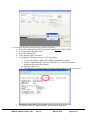
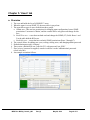
Select the right COM (Red "A" on the following screenshot) and click "Change COM". Skip
this step if you using COM1.
5. Request status using the 'Get All Telemetries' button (marked with a dashed green on page)
MPS Doc: M359_Console_UM
Rev (3)
May 20, 2012
Page 3 of 11