1
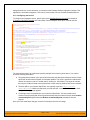
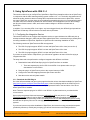
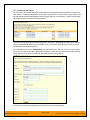
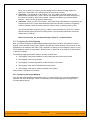
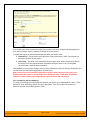
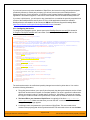
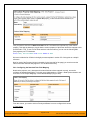
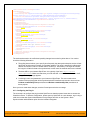
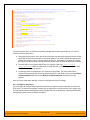
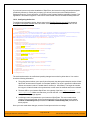
background service. In such situations, you should use the Desktop DataSync application instead. This application is described in Appendix 1 and can be used instead of the server-based DataSyncService. 2.1.2. Configuring the Service To configure the integration service, please open up the DataSyncService.exe.config file located in C:\Program Files\SpiraTeam\Bin with a text editor such as Notepad. Once open, it should look like: <?xml version="1.0" encoding="utf-8"?> <configuration> <configSections> <sectionGroup name="applicationSettings" type="System.Configuration.ApplicationSettingsGroup, System, Version=2.0.0.0, Culture=neutral, PublicKeyToken=b77a5c561934e089" > <section name="Inflectra.SpiraTest.DataSyncService.Properties.Settings" type="System.Configuration.ClientSettingsSection, System, Version=2.0.0.0, Culture=neutral, PublicKeyToken=b77a5c561934e089" requirePermission="false" /> </sectionGroup> </configSections> <applicationSettings> <Inflectra.SpiraTest.DataSyncService.Properties.Settings> <setting name="PollingInterval" serializeAs="String"> <value>600000</value> </setting> <setting name="WebServiceUrl" serializeAs="String"> <value>http://localhost/SpiraTeam</value> </setting> <setting name="Login" serializeAs="String"> <value>fredbloggs</value> </setting> <setting name="Password" serializeAs="String"> <value>fredbloggs</value> </setting> <setting name="EventLogSource" serializeAs="String"> <value>SpiraTeam Data Sync Service</value> </setting> <setting name="TraceLogging" serializeAs="String"> <value>False</value> </setting> </Inflectra.SpiraTest.DataSyncService.Properties.Settings> </applicationSettings> </configuration> The sections that need to be verified and possibly changed are marked in yellow above. You need to check the following information: The polling interval allows you to specify how frequently the data-synchronization service will ask SpiraTeam and the external system for new data updates. The value is specified in milliseconds and we recommend a value no smaller than 5 minutes (i.e. 300,000ms). The larger the number, the longer it will take for data to be synchronized, but the lower the network and server overhead. The base URL to your instance SpiraTeam. It is typically of the form http://<server name>/SpiraTeam. Make sure that when you enter this URL on a browser on the server itself, the application login page appears. A valid login name and password to your instance of SpiraTeam. This user needs to be a member of the project(s) that will be synchronized with JIRA and needs to have at least Incident create/modify/view permissions and Release create/modify/view permissions in these projects. Once you have made these changes, save the file and proceed to the next stage. © Copyright 2006-2015, Inflectra Corporation Page 3 of 168 This document contains Inflectra proprietary information