1
4 CONFIGURING THE CAMERA
After adding the camera to the Cameramanager application, the camera is configured to the default settings.
Chapter 4.1 contains a description of these settings. The settings can be personalized, tuning them to your wishes.
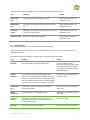
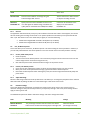
Chapter 4.2 contains an explanation of the options, including configuring motion detection and receiving email and
push notifications.
4.1
Default settings of the camera
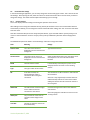
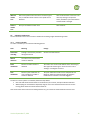
After adding the camera to the Cameramanager application, the camera is configured with the default settings.
The following default settings apply for the Cameramanager 360° business subscription (the recommended
subscription type):
Live View settings
Best image quality: 640x480
Recording settings
Recording resolution: 640x480
Compression type: H.264
Frames per second: 5
Sound recording: Off
Motion detection
Constant
Range of motion
One area on the entire camera image
Push notifications
Constant
Note: Push notifications will only be received on smartphones and tablets on
which the Cameramanager app has been installed and the account
concerned has logged in.
Email alerts
Off
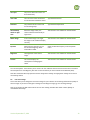
You can change the default settings to match your wishes. This is explained in more detail in the following sections.
Version September 17, 2014
10



![User Manual BS 15 [ASL]](http://vs1.manualzilla.com/store/data/005675346_1-422b291500c6ff99ebe2f8b515793259-150x150.png)