1
Main Menu and Toolbar
This section describes the Main Menu and Toolbar, which are the primary points to
access the functions of the E-Plex FIPS-201.
Main Menu
The Main Menu provides access to all functions and displays the available menu options.
The following 12 drop-down menus are available from the Main Menu:
•
File
•
Schedules
•
Holidays/Vacations
•
Door Groups
•
Doors
•
Access Groups
•
Departments
•
Users
•
Access Assignment
•
Reports
•
System Setup
•
Help
(Note: In previous FIPS-201, version 1.x software, this field was called
User Groups; both terms mean one and the same!).
Refer to the appropriate section in the manual in Chapter 3 for more detail on each of the
options that are available from the drop-down menus. These options are also available
from the Toolbar.
Toolbar
The Toolbar is located directly below the Main Menu and displays the icons for the Main
Menu options.
You can select an icon on the toolbar by positioning the mouse pointer on the icon and
clicking the left mouse button one time. The menus available from the E-Plex Main Menu
and the corresponding Toolbar icon (if applicable) are described in the following sections.
File Menu
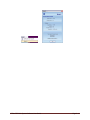
From the File menu, you can exit the software.
Schedules
E-Plex FIPS-201 System Software User Guide
Page 2-7