1
Control Files
Page 2-5
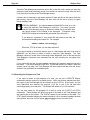
All other users will be suspended while <program> is running.
Enter RETURN to continue or CTRLC to abort.
For example, some of the Video Cassette programs (VCRSAV, VCRRES,
VCRDIR) and the 1/4" Streamer programs (STRSAV, STRRES, STRDIR)
display this message. Since the Task Manager is another "user," it will be
suspended also, so that it cannot continue running the task. DSKCPY is
another command that the Task Manager cannot run.
Also, do not use the STAT command inside of a control file. Because the
STAT command needs a Control-C to terminate it, it will wait for that input
from the Task Manager. The Task Manager will be waiting for an end signal
from STAT and, again, nothing will happen. You will have to kill the task,
take the STAT command out of the control file, and resubmit the task.
2.2.1Setting up a Permanent, Repeating Task
The control file for this type of task is the same as any other. You merely add a $JOB
statement to it. Place the $JOB statement at the end of the .CTL file ahead of the
LOGOFF command, if there is one. Make sure the job is at monitor level when the
$JOB statement is executed.
Here is an example of the $JOB statement that you might add to your .CTL file. (Be
sure to leave a space between $JOB and the option switches.)
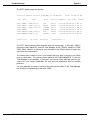
$JOB /NEXT:0-1-0/PERMANENT/RESTART
This command will reset the SUBMIT specifications for the task. This causes the task to
be run again exactly one day after the time the task last ran. (The /NEXT switch is
explained more fully in the next chapter.) For example, say that you submitted the task
to run at 2:00 PM. After the task is completed, the $JOB command will change the
entry in the queue so that it will be scheduled to run at 2:00 PM the next day. Do not
use /AFTER here, since the job would be reset to run again one day after the task
finished (which could be a few seconds to a few hours after the task started).
The reason this command comes at the end of the .CTL file is that, if the system should
crash while this task is running, the queue entry will not have yet changed (to the next
day). This way, you know that the task is finished running before it is re-scheduled for
the next running.
The /PERMANENT and /RESTART switches are included here as a precaution, in case
the original submission did not specify them. Once a control file with this $JOB
statement is submitted, the task will be performed daily until you stop it.
DSS-10010-00, Rev. B00