1
Page A-4
Appendix A
A.2CREATING JOB INITIALIZATION FILES
First you should decide how many jobs you want the Task Manager to control, and create
a separate job initialization file for each one. Then you can go ahead and set up both the
Task Manager and those jobs in your system initialization command file.
A.2.1Deciding How Many Jobs to Have
The number of jobs assigned to the Task Manager determines the number of tasks that
can be performed at the same time. Two or three jobs are usually enough.
For example, if you give it three jobs, the Task Manager can run three tasks at the same
time. There are no set limitations to the number of jobs you can specify. Your decision
depends on how much memory is available on your computer system, and how much
memory you give to your Task Manager and to each individual job. You will have to
balance your needs to your memory space and requirements.
The Task Manager controls which task it assigns to which job on the basis of several
criteria. It tries to match the option switches you specify when you SUBMIT the task
with the characteristics you define for the jobs in the initialization files. As you will see,
you can set up the jobs to accept only tasks of a certain memory or priority requirements.
For instance, you might want to set up one job specifically for small tasks. If you give
the job 10K of memory in the system .INI file, a task would only run on that job if you
specified a memory requirement of 10K or less when you SUBMIT the task.
The default memory for a task is 32K, so the Task Manager would bypass that 10K job
when normal tasks are submitted. In order to get a task to run on that job, you would
have to specify /MEMORY:10K (or less) when you SUBMIT a task. This small job
would be useful if you don’t want small tasks taking up queue space and delaying larger
tasks.
You may also wish to give one or more jobs extra memory, say, 128K. These jobs can
be specifically used for long and involved tasks that need more memory. If you have a
variety of jobs with different specifications, you can tailor the tasks to the jobs, and use
memory more efficiently.
A.2.2Contents of the Job .INI File
For each worker job you want the Task Manager to use, you must create a file with its
jobname and an .INI extension located in the System Library account, DSK0:[1,4]. If
you decide to call one of the worker jobs ROBOT1, here is an example of what the file
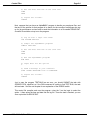
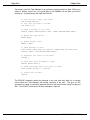
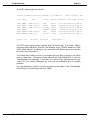
for ROBOT1.INI might contain:
DSS-10010-00, Rev. B00