1
RDP500 Remote Data Platform
Table of Contents
PDF viewers note: These page numbers refer to the printed version of this document. Use
the Adobe Acrobat® bookmarks tab for links to specific sections.
1. Introduction and Theory of Operation .......................1
2. Unpacking RDP500......................................................1
2.1 Parts List ...................................................................................................1
2.1.1 Common Accessories......................................................................2
3. Installation....................................................................2
3.1
3.2
3.3
3.4
Rain Gauge Preparation............................................................................2
Internal Enclosure and Load Cell .............................................................6
Solar Panel and Grounding Wire Installation Instructions .....................11
Overload Protection Adjustments...........................................................13
4. Calibration Instructions ............................................14
5. Software......................................................................17
5.1 PC200W Software ..................................................................................17
5.2 DevConfig ..............................................................................................18
5.2.1 Sending OS with DevConfig ........................................................19
6. CompactFlash® (CF) .................................................21
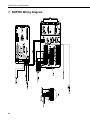
7. RDP500 Wiring Diagram............................................22
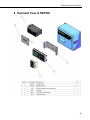
8. Exploded View of RDP500 ........................................23
Appendices
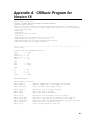
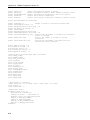
A. Example CRBasic Program.................................... A-1
B. Updating RDP500 Software .................................... B-1
B.1 Introduction..........................................................................................B-1
B.2 Update Process.....................................................................................B-1
B.2.1 Back Up the RDP500 – Step 1 ...................................................B-1
B.2.2 Send the Operating System – Step 2 ..........................................B-1
i