1
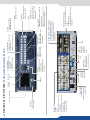
- 8 x 3G/HD/SD-SDI
- 8 x Universal Analog
(4 x HD15 & 4 x DVI-A)
Power supply:
100-240 VAC; 4.8A;
50/60Hz; 225W; internal,
autoswitchable
(Dual link available on Inputs 4 and 8)
- 2 x DisplayPort
(Dual link available on Inputs 2 and 6)
Inputs #1 to #8:
- 4 x HDMI
- 6 x DVI-I
Stand-by:
Hold for 3 seconds
for stand-by mode
4.3’’ TFT color display
Menu scroll
knob
See User’s Manual for details
Devices sync.:
Used for effect sync in
multi-machine mode.
Ethernet
Plug
Frame Lock:
Analog Frame
Lock plug and
specific loop
output
Tally
Monitoring Preview output:
- 1 x Universal Analog (HD15 & DVI-A)
- 1 x DVI-I
- 2 x SD/HD/3G SDI
- 1 x RGBs/RGsB/RGB/YPrBr/YC/comp
Analog output
Program output #1 - Preview output #2:
- 2 x Universal Analog (HD15 & DVI-A)
- 2 x DVI-I (DVI Dual-Link on output #1)
- 2 x Video Optical SFP module cage
- 3G/HD/SD-SDI
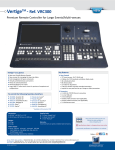
Source control:
Frame logo: press before selecting the
Logo/Frame number
Freeze: freeze the input linked to the
current layer on the Program
TAKE:
Transition the preselected sources onto the
Program output with the
selected effects
Step Back:
Recall the last preset into
your Preview monitor
Screen:
#1 to #2: select a screen
Edit:
Program: edit Program
Preview: edit Preview
Layer control:
Clear: clear a layer
Aspect Image Layer: adjust
Layer properties
Source selection:
#1 to #8: access Frame #1 to #4
or Logo #5 to #8
Color: fill in a layer with a color
Preset:
Load: load a preset
Save: save a preset
Layer selection:
Native Background: not
scaled layer.
A/B/C/D: scaled layers
Control:
Exit/Menu: Home menu
or back one level
Enter: validate the menu
or command
RS232 port:
Reserved for
manufacturer
4 x USB Plugs
USB Plug
Contextual
buttons
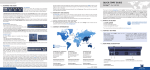
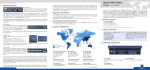
NeXtage 16 - Ref. NXT1604 / front & REAR panelS description