1
The Ultimate Box User Manual
Screen features and menu options.
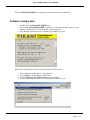
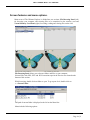
Main screen of The Ultimate Explorer is divided into two sections; File Browsing Panel (left)
for browsing your computer and selecting files to be transferred to the memory card and
Virtual Memory Card Panel (right) for writing, reading and viewing files on the card.
File Browsing Panel allows you to browse folders and files on your computer.
Selected files with .PES, .PEC and .HUS extensions open in the Preview area located at the
bottom of this section.
While browsing, double click on folder to open. To go up one level, double click on
<..> Parent Folder.
Full path of current folder is displayed to the left on the Menu line.
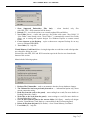
Menu includes following options:
Page 6 of 6