1
USER MANUAL
SMART TOUCH - V1.1
2.4.4 BRIGHTNESS
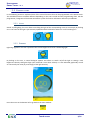
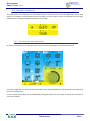
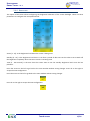
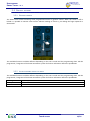
This option of the menu allows configuring the brightness behaviour of the screen backlight. There are three
parameters to configure that are explained next:
Active [3 - 15]: Is the brightness level when the screen is being used.
Standby [0 - 15]: Is the brightness level that it is set after a period of idle time. Set this value to 0 to switch off
the brightness completely when the Smart Touch is not being used.
Time [5 - 60 seconds]: Is the time that the screen waits to set the standby brightness level since the last
pulsation.
Press the arrow on the left to go back to the main window without saving changes. Press ok on the right to
accept the new configuration.
Press the arrow on the left to go back to the main window without saving changes.
Press ok on the right to accept the new configuration.
Touch screen
17/21