1
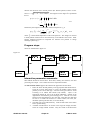
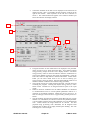
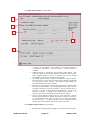
measure the direction of the second particle (the thermal particle) relative to this. v12 + v22 − 2 v1v2 cos θ12 , the integral over the angle θ12 is performed Since vrel = first as π q rel (v1 , v 2 ) = ∫ v rel Q( v rel ) sin θ 12 dθ 12 0 1 = v1 v 2 4.3.1 v1 + v 2 ∫v 2 rel Q( v rel )dv rel v1 − v2 followed by the integral over the speed of the second particle v2 as m2 q (v1 , T2 ) = 2π 2πkT2 3/ 2 ∞ ∫v 2 2 e − 1 m2 v 22 / kT2 2 q rel (v1 , v 2 )dv 2 4.3.2 0 where T2 is the thermal temperature of the second particle. This integral is relevant to beam plasma reactions and is used extensively in the ADAS3 series codes. Other angular weighted integrals are important for emission line profiles in charge exchange spectroscopy. Program steps: These are summarised in figure 4.3. Figure 4.3 EHJLQ ! VHOHFW HIIHFWLYH HPLV FRHIIW ! ILOH UHDG DQG YHULI\ HIIHFWLYH HPLV ! FRHIIW ILOH HQWHU ILW FKRLFHV VHOHFW [VHFW VSHFLI\ RXWSXW HQHUJLHV DQG SODVPD SDUDPHWHUV UHSHDW ! ! UHSHDW 2XWSXW WDEOHV DQG JUDSKV HQG GLVSOD\ FKDUJH H[FKDQJH FURVV VHFWLRQ JUDSK FRPSXWH FXELF LQWHUSRODWH WR VSOLQH DQG SODVPD PLQLPD[ ILW FRQGLWLRQV Interactive parameter comments: Most ADAS interactive routines have three tasks, namely, file selection, user data processing and output . This is achieved in three sequential windows. The file selection window appears first and has the appearance shown below. 1. Data root shows the full pathway to the appropriate data subdirectories. Click the Central Data button to insert the default central ADAS pathway to the correct data type. Note that each type of data is stored according to its ADAS data format (adf number). adf12 is the appropriate format for use by the program ADAS303. Details of the organisation of such data is given in the appxa-12. Click the User Data button to insert the pathway to your own data. Note that your data must be held in a similar file structure to central ADAS, but with your identifier replacing the first adas, to use this facility. 2. The Data root can be edited directly. Click the Edit Path Name button first to permit editing 3. Available sub-directories are shown in the large file display window. There are a large number of these. They are stored in sub-directories ADAS User manual Chap4-03 17 March 2003