1
Contents
List of Figures
iv
1 Executive Summary
1
2 Introduction
3
3 Requirements and Installation
3.1 Installing required software . . . . . . . . . . . . . . . . . . . . . . . . . . . . . . . . . . .
3.2 Installing EURACE-GUI from binary distribution . . . . . . . . . . . . . . . . . . . . . .
3.3 Installing EURACE-GUI from sources . . . . . . . . . . . . . . . . . . . . . . . . . . . . .
5
5
6
6
4 Overview of Agent and Population Design Process
7
5 Agent Design with XMML-Editor
10
6 Compiling Agents with GXparser
12
7 Population Design with PopGUI
7.1 Using PopGUI . . . . . . . . . . . . . . . . . . . . . . . . . . . . . . . . . . .
7.2 STEP 1: Creating a population . . . . . . . . . . . . . . . . . . . . . . . . . .
7.3 STEP 2: Specifying population composition . . . . . . . . . . . . . . . . . . .
7.4 STEP 3: Specifying agent memory variables . . . . . . . . . . . . . . . . . . .
7.4.1 Distinguishing simple and composite variables . . . . . . . . . . . . . .
7.4.2 Specification syntax for variables and basic random distributions . . .
7.4.3 Deterministic initialization . . . . . . . . . . . . . . . . . . . . . . . .
7.4.4 Using other memory variables of agent in expressions . . . . . . . . . .
7.4.5 Initializing arrays . . . . . . . . . . . . . . . . . . . . . . . . . . . . . .
7.4.6 Using model constants or population size for scalability purposes . . .
7.4.7 Accessing other agents and initializing agent relations . . . . . . . . .
7.4.8 A note about managing dependencies . . . . . . . . . . . . . . . . . .
7.4.9 Some useful Python constructs . . . . . . . . . . . . . . . . . . . . . .
7.4.10 FINISHING UP: Validating and saving memory variable specifications
7.5 STEP 4: Editing constants . . . . . . . . . . . . . . . . . . . . . . . . . . . .
7.6 STEP 5: Instantiating population and finishing up . . . . . . . . . . . . . . .
7.7 Command line options, utilities, and debugging . . . . . . . . . . . . . . . . .
7.8 NOTES . . . . . . . . . . . . . . . . . . . . . . . . . . . . . . . . . . . . . . .
.
.
.
.
.
.
.
.
.
.
.
.
.
.
.
.
.
.
.
.
.
.
.
.
.
.
.
.
.
.
.
.
.
.
.
.
.
.
.
.
.
.
.
.
.
.
.
.
.
.
.
.
.
.
.
.
.
.
.
.
.
.
.
.
.
.
.
.
.
.
.
.
.
.
.
.
.
.
.
.
.
.
.
.
.
.
.
.
.
.
.
.
.
.
.
.
.
.
.
.
.
.
.
.
.
.
.
.
.
.
.
.
.
.
.
.
.
.
.
.
.
.
.
.
.
.
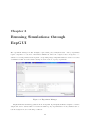
8 Running Simulations through ExpGUI
9 Analysis of results using
9.1 Overview . . . . . . .
9.2 Features . . . . . . . .
9.3 Using VisGUI . . . . .
9.3.1 Platforms . . .
VisGUI
. . . . . .
. . . . . .
. . . . . .
. . . . . .
.
.
.
.
.
.
.
.
.
.
.
.
13
14
15
16
16
19
19
20
20
21
21
22
24
24
25
25
25
26
26
28
.
.
.
.
.
.
.
.
.
.
.
.
ii
.
.
.
.
.
.
.
.
.
.
.
.
.
.
.
.
.
.
.
.
.
.
.
.
.
.
.
.
.
.
.
.
.
.
.
.
.
.
.
.
.
.
.
.
.
.
.
.
.
.
.
.
.
.
.
.
.
.
.
.
.
.
.
.
.
.
.
.
.
.
.
.
.
.
.
.
.
.
.
.
.
.
.
.
.
.
.
.
.
.
.
.
.
.
.
.
.
.
.
.
.
.
.
.
30
30
30
33
34