1
NOTE 2: If you’re using an application other than Ableton Live, please see
the Other Apps section.
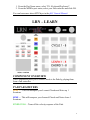
X/Y PAD
The X/Y Pad is used to control Pitch Bend and the Mod Wheel.
MISC
X/Y HOLD – Hold the current value of X/Y.
PB ON/OFF – This will turn Pitch Bend on/off for the X-axis.
MOD ON/OFF – This will turn Mod Wheel on/off for the Y-axis.
KNOBS
The Knobs are used to control 8 instrument-level parameters.
KNOB 1 ASGN – Press this Button and the Display will show the
parameter that is assigned to Knob 1. Hold this Button down and use the
Encoder to select which parameter is assigned to Knob 1.
KNOB 2 ASGN – Same as Knob 1 Asgn.
KNOB PARAMETERS
Aft – Channel Aftertouch
PB – Pitch Bend
Mod – Mod wheel
Vol – Volume (CC7)
Cut – Filter cutoff frequency (CC74)
Rez – Filter resonance (CC71)
Att – Amp attack (CC73)
Rel – Amp release (CC72)
OTHER APPS
When using this Component with applications other than Ableton Live, the
Transport section will work slightly differently.
Play, Stop, Rec, FFW and REW should all work as described in the
Transport section. The other functions may work, but may perform different
functions than what is described in the Transport section. The Clip Rec
function will definitely not work, that is a Live-specific function.
4