1
IQA Cryopreservation Panel Procedure
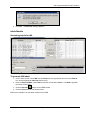
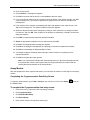
15. If you wish to print labels for the aliquots that were just added, select the IQA format from the
box, select the label size from the list, and click Yes.
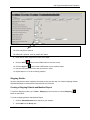
Note: To print labels for more aliquots than those on the Entry screen, refer to the Generating Labels for
IQA section on page 3.
Ordering the Cryopreservation Assay via Assign Tests
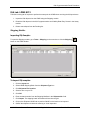
1. Enter the Assign Tests module via the Tools listing on the LDMS Toolbar.
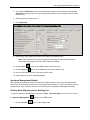
2. Click to select the Specimen field category.
3. Add the following data items to the Selection Criteria:
Group = IQA
Specimen Date = Current Date
4. Execute to populate the Select Samples grid.
5. Highlight the four specimens.
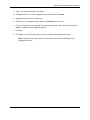
6. Click on the + sign next to Immunology and highlight Cryopreservation.
7. Click Assign Selected Test. A message box appears.
© 2012 Frontier Science Foundation
Page 3 of 12
Date Modified: 31 Jan 2012