1
Operating Instructions
The operating instructions are described in six steps. Please
read and understand these instructions before using this
equipment. Do not omit any steps.
Pan Handle Clamp
1
1.1
1.2
1.3
Fluid Head Set-up.
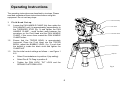
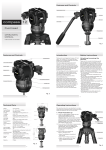
Loosen the PAN HANDLE CLAMP fully then rotate the
PAN HANDLE until it is approximately perpendicular to
the THREADED STUD (fig. 3) and tighten the PAN
HANDLE CLAMP - avoid contact wear between the
serrations on the Fluid Head and the PAN HANDLE
CLAMP, if this occurs then unwind the PAN HANDLE
CLAMP further.
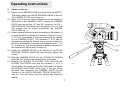
Ensure that the TRIPOD BOWL is approximately
horizontal. Place the Fluid Head into the TRIPOD
BOWL, adjust the BUBBLE LEVEL (fig. 3) such that
the bubble is inside the black circle and tighten the
CLAMP NUT.
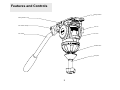
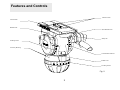
Set the initial control settings as follows – see Figure 1
& 2:
•
Select Counterbalance to position 4 (top setting).
•
Select Pan & Tilt Drag to position 0.
•
Tighten the PAN LOCK, TILT LOCK and the
SLIDING PLATFORM LOCK.
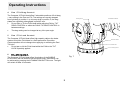
Pan Handle
Illumination Button
Threaded Stud
Clamp Nut
Fig. 4
6