1
AN-1 Creating a Portfolio Security List in Metastock the Easy Way
Created with Metastock by Equis © 2001
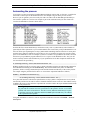
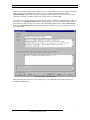
Click OK, then click Explore and click OK again to start the exploration. When the exploration has
completed click the Report button and the report dialogue box should open with all of the securities that
were matched between the security list file and the security database files. Check that all of the securities
that were in the security list file are present in the report. If some securities are missing in the report then
this maybe because you have not included all of the relevant security data folders in the security list or
some of the securities are missing from your data vendor or maybe the symbol names are different which
quite often happens. If you are happy with the list in the report you can save this list so that you can reuse it
later by clicking on the Save List button and saving it to an appropriate file. For example you might call it
“ASX-100”.
Created with Metastock by Equis © 2001
Using the GetSymbolLength function to generate a portfolio list.
Typically you may have data for all securities listed on your exchange. This can amount to thousands of
securities, which may include a lot of illiquid traded Warrants and Stock Options that you don’t want to
include when you generate a trade database. When you generate a security list you may only want to
Copyright © 2000-2002 by Compuvision Australia Pty Ltd. All Rights Reserved
http://www.compuvision.com.au
Page 11