1
10
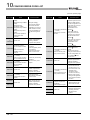
CONCISE ERROR CODE LIST
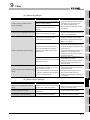
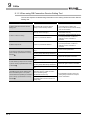
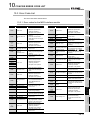
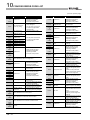
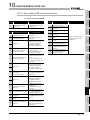
(2) Access log of DB Connection Service
Error code
Error description and
cause
(Service Not Start.)
0x20100001 Failed to start the service
due to insufficient memory.
(Service Not Start.)
0x20100002 Failed to start the service
due to insufficient resources.
Corrective action
• Terminate any
unnecessary applications.
• Add more memory to the
computer.
0x20100010 System error
• Please consult your local
Mitsubishi representative,
explaining a detailed
description of the
problem.
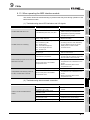
(Service Not Start.)
Failed to start the service
0x20100011
due to failure of the server
port initialization.
• If firewall software has
been installed, set the
specified server port
operational.
(Service Not Start.)
0x20100012 Another application has
opened the server port.
• Terminate the application
that has opened the
server port.
• Set another server port
No. with DB Connection
Service Setting Tool.
0x20100013 System error
• Please consult your local
Mitsubishi representative,
explaining a detailed
description of the
problem.
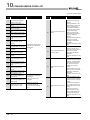
(Not Initialize a service for
each client: [IP address])
0x20200001 Failed to initialize a service
for each client due to
insufficient memory.
• Terminate any
unnecessary applications.
• Add more memory to the
computer.
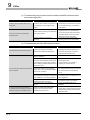
(Deny network connection
request from [IP address])
0x20200002 Rejected the connection
request from the nonpermitted IP address.
• Using DB Connection
Service Setting Tool, add
the IP address to those
with connection
permission.
0x20200003 System error
• Please consult your local
Mitsubishi representative,
explaining a detailed
description of the
problem.
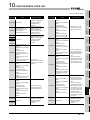
(SID [Session ID]: Request
Receive Error: [IP address])
0x20300001
Failed to receive data due to
insufficient memory.
0x20300010
(SID [Session ID]: Request
Receive Error: [IP address])
Connection disconnected
during request reception.
(SID [Session ID]: Request
Receive Error: [IP address])
0x20300011
Timed out during request
reception.
(SID [Session ID]: Request
Receive Error: [IP address])
Detected failure of the MES
0x20300012
interface module while
waiting for or receiving a
request.
(SID [Session ID]: Request
0x20300013 Receive Error: [IP address])
Receive I/O error
10 - 18
• Terminate any
unnecessary applications.
• Add more memory to the
computer.
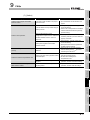
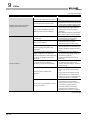
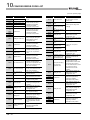
Error code
Error description and
cause
(SID [Session ID]: Request
Receive Error: [IP address])
0x20300014
Buffer overrun (Request
length exceeded)
(SID [Session ID]: Request
0x20300015 Receive Error: [IP address])
Received an invalid request.
• Check if the source IP
address belongs to the
MES interface module.
(SID [Session ID]:
Response Transmit Error:
[IP address])
0x20310010
Failed to transmit a
response due to
disconnection.
(SID [Session ID]:
Response Transmit Error:
0x20310011 [IP address])
Timed out during response
transmission
(SID [Session ID]:
Response Transmit Error:
[IP address])
0x20310012
Detected failure of the MES
interface module during
response transmission.
• Check if it is connected to
the network.
• Check if the gateway and/
or hub is operating.
• Check if the power of the
module is not turned off.
(SID [Session ID]:
Response Transmit Error:
0x20310013
[IP address])
Send I/O error
(SID [Session ID]: DB
Connect: [Data source]:
0x20400001 [User]: Failed)
Failed in DB connection due
to insufficient memory.
(SID [Session ID]: DB
Connect: [Data source]:
0x20400002 [User]: Failed)
Failed in DB connection due
to insufficient resources.
(SID [Session ID]: DB
Connect: [Data source]:
0x20400010 [User]: Failed)
Invalid DB connection
request
0x20400011
System error
0x20400012
• Check if it is connected to
the network.
• Check if the gateway and/
or hub is operating.
• Check if the power of the
module is not turned off.
Corrective action
(SID [Session ID]: DB
Connect: [Data source]:
0x20400020 [User]: Failed)
Failed to create a DB
handle.
• Terminate any
unnecessary applications.
• Add more memory to the
computer.
• Check if the source IP
address belongs to the
MES interface module.
• Please consult your local
Mitsubishi representative,
explaining a detailed
description of the
problem.
• Terminate any
unnecessary applications.
• Add more memory to the
computer.
(To the next page)