1
Employee Import File Specifications
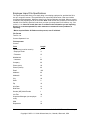
The import function will allow you to easily bring in an existing employee list, provided the file is
set up in a specific manner. The specifications for import files follow below. Lists must include
commas as field separators. Maximum sizes for the various fields are also listed. When a comma
is detected, the program goes to the next field. Note: Field number one (location) is the numerical
identifier for a location’s position found when you open your drop-down list of locations, e.g., first
on list is 1, etc. Note: Be certain there are no commas in the information you are importing.
Since it is a comma-separated file, other extraneous commas will cause problems in
importing.
* Marks required fields. All fields must be present, even if left blank.
File Format
Text file *.txt
Comma Separated *.csv
Field separator
Comma
Field
Length
Locationkey (must be numeric)
4
* Employee Code
11
* Firstname
15
MiddleInitial
1
* Lastname
20
Company
30
Phone (work)
20
Phone2 (home)
20
Email
100
Address1
30
Address2
30
City
20
State
2
Zip
10
Hire Date
14
Birth Date
14
Gender (M/F) Male/Female
1
Job Title
30
Supervisor/Manager (use employee
code)
11
SSN
11
Department
22
6
Keller-Soft® E-Z Access Recordkeeper
Copyright © 2003 J. J. Keller & Associates, Inc., Neenah, Wisconsin, USA