1
Contents
1.
2.
3.
4.
Overview .......................................................................................................................................... 6
The Shark Distributed Monitoring System (SDMS) ............................................................................. 6
The Shark Appliance ......................................................................................................................... 8
Shark Appliance Management Interface ............................................................................................ 8
Pilot Console................................................................................................................................................. 8
Web Browser ................................................................................................................................................ 9
Shark Appliance Login Page ......................................................................................................................... 9
Shark Appliance Status ...............................................................................................................................10
Navigation Buttons.....................................................................................................................................11
5. The Shark Packet Recorder ............................................................................................................. 11
Capture Jobs (Shark Appliance Packet Recorder) ......................................................................................13
Add/Edit Capture Jobs................................................................................................................................14
Trending/Indexing Parameters ..................................................................................................................15
The Parameters ..........................................................................................................................................17
Capture Job Control Buttons ......................................................................................................................18
Capture Jobs in the Pilot Console Devices Panel .......................................................................................18
Pilot Console Operations on Job Interfaces ...............................................................................................19
Capture Jobs in the Pilot Console Files Panel.............................................................................................19
Pilot Console Operations on Job Traces – Trace Clips................................................................................20
Creating Trace Clips ............................................................................................................................21
Time Control Panel for Creating Trace Clips.......................................................................................21
Using Time Selection to Create a Trace Clip.......................................................................................24
Using Views as Job Trace Indices........................................................................................................26
Using Events to Create Trace Clips .....................................................................................................26
6. Export Job Packets .......................................................................................................................... 28
7. User Management .......................................................................................................................... 30
Shark Appliance Credential Manager.........................................................................................................30
User and Group Access Control..........................................................................................................30
Shark Appliance Web Management Interface User Management ............................................................32
View Users/Groups.............................................................................................................................32
Add Users/Groups ..............................................................................................................................33
8. Capture Board Setup....................................................................................................................... 34
9. Port/Protocol Definition ................................................................................................................. 35
Port/Protocol Names .................................................................................................................................35
Port/Protocol Groups .................................................................................................................................36
10. Logs ............................................................................................................................................... 36
Shark Probe Logs ........................................................................................................................................36
Shark Packet Recorder Logs .......................................................................................................................36
11. Shark Probe Configuration File ........................................................................................................ 37
12. Logout ............................................................................................................................................ 37
Figures
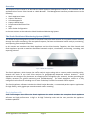
Figure 1: SDMS Shark Appliances........................................................................................................................ 6
Figure 2: Pilot Console ........................................................................................................................................ 7
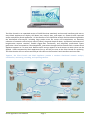
Figure 3: An Example Shark Distributed Monitoring System Deployment ........................................................ 7
Figure 4: Pilot Console Remote Ribbon .............................................................................................................. 8
Figure 5: Web Interface Selection....................................................................................................................... 9
Figure 6: Security Alert........................................................................................................................................ 9
Shark Appliance User Manual
Page 3