1
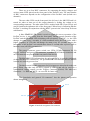
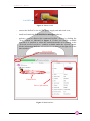
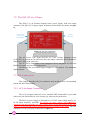
PreDAC User’s Manual Ethernet Communication If you have a firewall enabled on your router or on your computer, please make sure that the firewall is not preventing communication between your computer and the PreDAC device. The CAENels Device manager uses UDP port 30719 to find the device, so make sure that the UDP traffic is allowed in both directions on that specific port. 3.2.2 Device Configuration It is possible to change the Network configuration of the found devices. In order to set the Network configuration it is necessary to select the desired device and to click on the “Change device configuration” button in the main window as shown in Figure 6. The configurable Network options are: Device IP address; TCP/IP communication port; Subnet mask; Gateway. To apply the changes on the device configuration it is necessary to edit the corresponding fields and then to click on the “Save” button. A screenshot of a sample device configuration is shown in the following picture: Device configuration Figure 6: Change device configuration 36