1
Settings
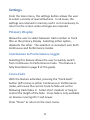
From the main menu, the settings button allows the user
to select a variety of special features. In all cases, the
settings are retained in memory and it is not necessary to
return to the screen unless changes are required.
Primary Display
Allows the user to select between track number or track
title as the primary display. Selecting either option,
deselects the other. The selection is consistent over both
Continuous and Performance modes.
Continuous to Performance toggle
Selecting this feature allows the user to quickly switch
from Continuous to Performance mode. This feature is
fully described on page 8 of this guide.
Cross-Fade
With the feature activated, pressing the “track-back”
button (left arrow) in either Continuous or Performance
mode, will cause the current track to fade-out as the
following track fades in. Select short medium or long to
control the length of the fade. Cross-fade is only available
on devices running iOS 7 and newer.
Press “Done” to return to the main menu.
11