1
Troubleshooting
If your iDevice won’t launch the app when connected to
the Cue Command appliance, try the following:
1. Verify your iDevice device is unlocked.
2. Verify the appliance is connected to power.
3. Turn the iDevice off by holding the sleep/wake
button (top of unit) for several seconds and then use
the slider to power off. Wait a few seconds before
turning it back on.
4. Verify the Cue Command app is on your device. If
necessary, delete and re-add it.
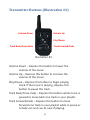
If the application is not reacting to button presses on the
transmitter, try the following:
1. Verify the app is launching when first plugged into
the dock.
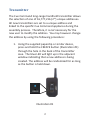
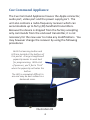
2. Test the wireless connection by looking for the LED
light on the dock every time one of the five buttons
is pressed. The LED should be visible through
the portal in the bottom of the Cue Command
appliance.
Still having problems? Contact support at:
[email protected]
18