1
Whiteboard V3.0 User's manual
Whiteboard V3.0 new added function
1. New added several more screen modes.
Add Windows mode, Full screen mode, Annotation mode.
2. New added teaching resources, subject tools
Add Math tools, Physics tools, Chemistry tools
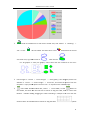
3. New added pie chart and histogram chart.
User can insert different kinds of pie chart, histogram chart into Whiteboard.
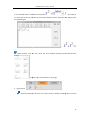
4. New added formula.
Enable user to insert formula on the page.
5. New added chemical equation.
Enable user to insert Chemical equation on the page.
6. New added many kinds of page switching effect.
Enable user to select different many kinds of page switching effect.
7. New added magic pen.
When user use magic pen to draw, the writing will disappear slowly, the page will still clear;
when draw circle, it will start spotlight tool; when draw rectangle, it will start magnifier and
enlarge the rectangle.
8. New added object alignment.
Enable user to select multiple objects aligned.
9. Newly added hands shrink or enlarge objects after select the object when two user write on
the multitouch electronic whiteboard.
Enable two users simultaneously written on a multi-point touch whiteboard. The user can be
hands shrink or enlarge objects when use under the multi touch mode if an object is
selected.
10. New added page theme editing functions
Enable users to edit their own classroom theme.
11. Newly added grid background display function.
Allows the user to display the grid and edit grid style.
12. Newly added many kinds of connected lines.
Enable user to use different kinds of connected lines.
13. Newly added a key to lock the screen.
Enable user to lock the screen.
14. Newly added increase recorder, clock, soft keyboard, calculator tools.
Added many kinds of classroom tools.
15. Newly added external tools.
Enable user add tools in the computer into Whiteboard.
16. Newly added customized tool’s button function.
Allow the user to add or remove a tool button under Full Screen mode..
17. Newly added toolbar edge adsorption.
Allow the user to move tool bar to upside edge or bottom side edge under Full Screen mode.
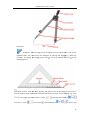
18. New added mathematical tool edge to draw lines
Enable user to draw lines when using mathematical tools.
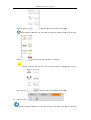
19. Newly added external images hotkey paste function
4