1
ABERLINK 3D MKIII MEASUREMENT SOFTWARE
PART 1 (CNC VERSION) COURSE TRAINING NOTES
ABERLINK LTD.
EASTCOMBE
GLOS.
GL6 7DY
UK
INDEX
1 .0 Introduction to CMM measurement.......................................................4
2.0 Preparation and general hints for solving measurement problems....4
3.0 Starting up your machine........................................................................5
4. 0 The Joystick ............................................................................................7
4.1 Movement X, Y and Z.............................................................................8
4.2 Taking Points (at constant feed).............................................................8
4.3 Indexing the Probe .................................................................................8
4.4 Locking the Axes ....................................................................................9
4.5 The Speed Control .................................................................................9
4.6 The Trigger Button .................................................................................9
5.0 Probe Calibration ...................................................................................10
5.1 Background ..........................................................................................10
5.2 How to datum the probe. ......................................................................10
5.3 Calibrating probe positions...................................................................12
5.4 To change to another datumed probe position .....................................13
6.0 Aligning your Parts................................................................................14
6.1 Example of traditional part alignment using a surface table, straight
edge and pins.............................................................................................14
6.2 Aligning parts using a CMM..................................................................14
7.0 Alignment examples ..............................................................................15
8.0 Basic 3-2-1(2) Alignment .......................................................................18
9.0 Plane and two circles Alignment ..........................................................19
10.0 Aligning components using a cylinder ..............................................20
11.0 Drive shaft (alignment along a shaft centre line) ..............................22
12.0 How accurate is your CMM? ...............................................................24
13.0 Step by step guide for measuring a circle .........................................26
14.0 Step by step guide for construction of an intersection point ..........27
15.0 Step by step guide for construction of a P.C.D.................................30
16.0 Inserting A ‘Move Via’ Into A Measuring Routine .............................32
16.1 Method One........................................................................................33
16.2 Method Two........................................................................................33
16.3 Method Three .....................................................................................34
17.0 Creating and running a CNC Programme - general notes................36
17.1 Teach and Repeat..............................................................................36
17.2 Off-Line Programming ........................................................................36
17.3 Setting Safe Volume...........................................................................37
17.4 Plunge and Rise moves from safe volume .........................................38
18.0 The Work Piece Co-ordinate (WPC or Work off set) .........................39
19.0 Setting rotations with WPC .................................................................41
19.1 Problems you can have with WPC .....................................................41
19.2 Setting Multiple Workpiece Co-ordinates (multiple components).....42
20.0 Automatically setting work offsets for a grid of components..........42
21.0 Bringing up dimensions on the screen..............................................44
22.0 Selecting Features ...............................................................................46
22.1 Using the Feature Select Buttons......................................................47
23.0 Aligned Dimensions ............................................................................48
23.1 3D Dimensions ...................................................................................48
23.2 2D Dimensions ...................................................................................50
23.3 Horizontal and Vertical Dimensions....................................................50
24.0 Angular Dimensions ............................................................................51
24.1 ‘3D’ Dimensional Angles ....................................................................51
24.2 2D Angles...........................................................................................52
25 .0 Dimensioning Circles ........................................................................53
26.0 Displaying a Feature as a Datum.......................................................54
27.0 Displaying the position of a Circle, Point or Sphere.........................55
27.1 True Position .....................................................................................55
27.2 True Position relative to specified datum(s)........................................56
27.3 Maximum Material Condition ..............................................................58
28.0 Dimensioning between two Lines or Planes ....................................59
29.0 Dimensioning to a Cone ......................................................................59
30.0 Setting Nominal Values and Tolerances for Dimensions .................61
31.0 Recalling a measured Unit ..................................................................62
32.0 Printing the results .............................................................................62
32.1 Graphic Print outs...............................................................................64
32.2 Tabulated Units ..................................................................................64
32.3 Tabulated Dimensions........................................................................65
32.4 Point Positions....................................................................................66
32.5 Feature Profile....................................................................................67
32.6 Multiple Components..........................................................................68
33.0 Geometrical tolerances summary ......................................................69
33.1 Introduction to Geometric Dimensioning and Tolerancing..................69
33.2 Geometric Tolerancing in Aberlink .....................................................70
34.0 Geometric Characteristic Symbols ....................................................71
34.2 Flatness..............................................................................................72
34.3 Roundness or Circularity ....................................................................72
34.5 Cylindricity ..........................................................................................72
34.6 Parallelism..........................................................................................73
34.7 Angularity ...........................................................................................73
34.8 Squareness ........................................................................................74
34.9 Concentricity.......................................................................................74
34.10 Total Runout.....................................................................................74
34.11 True Position ....................................................................................76
34.11.1 True Position relative to specified datum(s) ...................................................... 77
34.11.2 Maximum Material Condition ............................................................................. 79
34.12 Symmetry .........................................................................................80
34.13 Profiles .............................................................................................82
35.0 Change History ...................................................................................83
36.0 Contact Details.....................................................................................83
1 .0 Introduction to CMM measurement
The goal of this training document is to show you, by use of easy-tounderstand examples, how to set up the cmm and measure parts.
This training also helps you to get familiarized with Aberlink 3D general rules,
definitions and terms, and show you how to apply these to your specific
measurement problems.
These training notes contain some of the most important points to help
support you during this training course, these notes by no means replace the
use of the Aberlink user manual. In fact we highly recommend you read the
user manual in addition to the completion of a successful training course as
not all measurement capabilities of this software are covered in this
document.
It is important that you take your own notes throughout this training course.
If you have any questions about this training, I kindly ask you always put
these questions immediately and help contribute to the success of this training
by your active participation.
2.0 Preparation and general hints for solving measurement
problems
Before you start measuring with your CMM you must go through some
preparation functions. These functions include:
•
Give some thought to how you are going to position and hold the part
to be measured.
Reason:
- Ensure good accessibility, you can access all the
features you want measure.
•
Decide which stylus & extension you are going to need and if you are
using an indexible head which probe angles you are going to need to
measure the part before you start.
Reason:
- Save time while programming.
Saves you having to move the part.
•
It is good working practice to write the feature numbers on the drawing.
Reason:
- Easy verification of the inspection report.
Easy guidance when running a part inspection program.
•
It is good working practice to assign the datum letters to measured
features as they are shown in the drawing.
Reason:
- Easy verification of the inspection report.
Necessary for defining true positions when other than the
referenced features.
4
3.0 Starting up your machine
Air supply:- Check your CMM has a minimum air supply of 3.9 bar (55 psi)
and the filters attached to the air regulator are free from oil and water
contamination before you start the machine. (Oil & water must never get
through to air bearings as this could damage your machine.)
To start the software double click on the Aberlink 3D icon on the
desktop or click on the windows start button, select ‘programs’
then click on ‘Aberlink 3D’.
When the Aberlink 3D software starts. The first message that will appear will
be:
Click ‘OK’ to switch the air on automatically. Another message will then be
displayed on the screen:
Again click ‘OK to engage the motor drives.
5
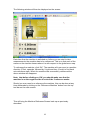
The following window will then be displayed on the screen:
Each time that the machine is switched on, before you can start to take
measurements, the machine has to be referenced. This is so that each of the
scales on the machine knows where it is with respect to the global error map.
To reference the machine, click ‘OK’. The machine will now move in a positive
direction (Z first, upwards, followed by X right and then Y back) to find each
axis reference mark. When the machine has successfully referenced the
above window will disappear.
Note: that before clicking on ‘OK’ you should make sure that the
machine is on the negative side of each of the 3 reference marks.
Should you ever need to re-reference the machine, this can be done at any
time afterwards by clicking on the ‘Reference Machine’ button from the top
tool bar on the main screen:
This will bring the Machine Reference Screen back up as previously
described.
6
4. 0 The Joystick
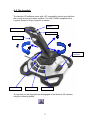
The Aberlink 3D software works with a PC compatible joystick provided that
the correct drivers have been installed. The CNC CMM is supplied with a
Logitech Extreme 3D pro Joystick, as shown:
Button 3
Hat Switch
Button 4
Trigger
Speed
Controller
X Axis : Hold
Y Axis : Hold
Z Axis : Hold
The joystick can be engaged and disengaged in the Aberlink 3D software
using the following button:
7
4.1 Movement X, Y and Z
Moving the CMM in the X axis direction is achieved by moving the joystick to
the left and right.
Moving the CMM in the Y axis direction is achieved by moving the joystick
forwards and backwards.
Moving the CMM in the Z axis direction is achieved by twisting the joystick.
The default setting for the joystick is clockwise drives in a Z positive direction
(upwards) and anti-clockwise drives in a negative direction (downwards),
although this can be altered in the machine set up.
4.2 Taking Points (at constant feed)
The joystick provides the additional function of allowing measurement points
to be taken at a constant feed rate. This means that the probe does not have
to be driven into the component being inspected. It can be positioned within
10mm of the desired point, and then the following buttons will produce a
move at the default probing speed in the directions as detailed below. If the
probe does not take a point within 10mm of the measurement direction it will
retreat to its’ previous position.
Button 3
-
Will travel in positive Z (upwards) until the probe is
triggered.
Button 4
-
Will travel in negative Z (downwards) until the
probe is triggered.
Button 1
-
Is a hat switch. Moving the switch to the left and
right moves the machine in the X- and X+ direction
Moving the switch forwards and backwards moves
the machine in the Y- and Y+ direction. The hat
switch also allows for probing at 45H in the XY
plane.
4.3 Indexing the Probe
Buttons 5 – 8 can be used for indexing the probe head position in place of
the four little black arrows adjacent to the Probe Datum Button in the top left
hand corner of the main software screen.
Each button will index the probe to the next datumed position:
either
or
or
or
with a higher A value
with a lower A value
with a higher B value
with a lower B value
This function will also need a
shift button to prevent
accidental probe indexes.
You can press one button repeatedly to cursor through all the datumed
positions, or you can use a combination of buttons to take the most direct way
8
to get to the required position. As soon as you pause for more than two
seconds the probe head will automatically index to that position, and you will
have to wait until the index is completed to select an alternative position.
4.4 Locking the Axes
Any of the machine axes can be locked as follows:
X Axis : Press down button 8
Y Axis : Press down button 10
Z Axis : Press down button 12
Repeat the sequence to unlock each axis.
When an axis is locked the corresponding readout will appear in red.
4.5 The Speed Control
The speed control is located in the base of the joystick as shown in the figure
above. When the control knob is towards the operator the speed is minimum,
and away from the operator is maximum.
The default settings for this control are 10% speed at minimum and 100% at
maximum, although these values can also be changed in the Machine Set Up.
This feature can also be used during program playback and when calibrating
probes as a feed override.
4.6 The Trigger Button
The trigger button is located on the front of the joystick. This can be used for
entering the machine’s current position into a ‘Move Via’ command.
Notes
9
5.0 Probe Calibration
5.1 Background
When using the Aberlink 3D software to inspect a component, the software
must know the relative position and diameter of the stylus ball being used.
This is achieved by using the probe stylus ball to measure the reference ball
mounted on the granite table. As the size and position of the reference ball
are known, this measurement is used to determine the size and relative
position of the stylus ball. This information is stored as three position offsets
X, Y and Z, and a diameter.
Obtaining this information is known as calibrating the probe. The probe must
be calibrated every time you change a stylus, or if you have an indexible
probe, each time you move the probe head to a position that has not
previously been calibrated.
If you are using a Renishaw indexible probe it is important to datum the probe
head at all relevant positions prior to commencing your inspection. Similarly if
you are using a standard probe, it is important to choose the correct stylus to
suit the work piece. A change of styli in the middle of an inspection should be
avoided as you will need to re-calibrate.
5.2 How to datum the probe.
To bring up the Probe Status window click on the Probe Datum button:
To calibrate the probe, left click with the mouse on the
green area in the probe head icon to call up the probe
status window. Later on you can use the arrows by the
side of this icon to change calibrated probe positions.
10
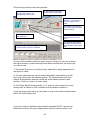
This will bring up the probe status window:
Use this to determine the
direction of the probe. For
straight down click on ball 1
2. Slider bars for selecting
probe head A and B angles
3. Stylus Rack Position
Selector – only relevant if
an auto-change rack is
fitted
Enter length of probe here
(For a PH10 with TP20 add
38mm to stylus)
Calibrated probes
are listed here
Enter the diameter of the
ruby ball here (4mm dia
ball)
The width is only used for
star stylus from the centre
of the shaft to centre of the
ball
This window shows selected probe
positions before they are calibrated
The top of the window is split into three sections, which you can use to select
the stylus direction, probe head angle and which module from the stylus rack
you wish to use:
1) The Probe Stylus Icon is used to select which ball is being datummed if a
star stylus is used.
2) The two slider bars are used to select the probe head position A and B
axes (only relevant for an indexible probe). The horizontal bar at the top
selects B axis position and the vertical bar at the bottom selects A axis
position. Click on ‘move to’ to index head
3) The Stylus Rack Position selector (1-6), which is only relevant if an auto
change rack is fitted to a CNC machine and will default to position 1.
If you are using a star stylus you will need to click on the relevant ball position
within the Probe Stylus Icon.
If you are using an indexible probe head for example PH10T, use the two
slider bars to select the probe head position that you want to datum. The
11
horizontal bar at the top selects B axis position and the vertical bar at the
bottom selects A axis position. This can also be done by using the two
selector boxes at the bottom left of the probe selector screen.
The Rack Position selector is only used if an auto-change rack is fitted to the
machine and will always default to position 1.
We also need to enter approximate values for the length and diameter of the
stylus being used. Roughly measure (+/-1mm) the length protruding below the
probe head:
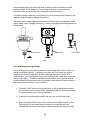
PH10
R1
L
D
L
Stylus length
Stylus length
Stylus length
D
Fig.1
5.3 Calibrating probe positions
The first thing you need to do is determine probe direction (click on ball no. 1
within the picture-top left). ) angles you require by Then enter the stylus
length in the ‘stylus length box’ and the ruby ball diameter into the ‘ball
diameter box,’ you only need to enter stylus width in the ‘width box’ if you are
using a star stylus. To datum a probe position select the A (incline) and B
(rotationusing the drop down menus located in the bottom left hand corner of
the probe status window or the top sliders.
1. Press the ‘Add’ button in the right corner of the probe status window
you should then see a line in the ‘Datumed positions’ window showing
the probe position you want to calibrate.
2. If using a manual head a prompt will ask you to move the head.
3. Place the probe 50mm above the reference ball and left click on the
‘Start button’ in the probe status window, the machine will now
automatically measure a number of points around the reference ball.
12
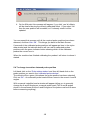
4. On the fifth point this message will appear, if you click ‘yes’ all offsets
will be cleared leaving the recently calibrated offset. If you select ‘No’
then the new position will be added, or if it already exists it will be
updated.
You can repeat this process until all the required probe positions have been
datumed, and then click ‘OK’. This brings you back to the Main Screen.
If successful, the calibrated probe positions will appear as lines in the stylus
data window and the indicator button will turn red for calibrated probes
positions with the green indicator button showing which of the calibrated
probes the current one is.
When the machine has finished calibrating the probes it will return to where it
started.
5.4 To change to another datumed probe position
Left hand click on the ‘Probe status window’ and then left hand click on the
probe position you want in the ‘calibrated probe window’.
The red dot will turn green (this shows the probe position has been selected)
Click on ‘OK’. An automatic probe head will then move to the correct A and B
angles.
With a manual indexible head a window will appear telling you to manually
change the A and B Angles on a manual probe head (The A and B angles
shown in the software and the A and B angles of the probe must be the same
before measuring anything).
13
6.0 Aligning your Parts
6.1 Example of traditional part alignment using a surface table, straight
edge and pins.
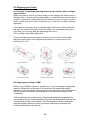
When you place a part on a surface table you are aligning the bottom face of
that part, true to the top of the surface table, you can still move the part about
in the X-Y plane and rotated about the Z axis but you can not move it up and
down in the Z axis and rotate it around the X or Y axis this is called a primary
alignment.
If you then push the part up to a straight edge fixed to the surface table this
will stop any rotation about the Z axis as well as any movement along the Y
axis. Now you can only slide the part along the X axis.
This is called a secondary alignment.
If you now slide the part along the X axis up to a pin in the surface table,
the part is now fixed in all six degrees of freedom. It cannot move or be
rotated in X Y or Z.
6.2 Aligning parts using a CMM
When using a CMM to inspect a component, it is not necessary to physically
align the component to the axes of the machine. By measuring specific
features on the component and setting them as references, you will be able to
use the computer to define the orientation of the axes and position of the
component.
This is important when measuring 2 dimensional shapes for example lines
and circles or points, as the software will project the measurement points into
a plane which must be fully defined. Also the alignment of the component
must be properly defined in order to produce meaningful horizontal and
vertical dimensions on the screen.
14
7.0 Alignment examples
When you place the component on to the table of the machine it has six
degrees of freedom which will need to be defined in order to fully define the
alignment and position of the component. Namely these are translation along,
and rotation about each of the three axes.
Depending on what measurements you wish to perform, not all of these
degrees of freedom will necessarily have to be defined. Take for example a
cube with a hole in the top and front faces:
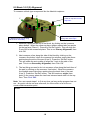
Z
Y
X
Measure a plane on the top face of the cube and set it as a reference. This
defines the XY plane for the cube and also a Z zero position. In effect it
defines three of the degrees of freedom, which are rotations about X and Y,
and also translation in Z.
Next measure a line along the front edge of the cube and set it as a reference.
This now defines the XZ plane for the cube and also a Y zero position. In
effect this line defines a further two of the degrees of freedom, which are
rotation about the Z axis and also translation in Y. Note that this line will now
be used to define the plane if the hole in the front face is now measured as a
circle.
Now measure the hole in the top face of the cube as a circle and set this as a
reference. The software will automatically determine that the hole is in the XY
plane by looking at the direction of motion of the probe. Setting this circle as a
reference will set the centre of the circle to X=0, Y=0 and define the last
outstanding degree of freedom, translation in X. The position and alignment of
the block will now be fully defined.
Note that a plane, a line and a circle are the most common features used to
fully define a component. Only one reference of each type can be set
however, and it is recommended that when creating a program when you set
a feature as a reference it is not changed half way through.
If the component being measured does not include these features other
common features can be used as references, these are as follows:
15
1. No straight edge for alignment
1. Measure circle – Set Ref
2. Measure circle – OK
3. Construct line – Set Ref
2. No Suitable Hole
2. Measure line
– OK
3. Construct point – Set
1. Measure line – Set Ref
In summary the six degrees of freedom for a component are usually fully
defined by referencing a plane, a line and a circle (or point). Different features
when referenced will define various degrees of freedom, and this was more
fully discussed at the beginning of this chapter.
16
The golden rules for choosing reference features are as follows:
1. References must be selected that fully define all six degrees of
freedom for a component when it is placed on the table. Usually this
will be done using one plane, one line and one circle or point. However,
if these features do not exist on your component other alternatives are
available.
2. Measure the reference features as close to the start of your program as
possible. When running a program the exact position and orientation of
a component will not be defined until all the reference features have
been measured.
3. Choose reference features that are easy to measure for example, large
planes, edges or holes, rather than important features that are perhaps
defined as datums on the drawing. Remember setting a feature as a
datum is totally different to setting it as a reference – reference features
are simply used to define the position and alignment of the component.
4. Once you click on the Play button it is not possible to modify or change
your reference features. So once you have measured your reference
features at the start of the program do not touch them again.
It is worth noting before finishing this chapter that cylinders and cones when
referenced will define four degrees of freedom. Take a cylinder that has been
referenced to define the X axis of the component.
Z
Y
X
The axis of the cylinder defines both the rotations about, and the translations
along, the Y and Z axes. This can be a useful technique for defining the
orientation and position for turned components.
Notes
17
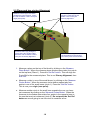
8.0 Basic 3-2-1(2) Alignment
To measure a block type component like the Aberlink testpiece
Z
1.) Measure at least four
points on top face Primary
alignment
Y
X
3.) Measure three points
along back face Origin
2.) Measure three points along
side of block Secondary
1. Measure a plane on the top of the block, by clicking on the ‘measure
plane button’. When the measure plane window opens take four points
on the top face (Plane 1). Press the ‘Set Ref’ button. This will align the
Z axis 90° to the measured plane. This is our Primary Alignment, then
click OK.
2. Next measure a line along the side of the block by clicking on the
‘measure line button’ when the measure line window opens take three
points along the side of the part (Line 2). Press the ‘Set Ref’ button.
This will rotate the axis system to align the Y axis to the side of the
part. This is our Secondary Alignment, then Click ‘OK’
3. The last thing we need to do is to measure a line along the back face of
the part by clicking on the measure ‘line button’. When the measure
line window opens take three points along the back face of the part
(Line 3). Press the ‘Set Ref’ button. This will create an origin (zero
point) in the corner where the two lines intersect each other on the top
face. Then Click ‘OK’.
Note: You can repeat steps 1 to 2 at any time, as long as the program has not
run. Any point can be set as a reference, be it the centre of a circle or a
constructed intersection point.
Notes
18
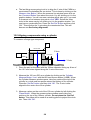
9.0 Plane and two circles Alignment
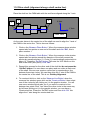
Measure a circle (2) in one of the
small bores in the top face. Press
the ‘set ref’ button. This is now your
origin (zero point).
Measure a plane (1) on the
top face. Press the ‘set ref’
button. This is now your
Primary alignment.
Construct a line (4), joining the
centre of the two circles (2 &3).
Press the ‘set ref’ button. This is
now your secondary alignment.
Measure a circle (3), in another of
the small bores in the top face.
Do not the press ‘set ref’ button
1. Measure a plane on the top of the block by clicking on the ‘Measure
Plane Button’. When the measure plane window opens take four points
on the top face (Plane 1). Press the ‘Set Ref’ button. This will align the
Z axis 90° to the measured plane. This is our Primary Alignment, then
click ‘OK’.
2.
Measure a circle in one of the small bores, by clicking on the ‘Measure
Circles Button’. When the measure circle window opens take four
points in one of the small bores (circle 1). Press the ‘Set Ref’ button.
This is now your origin (zero point).
3.
Measure another circle in the small bore opposite the one you have
just measured by clicking on the ‘Measure Circles Button’. When the
measure circle window opens take four points in the opposite bore to
the one that was just measured (circle 2). Do not press the ‘Set Ref’
button as we are going to use this circle to construct a line.
19
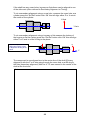
The last thing we are going to do is to align the Y axis of the CMM to a
constructed line between the two circles. This is done by clicking on the
‘Measure Line Button’. When the measure line window opens click on
the ‘Construct Button’ then select the circle 1 by left clicking on it in the
graphic window. You will now see a window which asks you if you want
to construct a line between two points, click ‘YES’. Select the other
circle in the same way by left clicking on it in the graphic window. You
now have a constructed line. Press the ‘Set Ref’ button and then click
‘OK’. This will align the Y axis along the constructed line. This will
become our Secondary Alignment.
4.
10.0 Aligning components using a cylinder
To measure a flange type component
3
100 mm Dia
Z Axis
2
10 mm Dia
Y Axis
1. Place the part on the table with the 100mm diameter facing up & two of
the 10.5 mm holes aligned along the Y axis of the cmm.
2. Measure the 100 mm O/D as a cylinder by clicking on the ‘Cylinder
Measure Button / Icon’ with the left hand mouse button (LHMB). When
the Cylinder Measure window opens, take four points at the top of the
cylinder in a circle and four points around the bottom of the cylinder.
Press the ‘Set Ref’ button and then click ‘OK’. The Z axis is now
aligned to the centre line of the cylinder.
3. Measure a plane on the end of the 100 mm cylinder by left clicking the
‘Plane Button’. When the measure plane window opens take four
points on the top of the 100mm cylinder. Do not press the ‘Set Ref’
button. This plane will be used as a working plane to project the circle
into. Then click ‘OK’.
20
5
Y Axis
X Axis
4
4. Next we are going to construct a datum at the point where the cylinder
meets the plane. This is the XY datum centre of the cylinder and the Z
datum on the top plane. Click on the ‘Measure Point Button’. When the
measure point window opens click on the ‘Construct Button’ then select
the plane by left hand clicking on it in the graphic window. You will now
see a window asking you if you want to construct an intersection point.
Click ‘YES’ and select the cylinder by left hand clicking it in the graphic
window. You have now constructed a point. Press the ‘Set Ref’ button,
and then click ‘OK’ this zeros X, Y and Z axes.
5. The last thing we need to do is to align the Y axis through one of the
10mm holes. Click on the ‘Measure Circle Button’. When the measure
circle window opens take four points in the 10mm hole at the ‘12
o’clock’ position. Click ‘OK’, you now have a 10mm circle in our
working plane. We are now going to align the Y axis of the CMM to a
constructed line between the datum point and the 10mm hole. Click on
the ‘Measure Line Button’. When the measure line window opens, click
on the ‘Construct Button’ then select the datum point by left clicking on
it in the graphic window. You will now see a window which asks you if
you want to construct a line between two points Click ‘YES’ and select
the circle by left hand clicking on it in the graphic window. You now
have a constructed line. Press the ‘Set Ref’ button and then click ‘OK’
to align the Y axis along the constructed line.
The component is now aligned true to the centre line of the 100mm cylinder.
This is the Primary Alignment with the Y axis going through the 10mm hole
which is the Secondary Alignment. The X Y Z is zeroed where the cylinder
meets the top face.
21
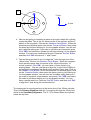
11.0 Drive shaft (alignment along a shaft centre line)
Place the shaft on the CMM table with the end faces aligned along the Y axis.
2
4
1
X Axis
Y Axis
CMM Table
As the main datum is the centre line of the shaft we need to align the Y axis of
the CMM to the centre line. This is done as follows:
1. Click on the ‘Measure Plane Button’. When the measure plane window
opens take four points on one end of the shaft and click ‘OK’, this is
plane number 1.
2. Click on the ‘Measure Circle Button’. When the measure circle window
opens take four points around the diameter of the shaft nearest the
previously measured plane (1). Circle (2) is automatically projected into
plane (1). Press the ‘Set Ref’ button. This sets the XYZ datum on this
end of the shaft (zero point). Click ‘OK’.
3. Repeat this process for the other end of the shaft but do not press the
‘Set Ref’ button. You now have one plane and one circle at each end
of the shaft. We can now create a centre line by constructing a line
between these two circles. We can then align the Y axis of the CMM to
the centre line of the shaft. This is our Primary Alignment.
4. To construct this line, click on the ‘Measure Line Button’ when the
measure line window opens click on the ‘Construct Button’ then select
one of the circles by left clicking on it in the graphic window. You will
now see a window which asks you if you want to construct a line
between two points Click ‘Yes’ select the other circle in the same way
by left hand clicking on it in the graphic window, you now have a
Constructed line, Press the ‘Set Ref’ button and then click ‘OK’ this
aligns the Y axis along the constructed line.
22
If the shaft has any cross holes, keyways or flats these can be aligned to one
of the other axis (often referred to Secondary Alignment or Timing).
To do a secondary alignment using a cross hole, measure the cross hole as a
cylinder press the ‘Set Ref’ button click ‘OK’ this will align either Z or X axis to
the centre of the cylinder.
X Axis
Y Axis
To do a secondary alignment using a keyway or flat measure the bottom of
the keyway or flat as a plane press the ‘Set Ref’ button click ‘OK’ this will align
either Z or X axis to a line 90 deg to the plane.
X
If you use a plane as a
alignment feature to axis
is aligned at 90 deg to the
plane
Y
The component is now aligned true to the centre line of the shaft (Primary
alignment) with the Z or X axis going through the cross hole or at 90 deg to
the flats (secondary alignment) with the X Y Z axes zeroed in the centre of the
shaft at the front end.
Notes
23
12.0 How accurate is your CMM?
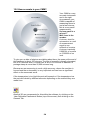
Your CMM is a very
accurate instrument
and in the right
circumstance your
CMM is capable of
measuring down to
just a few microns,
this is a very small
measurement.
So how small is a
micron?”
Well, here is the
answer:
A micron, short for
micrometre, is a unit
of measurement
equal to one
millionth of a metre.
A micron is actually
0.000001 of a metre
or 0.000039 of an
inch.
To give you an idea of what we are talking about here, the space at the end of
this sentence is about 397 microns. The eye of a needle is usually elongated,
but is 749 microns wide. A human hair is 40 to 120 microns in diameter. A
postage stamp is more than 25,000 microns long.
Because we are measuring to such a high accuracy, where the machine is
housed and the environment, is very important and can have a significant
effect on the measured result.
If the temperature is too high the parts will expand or if the temperature low
the parts will shrink by different amounts depending on the material they are
made from.
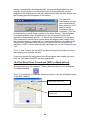
Aberlink 3D can compensate for this within the software, by clicking on the
‘User Definable Parameters’ Button (top of the screen) then clicking on the
General Tab.
24
o
Temperature ( C)
If you wish to compensate measurement
results so that they correspond to say as
o
if they were at 20 C, enter the mean
ambient temperature here. However,
you must now enter the material (and
thermal expansion coefficient) for the
component being measured below:
Material
Thermal Expansion Coefficient (ppm)
If you have selected ‘other’ from the material list above
then you must enter the thermal expansion coefficient in
ppm for the material here. If you have selected a specific
material from the list above then it’s expansion coefficient
is stored in the software and will have automatically been
entered.
Notes
25
As the Axiom structure is made from a
single material (Aluminium), it will expand
and contract uniformly with temperature.
It is therefore possible to compensate for
the ambient temperature of the machine
in the software providing that the material
(and thermal expansion co-efficient for
the material) is known. Select the material
of the measured component from this list
or alternatively select ‘other’ and then
enter the thermal co-efficient in this box.
13.0 Step by step guide for measuring a circle
In
this chapter we’ll go though measuring a circle step by step, because the
measurement windows for measuring circles have a similar layout to the
windows used for measuring other features like planes, lines, points, cylinders
and spheres.
You can apply the same method shown below to measure other features.
•
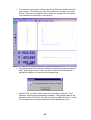
Click on the ‘Measure Circle’ button this will open the ‘Circle
measurement ‘ window
The ‘Retake’ button
removes the last point
taken
The ‘Clear’ button
removes all the points
so you can start again
The ‘Delete’ button
deletes the measured
feature from the
computer
When you have finished
your measurement click
the ‘OK’ button
This is the ‘Set Ref’
button.
If you press it the feature
you just measured will
be used as part of an
alignment system.
(You normally only use
the ‘Set Ref’’ three times
at the beginning of the
measurement to set the
part alignment up).
The ‘Plane’ button
If you wish, you can project the circle into a plane other than that chosen by the software.
If you press the button you can choose which of orthogonal planes to project the circle into. By clicking
on the appropriate XY,XZ or YZ button that defines the plane you want, you can also project the circle
in to any other relevant plane that has previously been measured.
26
Take four points
evenly spaced around
the circumference of
the central bore. The
depth of the
measurement points
does not matter, as
long as at least half the
ball is below the
surface of the
workpiece so that the
measurements are
taken using the full
circumference of the
ball. These
measurement points inside the hole will be projected on to the reference
plane (Top Face) to produce a 2 dimensional circle.
•
If you take a bad point use the ‘re-take button’ to delete the last point
taken.
•
A pictorial representation of the circle will appear in the window after
three points and be updated after the fourth. The X, Y and Z values
tabulated next to the graphic represent the X, Y and Z positions of the
centre of the circle. As no feature on the workpiece has yet been
datumed the X and Y co-ordinates for the circle will be referenced to
the machine zero. The D value given represents the circle diameter.
•
If you are happy with your circle click on the ‘OK’ button, you can now
see your circle in the main graphic window.
•
You can add points to the circle at any time by right clicking on the
circle in the graphic window (this will re-open the measurement
window).
14.0 Step by step guide for construction of an intersection
point
Because the measurement windows have similar layouts you can use the
same method to construct other features like centre lines and mid points.
Points of intersection can be constructed not only at the intersection of
features which touch, but can also be used to produce the closest point to
both features, when they do not touch.
27
•
To construct such a point, click on the ‘Point Measure’ button, from the
main screen. This will bring up the ‘Point Measure’ window. Now click
on the ‘Construct’ box and the ‘Point Measure’ window will now shrink
to a small box at the bottom of the screen.
•
Now simply select the features, whose intersections create the desired
point, by clicking on them. After you have selected the first feature a
prompt will appear, to confirm what is happening:
•
Click on ‘OK’, and then click on the second feature. Now the ‘Point
Measure’ window will automatically reappear. The graphics part of the
window and the ‘Points Fit’ box will of course be blank, but the X, Y and
Z co-ordinates of the constructed point will be displayed in red.
28
•
You may now click on ‘OK’ or ‘Set Ref’ as appropriate, as for any point.
The screen will now return to the Main Screen, and the point will form a
part of the graphical representation.
NOTE
29
15.0 Step by step guide for construction of a P.C.D
This is how to construct a P.C.D made up of six circles.
Click on the ‘Circle Measure’ button from the main window. This brings up the
‘Circle Measure’ window:
This time, rather than taking points using the your CMM, click on ‘Construct’
button. The Circle Measure window will shrink down to a small box at the
bottom of the screen.
Now click on one of the circles in the array. The circle will turn pink and a
prompt will appear on the screen:
Click on ‘PCD’ then click on ‘OK’
and the prompt will disappear.
Now click on all the other circles in
the array until they have all flashed
pink.
We now need to bring the circle
measure window back onto the
screen. Click on the right hand end
of the shrunken box to do this.
30
Click on the right hand end of the
shrunken box to open window
The window will now reappear with a circle now constructed through the
array.
Click on ‘OK’, to close the window and return to the main screen.
Notes
31
16.0 Inserting A ‘Move Via’ Into A Measuring Routine
When the Aberlink 3D software creates a measuring routine it will measure
the points on a feature in the most efficient way. ie. if three points are
measured on a plane the machine will measure the plane as follows:
1. It will rapid to the edge of the safe volume above the first point.
[plunge position]
2. It will rapid to the pre-travel distance above point 1. (typically 2mm)
[Approach 1]
3. It will probe point 1 and come back up to the pre-travel distance above
the plane. [Final 1 represents the over travel distance past the point]
4. It will then rapid at the pre-travel height above the plane to a position
above point 2. [Approach 2]
5. It will probe point 2 and come back up to the pre-travel distance above
the plane. [Final 2 represents the over travel distance past the point]
6. It will then rapid at the pre-travel height above the plane to a position
above point 3. [Approach 3]
7. It will probe point 3 and come back up to the pre-travel distance above
the plane. [Final 3 represents the over travel distance past the point]
8. It will then rapid to the edge of the safe volume above point 3 (rise
position). [Rise Position]
In other words when measuring the points on the plane the probe never
moves more than the pre-travel distance above the plane.
So what happens if there is an obstruction in the middle of the plane between
the points, which the probe will crash into?
Obstruction in the way of a measuring
plane.
Measured plane
The answer is that you will have to insert a ‘Move Via’ into the measurement
cycle for the plane. Say for instance that points 1 and 2 are on the left hand
side of the obstruction and point 3 is on the right hand side. As the software
would create the program the probe would crash into the obstruction after the
first two points. We must therefore insert a ‘Move Via’ between point two
[Final 2] and the move to above point three [Approach 3] that will take the
probe up and over the obstruction.
There are three methods in which this can be done:
32
16.1 Method One
Using the joystick trigger button it is possible to enter the machine’s current
position as a ‘Move Via’ command. Every time you press the trigger on the
joystick it enters a ‘Move Via’ into the measuring routine.
Measure points 1 and
Every time you pull the trigger on
the joystick you enter a ‘Move Via’
into the measuring routine
Measure point
16.2 Method Two
If you press this button you can see the path the probe takes along
with the plunge, rise positions, pre-travel and measurement points
graphically on the screen.
You can edit these paths by left hand clicking on the connect lines between
the measured points, this will add extra ‘Move Via’ graphically (shown as pink
points) if you keep the mouse button pressed, it is possible to move the ‘Move
Via’ points around on the screen, so clearing any obstruction.
Plunge from Safety
Zone
New path using move
via points to go round
obstruction
If you keep the
mouse button
pressed, it is
possible to move the
’move via’ points
around on the screen
Rise to Safety Zone
If you left clicking on
the connect lines
between the
measured points you
can create Move Via
points
Approach point
Approach point
Final measurement point
Final measurement point
Old path hitting obstruction
33
16.3 Method Three
You can type the X,Y,Z information ,speed and probe head position directly
into the measurement grid.
1.
To enter a ‘move
via’ between points
2 and 3 you need
to left hand click on
the ‘Approach 3’
box to select that
row of the grid. The
row will turn dark
blue.
2.
Now right click on
the ‘Approach 3’
box to bring up the
following menu:
3.
Select ‘Insert Cells’
and a blank move
via line will be
added into the
program:
34
4.
The X, Y, Z
information and
speed and probe
head position
could all be typed
directly into this
new row, if
desired. It is much
easier, however,
to simply drive the
probe to a suitable
safe position
above the
obstruction and
then click the
trigger of the
joystick to
automatically
enter this position
into the Move Via
line:
Click the trigger of the
joystick when the probe is
roughly in this position
When the following prompt appears you can click either ‘yes’ or ‘no’. If you
click ‘Yes’ the X, Y, Z position of the joystick will be automatically entered into
the Move Via line. If you click ‘No’ the procedure will be aborted.
35
The ‘Move Via’ position will now be added. All you need to do now is click the
OK button.
DO NOT click
‘Template from
measured
Points’ or
Template from
Details Given’
as these
buttons will
cause the probe
path to be
recalculated.
The program will
now move as
follows: It will
take points 1 and
2 staying at the
pre-travel height
above the plane.
It will then move
to the inserted
position above
the obstruction
before moving
down to the pretravel distance
above point 3, and then take point 3 before going up to the edge of the safe
volume.
17.0 Creating and running a CNC Programme - general notes
When using the Aberlink 3D CNC software there are two ways to create a
CNC program, as follows:
17.1 Teach and Repeat
By driving the machine around using the joystick and measuring a component
you are also creating a program that can afterwards be run automatically.
17.2 Off-Line Programming
Sometimes it will be quicker simply to type in the size and position of a feature
to be measured rather than to measure it directly.
Programs can even be created by a combination of the two methods, and
often this can be the most efficient solution.
If you wish to run the program automatically you will need to define the
position and alignment of the component by measuring certain features and
setting them as references.
36
When you are happy with the program and ready to run it automatically click
on the ‘Play’ button:
It is important if your program is to run successfully that the position and
alignment of the component has been properly defined by setting features as
references.
The golden rules for choosing reference features are as follows:
1. References must be selected that fully define all six degrees of
freedom for a component when it is placed on the table. Usually this
will be done using one plane, one line and one circle or point. However,
if these features do not exist on your component other alternatives are
available.
2. Measure the reference features as close to the start of your program as
possible. When running a program automatically the exact position and
orientation of a component will not be defined until all the reference
features have been measured.
3. Choose reference features that are easy to measure eg. Large planes,
edges or holes, rather than important features that are perhaps defined
as datums on the drawing. Remember setting a feature as a datum is
totally different to setting it as a reference – reference features are
simply used to define the position and alignment of the component.
4. Once you click on the Play button it is not possible to modify or change
your reference features. The ‘Ref Set’ button will be greyed out so once
you have measured your reference features at the start of the program
do not touch them again.
17.3 Setting Safe Volume
When you are running a program for the first time, having clicked on the Play
button there are three things that the software must do before the program
can run. The first thing is to define a ‘Safe Volume’ around the component
through which the probe must not travel when moving between features or
when indexing. When you click on the Play button the following prompt will
appear:
In almost all cases it will be
acceptable to automatically
calculate the safe volume by
clicking on ‘Yes’. The default
size of the safe volume is
defined in the Machine Set
Up. Now the program will automatically move to the edge of the safe volume
between measuring units to avoid crashing into the component.
Note that the safe volume can only be created around features that have
been measured. If your component has protrusions that are not
37
measured as part of the program you may need to adjust the safe
volume to account for them.
The values of the safe volume are shown in the workpiece co-ordinate
window.
17.4 Plunge and Rise moves from safe volume
The position that the probe goes to prior to measuring a unit is known as the
‘Plunge’ position. This position will be directly above the feature being
measured on the edge of the safe volume. When it has finished measuring
the feature it will also return to the edge of the safe volume. This position is
known as the ‘Rise’ position. Collectively the Plunge and the Rise are known
as the Approaches for the measurement unit.
Having calculated the Safe Volume as described the software must now
calculate the Plunge and Rise values for all measurement units. The following
prompt will appear:
Again it will almost always be correct to let the software calculate the
approaches by clicking on ‘Yes’.
The Plunge and Rise values are stored in the probe moves grid for each
measurement unit. The Plunge move will be the very first line, and the Rise
will be the very last:
It is possible to modify these values by simply overwriting them in the grid, but
do not then re-calculate the template, simply ‘OK’ the unit. Similarly if you
answer ‘Yes’ again to the original prompt these values will be automatically
calculated again and overwrite your modifications.
38
Having automatically calculated the Safe Volume and Approaches for the
program, the third piece of information required to automatically run the
program is the workpiece co-ordinate, (sometimes called the work offset), and
the following prompt will appear on the screen:
The reference
features that you will
have measured will
have defined a 0,0,0
position on the
component being
measured. (This will
be identified by a small datum symbol on the Main Screen). The workpiece
co-ordinate defines where this position on the component is within the
machines measurement volume – i.e. where the component is on the table.
If the component has not been moved since the program was created (and
the reference features measured), or it has been put back on the table in the
same position (perhaps using a fixture to locate it) then the workpiece coordinate (or WPC) can be automatically calculated, so you can simply click on
‘Yes’.
The X, Y and Z values for the WPC are stored along with the safe volume in
the workpiece co-ordinate window.
If you have moved the component since the program was created you must
click ‘No’ and define the WPC as discussed below.
18.0 The Work Piece Co-ordinate (WPC or Work off set)
Most of the time the workpiece co-ordinate and the safe volume will be
automatically set by the software. These values are stored in the workpiece
co-ordinate window:
The X,Y,Z workpiece co-ordinate values are shown in the top left hand section
of the WPC window.
Enter WPC offset here
Enter work piece safety
volume here
39
If the component has been moved on the table since the program was created
then it will not be possible to automatically calculate the WPC and therefore
you will have to define it as follows:
Drive the probe so that the ruby ball is physically at the position of the datum
on the component. If your datum is a hole, the
ruby ball should be at the centre of the hole so
that the centre of the ball is at the top face of the
hole. If you have chosen a point on a plane
(such as the corner of a block) so that this is not
possible, drive the ruby ball so that it’s base is
just over the corner of the block – we will have to
adjust in ‘Z’ by the radius of the ball later.
Note that you only have to set the WPC
accurately enough so that the program will
find the datum features. Once these have
been measured automatically in the program
the WPC will be updated to an exact value.
Tick the ‘Measure this Component’ box and then
click on the ‘Teach’ button. The position of the ruby ball will then automatically
be entered as the WPC. If you have positioned the ball away from the datum
on the component (eg. above the corner of the block) then you will now have
to modify the values accordingly.
The ‘Measure’ button will automatically calculate the WPC from the reference
features that have been measured in the current inspection. In effect this
button will perform the same calculation as the calculation performed when
prompted to automatically calculate it when running a program for the first
time. It assumes that the component has not been moved since the last time it
was measured.
40
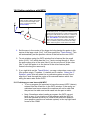
19.0 Setting rotations with WPC
Y
Set the zero in the centre of the
large circle by placing the probe
in the centre of the large circle
(X=0, Y=0) then press the
Teach button
To set rotations with WPC find a feature like this
small circle (X=50, Y=0) which has either the X or
Y axis running through it. For this move the probe
along the x axis but do not move it in Y until it’s in
the centre of the small circle right hand click on
the ‘Teach Button’ and select from the drop
down menu the ‘Z Rotation’ option, this will turn
the co-ordinate system around Z axis and align
the X axis through the centre of the two circles.
X
1. Set the zero in the centre of the large circle by placing the probe in the
centre of the large circle (X=0, Y=0) then press the ‘Teach Button’. This
will automatically set the position centre of the ball as the new WPC.
2. To set rotations using the WPC window find a feature like the small
circle (X=50, Y=0) which has the X or Y axis running through it. Move
the probe along one of the axis (like X) but do not move it in the other
(like Y) until the probe is in the centre of the other feature (both
features lie along the same axis).
3. If you right click on the ‘Teach Button’ you see a drop down menu with
four options origin, Z rotation, Y rotation and Z rotation. Select the ‘Z
Rotation’ option this will rotate the co-ordinate system around Z and
align the X axis through the centre of the second feature which lies
along the same axis as the WPC.
19.1 Problems you can have with WPC
• To run a program it’s important to have the correct WPC (datum)
entered into the offset box in the WPC window. If the wrong coordinates have been entered the machine will not be able find
the part on the table and could crash into the part or table.
•
Note: Sometimes when loading a program the WPC can set
itself to zero. If you tried to run the program with the WPC at
zero the machine would try to move to the reference position
(zero position machine co-ordinate system) in the top right hand
corner of the CMM.
41
•
If you are not using the rotation option when setting a WPC you
must place the parts on the table square to the machine axis
system.
•
If you have positioned the ball away from the datum on the
component (eg. above the corner of the block) then you will
have to modify the values accordingly by deducting half the
diameter of the ball.
19.2 Setting Multiple Workpiece Co-ordinates (multiple components)
To the left of the WPC values are two black arrows and a number (initially 1).
If you click on the upper black arrow the number will change to 2 and the
offset values for X, Y and Z will be refreshed.
You can now set the WPC for a second component in exactly the same
manner as for the first component as described above. As long as you tick the
‘Measure this Component’ box for item 2 the program will automatically run
both components when you run it.
You can continue to set as many workpiece co-ordinates as you like and
control which positions are run using the ‘Measure this component’ tick box.
20.0 Automatically setting work offsets for a grid of
components
If you are using a fixture that holds a grid of components at a regular spacing
then it is not necessary to set the WPC for each component. Simply set the
WPC for position 1 and then use the ‘Grid’ section to define the spacing and
quantity of components in both the X and Y directions.
For example if you had a fixture that held 20 components in a 4 x 5 grid with
the X spacing at 130mm and the Y spacing at 100mm, then fill in the grid
details as follows:
42
Now when you click on the ‘Set’ button the other 19 work offsets will
automatically be filled in (relative to position 1) and their ‘Measure this
Component’ boxes will be ticked in the WPC window.
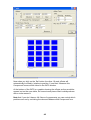
At the bottom of the WPC is a graphic showing the offsets as they would be
spaced out on the cmm table, the current work piece offset is always shown
with a circle around it.
Note that if you don’t have a full fixture of components you can control which
positions are run by un-ticking the relevant ‘Measure this Component’ box.
43
21.0 Bringing up dimensions on the screen
Dimensions for the
measured component
can be brought up on its
graphical representation,
in the same way as they
are shown on the
component’s
engineering drawing.
To bring up the
dimensions onto the
screen all you have to
do is select the features
that you wish to
44
measure between, by clicking on their graphical representation. If the software
doesn’t default to the type of measurement that you want (horizontal, aligned
etc.), then you will also have to select the correct dimension type.
In most cases the order in which you select the features will make no
difference. The instances in which the order of selection does make a
difference are highlighted later in this chapter.
It is important to grasp the following principles when bringing up dimensions:
•
Circles and spheres are treated as single points in space, with all
dimensions being to their centre. (You can use the Max or Min options
in the Dimension Details window to measure to the outside or inside of
a circle).
•
Cylinders are treated as three dimensional lines along their axis. When
dimensioning between two lines (or cylinders etc.) the order of their
selection is important.
•
Cones may be treated either as a line along it’s axis, or as a point at it’s
apex, depending on whether the cone is selected as the first or second
feature.
•
When linear dimensioning a feature to a plane or a line, the dimension
will be perpendicular to the plane or line. When dimensioning between
two planes or lines the order of their selection is important.
45
22.0 Selecting Features
When bringing up dimensions on the screen, it is necessary to select the
features that you wish to dimension in the graphical representation.
To select a feature, click on the dark blue outline of the feature. Make sure
that at the point that you click on the feature; there are no other overlapping
features within the selection box.
SELECT
NOT
HERE
Note – You cannot select a 3 dimensional feature by clicking on the grey
lines that represent it’s depth.
Also Note – If you are dimensioning in the side view of a reference
plane, which has had 2 dimensional features projected into the plane,
then a single line on the graphics will represent both the plane and the
features. In this instance clicking on the line may select any one of the
features. To define the specific feature required you must use the
feature select buttons.
The feature selected will become pink.
If you have trouble selecting a feature there are various courses of action.
46
You can use
the feature
select button
to assist
selection of
the feature.
22.1 Using the Feature Select Buttons
In some instances it will be difficult to select a feature by clicking on it directly.
For instance, the same line will represent both the side view of a circle, and
also the plane into which it is projected. If you have difficulty in selecting a
feature, the Feature Select buttons will provide the solution.
The red number (initially zero) refers to the feature number in the order that it
was measured. For instance if you measured a plane first, followed by a circle
and then a line, the plane would be feature number 1, the circle number 2 and
the line number 3. Now you can use the right and left arrows to increment and
decrement the feature number, to obtain the feature desired.
If you know the number
of the feature that you
require to select you
can simply type it in
over the existing
number and then click
on it.
So that you don’t have
to memorise the order
that the features are
taken in, as the feature
number is selected the
graphical
representation of that
feature will become
red.
47
Now click on any
part of the view
that you are
dimensioning in
(even the white
background or
on top of another
feature), and the
highlighted
feature will be
selected.
The Feature Select button will only work to select a feature once. If you need
to select the same feature twice (for instance to display the diameter of a
circle), simply click on the red number again to re-highlight that feature. (This
removes the necessity to use the right and left arrows to move off, and return
to the desired feature). Now click on in the view again to re-select the feature.
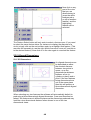
23.0 Aligned Dimensions
23.1 3D Dimensions
An aligned dimension can
be described as either
the shortest distance
between two points in
space, or as the
perpendicular distance
between a line (or
cylinder or plane) and a
point. If the two features
being dimensioned are
not in the same plane
then this will produce a
three dimensional aligned
dimension.
When selecting any two features the software will automatically default to
producing a three dimensional aligned dimension. Care must therefore be
taken if the features are in different planes as the dimension produced may
look like a two dimensional distance when shown in one of the two
dimensional views.
48
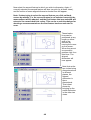
Now select the second feature to which you wish to dimension. Again, if
correctly selected the second feature will also turn pink (in all three views),
and the outline of some aligned dimension leader lines will appear.
Note: If when trying to select the second feature you click on blank
screen by mistake, (i.e. the second feature is not selected correctly) the
measurement will be aborted, and the first feature that was selected will
return to it’s normal dark blue colour. This can be a useful technique for
aborting a measurement where the first feature has been selected in
error.
These leader
lines can be
positioned at any
length on either
side of the
features by
moving the cursor
on the screen.
When they are at
a convenient
position click for a
third time. The
aligned
dimension will
now appear.
Note that as the
two circles being
dimensioned are
in different
planes, the
aligned
dimension is
three
dimensional.
This is best
shown by
bringing up the
same dimension
in the other two
views.
49
23.2 2D Dimensions
The method of constraining dimensions so that they are viewed only in two
dimensions. For instance perhaps you are interested only in the X,Y
separation of the two holes dimensioned above.
The method is:
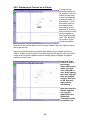
Select the two circle features, before placing the dimension on the screen.
Right Click with the
mouse this will
reveal Dimension
Type drop down
menu
Scroll down the
menu and select
2D Alignment.
Then left click to
place the
dimension on the
screen.
Note that the 2D
and 3D aligned
dimensions will
appear
identically in the
two dimensional
views, although
having different
values. Care
should therefore
be taken when
dimensioning
between
features that are
not in the same
plane.
23.3 Horizontal and Vertical Dimensions
A horizontal or vertical dimension can be described either between two points
in space, or between a line or plane and a point, in which case the dimension
will be attached to the mid-point of the line or plane. Instead of being aligned
between the features, these measurements will be perpendicular to the
50
alignment of the component (which is defined by setting references). If no
reference has been set, then the axes of the machine will be used.
Note – If the
alignment of the
component has not
been defined, and the
horizontal and
vertical dimensions
are perpendicular to
the axes of the
machine, these
measurements will
have little or no
significance.
A horizontal or vertical dimension can also be described between two lines, or
two planes, but in this case the dimension will attach to the mid point of the
first line or plane selected only, and give their separation in the direction
perpendicular to this line or plane.
When selecting two points (or circles or spheres) to dimension between, or a
line and a point (or equivalent) the software will automatically default to
producing a 3D aligned dimension. A horizontal or vertical dimension must be
defined as follows.
Select the features between which you wish to dimension, as for aligned
dimensions in section 23.2 above. The features will turn pink and the outline
of some aligned dimension leader lines will appear. Now before positioning
the dimension, right click the mouse, which will bring up the Dimension Type
window. Select horizontal or vertical as required. When the software returns to
the main screen the outline of the dimension leader lines now showing the
horizontal or vertical dimension, as selected.
These leader lines can be positioned at any length on either side of the
features, as for aligned dimensions, by moving the cursor on the screen.
When they are at a convenient position click the mouse for a third time and
the dimension will now appear on the screen.
24.0 Angular Dimensions
24.1 ‘3D’ Dimensional Angles
Angular dimensions may be created between two lines (or equivalent), or two
planes, or between a line and a plane. Any combination of these features will
create an included angle, which may be dimensioned irrespective of the
alignment of the component. As with aligned dimensions, if the features are
not in the same plane, the angle created will be three dimensional.
Select the features between which you wish to dimension; the features will
again turn pink if correctly selected. The software may now default either to an
51
angular dimension or an aligned dimension, depending on what the angle
between the features is, and the outline of the appropriate dimension leader
lines will appear on the screen. If the software has correctly selected an angle
dimension, the leader lines can be positioned at any length in any quadrant of
the angle, by moving the cursor on the screen. When they are at a convenient
position click for a third time and the dimension will now appear on the screen.
If however, the
software selected
an aligned linear
dimension, you
must use the
right mouse
button to bring up
the Dimension
Type menu, prior
to positioning the
dimension.
Select 3D
Angular
Dimension.
When the
software returns
to the main
screen the
outline of the angular dimension leader lines will now be showing a 3D angle.
You can now position the dimension as previously described.
24.2 2D Angles
It is possible to split angles into the two dimensional components of the view
in which it is called up. For instance perhaps you are interested only in the
X,Y component of the angle between the two planes dimensioned above.
Once again repeat as described above but this time select a 2D angle
dimension.
Again note that
the 2D and 3D
angle dimensions
will appear
identically in the
two dimensional
views, although
having different
values. Care
should therefore
be taken when
dimensioning
between features
that are not in the
same plane.
52
25 .0 Dimensioning Circles
The diameter of a circle, sphere or a cylinder may be brought up on the
screen as follows:
Select the circle, sphere or cylinder as previously described. If correctly
selected the feature will turn pink.
Note – You cannot select a cylinder by clicking on the grey lines that
indicate its depth.
Now select the same
feature again. The
outline of a single
dimension leader line
will appear on the
screen, and this can
be positioned
anywhere on the
screen by moving the
cursor. When it is at a
convenient position,
left click the mouse
for a third time and
the diameter will now
appear on the screen.
Displaying the form of a Line or a Plane
If you wish to display
the straightness of a
line or the flatness of
a plane on the main
screen simply click
on the feature twice
(like calling up the
diameter of a circle),
then move the cursor
to a convenient
position on the
screen before
clicking for a third
time to place the
geometric tolerance.
Note that the Geometric Tolerance button must be switched on.
53
26.0 Displaying a Feature as a Datum
If a feature has
previously been set
as a datum it can be
shown on the main
screen by attaching
a datum symbol to
that feature. To do
this simply click on
the feature twice
(like calling up the
diameter of a circle),
then move the cursor
to white space on
the screen and right
click. This will bring
up a menu on the
screen as follows:
Note that if the feature has not been set as a datum then the ‘Datum’ option
will be greyed out.
Assuming that the feature has previously been set as a datum select the
‘Datum’ option and the outline of a datum symbol will appear. Now move the
cursor to a convenient position before clicking again to display the datum
symbol on the screen.
Note that if the
cursor is over a
previously
measured feature
when you right
click (instead of
over white space)
then that unit will
also be recalled
and you will have
to OK that unit
again before
continuing.
Note also that the
Datum symbols
can only be
displayed if the
Geometric
Tolerance button
is switched on.
54
27.0 Displaying the position of a Circle, Point or Sphere
The position of a circle
(or point or sphere)
can be displayed either
as its cartesian or its
polar co-ordinates,
together with its
geometrical tolerance
for true position.
Select the circle twice
as though displaying
its diameter as
described above. Now
right click in white
space to bring up the
following menu.
You can now select the option that you desire. Note that the position of the
circle will be relative to the datum position selected on the component being
measured.
27.1 True Position
Having selected to
display the position
of the circle (or
Point or Sphere) as
described above
you can also
display the
geometrical
tolerance for true
position for the
circle by clicking on
the Geometrical
Tolerance button at
the top of the
screen (see chapter
20).
The software will not automatically know the correct position for the circle and
will have rounded the measured values to achieve a ‘guess’ at its position.
You must therefore check that the correct position values have been entered.
Right click on the green dimension line attached to the position information to
bring up the dimension details window:
The position of the circle is at the bottom of the details section. If you change
these nominal values the true position value will change accordingly. Note
55
that these values are relative to the datum position on the component being
measured.
27.2 True Position relative to specified datum(s)
If the true position that you are
measuring is relative to some
other point on the component
other than that which has been
set as 0,0,0 then it is possible to
show it relative to other specified
datums. For instance if you have
chosen a large hole as the
reference (because it is an easy
feature to measure automatically)
but need to show the true
position of a hole relative to a
smaller hole specified as datum
C, then this can also be done in
the dimension details window.
10.070
10.070
Select datum C and click on the
‘Add’ button. Also make sure that
the nominal position of the hole is
now relative to this datum. When
you now return to the main
screen the true position will now
be displayed relative to datum C.
C
56
It is possible to select up to three datums relative to a true position:
57
27.3 Maximum Material Condition
The maximum material condition
for a hole can also be displayed
if required. Again in the
dimension details window tick
the ‘mmc’ box. This will make
two further boxes appear. In the
top box type the minimum
allowable diameter for the hole.
The lower box will then be
automatically filled in with the
‘bonus’ tolerance due to the
‘MMC’.
10.50
A
B
When you return to the main
screen the ‘MMC’ symbol will be
present and the true position
value will be adjusted by the
bonus tolerance.
C
58
28.0 Dimensioning between two Lines or Planes
A linear dimension may be produced between two lines or planes by attaching
the dimension to the first line or plane selected, and extending it either
perpendicularly (for an aligned dimension), or horizontally or vertically (for
horizontal and vertical dimensions), until it reaches the mid-point of the
second one.
If the lines or planes are not parallel, different dimensions will be achieved
depending on which line or plane is selected first. Also the value for run out is
calculated by projecting perpendicular construction lines from the first
selected line, to meet the ends of the second line. The run out (or
perpendicularity) will be the difference between these two values.
A) Selecting the long line first:
L
RUN
OUT
B) Selecting the short line first:
L
RUN
OUT
The first line selected, in effect, becomes the reference line for the
measurement. If you are measuring the distance between a long line and a
short line it will be better to select the long line first .
29.0 Dimensioning to a Cone
A cone is a special case, as when measuring to it, it may be treated either as
a line along it’s axis, or alternatively as a point at it’s apex.
Similarly, its measured diameter has little meaning (as all the measured points
will be below the surface). Therefore selecting the cone twice will not display
its diameter, as for circles, spheres and cylinders, but it’s included angle.
To measure the diameter of a cone at its end requires the construction of
circle at the intersection of the cone with the plane forming its end.
59
When bringing up dimensions to a cone, the cone is treated either as a line or
a point,
depending on
whether it is
selected as
the first or
second
feature.
If selected
first, the
software will
treat the cone
as a line along
its axis, and
produce a
relevant
dimension
accordingly.
If however, the cone is selected as the second feature, the software will treat
it as a point at its apex, and again produce a relevant dimension accordingly.
Notes
60
30.0 Setting Nominal Values and Tolerances for Dimensions
When printing out inspection reports using Tabulated Dimensions, it is
possible to print out nominal values (and hence measured error) and
tolerance bands (and hence pass/fail statements). If no nominal value has
been set for a dimension, then the software will use the measured value
rounded to the precision defined in the Machine set-up. Here it is also
possible to set the default tolerance.
If however you wish to set a nominal value or tolerance band other than that
defaulted to, this can be done by right mouse clicking on the relevant
dimension. This will bring up the dimension details window, as follows:
10.070
Now the nominal
dimension and
tolerances can be
set by simply typing
over
the default values
that the software
has selected.
Note also that if the
measured
dimension falls
outside of the
tolerance band,
then the
background of the
measured
dimension value will
become red.
C
When you OK this window and return to the main screen, the dimension
leader lines will also appear red on the graphical representation.
Now printing out a tabulated dimensions report, it will be possible to show the
nominal value, the error, the upper and lower tolerances and also a pass/fail
statement.
61
31.0 Recalling a measured Unit
When you OK a measurement unit, and the software returns to the main
screen displaying this measured unit, it is not too late to modify the unit by
adding or deleting measurement points, or changing its reference status.
Each measured unit can be recalled by right clicking on the graphical
representation of the feature in the main screen.
32.0 Printing the results
Whenever you wish to produce a hard copy of inspection results the print
function is used.
This will bring up the following window:
All inspection reports will be printed with a border around them, which can
contain information about the part being inspected. This information can be
entered in the border details frame. Note that you are able to modify the
information titles at this screen. The date is entered by default. Your company
name and address (as entered in the Software Set Up) will also be printed on
each page.
62
There are six different types of inspection report that you can select.
•
Graphic Details, print results in the same form as the graphic display,
i.e. an XY, XZ, YZ or isometric view of the component and dimensions.
•
Tabulated Units, prints the details of the each feature, similar to the
information in the measure window of that feature.
•
Tabulated Dimensions, prints all dimensions that are added to report
from the current or previous inspections.
•
Point Positions, prints the co-ordinates of points and the co-ordinates
and size of circles.
•
Feature Profile, prints the graphical representation of how well the
individual points taken fit the theoretical shape i.e. the form of a feature
such as profile of a surface or the roundness of a circle.
•
Multiple Components, prints the measured values for a batch of
components in a single report.
You select the type of report that you require by clicking on the relevant option
button.
Printouts can be in either black and white or colour. Again to select which, you
simply click on the relevant option button. Printing in colour can help highlight
dimensions, which are out of tolerance.
The Excel button will automatically open Excel (provided that it has been
loaded on the PC) and export the report selected.
On clicking on the ‘Print’ button a preview of the output will be shown on the
screen. Only the first three sheets are shown in the print preview. To bring
one of the back sheets to the front simply click on it. If the text or result
becomes too long for the resolution of the screen then a box containing a
diagonal cross will replace it.
63
32.1 Graphic Print outs
This is the most commonly used print routine as it closely mimics the output
that the software produces during use. When this option is selected the user
can then select one or more of the four possible views XY, XZ, YZ and ISO for
printing. If more than one view is selected the individual views are printed on
separate sheets. The extent of the area that is printed is based on the current
software view, but as the aspect ratio of the page and screen are different it is
advisable to observe the print preview before continuing with the print. This
will confirm exactly what will be printed, especially useful if key dimensions
are close to the edge of the view. If all necessary dimensions are not on the
print preview then re-zoom the view in the software and recheck the print
preview.
32.2 Tabulated Units
This routine will print the properties of the units that have been inspected e.g.
for a circle unit it’s centre co-ordinates and diameter will be printed or for a
line unit the start and end co-ordinates will be printed, as well as it’s
directional vector. In order for these co-ordinates to have any real meaning
the part origin must have been defined, by referencing the appropriate
features.
64
32.3 Tabulated Dimensions
The dimensions that have been added to a part inspection can be printed in
tabulated form. This is often more useful than printing Tabulated Units as
these dimensions should be the same as on the original component drawing.
When printing Tabulated Dimension reports, it is possible to select what
information is printed in the report using the check boxes in the Print window.
Note: Unless you have typed in the value of the nominal and tolerance
for each dimension the nominal values shown will be the measured
values rounded to the rounding tolerance given in the Machine Set Up,
and all tolerances applied will be the default.
65
Note that both dimensions and geometric tolerances can be toleranced and
hence both have separate pass/fail statements where applicable.
It is possible to add the dimensions from more than one inspection to a
Tabulated Dimensions report, which is why the ‘Clear Report’ and ‘Add to
Report’ buttons appear on the Print window. Every time you click on the ‘Add
to Report’ button, the dimensions that are displayed on the main screen will
be added to the report. This will continue until the ‘Clear Report’ button is
clicked.
32.4 Point Positions
This is a specialised report for printing the position and size of circles or any
other feature that can be likened to a point. For instance, when measuring
2000 holes on a PCB this report allows the size and position of the holes to be
printed out without the requirement to call up dimensions to them all.
66
32.5 Feature Profile
As a feature is
inspected, the fit of
the individual points
to the theoretical
shape is shown in
the picture box on
the right side of the
measurement
window. If enough
points are taken
then a useful
representation of the
true surface is built
up. This picture can
be printed using the
feature profile
routine. When you
click on Print or Print Preview buttons, the software asks you to click on the
feature you wish to print.
67
When you click on ‘OK’, the feature profile will be displayed as follows.
32.6 Multiple Components
When measuring a batch of components using the ‘Play’ function with ‘SPC
All Components’ ticked on, the Aberlink 3D software will collect all the
measured data for the entire batch. These values can be printed out in a
single report using this option.
Note that any dimensions out of tolerance will be shown in red.
68
33.0 Geometrical tolerances summary
33.1 Introduction to Geometric Dimensioning and Tolerancing
Geometric Dimensioning and Tolerancing (GD&T) is a universal language of
symbols, much like the international system of road signs that advise drivers
how to navigate the roads. GD&T symbols allow a Design Engineer to
precisely and logically describe part features in a way they can be accurately
manufactured and inspected. GD&T is expressed in the feature control frame
(Figure 1). The feature control frame is like a basic sentence that can be read
from left to right. For example, the feature control frame illustrated would
read: The 5 mm square shape (1) is controlled with an all-around (2) profile
tolerance (3) of 0.05 mm (4), in relationship to primary datum A (5) and
secondary datum B (6). The shape and tolerance determine the limits of
production variability.
-A-
5.0
(1)
(2)
(6)
(4)
(3)
0.05 A B
5.0
(5)
2.0
-B-
Fig 1
There are seven shapes, called geometric elements, used to define a part and
it’s features. The shapes are: point, line, plane, circle, cylinder, cone and
sphere. There are also certain geometric characteristics that determine the
condition of parts and the relationship of features.
These geometric symbols are similar to the symbols used on maps to indicate
features, such as two and four lane highways, bridges, and airports. The
purpose of these symbols is to form a common language that everyone can
understand.
69
33.2 Geometric Tolerancing in Aberlink
Where relevant, the geometric tolerance applicable to each measurement unit
(eg. roundness of circles, straightness of lines) will be displayed underneath
the graphical representation of that unit.
None of these geometric tolerance values will by default be displayed on the
graphical representation of the component that is built up during the
inspection.
To display on the screen all geometric tolerance values relevant to the
inspection simply click on the ‘Geometric Tolerance’ button. The geometric
tolerance values that are relevant to the measurements on the screen will now
be displayed.
To display the geometric tolerances that are relevant to any particular feature,
(for instance flatness of a plane, straightness of a line) click twice on that
feature and the outline of a leader line will appear. Move the cursor to a
convenient position on the screen, where you would like to site the dimension,
and click for a third time. The geometric tolerance will now appear on the
screen.
70
Also true position and maximum material condition of circles can be displayed
and datum symbols attached to features.
Note that the Geometric Tolerance button will switch on and off all
geometric tolerances. If you wish to turn off selected tolerances only
this can be done in the Dimension Details window for that tolerance.
34.0 Geometric Characteristic Symbols
34.1 Straightness
— A condition where all points are in a straight line, the tolerance
specified by a zone formed by two parallel lines.
To display the straightness of a line click twice on the line and the
outline of a leader line will appear. Move the cursor to a convenient
position on the screen, where you would like to site the dimension, and click
for a third time. The geometric tolerance will now appear on the screen.
71
34.2 Flatness
— All the points on a surface are in one plane, the tolerance
specified by a zone formed by two parallel planes.
To display the flatness of a plane click twice on the plane and the outline of a
leader line will appear. Move the cursor to a convenient position on the
screen, where you would like to site the dimension, and click for a third time.
The geometric tolerance will now appear on the screen.
34.3 Roundness or Circularity
— All the points on a surface are in a circle. The tolerance is
specified by a zone bounded by two concentric circles.
If the geometric tolerance button is switched on, the roundness of a circle will
be displayed automatically underneath the diameter in the graphic window.
34.5 Cylindricity
— All the points of a surface of revolution are equidistant from a
common axis. A cylindricity tolerance specifies a tolerance zone
bounded by two concentric cylinders within which the surface must
lie.
72
If the geometric tolerance button is switched on, the cylindricity of a cylinder
will be displayed automatically underneath the diameter in the graphic
window.
34.6 Parallelism
— The condition of a surface or axis equidistant at all points from a
datum plane or axis. Parallelism tolerance specifies one of the
following: a zone defined by two planes or lines parallel to a datum
plane or axis, or a cylindrical tolerance zone whose axis is parallel to a datum
axis.
If the geometric tolerance button is switched on, the parallelism between two
lines or planes will be displayed automatically underneath the dimension in
the graphic window.
34.7 Angularity
— The condition of a surface or axis at a specified angle (other than
90°) from a datum plane or axis. The tolerance zone is defined by
two parallel planes at the specified basic angle from a datum plane
or axis.
If the geometric tolerance button is switched on, the angularity between two
lines or planes will be displayed automatically underneath the angle in the
graphic window.
73
34.8 Squareness
— The condition of a surface or axis at a right angle to a datum
plane or axis. Perpendicularity tolerance specifies one of the
following: a zone defined by two planes perpendicular to a datum
plane or axis, or a zone defined by two parallel planes perpendicular to the
datum axis.
If the angle is between 96°-84° and geometric tolerance button is switched on,
the perpendicular (squareness) between two lines or planes will be displayed
automatically underneath the angle in the graphic window.
34.9 Concentricity
— The axes of all cross sectional elements of a surface of revolution
are common to the axis of the datum feature. Concentricity
tolerance specifies a cylindrical tolerance zone whose axis coincides
with the datum axis.
To display the concentricty of two circles click on the first and then click on the
second outline of a leader line will appear. Move the cursor to a convenient
position on the screen, where you would like to site the dimension, and click
for a third time. The geometric tolerance will now appear on the screen.
34.10 Total Runout
— Provides composite control of all surface elements. The
tolerance applied simultaneously to circular and longitudinal
elements as the part is rotated 360 degrees. Total runout controls
cumulative variation of circularity, cylindricity, straightness, coaxiality,
angularity, taper, and profile when it is applied to surfaces constructed around
a datum axis. When it is applied to surfaces constructed at right angles to a
datum axis, it controls cumulative variations of perpendicularity and flatness.
74
In Aberlink 3D it’s possible to display the Total Runout between two cylinders /
lines or between a cylinder / line and a plane perpendicular to the cylinder.
The cylinder’s surface
must lie within the
specified runout
tolerance zone (0.001
full indicator movement)
when the part is rotated
360° about the datum
axis anywhere along the
cylinder’s length.
The top of the cylinder
must lie within the
specified runout
tolerance zone (0.001
full indicator
movement) when the
part is rotated 360°
about the datum axis
anywhere along the
top of the cylinder.
75
34.11 True Position
— A positional tolerance defines a zone in which the centre axis or
centre plane is permitted to vary from true (theoretically exact)
position. Basic dimensions establish the true position from datum
features and between interrelated features. A positional tolerance is
the total permissible variation in location of a feature about it’s exact location.
For cylindrical features such as holes and outside diameters, the positional
tolerance is generally the diameter of the tolerance zone in which the axis of
the feature must lie. For features that are not round, such as slots and tabs,
the positional tolerance is the total width of the tolerance zone in which the
centre plane of the feature must lie.
To display the True Position of a point or circle left click twice on that point or
circle then right click, this produces a drop down menu, select the ‘Cartesian /
Polar Position’ option and the outline of a leader line will appear. Move the
cursor to a convenient position on the screen, where you would like to site the
dimension, and left click for a third time. The geometric tolerance will now
appear on the screen.
It is possible to allocate datum letters to the features after you have measured
them. This is useful if you wish to match the datum letters marked on the
draw to the feature you have measured.
Fig. 17.0-7 Datum Letter displayed for specific features
76
To allocate a datum letter to a feature ‘right click’ on that feature with the
mouse this will open the ‘Measurement Window’ you can now use the drop
menu next to the word ‘Datum’ to select the letter you wish to assign to that
feature.
It is possible to display the datum letters in the graphic windows by left hand
clicking on a feature twice then right click the mouse you will get a drop down
menu select the ‘datum option’ from the menu then left click on the screen to
display the datum letter.
34.11.1 True Position relative to specified datum(s)
If the true position that you are measuring is relative to some other point on
the component other than that which has been set as 0,0,0 then it is possible
to show it relative to other specified datums. For instance if you have chosen
a large hole as the reference (because it is an easy feature to measure
automatically) but need to show the true position of a hole relative to a smaller
hole specified as datum B, then this can also be done in the dimension details
window.
Note:- to display the true position of a circle or a point from features
other than the origin you must allocate datum letters to those features .
Select the
datum’s by using
the drop down
menu.
After you have
selected the new
datum the
nominal will
change to show
the position from
the new datum.
Select datum B and click on the ‘Add’ button. Make sure that the nominal
position of the hole is now relative to this datum. When you now return to the
main screen the true position will be displayed relative to datum B.
77
Fig. 17.0-8 True position of circle from datum B
It is possible to select up to three datums relative to a true position.
Fig. 17.0-9 True position of circle from datum C,A & B
The software will not automatically know the correct position for the circle and
will have rounded the measured values to achieve a ‘guess’ at it’s position.
You must therefore check that the correct position values have been entered.
Right click on the green dimension line attached to the position information to
bring up the dimension details window.
78
Fig. 17.0-10 True position of circle from datum B
The position of the circle is at the bottom of the details section. If you change
these nominal values the true position value will change accordingly. Note
that these values are relative to the datum position on the component being
measured.
34.11.2 Maximum Material Condition
The maximum material condition for a hole can also be displayed if required.
Again in the dimension details window tick the ‘mmc’ box. This will make two
further boxes appear. In the top box type the minimum allowable diameter for
the hole. The lower box will then be automatically filled in with the ‘bonus’
tolerance due to the ‘mmc’.
79
Enter the bottom limit for the
diameter here
mmc ’bonus’ tolerance is show
here the closer to bottom limit the
diameter is the bigger the
positional tolerance is.
Click to get the two ‘mmc’ boxes
to appear
Fig. 17.0-11 True position of circle from datum B with ‘MMC’
When you return to the main screen the ‘mmc’ symbol will be present and the
true position value will be adjusted by the bonus tolerance.
34.12 Symmetry
- The condition where the median points of all opposed elements of
two or more feature surfaces are congruent with the axis or centre
plane of a datum feature.
80
If the geometric tolerance button is switched on, the symmetry between two
features and a centre line will be displayed automatically underneath each
dimension in the graphic window.
In Aberlink 3D the symmetry result is calculated from three features - the
centre line feature (A), and the mid point (B) between two other features, the
difference between the mid point and the centre line feature is displayed as
symmetry under both dimensions in the graphic window.
10.740
10.000
0.37
0.37
B
0.37
A
81
34.13 Profiles
— A tolerancing method of controlling irregular surfaces, lines, arcs,
or normal planes. Profiles can be applied to individual line elements
or the entire surface of a part. The profile tolerance specifies a
uniform boundary along the true profile within which the elements of the
surface must lie.
If you best-fit a DXF file to a measured curve it is possible to display the
profile tolerance by left click twice on the curve if you then right click you will
see a drop down menu pick ‘Profile’ option and the outline of a leader line will
appear. Move the cursor to a convenient position on the screen, where you
would like to site the dimension, and left click for a third time. The geometric
tolerance will now appear on the screen.
82
35.0 Change History
Date of Change
22/10/07
26/11/07
27/10/08
22/01/09
Description of Change
Geometrical tolerances chapter added
Index updated
Content review (Chris W)
Final review (Ann)
Changed
by
CJH
CJH
CJW
Ann
36.0 Contact Details
Aberlink Ltd.
Eastcombe
Gloucestershire
GL6 7DY, UK
Tel +44(0)1453 884461
Fax +44(0)1453 882348
Email
Website
83
[email protected]
www.aberlink.co.uk