1
VEMCO – A Division of AMIRIX Systems
5.4.2.2 VMT user settings
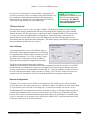
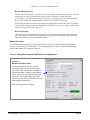
The VMT user settings window allows the user to set
parameters in the Mobile Transceiver.
The settings shown in the Factory settings portion of the
window are set during manufacture and cannot be
changed by the user. They are displayed in the software
for convenience. A description of some of these settings
is found in the Appendix.
The parameters that can be changed by the user are
found in the User parameters section of the window. A
description of these parameters is given below.
After all of the appropriate values are entered, click the
“Write” button to save them to the VMT and then click
“Done” to finish. Click the “Defaults” button to return
the settings to their default values.
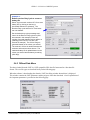
Study ID Text String
The Study ID text string is up to 20 characters of text which is stored in the VMT. This text can be used to
identify the study, the location of deployment, the date, or anything else you wish. The data appears in the
header of the data files.
Tx Configuration
Three options are available for transmitter configuration: Tx when Rx Off; Always Tx; Never Tx. Each of
these configuration options are briefly explained below.
Tx when Rx Off:
The VMT will only transmit when the receiver is off. This is useful for studies using a low
receiver duty cycle in which case the user may prefer to not interrupt the receiving mode with
a transmitter transmission.
Always Tx:
TheVMT will always transmit, even if the receiver is active. This is the normal mode of
operation. When the VMT transmits, the receiver will be blanked and not listen to itself.
Never Tx:
The VMT will not transmit. This allows the user to disable the transmitter.
Checking the “Log every Tx transmission” box will record a detection record every time the internal tag
transmits. As the receiver does not listen to itself during transmissions, this allows the user to have a record
of the VMT transmissions.
VEMCO Mobile Transceiver (VMT) User Manual
Page 16