1
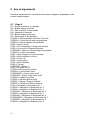
4.1 The basic System Menu.
NB: If reading this document as an RTF file on the PC, the BlackBrl.ttf font must be
installed from the accompanying installation CD so that the Braille version of the
menu can be seen, otherwise only cryptic symbols will appear. As each line is also
written in text, this is not strictly necessary.
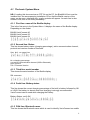
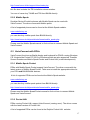
4.1.1 First line: name of the Braille display
This is the first entry in the System Menu. It displays the name of the Braille display.
Depending on the model:
BAUM VarioConnect 40
BAUM VarioConnect 32
BAUM VarioConnect 24
BAUM VarioConnect 40
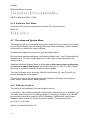
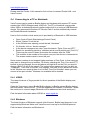
4.1.2 Second line: Status
This line shows battery status (charging percentage), active communication channel,
protocol and version number of firmware.
Stat: bb% ccc pppp Vxxx
Stat: bb% ccc pppp Vxx
bb = charging percentage.
ccc=active communication channel (USB or Bluetooth)
ppp= protocol
Vxx = Firmware-Version
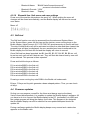
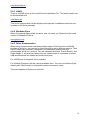
4.1.3 Third line: serial number
This shows the serial number of the Braille display
SN: xxxxxxxx.
Serial Number: xxxxxxxx
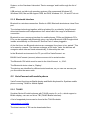
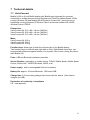
4.1.4 Forth line: Battery status
This line shows the current charging percentage of the built in battery followed by OK
or LOW if the battery is almost down and charging is strongly recommended.
VarioConnect can be used while charging the battery.
Battery Status: xxx% OK.
Battery Status: xxx% OK
4.1.5 Fifth line: Bluetooth name
This line shows the Bluetooth name which is used to identify VarioConnect on mobile
9