1
Apr. 25, 2013
US 2013/0099011Al
schedule based on learning from the user’s immediate-con
[0045]
trol inputs in combination With other information, and peri
odically suggests changes to the user according to certain
criteria (for example, energy saving or costs savings). If the
thermostat that generates potential schedule adjustments and
suggests them to a user for revieW and acceptance, according
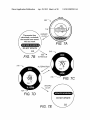
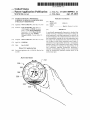
to some embodiments. FIG. 7A shoW the thermostat 300 With
user ansWers “no,” then in step 424 the thermostat does not
display 316. A message bubble 710 is overlaid on the display
generate any program and instead alWays folloWs the pro
316 to obtain the user’ s attention. According to some embodi
ments, one or more proximity sensors (not shoWn) are used to
gram set by the user.
FIGS. 7A-E shoW aspects of a user interface for a
detect When an occupant is approaching the thermostat 300.
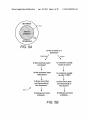
[0042] FIGS. 5A-B shoW aspects of a user interface for
generating a program, according to some embodiments. In
Upon sensing an approaching occupant, the message bubble
FIG. 5A, the user can select entering set-up questions relating
to the schedule settings as indicated by the colored disk 510,
using an inWard click input While the thermostat is displays
user Wishes further information an inWard click input leads to
the screen as shoWn in display 316. FIG. 5B is a How chart
shoWing questions that can be asked of the user in order to
generate a basic schedule, according to some embodiments.
As can be seen from the How chart 512 of FIG. 5B, the user is
initially asked if the thermostat is installed in a home or
business. Then some basic questions are asked to generate a
basic schedule, such as Whether the home is usually occupied
at noon, is someone usually up after 11 pm, and Whether or
not there is more than one thermostat in the home. Similar
questions are asked is the thermostat is installed in a business.
According to some embodiments, a basic schedule is gener
ated based on the ansWers to the questions in FIG. 5B.
710 is displayed in order to obtain the user’s attention. If the
the display 316 shoWn in FIG. 7B. In FIG. 7B, the thermostat
indicates to the user that a neW schedule has been calculated
that is estimated Would have saved about 10% of energy costs
in the past Week. The user has the choice to vieW the neW
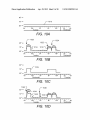
schedule or reject it. If the user indicates a desire to see the
neW schedule, then an animation is displayed Which alter
nates betWeen FIG. 7C shoWing the current schedule, and
FIG. 7D shoWing the proposed neW schedule. In FIG. 7C, the
current set point temperature 722 is shoWn and the applicable
erated based on ansWers to basic questions, such as those
time 724 is shoWn beloW. In FIG. 7D, the neW set point
temperature 722 is shoWn and the neW time 724 is shoWn
beloW. If there are further changes to the schedule then those
can be accessed by rotating the ring to the right or left. When
the user is ?nished revieWing the neW schedule, the user, in
FIG. 7E is given the choice to updated the schedule or not.
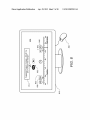
[0046] FIG. 8 shoWs an example of a Web-based user inter
shoWn in FIG. 5B, according to some embodiments. In FIG.
6A, curve 610 shoWs a basic schedule for setpoints from 6 am
Tuesday to 6 am Wednesday, Which corresponds to a home
that the user indicated is occupied during noon and the user
ments and suggests them to a user for revieW and acceptance,
according to some embodiments. A computer monitor 810 is
used to display to a user of the thermostat suggested schedule
indicated that someone is not usually up at 11 pm. As can be
changes. The user can use a pointing device such as mouse
seen, the setpoint temperature changes at 7 am from 62
degrees to 72 degrees and then stays at 72 degrees until 10 pm
When it changes back to 62 degrees. In FIG. 6B, curve 612
820 to move a pointer 822 to provide input. In the WindoW
812, the user is asked in bubble 814 Whether the displayed
schedule change should be adopted. According to some
embodiments, further information, such as the estimated
amount of energy savings associated With the proposed
change can be displayed to aid the user in making a decision.
The current schedule is shoWn in solid circles and the pro
posed changes are shoWn in dotted circles. For example, the
set back time to 62 degrees in the morning is suggested to be
changed from 9 am (shoWn by solid circle 830) to about 9:30
am (shoWn by dotted circle 832), and the evening set back to
[0043]
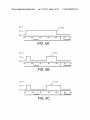
FIGS. 6A-B shoW examples of basic schedules gen
shoWs a basic schedule that corresponds to a home that the
user indicated is not occupied during noon and that someone
is not usually up at 11 pm. As can be seen, the set point
temperature changes at 7 am from 62 degrees to 72 degrees.
Then, at 9 am, the temperature is set back to 62 degrees until
5 pm, When the set point is changed to 72 degrees. The set
back from 9 am to 5 pm is due to the user’s indication that no
one is usually home at noon. In FIG. 6C, curve 614 corre
sponds to a user’s indication that no one is usually home at
noon, and some one is usually up at 11 pm. In this case the
evening set back time is set to midnight.As can be seen abasic
face for a thermostat that generates potential schedule adjust
62 degrees is suggested to be changed from midnight (shoWn
by the solid circle 840) to about 10:15 pm (shoWn by the
dotted circle 842).According to some embodiments, a “snap”
schedule is limited by the simple questions that it is based
button or similar can be provided to the user for the user to
upon, and as a results the occupants may either be uncom
fortable, or energy use and costs may be higher than neces
easily adopt all the suggested schedule changes. According to
sary. For example, the occupants may get up before 7 am, or
shoWn in FIG. 8 to make their oWn adjustments and/or accept
they may be perfectly comfortable at 68 degrees instead of 72
degrees. According to some embodiments, further questions
or reject particular suggested changes by clicking and drag
are asked of the user, such as Whether someone is usually up
at 6:30 am, or if the occupants are comfortable at 68 degrees.
user interface experience, as Well as introduces potential
temperature value Within one or more of the circles. Accord
ing to some embodiments, the interface screen such as shoWn
in FIG. 8 can be displayed at the request of the user, or it can
be shoWn at the request of a central server, such as is common
errors based on Wrong ansWers and/or misunderstood ques
in push technology. According to some embodiments, the
tions.
decision on When to “push” a noti?cation of a suggested
schedule change can be based at least in part on an estimation
HoWever, each additional question detracts from the simple
[0044]
According to some embodiments, after generating
some embodiments, the user can also use the interface as
ging the circles along the time line, and/or by changing the
the basic schedule based on a feW simple questions such as
of energy and/or cost savings being above a predetermined
shoWn in FIGS. 6A-C, the thermostat learns from the user’s
immediate-control inputs and periodically suggests, or auto
threshold or percentage value.
matically implements schedule changes that meet certain cri
immediate-control inputs can be useful in generating a sched
ule and/or adjustments to an existing scheduled program, it
teria.
[0047]
While simply observing and recording a user’s