1
Chapter 2 - Installation
Installation, Continued
Procedure (continued)
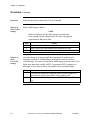
Step
8
9
10
11
12
Action
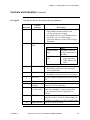
Verify mainframe power is on and press recessed latching switch
(LASER ENABLE) to activate the 1310 nm Transmitter.
Verify that the POWER, TEMP/FAN, OPT PWR and BIAS LEDs
are green before proceeding. Note that while the 1310 nm Transmitter
is stabilizing during initial startup, the LEDs may be red.
Press recessed latching switch (LASER ENABLE) to deactivate the
1310 nm Transmitter.
Clean outgoing fiber connector.
NOTE
Do not connect the RF input cable yet.
13
711970001
Connect the 1310 nm Transmitter to the outgoing fiber connector.
Continue to chapter 3 to activate the 1310 nm Transmitter.
Laser Link III 1310 nm Transmitter Installation Booklet
2-7