1
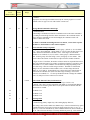
First Menu
Level
Mode Number
Second
Menu
Level
Value
Range
Mode Description and Instructions
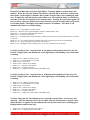
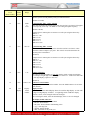
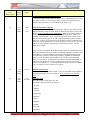
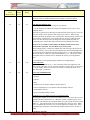
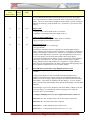
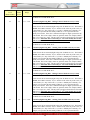
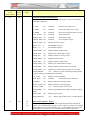
7=receive counter pulses from port L35. Do not use when SR/ST serial sync IC and
7400 IC is installed. Set Modes 32-46=0 and 32-60=0.
8=send counter pulses from increment (up) button out port L35. Do not use when
SR/ST serial sync IC and 7400 IC is installed. Set Modes 32-46=0 and 32-60=0
9=enable 59th minute sync output using the channel 1 alarm output relay.
10= enable 59th minute sync output using the channel 2 alarm output relay. Set Mode
32-26=2 and 43-1=1 to activate the four channel relay output.
11= enable 59th minute sync output using the channel 3 alarm output relay. Set Mode
32-26=2 and 43-1=1 to activate the four channel relay output.
12= enable 59th minute sync output using the channel 4 alarm output relay. Set Mode
32-26=2 and 43-1=1 to activate the four channel relay output.
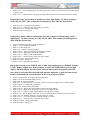
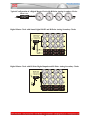
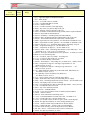
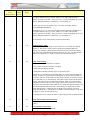
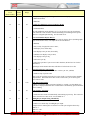
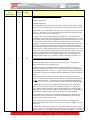
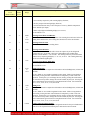
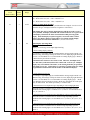
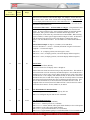
Sending 59th Minute Sync Impulse - The clock must have the relay output option
installed (AL). A pulse will be output hourly at xx:57:54 for 8 seconds, except for
05:57:54 and 17:57:54 for 14 seconds. If a four channel alarm relay is installed,
Mode 32-26 must be set to 2 to enable the four channel relay. Any one of the four
alarm channels may be used for 59th minute sync output by selecting Mode 37-3=9
through 37-3=12. Digital clocks receiving the 59th minute sync protocol must be
within 6 hours of the correct time and date before the 59th minute correction protocol
can force them to the correct time.
When the sync frequency is set to once per day (1), the time values at Modes 16
and 17 are used to trigger sync transmission and the Starting value. When the sync
frequency is set to once per hour (2), a sync pulse is transmitted hourly at 30 minutes
after the hour. Hours remain unchanged and seconds are set to 0. When the sync
frequency is set to once per minute (3), a sync pulse is transmitted every minute at 30
seconds after the minute. Hours and Minutes remain unchanged.
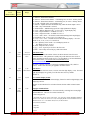
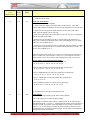
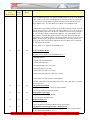
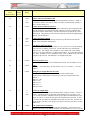
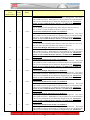
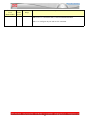
37
4
0-99
Display Refresh Delay
value 0-99 (default=0) – Display refresh delay in tenths of a second. The mode is for
factory use only.
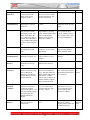
37
5
0,1
Zone Number Identifier
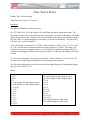
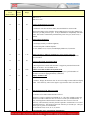
This mode is used to identify the zone number of each four digit display in clocks that
use multiple four digit displays. 0=inactive(default),
1=displays the respective zone numbers of each display.
Press the Mode button to cancel zone display and return to the normal time display.
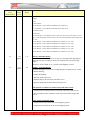
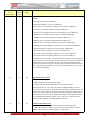
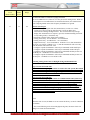
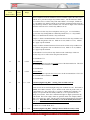
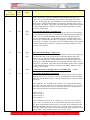
37
6
0,1
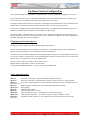
Elapsed Days and Hours Modifier
0 = true elapsed time in days where one day equals 24 hours or 3600 minutes or
86,400 seconds,
1 (default) = causes the elapsed day counter to always change at 00:00 (midnight),
regardless of the number of hours elapsed. When displaying elapsed hours, 1 = hours
will increment at 00 minutes, regardless of the time that has elapsed.
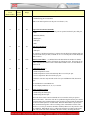
2 = display elapsed seconds up to 99,999,999 using counter display modes 66 and 40.
3 = converts the displayed time to seconds after midnight – can be used in real time.
Use with display modes 40 and 66.
37
7
0,1
Daylight Saving Active Indication
69