1
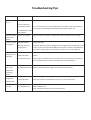
Troubleshooting Tips PROBLEM Unit will not turn on POSSIBLE REASON SOLUTION Battery not charged Plug the unit into a computer via USB cable and allows battery to fully re-‐charge. Incorrect operation caused unit to freeze Turn the unit off and on via the on/off switch on the front. If the unit still will not start, switch it on at the Main Power Switch at the bottom of the unit. Corrupted book caused unit to freeze Unit shuts down Battery not charged shortly after startup Plug the unit into a computer via USB cable and allow battery to fully recharge. Cannot connect USB Cable broken. to computer USB port on PC not enough power Replace USB cable. No Sound when Volume set too low playing music or Earphones broken video files Incorrect file format Change the USB port the unit is plugged into. We suggest that you plug the unit into the rear of a PC, where the actual USB port resides. On some PC’s, front USB ports do not carry enough power to operate the connection. Do not use a USB hub. Increase the volume by using the Up key. Replace Check the file on another device to see if the file is corrupt. Double check that the file is compatible with the unit by referring to the unit’s specifications. Cannot see any text on the screen after opening an eBook Corrupted or Check the unit’s specifications to make sure the eBook is in a compatible incompatible book file format. Download the eBook again and transfer to the unit again. Unit does not recognize TF memory card Faulty TF Card Reformat or replace the TF card. Card upside down Gently remove the TF card without any force, turn over and re-‐insert. Radio sound is not clear Not using earphones Poor reception area Use earphones. Move to a better area. Wait a moment for the unit to lock in to the channel.