1
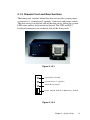
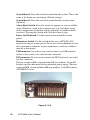
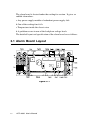
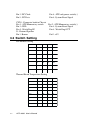
System Reset 1: Press this switch to reinitialize the system. This is the
same as the hardware reset button. (Default setting)
System Reset 2: Press this switch to reinitialize the second system.
(Optional)
Alarm Reset Switch: Press this switch to suppress or stop an audible
alarm. Whenever a fault in the system occurs (e.g. fan failure, rising
chassis temperature, backplane voltage problem), an audible alarm is
activated. Pressing this switch will cause the alarm to stop.
Power On/Off Switch: Use this switch to turn on/off the system
power.
Momentary Switch: Use this switch and by way of ATX (PS_ON)
function to turn on system power. Please use system shutdown to turn
off system power automatic or press momentary switch for a while to
turn off system power
USB connector: If you have you want to connect any USB interface
device to the system, you could use this connector.
PS/2 connector: If you want to connect the PS/2 keyboard, you could
use this connector.
The rear section of B/P version includes B/P rear window, 14-slot I/O
brackets and the sheet metal kit for redundant power supply. The rear
section of M/B version includes M/B rear window, 7-slot I/O brackets,
ATX M/B I/O cover.
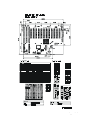
Figure 2.1.3-3
10
ACP-4000 User's Manual