1
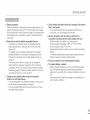
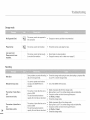
Connecting
toacomputer
When
accessing
videos,
acomputer
does
not
recognize
your
camcorder.
o Disconnect
the
USB
cable
from
the
computer
and
camcorder,
restart
the
computer,
then
reconnect
it
correctly.
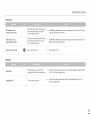
o You
need
toinstall
avideo
codec
onthe
PC
toplay
back
the
files
recorded
byyour
camcorder.
Install
or
run
the
internal
edit
software
(Intelli-studio).
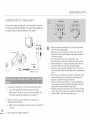
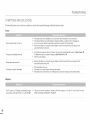
o Make
sure
you
insert
the
connector
inthe
correct
direction,
and
connect
the
USB
cable
totheUSB
Cannot
play
back
avideo
file
properly
onaPC. jack
onyour
camcorder
firmly.
Dbconnect
the
cable
from
the
computer
and
camcorder,
restart
the
computer.
Reconnect
itproperly.
o Your
computer
may
not
have
the
necessary
performance
specifications
toplay
back
avideo
file.
Check
the
recommended
computer
specifications.
Intelli-studio
does
not
function
properly.
o Exit
the
Intelli-studio
application,
and
restart
the
Windows
computer.
o Intelli-studio
isnotMac
OS
compliant.
o Set
PC
Software
toOn
inthe
Settings
menu.
o The
image
orsound
ofthe
video
fibmay
stop
playing
back
temporarily
depending
onthe
data
transfer
The
image
orsound
ofthe
video
file
recorded
by
speed
ofPC.
Copy
the
video
file
toyour
PC
and
then
play
itback
onthe
PC.
your
camcorder
does
not
play
back
correctly
on o Ifyou
connect
the
camcorder
toyour
PC
that
the
PC
does
not
support
Hi-Speed
USB
(USB2.0),
your
PC.
the
image
orsound
ofthe
video
file
may
not
play
back
correctly.
Video
files
copied
tothe
PC
are
not
affected
byit.
o Check
the
system
requirements
toplay
back
avideo.
_page
85
Fxit
allother
applications
running
onthe
computer.
The
playback
screen
ispaused
ordistorted. o
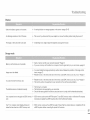
o Ifyou
play
back
the
recorded
file
byconnecting
the
camcorder
toyour
PC,
the
file
may
not
play
back
smoothly
depending
onthe
data
transfer
speed
ofPC.