1
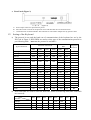
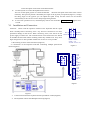
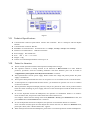
(Figure 1)
z
Func(1 cam):Set special function of the system together with other buttons.
z
Zoom(Full screen)
:Show picture of the camera in full screen.
z
PIP(up arrow):Show picture of the camera in PIP mode (Picture-in-Picture).
z
2×2(down arrow):Show picture of the camera in 4-frame.
z
3×3(left arrow):Show picture of the camera in 9-frame.
z
4×4(right arrow):Show picture of the camera in 16-frame.
z
Live:Show live picture of the camera at current mode.
z
Tape:Playback pictures; Function + Tape: Playback video information of VCR.
z
CAM: Select address of the intelligent Speed Dome or multiplexer.
z
CALL:
z
PRESET:To set the preset position.
z
SHOT: To set up or call cruising track.
z
TIME: Set time for special function.
z
AUTO:To control auto-horizontal rotation for pan/tilt.
z
WIDE:To a wide angle.
z
TELE:To turn to a telescopic range.
z
FAR:To make focus far manually.
z
NEAR:To make focus near manually.
z
OPEN:To open iris.
z
CLOSE:To close iris.
z
ON:Switch on the setting of function.
z
OFF:Switch off the setting of function.
z
F1/F2:Auxiliary control buttons.
z
F3:Switching control between intelligent Speed Dome and Multiplexer.
z
0-9: Number key
z
CLEAR:To clear inputted data
z
ENTER:To confirm
To call the preset position.