1
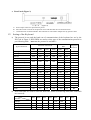
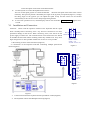
2. Rear Panel (Figure 2)
(Figure 2)
A. Power input connector: input DC12V power.
B. ID-Code switch: Used to set the protocol in use and the baud rate of communications.
C. Communication connector RS485: The controller is connected to adapter box by specific cable.
IV.
Setting of the Keyboard
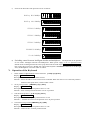
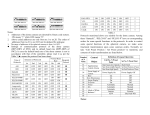
a) The protocol in use and the baud rate of communication of the keyboard are set by the
ID-Code in Figure 2. DIP1-DIP4 are used to select type of the communication protocol as
per following table (●means the protocol is available):
Normal Baud
Rate
Selection of Protocols
Type of Protocols
Integrated
Protocol
DIP1
DIP2
DIP3
DIP4
DIP5
DIP6
Minking A01
OFF
OFF
OFF
OFF
ON
OFF
●
Minking B01
ON
OFF
OFF
OFF
OFF
ON
●
Santachi
OFF
ON
OFF
OFF
OFF
ON
●
PELCO-D
ON
ON
OFF
OFF
OFF
OFF
●
OFF
OFF
ON
OFF
ON
OFF
●
OFF
ON
●
PANASONIC
ON
OFF
ON
OFF
OFF
ON
●
Longcomity
OFF
ON
ON
OFF
OFF
ON
〇
HUNDA600
ON
ON
ON
OFF
OFF
ON
●
LILIN
OFF
OFF
OFF
ON
OFF
ON
●
VICON
ON
OFF
OFF
ON
ON
OFF
●
MOLYNX
OFF
ON
OFF
ON
OFF
ON
〇
KALATEL
ON
ON
OFF
ON
ON
OFF
●
VCL
OFF
OFF
ON
ON
OFF
ON
〇
Reserved
ON
OFF
ON
ON
OFF
ON
〇
ALEC
OFF
ON
ON
ON
OFF
ON
●
Ultrak
ON
ON
ON
ON
OFF
ON
●
PELCO-P/4800Bps
PELCO-P/9600Bps
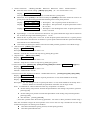
b) DIP5 and DIP6 are used to select the baud rate, shown as following table(DIP7 and DIP8
are not used):
Status of ID-Code
DIP5
DIP6
2400bps
OFF
OFF
4800bps
ON
OFF
9600bps
OFF
ON
19200bps
ON
ON
Baud Rate
DIP1
DIP2
DIP3
DIP4
DIP7
DIP8