1
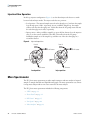
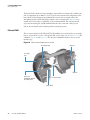
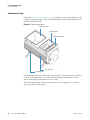
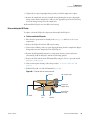
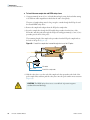
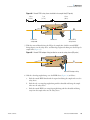
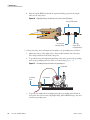
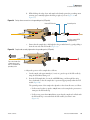
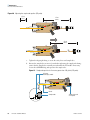
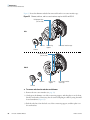
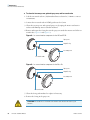
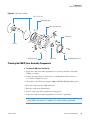
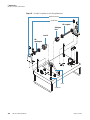
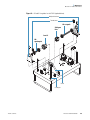
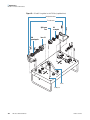
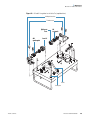
5 Maintenance Ion Source Interface Maintenance Figure 55 shows the skimmer and tube lens removed from the ion source interface cage. Figure 55. Skimmer, tube lens, and ion source interface cage for the LXQ and LTQ XL Ball plunger holes (for one side) LXQ Tube lens Skimmer Contact ring support Ion source interface cage Ball plunger holes (for one side) LTQ XL Tube lens Contact ring support Ion source interface outer cage Skimmer To remove and clean the tube lens and skimmer 1. Remove the ion source interface (see page 78). 2. Gently press the skimmer out of the contact ring support, and then place it on the clean, lint-free work surface. If necessary, first loosen the ball plungers a little by using the small slotted screwdriver (Figure 55). 3. Push the tube lens, from the back, out of the contact ring support, and then place it on the work surface. 80 LTQ Series Hardware Manual Thermo Scientific