1
TO COLLECT BASELINE DATA
Baseline data are saved for later comparison with new instrument data.
•
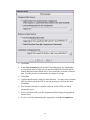
Under Compare Data Source, select the option Collect Data From
Instrument For Comparison
•
Under Reference Data Source, select Collect Baseline Data
•
Click Next.
•
Explanatory messages will be displayed. Click Next.
•
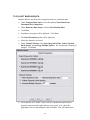
The Select Parameters panel will be displayed.
•
Select the channel to be tested.
•
Under Channel Settings, select Auto Integration Time, Collect Separate
Dark Spectra, and Average Multiple Spectra. We recommend averaging 10
samples. Click Next.
•
Check that the SLS “Stable” light is still on, and that the optical head is
properly connected to the light collector to be tested. If so, check the
appropriate boxes in the dialog box and click Next. This will initiate data
- 14 -