1
collection. Note that the data collection time depends on the sensitivity of the
HydroRad channel under test. Instruments set up for direct solar illumination
may require several seconds for each of the 10 integrations.
•
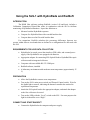
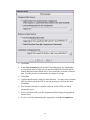
After the integrations have been selected, RadSoft will instruct you to turn off
the light source. Set the “Level” switch on the SLS to “Off” and click OK to
the following prompt(s).
•
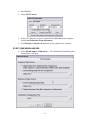
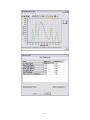
Wait for the data collection to complete. Depending on the relative positions
of the windows on your screen, you may need to click the Bring Graph to
Front button in the wizard to see the data. To switch between the light and
dark integrations, click on the slider control below the graph.
•
Click Save Graph Data in the Wizard window, and save the data file in the
standard Windows manner.
•
To collect additional data, click Back. The graph will close, and if you did
not save the data above, you will be asked whether you wish to save the data
first.
TO COMPARE LIVE DATA WITH A BASELINE FILE
•
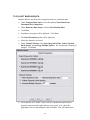
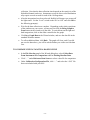
In the File Selection panel of the Wizard dialog box, select Collect Data
From Instrument For Comparison and Use Existing Baseline Data.
•
Click “…” under Reference Data Source to select a data file for comparison.
•
Under Calibration Configuration File, click “…” and select the “.SLS” file
that was included with your SLS.
- 15 -