1
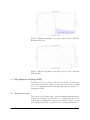
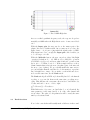
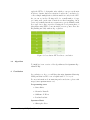
Figure 5: Fixed 18kHz High-Cut
As seen on this logarithmic frequency scale, the response drops dramatically at 18kHz when the High-Cut is active. A true razor-blade
cut !
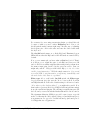
With the Input gain, the user can choose the master gain of the
plugin. It is set by default at 0dB, but you may use it to reduce the
input down to 1, if some eq’ing makes the signal peak to 0 dBFS.
If the input is not “hot” enough, the Input gain control enables you
to boost it up to +12 dB.
With the Mid-side button, the user can select either Left/Right
operation (default mode : red LED is o↵) or Mid/Side operation
(red LED is on). If you don’t know what is mid-side operation, just
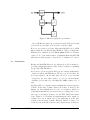
try it, it’s cool ! What does it do ? With a simple trick we create a
channel matrix that isolate the mono (in-phase) part of the mix, and
the stereo (out of phase). We process this matrix the same way we
process left-right channels, and then decode the matrix to regenerate
true left-right stereo image. If you wish to work in MS and Stereo
modes at the same time, use the Link switch.
The Link switch (yellow LED on) locks an EQ band of both channels
together, so you can edit them at the same time, providing stereo
eqing. This will have the exact same e↵ect in Stereo and MS modes,
because mid+side = stereo = left + right
P2
i=1 Channel [i]
= T rueStereo
With Link active, if you use one band’s knob or on/o↵ switch, the
same parameter on the same band [1 to 4] of the other channel will
act as a slave. The value of both parameters will be exactly the same
until you deactivate Link.
2.3
Band functions
Now for the controls that will actually make a di↵erence in the sound.
Quantum Matering LPEQ User Manual
8