1
INTREPID User Manual
Library | Help | Top
GDADS data administration (D04)
3
| Back |
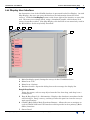
List Display User Interface
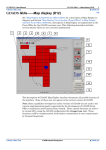
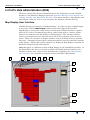
An alternative view of the GDADS database is presented in the List Display. As with
Map Display, the user can query the database for information about the listed
surveys. Click the List Display button on the lower right of the interface to open this
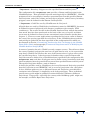
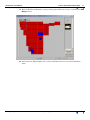
tool. All surveys are simply listed, using a thumbnail graphic, which shows each
survey's boundary outline. Like Map Display, this function is not extensively used in
the Back-Office, and is only briefly described.
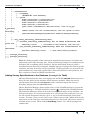
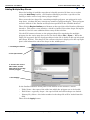
1
2
3
4
5
6
7
1
Main list display panel, listing the surveys in the GDADS database.
2
Menu Item: File
3
Menu Item: Options
4
Database button. Opens the dialog box used to manage the display list
Drag & Drop Panels
Using the mouse, select a map object from the list, then drag, and drop it on a
chosen panel.
Library | Help | Top
5
Drag & Drop Panel: (i) = Information. Displays the database's metadata for the
selected object. Drag a survey, and drop it onto this panel to view the survey's
main specifications.
6
GDADS (Back-Office) Main Functions Buttons. Allows the user to navigate to
each of GDADS' different GUI interfaces which provide its four primary (BackOffice) functions.
7
Status Panel.
© 2006 Intrepid Geophysics
| Back |