1
ZN-R1000E
Installation Manual
Webpage User's Manual
Table of Contents
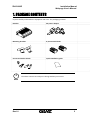
1. PACKAGE CONTENTS .............................................................................................. 5 2. INTRODUCTION ...................................................................................................... 6 2.1. Main Features .................................................................................................................... 6 2.2. Hardware Overview ........................................................................................................... 7 2.2.1. Front Panel .................................................................................................................. 7 2.2.2. Rear Panel ................................................................................................................... 8 3. Installation ............................................................................................................. 9 3.1. Video Output Configuration Switch ................................................................................... 9 3.2. Cabling.............................................................................................................................. 10 3.3. Wall‐Mounting ................................................................................................................. 14 4. Basic Setup ........................................................................................................... 15 4.1. Network Setup ................................................................................................................. 15 4.2. System Configuration on Web Page................................................................................. 16 4.3. Video Display.................................................................................................................... 17 4.4. Reset................................................................................................................................. 18 4.5. Factory Default................................................................................................................. 18 5. How to Use OSD Menu ......................................................................................... 19 5.1. Menu Configuration ......................................................................................................... 19 5.2. Display Mode.................................................................................................................... 21 5.2.1. Quad View ................................................................................................................. 21 5.2.2. Single View ................................................................................................................ 21 5.2.3. PIP View..................................................................................................................... 21 5.3. Audio Mode...................................................................................................................... 23 5.4. Quick Menu ...................................................................................................................... 23 5.4.1. Changing connection mode ...................................................................................... 23 5.4.2. Checking device and channel information ................................................................ 24 5.4.3. Rebooting device....................................................................................................... 24 6. How to Use Web Page .......................................................................................... 25 6.1. Recommended PC specification....................................................................................... 25 6.2. Basic Configuration .......................................................................................................... 26 6.2.1. User management..................................................................................................... 26 6.2.3. Setting date and time of device ................................................................................ 30 6.3. Encoder Setting ................................................................................................................ 32 Rev1.0
2