1
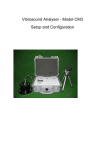
CM3 Setup and Configuration
Noise and Vibration Fast Setup Instructions
1)
Connect vibration and microphone sensors as required. See page 6 of the user manual for more
details.
2) Ensure power is available to cover the monitoring period. DO NOT ALLOW THE BATTERY TO GO
FLAT. See page 7 for more details.
3) Switch the unit on. If the modem option is fitted, wait for the network to log on. If you are not using the
modem option, please press ‘Enter’ to bypass the modem logging on.
4) You will then be shown 3 screens of settings. Press ‘Menu’ to advance each screen until the base
menu is shown.
5) Once at the base menu, press ‘2 - Continuous Monitoring’.
6) Close the lid, ensuring no cables are trapped.
7) At the end of the monitoring period, press the power button and wait for the event to save and the unit
to power off.
Note:
For software versions 1.13 and above, and if the modem option is fitted, the CM3 will now send an SMS text
alert when the internal battery is very low, and then proceed to switch itself off soon after to protect the internal
battery from damage.
Adequate power in the form of a mains supply or an external power supply, e.g. a 12 V 110 Ah car battery,
should be provided at all times to avoid seeing the warning text message.
Depending on the ambient temperature and configurations installed on the CM3, you may get up to 8 hours
after the warning text until the unit switches itself off. However, this is not guaranteed.
[2]
Issue 1.20