1
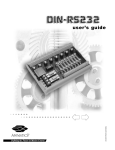
DINIO7
user ’s manual
4
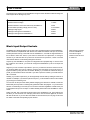
The ratings for the interface to the SmartMotors are given below. Absolute maximum ratings are
levels beyond which damage may occur.
Absolute maximum voltage:
5.5VDC
Absolute minimum voltage:
-0.3VDC
Absolute maximum current sourced/sunk by SmartMotor™:
30 mA
Recommended operating voltage (source or sink):
4.75-5.25VDC
Valid logical high signal:
2.0VDC
Valid logical low signal to SmartMotor™:
0.4VDC
Valid logical low signal from SmartMotor™:
0.8VDC
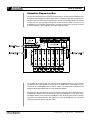
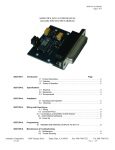
Block Input/Output Sockets
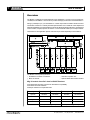
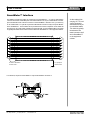
The DINIO7 has 7 block I/O sockets, one for each of the 7 general purpose I/O on the SmartMotor™.
These sockets are compatible with both 24VDC and 110VAC I/O modules from Opto-22, Crouzet
and Grayhill. When issuing commands from the SmartMotor™, note that the logical interface to
the I/O block is active low. That is, a port value of 0 would turn an output block, on closing its
contacts. If you read the value of a port that is connected to an input block, a value of 0 would
mean that the there is current flowing through the I/O block.
At power up, the SmartMotor™ I/O ports are configured as an input pulled high. In order to close
the contacts on an I/O block, you must both configure the SmartMotor™ port as an output and
set it low.
Suppose you have a 24VDC output block in port A. If you want the I/O block contacts to close,
you must first define port A as an output by using the UAO command. You then set port A to a
logical low state by using the UA=0 command. Similarly, if you needed to activate the relay on
port B, you would use the UB=0 command. If you want to open the contacts, you would issue the
UB=1 command.
Similarly, if you had an input block, you would generally read its state by stuffing its value into a
variable. For example, if you had an input block in port C, you would stuff its value into the variable
g by issuing the command g=UCI.
You can also use the port value directly without assigning port value into a variable, but this has
limited utility and may lead to confusing timing interaction within the program - so you have been
warned. It is interesting to note that you can issue this command regardless of whether the port
is configured as an input or an output. For further details, please refer to the SmartMotor™ User’s
Guide.
Please note that, due to the multi-functional nature of the SmartMotor™ I/O, some features are
lost when you use I/O blocks. For example, ports E and F can be used as digital I/O, as well as
RS-485 and AniLink. If you use either the RS485 or AniLink functions, do not plug an I/O block
into either of the slots corresponding to ports E and F.
Fax: (408) 748 8725
Tel: (408) 748 8721
www.animatics.com
When issuing commands
from the SmartMotor™,
note that the logical
interface to the I/O block
is active low.