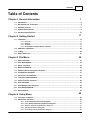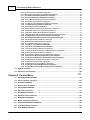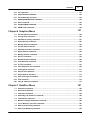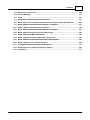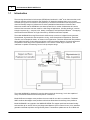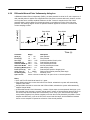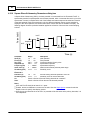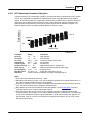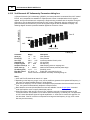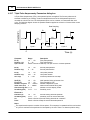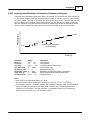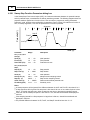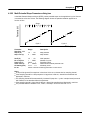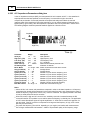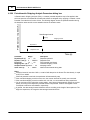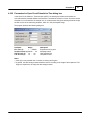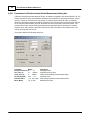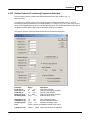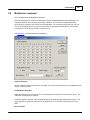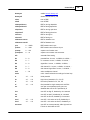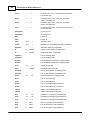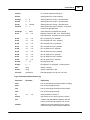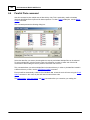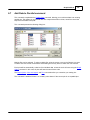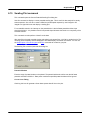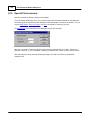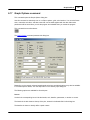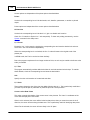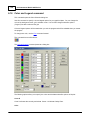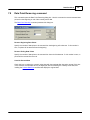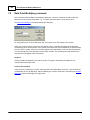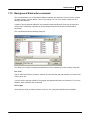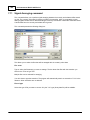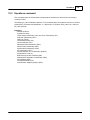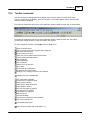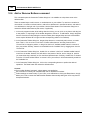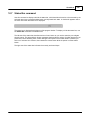
1
Model 900D Series Scanning Electrochemical Microscope User Manual CH Instruments CH Instruments Model 900D Series User Manual © 2014 CH Instruments, Inc. All rights reserved. No parts of this work may be reproduced in any form or by any means - graphic, electronic, or mechanical, including photocopying, recording, taping, or information storage and retrieval systems - without the written permission of the publisher. Products that are referred to in this document may be either trademarks and/or registered trademarks of the respective owners. The publisher and the author make no claim to these trademarks. While every precaution has been taken in the preparation of this document, the publisher and the author assume no responsibility for errors or omissions, or for damages resulting from the use of information contained in this document or from the use of programs and source code that may accompany it. In no event shall the publisher and the author be liable for any loss of profit or any other commercial damage caused or alleged to have been caused directly or indirectly by this document. Printed: August 2014 in Austin, Texas. Contents i Table of Contents Chapter 1 General Information 1 1.1 Introduction ................................................................................................................................... 2 1.2 Electrochemical ................................................................................................................................... Techniques 4 1.3 Software ................................................................................................................................... Features 6 1.4 System................................................................................................................................... Requirements 9 1.5 Hardware ................................................................................................................................... Specifications 10 Chapter 2 Getting Started 11 2.1 Installation ................................................................................................................................... 12 2.1.1 2.1.2 2.1.3 2.1.4 Parts List .......................................................................................................................................................... 13 Softw are .......................................................................................................................................................... 14 Hardw are .......................................................................................................................................................... 16 Nanopositioner, .......................................................................................................................................................... Stepper Motors, and Piezo 19 2.2 USB Driver ................................................................................................................................... Installation 22 2.3 Testing ................................................................................................................................... 25 2.4 Some................................................................................................................................... Useful Tips 27 Chapter 3 File Menu 29 3.1 Open................................................................................................................................... command 30 3.2 Save ................................................................................................................................... As command 32 3.3 Delete ................................................................................................................................... command 34 3.4 Retrieve ................................................................................................................................... command 35 3.5 Update ................................................................................................................................... Instrument Program command 36 3.6 List Data ................................................................................................................................... File command 37 3.7 Convert ................................................................................................................................... to Text command 38 3.8 Text File ................................................................................................................................... Format command 39 3.9 Import ................................................................................................................................... Text File command 42 3.10 Print ................................................................................................................................... command 43 3.11 Print ................................................................................................................................... Multiple Files command 44 3.12 Print ................................................................................................................................... Setup command 45 3.13 Exit command ................................................................................................................................... 47 Chapter 4 Setup Menu 49 4.1 Technique ................................................................................................................................... command 50 4.2 Parameters ................................................................................................................................... command 52 4.2.1 4.2.2 4.2.3 4.2.4 4.2.5 © 2014 CH Instruments, Inc. Cyclic Voltam .......................................................................................................................................................... m etry Param eters dialog box 53 Linear .......................................................................................................................................................... Sw eep Voltam m etry Param eters dialog box 55 Staircase .......................................................................................................................................................... Voltam m etry Param eters dialog box 57 Tafel Plot .......................................................................................................................................................... Param eters dialog box 58 Chronoam .......................................................................................................................................................... perom etry Param eters dialog box 59 ii CH Instruments Model 900D Series 4.2.6 4.2.7 4.2.8 4.2.9 4.2.10 4.2.11 4.2.12 4.2.13 4.2.14 4.2.15 4.2.16 4.2.17 4.2.18 4.2.19 4.2.20 4.2.21 4.2.22 4.2.23 4.2.24 4.2.25 4.2.26 4.2.27 4.2.28 4.2.29 4.2.30 4.2.31 4.2.32 4.2.33 4.2.34 4.2.35 4.2.36 .......................................................................................................................................................... 61 Chronocoulom etry Param eters dialog box Differential .......................................................................................................................................................... Pulse Voltam m etry Param eters dialog box 63 Norm al.......................................................................................................................................................... Pulse Voltam m etry Param eters dialog box 64 Differential .......................................................................................................................................................... Norm al Pulse Voltam m etry dialog box 65 Square .......................................................................................................................................................... Wave Voltam m etry Param eters dialog box 66 AC Voltam .......................................................................................................................................................... m etry Param eters dialog box 67 2nd Harm .......................................................................................................................................................... onic AC Voltam m etry Param eters dialog box 68 FT AC.......................................................................................................................................................... Voltam m etry Param eters dialog box 69 Am perom .......................................................................................................................................................... etric i-t Curve dialog box 70 Differential .......................................................................................................................................................... Pulse Am perom etry Param eters dialog box 71 Double .......................................................................................................................................................... Differential Pulse Am perom etry dialog box 72 Triple.......................................................................................................................................................... Pulse Am perom etry Param eters dialog box 74 Integrated .......................................................................................................................................................... Pulsed Am perom etric Detection Param eters dialog box 76 Bulk Electrolysis .......................................................................................................................................................... w ith Coulom etry Param eters dialog box 78 Hydrodynam .......................................................................................................................................................... ic Modulation Voltam m etry Param eters dialog box 79 Sw eep .......................................................................................................................................................... Step Function Param eters dialog box 80 Multi-Potential .......................................................................................................................................................... Steps Param eters dialog box 81 A.C. Im .......................................................................................................................................................... pedance Param eters dialog box 82 Im pedance .......................................................................................................................................................... - Tim e Param eters dialog box 84 Im pedance .......................................................................................................................................................... - Potential Param eters dialog box 85 Chronopotentiom .......................................................................................................................................................... etry Param eters dialog box 86 Chronopotentiom .......................................................................................................................................................... etry w ith Current Ram p Param eters dialog box 88 Multi-Current .......................................................................................................................................................... Steps Param eters dialog box 89 Potentiom .......................................................................................................................................................... etric Stripping Analysis Param eters dialog box 90 Param.......................................................................................................................................................... eters for Open Circuit Potential vs Tim e dialog box 91 Param.......................................................................................................................................................... eters for Electrochem ical Noise Measurem ent dialog box 92 Surface .......................................................................................................................................................... Patterned Conditioning Param eters dialog box 93 Probe.......................................................................................................................................................... Scan Curve Param eters dialog box 95 Probe.......................................................................................................................................................... Approach Curve Param eters dialog box 98 Surface .......................................................................................................................................................... Interrogation SECM Param eters dialog box 100 Scanning .......................................................................................................................................................... Electrochem ical Microscope Param eters dialog box 102 4.3 System ................................................................................................................................... command 105 4.4 Hardware ................................................................................................................................... Test command 108 Chapter 5 Control Menu 111 5.1 Run ................................................................................................................................... Experiment command 112 5.2 Pause ................................................................................................................................... / Resume command 113 5.3 Stop................................................................................................................................... Run command 114 5.4 Reverse ................................................................................................................................... Scan command 115 5.5 Zero................................................................................................................................... Current command 116 5.6 Zero................................................................................................................................... Time command 117 5.7 Run ................................................................................................................................... Status command 118 5.8 Repetitive ................................................................................................................................... Runs command 121 5.9 Multiplexer ................................................................................................................................... command 123 5.10 Macro ................................................................................................................................... Command command 125 5.11 Open ................................................................................................................................... Circuit Potential command 132 5.12 iR Compensation ................................................................................................................................... command 133 5.13 Filter ................................................................................................................................... Setting command 135 © 2014 CH Instruments, Inc. Contents iii 137 5.14 Cell ................................................................................................................................... command 5.15 Step................................................................................................................................... Functions command 140 5.16 Preconditioning ................................................................................................................................... command 142 5.17 Rotating ................................................................................................................................... Disk Electrode command 144 5.18 Other ................................................................................................................................... command 145 5.19 Stripping ................................................................................................................................... Mode command 146 5.20 SECM ................................................................................................................................... Probe command 148 Chapter 6 Graphics Menu 151 6.1 Present ................................................................................................................................... Data Plot command 152 6.2 Overlay ................................................................................................................................... Plots command 156 6.3 Add ................................................................................................................................... Data to Overlay command 157 6.4 Replot ................................................................................................................................... Overlay command 158 6.5 Manage ................................................................................................................................... Overlay command 159 6.6 Parallel ................................................................................................................................... Plots command 160 6.7 Add ................................................................................................................................... Data to Parallel command 161 6.8 Replot ................................................................................................................................... Parallel command 162 6.9 Manage ................................................................................................................................... Parallel command 163 6.10 Zoom ................................................................................................................................... In command 164 6.11 Manual ................................................................................................................................... Results command 165 6.12 Peak................................................................................................................................... Definition command 166 6.13 X-Y Plot ................................................................................................................................... command 167 6.14 Peak................................................................................................................................... Parameter Plot command 169 6.15 Semilog ................................................................................................................................... Plot command 171 6.16 Special ................................................................................................................................... Plot command 172 6.17 Graph ................................................................................................................................... Options command 173 6.18 Color ................................................................................................................................... and Legend command 176 6.19 Font................................................................................................................................... command 178 6.20 Copy................................................................................................................................... to clipboard command 179 Chapter 7 DataProc Menu 181 7.1 Smoothing ................................................................................................................................... command 182 7.2 Derivatives ................................................................................................................................... command 184 7.3 Integration ................................................................................................................................... command 185 7.4 Semiinteg ................................................................................................................................... and Semideriv command 186 7.5 Interpolation ................................................................................................................................... command 187 7.6 Baseline ................................................................................................................................... Fitting & Subtraction command 188 7.7 Linear ................................................................................................................................... Baseline Correction command 190 7.8 Data................................................................................................................................... Point Removing command 191 7.9 Data................................................................................................................................... Point Modifying command 192 © 2014 CH Instruments, Inc. iv CH Instruments Model 900D Series ................................................................................................................................... 193 7.10 Background Subtraction command 7.11 Signal ................................................................................................................................... Averaging command 194 7.12 Mathematical ................................................................................................................................... Operation command 195 7.13 Fourier ................................................................................................................................... Spectrum command 196 Chapter 8 Analysis Menu 197 8.1 Calibration ................................................................................................................................... Curve command 198 8.2 Standard ................................................................................................................................... Addition command 200 8.3 Data................................................................................................................................... Report command 202 8.4 Time................................................................................................................................... Dependence command 205 8.5 Special ................................................................................................................................... Analysis command 207 Chapter 9 Sim Menu 209 9.1 Mechanism ................................................................................................................................... command 210 9.1.1 9.1.2 9.1.3 9.1.4 9.1.5 9.1.6 Digital.......................................................................................................................................................... Sim ulation dialog box 211 Potentials .......................................................................................................................................................... and Rate Constants dialog box 215 Concentration .......................................................................................................................................................... and Diffusion Coefficients dialog box 216 Surface .......................................................................................................................................................... Concentration dialog box 217 Concentration .......................................................................................................................................................... at Equilibrium dialog box 218 Sim ulation .......................................................................................................................................................... Variables dialog box 219 9.2 AC Impedance ................................................................................................................................... Simulator and Fitting Program 220 9.3 CV Simulate ................................................................................................................................... command 224 9.4 CV Fitting ................................................................................................................................... command 225 Chapter 10 View Menu 227 10.1 Data................................................................................................................................... Information command 228 10.2 Data................................................................................................................................... Listing command 230 10.3 Equations ................................................................................................................................... command 231 10.4 Clock ................................................................................................................................... command 232 10.5 Toolbar ................................................................................................................................... command 233 10.6 Add ................................................................................................................................... or Remove Buttons command 234 10.7 Status ................................................................................................................................... Bar command 235 Chapter 11 Help Menu 237 11.1 Help................................................................................................................................... Topics command 238 11.2 Old Help ................................................................................................................................... command 239 11.3 About ................................................................................................................................... command 240 Chapter 12 Appendix 241 12.1 Cables ................................................................................................................................... and Connections 242 12.2 Firmware ................................................................................................................................... Update Instructions 244 12.3 Troubleshooting ................................................................................................................................... 245 © 2014 CH Instruments, Inc. Contents v ................................................................................................................................... 246 12.4 Maintenance and Service 12.5 Limited ................................................................................................................................... Warranty 247 12.6 Safety ................................................................................................................................... 248 12.7 Abbreviations ................................................................................................................................... of Electrochemical Techniques 251 12.8 Model ................................................................................................................................... 400C Series Time-Resolved Electrochemical Quartz Crystal Microbalance 252 12.9 Model ................................................................................................................................... 600E Series Electrochemical Analyzer Techniques 255 12.10 Model ................................................................................................................................... 700E Series Bipotentiostat Techniques 256 12.11 Model ................................................................................................................................... 800D Series Electrochemical Detector Techniques 257 12.12 Model ................................................................................................................................... 920D Scanning Electrochemical Microscope 258 12.13 Model ................................................................................................................................... 1000C Series Multi-Potentiostat 260 12.14 Model ................................................................................................................................... 1100C Series Power Potentiostat / Galvanostat 262 12.15 Model ................................................................................................................................... 1200B Series Handheld Potentiostat / Bipotentiostat 264 12.16 Model ................................................................................................................................... 1550A Pico-Liter Solution Dispenser 265 12.17 Picoamp ................................................................................................................................... Booster/Faraday Cage and Multiplexer 267 12.18 Amp................................................................................................................................... Booster and Liquid/Liquid Interface Adapter 269 12.19 Accessories ................................................................................................................................... 270 © 2014 CH Instruments, Inc. General Information Chapter 1 General Information This chapter contains general information about your instrument. Introduction Electrochemical Techniques Software Features System Requirements Hardware Specifications © 2014 CH Instruments, Inc. 1 2 1.1 CH Instruments Model 900D Series Introduction The scanning electrochemical microscope (SECM) was introduced in 19891 as an instrument that could examine chemistry at high resolution near interfaces. By detecting reactions that occur at a small electrode (the tip) as it is scanned in close proximity to a surface, the SECM can be employed to obtain chemical reactivity images of surfaces and to make quantitative measurements of reaction rates. Numerous studies with the SECM have now been reported from a number of laboratories all over the world and the instrument has been used for a wide range of applications, including studies of corrosion, biological systems (e.g., enzymes, skin, leaves), membranes, and liquid/liquid interfaces. 2 The trapping and electrochemical detection of single molecules by SECM has also been reported. The model 900D/920D Scanning Electrochemical Microscope consists of a digital function generator, bipotentiostat, high-resolution data acquisition circuitry, three-dimensional nanopositioner, positioner controller, and a sample/cell holder, as shown in the Figure below. The three dimensional nanopositioner has a spatial resolution of nanometers and allows a maximum traveling distance of several centimeters. The potential control range of the bipotentiostat is ±10 V and the current range is ±250 mA. The instrument is capable of measuring current in the picoampere range. The model 900D/920D is designed for scanning electrochemical microscopy, but is also capable of many conventional electrochemical techniques for convenience. Model 900D uses a stepper motor positioner that can travel 50 mm with 8 nm resolution. The Model 920D combines the stepper motor positioner with a three dimensional closed-loop piezo positioner. Model 900D/920D is an upgrade to the 900B/910B SECM. The stepper positioner has better linearity and resolution (8 nm versus 100 nm) and longer travel distance (50 mm versus 25 mm). Also, waveform generation and data acquisition are significantly faster. The waveform update rate can be 10 MHz and © 2014 CH Instruments, Inc. General Information 3 the sampling rate can be 1 MHz at 16-bit resolution, while maintaining low noise levels. AC measurement techniques including electrochemical impedance spectroscopy have also been added. Improvements also include very stable and accurate potential and current control, and dual-channel data acquisition at high speed. The instrument can be controlled by any PC running Windows 98 or higher. It is easy to install and use. The user interface uses the classic Microsoft design, so if you are familiar with Windows applications, you can likely use the software without referring at all to this user manual or the comprehensive, contextsensitive help files that are included with the instrument software. The commands, parameters, and options have been written using terminology that most chemists are familiar with. A customizable toolbar allows quick access to the most commonly used commands. The instrument provides many powerful functions, such as straightforward file handling, extensive experimental control, flexible graphics, various data analyses, and efficient digital simulation. Additional features include macro commands, working electrode conditioning, color, legend and font selection, data interpolation, visual baseline correction, data point removal, visual data point modification, signal averaging, Fourier spectrum, and a convenient technique-specific electrochemical equation viewer. This model series includes a USB port (default) and a serial port for data communication with the PC, with hot-switching capabilities available on the rear panel of the instrument. Firmware is now stored in flash memory, and as a result, instrument firmware upgrades can be downloaded electronically and installed immediately, instead of the inconvenient shipment and installation of EPROM chips. 1. A. J. Bard, F.-R. F. Fan, J. Kwak, and O. Lev, Anal. Chem. 61, 132 (1989); U.S. Patent No. 5,202,004 (April 13, 1993). 2. A. J. Bard, F.-R. Fan, M. V. Mirkin, in Electroanalytical Chemistry, A. J . Bard, Ed., Marcel Dekker, New York, 1994, Vol. 18, pp 243-373. © 2014 CH Instruments, Inc. 4 1.2 CH Instruments Model 900D Series Electrochemical Techniques Scanning Probe Techniques SECM Imaging: constant height, constant current, potentiometric Probe Approach Curves Probe Scan Curve: amperometric, constant current, potentiometric Surface Patterned Conditioning Sweep Techniques Cyclic Voltammetry Linear Sweep Voltammetry Rotating Disk Electrode Voltammetry Tafel Plot Sweep-Step Functions Step Techniques Chronoamperometry Chronocoulometry Staircase Voltammetry Tast Polarography Differential Pulse Voltammetry and Polarography Normal Pulse Voltammetry and Polarography Differential Normal Pulse Voltammetry and Polarography Square Wave Voltammetry Sweep-Step Functions Multi-Potential Steps A.C. Techniques A.C. Voltammetry and Polarography Phase-selective A.C. Voltammetry and Polarography Second Harmonic A.C. Voltammetry and Polarography A.C. Impedance Spectroscopy A.C. Impedance versus Time A.C. Impedance versus Potential Stripping Techniques Linear Sweep Stripping Voltammetry Differential Pulse Stripping Voltammetry Normal Pulse Stripping Voltammetry Square Wave Stripping Voltammetry A.C. Stripping Voltammetry Phase-selective A.C. Stripping Voltammetry Second Harmonic A.C. Stripping Voltammetry Controlled-Current Techniques Chronopotentiometry Chronopotentiometry with Current Ramp Multi-Current Steps Potentiometric Stripping Analysis Amperometric Detection Techniques Amperometric i-t Curve Differential Pulse Amperometry © 2014 CH Instruments, Inc. General Information Double Differential Pulse Amperometry Triple Pulse Amperometry Integrated Pulse Amperometric Detection Other Techniques Bulk Electrolysis with Coulometry Hydrodynamic Modulation Voltammetry Electrochemical Noise Measurement Open Circuit Potential - Time © 2014 CH Instruments, Inc. 5 6 1.3 CH Instruments Model 900D Series Software Features User Interface Unicode tabbed-document application: compatible with 32- and 64-bit Windows monolithic architecture: minimal installation footprint and portable design bypasses the Windows registry multiple instances: control multiple instruments by simply duplicating the program customizable toolbar: quick access to your most frequently used commands complete, intuitive environment: run experiments, analyze data, and generate plots all in the same window dock able toolbar: quick graphical access to the most commonly used commands status bar: technique, file status, and command prompt WYSIWYG graphics comprehensive context-sensitive help File Management Unicode support: international file and folder names open data files: read directly from binary or plain-text files save data file: binary, plain-text formats for exporting data (e.g., to spreadsheet) list data file convert to text files: for exporting multiple data files text file format print present data print multiple data files print setup Experimental Setup technique: a large repertoire of electrochemical techniques experimental parameters: extremely wide dynamic range system setup: line frequency, potential/current axis polarities hardware test: digital and analog circuitry diagnostic test Instrument Control run experiment: real time data display in most cases pause/resume during run stop running experiment reverse CV scan direction during run repetitive runs: automatic data save, signal averaging, delay or prompt run status: stir, purge, smooth after run, iR compensation, RDE and SMDE control status macro commands: edit, save, read, and execute any series of commands open circuit potential measurement work ing electrode conditioning before running experiment analog filter settings: automatic or manual setting of i/V converter, potential, and signal filters stripping mode: enable/disable, deposition potential and time, stir and purge conditions cell control: purge, stir, cell on, SMDE drop collection, pre-run drop knock, and stabilizing capacitor rotating disk electrode: rotation speed, on/off control during deposition, quiescent time, run, and between runs step functions: multiple cycles of step function generator, for electrode cleaning or other purposes iR compensation: automatic and manual compensation, solution resistance, double layer capacitance and stability test SECM probe control: calibration and move probe in three dimensions Graphical Display © 2014 CH Instruments, Inc. General Information 7 present data plot: data plot with header, filename, parameters, and results re-scaling and labeling: axis expression, re-scaling, and text insertion overlay plots: plot multiple data sets on the same graph for comparison parallel plots: plot multiple data sets side by side for comparison zoom in: visually selected zoom area manual results: visually selected baseline peak definition: shape, width, and report options X-Y Plot: import arbitrary data sets peak parameter plot: ip~v, ip~v1/2, Ep~log(v) plots semilog plot: current-potential semilog plot graph options: display or printer options, axis, parameters, baseline, results, grids, axis inversion, axis freeze, axis titles, data sets, XY scales, reference electrode, header, and notes color and legend: background, axis, grid, curves, legend size, thickness, and display intervals font: font, style, size, and color of axis labels, axis titles, header, parameters, and results copy to clipboard: for pasting graphics in third-party applications (word processors, etc.) 3d plotting (NEW): interactive visualization of impedance data and SECM results; Laplacian smoothing, Delaunay triangulation, and stereoscopic 3D anaglyph imaging (no special video card or display required) Data Processing smoothing: 5-49 point least square and Fourier transform derivatives: 1st - 5th order, 5-49 point least square numerical integration convolution: semi-derivative and semi-integral interpolation: 2× - 64× data interpolation baseline fitting and subtraction: selectable fitting function, polynomial order and potential range for best fitting and baseline subtraction; particularly useful for trace analysis linear baseline correction: visually selected baseline, slope, and DC level compensation data point removal data point modification: visual data point modification back ground subtraction: difference between two data sets signal averaging: averaging multiple sets of data mathematical operations: both X and Y data arrays Fourier spectrum Analysis calibration curves: calculate the unknown concentration and the slope, intercept, and correlation of the curve; plot the calibration curve; save and read the calibration data standard addition: calculate the unknown concentration and the slope and correlation of the standard addition curve; plot the standard addition curve; save and read the standard addition data data file report: calculate the unknown concentration from saved data files based on user-defined peak potential range, species, and calibration information; generate analytical report in text format; up to four species of interest time dependence: calculate the unknown concentration as a function of time from saved data files based on user-defined peak potential range and calibration information; report and/or plot concentration as a function of time corrosion rate calculation CV Simulation and Fitting fast implicit finite difference algorithm reaction mechanisms: 10 predefined mechanisms; in select models, any combination involving electron transfer, first- and second-order chemical reactions system: diffusive or adsorptive © 2014 CH Instruments, Inc. 8 CH Instruments Model 900D Series maximum equations: 12 maximum species: 9 simulation parameters: standard redox potential, rate of electron transfer, transfer coefficient, concentration, diffusion coefficient, forward and reverse chemical reaction rate constants, temperature, electrode area, and experimental parameters save simulation parameters read simulation parameters real-time display of simulation data, concentration profiles dimensionless current equilibrium data automatic detection and calculation of over-determined equilibrium constants AC Impedance Simulation and Fitting visually equivalent circuit input automatic equivalent circuit parameters fitting View data information: date, time, filename, data source, instrument model, data processing performed, header and notes data listing: data information and numerical data array equations: convenient compilation of general and technique-specific equations clock toolbar status bar Help comprehensive context-sensitive HTML help on-the-fly switching between HTML help and legacy WinHelp using help about the application © 2014 CH Instruments, Inc. General Information 1.4 System Requirements Operating System: Windows 98 / NT / Me / 2000 / XP / Vista / 7 / 8 Communication between PC and instrument: USB or RS-232 serial port Output device: any printer or plotter supported by Windows © 2014 CH Instruments, Inc. 9 10 1.5 CH Instruments Model 900D Series Hardware Specifications Micropositioner: Piezo positional resolution: 1.6 nm Stepper motor resolution: 4 nm X, Y, Z total distance: 50 mm Bipotentiostat: Probe Potential: ±10 V Substrate Potential: ±10 V Current: ±250 mA Compliance Voltage: ±12 V Input Impedance of Reference Electrode: 1012 Ω Current Measurement Range: 10-12 - 0.1 A/V in 12 ranges Low Current Measurability: 1 pA Maximum Sampling Rate: 1 MHz (16-bit) Waveform update rate: 10 MHz maximum Cell Control: purge, stir, and knock RDE Rotation Rate Control: 0-10V voltage output for 0 - 10000 rpm Other Features: External voltage input recording channel Automatic and manual iR compensation © 2014 CH Instruments, Inc. Getting Started Chapter 2 Getting Started This chapter contains information about how to get started using your instrument. Installation Testing Some Useful Tips USB Driver Installation © 2014 CH Instruments, Inc. 11 12 2.1 CH Instruments Model 900D Series Installation Important Note After you unpack the instrument, please check the contents of the shipment carefully. You should find the instrument, USB cable, electrode leads, software CD, and a printed copy of this User Manual (optional). Electrodes and other accessories are sold separately; if you ordered electrodes and accessories, please thoroughly check the shipment and compare its contents with the packing list. If anything is missing, please search thoroughly inside the container, since the missing items may have been mixed with the packing material over the course of shipping. Please report any missing or damaged items immediately and do not throw away the shipping materials, as these may be used for return shipping. © 2014 CH Instruments, Inc. Getting Started 2.1.1 13 Parts List The CHI900D series SECM comes with the following parts: Part # Item CHI900D Bipotentiostat CHI900D Motor controller Stepper motors with translation stages 3' 15F-15M cable for stepper motor control Z-Stand Piezo Positioner (CHI920D only) Mounting Piece for Z stage or Piezo positioner (Black T-shaped) Base, Sample holder Probe holder (Teflon) Mounting piece for probe holder Nylon screws for piezo calibration Nylon washers for piezo calibration Brass pin with 10K ohm resistor for piezo calibration Teflon cell with Pt wire counter electrode (for insulator substrate) with O-ring Teflon cell with Pt wire counter electrode (for conducting substrate) CHI303 Pt disk electrode (as conducting substrate) with O-ring CHI304 Ag/AgCl reference electrode CHI116 10 mmm Pt disk probe Tools (wrenches) User manual (electronic copy) Power cord 6' USB A/B cable for communications 3' 25F-25M cable for connections between bipotentiostat and motor controller Electrode leads Software CD Quant. 1 1 3 3 1 1 1 1 1 1 4 4 1 1 1 2 2 3 1 1 2 1 1 1 1 Please examine the contents of your shipment carefully and immediately report any missing parts to CH Instruments, Inc.. © 2014 CH Instruments, Inc. 14 2.1.2 CH Instruments Model 900D Series Software The instrument can be controlled by any PC running Windows 98 / NT / Me / 2000 / XP / Vista / 7 / 8. A free USB port or serial port is required for communication between the instrument and the PC. Refer to your Windows system documentation to gain familiarity with Windows operation. Windows Vista can control the instrument properly, but will sometimes can experience graphical glitches. The program may paint single pixel dots incorrectly or leave entire areas of the screen blank. Choose other legends (such as circle, square, triangle or line) to plot data correctly. These glitches appear endemic to Vista and do not occur in versions of Windows older or newer than Vista. The software in-program documentation has been upgraded to compressed HTML (.chm) files, which provide comprehensive context-sensitive help via the Shift+F1 keyboard shortcut and in dialog boxes. Legacy documentation is also available in Microsoft's old WinHelp (.hlp) file format, and the program can switch dynamically between .chm and .hlp files when the latter are available. This is particularly useful when using newer software versions with older instrument models. However, our old WinHelp files may be out of date, and their use is discouraged. Moreover, starting with Windows Vista, Microsoft has also dropped out-of-the-box support for 32-bit .hlp files (although strangely, 16-bit .hlp files from the Windows 3.x era are still supported). This issue can be resolved by installing WinHlp32.exe from the Microsoft website; refer to article KB917607 for more information. To install the software, insert the software CD. Double-click the "set####.exe" file on the CD to extract the files to your hard drive. The default extraction directory is C:\CHI. The installation simply copies all files to the extraction directory. After installation, you should find chi####.exe (the program executable), chi####.chm (HTML help file), and some test data files (*.bin) in this directory. Administrative rights are not required to run the program, and UAC permissions introduced in Vista should not be an issue. If the executable is copied or moved (say, to D:\My.Prog.exe) it must be accompanied by a help file with the same name (say, D:\My.Prog.chm) for the comprehensive context-sensitive help to be available. The program has been designed with ease of use in mind. It is self-contained and portable. Double-click chi####.exe to start the program. The only file required to run the software and control the instrument is chi####.exe, which can be placed in any directory for which you have write and execute permission. This can be particularly useful in restricted user settings (teaching labs, portable installations on removable media, etc.)--simply copy the .exe file and .chm file to, say, the user's home directory. The first time it is run, the program will automatically generate a binary configuration file (chi####.cfg) containing (virtually) all user preferences and settings. This configuration file will have the same name and location as the executable, and multiple instruments can be controlled using multiple copies of the executable, each with its own configuration file (e.g., chi660d1.exe + chi660d1.cfg and chi660d2.exe + chi660d2.cfg). Newer versions of the software will also generate chi####.ini, which harkens back to a kinder, gentler time when ini files ruled the electronic earth, untrammeled by the unreliable tyranny of the registry. Even now, our software avoids the registry completely, storing all settings in the .cfg and .ini files, streamlining the transfer of user settings between directories or computers to a simple file copy operation. In previous versions of the software, the auto-generated configuration files would be stored in the C:\CHI directory, and if this directory was not found, the configuration files would be annoyingly spread everywhere. This behavior should not occur in the current software version, and it should be safe to extract the program to any directory on any drive or partition for which you have write and execute permission. © 2014 CH Instruments, Inc. Getting Started 15 To uninstall the software, simply delete all program files: the executable (.exe), help (.chm and .hlp if present), and configuration (.cfg and .ini). Since no settings are stored on the registry, an uninstaller is unnecessary. The software CD also contains a hyperlinked, electronic copy of this User Manual and the USB Driver. In addition, you can find a Lab Manual from the 2003 SECM Summer School at the University of Texas at Austin. Note that an older model 900 SECM was used in the Summer School; nevertheless, it contains quite a bit of information that you may find useful. © 2014 CH Instruments, Inc. 16 2.1.3 CH Instruments Model 900D Series Hardware System hardware installation is also easy and simple. After unpacking the instrument, you should check your power lines. The AC voltage of the instrument was preset in the factory and is indicated on the serial number label on the back panel. If the AC voltage is correct, connect the instrument to the power with the power cord. There are two instrument boxes; you can stack them on top of each other as shown in Figure 2.1. The box with three DA-9 connectors, a 4-pin round connector, and a DA-15 connector on the front panel is the stepper motor and piezo controller. Connect the stepper motors to the 15-pin DA connectors labeled "Stepper", labeled from left to right for the X, Y, and axes. For the model 920D, also plug connect the piezo to the 4-pin round connector labeled "Piezo" and the sensor to the 15-pin DA connector. The other instrument box contains the bipotentiostat, digital function generator and data acquisition circuitry. You need to connect the two boxes together, plugging the 3-ft DB-25 cable into the two connectors labeled "Cell Control" on their rear panels. Figure 2.1. Front and rear view of the instrum ent chassis for the stepper m otor/piezo controller (bottom ) and bipotentiostat (top). It is recommended to power the bipotentiostat on first. Turn the motor controller off first when powering down the system. It is recommended to keep the motor controller turned off when the piezo block is not going to be used in the next hour or longer (model 920D). The bipotentiostat can still be used when the motor controller is turned off, and this will extend the lifetime of the piezo. For model 920D, please make sure that the motor controller is turned off when powering up or powering down the bipotentiostat. Otherwise, very high voltages will be applied to the piezo block, greatly reducing the lifetime of the piezo. The instrument communicates with the PC through an RS-232 serial port (default) or USB port (but not both). If your computer has a free serial port (9-pin male connector), it can directly communicate with the instrument without installing any drivers using a 9F-25M serial cable (not included). You may need to change the instrument software com port setting (default COM1) using the System command under the Setup menu. You don’t have to worry about the baud rate. After changing the COM port setting, exit and re-launch the program. If you have a free serial port available on your PC, we recommend its use over a USB port. This is because we implement USB connectivity using a USB-to-serial chip on the instrument, i.e., a physical USB port is used on the PC, but the USB data are converted to serial by the driver software supplied by the USB chip vendor. © 2014 CH Instruments, Inc. Getting Started 17 USB communication is achieved using a USB-to-serial chip built into the instrument, allowing serial communication to occur through the USB port using drivers provided by the chip vendor. It therefore provides no specific advantages over the serial port besides the difference in physical connectivity, and both the instrument and the PC will interact as if connect by a serial connection. The reason we include USB support is that newer computers may not include a serial port, and it may be impractical or impossible to add a serial port card. To use a USB port for data communication, you must first install the USB driver (included on the software CD; also available from www.chinstruments.com). Depending on your model, you may also need to change a jumper setting inside the instrument (see below). If there is no available serial port on your computer, you can use a USB port for communication instead. To do so, you need to change a jumper setting inside the instrument (Figure 2.2) and install the driver software on your PC. Figure 2.2 Serial port or USB port sw itch selection using tw o jum pers (indicated by arrow s). Left: RS-232 serial port jum per setting. Right: USB jum per setting. USB driver installation will be described in detail later in this chapter. If you consistently encounter "Link Failed" messages, try a different PC. The instrument we delivered was turned on for a week and tested. In nearly all cases, consistent "Link Failed" messages are caused by the PC, either by port settings or problems. You may occasionally notice unreliable data communication. This could be due to background tasks that generate interrupts, since serial port data communication is interrupt-based. In recent versions, Microsoft Windows has lowered the priority of the serial port interrupt. Other devices, such as disk access, screen saver, virus scan, internet connection, etc. will all generate interrupts that could interfere with the serial port data communication. Please disable your screen saver, disconnect from the internet, disable any virus scanners, and try again. You should also not use a network card, which will generate a background interrupt that interferes with data transfer between the PC and the instrument. Disconnect the connector to the network card. If you continue to encounter get "Link Failed" messages after all these efforts, please try a different computer. Once the instrument and PC can communicate properly, you can connect the electrode leads to the rear panel. The green clip is for the working electrode, white is for reference, and red is for counter. The black clip is a sensing electrode. © 2014 CH Instruments, Inc. 18 CH Instruments Model 900D Series The Cell Control port on the rear panel is used for stepper and motor control when the nanopositioner is used for SECM or other scanning probe techniques. This port can also be used to control purge, stir, and mercury drop dislodge. Please see the Appendix for more information. If you have a Pine Instrument AFMSRX or AFMSREC Rotator for RDE, it is possible for the instrument to control the RDE with the instrument (select models). Two banana jacks on the rear panel will provide a voltage of 0 - 10 V, corresponding to a rotation rate of 0 - 10,000 rpm. This instrument is also capable of controlling a Pine Instrument AFMSRX or AFMSREC Rotator for RDE. Two banana jacks on the rear panel will provide a voltage of 0 - 10 V, corresponding to a rotation rate of 0 - 10,000 rpm. © 2014 CH Instruments, Inc. Getting Started 2.1.4 19 Nanopositioner, Stepper Motors, and Piezo Nanopositioner Assembly Figure 2.3. Nanopositioner and Cell/sam ple holder When the instrument is shipped, all stages are dismounted. Please carefully follow the instruction video included on the software CD to assemble the positioner. Follow the video exactly to assemble the nanopositioner and cell/sample holder as shown in Figure 2.3. Please call or e-mail us if you have any questions. Make sure not to unscrew the screws that are part of the stages. The X Y Z stages will all be mounted on top of the supporting stainless steel plate, with the Y stage under the X stage. The cell/sample holder will also be mounted to the stainless steel base. First, mount the Z stage on the Z stand. Tighten the four cap screws on the rear panel of the Z stand. Be sure to place the Z stage as high as possible. This is important. Otherwise, when the Z stage moves © 2014 CH Instruments, Inc. 20 CH Instruments Model 900D Series down, it will collide with the Y stage. This may cause the motor to stop and lose track of its position, as well as reducing the travel distance for the Z stage. Next, stack the Z stand on the X stage plate. Use four cap screws to secure the Z stand to the X stage. The front edge of the Z stand should be aligned with the front edge of the X stage and not recessed in at all, to ensure that when the Z stage does not collide with the X stage when it moves up and down. Please note that the positive direction for the X axis is to the right. The positive direction for the Y axis is to the front. The positive direction for the Z axis is downward. For the 920D, once all three stages are mounted, you need to mount the XYZ piezo block to the Z stage. The piezo mounting piece, piezo positioner, and tip holder are shipped pre-assembled. Use two 5 mm cap screws to mount the T-shaped mounting piece with the XYZ piezo block to the middle row of the Z stage. The cell/sample holder should be mounted on top of the bottom supporting stainless steel plate, with a rectangular plate on top of the columns. You can put the cell and sample on the plate for measurements. If you want to adjust the tilt level of the cell and sample, you can mount three fine adjustment screws on the rectangular plate and put the T-shaped stainless steel plate on top of those fine adjustment screws. Each turn of screw corresponds to 317 µm. The resolution is 1 µm. On both the rectangular and T-shaped plates, there is a hole for a round plate or a ring. The round plate and ring are interchangeable. Insert the platinum disk working electrode into the ring to use it as a conducting substrate electrode. Alternatively, you can use the round plate to hold other samples. Use a rubber O-ring to seal the sample and cell holder to prevent leakage. The Teflon cell should be mounted on the rectangular or T-shaped plate using screws. You may want to change the line frequency program setting (60 Hz or 50 Hz) using the System command under the Setup menu. This will set the default sampling period to a multiple of the reciprocal line frequency when applicable, which will help to reduce noise. Connecting the stepper motors and XYZ piezo block Use 15M-15F extension cables to connect the stepper motors to the 15-pin DA connectors labeled "Stepper" on the front panel (marked for the X, Y, and Z axes from left to right). You should use the 3 ft 15M-15F extension cables included with the instrument. Other cables may have too high resistance, which can cause serious errors in motor control. To connect the piezo block to the controller, simply connect the 4-pin round plug to the 4-pin round connector labeled "Piezo" on the front panel of the motor controller. Please be advised that there are high voltages in the round connector. You also need to connect the sensor connector to the front panel. Understanding the piezo block The piezo lifetime depends essentially on the amplitude of the voltage applied to the piezo and how long a high voltage is applied. At highest voltage (150V for this piezo), the lifetime is about 1000-1500 hours, or 125-200 days for average usage of 8 hours per day. At 50V, it will last 30,000 hours or about 10 years. It is recommended to keep the motor controller turned off when the piezo block is not going to be used in the next hour or longer. It is also recommended to image by scanning X and Y from zero in the positive direction. At the end of imaging, set the tip to return to the origin. This will ensure low piezo voltage between experiments, extending the lifetime of the piezo, which is a relatively expensive part to replace. © 2014 CH Instruments, Inc. Getting Started 21 The program will issue a warning if a high piezo voltage is detected for too long. If this happens, you should either move the piezo back to zero or start the next experiment. © 2014 CH Instruments, Inc. 22 2.2 CH Instruments Model 900D Series USB Driver Installation Part 1: Driver Installation System Requirements Windows XP / Vista / 7 / 8 CH Instruments Software version 12.04 or newer If your system does not meet the requirements above, please visit our website for instructions and downloads for all versions of Windows, starting from Windows 98. Installation Procedure 1. Do not connect the instrument to the computer yet. 2. Double-click the USB Driver installer on your software CD. 3. Follow the on-screen instructions, accepting all default options in the affirmative. - Make sure the "Launch the CP210x VCP Driver Installer" option is checked, when it appears. - This should install files in two locations. - Restart your computer if prompted to do so. 4. Finally, power on and connect your instrument to your computer. Windows should now recognize the instrument automatically. 5. Please note that the latest driver requires our software version 12.04 or newer. Part 2: Instrument Installation Installation Procedure 1. 2. 3. 4. 5. 6. Complete the USB Driver Installation Procedure from Part 1 above. Disconnect the instrument from your PC, if applicable. Connect the instrument to your PC and turn the power on. Wait for any automatic system installation tasks to complete. Open Device Manager (right-click [My] Computer > Manage > Device Manager). Double-click the category "Ports (COM & LPT)" to display: © 2014 CH Instruments, Inc. Getting Started 23 7. Determine the COM number for the newly installed "CP2101 USB to UART Bridge Controller" or similarly named device. - In the figure above, this is COM5. 8. Assign this COM number using the System command under the Setup menu in our software. 9. Run the Hardware Test command under the Setup menu to confirm that the instrument and computer are communicating properly. This completes instrument installation. Part 3: Additional Information In the future, if you encounter the “Can not open com port” message when starting the program, please check Device Manager again and see what com port number is currently assigned to the instrument. If the com port number assignment has changed, you need to set the com port number using the System command accordingly. If you do not see the CP2101 device listed in under Ports (COM & LPT), please make sure your instrument is turned on and the USB cable is properly connected. The USB driver needs to be installed only once on your computer. Multiple instruments can be connected to the same computer, and Windows automatically assign them to different COM ports. USB communication is achieved using a USB-serial port converter chip inside the instrument. Our software will behave as if this device is connected to a serial port, even though the physical connection is by USB. Thus, you need to use Device Manager as described above to determine what serial port number is assigned to this device. You can double-click on the "CP210x USB to UART Bridge Controller" item in Device Manager to display various status information: driver version number, whether the driver is functioning correctly, etc. If you have a free serial port available on your PC, we recommend its use over a USB port. This is because we implement USB connectivity using a USB-to-serial chip on the instrument, allowing serial © 2014 CH Instruments, Inc. 24 CH Instruments Model 900D Series communication to occur through the USB port using drivers provided by the chip vendor. USB therefore provides no specific advantages over the serial port besides the difference in physical connectivity, and both the instrument and the PC will interact as if connected by a serial connection. The reason we include USB support is that most computers sold today do not include a serial port, and it may be impractical or even impossible to add a serial port card. However, the supplied third-party USB-serial port drivers may not be perfect. We have tested them on several computers in our office and they all seem to work, but if problems occur, since the Windows drivers are closed-source, we have no way to modify, let alone debug them. Our only recourse in that scenario would be to file a support ticket with the chip vendor, and it may prove more expedient to buy a USB to Serial Adapter cable and a DB-25 male to DB-9 female cable (each ~$10 USD at the time of this writing). Depending on your instrument model, you may also need to set the USB/serial selection switch inside the instrument (see Figure 2.2 above) to the appropriate setting. For more information, please visit <www.chinstruments.com/downloads.shtml>. © 2014 CH Instruments, Inc. Getting Started 2.3 25 Testing The instrument was thorougnly tested by our quality assurance team before it was shipped. The "*.bin" files included on the software CD are the data actually acquired with the particular instrument you received. To test communication between the computer and the instrument, start the software and turn the instrument on. Use the Hardware Test command under the Setup menu. If a “Link Failed” error appears, should check the connection and port settings. Use the System command under the program Setup menu to see if the port setting matches the port in use. If hardware test results appear on the screen, the PC-instrument communication is working properly. The hardware test results will provide further details regarding the status of your instrument. To test hardware performance, you can use (say) a 100K ohm resistor as a dummy cell. Short the reference (white) and counter (red) electrode leads and connect the 100K ohm resistor between the red/ white clips and working (green) electrode clip. Select the potential range to be 0.5 V to -0.5 V using the Parameters command under the Setup menu. The sensitivity can be set to 1e-6 A/V. Run the experiment using the Run command under the Control menu. You should observe a straight line with current from -5e-6 A to +5e-6 A. To test software performance, open a data file using the Open command under the File menu to open the test data files included on the software CD. These are the actual test results for this particular instrument. To open the files, select the files and click OK, or double-click the filename. After reading them in, you can display or process the data. Try the commands under the Graphics and DataProc menus. To revert to the original data and undo all unsaved changes, simply close the file and reload the data with the Open command. When you assemble the SECM as shown in Figure 2.3 above, you need to calibrate the piezo first for model 920D. Use the SECM Probe command under the Control menu (see Chapter 5). To test the SECM, it is suggested to use 1 mM ferrocenemethanol in 0.1M KNO3. Ferrocenemethanol can be purchased from Aldrich Chemical Co. It is water soluble and its redox reaction is reversible. It is better than ferricyanide or rutheniumhexamine and gives more reproducible data. The curve is flatter in the diffusion-limited region. Moreover, the electrode surface will not be contaminated, whereas ferricyanide reaction products may adsorb to the surface of the electrode, decreasing current flow over time. First mount the platinum disk substrate electrode onto the SECM cell. The substrate electrode can be inserted into the metal ring. Insert the substrate electrode into the bottom of the Teflon SECM cell. You will need to insert a rubber O-ring between the Teflon cell and the metal ring to avoid leakage. Screw the Teflon cell to the stainless steel plate. Usually the counter and reference electrodes will be on the right side when viewed from the front. Pour the solution into the cell. Insert the reference electrode into the hole on the Teflon cell wall. Insert the tip into the tip holder. You need to move the tip close to the substrate surface. Initially you should use the SECM Probe command under the Control menu. You will find the XYZ move command at the bottom-left of the dialog box, which moves the tip fairly fast. Make sure sure it does not get too close to the surface. If the tip touches the surface, the surface will be damaged (fortunately, the 10 um tip will not be damaged so easily). On the other hand, you do not want the tip to be too far away from the surface, because the following Probe Approach Curve experiment moves the tip rather slowly. © 2014 CH Instruments, Inc. 26 CH Instruments Model 900D Series Once the tip is reasonably close to the surface, you can use the Probe Approach Curve technique to bring the tip closer to the surface. You can set experimental parameters using the file PACxx.bin included on the software CD. For ferrocenemethanol, the tip is held at an oxidation potential around +0.5V vs. Ag/AgCl. The substrate potential is held at a reduction potential around 0 V vs. Ag/ AgCl. If the tip is over the insulating part of the surface, current will drop as the tip approaches the surface. If the tip is over the conducting part of the substrate, current will increase as the tip gets approaches the surface. Tip approach will stop when the specified threshold current ratio or level is reached. The threshold current ratio should be less than 100% for insulators and greater than 100% for conductors; if the current ratio is improperly specified, approach will stop at a current ratio of 75% or 125%. Once the tip is close to the surface, you can use the Probe Scan Curve (PSC) technique to scan across the sample surface. For a platinum substrate electrode, it is useful to find the boundary between the insulator and the conductor. A good test is to image this boundary. If the tip is close to the leftmost boundary, a standard SECM scan of 80 µm 80µm using X as the long axis should reveal a vertical boundary because your scan area is much smaller than the curvature of the disk electrode. If you move the tip to the frontmost edge and image using Y as the long axis, you should see a horizontal boundary line. Check your PAC, PSC, and SECM images to verify the correct operation of your SECM instrument. These are not very exciting images or curves, but they constitute a good test of the instrument. © 2014 CH Instruments, Inc. Getting Started 2.4 27 Some Useful Tips If you are comfortable with Windows applications, you may not have any problem using the instrument. Most of the following tips are intended for users who do not have much experience with Windows, but may still be useful even for experienced users. 1. Familiarize yourself with with the toolbar (the bar with many buttons under the main menu bar), which provides quick access to the most commonly used commands. Hover the mouse cursor over a button without clicking to display a descriptive comment in the lower-left corner of the main window. 2. To select multiple filenames for multiple file printing, overlay plots, parallel plots, etc., left-click on the name of the first file you want to select and drag the mouse while holding the left button to select multiple files. If the files you want are scattered in the directory (i.e., non-consecutive), you can select them by holding down the Ctrl key and clicking on each filename. 3. If the Y axis title is oriented in the wrong direction, use the Font command under the Graphics menu to change the rotation angle of the Y axis for printing. 4. To select a file or technique, you can double-click the item. This is equivalent to clicking the item and then click OK. 5. To change parameters in a dialog box, you can use the Tab key to cycle through its fields. Text in the edit box will become highlighted, and you can type directly to replace the highlighted text. This can sometimes be much more convenient and faster than using the mouse. Advanced users should also consider memorizing frequently used keyboard shortcuts (press the Alt key to move focus to the menu bar, then type underlined letters to enter menus and run commands). 6. The internal noise of the instrument is quite low. The most common and most serious source of noise is the line frequency (60 Hz or 50 Hz). The instrument contains analog low-pass filters to reduce this noise. At a scan rate of 0.1 V/s, the automatic filter cutoff setting is 150 or 320 Hz, which does not cover the line frequency, but at a scan rate of 0.05 V/s, the cutoff frequency of the filter is 15 or 32 Hz, and the line frequency noise can be effectively reduced. Line frequency noise can also be reduced if the sampling interval is set to a multiple of the period of the power line. For small signals or relatively fast experiments, use of a Faraday cage is strongly recommended. 7. Use the Graph Options command under the Graphics menu to adjust the way data is displayed; see Chapter 6 for more information on the wide variety of options available. 8. The latest version of the software includes interactive 3D graphics for visualizing SECM data. You can also generate a 3D surface plot with the SECM image data in Microsoft Excel by converting the data to text format. First use the Text File Format command under the File menu and check the Excel 3D Format box. Consult the context-sensitive Help in the Text File Format dialog box to read the procedures for making Excel 3D surface plot. © 2014 CH Instruments, Inc. File Menu Chapter 3 File Menu The File menu offers the following commands: New Open Close Save As Delete Retrieve Update Instrument Prog. List Data File Convert to Text Text File Format Import Text File Print Print Multiple Files Print Preview Print Setup Send... Most Recently Used Exit © 2014 CH Instruments, Inc. Creates a new document. Opens an existing document or text file. Closes an opened document. Save current document; can convert to plain text, csv. Delete existing data files permanently (legacy command). Retrieve lost experimental data. Update instrument firmware. Display an existing data file in text format. Convert multiple existing data files to text files. Choose text file formatting options. Import text file (legacy command superseded by Open). Prints a document. Print multiple documents. Displays the document on the screen as it would appear printed. Selects a printer and printer connection. Sends the active document through electronic mail. Open the most recently used documents quickly. Exits the program. 29 30 3.1 CH Instruments Model 900D Series Open command This command opens the File Open dialog box. Use this command to open one or more existing documents each in a new window. You can open multiple documents at once. The program displays the File Open dialog box so you can select the files you want to convert. Binary data files and text files saved from the program can both be read directly by this command, which fully supersedes the Import Text File command. When a file is read, the program places its data in memory and updates the display, technique, and experimental parameters (some of which are only available in binary data files). You can only open files generated by this or an older version of the software. Use the Window menu to switch among the multiple open documents. See Window 1, 2, ... command. You can create new blank documents with the New command. This command has a toolbar button: The Open command presents this dialog box. Binary data files and text files saved from the program can both be read directly by the Open command, which fully supersedes the Import Text File command. The following options allow you to specify which file to open: File name Type or select the name of the file(s) to be opened. The box above lists files with the extension you select in the "Files of type" box. You don't have to type the extension; the program will automatically attach the selected extension in the "Files of type" box to the filename (or the default “.bin” if All Files (*. *) is selected). Multiple file names in the "File name" field are enclosed by quotation marks and © 2014 CH Instruments, Inc. File Menu separated by spaces, for example, "CV0" "CV1". Files of type Specifies the type of file you want to open (by default, all files are displayed): Extension .bin .txt .csv Description Binary data files Plain text files Comma-separated value files © 2014 CH Instruments, Inc. 31 32 3.2 CH Instruments Model 900D Series Save As command This command opens the File Save As dialog box. Use this command to save and name the active document. The program displays the Save As dialog box so you can name your document. When a non-binary file type is selected, this command allows you to perform the Convert to Text operation on the currently active data file without having to navigate to the file. This command has a toolbar button: The Save As command presents this dialog box. The following options allow you to specify the name and location of the file you're about to save: File name Specifies a file name to save the current data and system variables with a different name. You don't have to type the extension; the program will automatically add the extension you specify in the "Save as type" box. If an existing filename is used, the system will display a confirmation prompt before proceeding. Save as type Specifies the type of file you want to save as. When saving in the ".txt" or ".csv" formats, a corresponding ".bin" file will be generated unless a binary file is currently open. The use of binary files is encouraged, since they contain many system parameters that are not stored in other formats. Extension .bin .txt .csv Description Binary data files (recommended) Plain text files (compatible with most other programs) Comma-separated value files (useful for spreadsheet programs) © 2014 CH Instruments, Inc. File Menu 33 For a macro file, the extension is ".mcr". For a simulation file, the extension is ".sim". Other extensions are not allowed. © 2014 CH Instruments, Inc. 34 3.3 CH Instruments Model 900D Series Delete command Use this deprecated command to delete files permanently via the File Delete dialog box. The Delete command bypasses the Recycle Bin that has been available starting with Windows 95, and its use is discouraged for all but the audacious and the accustomed. To send one or more files to the Recycle Bin (unless it has been disabled in your Windows system settings), in the CHI program environment, select the desired file(s) in the, say, Open or Save As dialog box and press the Del key. Windows will then prompt you for confirmation to send the file(s) to the Recycle Bin. To delete files permanently in the same manner, press Shift+Del instead of Del. The deprecated Delete command presents this dialog box. The following options allow you to specify the name and location of the file you're about to delete permanently: File name Type or select the filename(s) you want to delete permanently. You don't have to type the extension; the system will automatically attach the selected extension in the "Files of type" box to the filename. The box above lists files with the extension you select in the "Files of type" box. To delete multiple files permanently, point the mouse cursor to the files you want to select and click the left mouse button while holding down the Ctrl key. You will be prompted for confirmation before the files are deleted permanently. Files of type Select the type of file you want to delete permanently. © 2014 CH Instruments, Inc. File Menu 3.4 35 Retrieve command Use this command to retrieve data saved on the PC hard drive during an experimental run. In case your experiment does not run to completion, e.g., due to external interference, interruption, or missed communication, data can be recovered partially. This is useful for very slow experiments; hours of experimental data can be recovered. For performance reasons, this command is not enabled by default. For fast experiments, it may prove more expedient to simply re-run the experiment instead of using the Retrieve command. In order to enable the Retrieve command, use the System command under the Setup menu and check the "Save retrieve data during run" option. Data from the previous run must be retrieved before starting a new run. Once a new run has started, the saved data for the last run will be lost and cannot be recovered. © 2014 CH Instruments, Inc. 36 3.5 CH Instruments Model 900D Series Update Instrument Program command This command opens the Firmware Update dialog box. Control of the instrument control is accomplished by two interacting components: the software that resides on the PC, and the firmware that resides on the instrument. This command, available in all of our newer models with flash memory, allows the user to install firmware updates, which are issued occasionally by CH Instruments, Inc.. For more information about software and firmware updates, please consult the Appendix of this User Manual or contact [email protected]. © 2014 CH Instruments, Inc. File Menu 3.6 37 List Data File command This command opens the List Data File dialog box. Use this command to display a saved data file in text mode. Formatting options are available in the Text File Format command. The current data remains unchanged when this command is executed. To view the current data similarly, use the Data Listing command under View menu. The List Data File command presents this dialog box. The following options allow you to specify the name and location of the file you're about to display in text mode: File name Type or select the filename you want to display. The box above lists files with the extension you select in the "Files of type" box. You don't have to type the extension. The system will automatically attach an extension of ".bin" to the filename. Other extensions are not allowed. Files of type Select the type of file you want to list. Only ".bin" files (binary data) are available. © 2014 CH Instruments, Inc. 38 3.7 CH Instruments Model 900D Series Convert to Text command This command opens the File Conversion dialog box. Use this command to convert one or more binary data files to text (the format can be altered with the Text File Format command in the File menu). The program displays the File Conversion dialog box so you can select the files you want to convert. The resulting text file can be read by other software, such as commercial spreadsheet or database handlers. The Convert to Text command presents this dialog box. To select multiple files for conversion, point the mouse cursor to the filenames you want to select and click the left mouse button while holding the Ctrl key, or left-click on two files while holding the Shift key to select a range of files, or left-click and drag. To quickly convert the currently active file, use the Save As command instead. The following options allow you to specify the name and location of the binary file(s) that will be converted to text format: File name Type or select the filename(s) you want to convert. The box above lists files with the extension you select in the "Files of type" box. Multiple files can be selected for conversion. You don't have to type the extension. The program will automatically attach an extension of ".bin" to the filename. Other extensions are not allowed. Files of type Select the type of file you want to convert. Only the ".bin" type (binary data file) will be available. © 2014 CH Instruments, Inc. File Menu 3.8 39 Text File Format command This command opens the Text File Format dialog box. Use this command to specify text formatting options for non-binary files generated by the Save As and File Conversion commands. The Text File Format command presents this dialog box. Memo Check this box to include date, time, technique name, labels, and notes in the output text file. Parameters Check this box to include experimental parameters in the output text file. Results Check this box to include experimental results such as peak/wave potential, current, and electrode area in the output text file. To select the item to be displayed on screen when an experiment is complete, execute the Peak Definition command in the Graphics menu. Numeric Data Check this box to include numeric data points in the output text file. © 2014 CH Instruments, Inc. 40 CH Instruments Model 900D Series Separator Select the separator (comma, TAB, space, or linefeed) to be used between data columns. For two data points X and Y, the resulting output will be: Separator Comma TAB Space Linefeed Output X, Y X Y XY X Y This allows you to make the data format compatible with other commercial software, such as spreadsheet or database handlers. Number of Significant Figures This option allows you to set the data precision of the text file up to a maximum of 10 significant digits (figures). A larger number of significant digits will of course result in larger data files. The default setting of 4 significant digits is sufficiently precise for most applications. Data Point Interval This option allows you to store or display a subset of the data points. For example, when the value is changed to 3, only every 3rd data point will be stored or displayed. This option is useful for quick examination of data or file size reduction. However, some details might be lost. DigiSim Format for CV and LSV Data This option applies only to CV and LSV data. When this box is checked, the text data file will be directly readable by DigiSim (© Bioanalytical Systems, West Lafayette, IN) software. Excel 3D Format This option applies only to SECM image data (CHI 900 series). When this box is checked, the output text data file can be read directly by Excel (© Microsoft Corp., Redmond, WA) to generate a 3D surface plot. To generate Excel 3D surface plots, follow these instructions: 1. 2. 3. 4. Start the Excel Program. Open the target text data file created by the CHI900/CHI900A/CHI900B program. The "Text Import Wizard - Step 1 of 3" dialog box will appear. Click "Next". The "Text Import Wizard - Step 2 of 3" dialog box will appear. Change the Delimiters setting to match the data separator used in the output text file. Click "Finish". A spreadsheet containing the data will appear. 5. Select all data points in the spreadsheet. 6. Click the "Chart" command in the "Insert" menu. 7. The "ChartWizard - Step 1 of 4" dialog box will appear. Choose "Surface" and click "Next". 8. The "ChartWizard - Step 2 of 4" dialog box will appear. Choose "Rows" and click "Next". 9. The "ChartWizard - Step 3 of 4" dialog box will appear. Enter descriptive labels and change graph options as desired. Click "Finish" when done. 10. A 3D surface plot will appear in the spreadsheet data area. You can resize the plot by left-clicking © 2014 CH Instruments, Inc. File Menu 41 and dragging on the edges of the plot. 11. Copy and paste the graph into a word processor for further usage or printing. Exporting the graph to a picture format like JPEG or PNG (e.g., by pasting in Paint) and inserting the resulting picture into a word processor document will generally reduces the final file’s size, but will also lower the resolution of the plot. If the data density is so high that the lines between data points cannot be seen clearly, set the data point interval to more than 1 as described above. Nanoscope Header This option applies only to SECM image data (CHI 900 series). When this box is checked, the output text data file will be directly readable by Nanoscope (© Veeco Instruments Inc., Santa Barbara, CA) software to create a 3D image. However, as Veeco Instruments frequently updates their Nanoscope software, your generated text file may not be readable if your version of Nanoscope is older than the CHI 900B series software. © 2014 CH Instruments, Inc. 42 3.9 CH Instruments Model 900D Series Import Text File command This deprecated command opens the Import Text File dialog box. Use the Import Text File command to import text files; CHI and BAS text file formats are both supported. For CHI text files, this command will only succeed if Memo and Parameter fields are present. For BAS text files, parameters will be converted to be CHI format. This command can only import one text file at a time; to import multiple files, use the Open command instead. The Import Text File command presents this dialog box. © 2014 CH Instruments, Inc. File Menu 3.10 43 Print command Use this command to print a document. The printer output is identical to what is displayed on the screen (What You See Is What You Get). Use the Graph Option command in the Graphics menu to customize the print output. The paper orientation must be set to landscape. If a warning pops up, use the Print Setup command to set the paper orientation to landscape. This command has a toolbar button: © 2014 CH Instruments, Inc. 44 3.11 CH Instruments Model 900D Series Print Multiple Files command This command opens the Multiple File Print dialog box. Printer output is identical to what is displayed on the screen (What You See Is What You Get). Use the Graph Option command under the Graphics menu to customize the print output. Use this command to print multiple data files. The Print Multiple Files command presents this dialog box. The following options allow you to specify the name and location of the binary data files you're about to print: File name Type or select the filename(s) you want to print. The box above lists files with the extension you select in the "Files of type" box. To select multiple files, hold down the Ctrl key and left-click on the desired files. You don't have to type the extension, the system will automatically attach a ".bin" extension to the filename. Other extensions are not allowed. Files of type Select the type of file you want to print. Only ".bin" files (binary data) are available. © 2014 CH Instruments, Inc. File Menu 3.12 45 Print Setup command This command opens the Print Setup dialog box. Use this command to select a printer and a printer connection. This command presents a Print Setup dialog box, where you specify the printer and its connection. Printer Name Specifies the printer you want to use. Use the default printer, or select one of the currently installed printers shown in the box. You can install printers and configure ports using the Windows Control Panel. Printer Properties Displays a dialog box where you can make additional choices about printing, specific to the type of printer you have selected. Orientation Specifies Portrait or Landscape. The paper orientation should be set to landscape in the CHI program environment. If you choose Portrait and try to print, a warning may pop up, and you will have to use the Print Setup command to set the paper orientation back to landscape. Paper Size Specifies the size of paper that the document is to be printed on. Paper Source Specifies the paper source, because some printers offer multiple trays for different paper sources. Network © 2014 CH Instruments, Inc. 46 CH Instruments Model 900D Series Click this button to connect to a network location, assigning it a new drive letter. © 2014 CH Instruments, Inc. File Menu 3.13 47 Exit command Use this command to end your program session. The program prompts you to save documents with unsaved changes. Upon exiting, settings including directory, system setup, control status, macros, data processing, simulation, and graphics options, color, and font will be saved. © 2014 CH Instruments, Inc. Setup Menu Chapter 4 Setup Menu The Setup menu offers the following commands: Technique Parameters System Hardware Test © 2014 CH Instruments, Inc. Select one of many electrochemical techniques. Choose experimental parameters. Set system defaults. Test system hardware. 49 50 4.1 CH Instruments Model 900D Series Technique command This command opens the Electrochemical Techniques dialog box. Use this command to select an electrochemical technique. This frequently used command is the fountainhead from whence all experiments spring forth. This command has a toolbar button: The Technique command presents this dialog box, which lists all electrochemical techniques available on your instrument. Technique Selection There are multiple ways to perform technique selection: Double-click the desired technique Single-click the technique, then click OK Single-click the technique, then press Enter Use the Up/Down arrow keys, then press Enter. Tech Help Click this button to toggle technique-specific help. When this is enabled, information about the selected technique will be displayed automatically. Tech Help is not compatible with the Old Help option. Also, please note that the parameter value ranges and technical details shown here may not apply to your instrument model; for model-specific information, click Help once a technique-specific dialog box is shown. Show on startup When this option is checked, this dialog box will be presented each time the program starts. Show for new documents When this option is checked, this dialog box will be presented each time you create a new document. Use current tech on startup When this option is checked, the currently selected technique will become the new default when the program starts, as well as for all new documents. This will not take effect if you click Cancel or the close button. Always confirm parameters When this option is checked, a parameters dialog box will always be displayed after technique selection, even if your selection has not changed. Run prompt after params When this option is checked, you will be asked whether to run the experiment immediately after confirming parameter values. © 2014 CH Instruments, Inc. Setup Menu 51 Polarographic Mode When this option is checked, polarographic mode will be enabled, allowing the mercury drop to grow and be dislodged for every data point. Polarographic mode is available only for the following techniques: Differential Pulse Polarography (DPP) Normal Pulse Polarography (NPP) Enabling polarographic mode will automatically disable stripping mode. To re-enable stripping mode, the Polarographic Mode option must be unchecked. View as tree When this option is checked, the Technique Selection item will be displayed as a categorized list. The categories can be expanded or collapsed by clicking the plus or minus boxes to their left. The program will remember which categories you previously had expanded. © 2014 CH Instruments, Inc. 52 4.2 CH Instruments Model 900D Series Parameters command This command opens a dialog box to set experimental parameters for the technique currently selected in the Electrochemical Techniques dialog box. This command has a toolbar button: The following parameter dialog boxes available for your instrument series are listed below. For details about each technique, please refer to the description of each dialog box. Parameters Parameters Parameters Parameters Parameters Parameters Parameters Parameters Parameters Parameters Parameters Parameters Parameters Parameters Parameters Parameters Parameters Parameters Parameters Parameters Parameters Parameters Parameters Parameters Parameters Parameters Parameters Parameters Parameters Parameters Parameters Parameters Parameters Parameters Parameters Parameters Parameters Parameters for Cyclic Voltammetry for Linear Sweep Voltammetry for Staircase Voltammetry for Tafel Plot for Chronoamperometry for Chronocoulometry for Differential Pulse Voltammetry for Normal Pulse Voltammetry for Differential Normal Pulse Voltammetry for Square Wave Voltammetry for A.C. Voltammetry for 2nd Harmonic A.C. Voltammetry for FT A.C. Voltammetry for Amperometric i-t Curve for Differential Pulse Amperometry for Double Differential Pulse Amperometry for Triple Pulse Amperometry for Integrated Pulse Amperometric Detection for Bulk Electrolysis with Coulometry for Hydrodynamic Modulation Voltammetry for Sweep-Step Functions for Multi-Potential Steps for A.C. Impedance for Impedance - Time for Impedance - Potential for Chronopotentiometry for Chronopotentiometry with Current Ramp for Multi-Current Steps for Potentiometric Stripping Analysis for Electrochemical Noise Measurement for Open Circuit Potential - Time for Surface Patterned Conditioning for Probe Scan Curve for Probe Approach Curve for Surface Interrogation SECM for Scanning Electrochemical Microscope for Z Probe Constant Current Control for Sampling Scheme © 2014 CH Instruments, Inc. Setup Menu 4.2.1 53 Cyclic Voltammetry Parameters dialog box In Cyclic Voltammetry (CV), the potential is linearly swept from Init E to High E (or Low E, depending on the Init P/N polarity parameter). The potential is then swept back in the reverse direction. The following diagram shows the applied potential waveform as a function of time. Current is recorded as a function of potential. Potential(V) High E Scan Rate (V/s) Init E Low E Segment 1 Segment 2 Segment 3 Time (s) Parameter Init E (V) High E (V) Low E (V) Final E (V) Init P/N Scan Rate (V/s) Sweep Segments Sample Int. (V) Quiet Time (sec) Sensitivity (A/V) Auto Sens Enable Final E Aux. Signal Rec. Range -10 - +10 -10 - +10 -10 - +10 -10 - +10 Pos. or Neg. 1e-6 - 10000 1 - 1000000 0.001 - 0.064 0 - 100000 1e-12 - 0.1 Check or Uncheck Check or Uncheck Check or Uncheck Description Initial potential Upper limit of potential scan Lower limit of potential scan Final potential (if enabled) Initial scan direction Potential scan rate Sweep segments (each is half cycle) Data sampling interval Quiescent time before potential scan Sensitivity scale Automatic sensitivity switching during run Allow potential scan to end at Final E Record external signal Electrode 2: Potential (V) Differential E (V) Sensitivity (A/V) Off Constant E Scan Diff Scan -10 - +10 -0.2 - +0.2 1e-12 - 0.1 Select or deselect Select or deselect Select or deselect Select or deselect Second working electrode potential Potential difference with 1st channel if Diff Scan is enabled Sensitivity scale for second electrode Second working electrode turned off Hold second electrode at constant potential Scan 2nd channel with 1st channel Scan 2nd channel at constant potential difference with 1st channel Notes © 2014 CH Instruments, Inc. 54 CH Instruments Model 900D Series The potential increment is 0.1 mV when the scan rate is below 1000 V/s, 1 mV at 5000 V/s, and 2 mV at 10000 V/s. High E and Low E should be at least 0.01 V apart. If unreasonably values for High E or Low E are entered, the system will automatically readjust them. Depending on the Init E, High E, and Low E values, the system will automatically readjust the initial scan direction. The maximum potential scan range is 13.1V. The sampling interval can be 1 mV when the scan rate is below 1000 V/s, 2 mV below 2000 V/s, 5 mV below 5000 V/s, and 10 mV below 10000 V/s. The data sampling interval will be automatically increased at high scan rates. When a large number of sweep segments is involved, the data sampling interval will be automatically increased up to 0.02 V. If the scan rate is higher than 0.5 V/s (or 3 V/s using fast com port speed), the number of sweep segments will be limited by the instrument memory size (64K points). If the scan rate is lower than 0.5 V/s (or 3 V/s using fast com port speed), the maximum data length specified by the System command will take effect. When the scan rate is low, the specified sweep segments will be executed, but only a limited number of segments will be stored. Large sweep segments can be useful for, say, electrode conditioning. When the scan rate is below 0.01 V/s, the sensitivity scale during the run can be automatically adjusted according to the current level. When Auto Sens is enabled, the value of the Sensitivity field will have no effect on the measurement. However, the smallest available automatic sensitivity will be 1e-6 A/V instead of 1e-12 A/V. The Picoamp Booster will not work either. In order to specify smaller sensitivities, the automatic sensitivity switching option must be disabled. The Enable Final E option will allow you to scan complete cycles when the number of Sweep Segments is odd and Initial E is different from High E and Low E. Check the Enable Final E box and set Final E equal to Initial E, and the last segment will stop at Initial E instead of High E or Low E. It is possible to record external voltage signals (e.g., spectroscopic signals) simultaneously with the voltammogram (maximum scan rate may be limited). Use the 9-pin D-connector on the rear panel for signal input. Consult the User's Manual for the pin-out and signal level requirements. When the second electrode is in Scan mode, it will have the same potential as the primary electrode throughout the experiment. The potential of the second electrode is therefore not independent. When the second electrode is enabled, the maximum scan rate is reduced to 100 V/s and the sampling interval will be doubled at high scan rates. When the second electrode is enabled, the auxiliary signal recording channel will be disabled. © 2014 CH Instruments, Inc. Setup Menu 4.2.2 55 Linear Sweep Voltammetry Parameters dialog box In Linear Sweep Voltammetry (LSV), the potential is scanned from Init E toward Final E. The following diagram shows the potential waveform applied as a function of time. Current is recorded as a function of potential. Potential(V) Final E Scan Rate (V/s) Init E Time (s) Parameter Init E (V) Final E (V) Scan Rate (V/s) Sample Int. (V) Quiet Time (sec) Sensitivity (A/V) Auto Sens Aux. Signal Rec. Range -10 - +10 -10 - +10 1e-6 - 20000 0.001 - 0.064 0 - 100000 1e-12 - 0.1 Check or Uncheck Check or Uncheck Description Initial potential Final potential Potential scan rate Data sampling interval Quiescent time before potential scan Sensitivity scale Automatic sensitivity switching during run Record external signal when scan rate < 0.1 V/s Electrode 2: Potential (V) Differential E (V) Sensitivity (A/V) Off Constant E Scan Diff Scan -10 - +10 -0.2 - +0.2 1e-12 - 0.1 Select or deselect Select or deselect Select or deselect Select or deselect Second working electrode potential Potential difference with 1st channel if Diff Scan is enabled Sensitivity scale for second electrode Second working electrode turned off Hold second electrode at constant potential Scan 2nd channel with 1st channel Scan 2nd channel at constant potential difference with 1st channel Notes Init E and Final E should be at least 0.01 V apart. The maximum potential scan range is 13.1 V. When the scan rate is high, the data sampling interval will be automatically increased. When the scan rate is below 0.01 V/s, the sensitivity scale during the run can be automatically adjusted according to the current level. When Auto Sens is enabled, the value of the Sensitivity field will have no effect on the measurement. However, the smallest available automatic sensitivity will be © 2014 CH Instruments, Inc. 56 CH Instruments Model 900D Series 1e-6 A/V instead of 1e-12 A/V. The Picoamp Booster will not work either. In order to specify smaller sensitivities, the automatic sensitivity switching option must be disabled. Linear polarization resistance plots can be generated using the Special Plots command under the Graphics menu. The potential increment is 0.1 mV when the scan rate is below 1000 V/s, 1 mV at 5000 V/s, and 4 mV at 20000 V/s. The sampling interval can be 1 mV when the scan rate is below 1000 V/s, 2 mV at 2000 V/s, 5 mV at 5000 V/s, and 20 mV at 20000 V/s. The data sampling interval will be automatically increased at high scan rates. If the scan rate is below 0.1 V/s, it is possible to record external voltage signals (e.g., spectroscopic signals) simultaneously with the voltammogram. The input full scale range is +/-10V. Use the 9-pin Dconnector on the real panel for signal input. Consult the User Manual for the pin-out and signal level requirements. When the second electrode is enabled, the auxiliary signal recording channel will be disabled. When the second electrode is in Scan mode, it will have the same potential as the primary electrode throughout the experiment. The potential of the second electrode is therefore not independent. When the second electrode is enabled, the maximum scan rate is reduced to 100 V/s and the sampling interval will be doubled at high scan rates. © 2014 CH Instruments, Inc. Setup Menu 4.2.3 57 Staircase Voltammetry Parameters dialog box In Staircase Voltammetry (SCV), the potential is incremented from Init E toward Final E, and it may be scanned back. The following diagram shows the potential waveform applied as a function of time. Current is sampled after every potential increment and recorded as a function of potential. Potential(V) Final E Incr E Sample Width Init E Segment 1 Step Period Segment 2 Time (s) Parameter Range Init E (V) -10 - +10 Final E (V) -10 - +10 Incr E (V) 1e-3 - 0.05 Segments 1 - 1000 Sampling Width (s)1e-4 - 50 Step Period (s) 0.001 - 50 Quiet Time (sec) 0 - 100000 Sensitivity (A/V) 1e-12 - 0.1 Description Initial potential Final potential Increment potential of each step Number of scan segments Data sampling width for each point Potential step period or dropping time Quiescent time before potential scan Sensitivity scale Electrode 2: Potential (V) Sensitivity (A/V) On Scan Second working electrode potential (if not scan) Sensitivity scale for second electrode Second electrode at constant potential Scan the second electrode potential -10 1e-12 Check Check +10 - 0.1 or Uncheck or Uncheck Notes Init E and Final E should be at least 0.01 V apart. Sampling Width should be no more than half of Step Period; otherwise the system will automatically readjust the former. Data sampling always occurs at the end of each step. When the second electrode is in Scan mode, it will have the same potential as the primary electrode throughout the experiment. The potential of the second electrode is therefore not independent. © 2014 CH Instruments, Inc. 4.2.4 CH Instruments Model 900D Series Tafel Plot Parameters dialog box In the Tafel Plot technique (TAFEL), the potential is scanned from Init E toward Final E. The potential may be held there and then scanned back. The following diagram shows the potential waveform applied as a function of time. The logarithm of current is recorded as a function of potential. Final E Potential(V) 58 Hold Time Scan Rate (V/s) Init E Segment 1 Segment 2 Time (s) Parameter Init E (V) Final E (V) Incr E (V) Sweep Segments Scan Rate (V/s) Quiet Time (sec) Sensitivity (A/V) Auto Sens Range -10 - +10 -10 - +10 1e-3 - 0.05 1 - 2 1e-6 - 0.01 0 - 100000 1e-12 - 0.1 Check or Uncheck Description Initial potential Final potential Increment potential of each step Sweep segments; each segment is half cycle Potential scan rate Quiescent time before potential scan Sensitivity scale Automatic sensitivity switching during run Notes Init E and Final E should be at least 0.01 V apart. Corrosion rate calculations can be performed using the Special Analysis command under the Analysis menu. © 2014 CH Instruments, Inc. Setup Menu 4.2.5 59 Chronoamperometry Parameters dialog box In Chronoamperometry (CA), the potential is stepped from Init E to either High E or Low E depending on the Init P/N and may then be stepped back. The following diagram shows the potential waveform applied as a function of time. Current is recorded as a function of time. Potential(V) High E Pulse Width High E Pulse Width Init E Low E Step 1 0 Step 2 Step 3 Time (s) Parameter Range Init E (V) -10 - +10 High E (V) -10 - +10 Low E (V) -10 - +10 Init P/N Pos. or Neg. Number of Steps 1 - 320 Pulse Width (s) 1e-4 - 1000 Sample Interval (s) 1e-6 - 10 Quiet Time (s) 0 - 100000 Sensitivity (A/V) 1e-12 - 0.1 Aux. Signal Rec. Check or Uncheck Description Initial potential Upper limit of potential step Lower limit of potential step Initial step direction Number of potential steps Potential pulse width Data sampling interval Quiescent time before potential step Sensitivity scale Record external signal when sample interval >= 0.005s Electrode 2: Potential (V) Sensitivity (A/V) On Step Second working electrode potential if not step Sensitivity scale for second electrode Second working electrode at constant E Step the second electrode potential -10 1e-12 Check Check +10 - 0.1 or Uncheck or Uncheck Notes High E and Low E should be at least 0.001 V apart. If unreasonably values for High E or Low E are entered, the system will automatically readjust them. Depending on the Init E, High E, and Low E values, the system will automatically readjust the initial scan direction. The maximum potential scan range is 13.1V. A shorter sampling interval will increase data density but also reduce the signal-noise ratio. If earlier transient data points are important, a shorter sampling interval is recommended. If later data points are of interest, a longer sampling interval is recommended. However, a minimum of 100 points per step is © 2014 CH Instruments, Inc. 60 CH Instruments Model 900D Series required. If the sampling interval is shorter than 0.002s (or 0.0005s with fast com port speed), data will not be transferred in real time, but rather after the experiment is completed. The cell is turned off during data transfer unless the Cell On between Run option has been enabled using the Cell command. The total number of data points will be limited by the instrument memory size (64K points). The sampling interval may be automatically adjusted to fit the data points in a reasonable range. If the sampling interval is longer than 0.002s (or 0.0005s with fast com port speed), data will be transferred in real time during the experiment. The number of data points for each step will be limited by the instrument memory size (64K points). The sampling interval may be automatically adjusted to fit the data points in a reasonable range. If the sampling interval is greater than 0.005s, it is possible to record external voltage signals (e.g., spectroscopic signals) simultaneously with the voltammogram. Use the 9-pin D-connector on the rear panel for signal input. Consult the User's Manual for the pin-out and signal level requirements. When the second electrode is set to Step, its potential will be the same as the primary electrode; it is not independent. © 2014 CH Instruments, Inc. Setup Menu 4.2.6 61 Chronocoulometry Parameters dialog box In Chronocoulometry (CC), the potential is stepped from Init E to Final E and may then be stepped back. The following diagram shows the potential waveform applied as a function of time. The charge passing through the working electrode is recorded as a function of time. Potential(V) Final E Pulse Width Final E Pulse Width Init E Init E Step 1 Step 2 Step 3 0 Parameter Range Init E (V) -10 - +10 Final E (V) -10 - +10 Number of Steps 1 - 320 Pulse Width (s) 1e-4 - 1000 Sample Interval (s) 1e-6 - 10 Quiet Time (s) 0 - 100000 Sensitivity (A/V) 1e-12 - 0.1 or 1e-9 - 1e-6 C/V Time (s) Description Initial potential Final potential Number of potential steps Potential pulse width Data sampling interval Quiescent time before potential step Sensitivity scale Notes Init E and Final E should be at least 0.01 V apart. The maximum potential step range is 13.1 V. A true integrator (charge-to-voltage converter) can be employed, in which case the sensitivity is 1e-9 to 1e-6 C/V. If charge exceeds 8e-6 coulombs, the capacitor of the integrator will be discharged and the new charge will be added to the previous value. This allows higher charge to be measured with the integrator. There may be discontinuities in the charge-time curve due to this capacitor discharge. These discontinuities should be negligible, but if they turn out to have a significant effect on the measurement, you can use the current-to-voltage converter instead and use the software integrator to convert current to charge. A current-to-voltage converter is not ideal for chronocoulometry, particularly if early transient data are important as in double layer capacitance or surface reactions. A charge-to-voltage converter (true integrator) is a better choice. If the current-to-voltage converter is employed due to high total charge, a shorter sampling interval will increase data density but also reduce the signal-to-noise ratio. If earlier transient data are important, a shorter sampling interval is recommended. If later data points are of interest, a longer sampling interval is recommended. However, a minimum of 1000 points per step is required unless the sampling rate © 2014 CH Instruments, Inc. 62 CH Instruments Model 900D Series does not allow it. If the sampling interval is shorter than 0.002s (or 0.0005s with fast com port speed), data will not be transferred in real time, but rather after the experiment is completed. The cell is turned off during data transfer unless the Cell On between Run option has been enabled using the Cell command. The total number of data points will be limited by the instrument memory size (64K points). The sampling interval may be automatically adjusted to fit the data points in a reasonable range. If the sampling interval is longer than 0.002s (or 0.0005s with fast com port speed), data will be transferred in real time during the experiment. The number of data points for each step will be limited by the instrument memory size (64K points). The sampling interval may be automatically adjusted to fit the data points in a reasonable range. If the current-to-voltage converter is employed, during the run, an “Overflow” warning may appear. This is caused by the current transient immediately following the potential step. If the intercept (which gives information about double layer capacitance and adsorption) of the Anson plot (Q-t^1/2 plot) is not your primary interest, you need not worry about this. However, if data distortion can be observed visually, you should lower the sensitivity scale. In some cases, you may want to use the i/E converter filter to slow the system down, but make sure that the time constant of the filter (1/cutoff freq) is much shorter than the pulse width. In order to reduce noise and enhance measurement accuracy, it is recommended to use the highest sensitivity scale possible. © 2014 CH Instruments, Inc. Setup Menu 4.2.7 63 Differential Pulse Voltammetry Parameters dialog box Potential(V) In Differential Pulse Voltammetry (DPV), the base potential is incremented from Init E toward Final E. A potential pulse is applied. Current is sampled before the potential pulse and at the end of the pulse. The difference between these two current samples is recorded as a function of potential. The following diagram shows the potential waveform applied as a function of time and the current sampling scheme. Pulse Width Amplitude Final E Incr E Init E Pulse Period Sample Width Time (s) Parameter Init E (V) Final E (V) Incr E (V) Amplitude (V) Pulse Width (s) Sample Width (s) Pulse Period (s) Quiet Time (s) Sensitivity (A/V) Range -10 - +10 -10 - +10 0.001 - 0.05 ±0.001 - ±0.5 1e-3 - 10 1e-4 - 10 0.01 - 50 0 - 100000 1e-12 - 0.1 Description Initial potential Final potential Increment potential of each pulse Potential pulse amplitude Potential pulse width Data sampling width Potential pulse period or dropping time Quiescent time before potential pulses begin Sensitivity scale Electrode 2: Potential (V) Sensitivity (A/V) On Scan -10 1e-12 Check Check Second working electrode potential if not step Sensitivity scale for second electrode Second working electrode at constant E Scan the second electrode potential +10 - 0.1 or Uncheck or Uncheck Notes Init E and Final E should be at least 0.01 V apart. Pulse Width should be no more than half of Pulse Period; otherwise the system will automatically readjust Pulse Width. Sample Width should be no more than half of Pulse Width; otherwise the system will automatically readjust Sample Width. When Amplitude is negative, the pulse direction will in the opposite direction of the potential scan. When the second electrode is set to Scan, its potential will be the same as the primary electrode; it is not independent. © 2014 CH Instruments, Inc. 4.2.8 CH Instruments Model 900D Series Normal Pulse Voltammetry Parameters dialog box In Normal Pulse Voltammetry (NPV), the base potential is held at Init E, and a sequence of potential pulses with increasing amplitude is applied. The current at the end of each potential pulse is sampled and recorded as a function of the pulse potential. The following diagram shows the potential waveform applied as a function of time and the current sampling scheme. Potential(V) 64 Pulse Width Final E Incr E Init E Pulse Period Sample Width Time (s) Parameter Range Init E (V) -10 - +10 Final E (V) -10 - +10 Incr E (V) 0.001 - 0.05 Pulse Width (s) 1e-3 - 10 Sampling Width (s)1e-4 - 10 Pulse Period (s) 0.01 - 50 Quiet Time (s) 0 - 100000 Sensitivity (A/V) 1e-12 - 0.1 Description Initial potential Final potential Increment potential of each pulse Potential pulse width Data sampling width Potential pulse period or dropping time Quiescent time before potential pulses begin Sensitivity scale Electrode 2: Potential (V) Sensitivity (A/V) On Scan Second working electrode potential if not scan Sensitivity scale for second electrode Second working electrode at constant E Scan the second electrode potential -10 1e-12 Check Check +10 - 0.1 or Uncheck or Uncheck Notes Init E and Final E should be at least 0.01 V apart. Pulse Width should be no more than half of Pulse Period; otherwise the system will automatically readjust Pulse Width. Sample Width should be no more than half of Pulse Width; otherwise the system will automatically readjust Sample Width. When the second electrode is set to Scan, its potential will be the same as the primary electrode; it is not independent. © 2014 CH Instruments, Inc. Setup Menu 4.2.9 65 Differential Normal Pulse Voltammetry dialog box Potential(V) In Differential Normal Pulse Voltammetry (DNPV), the base potential is held at Init E, and a sequence of dual potential pulses is applied. The magnitude of the first pulse increments after every iteration, and the second pulse has a constant amplitude relative to the first. Current is sampled at the end of both potential pulses, and the difference of these two values is recorded as a function of the first pulse potential. The following diagram shows the potential waveform applied as a function of time and the current sampling scheme. Pulse Width Incr E Pulse Width Final E Amplitude Init E Pulse Period Sample Width Time (s) Parameter Range Init E (V) -10 - +10 Final E (V) -10 - +10 Incr E (V) 0.001 - 0.05 Amplitude (V) 0.001 - 0.5 1st Pulse Width (s) 0.001 - 0.02 2nd Pulse Width 0.001 - 0.02 Sampling Width (s)0.001 - 0.5 Pulse Period (s) 0.05 - 50 Quiet Time (s) 0 - 100000 Sensitivity (A/V) 1e-12 - 0.1 Open Circuit Check or Uncheck Description Initial potential Final potential Increment potential of each pulse Potential pulse amplitude First potential pulse width Second potential pulse width Data sampling width Potential pulse period or dropping time Quiescent time before potential pulses begin Sensitivity scale Hold Step 1 at open circuit or constant potential Notes Init E and Final E should be at least 0.01 V apart. Pulse Width should be no more than half of Pulse Period; otherwise the system will automatically readjust Pulse Width. Sample Width should be no more than half of Pulse Width; otherwise the system will automatically readjust Sample Width. In Differential Normal Pulse Voltammetry, consists of three steps (constant potential levels) per cycle. The potential of the first step is normally held at Initial E, where no electrochemical reaction will occur. The second step and third steps are incremented by Incr E every cycle, with the third step always more positive (negative) for a positive (negative) scan than the second potential by Amplitude. Current samples are taken every cycle at the end of the second and third steps, and the difference between the two current samples is reported as a function of the second potential. © 2014 CH Instruments, Inc. 66 CH Instruments Model 900D Series 4.2.10 Square Wave Voltammetry Parameters dialog box Potential(V) In Square Wave Voltammetry (SWV), the base potential is incremented from Init E towards Final E. A square wave potential is superimposed onto the base potential, which increments after each cycle of the square wave. Current is sampled at the end of the forward and reverse steps and recorded as a function of the base potential. During the experiment, only the difference between the two current samples is displayed. After the experiment, the forward and reverse currents will also be available for display. The following diagram shows the potential waveform applied as a function of time and the current sampling scheme. Incr E Final E Amplitude Init E 1/Frequency Sample Width Time (s) Parameter Init E (V) Final E (V) Incr E (V) Amplitude (V) Frequency (Hz) Quiet Time (s) Sensitivity (A/V) Range -10 - +10 -10 - +10 0.001 - 0.05 0.001 - 0.5 1 - 100000 0 - 100000 1e-12 - 0.1 Description Initial potential Final potential Increment potential of each pulse Square wave amplitude Square wave frequency Quiescent time before potential pulses begin Sensitivity scale Electrode 2: Potential (V) Sensitivity (A/V) On Scan -10 1e-12 Check Check Second working electrode potential if not scan Sensitivity scale for second electrode Second working electrode at constant E Scan the second electrode potential +10 - 0.1 or Uncheck or Uncheck Notes Init E and Final E should be at least 0.01 V apart. Forward, reverse, and difference currents are recorded. Use the Graph Option command under the Graphics menu to specify data display options. When the second electrode is set to Scan, its potential will be the same as the primary electrode; it is not independent. © 2014 CH Instruments, Inc. Setup Menu 67 4.2.11 AC Voltammetry Parameters dialog box Potential(V) In [Second Harmonic] AC Voltammetry ([SH]ACV), the base potential is incremented from Init E toward Final E, and a sequential sine waveform is superimposed. Current is sampled when the AC signal is applied, and it[s second harmonic component] is analyzed using a software lock-in amplifier. During the experiment, only the absolute [second harmonic] AC current is displayed. After the experiment, the phase-selective [second harmonic] current at any phase angle will also be available for display. The following diagram shows the potential waveform applied as a function of time. Incr E Final E Amplitude Init E Sample Period Time (s) Parameter Init E (V) Final E (V) Incr E (V) Amplitude (V) Frequency (Hz) Sample Period (s) Quiet Time (s) Sensitivity (A/V) Bias DC Current Auto Sens Range -10 - +10 -10 - +10 0.001 - 0.05 0.001 - 0.5 0.1 - 10000 0.1 - 50 0 - 100000 1e-12 - 0.1 off - range - on Check or Uncheck Description Initial potential Final potential Increment potential of each pulse AC amplitude AC frequency Data sampling period or dropping time Quiescent time before potential pulses begin Sensitivity scale Enable DC current bias during run Automatic sensitivity switching during run Notes Init E and Final E should be at least 0.01 V apart. Depending on the frequency range, it may not be possible to generate the requested AC frequency; in this case, the closest available frequency will be applied. When the AC frequency is 2 Hz or lower, the Sample Period parameter should be at least 2 seconds; if not, the system will automatically readjust the Sample Period. Both absolute current and phase-selective current are available. Use the Graph Option command under the Graphics menu to specify data display options. When DC current is high and AC current is low, sensitivity cannot be increased because the DC current will overflow. This problem is more serious when the frequency is relatively low. The application of a DC current bias allows higher AC signal amplification. A 16-bit DAC is used for this purpose. On the other hand, if the DC current is not expected to be large and the frequency is high, a DC current bias may be unnecessary. © 2014 CH Instruments, Inc. 68 CH Instruments Model 900D Series 4.2.12 2nd Harmonic AC Voltammetry Parameters dialog box Potential(V) In [Second Harmonic] AC Voltammetry ([SH]ACV), the base potential is incremented from Init E toward Final E, and a sequential sine waveform is superimposed. Current is sampled when the AC signal is applied, and it[s second harmonic component] is analyzed using a software lock-in amplifier. During the experiment, only the absolute [second harmonic] AC current is displayed. After the experiment, the phase-selective [second harmonic] current at any phase angle will also be available for display. The following diagram shows the potential waveform applied as a function of time. Incr E Final E Amplitude Init E Sample Period Time (s) Parameter Init E (V) Final E (V) Incr E (V) Amplitude (V) Frequency (Hz) Sample Period (s) Quiet Time (s) Sensitivity (A/V) Bias DC Current Auto Sens Range -10 - +10 -10 - +10 0.001 - 0.05 0.001 - 0.5 0.1 - 5000 0.1 - 50 0 - 100000 1e-12 - 0.1 off - range - on Check or Uncheck Description Initial potential Final potential Increment potential of each pulse AC amplitude AC frequency Data sampling period or dropping time Quiescent time before potential pulses begin Sensitivity scale Enable DC current bias during run Automatic sensitivity switching during run Notes Init E and Final E should be at least 0.01 V apart. Depending on the frequency range, it may not be possible to generate the requested AC frequency; in this case, the closest available frequency will be applied. When the AC frequency is 2 Hz or lower, the Sample Period parameter should be at least 2 seconds; if not, the system will automatically readjust the Sample Period. Both absolute current and phase-selective current are available. Use the Graph Option command under the Graphics menu to specify data display options. When DC current is high and AC current is low, sensitivity cannot be increased because the DC current will overflow. This problem is more serious when the frequency is relatively low. The application of a DC current bias allows higher AC signal amplification. A 16-bit DAC is used for this purpose. On the other hand, if the DC current is not expected to be large and the frequency is high, a DC current bias may be unnecessary. © 2014 CH Instruments, Inc. Setup Menu 69 4.2.13 FT AC Voltammetry Parameters dialog box In Fourier Transform AC Voltammetry (FTACV), the DC potential is scanned from Init E to Final E in increments of 0.3 mV. On top of this DC scan, a sine waveform is superimposed, applied continuously without interruption. The resulting current is sampled and displayed directly at all times (cf. ACV). Once the experiment is complete, data analysis by Fourier transform yields the absolute AC current, DC current, first, second, third, and fourth harmonic components, as well as the complete response spectrum. Hence, a very rich set of information can be obtained from a single measurement. Parameter Init E (V) Final E (V) Frequency (Hz) Amplitude (V) Total Data Point Data Points Per Sine Sweep Segments Quiet Time (s) Sensitivity (A/V) Range -10 - +10 -10 - +10 0.1 - 50 0.001 - 0.5 8192 - 65536 4 - 256 Description Initial potential Final potential AC frequency AC amplitude Total number of data points sampled Number of data points per AC waveform period 1 - 2 0 - 100000 1e-12 - 0.1 Single or cyclic DC potential scan Quiescent time before potential scan Sensitivity scale Notes Init E and Final E should be at least 0.01 V apart. For a given frequency, the more data points per sine wave, the faster the sampling rate will be. Faster sampling will result in less noise (more signal averaging), but lower data density. If the specified sampling rate exceeds 3 KHz, data will be be displayed at the end of the experiment instead of in real time. The total measurement time in seconds is equal to the total number of points / points per sine wave / frequency. The potential scan rate in turn is equal to the specified potential range divided by the total measurement time. The absolute AC current, DC current, first, second, third, and fourth harmonic components, and the complete response spectrum can be plotted using the Graph Option command under the Graphics menu. © 2014 CH Instruments, Inc. 70 CH Instruments Model 900D Series 4.2.14 Amperometric i-t Curve dialog box Potential(V) In the Amperometric i-t Curve technique (i-t), a constant potential is applied, and current is recorded as a function of time. The following diagram shows the potential waveform applied as a function of time and the current sampling scheme. Sample Interval Init E 0 Run Time Time (s) Parameter Range Init E (V) -10 - +10 Sample Interval (s) 1e-6 - 50 Run Time (s) 0.001 - 500000 Quiet Time (s) 0 - 100000 Scales During Run 1, 2, 3 Sensitivity (A/V) 1e-12 - 0.1 Aux. Signal Rec. Check or Uncheck Description Initial potential Data sampling interval Total measurement time Quiescent time before potential step Number of current display scales Sensitivity scale Record external signal when sample interval > 0.005 s Electrode 2: Potential (V) Sensitivity (A/V) E2 On i2 On Second working electrode potential Sensitivity scale for second electrode Second working electrode on/off control Second working electrode current measurement on/off -10 1e-12 Check Check +10 - 0.1 or Uncheck or Uncheck Notes The data sampling interval should be chosen according to the length of the experiment. The longer the experiment, the longer the sampling interval should be. A longer sampling interval results in more signal averaging and less noise. During an experiment, whenever the data exceed the maximum allowed points, the data storage interval will be doubled automatically. Therefore, data points will not overflow for an unexpectedly long experiment. It is possible to record external voltage signals (e.g., spectroscopic signals) simultaneously with the amperometric i-t response (minimum sampling interval may be limited). Use the 9-pin D-connector on the rear panel for signal input. Consult the User's Manual for the pin-out and signal level requirements. When only 1 current scale is displayed during a run, the data will be automatically scaled to fit. When 2 current scales are displayed during a run, they will be 1/100 and 1/10 of full scale. When 3 current scales are displayed, they will be 1/100, 1/10, and 1/1 of full scale. E2 On will turn the 2nd electrode potential control on without current sampling. This is useful if the 2nd electrode is used for some kind of generator electrode. In order to measure current from the 2nd channel, check i2 On. © 2014 CH Instruments, Inc. Setup Menu 71 4.2.15 Differential Pulse Amperometry Parameters dialog box In Differential Pulse Amperometry (DPA), a cleaning potential can be applied for electrode conditioning, during which current is not sampled. Two potential pulses are applied after the cleaning step, and the current at the end of each pulse is recorded as a function of time. During the experiment, only the difference between the two current samples is displayed. After the experiment, the current responses to the two potential pulses will also be available for display. The following diagram shows the potential waveform applied as a function of time and the current sampling scheme. Potential(V) Data Sampling Clean E E1 Init E E2 Clean T Cycle 1 0 Parameter Init E (V) Cleaning E (V) Cleaning Time (s) Pulse E1 (V) Pulse T1 (s) Pulse E2 (V) Pulse T2 (s) Number of Cycles Quiet Time (s) Scales During Run Sensitivity (A/V) Open Circ. Clean. T1 Cycle 2 T2 Cycle 3 Time (s) Range -10 - +10 -10 - +10 0 - 32 -10 - +10 0.01 - 32 -10 - +10 0.01 - 32 10 - 100000 0 - 100000 1, 2, 3 1e-12 - 0.1 Check or Uncheck Description Initial potential Electrode cleaning potential Electrode cleaning time First pulse potential First pulse time Second pulse potential Second pulse time Number of Repetitive Cycles Quiescent time before potential pulses begin Number of current display scales Sensitivity scale Cleaning step held at constant or open circuit potential Notes The experimental sequence consists of a cleaning step, the first pulse, and the second pulse. This sequence is repeated until the total number of cycles is reached or the experiment is interrupted by the user. There is no data acquisition during the cleaning step; if the cleaning time is zero, this step will be ignored. Data are sampled for first and second pulses and the difference is reported. Data sampling occurs during the second half-period of pulses 1 and 2. The longer the pulse width, the longer the sample interval will be, resulting in better signal averaging and less noise. During an experiment, whenever the data exceed the maximum allowed points, the data storage interval will be doubled automatically. Therefore, data points will not overflow for an unexpectedly long experiment. When only 1 current scale is displayed during a run, the data will be automatically scaled to fit. When 2 current scales are displayed during a run, they will be 1/100 and 1/10 of full scale. When 3 current scales are displayed, they will be 1/100, 1/10, and 1/1 of full scale. © 2014 CH Instruments, Inc. 72 CH Instruments Model 900D Series 4.2.16 Double Differential Pulse Amperometry dialog box Double Differential Pulse Amperometry (DDPA) alternates between two instances of differential pulse amperometry, with two sets of data recorded and displayed. In each instance, a cleaning potential can be applied for electrode conditioning, during which current is not sampled. Two potential pulses are applied after the cleaning step, and the current at the end of each pulse is recorded as a function of time. During the experiment, only the difference between the two current samples is displayed. After the experiment, the current responses to the two potential pulses will also be available for display. The following diagram shows the potential waveform applied as a function of time and the current sampling scheme. Potential(V) Data Sampling Clean E1 Data Sampling Clean E2 E1 E2 Init E E3 E4 Clean T1 T1 T2 Clean T2 Cycle 1 0 Parameter First DPA: Cleaning E1 (V) Cleaning Time (s) Pulse E1 (V) Pulse T1 (s) Pulse E2 (V) Pulse T2 (s) Open Circ. Clean. T3 T4 Cycle 2 Time (s) Range Description -10 - +10 0 - 32 -10 - +10 0.01 - 32 -10 - +10 0.01 - 32 Check or Uncheck Electrode cleaning potential Electrode cleaning time First pulse potential First pulse time Second pulse potential Second pulse time Cleaning step held at constant or open circuit potential Second DPA: Cleaning E2 (V) Cleaning Time (s) Pulse E1 (V) Pulse T1 (s) Pulse E2 (V) Pulse T2 (s) Open Circ. Clean. -10 - +10 0 - 32 -10 - +10 0.01 - 32 -10 - +10 0.01 - 32 Check or Uncheck Electrode cleaning potential Electrode cleaning time First pulse potential First pulse time Second pulse potential Second pulse time Cleaning step held at constant or open circuit potential Init E (V) Number of Cycles Quiet Time (s) Scales During Run Sensitivity (A/V) -10 - +10 10 - 100000 0 - 100000 1, 2, 3 1e-12 - 0.1 Initial potential Number of Repetitive Cycles Quiescent time before potential pulses begin Number of current display scales Sensitivity scale Notes The experimental sequence consists of the first DPA cleaning, a first pulse, and a second pulse, followed by a second DPA cleaning, a third pulse, and a fourth pulse. This sequence is repeated until © 2014 CH Instruments, Inc. Setup Menu 73 the total number of cycles is reached or the experiment is interrupted by the user. There is no data acquisition during the cleaning steps; if the cleaning time is zero, the cleaning step will be ignored. Data are sampled for first and second pulses and the difference is reported. Data sampling occurs during the second half-period of pulses 1 and 2. The longer the pulse width, the longer the sample interval will be, resulting in better signal averaging and less noise. During an experiment, whenever the data exceed the maximum allowed points, the data storage interval will be doubled automatically. Therefore, data points will not overflow for an unexpectedly long experiment. When only 1 current scale is displayed during a run, the data will be automatically scaled to fit. When 2 current scales are displayed during a run, they will be 1/100 and 1/10 of full scale. When 3 current scales are displayed, they will be 1/100, 1/10, and 1/1 of full scale. To specify options to display data for the first or second DPA or both, use the Graph Option command under the Graphics menu. © 2014 CH Instruments, Inc. 74 CH Instruments Model 900D Series 4.2.17 Triple Pulse Amperometry Parameters dialog box In Triple Pulse Amperometry (TPA), three potential pulses are applied. The first two pulses are for electrode conditioning or cleaning. Current is sampled at the end of the third potential pulse and recorded as a function of time. The third potential pulse can be constant or incremented after each cycle. The following diagram shows the potential waveform applied as a function of time and the current sampling scheme. Data Sampling Potential(V) E1 Init E T1 Cycle 1 E3 E3 E3 E2 T2 T3 Cycle 2 Cycle 3 0 Time (s) Parameter E1 (V) Duration 1 (s) Open Circuit Range -10 - +10 0 - 32 Check or Uncheck Description First pulse potential First pulse duration Hold step 1 at open circuit or constant potential E2 (V) Duration 2 (s) -10 - +10 0 - 32 Second pulse potential Second pulse duration E3 (V) Duration 3 (s) Incr E (V) -10 - +10 0.01 - 32 0 - 0.02 Third pulse potential Third pulse duration Increment potential for third step Init E (V) Final E (V) Number of Cycles Quiet Time (sec) Scales During Run Sensitivity (A/V) -10 - +10 -10 - +10 10 - 100000 0 - 100000 1, 2, 3 1e-12 - 0.1 Initial potential during quiescent time Final potential for scan Number of Repetitive Cycles Quiescent time before taking data Number of current display scales Sensitivity scale Electrode 2: Potential (V) Sensitivity (A/V) On Pulse -10 1e-12 Check Check Second working electrode potential Sensitivity scale for second electrode Second working electrode at constant E Step the second electrode potential +10 - 0.1 or Uncheck or Uncheck Notes The experimental sequence consists of three pulses. This sequence is repeated until the total number of cycles is reached or the experiment is interrupted by the user. There is no data acquisition during © 2014 CH Instruments, Inc. Setup Menu 75 the first two pulses, which are used for electrode cleaning purposes; data are sampled only for the third pulse. If the first or second pulse time is zero, the corresponding step will be ignored. If the increment potential is non-zero, the experiment will start at E3 and end at Final E. E3 and Final E should be at least 0.01 V apart. The number of cycles will have no effect. Data sampling occurs during the second half-period of pulse 3. The longer the pulse width, the longer the sample interval will be, resulting in better signal averaging and less noise During an experiment, whenever the data exceed the maximum allowed points, the data storage interval will be doubled automatically. Therefore, data points will not overflow for an unexpectedly long experiment. When only 1 current scale is displayed during a run, the data will be automatically scaled to fit. When 2 current scales are displayed during a run, they will be 1/100 and 1/10 of full scale. When 3 current scales are displayed, they will be 1/100, 1/10, and 1/1 of full scale. © 2014 CH Instruments, Inc. 76 CH Instruments Model 900D Series 4.2.18 Integrated Pulsed Amperometric Detection Parameters dialog box In Integrated Pulse Amperometric Detection (IPAD), six segments of potential sweeps or steps are applied. Current is sampled and integrated during the first four segments. Electrode conditioning or cleaning occurs during the last two steps. The integrated current is averaged and recorded as a function of time. The following diagram shows the potential waveform applied as a function of time and the current sampling scheme. St 1 St 2 St 3 St 4 St 5 St 6 Potential(V) Oxd E Peak E Start E Return E Hold E Integration Time Cycle 1 Red E Cycle 2 0 Parameter Step 1: Start Start E (V) Hold Time (s) Time (s) Range Description -3.276 - +3.276 Start potential (constant) 0.05 - 1 Start potential duration (current integration for last 10 ms) Step 2: For. Scan Peak E (V) -3.276 - +3.276 Potential is scanned Start E to Peak E Scan Time (s) 0.15 - 1 Potential scan time (current integration continues) Step 3: Rev. Scan Return E (V) -3.276 - +3.276 Potential is scanned Peak E to Return E (often Start E) Scan Time (s) 0.15 - 1 Potential scan time (current integration continues) Step 4: Hold Hold E (V) Hold TIme (s) -3.276 - +3.276 Hold potential (constant) 0.05 - 1 Hold potential duration (current integration for first 10 ms) Step 5: Oxidation Oxd E (V) -3.276 - +3.276 Oxidation potential for electrode treatment Oxd Time (s) 0.05 - 1 Oxidation time duration Step 6: Reduction Red E (V) -3.276 - +3.276 Reduction potential for electrode treatment Red Time (s) 0.05 - 1 Reduction time duration Number of Cycles 5 - 65535 Quiet Time (s) 0 - 100000 Sensitivity (A/V) 1e-12 - 0.1 Number of cycles through six steps Quiescent time before potential scan Sensitivity scale © 2014 CH Instruments, Inc. Setup Menu 77 Notes The experimental sequence consists of a constant starting potential, forward potential scan, reverse potential scan, hold potential, oxidation potential, and reduction potential. This sequence will be repeated until the total number of cycles is reached or interrupted by the user. Current is sampled during the last 10 msec of the start potential, forward scan, reverse scan, and the first 10 msec of the hold potential. The current are integrated and reported. During an experiment, whenever the data exceed the maximum allowed points, the data storage interval will be doubled automatically. Therefore, data points will not overflow for an unexpectedly long experiment. © 2014 CH Instruments, Inc. 78 CH Instruments Model 900D Series 4.2.19 Bulk Electrolysis with Coulometry Parameters dialog box In Bulk Electrolysis with Coulometry (BE), a constant potential is applied and the integrated charge is recorded as a function of time. The following diagram shows the potential waveform applied as a function of time and the sampling scheme. Potential(V) A preelectrolysis step can be applied to reduce interference and background current. Sample Interval Init E 0 Run Time Time (s) Parameter Electrolysis E (V) End Current Ratio Data Stor. Int. (s) Preelec. E (V) Preelec. T. (s) Range -10 - +10 0 - 100% 0.01 - 100 -10 - +10 0 - 1000000 Description Electrolysis potential Upper limit of potential step Data display and storage interval Preelectrolysis potential Preelectrolysis time Notes Before electrolysis, a preelectrolysis step can be performed, which is useful for reducing residual current. Any current at the end of preelectrolysis will be regarded as residual current and be subtracted from the total charge to give the net charge. If preelectrolysis time is set to zero, this step is ignored. You can stop preelectrolysis at any time by invoking the Stop command, and the regular electrolysis will follow immediately. The sensitivity scale will be switched automatically during the experiment. The current ratio is reported relative to to the initial current. If the data storage interval is 1 second, the initial current is the average current of the first second after electrolysis begins. If the specified end current ratio is zero, electrolysis will continue forever. In order to stop the experiment, the Stop command should be invoked. During the experiment, the data will be updated at the same rate that data storage occurs (i.e.. will be dictated by the data storage interval). The data sampling interval should be chosen according to the length of the experiment. The longer the experiment, the longer the sampling interval should be. A longer sampling interval results in more signal averaging and less noise. However, for a thin layer cell, a short data storage time should be chosen in order to observe the electrolysis process in detail. During an experiment, whenever the data exceed the maximum allowed points, the data storage interval will be doubled automatically. Therefore, data points will not overflow for an unexpectedly long experiment. © 2014 CH Instruments, Inc. Setup Menu 79 4.2.20 Hydrodynamic Modulation Voltammetry Parameters dialog box Potential(V) In Hydrodynamic Modulation Voltammetry (HMV), the potential is incremented from Init E toward Final E. The following diagram shows the potential waveform applied as a function of time. At each potential, the rotating speed of the RDE is modulated. The resulting alternating current is sampled and analyzed using a software lock-in amplifier. During the experiment, only the absolute AC current is displayed. After the experiment, the phase-selective current at any phase angle will also be available for display. The AC current is sampled at every potential increment and recorded as a function of potential. Final E Init E Incr E Rotation speed modulation & data sampling Time (s) Parameter Init E (V) Final E (V) Incr E (V) Rot. Rate (rpm) Modul Freq. (Hz) Modul Amp. (rpm) Quiet Time (s) Sensitivity (A/V) Range -10 - +10 -10 - +10 0.001 - 0.02 0 - 10000 1 - 5 0 - 3600 0 - 100000 1e-12 - 0.1 Description Initial potential Final potential Increment potential of each step Center rotation rate Modulation frequency Modulation amplitude (see Notes or Equations) Quiescent time before potential pulses begin Sensitivity scale Notes Init E and Final E should be at least 0.01 V apart. The actual rotation rate in hydrodynamic modulation is given by ω1/2=ω01/2+∆ω1/2sin(σt) The modulation function is a periodic waveform with modulation frequency σ but more complicated than a sine wave. The rotation rate oscillates about ω0(rotation rate), but the amplitude of this oscillation is not symmetric. The input parameter ∆ω (modulation frequency) is not really the amplitude, but the square of ∆ω1/2 in the equation above. © 2014 CH Instruments, Inc. 80 CH Instruments Model 900D Series 4.2.21 Sweep Step Function Parameters dialog box In the Sweep-Step Functions technique (SSF), the instrument alternates between six potential sweeps and six potential steps, somewhat like an arbitrary waveform generator. The following diagram shows the potential waveform applied as a function of time. One can skip any segment by setting parameters sufficiently small, allowing enhanced flexibility for waveform control. Current is recorded as a function of time; for sweep segments, it can also be presented as a function of potential. Segments: Potential(V) 1 2 3 4 5 6 7 8 9 10 11 12 Step E Final E Init E Scan Rate (V/s) Time (s) Parameter Seq. 1,3,5,7,9,11 Sweep: Init E (V) Final E (V) Scan Rate (V/s) Range Description -10 - +10 -10 - +10 1e-4 - 50 Initial potential Final potential Potential scan rate Seq. 2,4,6,8,10,12 Step: Step E (V) -10 - +10 Step Time (s) 0 - 10000 Step potential Step duration Init E (V) Sweep S.I. (V) Step S.I. (s) Quiet Time (s) Sensitivity (A/V) Initial potential Sweep function sampling interval Step function sampling interval Quiescent time before potential scan Sensitivity scale -10 - +10 0.001 - 0.05 0.0001 - 1 0 - 100000 1e-12 - 0.1 Notes A Sweep sequence will be ignored if the difference between its Init E and Final E is less than 0.01 V. A Step sequence will be ignored if its step time is less than 0.001 sec or its number of points is less than 3. To remedy the latter case, either increase its step time or decrease its sampling interval. If the scan rate for a Sweep sequence is less than 0.5 V/s, data will be transferred and displayed in real time. If the sampling interval for a Step sequence is larger than 0.002 sec, data will be transferred and displayed in real time. The potential differences between Init E, Final E, and Step E should be less than 13.1 V. © 2014 CH Instruments, Inc. Setup Menu 81 4.2.22 Multi-Potential Steps Parameters dialog box In the Multi-Potential Steps technique (STEP), twelve potential steps can be applied and cycled. Current is recorded as a function of time. The following diagram shows the potential waveform applied as a function of time. Potential(V) Steps: 1 2 3 4 5 6 7 8 9 10 11 12 Cycle 1 Cycle 2 Time (s) Parameter Step Seq. 1-12 Step E (V) Step Time (s) Range Description -10 - +10 0 - 10000 Step potential Step duration Init E (V) No. of Cycles Smpl Intv (s) Quiet Time (s) Sensitivity (A/V) E1 On -10 - +10 1 - 10000 0.0001 - 1 0 - 100000 1e-12 - 0.1 Check or Uncheck Initial potential Number of cycles Sampling interval Quiescent time before potential scan Sensitivity scale Working electrode 1 on/off control Notes A step will be ignored if its step time is less than 0.001 sec or shorter than its sampling interval. If the sampling interval for a Step sequence is larger than 0.002 sec, data will be transferred and displayed in real time. The sampling interval will be automatically increased if (step time * cycles / sample interval) exceeds 64K if data is to be transferred after the experiment. If the sampling interval is larger than 0.002 sec, data will be transferred and displayed in real time. The potential difference between Init E, Final E, and Step E should be less than 13.1 V. © 2014 CH Instruments, Inc. 82 CH Instruments Model 900D Series 4.2.23 A.C. Impedance Parameters dialog box Potential(V) In the AC Impedance technique (IMP), the base potential is held constant at Init E. A sine waveform is superimposed onto the base potential, and its frequency is scanned from high to low with 12 components per decade. Current and potential are sampled and analyzed to obtain the real and imaginary parts of the impedance. During the experiment, you can switch between a Bode plot and a Nyquist plot by right-clicking. After the experiment, impedance data can be presented in various forms. The following diagram shows the potential waveform applied as a function of time. Amplitude Init E High Freq Low Freq Time (s) Parameter Init E (V) High Freq. (Hz) Low Freq. (Hz) Amplitude (V) Quiet Time (s) Sensitivity Scale Meas. Mode Avrg (1K-1M Hz) Avrg (1-999 Hz) Cycles (0.1-1 Hz) Cycles (0.01-0.1) Cycles (1e-3-1e-2) Cycles (1e-4-1e-3) Cycles (1e-5-1e-4) Points (all freqs) Bias DC Current Range -10 - +10 1e-4 - 2e6 1e-5 - 1e5 1e-5 - 0.7 0 - 100000 Select FT - Single - Galv. 0.1 - 4 1 - 256 1 - 25 1 - 25 1 - 25 1 - 16 1 - 4 0 - 100 off - range - on Description Initial potential High frequency limit Low frequency limit A.C. amplitude Quiescent time before potential scan Automatic or Manual Select measurement mode above 100 Hz Average factors Average factors Number of cycles at each frequency point Number of cycles at each frequency point Number of cycles at each frequency point Number of cycles at each frequency point Number of cycles at each frequency point Number of points per decade frequency Enable DC current bias during run Notes Above 100 Hz, both current and potential are measured in order to calculate impedance. 12 frequency components per decade will be measured. In the Fourier transform case, each measurement covers a decade of frequency range. Below 100 Hz, only current is measured. The applied potential is assumed to have no extra phase shift and be accurate. When DC current is high and AC current is low, sensitivity cannot be increased because the DC current will overflow. This problem is more serious when the frequency is relatively low. The application of a DC current bias allows higher AC signal amplification. A 16-bit DAC is used for this purpose. On the other hand, if the DC current is not expected to be large and the frequency is high, a DC current bias may be unnecessary. The power line frequency (50 or 60 Hz, depending on your region) can interfere with measurements. Use a longer measurement time between 1-100Hz to improve data quality of this frequency range. © 2014 CH Instruments, Inc. Setup Menu Automatic sensitivity scale is used by default. The sensitivity scale setting can also be manually overridden by clicking the Manual button top open the Manual Sensitivity Setting dialog box. © 2014 CH Instruments, Inc. 83 84 CH Instruments Model 900D Series 4.2.24 Impedance - Time Parameters dialog box Potential(V) In the Impedance - Time technique (IMPT), the base potential is held constant at Init E, onto which a sine waveform is superimposed. Current and potential are sampled and analyzed to obtain the real and imaginary parts of the impedance as a function of time. The following diagram shows the potential waveform applied as a function of time. Amplitude Sample Interval Init E Run Time Time (s) Parameter Range Init E (V) -10 - +10 Amplitude (V) 0.0001 - 1.5 Frequency (Hz) 0.0001 - 1e6 Sample Interval (s) 1 - 20000 Run Time (s) 1 - 500000 Cycles (< 10 Hz) 1 - 100 Quiet Time (s) 0 - 100000 Bias DC Current off - range - on Sensitivity Scale 1e-12 - 0.1 Description Initial potential A.C. amplitude A.C. frequency Data sampling interval Total experiment time Number of repetitive cycles at each frequency Quiescent time before sampling data Enable DC current bias during run Sensitivity scale (automatic or manual) Notes If the sampling interval is smaller than the actual time required for sampling, it will be automatically adjusted. More cycles result in a better signal-to-noise ratio but also a longer experiment run time. When DC current is high and AC current is low, sensitivity cannot be increased because the DC current will overflow. This problem is more serious when the frequency is relatively low. The application of a DC current bias allows higher AC signal amplification. A 16-bit DAC is used for this purpose. On the other hand, if the DC current is not expected to be large and the frequency is high, a DC current bias may be unnecessary. Automatic sensitivity scale is used by default. During the experiment, the system tests the current size and determines the proper sensitivity scale. This usually works pretty well. The sensitivity scale setting can also be manually overridden, which may yield better results in certain cases. © 2014 CH Instruments, Inc. Setup Menu 85 4.2.25 Impedance - Potential Parameters dialog box Potential(V) In the Impedance - Potential technique (IMPE), the base potential is incremented from Init E toward Final E, onto which a sequential sine waveform is superimposed. Current and potential are sampled and analyzed to obtain the real and imaginary parts of the impedance as a function of potential. The following diagram shows the potential waveform applied as a function of time. Incr E Final E Amplitude Init E One Cycle Time (s) Parameter Init E (V) Final E (V) Incr E (V) Amplitude (V) Frequency (Hz) Cycles (< 10 Hz) Quiet Time (s) Bias DC Current Sensitivity Scale Range -10 - +10 -10 - +10 0.001 - 0.25 0.001 - 1.5 0.0001 - 1e5 1 - 100 0 - 100000 off - range - on 1e-12 - 0.1 Description Initial potential Final potential Increment potential A.C. amplitude A.C. frequency Number of repetitive cycles at each frequency Quiescent time before sampling data Enable DC current bias during run Sensitivity scale (automatic or manual) Notes When DC current is high and AC current is low, sensitivity cannot be increased because the DC current will overflow. This problem is more serious when the frequency is relatively low. The application of a DC current bias allows higher AC signal amplification. A 16-bit DAC is used for this purpose. On the other hand, if the DC current is not expected to be large and the frequency is high, a DC current bias may be unnecessary. Automatic sensitivity scale is used by default. During the experiment, the system tests the current size and determines the proper sensitivity scale. This usually works pretty well. The sensitivity scale setting can also be manually overridden, which may yield better results in certain cases. © 2014 CH Instruments, Inc. 86 CH Instruments Model 900D Series 4.2.26 Chronopotentiometry Parameters dialog box In Chronopotentiometry (CP), two current levels can be specified to pass through the working electrode, with the switching between the two dictated by time or potential. Potential is recorded as a function of time. The following diagram shows the current waveform applied as a function of time. Current (A) Anodic Current Cathodic Time Anodic Time Cathodic Current Cathodic Current Segment 1 0 Parameter Range Cathodic Curr. (A) -2 - +2 Anodic Current (A) -2 - +2 High E Limit (V) -10 - +10 High E Hold T. (s) 0 - 100000 Low E Limit (V) -10 - +10 Low E Hold T. (s) 0 - 100000 Cathodic Time (s) 0.005 - 100000 Anodic Time (s) 0.005 - 100000 Initial Polarity Cathodic/Anodic Data Stor. Intvl (s) 0.0001 - 500 Num. of Segments 1 - 1000000 Curr. Switch. Prior.Potential or Time Aux. Signal Rec. Check or Uncheck Cathodic Time Segment 2 Segment 3 Time (s) Description Controlled cathodic current Controlled anodic current High potential limit High potential hold time Low potential limit Low potential hold time Cathodic run time Anodic run time Polarity for the first segment Data storage interval Number of half cycles Current polarity switching control Simult. record external signal when samp. interval >= 0.0005 s Notes Cathodic and anodic currents correspond to reduction and oxidation, respectively. When the Low E limit is reached during reduction, the current polarity will automatically be switched to anodic. Similarly, when the High E Limit is reached during oxidation, current will automatically be switched to cathodic. When the number of current polarity switches (Segments) is reached, the experiment stops. The Initial Polarity parameter specifies the initial current polarity. During the experiment, data update and storage rates will be the same (i.e., dictated by the Data Storage Intvl parameter). The data sampling interval should be chosen according to the length of the experiment. The longer the experiment, the longer the sampling interval should be. During an experiment, whenever the data exceed the maximum allowed points, the data storage interval will be doubled automatically. Therefore, data points will not overflow for an unexpectedly long © 2014 CH Instruments, Inc. Setup Menu 87 experiment. A large number of segments can be specified, but data will only be stored for the first 400 segments. Later segments will be displayed during the run but not stored. The current polarity can be switched when either the specified potential or the specified time has been reached. The switching time can be different for cathodic and anodic switching. Note, however, that even with Time switching selected, if the limiting potential is reached, the current polarity will still be reversed in order to protect the electrode. © 2014 CH Instruments, Inc. 88 CH Instruments Model 900D Series 4.2.27 Chronopotentiometry with Current Ramp Parameters dialog box In the Chronopotentiometry with Current Ramp technique (CPCR), a current ramp is applied to the working electrode, and potential is recorded as a function of time. The following diagram shows the current waveform applied as a function of time. Current (A) Final Current Scan Rate (A/s) Init Current Time (s) Parameter Init Current (A) Final Current (A) Scan Rate (A/s) High E Limit (V) Low E Limit (V) Data Stor. Intvl (s) Range -2 - +2 -2 - +2 1e-12 - 0.1 -10 - +10 -10 - +10 0.0001 - 500 Description Controlled cathodic current Controlled anodic current Current scan rate High potential limit Low potential limit Data storage interval Notes Initial Current and Final Current should be at least 1e-9A apart. Cathodic and anodic currents correspond to reduction and oxidation, respectively. If the High E or Low E limit is reached during reduction, the experiment stops. At least 10 points are required to run the experiment. Reduce the current scan rate or reduce the sampling interval as needed to meet this requirement. During the experiment, data update and storage rates will be the same (i.e., dictated by the Data Storage Intvl parameter). The data sampling interval should be chosen according to the length of the experiment. The longer the experiment, the longer the sampling interval should be. During an experiment, whenever the data exceed the maximum allowed points, the data storage interval will be doubled automatically. Therefore, data points will not overflow for an unexpectedly long experiment. © 2014 CH Instruments, Inc. Setup Menu 89 4.2.28 Multi-Current Steps Parameters dialog box In the Multi-Current Steps technique (ISTEP), up to twelve current steps can be applied and cycled. Potential is recorded as a function of time. The following diagram shows the current waveform applied as a function of time. Steps: Current (A) 1 2 3 4 5 6 7 8 9 10 11 12 Cycle 1 Cycle 2 Time (s) Parameter Step Seq. 1-12 Step i (A) Step Time (s) Range Description -2 - +2 0 - 10000 Step current Step duration High E Limit (V) Low E Limit (V) No. of Cycles Smpl Intv (s) -10 -10 1 1e-5 High potential limit Low potential limit Number of cycles Sampling interval - +10 - +10 10000 - 1 Notes A step with duration less than 0.001 sec or shorter than the sampling interval will be ignored. If the sampling interval is longer than 0.002 sec, data will be transferred and displayed in real time. The experiment will stop if the potential reaches either High E Limit or Low E Limit. The sampling interval will be automatically increased if (step time * cycles / sample interval) exceeds 128K if data is to be transferred after the experiment. © 2014 CH Instruments, Inc. 90 CH Instruments Model 900D Series 4.2.29 Potentiometric Stripping Analysis Parameters dialog box Potential (V) or Current (A) In Potentiometric Stripping Analysis (PSA), a constant potential deposition step is first applied, after which the species accumulated at the electrode surface are stripped out by applying a constant current. Potential is recorded as a function of time. The following diagram shows the potential waveform during the deposition stage and the current waveform during the stripping stage. Data Storage Interval Stripping Current Deposition E Deposition Time 0 Parameter Range Deposition E (V) -10 - +10 Deposit. Time (s) 0 - 1000000 Final E (V) -10 - +10 Stripping Curr. (A) 0 - 2 Sample Interval (s) 0.0001 - 50 Quiet Time (s) 0 - 100000 Time (s) Description Deposition potential Deposition time Final potential (see Notes) Controlled stripping current Sampling interval Quiescent time before taking data Notes If sample interval is less than 0.002 s, a total of 64K data points is allowed. The data density is equal to Run Time / 64000. If the final potential is reached, the experiment will automatically stop. If the controlled stripping current is set to zero, the counter electrode is actually not connected. If the controlled stripping current is smaller than 1.0e-10A, no current will flow during experiment. You do not have to worry about the current polarity; the system will automatically assign the current polarity according to the deposition potential and the final potential. Positive and negative current correspond to reduction and oxidation, respectively. In general, the data storage interval should be chosen according to the length of the experiment. The longer the experiment, the longer the data storage interval should be. © 2014 CH Instruments, Inc. Setup Menu 91 4.2.30 Parameters for Open Circuit Potential vs Time dialog box In the Open Circuit Potential - Time technique (OCPT), the working and reference electrodes are connected and the potential difference across them is recorded as a function of time. Since the counter electrode is not connected to the external cell, no current passes through the working electrode except the bias current of the measuring amplifiers, which is in the picoamperes range. The program presents the following dialog box: Parameter Range Run Time (s) 1 - 500000 Sample Interval (s) 0.0025 - 50 High E Limit (V) -10 - +10 Low E Limit (V) -10 - +10 Description Experiment running time Sampling interval High potential limit Low potential limit Notes If the high or low potential limit is reached, a warning will be given. In general, the data storage interval should be chosen according to the length of the experiment. The longer the experiment, the larger the data storage interval. © 2014 CH Instruments, Inc. 92 CH Instruments Model 900D Series 4.2.31 Parameters for Electrochemical Noise Measurement dialog box In Electrochemical Noise measurements (ECN), no waveform is applied to the electrochemical cell. The working electrode is at the zero-resistance ammeter, and its potential is at virtual ground (very close to ground; it cannot be connected to a true ground). To measure electrochemical noise, an electrode identical to the working electrode should be connected to the instrument ground (the black banana jack on the rear panel labeled GND), and both electrodes should be immersed in the same solution. The electrochemical noise current passing through these two electrodes will be measured. To measure potential noise, add a reference electrode to the solution and connected it to the reference clip. The counter electrode will not be used. The system displays the following dialog box: Parameter Range Sample Interval (s) 0.1 - 10 Run Time (s) 10 - 100000 Quiet Time (s) 0 - 100000 Sensitivity (A/V) 1e-9 - 0.1 Potential Gain 1, 10, 100, 1000 Meas. Mode i, E, or both Description Sampling interval Experiment running time Quiescent time before potential pulses begin Sensitivity scale Gain setting for potential noise measurement Measurement mode © 2014 CH Instruments, Inc. Setup Menu 93 4.2.32 Surface Patterned Conditioning Parameters dialog box This technique is used to condition the SECM substrate surface with a pattern, e.g., for micromachining. For instance, the SECM probe can be scanned across the surface and held at either E1 or E2 at rectilinear grid points as dictated by the specified pattern. If a reaction occurs at E1 but not E2 (or vice versa), then deposition/etching will occur at the patterned points. The Create New Pattern button opens the graphical pattern editor; please refer to the Notes below for more details. The program presents a Surface Patterned Conditioning Parameters dialog box: Parameter Probe E1 (V) Hold Time 1 (s) Probe E2 (V) Hold Time 2 (s) Sensitivity (A/V) Range -10 - +10 0 - 4000 -10 - +10 0 - 4000 1e-12 - 0.1 Description First probe potential Hold time at first probe potential Second probe potential Hold time at first probe potential Probe sensitivity scale Substrate E1 (V) Substrate E2 (V) Sensitivity (A/V) E On -10 -10 1e-12 Check First substrate potential Second substrate potential Substrate sensitivity scale Substrate potential on/off control X Distance (um) -50000 - 50000 Probe travel distance in X direction © 2014 CH Instruments, Inc. +10 +10 - 0.1 or Uncheck 94 CH Instruments Model 900D Series Y Distance (um) Incr. Dist. (um) -50000 - 50000 Probe travel distance in Y direction 0.0001 - 100 Probe increment distance during scan Create New Patt. Return to Origin Motor Selection Long Travel Dir. Button Check or Uncheck Select X or Y Click to create new pattern Return probe to origin after conditioning Auto, Stepper, or Piezo Select the long move direction Notes In this technique, a new pattern needs to be created by using the Create New Pattern button. The pattern size and pixel size are determined by the X/Y distances and the increment distance in the Probe Travel section. The “Create New Pattern” button can also be used to clear an existing pattern. A new pattern is created with all dark pixels. Left-click and drag to create a trace of bright pixels. To erase bright pixels, right-click and drag. You can create a bitmap pattern for surface conditioning this way. A dark pixel represents "0". It puts the probe and substrate (if turned on) at their respective first potentials E1 for Hold Time 1. A bright pixel represents "1". It puts the probe and substrate (if turned on) at their respective second potentials E2 for Hold Time 2. Sensitivity should be chosen high enough so that the current at each pixel can be displayed correctly during a run, but not so high that overflow occurs. Overflow will affect the accuracy of potential control, and it is safer to set a relatively low sensitivity. If the sensitivity setting is too low, the current reading may not be accurate. Nevertheless, this will not affect the surface patterned conditioning results. If both X and Y distances are within the X and Y piezo range, automatic motor selection will choose the piezo positioner. Otherwise, the stepper motors will be used. If the piezo positioner is selected but the X or Y distance exceeds the piezo range, the stepper motors will be used instead. A maximum of 512 × 512 pixels per image is allowed. If the number of data point in a dimension exceeds 512, its increment distance will be automatically adjusted. X and Y distances cannot be zero. At least two points are needed in each direction. © 2014 CH Instruments, Inc. Setup Menu 95 4.2.33 Probe Scan Curve Parameters dialog box In this technique, the SECM probe is scanned in the X, Y, or Z direction, and the resulting probe and/or substrate current is measured. Both the potential and sensitivity of the probe and substrate electrode can be controlled independently. The probe electrode can also be subjected to a pulse of specified potential and duration for electrochemical cleaning prior to data sampling. The substrate electrode can be turned on or off. Scan/ increment distance and increment (sampling) time can also be specified. Optionally, a probe scan can be aborted if the measured current exceeds the specified thresholds, for the purpose of probe protection. Several measurement modes are available. When performed in the X or Y direction, amperometry, potentiometry, and impedance modes maintain constant probe height. Amperometry: measure probe current as a function of position Potentiometry: measure probe potential as a function of position Constant current: measure probe height as a function of position Height (Z) will be adjusted automatically to maintain current constant. If the sample or substrate is an insulator, the resulting plot yields topographic information. Current value and tolerance must be specified. Impedance: measure probe impedance as a function of position AC frequency and amplitude must be specified. In a Z direction scan, the impedance will increase sharply when approaching the surface. thus allowing a close probe approach without a redox mediator in solution. The program presents the following dialog box: © 2014 CH Instruments, Inc. 96 CH Instruments Model 900D Series Parameter Probe E (V) Sensitivity (A/V) Range -10 - +10 1e-12 - 0.1 Description First probe potential Probe sensitivity scale Pulse E (V) -10 - +10 Pulse Duration (s) 0 - 10 Delay time (s) 0.1 - 50 E1 Pulse On Check or Uncheck Probe pulse potential Pulse duration Delay time after pulse before sampling Probe pulse potential on/off Substrate E (V) Sensitivity (A/V) E2 On i2 On -10 1e-12 Check Check Substrate potential Substrate sensitivity scale Substrate potential on/off Substrate current measurement on/off Probe Stop... No Abs. Current (A) Select or Unselect Manually stop probe motion 0 - 0.01 Probe will stop at the specified current threshold Mode Frequency (Hz) Amplitude (V) Bias DC Current AutoSens Select 1 - 1000000 1e-5 - 0.7 Check or Uncheck Check or Uncheck Amperometry, potentiometry, constant current, or impedance AC frequency AC amplitude Enable DC current bias during run Enable automatic sensitivity scale (impedance only) Scan Direction Const. Current (A) Current Tolerance Max Z Incr (um) Select 5e-12 - 1e-8 0.01% - 5% 0.0001 - 10 Scan X, Y, or Z direction Constant current control value Allowed current tolerance for constant current control Maximum increment in Z direction +10 - 0.1 or Uncheck or Uncheck © 2014 CH Instruments, Inc. Setup Menu Motor Selection Travel Dist. (um) Incr. Dist. (um) Incr Time (s) Quiet Time (s) Select -50000 - 50000 0.001 - 100 0.002 - 60 0 - 100000 97 Auto, stepper, or piezo Probe travel Probe increment distance during scan Increment or sampling time Quiescent time before probe move Notes When E2 On is checked, the substrate potential will be turned on but no current will be measured. When i2 On is checked, the substrate potential will be turned on and current will be measured. The probe can be stopped either manually or at an absolute current level, depending on the selection made in the Probe Stop at Current Level area. The travel distance cannot be set to zero. The options in the Probe E Pulse before Sampling area can be used for electrode cleaning purposes during an experiment. If "E1 Pulse On" is unchecked, this feature will be ignored. If both X and Y distances are within the X and Y piezo range, automatic motor selection will choose the piezo positioner. Otherwise, the stepper motors will be used. If the piezo positioner is selected but the X or Y distance exceeds the piezo range, the stepper motors will be used instead. To reduce interference from the (power) line frequency, the sampling period (via Incr Time) should be a multiple of the reciprocal of the line frequency. For instance, if the line frequency is 60 Hz, an Incr Time of 0.01667, 0.03333, 0.05, 0.06667, 0.08333, 0.1, etc. is recommended. If the line frequency is 50 Hz, an Incr Time divisible by 0.02 is recommended. In Constant Current mode, negative (positive) height indicates that the tip has moved upward (downward). Before the measurement, the Z piezo will be set to its middle position, and the specified constant current level will be reached with a combination of stepper motor and piezo movements. Once the scan starts, only the Z piezo will be adjusted to keep the current constant. Since the Z piezo has a maximum range of about 80 microns and its start position is at the middle, its maximum adjustable range is ±40 microns. If a Z move exceeds ±40 microns, a warning will appear and the scan will be terminated. At the end of a scan in Constant Current mode, the Z piezo will be set back to the zero position. Constant Current mode is not available for a Z probe scan curve. © 2014 CH Instruments, Inc. 98 CH Instruments Model 900D Series 4.2.34 Probe Approach Curve Parameters dialog box This technique (carefully) moves the SECM probe towards the surface of the substrate and measures the resulting current response. Probe current is always measured; the substrate electrode can be optionally monitored. Both the potential and sensitivity of the probe and substrate electrode can be controlled independently. The probe electrode can also be subjected to a pulse of specified potential and duration for electrochemical cleaning prior to data sampling. The substrate electrode can be turned on or off. The maximum increment distance, the increment (sampling) time, and the probe current ratio or absolute current level for approach to stop can also be specified as listed below. Please refer to the Notes below for more details. The program presents the following dialog box: Parameter Probe E (V) Sensitivity (A/V) Range -10 - +10 1e-12 - 0.1 Description First probe potential Probe sensitivity scale Pulse E (V) -10 - +10 Pulse Duration (s) 0 - 10 Delay time (s) 0.1 - 50 E1 Pulse On Check or Uncheck Probe pulse potential Pulse duration Delay time after pulse before sampling Probe pulse potential on/off Substrate E (V) Sensitivity (A/V) E2 On i2 On -10 1e-12 Check Check Substrate potential Substrate sensitivity scale Substrate potential on/off Substrate current measurement on/off Motor Selection Select +10 - 0.1 or Uncheck or Uncheck Auto, stepper, or piezo © 2014 CH Instruments, Inc. Setup Menu Approach Speed Ratio (%) Absolute (A) Select 1 - 1000 0 - 0.01 Normal or fast Current ratio threshold Current level threshold Max Incr (um) With. Dist. (um) Incr Time (s) Quiet Time (s) 0.0001 - 1 0 - 10000 0.001 - 0.2 0 - 100000 Maximum increment of probe when approaching surface Probe withdraw distance before surface approach Increment or sampling time Quiescent time before probe approach 99 Notes When E2 On is checked, the substrate potential will be turned on but no current will be measured. When i2 On is checked, the substrate potential will be turned on and current will be measured. The probe can be stopped either manually or at an absolute current level, depending on the selection made in the Probe Stop at Current Level area. If the Current Ratio parameter is lower than 100% but the current increases as the probe approaches the (e.g., conducting) surface, a default value of 125% will be used instead. If the Current Ratio parameter is higher than 100% but the current decreases as the probe approaches the (e.g., insulating) surface, a default value of 75% will be used instead. PID control (Proportional-Integral-Derivative) is used for the probe approach. The tip moves faster (i.e., moves with bigger increments) when the tip is far away from the surface and slows down (i.e., moves with smaller increments) when the tip is closer to the surface and the system senses a change in the tip current. PID control reduces the risk of tip overshoot (collision with the sample) and consequent sample and/or tip damage. The maximum increment should be set according to the probe size--the smaller the probe diameter, the smaller the increment should be. Before the probe moves toward the surface, it will move backward for by Withdraw Distance. The options in the Probe E Pulse before Sampling area can be used for electrode cleaning purposes during an experiment. If “E1 Pulse On” is unchecked, this feature will be ignored. Normal approach speed should be used if the probe approach curve is to be recorded for data analysis purposes or if the probe is already close to the surface. Fast approach speed can be used for a quicker probe approach, without causing the probe to touch the surface. This is useful when the probe is far away from the surface. If Automatic motor selection is selected, the stepper motor will be used if the increment is greater than 0.1 micron. Otherwise, the piezo will be used. If the piezo positioner is selected but the travel distance exceeds the piezo range, a warning will appear and the approach will stop. To reduce interference from the (power) line frequency, the sampling period (via Incr Time) should be a multiple of the reciprocal of the line frequency. For instance, if the line frequency is 60 Hz, an Incr Time of 0.01667, 0.03333, 0.05, 0.06667, 0.08333, 0.1, etc. is recommended. If the line frequency is 50 Hz, an Incr Time divisible by 0.02 is recommended. © 2014 CH Instruments, Inc. 100 CH Instruments Model 900D Series 4.2.35 Surface Interrogation SECM Parameters dialog box In this technique, the potential of the substrate electrode, which should be about the same size and positioned close to the probe, is first swept or stepped to adsorb or electrochemically generate a species of interest, with the probe electrode at open circuit. Then the substrate electrode is disconnected (at open circuit), and the probe electrode potential is swept or stepped to electrochemically generate a titrant from a reversible redox mediator. This titrant reacts in situ with the species generated during the first step, resulting in a transient positive feedback loop until the adsorbate is consumed completely. The current response is recorded. The program presents the following dialog box: Parameter Substrate Electrode: Init E (V) Final E (V) Segments Quiet Time (s) Sensitivity (A/V) Sweep/Step Scan Rate (V/s) Sample Int. (V) Pulse Width (s) Sample Int. (s) Probe Electrode: Init E (V) Final E (V) Segments Quiet Time (s) Sensitivity (A/V) Range Description -10 - +10 -10 - +10 1 - 320 0 - 50000 1e-12 - 0.1 Select 1e-6 - 3 0.001 - 0.02 0.01 - 1000 0.0005 - 10 Initial substrate electrode potential Final substrate electrode potential Number of half-cycles Quiescent time before run Substrate sensitivity scale Potential control: linear sweep or pulsed step Potential scan rate (Sweep only) Data sampling interval (Sweep only) Duration of potential step (Step only) Data sampling interval (Step only) -10 - +10 -10 - +10 1 - 100 -10 - +10 1e-12 - 0.1 Initial probe electrode potential Final probe electrode potential Number of half-cycles Quiescent time before run Probe sensitivity scale © 2014 CH Instruments, Inc. Setup Menu Sweep/Step Scan Rate (V/s) Sample Int. (V) Pulse Width (s) Sample Int. (s) Select 1e-6 - 3 0.001 - 0.02 0.01 - 1000 0.0005 - 10 Action b/w Two Runs Delay OCP Select © 2014 CH Instruments, Inc. 0 - 10000 -10 - 10 Potential control: linear sweep or pulsed step Potential scan rate (Sweep only) Data sampling interval (Sweep only) Duration of potential step (Step only) Data sampling interval (Step only) Delay in seconds Initiate second run at Open Circuit Potential 101 102 CH Instruments Model 900D Series 4.2.36 Scanning Electrochemical Microscope Parameters dialog box In the general SECM experiment, the probe electrode is scanned across the XY plane, and a probe response is recorded and plotted as a function of X and Y to yield an SECM image. Typically the image will be generated from the probe electrode response, but the substrate electrode response can also be used in amperometry mode. The probe and substrate electrode potential and current sensitivity can be controlled independently; time and distance increments and the scan distance can also be specified. Several measurement modes are available. When performed in the X or Y direction, amperometry, potentiometry, and impedance modes maintain constant probe height. Amperometry: measure probe current as a function of position Potentiometry: measure probe potential as a function of position Constant current: measure probe height as a function of position Height (Z) will be adjusted automatically to maintain current constant. If the sample or substrate is an insulator, the resulting plot yields topographic information. Current value and tolerance must be specified. Impedance: measure probe impedance as a function of position AC frequency and amplitude must be specified. In a Z direction scan, the impedance will increase sharply when approaching the surface. thus allowing a close probe approach without a redox mediator in solution. During an SECM experiment, the program will display a greyscale or color-coded 2-d plot of the XY plane in real time. Interactive 3-d plots (rotate, zoom, etc.) are available from the Graph Options menu once the experiment has completed. The program presents the following dialog box: © 2014 CH Instruments, Inc. Setup Menu Parameter Probe E (V) Quiet Time (s) Sensitivity (A/V) Range -10 - +10 1 - 100000 1e-12 - 0.1 Description First probe potential Quiescent time before data sampling Probe sensitivity scale Substrate E (V) Sensitivity (A/V) E On i2 On -10 1e-12 Check Check +10 - 0.1 or Uncheck or Uncheck Substrate potential Substrate sensitivity scale Substrate potential on/off Substrate electrode imaging on/off X Distance (um) Y Distance (um) Incr. Dist. (um) Incr Time (s) -50000 -50000 0.0001 0.002 - 50000 Probe travel distance in X direction - 50000 Probe travel distance in Y direction - 100 Probe distance increment during scan - 60 Probe time increment (sampling time) SECM Mode Select Const. Current (A) 5e-12 - 1e-8 Current Tolerance 0.01% - 5% Max Z Incr (um) 0.0001 - 10 Amperometry (constant height), potentiometry, constant current, or impedance Constant current control value Allowed current tolerance for constant current control Maximum allowed Z step size for current adjustment Impedance Mode: Frequency (Hz) Amplitude (V) Bias DC Current AutoSens AC frequency AC amplitude Bias DC current during measurement to increase AC gain Enable automatic sensitivity scale (impedance only) 1 - 1000000 0.0001 - 0.7 Check or Uncheck Check or Uncheck Motor Selection Select X / Y Axis as Long Select Return to Origin © 2014 CH Instruments, Inc. Auto, stepper, or piezo Specify long move direction Check or Uncheck Move probe back to origin after imaging 103 104 CH Instruments Model 900D Series Notes A maximum of 512 × 512 pixels per image is allowed. If the number of data point in a dimension exceeds 512, its increment distance will be automatically adjusted. When E2 On is checked, the substrate potential will be turned on but no current will be measured. When i2 On is checked, the substrate potential will be turned on and current will be measured. X/Y distance cannot be zero. If both X and Y distances are within the X and Y piezo range, automatic motor selection will choose the piezo positioner. Otherwise, the stepper motors will be used. If the piezo positioner is selected but the X or Y distance exceeds the piezo range, the stepper motors will be used instead. To reduce interference from the (power) line frequency, the sampling period (via Incr Time) should be a multiple of the reciprocal of the line frequency. For instance, if the line frequency is 60 Hz, an Incr Time of 0.01667, 0.03333, 0.05, 0.06667, 0.08333, 0.1, etc. is recommended. If the line frequency is 50 Hz, an Incr Time divisible by 0.02 is recommended.. If the line frequency is 50 Hz, Incr Time of 0.02s and its multiples are recommended. In Constant Current mode, negative (positive) height indicates that the tip has moved upward (downward). Before the measurement, the Z piezo will be set to its middle position, and the specified constant current level will be reached with a combination of stepper motor and piezo movements. Once the scan starts, only the Z piezo will be adjusted to keep the current constant. Since the Z piezo has a maximum range of about 80 microns and its start position is at the middle, its maximum adjustable range is ±40 microns. If a Z move exceeds ±40 microns, a warning will appear and the scan will be terminated. At the end of a scan in Constant Current mode, the Z piezo will be moved back to its zero position. © 2014 CH Instruments, Inc. Setup Menu 4.3 105 System command This command opens the System Setup dialog box. Use this command to set up the serial communication port, current polarity, potential axis and current axis. You can choose any convention for the potential and current axis. The System command presents this dialog box. The following options allow you to set up your system: Communication Port Select the PC communication port to which the instrument is linked. This setting is required to establish communication between your PC and your instrument. If it is not set correctly, you will not be able to control your instrument. Available ports should be listed in the Windows Device Manager. If you are using the "Automatically detect Com port" option, you will not need to change this setting. Com Port Speed Set the communication speed between the PC and the instrument. The Fast setting allows real time data transfer at higher scan rate and/or shorter sampling interval. The Standard setting is included for greater compatibility. This setting is not available on older instruments. © 2014 CH Instruments, Inc. 106 CH Instruments Model 900D Series Current Polarity Assign anodic or cathodic current as positive-valued. This sign convention must be chosen before running an experiment; otherwise, experimental results (peaks, waves) will not be reported properly. Potential Axis Assign left or right as the positive direction for the potential axis (only applicable to voltammetric or polarographic techniques). Current Axis Assign up or down as the positive direction for the current axis. Line Frequency Select the correct (power) line frequency for your geographic region. This will reduce interference from the line frequency by adjusting the default sampling interval in certain techniques. Windows Select the language used by your Windows operating system (Oriental covers Chinese, Japanese, and Korean Windows). The Technique selection field may be truncated if you select English Windows. Oriental Windows uses shows slightly bigger letters than English Windows, and does not support certain symbols. For instance, the symbol "µ" may not be displayed properly in Oriental Windows. When set to Oriental, the program will use "u" instead of "µ". Erase ADC Calibration Coefficients The analog-to-digital converter (ADC) calibration coefficients are stored in the instrument's non-volatile memory. ADC calibration is carried out in the factory before the instrument is shipped. Use this command only if you want to recalibrate the ADC yourself. To do so, simply click this button, and the program will automatically prompt you to calibrate the ADC during the next hardware test or experiment. Data Length (requires program restart) The default data length is 128K. It is recommended not to use longer data lengths unless necessary. Longer data lengths will require more computer resources, slow down your PC, and may prevent other programs from running. After changing this setting, please exit and restart the program; otherwise the program may crash. If data are acquired and saved with a longer data length but read back with a shorter data length, the program may also crash. To prevent this, if the data length has been increased, it should not be decreased to a smaller value later. Please take this into consideration before you decide to increase the data length. Save retrieve data during run This option allows data to be saved on the PC hard drive during an experimental run. In case your experiment does not run to completion, e.g., due to external interference, interruption, or missed communication, data can be recovered partially. This is useful for very slow experiments; hours of © 2014 CH Instruments, Inc. Setup Menu 107 experimental data can be recovered. For performance reasons, this command is not enabled by default. If a fast experiment is accidentally interrupted, it may prove more expedient to simply re-run the experiment instead of using the Retrieve command, which is located under the File menu. Present Data Override Warning If your experimental data is not saved before running a new experiment or opening an existing file on the disk, your unsaved data will be overridden. This option will allow system to issue a warning before the data is lost. Save Text File As Well By default, the program only saves binary data files, which contain extra system information (including experimental control information). This option allows you to save your data in text format as well whenever you save a binary data file. This is useful for exporting data to read into other software (e.g., spreadsheets). Check Com port while idling Allow the program to periodically check that a valid and available Com (serial) port number has been assigned. If so, then "COM OK" will be displayed in the Status Bar. This will not check for a compatible instrument connected to the Com port. In particular, "COM OK" will be displayed for any traditional serial ports or external USB-serial converters, even if there is no instrument attached at all. This check box is deprecated in favor of "Automatically detect Com port". Automatically detect Com port When this option is checked, the program will detect a compatible instrument and assign its Com port number automatically. This requires that the instrument be powered on and connected to your computer. Set Com Port Press this button to assign your instrument's Com port number. This will take the "Automatically detect Com port" setting into account. If the Com port assignment does not succeed, the dialog will not be closed. To assign your Com port number and close the dialog regardless of whether the change succeeds, use the OK button instead. © 2014 CH Instruments, Inc. 108 4.4 CH Instruments Model 900D Series Hardware Test command Use this command to test the system hardware. The system will test digital and analog circuitry. After the test, the system will display the test results in the Hardware Test Results dialog box. The Self Test command tests the digital and analog circuitry in the instrument. This command presents the following dialog box: Review the Self Test results carefully. In the case of an analog test error, please repeat the test several times to see if the error is consistent. Record the error message and contact the factory for servicing. Digital Circuitry Test Results Firmware version number and revision date ROM test result (if applicable) RAM test result (if applicable) Potential and current offset test If this test has been failed, an error message will be given. Sensitivity scale test If this test has been failed, an error message will be given. This error is usually is related to leakage current. Gain test If this test has been failed, an error message will be given. There are 3 gain stages. © 2014 CH Instruments, Inc. Setup Menu 109 Analog Test Summary If no error has been detected, the message box will simply read “Analog circuitry test OK.” Errors caused by the analog-to-digital converters will also be reported here. In the case of an analog test error, please repeat the test several times to see if the error is consistent. Record the error message and contact the factory for servicing. © 2014 CH Instruments, Inc. Control Menu Chapter 5 111 Control Menu The Control menu offers the following commands: Run Experiment Pause / Resume Stop Run Reverse Scan Zero Current Zero Time Run Status Repetitive Runs Multiplexer Macro Command Open Circuit Potential iR Compensation Filter Setting Cell Step Functions Preconditioning Rotating Disk Electrode Other Stripping Mode SECM Probe © 2014 CH Instruments, Inc. Start running an experiment. Pause or unpause an experiment. Stop running an experiment. Reverse potential scan direction (CV only) Zero current Zero time Set certain conditions for running an experiment. Run an experiment multiple times. Set options for multiplexer (sold separately; hardware support required). Execute a series of commands (cf. batch file or shell script). Measure the open circuit potential. Set and test iR compensation (select models only). Set potential and current filters. Set and control the electrochemical cell. Generate square waveform for cleaning, etc. (select models only). Condition working electrode before experiment. Set rotating disk electrode control parameters (select models only). Set miscellaneous options (select models only). Set stripping mode and conditions. Calibrate and control the SECM probe (900 series only). 112 5.1 CH Instruments Model 900D Series Run Experiment command Use this command to start running your experiment. This command can also be used to skip Quiet Time, Deposition Time or Preconditioning and go to the next step. Before each run, the program will first verify data link with the instrument before proceeding. The program will also verify the values of experimental parameters; if illegal values have been entered, the command will terminate and the program will issue an error message. During most experiments, data can be displayed in real time. When the data acquisition speed exceeds the data transmission rate, the results will be displayed immediately following the experiment. Graphics can be copied to the clipboard during the run. The experiment can be halted by invoking the Stop command. This command has a toolbar button: © 2014 CH Instruments, Inc. Control Menu 5.2 113 Pause / Resume command Use this command to pause and unpause your experiment. This command is unavailable for time-based techniques, e.g., CA, CC, BE, DPA, DDPA, TPA, IMP, IMP-t, CP, PSA. This command has a toolbar button: © 2014 CH Instruments, Inc. 114 5.3 CH Instruments Model 900D Series Stop Run command Use this command to stop running your experiment. This command can also be used to stop repetitive runs or macro commands. It has a toolbar button: © 2014 CH Instruments, Inc. Control Menu 5.4 115 Reverse Scan command Use this command to reverse the potential scan direction during a cyclic voltammetry experiment. Each time this command is invoked, the sweep segment counter increments. If this command is used during an experiment, certain data analysis features will be unavailable, e.g., peak search. This command has no effect for other techniques. It has a toolbar button: © 2014 CH Instruments, Inc. 116 5.5 CH Instruments Model 900D Series Zero Current command During an Amperometric i-t Curve experiment, the Zero Current command will manually bias the current to zero, to facilitate current reading after the baseline has settled. This is particularly useful for electrochemical detection. This command can only be used while an Amperometric i-t Curve experiment is in progress, and it cannot be used for other techniques. It has a toolbar button: © 2014 CH Instruments, Inc. Control Menu 5.6 117 Zero Time command During an Amperometric i-t Curve experiment, the Zero Time command set the time to zero, throwing away all previous data points. This command can facilitate the time reading and reduce the number of unusable data points, and is particularly useful for electrochemical detection. This command can only be used while an Amperometric i-t Curve experiment is in progress, and it cannot be used for other techniques. © 2014 CH Instruments, Inc. 118 5.7 CH Instruments Model 900D Series Run Status command This command opens the Run Status dialog box. Use this command to adjust certain options related to the currently running experiment, including iR compensation, automatic smoothing, purge, stir, and prerun mercury drops. The Run Status command presents this dialog box. Calibration Before Run When this box is checked, the potential and current offsets will be measured and compensated before running the experiment. Disable this option to allow the experiment to start faster. Check Connection Before Run When this box is checked, the program will verify that the counter and reference electrodes are connected before running the experiment. If one of the electrodes is not connected, a warning message will appear; proceed with the experiment at your own caution. This option can prevent accidental damage to the working electrode due to an open loop. Disable this option to allow the experiment to start faster. Use Open Circuit E as Init E When this box is checked, the program will measure the open circuit potential before running the © 2014 CH Instruments, Inc. Control Menu 119 experiment and use this value as the initial potential. External Trigger Run When this box is checked, the experiment will be initiated by an external trigger signal from the Cell Control port on the rear panel. Consult the appendix of the user manual for pin assignments. iR Comp for Next Run When this box is checked, iR compensation will be enabled for the next run. You may be unable to enable iR compensation if automatic compensation has been set but the iR compensation test has not been conducted, or if the sensitivity scale has been altered. iR compensation is not available for certain techniques, such as TAFEL, BE, IMP, CP, and PSA. This option can also be turned on or off from the iR Compensation command under the Control menu. Smooth After Run When this box is checked, automatic smoothing will be performed after the run. Certain techniques, such as TAFEL, BE and IMP, do not allow smoothing. This option can also be turned on or off using the Smoothing command under the DataProc menu, where the mode of smoothing can be set to least square or Fourier transform. Purge Between Runs Check this box to enable purging between runs. Stir Between Runs Check this box to enable stirring between runs. SMDE Drops Before Run When using the static mercury drop electrode (SMDE), specify the number of mercury drops to be dispensed before the experiment. Normally the system will issue a combined dispense and knock signal before running the experiment to allow a new drop to be formed. This parameter should be between 0-20 (default 1); if set to 0, the same drop used in the previous experiment will be used for the next experiment. It may be useful to use more than one prerun drop if the SMDE occasionally traps little air bubbles in the capillary and loses contact. This option can also be varied using the Cell command under the Control menu. E2 off During Quiet Time (if applicable) Not applicable for your instrument series. Abort Experiment at Level The experiment will terminate automatically if the current or charge level reaches the specified value (or overflows). This allows electrode over-current protection. If "No" is selected, the experiment will end normally. © 2014 CH Instruments, Inc. 120 CH Instruments Model 900D Series If "10s Change <" is selected, the experiment will terminate automatically if the signal change after 10 seconds is less than the specified value (in Amperes for current and Volts for potential). This option is applicable only for time-based techniques, such as CA, IT, DPA, DDPA, and TPA. The program does not monitor the signal change during the first 10 seconds of the experiment. After that, the program checks every time it samples. The response time is equal to the sampling interval. After data is read, the program compare with the data point sampled 10 seconds ago and the difference will be checked. If the difference is less than the specified value, the experiment will terminate. Abort Quiet Time The quiet time before data acquisition will terminate automatically if the current or charge level reaches the specified value (or overflows). If "No" is selected, the experiment will end normally. Current Display during Quiet Time Specify whether the current during quiet time is displayed numerically, graphically, or not at all. The sensitivity scale will be automatically adjusted in order to read the current properly. If "No" is selected, the current will not be displayed during quiet time, and the sensitivity will be the same as that used in the experiment. © 2014 CH Instruments, Inc. Control Menu 5.8 121 Repetitive Runs command This command opens the Repetitive Run dialog box. Use this command to run an experiment multiple times. Before each run, the program will first verify data link with the instrument, aborting the series of runs if link fails. The program will also verify the values of experimental parameters; if illegal values have been entered, the command will terminate and the program will issue an error message. The Repetitive Runs command opens this dialog box. Number of Runs Enter the number of runs; the parameter range is 1 - 9999. Time Interval Between Runs Specify the time delay between two successive runs; the parameter range is 0 - 32767. This parameter is ignored if Prompt Before Each Run is enabled. Prompt Before Each Run If Manual is selected, you will have to click on a message box before each run (except the 1st run). The instrument will wait until you respond. If External Trigger is selected, the instrument will wait for an external trigger signal before each run. The trigger signal is an active low signal and can be applied to Pin 13 of the Cell Control port on the rear panel. When Manual or External Trigger is selected, the Time Interval Between Runs parameter is ignored. Base Filename Click Browse or type directly in this field to specify the filename prefix (up to 5 characters). Data will be saved after each run. The run number will be attached to the base filename, i.e., filenameN, where N is the run number. If a base filename is not specified, a warning will be given. If you continue, the system will run the experiments without saving any data. Data Averaging When Done © 2014 CH Instruments, Inc. 122 CH Instruments Model 900D Series When this item is checked, the data of the repetitive runs will be averaged and saved as filename0. © 2014 CH Instruments, Inc. Control Menu 5.9 123 Multiplexer command This command opens the Multiplexer dialog box. Use this command to run a series of experiments using the CHI684 Multiplexer (sold separately). The multiplexer switches four lines (working, sensing, reference, and counter for a single potentiostat, second working, reference and counter for a bipotentiostat). You can have up to 64 cells, but only one cell can be connected at a time. The minimum number of channels for the CHI684 is 8. The channel increment is 8. The maximum number of channels is 64. The Multiplexer command presents this dialog box. Channel Selection Click a channel to enable it and uncheck to disable. If you select a channel beyond your CHI684 channel number, it will be ignored. Prompt Before Each Run If Manual is selected, you will have to click on a message box before each run (except the 1st run). The instrument will wait until you respond. If External Trigger is selected, the instrument will wait for an external trigger signal before each run. The trigger signal is an active low signal and can be applied to Pin 13 of the Cell Control port on the rear panel. Base Filename © 2014 CH Instruments, Inc. 124 CH Instruments Model 900D Series Click Browse or type directly in this field to specify the filename prefix (up to 5 characters). Data will be saved after each run. The run number will be attached to the base filename, i.e., filenameN, where N is the channel number. For instance, if you set base filename as "test", and you select channels 3, 8, 23, and 58, Run Multiplexer will run 4 experiments and save data as test3.bin, test8.bin, test23.bin, and test58.bin. If a base filename is not specified, a warning will be given. If you continue, the system will run the experiments without saving any data. Before execution, the program will check for existing data files with a same base filename, issuing an overwrite warning if found. Immediate Channel Set This allows you to select an arbitrary channel immediately. You can then exit the dialog box and run an experiment for that particular channel. Run Multiplexer Click this button to run experiments for the selected channels using the CHI684 Multiplexer. Experimental conditions should be set before this command is executed. Side Note: Multiplexer-Related Macro Commands Two Macro commands are available for the CHI684 multiplexer. The macro comamnd "mch:##" allows you to select an individual channel. The macro command "mchn" is used in For loops to select the channel given by the For loop counter. Note that this macro command will run in 1,2,3,4... sequence; you cannot skip channels in a For loop. © 2014 CH Instruments, Inc. Control Menu 5.10 125 Macro Command command This command opens the Macro Command dialog box. Use this command to execute a series of other commands. This is analogous to batch files in Windows or shell scripts in Unix/Linux and is much more flexible than the Repetitive Runs command. The Macro Command command presents this dialog box. Read Load macro from file. The program displays the Open dialog box so you can select your file. Save Save macro to file for later use. The program displays the Save As dialog box so you can name your file. Test Test macro for syntax errors. The program will automatically do this when the macro is run; this button is included so that you can check your macro before you are finished writing it. Run Macro Click this button to execute the macro. The system will verify the commands and parameter ranges of your macro before proceeding. Run on OK When this box is checked, the macro will execute after you click the OK button. When this box is unchecked, the dialog box will close when you click OK, saving your macro without running it (the old default behavior of OK). Macro Command Editor © 2014 CH Instruments, Inc. 126 CH Instruments Model 900D Series Type in the desired series of commands in the editor box. Each command occupies one line. The command is case insensitive. Space will be ignored. If a parameter is required following the command, a colon ":" or a equal sign "=" is used to separate the command and parameter. Any text following a semicolon ";" or pound symbol "#" on a line will be ignored (inline comments). Run Macro Files from Command Line chi660e.exe /runmacro:"C:\CHI\test.mcr" Legal Commands (common) Command Parameter Explanation tech string select an electrochemical technique folder string specify where to save files: e.g., c:\chi\test run run experiment save string save data to file; when used in for…next loop, filename will be truncated to 5 letters and loop number (1-999) will be added to filename tsave string save data as text file fileoverride allow file override without warning macrotest check macro without execution end end of macro; lines below will be ignored beep sound notification for 1 - 999 next for…next loop; only one layer is allowed end of for…next loop delay 1 - 32000 delay between commands purge 1 - 32000 purge for specified time stir 1 - 32000 stir for specified time trigon turn on trigger before run trigoff turn on trigger before run knockon turn on drop knocker; also used to send trigger pulse to external device before run knockoff turn off drop knocker; no pulse before run qcmon QCM mode on qcmoff QCM mode off auxon turn on auxiliary signal recording channel auxoff turn off auxiliary signal recording channel cellon cell on between runs celloff cell off between runs © 2014 CH Instruments, Inc. Control Menu dummyon enable internal dummy cell dummyoff disable internal dummy cell rdeon turn on RDE rdeoff turn off RDE rdedepositionon RDE on during deposition rdedepositionoff RDE off during deposition rdequieton RDE on during quiet time rdequietoff RDE off during quiet time rderunon RDE on during run rderunoff RDE off during run rdebetweenrunon RDE on between runs rdebetweenrunoff RDE off between runs rpm 0 - 10000 RDE rotation rate in rpm rpmincr 0 - 1000 RDE rotation rate increment in rpm rpmsqrt 0 - 100 square root of rotation rate rpmsqrtincr 0 - 10 square root of rotation rate increment aflt automatic filter setting flt1 0 - 8 potential filter: 0=none, 1=150KHz, 2=15KHz, … flt2 0 - 7 i/V converter: 0=none, 1=32kHz, 2=3.2kHz, … flt3 0 - 8 signal filter: 0=none, 1=150KHz, 2=15KHz, … flt4 0 - 7 2nd channel i/V: 0=none, 1=32kHz, 2=3.2kHz, … flt5 0 - 8 2nd channel signal filter: 0=none, 1=150KHz, … mch 1 - 64 select multiplexer channel mchn multi. channel selection according to for/next loop ei -10 - +10 initial potential eh -10 - +10 high limit of potential in CV, CA, CP el -10 - +10 low limit of potential in CV, CA, CP ef -10 - +10 final potential for single sweep tech and PSA eio use open circuit potential (OCP) as init E; disabled after new init E is specified by ei eho use OCP as high E; disabled by eh command elo use OCP as low E; disabled by el command efo use OCP as final E; disabled by ef command eioei -10 - +10 use OCP + this value as init E; disabled by ei eioef -10 - +10 use OCP + this value as final E; disabled by ei eiocenter © 2014 CH Instruments, Inc. use OCP as center potential; shifts high and low E limits on both sides of OCP 127 128 CH Instruments Model 900D Series eiincr -1 - +1 increment init E in for...next loop; should be reset to zero after loop efincr -1 - +1 increment final E in for...next loop; should be reset to zero after loop ehincr -1 - +1 increment high E in for...next loop; should be reset to zero after loop elincr -1 - +1 increment low E in for...next loop; should be reset to zero after loop fullcycleon CV full cycle on fullcycleoff CV full cycle off efon Final E on efoff Final E off sens 1e-12 - .1 sensitivity scale sens2 1e-12 - .1 sensitivity for 2nd working electrode if applicable autosens automatic sensitivity if applicable qt 0 - 100000 quiescent time before run if applicable ht 0 - 100000 hold time at final E if applicable smodeon turn on stripping mode smodeoff turn off stripping mode depeon turn on deposition potential in stripping mode depeoff turn off deposition potential in stripping mode depe -10 - +10 deposition potential dept 1 - 100000 deposition time in seconds quieteon turn on quiet potential in stripping mode quieteoff turn off quiet potential in stripping mode quiete -10 - +10 quiescent potential in stripping mode pcon turn on preconditioning pcoff turn off preconditioning pcon2 turn on preconditioning for channel 2 pcoff2 turn off preconditioning for channel 2 initeon return to initial potential after run initeoff remain at final potential after run pce1 -10 - +10 potential for 1st stage of preconditioning pce2 -10 - +10 potential for 2nd stage of preconditioning pce3 -10 - +10 potential for 3rd stage of preconditioning pct1 0 - 6400 time for 1st stage of preconditioning pct2 0 - 6400 time for 2nd stage of preconditioning pct3 0 - 6400 time for 3rd stage of preconditioning © 2014 CH Instruments, Inc. Control Menu noabort do not abort experiment during run abortov abort experiment if current overflow abortigt 0 - 2 abort experiment if current > specified value abortilt 0 - 2 abort experiment if current < specified value abortq 0 - 100000 abort experiment if charge > specified value abort10s 0 - 1 abort experiment if signal change in 10 seconds is less than specified value abortchgt 1 - 3600 revise abort10s to specified time interval bce1a -10 - +10 Baseline Correction (BC; a.k.a. baseline fitting and subtraction): 1st peak foot "from" potential bce1b -10 - +10 BC: 1st peak foot "to" potential bce2a -10 - +10 BC: 2nd peak foot "from" potential bce2b -10 - +10 BC: 2nd peak foot "to" potential bce3a -10 - +10 BC: 3rd peak foot "from" potential bce3b -10 - +10 BC: 3rd peak foot "to" potential bce4a -10 - +10 BC: 4th peak foot "from" potential bce4b -10 - +10 BC: 4th peak foot "to" potential bce5a -10 - +10 BC: 5th peak foot "from" potential bce5b -10 - +10 BC: 5th peak foot "to" potential bcorder 1 - 19 BC polynomial order bcalgor 0 - 1 BC algorithm: 0=orthogonal, 1=least squares note string specify note field header string specify header field in plot forcequit yesiamsure terminate program (use at your own risk!) Legal Commands (bipotentiostat only) Command Parameter Explanation e2on turn on 2nd working electrode (no data recording) e2off turn off 2nd working electrode i2on turn on 2nd working electrode and record data i2off turn off 2nd working electrode e2 -10 - +10 initial potential for channel 2 e2scan 2nd channel scan or step w/ primary channel e2d constant potential difference between 2nd and primary channel during potential scan or step e2dscan enable 2nd channel potential scan w/ primary channel but keep constant potential difference © 2014 CH Instruments, Inc. 129 130 CH Instruments Model 900D Series Legal Commands (multipotentiostat only) Command Parameter Explanation ei -10 - +10 initial potential for channel 1 e2 -10 - +10 potential for channel 2 e3 -10 - +10 potential for channel 3 e4 -10 - +10 potential for channel 4 e5 -10 - +10 potential for channel 5 e6 -10 - +10 potential for channel 6 e7 -10 - +10 potential for channel 7 e8 -10 - +10 potential for channel 8 sens 1e-9 - 1e-3 sensitivity scale for channel 1 sens2 1e-9 - 1e-3 sensitivity scale for channel 2 sens3 1e-9 - 1e-3 sensitivity scale for channel 3 sens4 1e-9 - 1e-3 sensitivity scale for channel 4 sens5 1e-9 - 1e-3 sensitivity scale for channel 5 sens6 1e-9 - 1e-3 sensitivity scale for channel 6 sens7 1e-9 - 1e-3 sensitivity scale for channel 7 sens8 1e-9 - 1e-3 sensitivity scale for channel 8 e1on turn on channel 1 e2on turn on channel 2 e3on turn on channel 3 e4on turn on channel 4 e5on turn on channel 5 e6on turn on channel 6 e7on turn on channel 7 e8on turn on channel 8 e1off turn off channel 1 e2off turn off channel 2 e3off turn off channel 3 e4off turn off channel 4 e5off turn off channel 5 e6off turn off channel 6 e7off turn off channel 7 e8off turn off channel 8 e2scan scan or step channel 2 with primary channel e3scan scan or step channel 3 with primary channel © 2014 CH Instruments, Inc. Control Menu e4scan scan or step channel 4 with primary channel e5scan scan or step channel 5 with primary channel e6scan scan or step channel 6 with primary channel e7scan scan or step channel 7 with primary channel e8scan scan or step channel 8 with primary channel eiincr -1 - +1 increment e1 in for...next loop; should be reset to zero after loop e2incr -1 - +1 increment e2 in for loop; should be reset to 0 after e3incr -1 - +1 increment e3 in for loop; should be reset to 0 after e4incr -1 - +1 increment e4 in for loop; should be reset to 0 after e5incr -1 - +1 increment e5 in for loop; should be reset to 0 after e6incr -1 - +1 increment e6 in for loop; should be reset to 0 after e7incr -1 - +1 increment e7 in for loop; should be reset to 0 after e8incr -1 - +1 increment e8 in for loop; should be reset to 0 after sequential sequential measurements simultaneous simultaneous measurements indcell independent cell onecell single cell with common reference and counter 131 For a complete list of technique-specific macro commands, please consult your .chm or .hlp help file. © 2014 CH Instruments, Inc. 132 5.11 CH Instruments Model 900D Series Open Circuit Potential command Use this command to measure the open circuit potential. The open circuit potential is the potential between the working electrode and reference electrode while no current is flowing through the cell. This is an important parameter. It gives you information about the initial conditions before you start the experiment. You can then figure out if the compound under study is oxidizable or reducible. After the measurement, the program will display the open circuit potential value through the Open Circuit Potential dialog box. © 2014 CH Instruments, Inc. Control Menu 5.12 133 iR Compensation command This command opens the iR Compensation dialog box. Use this command to test the solution resistance and cell time constant, as well as switch between automatic or manual iR compensation. This command has a toolbar button: The iR Compensation command presents this dialog box. iR Comp Test Results Click the Test button to execute the solution resistance and cell time constant test. The result will be reported here. After that the program will test stability by gradually increasing the compensation level until the desired compensation level is reached or the system is no longer stable. The allowed compensation level and uncompensated resistance will be displayed. The uncompensated resistance is calculated from the measured resistance and the allowed compensation level. Please note that the maximum allowed resistance and compensation may be limited to the feedback resistor of the i/E converter. iR Comp Test Before starting the iR compensation test, these test parameters must be specified correctly. © 2014 CH Instruments, Inc. 134 CH Instruments Model 900D Series Test E is the test potential at which no electrochemical reaction will occur. When the system is performing the test, it applies a potential step relative to the test potential. The test is passed only if the electrochemical cell can be considered equivalent to a solution resistance in series with a double layer capacitor. The allowed range of the Test E parameter is -10V to +10V. Step Amplitude refers to the magnitude of the applied potential step. The larger the amplitude, the higher the signal-to-noise ratio. However, too large of an amplitude may cause faradaic current to flow. A step amplitude of 0.05V is recommended. The allowed range of the Step Amplitude parameter is 0.01V to 0.25 V. The compensation level (Comp Level) is the percentage of resistance you want to compensate based on the measured solution resistance. The allowed range of this parameter is 0% to 200% (default 100%). Overshoot level is the criterion of the stability test. As the amount of positive feedback increases, the system might become unstable. Before the potentiostat starts to oscillate, an overshoot in current in response to the potential pulse will be observed. The higher the allowed overshoot level, the higher the possible compensation level, but the worse the system stability. The range of this parameter is 0 100%. The default level is 2%. Click the Test button to perform the solution resistance and stability test. The result will be reported in the iR Comp Test Results Box. For more details about iR compensation, please refer to “Intelligent, Automatic Compensation of Solution Resistance”, P. He, and L. R. Faulkner, Anal. Chem., 58, 517-523 (1986). iR Compensation for Next Run When this box is checked, iR compensation will be enabled for the next run. You may be unable to enable iR compensation if automatic compensation has been set but the iR compensation test has not been conducted, or if the sensitivity scale has been altered. This option can also be turned on or off from the Run Status command under the Control menu. iR Comp Enable If the "Once" option is selected, iR compensation will be applied only to the next run and subsequently disabled. If you want the same compensation conditions to be applied to consecutive runs, select the "Always" option. iR Comp Mode Specify the mode of iR compensation. Automatic iR compensation will be based on the iR compensation test results. Manual iR compensation uses the resistance value you specify in the Resistance field below. Manual Compensation Resistance Specify the resistance value that you want system to compensate; this value is used only for manual iR compensation. Choose this value with care; if the compensation level is close to or exceeds the actual solution resistance, the potentiostat will oscillate. Please also notice that the maximum allowed resistance compensation may be limited to the feedback resistor of the i/E converter. This parameter will be ignored if automatic iR compensation is selected. © 2014 CH Instruments, Inc. Control Menu 5.13 135 Filter Setting command This command opens a Filter Selection dialog box. Use this command to set potential and current filters. The potential filter is used to filter the potential waveforms. It is a second-order Bessel low-pass filter and can be used to filter out transient components. The potential filter can be used, for instance, to convert a staircase ramp to a linear sweep. A capacitor can be connected to the feedback resistor of the i/E converter to form a low-pass RC filter. This can remove the high-frequency noise at the first hand. The signal filter is applied before the gain stage. It is a second-order Bessel low-pass filter. These filters are useful for reducing the amount of noise during measurements. Click the Help button in the resulting dialog box for more information. This command has a toolbar button: The Filter Setting command presents this dialog box. The "2nd" columns apply to dual-channel measurements. If you are unsure what settings to choose, please select "Automatic". Potential Filter The grayed-out box displays the actual potential filter setting. Choose the potential filter cutoff frequency from the list. The potential filter is a 2nd order Bessel filter used to shape the waveforms. The appropriate setting for © 2014 CH Instruments, Inc. 136 CH Instruments Model 900D Series this filter should take the type and time scale of the experiment into account. For instance, the Automatic setting will filter out high frequency components to avoid aliasing in AC impedance measurements, whereas in linear sweep voltammetry it will convert the staircase ramp to a true linear potential sweep. i/E Conv Filter The grayed-out box displays the actual current-to-voltage converter filter setting. Choose the i/E converter filter cutoff frequency from the list. The i/E converter filter is an RC filter in conjunction with the current-to-voltage (i/E) converter. The appropriate setting for this filter should take the type and time scale of the experiment into account. In certain cases, some cutoff frequencies cannot be selected. This is because for a given sensitivity scale, the feedback resistor of i/E converter is fixed, and when this is combined with the RC filter, it may be impossible to reach certain cutoff frequencies. For instance, a low (high) sensitivity scale could preclude the selection of a relatively low (high) cutoff frequency. You may be able to select the desired cutoff frequency by altering the sensitivity scale. Signal Filter The grayed-out box displays the actual signal filter setting. Choose the signal filter cutoff frequency from the list. The signal filter is a 2nd order Bessel filter. The appropriate setting for this filter should take the type and time scale of the experiment into account. © 2014 CH Instruments, Inc. Control Menu 5.14 137 Cell command This command opens a Cell Control dialog box. Use this command to control purge, stir, and electrochemical cleaning settings. You can also set the signal level of the stir line, mercury drop collection, prerun drops, and stabilizing capacitor. Click the Help button of the resulting dialog box for more information. This command has a toolbar button: The Cell command presents this dialog box. Control Level of Stir Line The stir line control signal can be specified as active high (BAS) or active low (PAR). Immediate Stir Specify the immediate stir time (from 1 - 32767). Click the Stir button to activate immediate stirring. Immediate Purge Specify the immediate purge time (from 1 - 32767). Click the Purge button to activate immediate purging. © 2014 CH Instruments, Inc. 138 CH Instruments Model 900D Series Immediate Cell On Specify the cell potential (from -10 to +10) and the cell on time (from 1 to 32767). Click the Cell On button to poise the electrode at this potential for the specified amount of time. SMDE Drops Before Run When using the static mercury drop electrode (SMDE), specify the number of mercury drops to be dispensed before the experiment. Normally the system will issue a combined dispense and knock signal before running the experiment to allow a new drop to be formed. This parameter should be between 0-20 (default 1); if set to 0, the same drop used in the previous experiment will be used for the next experiment. It may be useful to use more than one prerun drop if the SMDE occasionally traps little air bubbles in the capillary and loses contact. Stabilizing Capacitor There is a 0.1 F stabilizing capacitor that can be connected between the counter and reference electrodes. This capacitor can stabilize the potentiostat but slows the system down somewhat. This is particularly useful when the double layer capacitance of the working electrode is large, such as in bulk electrolysis, or when a high degree of iR compensation is required. When the Automatic Setting box is checked (default), the system will manage the stabilizing capacitor without user intervention; uncheck this box to manage the stabilizing capacitor manually with the radio buttons in this section. Mercury Drop Collection This useful option allows you to collect and weigh mercury drops. Specify the number of drops you want to collect (from 1 to 1000) and the time interval between drops (from 0.5 to 10), and click the Collect button to activate the collection process. 4 Electrodes Check this box to set the potentiostat in 4-electrode mode. The 4th electrode is used for sensing the voltage drop due to the contact resistance of the electrode clip, connector, relay, and circuit board traces. The contact resistance can be about 0.2 - 0.3 ohm and can cause a 50 - 75 mV voltage drop if the current is 250 mA, making low impedance cell measurements impossible (e.g., battery). With the addition of the 4th electrode, the effect of contact resistance can be eliminated, and low impedance cells can be readily measured. The 4th electrode can also be used for liquid/liquid interface measurements. In the first liquid phase, the red clip is connected to the counter electrode and the white clip is connected to the reference electrode. In the second liquid phase, the green clip is connected to the counter electrode and the black clip is connected to the reference electrode. You should turn the 4th electrode off if you do not use a 4-electrode configuration. Otherwise the potential will be out of control if the sensing electrode is left unconnected, which could damage the electrodes. Purge Between Runs © 2014 CH Instruments, Inc. Control Menu 139 Check this box to enable purging between runs. This option can also be turned on or off using the Run Status command under the Control menu. Stir Between Runs Check this box to enable stirring between runs. This option can also be turned on or off using the Run Status command under the Control menu. Stir and Purge Simultaneously Check this box to stir and purge at the same time. Test with Internal Dummy Cell Check this box to run the experiment with the instrument's internal dummy cell (a built-in 1K ohm resistor) instead of an external cell, which can be useful for testing the instrument. Cell On Between Runs Normally, the cell will be turned on only during an experiment and turned off after the experiment ends. Check this box to keep the cell connected after a run. Be careful when this option is enabled. Connecting or disconnecting the cell in an improper sequence can damage the electrodes when the cell is on. You should connect the reference and counter electrodes first. When disconnecting, disconnect the working electrode first. Return to Initial E after Run Check this box to set the potential back to the Initial E value after a run; otherwise, the potential will remain at the final value of the previous run. It only makes sense to enable this option if Cell On Between Runs is also checked. © 2014 CH Instruments, Inc. 140 5.15 CH Instruments Model 900D Series Step Functions command This command opens the Step Functions dialog box. Use this command to generate a continuous square waveform for electrode conditioning, cleaning, or other purposes. No data will be collected and displayed. The Step Functions command presents this dialog box. Parameter Range Description Start E (V) -10 - +10 Starting potential Duration (s) 0 - 100000 Duration at Start E Step E1 (V) / i1 (A) -10 - +10 First step potential Step Time 1 (s) .0001 - 100000 Duration of each step Step E2 (V) / i2 (A) -10 - +10 Second step potential Step Time 2 (s) .0001 - 100000 Duration of each step Step Segments 1 - 2000000000 Step segments; each segment is a half cycle Galvanostatic Mode Check or Uncheck Galvanostatic or potentiostatic (unchecked) mode Notes 1. The potential range between Start E, Step E1, and Step E2 should be less than 13.1 V. 2. If Duration is less than 0.001 sec, the Start E potential will be ignored. 3. The steps are applied in the sequence of Step E1, Step E2, Step E1, Step E2, ... Thus, the final potential will be Step E1 for an odd number of segments and Step E2 for an even number. Run Click the Run button to activate the step function generator. No data will be collected and displayed. A status box will be displayed showing the number of steps completed, the remaining steps and the remaining time. Cancel this function by pressing the Stop pushbutton. © 2014 CH Instruments, Inc. Control Menu © 2014 CH Instruments, Inc. 141 142 5.16 CH Instruments Model 900D Series Preconditioning command This dialog box opens the Preconditioning before Run dialog box. Use this command to condition the working electrode before running an experiment. This can be useful for cleaning the electrode among other purposes. Preconditioning occurs before the deposition or quiet time. The Precondition command presents this dialog box. The working electrode will be conditioned with up to three potential steps. Enable Preconditioning Uncheck this box to disable proconditioning, which occurs before the deposition or quiet time. Potential The parameter range is from -10 to 10. Time The parameter range is from 0 to 6400. Set to 0 to skip a given step. If a nonzero value less than 1 msec is specified, the time control may not be accurate. Stir On Check this box to enable stirring during preconditioning. Purge On Check this box to enable purge during preconditioning. © 2014 CH Instruments, Inc. Control Menu © 2014 CH Instruments, Inc. 143 144 5.17 CH Instruments Model 900D Series Rotating Disk Electrode command This command, available only in select models, opens the Rotating Disk Electrode Control dialog box. Use this command to specify the rotation rate of the rotating disk electrode. You can also turn the rotator on and off in certain cases. The Rotating Disk Electrode command presents this dialog box. Rotation Speed (rpm) Specify the speed of the rotating disk electrode from 0 to 10000 rpm. There are banana jacks on the rear panel of the instrument that will output 0 to 10 V corresponding to these speeds. Rotate during Deposition Time Check this box to turn the rotator on during deposition time in stripping analysis. This option can also be found in the Run Status command under the Control menu. Rotate during Quiet Time Check this box to turn the rotator on during quiet time. This option can also be found in the Run Status command under the Control menu. Rotate during Run Check this box to turn the rotator on during the experiment. This option can also be found in the Run Status command under the Control menu. Rotate between Runs Check this item to turn the rotator on between experiments. This option can also be found in the Run Status command under the Control menu. © 2014 CH Instruments, Inc. Control Menu 5.18 145 Other command This command opens the Other Controls dialog box. Use this command to control the cooling fan and working electrode static discharge protection. The Other command presents this dialog box. Fan Control The instrument as all electronics will generate heat. Most components consume minimal power, but the voltage regulators, buffer amplifiers, and some other amplifiers may grow warm, particularly when higher currents are passing through the cell. Turning the fan on will help help to dissipate this heat and cool the instrument. However, the fan will also generate mechanical noise and electrical interference. When current sensitivity is set to 0.01 A/V or lower or if automatic sensitivity is employed, the fan will be turned on automatically. Check the appropriate box to turn the fan on during or between experiments. WE Static Discharge Protection The working electrode input amplifier is automatically protected from static discharge protection. However, the protection circuit generates extra leakage current at the input stage. This leakage current is normally less than 50 pA and is therefore not noticeable if the current is at nanoamperes or higher. For low current measurements, you may want to turn off discharge protection when the sensitivity is high. However, if you are doing electrochemical detection for electrophoresis, it is advisable for the protection circuit to be connected at all times to prevent possible high voltage feedthrough. © 2014 CH Instruments, Inc. 146 5.19 CH Instruments Model 900D Series Stripping Mode command This command opens the Stripping Control dialog box. Use this command to enable/disable the stripping mode and specify deposition conditions. This command is only available for the following techniques: LSV, SCV, DPV, NPV, SWV, ACV, SHACV. It is not available in polarographic mode. The Stripping Control command presents this dialog box. Stripping Mode Enabled Check this box to enable stripping mode, inserting a deposition step before the quiet time step preceding the experiment. The deposition potential and time can be specified in this dialog box. After the deposition period and before quiet time, the potential will be set back to its initial value. The potential scan during the stripping step will start from this value. Purge During Deposition When this box is checked, the system will purge the solution during the deposition period. Stir During Deposition When this box is checked, the system will stir the solution during the deposition period. Deposition Potential Specify whether the initial potential or the value specified in the Deposition E field is applied during the deposition period. © 2014 CH Instruments, Inc. Control Menu 147 Quiet Potential Specify whether the initial potential or the value specified in the Quiet E field is applied during the quiescent period. Deposition E Specify the value of the potential to be applied during the deposition period if the Deposition E option is selected under Deposition Potential; this value is ignored if Initial E is selected instead. Deposition Time Specify the deposition time from 0 to 100000. Quiet E Specify the value of the potential to be applied during the quiescent period if the Quiet E option is selected under Quiet Potential; this value is ignored if Initial E is selected instead. © 2014 CH Instruments, Inc. 148 5.20 CH Instruments Model 900D Series SECM Probe command This command opens the SECM Probe Control dialog box. Use this command to control the SECM probe position. You can calibrate the probe movement distance or move the probe directly. Current and distances in absolute and relative coordinates will be displayed. The SECM Probe command presents this dialog box. Stage Reset Execute this command when the instrument is first used or if the positions of the stepper stage are lost. Before doing so, ensure that no tip is present in the tip holder; otherwise the motor move will cause the tip to be broken. Clicking on the Reset button will move the stage to its home position, which is stored in memory, and then move it to the center position. After clicking on the Reset button, please wait for the operation to be completed. The stage position will be remembered even after the motor controller is powered off. Stepper Stage Moving Speed When this value is below 32 um/sec, setting resolution will be 1 nm. As moving speed increases, setting resolution and accuracy will worsen, i.e., there is a tradeoff between speed and setting resolution. When the Max Speed box is checked, the motor will move at maximum rate with relatively low setting resolution. Please keep in mind that the stage may vibrate slightly when the moving speed is high. It is recommended to raise the tip at fast speeds to prevent the tip from touching the sample surface due to stage vibration. © 2014 CH Instruments, Inc. Control Menu 149 Stepper Stage Position Set and Relocate Up to four positions can be defined by the user for quickly changing the stage position. Click the corresponding Set button to memorize the current position as one of these points; click the Goto button to move the stepper stage to the preset point. Stepper Stage Position The stepper motor position is continuously updated while this dialog box is open. Click the Zero button to re-zero the relative position of the corresponding axis at any time. Click the Move button of the corresponding axis to move the stepper motor to the specified position in absolute or relative coordinates. If the requested move hits the zero or full range limit, a warning will be issued. You can also use the scroll bar to move the stepper motor. Every click on the left or right arrow on the scroll bar will move 1/100 of the full scale. If you click and hold down the left or right arrow, after finishing the last move, the system will move in the requested direction until you release the mouse button. This is useful for moving the stage while watching the position. Piezo Stage Calibration The Piezo block used in the Model CHI920D needs to calibrate its motor before the first measurement. Calibration is performed using the stepper motor because its travel distance is known. Before calibration, place four plastic washers on top of four stainless steel columns and underneath the rectangular stainless steel plate of the cell/sample holder. Use four nylon screws to mount the rectangular plate to four stainless steel columns. This is because during calibration, a voltage will be applied to the metal plate (through counter and reference electrode clips). The rectangular plate must be totally isolated from the positioner base, which is grounded. Four plastic washers and four nylon screws are provided when the instrument is shipped. After the initial calibration, please save them for future use in case calibration is needed again. Insert the stainless steel pin with 10K ohm resistor (also shipped with the instrument) into the probe holder. Then position the metal pin so that it is close to the base metal plate of the cell/sample holder. Please see the figure below for an illustration of the pin position. The small circle indicates one of the small holes around the center round opening of the base metal plate. For X and Y calibration, the sharp pin end should be moved below the metal plate surface. For X calibration, the pin will move to the right and use the wall of the hole to make electrical contact. For Y calibration, the pin will move to the front and use the wall of the hole to make electrical contact. For Z calibration, the pin should be placed slightly above the base metal plate. The pin will move down and use the base metal plate to make electrical contact. © 2014 CH Instruments, Inc. 150 CH Instruments Model 900D Series Relative position of m etal pin and base m etal plate for piezo calibration. Connect the working electrode clip (green) to the resistor attached to the metal pin. Connect the counter (red) and reference (white) clips to the metal base. This configuration will allow current to flow when the pin contacts the base metal plate. During calibration, the motor will move in the negative direction first. The positive directions for X, Y, and Z are right, front, and down, respectively. The piezo is fully extended. The stepper motor then moves in the positive direction until the pin touches the base metal plate, allowing a current to flow. This stepper motor position is saved as point 1. The piezo is then fully retracted. The stepper motor moves further in the positive direction until the tip touches the base metal plate again. This stepper motor position is saved as point 2. The distance between point 1 and point 2 is the full scale distance the piezo can travel. Typically there might be a few percent deviation in calibration. It is recommend to calibrate several times to verify that the results are reasonably repeatable. Any observed error is probably due to variations in the metal contact position caused by the roughness of the base metal plate and the metal pin. Please save the metal pin, plastic washers, and nylon screws for future calibration use. You may want to check if the piezo behavior changes over time (say months or years later). Piezo Stage Position The probe position is continuously updated while this dialog box is open. Click the Zero button to re-zero the relative position of the corresponding axis at any time. Click the Move button of the corresponding axis to move the piezo to the specified position in absolute or relative coordinates. If the requested move hits the zero or full range limit, a warning will be issued. The tip will stop at zero or full range. You can also use the scroll bar to move the piezo. Every click on the left or right arrow on the scroll bar will move 1/100 of the full scale. © 2014 CH Instruments, Inc. Graphics Menu Chapter 6 Graphics Menu The Graphics menu offers the following commands: Present Data Plot Overlay Plots Add Data to Overlay Replot Overlay Plot current data graphically. Plot multiple data sets in a single graph. Add data sets to existing overlay plot. Show most recent overlay plot. Parallel Plots Add Data to Parallel Replot Parallel Plot multiple data sets in side by side graphs. Add data sets to existing parallel plots. Show most recent parallel plots. Zoom In Manual Results Peak Definition X-Y Plot Peak Parameter Plot Semilog Plot Special Plots Graph Options Color and Legend Font Copy to Clipboard Magnify graph region. Report results manually. Define peak or wave parameters. Input custom data for plotting Plot peak current or potential versus scan rate. Generate current-potential semilog plot. Generate special plots. Set graph options. Set color and legend options. Set graph font options. Copy graph to clipboard. © 2014 CH Instruments, Inc. 151 152 6.1 CH Instruments Model 900D Series Present Data Plot command Use this command to plot the currently active data. You can rescale the X or Y axis by hovering over it, changing the mouse cursor to a double-headed arrow. Left-click and drag to rescale the axis. This provides a convenient way to zoom out further than the default scale and can be particularly useful for overlay plots when some data files go off the charts. Double-clicking on an axis opens the Axis Options dialog box. Double-clicking elsewhere in the plot area opens the Insert Text dialog box. Other settings are available under the Graph Option, Color and Legend, and Font commands. When data is saved to file, the display format is also saved, and is recovered when the file is loaded. This is also true for Overlay Plots, Parallel Plots, and Print Multiple Files. This command is disabled if there is no currently active data. Its toolbar button is: Double-clicking on a graph axis will open this dialog box. © 2014 CH Instruments, Inc. Graphics Menu 153 Many settings listed here can also be set using the Graph Options, Color and Legend, and Font commands. The options unique to this dialog box are: Axis Label Expression The format of axis values can be selected as Scientific (e.g., 1e-6A) or Engineering (e.g., 1 A). Warning: if you are using Oriental Windows (such as Chinese, Japanese, Korean), the "micro" symbol will not appear properly, you need to adjust the Windows setting using System command under the Setup menu. The “micro” symbol will then be expressed as "u". Long/Short These options allow you to customize long (major) and short (minor) ticks. You should freeze the axis scale when adjusing these settings manually. Double-clicking on a graph opens this dialog box. The entered text will be saved with the data when you save the data file. The following options allow you to type and format text in the data graphics field: Text Enter the text to be displayed. If you clear an existing Text field, text will be removed from the plot upon exiting the dialog box. Erase Clear the text field. X and Y Change the position of the text: X and Y give the precise coordinates of the upper-left corner of the first letter. The initial values indicate where you double-clicked. Rotation Rotate the text clockwise by an angle between 0 and 360 degrees. Font © 2014 CH Instruments, Inc. 154 CH Instruments Model 900D Series Click the Change button to specify the style, size, color, and font of the inserted text. This setting will be applied to all text inserted in the current plot. Text Display Enabled Uncheck this option to hide all text messages (the messages will not be deleted). Default Set the current font as the default for all data files. Monochrome Set the text color to black. Depending on the active technique, data can be displayed in various formats: Tech. CV TAFEL CA CC SWV ACV PSACV BE IMP Data Display Formats sweep segment log current ~ potential current ~ potential current density ~ potential i~t i ~ t-1/2 Q~t Q ~ t1/2 forward current reverse current forward and reverse current difference of forward and reverse current sum of forward and reverse current forward, reverse, and summation current forward, reverse, and difference current absolute current phase selective current resistance capacitance absolute current phase selective current resistance capacitance charge ~ time current ~ time current ~ log(time) Bode: log Z ~ log (freq) Bode: phase ~ log (freq) Bode: log Z" & Z' ~ log (freq) Bode: log Y ~ log (freq) Nyquist: Z" ~ Z' Admittance: Y" ~ Y' Warburg: Z" & Z' ~ w-1/2 Z' ~ w Z" Z' ~ Z"/w © 2014 CH Instruments, Inc. Graphics Menu cot (phase) ~ w1/2 IMP-t/IMP-E log Z ~ t or E phase ~ t or E Z ~ t or E Z' ~ t or E Z" ~ t or E Z' & Z" ~ t or E log (Z' & Z") ~ t or E log Y ~ t or E Y ~ t or E Y' ~ t or E Y" ~ t or E Y' & Y" ~ t or E log (Y' & Y") ~ t or E IMP-E Rs ~ E Cs ~ E Rp ~ E Cp ~ E Mott-Schottky: 1 / (Cs×Cs) ~ E Mott-Schottky: 1 / (Cp×Cp) ~ E CP, PSA potential ~ time dE/dt ~ time dt/dE ~ potential Potential ~ charge © 2014 CH Instruments, Inc. 155 156 6.2 CH Instruments Model 900D Series Overlay Plots command Use this command to plot multiple sets of data in a single graph. This is particularly useful for data comparison. A multi-colored legend will be automatically generated from the data filenames. To view a saved overlay plot, use the Replot Overlay command. This command presents the following dialog box: Select the data files you want to overlay with the currently active data. Multiple files can be selected. To select multiple files, point the mouse cursor to the filename you want to select and click the left mouse button while holding the Ctrl key down to select files one at a time. This command allows you select multiple files in the same directory. In order to overlay data files located in a different directory or drive, use the Add Data to Overlay command. The plot will be automatically scaled to fit the currently active data. If both X and Y values fall into the plot scale, the data point will be plotted. The Graph Option, Color and Legend, and Font commands allow you customize your overlay plot. This command does not check the type of data, and it is up to the user to ensure the meaningfulness of the overlay plot. © 2014 CH Instruments, Inc. Graphics Menu 6.3 157 Add Data to Overlay command This command complements the Overlay Plots command, allowing you to add more data to an existing overlay plot. This allows you to overlay data files from multiple directories or drives. This command presents the following dialog box: Multiple files can be selected. To select multiple files, point the mouse cursor to the filename you want to select and click the left mouse button while holding the Ctrl key down to select files one at a time. The plot will be automatically scaled to fit the currently active data. If both X and Y values fall into the plot scale, the data point will be plotted. The Graph Option, Color and Legend, and Font commands allow you customize your overlay plot. This command does not check the type of data, and it is up to the user to ensure the meaningfulness of the overlay plot. It is disabled if there is no currently active data, or if the current plot is not an overlay plot. © 2014 CH Instruments, Inc. 158 6.4 CH Instruments Model 900D Series Replot Overlay command Use this command to display the most recent Overlay plot. This is useful after clicking the Present Data Plot button or when loading plots from file. © 2014 CH Instruments, Inc. Graphics Menu 6.5 159 Manage Overlay command Use this command to open the Manage Files dialog box. This will allow you to add, reorder, and remove files from a multi-file plot. The Manage Overlay or Manage Parallel command presents this dialog box. This dialog box displays a list of all files being plotted with the current file. As in older versions of the program, the current file is always the first plot, so it cannot be moved or removed. Click OK to confirm all changes. Add Clicking this button has the same effect as the Add Data to Overlay or Add Data to Parallel command. Move Up / Down Select multiple files by holding down Ctrl or Shift key and left-clicking. You can then to move your selection up or down in the list by clicking the appropriate Move button. The current file is always the first plot, so you will not be able to move your selection above it. Remove Select file(s) as when using Move Up / Down. Once you click Remove, these files will be removed from your plot. © 2014 CH Instruments, Inc. 160 6.6 CH Instruments Model 900D Series Parallel Plots command Use this command to plot multiple sets of data side by side. This is particularly useful to view data obtained with different techniques and for data comparison. To view a saved parallel plot, use the Replot Parallel command. This command presents the following dialog box: Select the data files you want to plot alongside the currently active data. Multiple files can be selected. To select multiple files, point the mouse cursor to the filename you want to select and click the left mouse button while holding the Ctrl key down to select files one at a time. This command allows you select multiple files in the same directory. In order to plot data files located in a different directory or drive, use the Add Data to Parallel command. Each plot will be automatically scaled to fit its individual data, unless the scale is frozen using the Graph Option command. In this case, all plots will have the same frozen scale. The Graph Option, Color and Legend, and Font commands allow you customize your overlay plot. © 2014 CH Instruments, Inc. Graphics Menu 6.7 161 Add Data to Parallel command This command complements the Parallel Plots command, allowing you to add more data to an existing parallel plot. This allows you to plot data files from multiple directories or drives, as well as control the sequence of the data in the plots. This command presents the following dialog box: Multiple files can be selected. To select multiple files, point the mouse cursor to the filename you want to select and click the left mouse button while holding the Ctrl key down to select files one at a time. Each plot will be automatically scaled to fit its individual data, unless the scale is frozen using the Graph Option command. In this case, all plots will have the same frozen scale. The Graph Option, Color and Legend, and Font commands allow you customize your overlay plot. This command is disabled if there is no currently active data or if the current plot is not a parallel plot. © 2014 CH Instruments, Inc. 162 6.8 CH Instruments Model 900D Series Replot Parallel command Use this command to display the most recent Parallel plot. This is useful after clicking the Present Data Plot button or when loading plots from file. © 2014 CH Instruments, Inc. Graphics Menu 6.9 163 Manage Parallel command Use this command to open the Manage Files dialog box. This will allow you to add, reorder, and remove files from a multi-file plot. The Manage Overlay or Manage Parallel command presents this dialog box. This dialog box displays a list of all files being plotted with the current file. As in older versions of the program, the current file is always the first plot, so it cannot be moved or removed. Click OK to confirm all changes. Add Clicking this button has the same effect as the Add Data to Overlay or Add Data to Parallel command. Move Up / Down Select multiple files by holding down Ctrl or Shift key and left-clicking. You can then to move your selection up or down in the list by clicking the appropriate Move button. The current file is always the first plot, so you will not be able to move your selection above it. Remove Select file(s) as when using Move Up / Down. Once you click Remove, these files will be removed from your plot. © 2014 CH Instruments, Inc. 164 6.10 CH Instruments Model 900D Series Zoom In command Use this command to magnify the data plot. This command has a toolbar button: To enter zoom mode, either click on the toolbar button or on its entry in the Graphics menu. A check mark appears next to the menu item when zoom mode is enabled, and its toolbar button will be depressed. Once in zoom mode, the mouse cursor will appear as an up arrow in the data plot area. To zoom in, leftclick and drag between diagonal corners of the box containing the area you want to view more closely. Release the mouse button to zoom in. To zoom back out and exit zoom mode, click the Zoom In command or toolbar button again. © 2014 CH Instruments, Inc. Graphics Menu 6.11 165 Manual Results command Use this command to report peaks, wave potentials, currents, and area manually. You can determine the linear baseline(s) for a peak or wave graphically. This command has a toolbar button: To enter manual mode, either click on the toolbar button or on its entry in the Graphics menu. When manual mode is enabled, the menu entry and toolbar button will both be marked. Once in manual mode, the mouse cursor will appear as an up arrow in the data plot area. In order to report a peak or wave correctly, you must use the Peak Definition command to define the peak shape as Gaussian, diffusive, or sigmoidal. You can also choose between reporting peak (or wave) potential, half peak (or wave) potential, peak (or wave) currents, and/or peak area. For a Gaussian peak, the baseline is determined by two points straddling the peak. Left-click at one point, drag to the other point, and release the left mouse button. A vertical line from peak to baseline will appear, with corresponding numerical values reported at the right side of the plot. For a diffusive peak, the baseline is determined by extending the foot before the peak. Left-click at the foot, drag past the peak potential, and release the left mouse button. A vertical line from peak to baseline will appear, with corresponding numerical values reported at the right side of the plot. Notice that half peak area is reported in this case. For a sigmoidal wave, two baselines are needed: one at the foot and one at the plateau of the wave. Leftclick and drag to draw each baseline. A vertical line connecting the two baselines and crossing the middle of the wave will appear, with corresponding numerical values reported at the right side of the plot. © 2014 CH Instruments, Inc. 166 6.12 CH Instruments Model 900D Series Peak Definition command Use this command to define the peak shape as Gaussian, diffusive, or sigmoidal. You can also choose to report peak (or wave) potential, half peak (or wave) potential, peak (or wave) currents, and/or peak area. The selected peak definition is used by both automatic and manual result reporting. This command opens a technique-dependent dialog box: ACV, CV, IT, SWV, other. This command has a toolbar button: The general Peak Definition dialog box is: General Peak Definition options are: Peak Shape Define the peak shape as Gaussian, diffusive, or sigmoidal as appropriate to your data. A default peak shape is assigned based on the selected experimental technique. However, you can change this setting. Report Option You can also choose to report peak (or wave) potential, half peak (or wave) potential, peak (or wave) currents, and/or peak area. Peak or wave search potential range Depending on peak shape, the peak search potential range can be adjusted. For a broader peak or wave, the search potential range should be larger. The search potential range should include both sides of the peak or wave. This parameter is only meaningful for automatic result reporting. © 2014 CH Instruments, Inc. Graphics Menu 6.13 167 X-Y Plot command This command opens the X-Y Plot dialog box. Use this command to input data manually for plotting. Linear curve fitting can also be performed. After the data have been input, click the OK button to generate the plot. The resulting X-Y plot is temporary and will disappear if other data display commands are invoked. You can use the Graph Option , Color and Legend, and Font commands to customize your plot. You can also save your data, overlay your data plots, or make parallel plots. The X-Y Plot command presents this dialog box. The following options allow you to edit your data and enter plot options: X, Y Data Array Editor Enter your own X Y data points. Use comma or space to separate X and Y values, one pair per line: x1, y1 x2, y2 x3, y3 ...... Overlay Plot Click this button to plot multiple sets of data in a single graph. To display both data markers and lines, © 2014 CH Instruments, Inc. 168 CH Instruments Model 900D Series save your data with two different names and select proper legends with the Color and Legend command. To freeze the axes, use the Graph Option command. The program will display the Overlay Data Display dialog box so you can select the data files you want to plot along with the data in the X, Y Data Array Editor. Multiple files can be selected. The plot will be automatically scaled to fit the data in the X, Y Data Array Editor. If both X and Y values fall into the plot scale, the data point will be plotted. Parallel Plot Click this button to plot multiple sets of data side by side. The program will display the Parallel Data Display dialog box so you can select the data files you want to plot along with the data in the X, Y Data Array Editor. Multiple files can be selected. Each plot will be automatically scaled to fit its individual data unless the scale is frozen using the Graph Option command. In this case, all plots will have the same frozen scale. Plot Use this command to plot the data entered in the X, Y Data Array Editor. The plot will be automatically scaled to fit the data range unless the scale is frozen using the Graph Option command. X, Y Axis Title, Unit Specify titles and units/dimensions for the X and Y axes. Header Enter the desired title (header) for the data. To display the header on the top of the plot, check the Header box using the Graph Option command. Note Enter any comments about the plot. The note will not be displayed on the plot, but will be saved in the data file. It allows you to put additional comments about the data and is well-suited for a brief description of the purpose and conditions of the experiment. Read Use this command to read data from file. Save Use this command to save data to file. XY titles, units, header, and note will be saved along with the data. Linear Curve Fitting Toggle least squares fit; if this box is checked, a best fit straight line will also appear on the plot. © 2014 CH Instruments, Inc. Graphics Menu 6.14 169 Peak Parameter Plot command This command opens the Peak Parameter vs Scan Rate Plot dialog box. Use this command to plot peak current or potential against the scan rate. This command can also perform a linear fit to the data. This command works only for cyclic voltammetric (CV) or linear sweep voltammetric (LSV) data. For CV data, the system only searches for the currently active data segment. After specifying the peak potential window and selecting the proper files, click OK to render the plot. The resulting plot is temporary and will disappear if other data display commands are invoked. You can use the Graph Option, Color and Legend, and Font commands to customize your plot. The Peak Parameter Plot command opens this dialog box. Peak Potential Window Specify the potential range in which the program will search for peaks. The first peak in this potential range will be used for plotting. Type of Plot Plot peak current versus the scan rate, peak current versus the square root of the scan rate, or peak potential versus the logarithm of the scan rate. For a reversible surface reaction, the peak current is proportional to the scan rate. For a reversible diffusive system, the peak current is proportional to the square root of the scan rate. The peak potential should be independent of the scan rate for a reversible reaction. A change in peak potential with scan rate indicates either slow kinetics or chemical complexity. Linear Curve Fitting Checking this box will generate a linear least squares best fit line on the plot. Select Files Select data files to be plotted (CV or LSV only). Select at least three data files obtained at different scan © 2014 CH Instruments, Inc. 170 CH Instruments Model 900D Series rates. © 2014 CH Instruments, Inc. Graphics Menu 6.15 171 Semilog Plot command This command opens the Current-Potential Semilog Plot dialog box. Use this command to display a current-potential semilog plot. This is useful in data analysis for steadystate responses. One can also convert a diffusive or peak-shaped response by semi-integral or full integral to a sigmoidal curve and display a semilog plot. For a reversible reaction, the intercept on the potential axis is the half wave potential and the slope should be 0.059/n V. Any deviation from this expected slope indicates slow kinetics or complexity of the electrode reaction. This command can also perform a linear fit to the data. After specifying the peak potential window and selecting the proper files, click OK to render the plot. The resulting plot is temporary and will disappear if other data display commands are invoked. You can use the Graph Option, Color and Legend, and Font commands to customize your plot. The Semilog Plot command presents this dialog box. Potential Window Enter the range of potential values to be plotted. The potential window should be near the half wave potential and within ±0.059/n V. Data points outside the specified potential window will be ignored. Linear Curve Fitting Checking this box will generate a linear least squares best fit line on the plot. © 2014 CH Instruments, Inc. 172 6.16 CH Instruments Model 900D Series Special Plot command Use this command to display special plots if available. For linear sweep voltammetry (LSV), this command opens the Polarization Resistance Plot dialog box. The resulting plot is temporary and will disappear if other data display commands are invoked. You can use the Graph Option, Color and Legend, and Font commands to customize your plot. The Special Plot command presents this dialog box for the LSV technique. After this command is invoked, the program will check for a potential with zero current. If found, this potential is set as E (V, I=0). Otherwise, a warning "Potential at zero current not found" will be issued. After specifying the center potential and potential range, click OK to construct the polarization resistance plot. © 2014 CH Instruments, Inc. Graphics Menu 6.17 173 Graph Options command This command opens the Graph Options dialog box. Use this command to selectively turn on or off plot captions, grids, axis inversion. You can also freeze axes, customize axis titles, and write notes that can be saved together with the data. Most other parameters will be saved when you exit the program and reloaded when you restart the program. This command has a toolbar button: The Graph Options command presents this dialog box. Depending on the currently selected experimental technique, specialized options may also be available. For context-specific details, click the Help button in the currently open dialog box. The following options are available for all techniques: Screen Uncheck the corresponding box to hide the header, axis, baseline, parameters, or results on screen. The header is the title shown at the top of the plot, entered in the Header field in this dialog box. The baseline is drawn to visually define a peak or wave. © 2014 CH Instruments, Inc. 174 CH Instruments Model 900D Series Screen options are independent of the printer options described below. Printer Uncheck the corresponding box to hide the header, axis, baseline, parameters, or results on printed output. Printer options are independent of the screen options described above. Grid and Inv Uncheck the corresponding box to hide the X or Y grid or to disable axis inversion. Check X or Y inversion to flip the X or Y axis temporarily. To invert axis polarity permanently, use the System command in the Setup menu. X, Y Freeze Freeze the X or Y axis range by checking the corresponding box and enter the desired min and max. The X and Y axis can be frozen independently. When the corresponding box is unchecked, the X or Y scale will revert to the original scale of the present plot. In SECM mode, the Z axis can also be frozen similarly. Due to the program requirement for an integer number of ticks, an axis may be unable to be frozen at the scale you entered X, Y Title The program automatically provides default axis titles for each electrochemical technique. To override these defaults, check the corresponding box and enter the desired title. Unit Specify the units or dimensions of customized axis titles. X, Y Scale These values change the size of the plot (the default full-size value is 1). This is particularly useful when you want to print the plot for publication or paste the plot into a word processor. Cursor Lock to Data Points This option controls the behavior of the mouse cursor in the plot area. The X and Y coordinates of the cursor will be displayed in both modes. When Lock is selected, the cursor will be locked to data points; when you move the mouse in the X direction, the cursor will move along the data curve. This is particularly useful for identifying data points. When Free is selected, the cursor will move freely in the XY plane. © 2014 CH Instruments, Inc. Graphics Menu 175 This option is not available for the SECM technique. Current Density Check this box to display current density. Electrode Area This value is used to calculate the current density. E vs Reference Electrode Specify the name of the reference electrode used in the experiment in the Ref. Electrode field, e.g., "Ag/ AgCl". The default potential axis title is “Potential / V”. Check the "E vs Reference Electrode" to append the Ref. Electrode field to the potential axis title, e.g., “Potential / V vs Ag/AgCl". Header Enter your header in this field. To display this header at the top of your plot, check the Header box under Screen and/or Printer options in this dialog box. Note Enter your notes in this field. Notes will not be displayed on the screen or printed, but will be saved in the data file, allowing you to add comments about the experiment and remind yourself later about the purpose and the conditions of the experiment. © 2014 CH Instruments, Inc. 176 6.18 CH Instruments Model 900D Series Color and Legend command This command opens the Color Selection dialog box. Use this command to specify color and legend options for your graphical plots. You can change the color of the background, axes, grid, and data curves. You can also change marker/line options ("Legend") for data curves and the grid. Color and legend options will be saved when you exit the program and will be reloaded when you restart the program. To change text color, use the Font command instead. This command has a toolbar button: The Color and Legend command presents a dialog box. The following options allow you to specify the colors and the data marker/line options of the plot: Curve # Curve 0 indicates the currently active data. Curves 1-9 indicate Overlay Plots. Color © 2014 CH Instruments, Inc. Graphics Menu 177 You can specify the color of data curves, the grid, the background, and the axes by clicking the corresponding Change button to open a system Color dialog box. To adjust text color, use the Font command instead. Legend Specify the style ("legend") of the marker/line style for the data curves and grid, e.g., line, point, circle. When the legend is chosen to be "point", data curves curve or the grid may not print correctly. This has been found to be a printer-specific problem. Please consult your printer documentation or choose a different legend if this occurs. Size Specify the marker size/line thickness. Interval Setting this value to N plots every Nth data point (default 1). A larger value of Interval lowers your data point, which is useful for Overlay Plots or different legends. Default Clicking this button will reset all colors and legends to the program's default values. © 2014 CH Instruments, Inc. 178 6.19 CH Instruments Model 900D Series Font command This command opens the Font Selection dialog box. Use this command to adjust the appearance of the text used in the plot. The font, style, size, and color can be adjusted separately for all text elements. You can also rotate the Y axis title for printing. Font options will be saved when you exit the program and will be reloaded when you restart the program. This command has a toolbar button: The Font command presents a dialog box. To change the font, style, size or color of the text, click the Change button to the right of the corresponding item. The Y axis title should read from bottom to top. However, different printers have been found to follow different character rotation conventions, so you may have to adjust the rotation angle to obtain the correct orientation for your printer. Pressing the Default button will reset all font settings to the program defaults. © 2014 CH Instruments, Inc. Graphics Menu 6.20 179 Copy to clipboard command Use this command to copy the currently displayed plot to the clipboard. You can then paste it into a word processor or any other Windows based program. This command will work during a run or a digital simulation. Alternatively, use the Alt+PrtScn system keyboard shortcut. This command has a toolbar button: © 2014 CH Instruments, Inc. DataProc Menu Chapter 7 DataProc Menu The DataProc menu offers the following commands: Smoothing Smooth data by least squares or bandwidth filtering. Derivatives Compute numerical derivatives of data up to 5th order. Integration Integrate data numerically. Semiinteg and Semideriv Take semi-integral or semi-derivative. Interpolation Insert interpolated data points. Baseline Fitting & Subtract.Fit and subtract a polynomial baseline from data. Linear Baseline Correction Correct baseline visually. Data Point Removing Remove data points visually. Data Point Modifying Modify data points visually. Background Subtraction Subtract background data from present data. Signal Averaging Average multiple data sets. Mathematical Operation Perform mathematical operation on X or Y data. Fourier Spectrum Compute Fourier spectrum of data. © 2014 CH Instruments, Inc. 181 182 7.1 CH Instruments Model 900D Series Smoothing command This command opens the Smoothing dialog box. Use this command to smooth the currently active data. This command has a toolbar button: The Smoothing command presents this dialog box. The following options allow you to specify the smoothing method and corresponding parameters: Method Selection Least square and Fourier transform (FT) smoothing options are available. Least Square Point Least square smoothing requires an odd number of points between 5 and 49. More points will result in better smoothing, but may also cause distortion. The program performs least square smoothing using the algorithm of Savitzky and Golay. For more details about this algorithm, please refer to "Smoothing and Differentiation of Data by Simplified Least Squares Procedures", Anal. Chem., 36, 1627-1639 (1964). FT Cutoff (1/s or 1/V) Specify the filter cutoff frequency. For a time-based experiment (e.g., CA, CC, TB), the Fourier-conjugate frequency has units of 1/s or Hz; voltammetry, it has units of 1/V. In the latter case, the physical meaning is how many signal cycles are allowed in one volt of potential range. A lower cutoff will result in better smoothing, but may also cause distortion. The program performs Fourier transform smoothing using the algorithm of D.E. Smith et al. For more details about this algorithm, please refer to "Some Observations on Digital Smoothing of Electroanalytical Data Based on the Fourier Transformation", Anal. Chem., 45, 277-284 (1973). In general, Fourier transform smoothing is very effective. Distortion may be minimal, if the signal band is well separated from the noise band. However, this method is more time-consuming than least square smoothing. © 2014 CH Instruments, Inc. DataProc Menu 183 Smooth After Run Check this box to enable automatic smoothing after each experimental run. Certain techniques do not allow smoothing (e.g., TAFEL, BE, IMP). This option can also be turned on or off from the Run Status command under the Control menu. Override Present Data Check this box to replace the currently active data with the resulting smoothed data. If this box is not checked, the smoothed data will only be displayed, without overriding the currently active data, and invoking the Present Data Plot command will display the original data. © 2014 CH Instruments, Inc. 184 7.2 CH Instruments Model 900D Series Derivatives command This command opens the Derivative dialog box. Use this command to compute the numerical derivative of the currently active data. After performing a first order derivative, the Y axis has dimensions of Y unit / X unit (A/V for voltammetry, A/s for i-t curves, etc.). The new unit is not explicitly expressed, but you should be aware of it. This command has a toolbar button: The Derivatives command presents this dialog box. Derivative Order Up to fifth order derivatives can be taken. Least Square Point Derivative computation requires an odd number of points between 5 and 49. More points will result in better smoothing, but may also cause distortion. Numerical differentiation will inherently amplify high frequency noise, so a relatively large number of points should be considered. More points will result in less noisy derivative data, but may also cause distortion. The program performs numerical differentiation using the algorithm of Savitzky and Golay. For more details about the Savitzky and Golay algorithm, please refer to "Smoothing and Differentiation of Data by Simplified Least Squares Procedures", Anal. Chem., 36, 1627-1639 (1964). Override Present Data Check this box to replace the currently active data with the resulting derivative data. If this box is not checked, the derivative data will only be displayed, without overriding the currently active data, and invoking the Present Data Plot command will display the original data. © 2014 CH Instruments, Inc. DataProc Menu 7.3 185 Integration command This command opens the Integration dialog box. Use this command to integrate the currently active data. After performing integration, the Y axis has dimensions of Y unit × X unit (A/V for voltammetry, coulombs for i-t curves, etc.). The new unit is not explicitly expressed, but you should be aware of it. The Integration command presents this dialog box. Override Present Data Check this box to replace the currently active data with the resulting integrated data. If this box is not checked, the integrated data will only be displayed, without overriding the currently active data, and invoking the Present Data Plot command will display the original data. © 2014 CH Instruments, Inc. 186 7.4 CH Instruments Model 900D Series Semiinteg and Semideriv command This command opens the Semi-derivative and Semi-integral dialog box. Semi-derivatives and semi-integrals can be used for a variety of purposes. For instance, the semiderivative can be used to convert a diffusive peak to a Gaussian peak. This allows higher resolution and facilitates measurement. A diffusive peak can also be converted to a sigmoidal wave to yield a timeindependent steady state current plateau. In polarographic theory, current-potential semilog analysis can be used to interpret the resulting data. This command has a toolbar button: The Semiinteg and Semideriv command presents this dialog box. Order Selection Both semi-derivative and semi-integral can be computed. Override Present Data Check this box to replace the currently active data with the resulting convoluted data. If this box is not checked, the convoluted data will only be displayed, without overriding the currently active data, and invoking the Present Data Plot command will display the original data. © 2014 CH Instruments, Inc. DataProc Menu 7.5 187 Interpolation command This command opens the Interpolation dialog box. Use this command to insert additional data points into the currently active data. The Interpolation command presents this dialog box. Data Insertion Density The larger the multiplier, the more points will be inserted between the existing data points. When the number of data points exceeds the available memory size, a warning will be given and the command will terminate. The multiplier can only be a power of 2. Fourier transform is used in this case. Override Present Data Check this box to replace the currently active data with the resulting interpolated data. If this box is not checked, the interpolated data will only be displayed, without overriding the currently active data, and invoking the Present Data Plot command will display the original data. © 2014 CH Instruments, Inc. 188 7.6 CH Instruments Model 900D Series Baseline Fitting & Subtraction command This command opens the Baseline Fitting & Subtraction dialog box. Use this command to fit the baseline and subtract the fitting curve from the currently active data. This is very useful for peak evaluation. In order to perform Baseline Fitting and Subtraction, you need to specify the potential on both sides of the peak base, the algorithm, and the order of fit. Baseline Fitting and Subtraction only works for certain peaks and experimental techniques. If more than one segment of data is available, such as CV data, you can choose the segment to operate on with the Graph Option command under the Graphics menu. This command has a toolbar button: The Baseline Fitting & Subtraction command presents this dialog box. The following options allow you to select fitting parameters and data file options: Two sides of Peak Foot When fitting the baseline, data points corresponding to peaks must not be included. In a mountaineering analogy, the user must mark off the "feet" (data interval) of each peak. Adjusting peak foot values can © 2014 CH Instruments, Inc. DataProc Menu 189 improve your baseline fit. If there are multiple peaks, feet need to be specified for each peak (up to 5), or alternatively, you can also specify a large potential or time range covering several peaks. Baseline Fitting Algorithm and Orders Orthogonal Least Square and Least Square algorithms are available for fitting the baseline, both utilizing polynomial fits. The Baseline Fitting Orders field specifies the order of the polynomial fit: first order stands for linear fitting, aX+b; second order stands for aX2+bX+c fitting; and so on. Save to Override Original Data This option determines what data are output upon clicking the "OK" button. When “No Action” is selected, the original data will be plotted with the fitted baseline, and the original data remains unchanged. When “Difference” is selected, the original data will be replaced by the difference between the original data and the fitted baseline. When “Baseline” is selected, the fitted baseline data will be saved. View Baseline This button plots the original data and the fitted baseline together to evaluate the fitting results. Use this command to preview the quality of the baseline fit. The original data remains unchanged. Use the Present Data Plot command under the Graphics menu to display the original data. If peak defining lines obstruct your view, you can turn off the “Screen Baseline” option by using the Graph Options command under the Graphics menu. View Difference This button plots the difference between the original data and the fitted baseline. This is helpful when evaluating the fitting results. Use this command to preview the quality of the baseline fit. The original data remains unchanged. Use the Present Data Plot command under the Graphics menu to display the original data. © 2014 CH Instruments, Inc. 190 7.7 CH Instruments Model 900D Series Linear Baseline Correction command This command opens the Baseline Correction dialog box. Use this command to visually correct the baseline of the currently active data. You can compensate a sloped baseline and shift the DC level of the curve. The Linear Baseline Correction command presents this dialog box. To perform baseline correction, click the OK button first. The mouse cursor will change to an up arrow. Left-click at the starting point and drag to define a sloped baseline. When the mouse button is released, this line is subtracted from your data. X values not covered by the line will be unaffected. To shift the DC level, left-click and drag to create a horizontal line, which defines the new zero of the entire curve. You don't have to draw a line to cover the entire X range. If more than one segment of data is available, such as CV data, you can choose the segment to operate on with the Graph Option command under the Graphics menu. This command is applied only once per invocation. To compensate or shift the baseline more than once, invoke this command repeatedly. Override Present Data Check this box to replace the currently active data with the resulting baseline corrected data. If this box is not checked, the baseline corrected data will only be displayed, without overriding the currently active data, and invoking the Present Data Plot command will display the original data. © 2014 CH Instruments, Inc. DataProc Menu 7.8 191 Data Point Removing command This command opens the Data Point Removing dialog box. Use this command to remove unwanted data points from the beginning or end of the currently active data. The Data Point Removing command presents this dialog box. Remove Beginning Data Points Specify the number of data points to be removed from the beginning of the data set. If this number is zero, no points will be removed from the beginning. Remove Ending Data Points Specify the number of data points to be removed from the end of the data set. If this number is zero, no points will be removed from the end. Override Present Data Check this box to replace the currently active data with the new data after data point removal. If this box is not checked, the new data will only be displayed, without overriding the currently active data, and invoking the Present Data Plot command will display the original data. © 2014 CH Instruments, Inc. 192 7.9 CH Instruments Model 900D Series Data Point Modifying command This command opens the Data Point Modifying dialog box. Use this command to visually modify the data points of the currently active data, e.g., to correct data points due to a bad mercury drop. The Data Point Modifying command presents this dialog box. To modify data points, click the OK button first. The mouse cursor will change to an up arrow. When you move the mouse cursor in the data display region, crosshairs will appear at the data point corresponding to the X axis position of the mouse cursor. Move the mouse horizontally to select the data point you want to modify. When the crosshairs appear at the selected point, left-click and drag vertically to move the data point, and release the mouse button to finish. The old data point will be erased and a new data point will appear at the new position. Segment Choose the data set (segment) you want to modify. The range of valid values will depend on the electrochemical technique used. Override Present Data Check this box to replace the currently active data with the modified data. If this box is not checked, the modified data will only be displayed, without overriding the currently active data, and invoking the Present Data Plot command will display the original data. © 2014 CH Instruments, Inc. DataProc Menu 7.10 193 Background Subtraction command This command allows you to calculate the difference between two data sets. First you have to measure the blank solution, save the data file. Then run the sample. You can now use this command to do a background subtraction. In order to do a background subtraction, the background data should be the same type of experiment and the same X data array. Otherwise an error message will be issued, and the command will be terminated. This command presents the following dialog box: This allows you to select the background data file that will be subtracted from the currently active data. File name Type or select the filename you want to subtract. This box lists files with the extension you select in the "Files of type" box. You don't have to type the extension. The program will automatically attach an extension of ".bin" to the filename. Other extensions are not allowed. Files of type Select the type of file you want to subtract. Only the ".bin" type (binary data file) will be available. © 2014 CH Instruments, Inc. 194 7.11 CH Instruments Model 900D Series Signal Averaging command This command allows you to perform signal averaging between the currently active data and files saved on disk. The currently active data is always included in the averaging, which is computed by simply adding together several sets of data and dividing the result by the number of data sets. Data sets whose X values differ from the currently active data will be ignored. This command presents the following dialog box: This allows you to select the files that will be averaged with the currently active data. File name Type or select the filename(s) you want to average. The box above lists files with the extension you select in the "Files of type" box. Multiple files can be selected for averaging. You don't have to type the extension. The program will automatically attach an extension of ".bin" to the filename. Other extensions are not allowed. Files of type Select the type of file you want to convert. Only the ".bin" type (binary data file) will be available. © 2014 CH Instruments, Inc. DataProc Menu 7.12 195 Mathematical Operation command This command opens the Math Operation dialog box. Use this command to perform mathematical operations on the currently active data. The allowed operations are addition, subtraction, multiplication, division, exponential, logarithm, square, square root, and reciprocal, applicable to both X and Y data values. The Mathematical Operation command presents this dialog box. Operation Selection Select the operation you want to apply to the data. If addition, subtraction, multiplication or division is chosen, you have to provide the second operand in the appropriate field. Data Selection Select either the X data array or the Y data array as the target of the mathematical operation. Override Present Data Check this box to replace the currently active data with the operated data. If this box is not checked, the operated data will only be displayed, without overriding the currently active data, and invoking the Present Data Plot command will display the original data. © 2014 CH Instruments, Inc. 196 7.13 CH Instruments Model 900D Series Fourier Spectrum command This command opens the Fourier Spectrum dialog box. Use this command to obtain the Fourier spectrum of the currently active data. The Fourier Spectrum command presents this dialog box. X Scale The X data array of the Fourier spectrum can have an nth component, a 1/s scale, or a 1/V scale, depending on your choice. An nth component scale is generally used. It is available for all techniques. Its physical meaning is derived from experimental parameters. The 1/s and 1/V scales have a clear physical meaning. For time-based experiments, the 1/s scale should be used, and the 1/V is invalid; for voltammetric experiments, the 1/V should be used since the 1/s scale may not be valid. CV and LSV experiments are special cases; both 1/s and 1/V scales can be used here. Y Scale The Y data array contains the Fourier coefficients and can have either a linear or logarithmic scale. Override Present Data Check this box to replace the currently active data with the Fourier spectrum data. If this box is not checked, the Fourier spectrum data will only be displayed, without overriding the currently active data, and invoking the Present Data Plot command will display the original data. © 2014 CH Instruments, Inc. Analysis Menu Chapter 8 Analysis Menu The Analysis menu offers the following commands: Calibration Curve Standard Addition Data File Report Time Dependence Special Analysis © 2014 CH Instruments, Inc. Plot a calibration curve. Determine concentration by Standard Addition. Generate report file. Plot time-dependence of concentration. Perform special analysis for select techniques (if available). 197 198 8.1 CH Instruments Model 900D Series Calibration Curve command This command opens the Calibration Curve dialog box, which allows you to specify options for calibration curve calculation and/or plotting. The Calibration Curve command presents this dialog box. Standard # Enter the concentration and peak height/current obtained from standard solutions. Unknown Enter the peak height of the unknown species if available to allow calculation of its concentration. X Axis Title Enter the desired X-axis title (e.g., Concentration) to be plotted. X Axis Unit Enter the X Axis unit or dimension (e.g., ppm or M) to be plotted. Y Axis Title Enter the desired Y axis title (e.g., Peak Current) to be plotted. Y Axis Unit Enter the signal unit or dimension (such as A) to be plotted. Header © 2014 CH Instruments, Inc. Analysis Menu 199 Enter the desired title (header) for the data. To display the header on the top of the plot, check the Header box using the Graph Option command. Note Enter any comments about the plot. The note will not be displayed on the plot, but will be saved in the data file. It allows you to put additional comments about the data and is well-suited for a brief description of the purpose and conditions of the experiment. Read Use this command to read data from file. Save Use this command to save data to file. XY titles, units, header, and note will be saved along with the data. Calculate Use this command to calculate the slope, intercept and correlation coefficient of the calibration curve. If the unknown peak height is given, the unknown concentration will also be calculated. Plot Use this command to plot the calibration curve. The plot will be automatically scaled according the data range. To freeze the scale, please use the Graph Option command. © 2014 CH Instruments, Inc. 200 8.2 CH Instruments Model 900D Series Standard Addition command This command opens the Standard Addition dialog box. Use this command to calculate the concentration of the unknown by standard addition. Namely, the unknown is measured first and its peak height is recorded. Then the standard solutions are added repeatedly, measuring the peak height of the unknown after each standard addition. Usually, the added volume is much smaller than the total volume in order to maintain the sample compositions and have the same matrix effect. The increment concentration should be comparable to the unknown. The Standard Addition command presents this dialog box. The following options allow you to specify data calculating the concentration of the unknown species or plotting: Unknown Enter the peak height of the unknown species to allow calculation of its concentration. Addition # Enter the concentration and peak height/current after adding standard solutions. X Axis Title Enter the desired X-axis title (e.g., Concentration) to be plotted. X Axis Unit Enter the X Axis unit or dimension (e.g., ppm or M) to be plotted. Y Axis Title Enter the desired Y axis title (e.g., Peak Current) to be plotted. © 2014 CH Instruments, Inc. Analysis Menu 201 Y Axis Unit Enter the signal unit or dimension (such as A) to be plotted. Header Enter the desired title (header) for the data. To display the header on the top of the plot, check the Header box using the Graph Option command. Note Enter any comments about the plot. The note will not be displayed on the plot, but will be saved in the data file. It allows you to put additional comments about the data and is well-suited for a brief description of the purpose and conditions of the experiment. Read Use this command to read data from file. Save Use this command to save data to file. XY titles, units, header, and note will be saved along with the data. Calculate Use this command to calculate the slope, intercept and correlation coefficient of the standard addition curve. If the unknown peak height is given, the unknown concentration will also be calculated. Plot Use this command to plot the standard addition curve. The plot will be automatically scaled according the data range. To freeze the scale, please use the Graph Option command. © 2014 CH Instruments, Inc. 202 8.3 CH Instruments Model 900D Series Data Report command This command opens the Data File Report dialog box. Use this command to generate a report for stored data files. Options are available to specify peak potential windows, slope/intercept of calibration curves, destination file name, etc. The Data File Report command presents this dialog box. The following options allow you to specify peak potential windows, slope/intercept of calibration curves, and select the data files to be reported: Compound Enter the names of the species to be analyzed. Up to four compounds can be searched and reported. Ep From and Ep To Enter the peak potential range. Ep From and Ep To cannot be equal. When the program searches for peaks, the first peak in the specified range will be selected. Ranges should not overlap for different species. Slope Enter the slope of the calibration curve for each species to calculate the concentration of the compound. A value must be specified for each species. The program will warn the user if Conc. Data Type is selected and a slope is zero. Intercept © 2014 CH Instruments, Inc. Analysis Menu 203 Enter the intercept of the calibration curve for each species to calculate the concentration of the compound. A value must be specified for each species. Peak Shape Select the peak shape that is most appropriate for your data. The currently available choices are Gaussian, diffusive, and sigmoidal. Data Type Choose between original data, semi-derivative, and first derivative to report the concentration. Number of Species Enter the number of species for the data file report. Concentration Unit Enter the units/dimension of concentration (e.g., ppm or M). Report Filename Enter the report filename if you want to save the report text file. If a file with the specified name already exists, an overwrite warning will be issued. If no filename is specified, the report will be shown but not saved. Report Data Type Either concentration or peak current can be reported. Header Enter the desired title (header) for the data. To display the header on the top of the plot, check the Header box using the Graph Option command. Note Enter any comments about the plot. The note will not be displayed on the plot, but will be saved in the data file. It allows you to put additional comments about the data and is well-suited for a brief description of the purpose and conditions of the experiment. Read Use this command to read data from file. Save Use this command to save data to file. XY titles, units, header, and note will be saved along with the data. Report © 2014 CH Instruments, Inc. 204 CH Instruments Model 900D Series Use this command to generate the data file report. © 2014 CH Instruments, Inc. Analysis Menu 8.4 205 Time Dependence command This command opens the Time Dependence dialog box. Use this command to generate a report or plot for the time dependence of peak heights or concentrations from stored data files. The program will search for peak height or concentration in each data file, sorted in chronological order relative to the earliest experiment. The Time Dependence command presents this dialog box. The following options allow you to specify peak potential windows, slope/intercept of calibration curves, and select the data files whose time dependence is to be reported or plotted: Ep From and Ep To Enter the peak potential range. Ep From and Ep To cannot be equal. When the program searches for peaks, the first peak in the specified range will be selected. Ranges should not overlap for different species. Slope Enter the slope of the calibration curve for each species to calculate the concentration of the compound. A value must be specified for each species. The program will warn the user if Conc. Data Type is selected and a slope is zero. Intercept Enter the intercept of the calibration curve for each species to calculate the concentration of the compound. A value must be specified for each species. Peak Shape Select the peak shape that is most appropriate for your data. The currently available choices are Gaussian, diffusive, and sigmoidal. © 2014 CH Instruments, Inc. 206 CH Instruments Model 900D Series Data Type Choose between original data, semi-derivative, and first derivative to report the concentration. Y Axis Title Enter the desired Y axis title (e.g., Concentration or Peak Current) to be plotted. Y Axis Unit Enter the units/dimension of concentration (e.g., ppm or M). Report Name Enter the report filename if you want to save the report text file. If a file with the specified name already exists, an overwrite warning will be issued. If no filename is specified, the report will be shown but not saved. Report Data Type Either concentration or peak current can be reported. Header Enter the desired title (header) for the data. To display the header on the top of the plot, check the Header box using the Graph Option command. Note Enter any comments about the plot. The note will not be displayed on the plot, but will be saved in the data file. It allows you to put additional comments about the data and is well-suited for a brief description of the purpose and conditions of the experiment. Read Use this command to read data from file. Save Use this command to save data to file. XY titles, units, header, and note will be saved along with the data. Report Use this command to generate the time dependence report. Plot Use this command to generate the time dependence plot. © 2014 CH Instruments, Inc. Analysis Menu 8.5 207 Special Analysis command Currently this command is only active for TAFEL measurements. Use this command to calculate the corrosion rate from Tafel experiment results by opening the Corrosion Rate Calculation dialog box. When TAFEL data are available, invoking the Special Analysis command presents this dialog box. Data Segment If you have more than one segment of data, you need to specify which segment of data to use in the corrosion rate calculation. Equilibrium E The program will automatically estimate the equilibrium potential by searching for the potential value where current is closest to zero. You can manually override this default estimate. Cathodic Tafel Slope Potential Range By default, the cathodic Tafel slope potential range starts at 60 mV more negative than the equilibrium potential and has a default range of 100 mV. You can manually override this default potential range. Anodic Tafel Slope Potential Range By default, the anodic Tafel slope potential range starts at 60 mV more positive than the equilibrium potential and has a default range of 100 mV. You can manually change this potential range. Calculate Once data segment, equilibrium potential, and anodic and cathodic potential ranges are properly set, click this button to calculate the cathodic and anodic Tafel slope, linear polarization resistance (in © 2014 CH Instruments, Inc. 208 CH Instruments Model 900D Series ohms), and the corrosion current (in amperes). © 2014 CH Instruments, Inc. Sim Menu Chapter 9 Sim Menu The Setup menu offers the following commands: Mechanism CV Simulate CV Fitting © 2014 CH Instruments, Inc. Set CV or IMP simulation parameters. Run CV simulation. Run CV data fitting. 209 210 9.1 CH Instruments Model 900D Series Mechanism command Select instrument models include built-in CV simulation, impedance simulation, and impedance data fitting software. For most techniques, this command opens the Digital Simulation dialog box. However, when the A.C. Impedance technique is selected under the Setup menu, this command will instead launch the impedance simulator. © 2014 CH Instruments, Inc. Sim Menu 9.1.1 211 Digital Simulation dialog box The Mechanism command presents this dialog box. (This section, of course, applies only when the A.C. Impedance technique is not active.) Before running a simulation, use this dialog box to set the reaction mechanism, species concentrations, kinetic, experimental, and other parameters. All settings can be saved to and read from file. The equilibrium concentration can also be checked. Mechanism Edit This edit box allows you to edit the reaction mechanism. The Mechanism Select list contains several pre-defined mechanisms which when clicked automatically fill out the Mechanism Edit box. Type directly in the edit box to input a user-defined mechanism (select models only). To write your own mechanism, use a single letter (A-Z) to represent each chemical species. The letter "e" is reserved for electron transfer. The program will treat uppercase and lowercase letters as identical and ignore any spaces. The program can simulate any reasonable combination of electron transfer, 1st order, and 2nd order chemical reactions, up to 11 reactions and 9 chemical species. Example usage: A A A A A +e=B -e=B =B =B+C +B=C © 2014 CH Instruments, Inc. (reduction) (oxidation) (isomerization) (dissociation) (combination) 212 CH Instruments Model 900D Series A+B=C+D (general reaction) Mechanism Select There are 10 pre-defined mechanisms covering the most commonly encountered reactions. The first item is "User Input". Only Model 630 and Model 660 will accept the user defined mechanism. Some mechanisms not listed can still be obtained from the pre-defined mechanisms. For instance, EEC, ECC, and CEC mechanisms can be obtained from the ECEC mechanism by setting the appropriate kinetic parameters to null. If you define the heterogeneous electron transfer rate ko to zero, the corresponding electron transfer step will have no effect. If you define the forward and reverse rate constants of a chemical reaction to zero, the corresponding chemical reaction will have no effect. Clicking on a pre-defined reaction mechanism will automatically fill out the Mechanism Edit box. If "User Input" is selected, the Mechanism Edit box will be empty. System under study A diffusive or adsorptive system can be simulated. For diffusive systems, planar diffusion is assumed. For adsorptive systems, it is assumed that the adsorption obeys the Langmuir isotherm, and both oxidized form and reduced form are strongly adsorbed. Dimensionless current When this box is checked, the program will calculate the dimensionless current, which is useful for comparison with other theoretical predictions. When this box is not checked, current will be calculated according to the concentration, electrode area, and time scale of the experiment. Initial Concentration at the equilibrium When this box is checked, the program will first calculate equilibrium concentrations and then use the computed values as the initial conditions for the simulation. The equilibrium state is calculated according to the kinetic parameters and input concentrations. When this box is unchecked, the program uses input concentrations as initial condition. Display concentration profile during run When this box is checked, the program will display the concentration profile along with the voltammogram during the simulation. This is very helpful to understand the reaction mechanism and is ideal for teaching purposes. For voltammograms, the current axis scale is determined by the sensitivity scale selected under the Parameters command. If the current axis scale is too high, the voltammogram will appear as a flat line. If the current axis scale is too low, the data points will be scattered everywhere. However, the post-run data display will always autoscale the voltammogram to maximize readability. The sensitivity scale can be adjusted for the next simulation run according to the post-run display. For concentration profiles, relative concentrations and relative distances are used. The total concentration of all involved species is set to unity by default, and all concentrations during simulation are scaled relative to this value. The unit distance is set to 6*sqrt(Dt) by default, where D is the diffusion coefficient and t the total time involved in the given experiment. To change the scales for concentration and distance from these default values, see the two sections below. © 2014 CH Instruments, Inc. Sim Menu 213 Conc. Range Enter the scale factor for displaying the concentration profile. The range is 0.001 - 100000, and the default is 1. Dist. Range Enter the scale factor for displaying distances. The range is 0.001 - 10, and the default is 1. Time Delay Loop The execution time of the simulation depends on the problem you want to study and the type of computer used. When the execution time is too short, you may not be able to visualize changes in the concentration profile clearly. The Time Delay Loop variable allows you to slow the simulation down for such visualization purposes, by inserting a delay of this value between the computation of two points. The range of this parameter is from 0 to 1e6. The appropriate value will depend on the problem you want to study and the speed of your PC. Read/Save You can read from/save to *.sim files that contain all the parameters needed for simulation. On clicking the Read/Save button, the program displays an Open/Save As dialog box so you can select/ name your file. Exp. Param Click this button to set experimental parameters. Alternatively, use the Parameter command under Setup menu. The system displays the Cyclic Voltammetry Simulator Parameters dialog box so you can select the parameters you want to use. Kinetics This button allows you to enter the electron transfer kinetic parameters, such as standard heterogeneous rate constant, the standard redox potential, the charge transfer coefficient. It also allows you to enter the forward and backward rate constant for chemical reactions. The system displays the Potentials and Rate Constants dialog box so you can enter the kinetic parameters. Conc This button allows you to enter the diffusion coefficient and concentration of all chemical species in the system. Clicking this button displays the Concentration and Diffusion Coefficients dialog box for diffusive systems or the Surface Concentration dialog box for adsorptive systems. Equilibrium Command This button allows you to view the concentration of each involved chemical species under the given kinetic conditions. Clicking this button displays the Concentration at Equilibrium dialog box so you can view the equilibrium state. © 2014 CH Instruments, Inc. 214 CH Instruments Model 900D Series Variables Command This button allows you to specify values for other parameters, such as temperature and electrode area. Clicking this button displays the Simulation Variables dialog box so you can enter values for the appropriate variables. © 2014 CH Instruments, Inc. Sim Menu 9.1.2 215 Potentials and Rate Constants dialog box This dialog box allows you to enter the kinetic parameters for CV simulations. All steps of the reaction mechanism are listed on the left. Depending on the type of reaction, up to 3 parameters can be specified on the right. For charge transfer reactions, you should enter the heterogeneous rate constant ko, the standard redox potential Eo, and the charge transfer coefficient, alpha. For other chemical reactions, forward and backward rate constants should be specified. Certain kinetic parameters may be "predetermined". This is because the concentrations of n species can be determined by n-1 reactions plus the initial conditions. It is often the case that there are more equations than the number of species, and hence some of the equations must be linearly dependent. In this case, The equilibrium constants of the reactions are overdetermined, and if they are all be assigned arbitrarily, the system will never reach equilibrium. The software will automatically detect this situation and properly assign the linearly dependent kinetic parameters. You should put the reactions whose kinetic parameters are not well known on the bottom of the mechanism list and let the program automatically assign their values. If an overdetermined equilibrium constant involves a chemical reaction, the backward rate constant will be determined by the program. You should still enter the forward rate constant. For charge transfer reactions, the standard redox potential will be determined by the program. You should still enter the heterogeneous rate constant and alpha. © 2014 CH Instruments, Inc. 216 9.1.3 CH Instruments Model 900D Series Concentration and Diffusion Coefficients dialog box This dialog box allows you to specify the concentration and diffusion coefficients for CV simulations. All steps of the reaction mechanism are listed in the first column. The second column lists all species in the system. In the right two columns, you can enter the concentration and diffusion coefficient for each species. © 2014 CH Instruments, Inc. Sim Menu 9.1.4 217 Surface Concentration dialog box This dialog box allows you to specify the surface concentration for CV simulations. All steps of the reaction mechanism are listed in the left column. The middle column lists all species in the system. In the right column, you can enter the surface concentration for each species. © 2014 CH Instruments, Inc. 218 9.1.5 CH Instruments Model 900D Series Concentration at Equilibrium dialog box This informational dialog box allows you to view the equilibrium concentrations computed by the CV simulator. All steps of the reaction mechanism are listed on the left. The equilibrium concentration of each species is displayed on the right. © 2014 CH Instruments, Inc. Sim Menu 9.1.6 219 Simulation Variables dialog box This dialog box allows you to specify selected CV simulation parameters: Temperature Enter the temperature in Celsius here. Both thermodynamic and kinetic parameters depend on temperature. Electrode Area Enter the area of the electrode in square centimeters here. The current is proportional to the electrode area in planar diffusion situations and surface reactions. Capacitance Enter the electrode double layer capacitance in microfarads here. Charging currents will be added to the total current reported during the simulation. © 2014 CH Instruments, Inc. 220 9.2 CH Instruments Model 900D Series AC Impedance Simulator and Fitting Program An impedance simulator is integrated into the program. To use the impedance simulator, you need to set Technique to AC Impedance (IMP) and then use the Mechanism command to enter the equivalent circuitry. Once the Mechanism command has been invoked, the original toolbar will be replaced by a new one containing symbols for components and commands. Undo previous action. Redo previous action. Rearrange components. Move components left, right, up, or down. Clear all components. Cut (remove) circuit element or connection. Add resistor (Ohms). Add capacitor (Farads). Add inductor (Henries). Add Warburg impedance. Add constant phase element. Add Cole-Cole impedance. Add Cole-Davidson impedance. Add Finite Length Diffusion impedance. Add Open Finite Length Diffusion impedance. Add Gerischer impedance. Change simulation parameters (e.g., frequency range). © 2014 CH Instruments, Inc. Sim Menu 221 Open equivalent circuit file for simulation or fitting. Save current equivalent circuit. Run impedance simulator. Run impedance fitting program. Stop fitting in progress. Exit mechanism editor simulation environment. Circuit Editor The equivalent circuit editor is fully graphical. To add a circuit element, click the appropriate symbol on the toolbar and click in the main window to place the component. Double-click the component to specify the name and value of the circuit element. Connect two elements by moving the cursor to the left or to the right of an element. When the mouse cursor is close to the left or right side of an element, a black dot will appear. Left-click and drag the mouse cursor to the left or right of the other element, releasing the left mouse button when a black dot appears on beside the other component. The two elements will now be connected. To remove a circuit element or connection wire, left-click to select it. The color of the element or wire will change to red. Click the Cut button on the toolbar to remove the element or wire. When an element is deleted, all of its connections are deleted with it. You can also remove a component by left-clicking it and dragging it out of the window. To move elements and wires, left-click and drag, releasing the left mouse button at the desired location in the window. Alternatively, use the Move button on the toolbar to move all components left, right, up, or down. To rearrange components and connection wires automatically, click the Rearrange button on the toolbar. However, there are only four modes and they may not create an ideal diagram. You may have to redraw the diagram manually. To finish the equivalent circuit drawing, you need to connect to the two big dots on the left and the right sides of the window. If you do not connect these two dots, the program will be unable to determine the two terminals of your circuit and to start the simulation. Other potentially useful toolbar buttons have been included to: undo or redo your actions; remove all components and connection wires; save your equivalent circuit drawing to file and read it back later; and change the impedance simulation parameters, such as frequency range and number of data points per decade of frequency. Simulation and Fitting Please notice that the equivalent circuit you draw can be used for both simulation and fitting. To perform a simulation, click the Sim button; the program will close the circuit editor in order to display the simulated data on the screen. Warning: unsaved data will be erased when a new simulation starts. Save your existing data before starting a simulation. Data fitting requires an equivalent circuit as well as a set of impedance data, obtained from impedance measurements or even from a preceding simulation. A poor fit may indicate an equivalent circuit that is a poor approximation to your physical system. You may need to revise your proposed equivalent circuit to obtain a better fit. © 2014 CH Instruments, Inc. 222 CH Instruments Model 900D Series The fitting program has known limitations. Sometimes, a poor fit will be obtained even with a known (simulated) data set. Results may also depend on the initial values of the components. If you experience problems, please send the data to [email protected]. We will try to study and improve it, but cannot guarantee better results. Efficient fitting algorithms are difficult and complicated to obtain. Click the Fit button on the toolbar to start the fitting process. During fitting, the elapsed time, fitting error, and evolution of circuit element parameters will be displayed. The fitting process is complete when the component values have converged; the resulting values value of circuit elements as well as fitting error will be displayed. To stop the fitting process, click the Exit button on the toolbar. The original and fitted data will be overlaid and displayed. To exit the circuit editor and return to the main program, click the Exit button. Notes Before you run the fitting program, make sure the instrument is correctly connected to your PC, e.g. by running the Self Test command. The program will verify that your instrument model is supported. This check only needs to be performed once after the program is started. After the first fit, you do not need to have the instrument connected anymore. When carrying out impedance simulation and fitting, do not run other techniques or read data files other than impedance measurements. Otherwise the circuit editor may not function correctly. Circuit Element Notation and Ranges Circuit Element Resistor Capacitor Inductor Warburg Impedance Constant Phase Cole-Cole Cole-Davidson Finite Layer Diffusion Abbrev. R C L W Q CC CD FD Open Finite Layer Diffusion OFD Gerischer Impedance GI Units Ohm Farad Henry Siemens sec 1/2 Siemens sec n Ohm Ohm Siemens sec 1/2 Range 0.001 to 1e12 1e-12 to 1 1e-12 to 1 1e-6 to 1 1e-12 to 1000 0.001 to 1e12 0.001 to 1e12 Yo = 1e-12 to 1e12 Siemens sec 1/2 d/v D = 1e-6 to 1000 Yo = 1e-12 to 1e12 Siemens sec 1/2 d/v D = 1e-6 to 1000 Yo = 1e-12 to 1e12 k = 1e-12 to 1e12 Circuit Element Properties Element R (resistor) Impedance ZR = R Conductance YR = 1/R C (capacitor) ZC = -j/ C YC = j C L (inductor) ZL = j L YL = -j/ L -1/2 W (Warburg) ZW = (j ) Q (phase) ZQ = (j )-n/Yo CC (Cole-Cole) ZCC = R / [1+(j CD (Cole- ZCD = R / (1+j = /2 1/2 /Yo YW = (j ) = - /2 Yo YQ = (j )n Yo ) ] YCC = [1+(j ) Phase = 0 (frequency-independent) YCD = (1+j = /4 = n /2, 0 < n < 1 ) ] / R tan ) /R = ( ) sin( /2) / [1+( ) cos( /2)] tan ( / ) = © 2014 CH Instruments, Inc. Sim Menu Davidson) FD (Finite Layer Diffusion) ZFD = 1/YFD OFD (Open Finite ZOFD = 1/YOFD Layer Diffusion) GI (Gerischer Impedance) ZGI = 1/YGI YFD = Yo sqrt(j ) tan ( ) = arg (YFD ) tanh[ sqrt(j /D)] YOFD = Yo sqrt(j ) tan ( ) = arg (YOFD ) 223 coth[ sqrt(j /D)] YGI = Yo sqrt(k + j ) tan ( ) = arg (YGI ) For more information, refer to J. R. Macdonald, Ann. Biomed. Eng., 20, 289-305 (1992) or "Impedance Spectroscopy", E. Barsoukov and J. R. Macdonald, Wiley, Hoboken, 1987 (1st ed), 2005 (2nd ed). © 2014 CH Instruments, Inc. 224 9.3 CH Instruments Model 900D Series CV Simulate command Use this command to generate simulated CV data. The reaction mechanism, concentrations, kinetic parameters, and experimental parameters must be first set with the Mechanism command before the simulation is run. In order to do simulation, make sure the instrument is correctly connected to your PC, e.g. by running the Self Test command. The program will check for the proper instrument model. It only needs to check once after the program is started. After the first fit, you do not need to have the instrument connected anymore. You can copy the screen graphics to the clipboard during the simulation. © 2014 CH Instruments, Inc. Sim Menu 9.4 225 CV Fitting command Use this command to fit parameters to existing CV data, leveraging our built-in CV simulator to evaluate the fit (select models only). Before you run the fitting program, make sure the instrument is correctly connected to your PC, e.g. by running the Self Test command. The program will verify that your instrument model is supported. This check only needs to be performed once after the program is started. After the first fit, you do not need to have the instrument connected anymore. First open the CV data file you want to fit. This can be either experimental or simulated data. Using the CV Fitting command will then open the CV reaction mechanism dialog box discussed in a previous section. A judicious choice of mechanism is critical here--the numerical fitting algorithm could find an excellent fit to an incorrect mechanism, yielding unmeaningful and misleading results. The system must be specified as diffusive or a surface reaction, but kinetic parameters need not be entered. Click OK in the Digital Simulation dialog box to bring up the CV Fitting Parameter dialog box. This dialog box allows you to specify parameters for the CV Fitting program. The previously selected reaction mechanism and its associated potentials and rate constants will be shown. You do not need to enter kinetic parameters. A well chosen initial value may reduce the time needed for fitting, although this is not required. You can also assign and fix any kinetic parameters whose correct values are known beforehand. Checking Fix for any variable will prevent its value from being changed during the fitting process, reducing the total number of unknown variables and thus the time needed for fitting. The initial values for the fitting potential range is determined automatically from the peak potentials, but the positive and negative limits can also be specified manually in the Fit_eh(v) and Fit_el(v) fields, respectively. The fitting procedure will generate a fitted curve over the entire potential range, but the goodness of fit will only be measured on the Fitting Potential Range subinterval. This is because toward more extreme potentials there tend to be significant contributions from residual or background current, which are insensitive to changes in the kinetic parameters and difficult to fit accurately. The potential subinterval near the peak currents tend to be more sensitive to the kinetic parameters. © 2014 CH Instruments, Inc. 226 CH Instruments Model 900D Series Since charging current can also make a significant contribution to CV data, the double layer capacitance is also available as a variable or constant. Our algorithm minimizes the absolute error, defined as sqrt [ i (Fi - Ei)^2 ] / N, where the Fi are fitted data points, Ei are your input data points, and N is the total number of data points. Absolute instead of relative error is used to avoid overweighting points for which the current nearly vanishes. The Skip parameter allows you to to omit data points from the fitting procedure, which can greatly reduce the fitting time. The Error parameter is the desired error threshold, below which the fitting procedure will end. Click OK to start the fitting procedure. The fitting potential range will be bracketed graphically, with the fitted data plotted in green and your input data plotted in red. Fitting error and the time elapsed are also displayed in the top left. The fitting process will end when the specified Error is reached; alternatively, it can be terminated at any time by clicking the Stop button or by pressing the Esc key. The resulting fitted kinetic parameters will be then be displayed. © 2014 CH Instruments, Inc. View Menu Chapter 10 View Menu The View menu offers the following commands: Data Information Data Listing Equations Clock Toolbar Status Bar © 2014 CH Instruments, Inc. View data information. View current data as a text list. View equations related to the selected technique. View current date and time. Shows or hides the toolbar. Shows or hides the status bar. 227 228 10.1 CH Instruments Model 900D Series Data Information command This command opens the Data Information dialog box. Use this command to view the information of the currently active data, including the date and time of the experiment, data source, and type of data processing. You can also enter your own notes about the experiment. The Data Information command presents this dialog box. Filename This non-editable box displays the name of the file containing the currently active data. If the data have not been stored, the filename is "Unsaved". Data Source This box will read either "Experiment" or "Simulated." Model This box displays the instrument model with which the data were acquired. Date This box displays the date that the data were acquired. Time © 2014 CH Instruments, Inc. View Menu 229 This box displays the time that the data were acquired. Data Proc Performed This list box displays what types of data processing have been previously performed on the data, if applicable. If several types of data processing have been performed, multiple items will be highlighted. Header This box displays the optional data plot header (title). Note This box displays user-defined notes, and is best suited for a brief description of the purpose and conditions of the experiment/simulation. © 2014 CH Instruments, Inc. 230 10.2 CH Instruments Model 900D Series Data Listing command This command opens the Data List dialog box. The format of the list can be altered by the Text File Format command under the File menu. The Data List command presents this dialog box. This dialog box lists the experimental conditions, results, and numerical values of the currently active data, with scroll bars if necessary. If the list is too long, the later part of the data will be truncated. © 2014 CH Instruments, Inc. View Menu 10.3 231 Equations command This command opens the help browser to view equations related to the electrochemical technique currently invoked. The following is a list of available equations. For more details about the equations and how to use them, please refer to "Electrochemical Methods", A.J. Bard and L.R. Faulkner, Wiley, New York, 1980 (1st ed), 2001 (2nd ed). Equations General equations Symbols and Units Linear Sweep Voltammetry (LSV) and Cyclic Voltammetry (CV) Staircase Voltammetry (SCV) Tafel Plot (TAFEL) Chronoamperometry (CA) Chronocoulometry (CC) Differential Pulse Voltammetry (DPV) Normal Pulse Voltammetry (NPV) Square Wave Voltammetry (SWV) AC Voltammetry (ACV) Second Harmonic A.C. Voltammetry (SHACV) Amperometric Curve (i-t) Bulk Electrolysis with Coulometry (BE) Hydrodynamic Modulation Voltammetry (HMV) AC Impedance (IMP) Chronopotentiometry (CP) Potentiometric Stripping Analysis (PSA) © 2014 CH Instruments, Inc. 232 10.4 CH Instruments Model 900D Series Clock command This command opens the Clock dialog box. Use this command to view the current date and time, which are refreshed constantly. The Clock command presents this dialog box, which displays the current system date and time. © 2014 CH Instruments, Inc. View Menu 10.5 233 Toolbar command Use this command to display and hide the toolbar, which includes buttons for some of the most common commands in the program, such as File Open. A checkmark appears next to the menu item when the toolbar is displayed. The toolbar is displayed across the top of the application window, below the menu bar, as shown below. The toolbar is displayed across the top of the application window, below the menu bar. The toolbar provides quick mouse access to many tools used in the program. To hide or display the toolbar, click Toolbar from the View menu. Create a new document. Open an existing document using the Open dialog box. Save the active document Print the active document. Select one of many electrochemical techniques. Choose experimental parameters. Start experiment. Pause experiment. Stop experiment. Reverse CV scan direction. Zero current. Set and test iR compensation. Set potential and current filters. Set purge, stir, cleaning, and other cell conditions. Calibrate and control SECM probe. Plot current data graphically. Increase zoom in graphics mode. Report results manually. Define peak or wave parameters. Adjust graphics options. Set color and legend in graphics. Set caption font in graphics. Copy graphics to clipboard. Data smoothing. Compute derivative. Compute semi-integral and semi-derivative. View current data as text. View SECM probe status. Enter context-sensitive help mode (Shift + F1). © 2014 CH Instruments, Inc. 234 10.6 CH Instruments Model 900D Series Add or Remove Buttons command This command opens the Customize Toolbar dialog box. It is available as a drop-down arrow on the default toolbar. There are several ways to add, remove, or reorder buttons on your toolbar. For maximum convenience, use method 1 to reorder or remove buttons, method 2 to add buttons in specified locations, and method 3 to add buttons to the right end of your toolbar. Use the Reset button in the Customize dialog box to restore the default toolbar buttons (and menus, if applicable). 1. In the main program window, while holding down the Alt key you can click on any button and drag it to a new position, or even drag it off the toolbar altogether to remove it. To add buttons, simply drag them from the Customize Toolbar dialog box onto the toolbar (direct drag-and-drop and user-customizable menus require Windows XP or higher and the corresponding edition of our software). 2. In the Customize Toolbar dialog box, drag and drop buttons to conveniently add, remove, or reorder them. That is, click on an item in the list of "Current toolbar buttons" and drag it around in the "Current" list to change its position, or drag it into the list of "Available toolbar buttons" to remove it from your toolbar. Similarly, buttons can be added from the "Available" list by dragging them into the "Current" list. 3. In the Customize Toolbar dialog box, double-click on a button in the list of "Available toolbar buttons" to add it to the toolbar. However, this will add it to the bottom of the list, and to change its position you must either drag it vertically or click the Move Up/Down button. Similarly, double-click on a button in the list of "Current toolbar buttons" to remove it from your toolbar; it will be automatically sorted into the "Available" list. 4. In the Customize Toolbar dialog box, click on the corresponding buttons to perform the desired operations. The Reset button will restore the default toolbar. Caveats If your toolbar displays improperly, please restart your application. This command is currently not compatible with the AC Impedance simulator. Toolbar settings are saved locally in your ini file; as an alternative to clicking the Reset button, simply delete your ini file to restore the default toolbar. Beware that manually editing the ini file may result in unexpected behavior. © 2014 CH Instruments, Inc. View Menu 10.7 235 Status Bar command Use this command to display and hide the status bar, which describes the action to be executed by the selected menu item or pressed toolbar button, and keyboard latch state. A checkmark appears next to the menu item when the status bar is displayed. The status bar is displayed at the bottom of the program window. To display or hide the status bar, use the Status Bar command in the View menu. The left area of the status bar describes actions of menu items as you use the arrow keys to navigate through menus. This area similarly shows messages that describe the actions of toolbar buttons as you press them, before releasing them. If after viewing the description of the toolbar button command you wish not to execute the command, then release the mouse button while the pointer is off the toolbar button. The right area of the status bar indicates the currently active technique. © 2014 CH Instruments, Inc. Help Menu 237 Chapter 11 Help Menu The Help menu offers the following commands, which provide you assistance with this application: Help Topics About © 2014 CH Instruments, Inc. Offers you an index to topics on which you can get help. Displays the version number of this application. 238 11.1 CH Instruments Model 900D Series Help Topics command Use this command to display the opening screen of help. From the opening screen, you can jump to step-by-step instructions for using the program and various types of reference information. Once you open help, you can click the Home button whenever you want to return to the opening screen. Context-sensitive help is available for the pull-down menus and the buttons on the toolbar. Press Shift+F1 to activate context-sensitive help (the mouse pointer will change to an arrow and question mark), and click on a menu command, toolbar button, or other part of the application window to learn more about it. © 2014 CH Instruments, Inc. Help Menu 11.2 239 Old Help command Check this item to enable legacy .hlp file context-sensitive help (if available). Please note that such .hlp files are no longer kept up to date. © 2014 CH Instruments, Inc. 240 11.3 CH Instruments Model 900D Series About command Use this command to display the copyright notice, version number, software revision date, and manufacturer's contact information. © 2014 CH Instruments, Inc. Appendix 241 Chapter 12 Appendix This chapter contains technical details, safety information, and an overview of our full line of electrochemical instrumentation. More information about the latter is also available on our website at www.chinstruments.com. Cables and Connections Firmware Update Instructions Troubleshooting Maintenance and Service Limited Warranty Safety Abbreviations Model 400C Series Time-Resolved Electrochemical Quartz Crystal Microbalance Model 600E Series Electrochemical Analyzer Model 700E Series Bipotentiostat Model 800D Series Electrochemical Detector Model 920D Scanning Electrochemical Microscope Model 1000C Series Multi-Potentiostat Model 1100C Power Potentiostat / Galvanostat Model 1200B Handheld Potentiostat / Bipotentiostat Pico-Liter Solution Dispenser Picoamp Booster/Faraday Cage and Multiplexer Amp Booster and Liquid/Liquid Interface Adapter Accessories © 2014 CH Instruments, Inc. 242 12.1 CH Instruments Model 900D Series Cables and Connections Electrode connection (Video connector) Pin Function 1 Working electrode 2 Sensing electrode* 3 Second working electrode 4 Reference Electrode 5 Counter electrode 6 Analog Ground Color (if applicable) Green Black Yellow White Red * This electrode is used for 4-electrode configuration, which can be used for liquid/liquid interface measurements. In this case, the red and white clips are respectively connected to the counter and reference electrodes in phase I, and the green and black clips are respectively connected to the counter and reference electrodes of phase II. The 4-electrode configuration also helps to eliminate contact resistance (due to clips, connectors, and switching relay) and the resistance of circuitry traces, which is very important for large current (> 100 mA) measurements and low impedance cells (< 1 ohm). However, some instruments have a maximum current of 10 mA or lower. It is therefore not necessary to employ 4-electrode configuration in non-L/L measurements in these instances. To use 4-electrode configuration, please check the "4-Electrode" option using the Cell command under the Control menu. If you are using the 4-electrode configuration to eliminate contact resistance, you should connect the sensing electrode together with the working electrode. When not using 4-electrode configuration, please make sure that the "4-Electrode" box in the Cell Control dialog box is unchecked. Otherwise noise and other problems may occur. When using 3-electrode configuration, please leave the Sensing electrode unconnected. RDE Control Connection (Banana jack s) Red Signal Black Analog Ground Signal Output on Rear Panel (9-pin D connector) 1 Current 1 Output 2 Current 2 Output (bipotentiostat) 3 Potential Output 4 External Potential Input** 5 External Signal Input* 6 Ground 7 Ground 8 Ground 9 Ground * The input voltage range is 10 V, and the input impedance of the input stage is 10K ohms. For signals with high voltages, a resistor divider should be used. For signals with a small voltage range (< 0.1 V), it is possible to amplify the signal by a factor of 10 or 100; please contact [email protected] for details. ** The external potential input is disabled by default. To enable it, you need to change a jumper setting inside the instrument. Please contact [email protected] for details. © 2014 CH Instruments, Inc. Appendix 243 Com Port connection (DB-25 connector) Pin Function 2 Receive 3 Transmit 7 Digital Ground Cell Control connection (DB-25 connector) Pin Function 1 2 Stepper motor control line 1 3 Stepper motor control line 2 4 Analog Ground 5 -15 V (< 20 mA load) 6 +5 V (< 100 mA load) 7 Digital Ground 8 Stir (active level can be set in Cell Control) 9 Knock (active low pulse) 10 External Device Sense 1 11 External Device Sense 2 12 External Device Control 1 13 External Device Sense 3 (external trigger input, TTL signal, active low) 14 Stepper motor control line 15 Piezo positioner control line 16 Piezo positioner control line 17 +15 V (< 20 mA load) 18 Piezo positioner control line 19 External Device Control 2 20 External Device Control 3 21 Purge (active low level) 22 23 External Device Control 4 24 External Device Control 5 25 Reserved The Cell Control port can be used to control stir, knock, and purge. Please check the manual of your cell stand for compatibility. Customized jumper settings or connection cables might be needed. © 2014 CH Instruments, Inc. 244 12.2 CH Instruments Model 900D Series Firmware Update Instructions The instrument is controlled using software on the PC side, and updates will often be as straightforward as replacing chi####.exe with a newer version. Occasionally, however, the instrument firmware will also need to be updated. The instrument firmware is now stored in flash memory, allowing it to be distributed electronically rather than through the inconvenient mailing of an EPROM chip. Software and firmware are both available from [email protected]. Software installation is described in Chapter 2 of this User Manual. Firmware updates are distributed in the form of a hexadecimal file (chi####.hex, where #### is the model number). To initiate a firmware update, use the Update Instrument Program command under the File menu to bring up the following dialog box: Click the Browse button to select the appropriate hex file, or type its name and full path in the Filename field. Click the Update button to upload the hex file to the instrument flash memory. During the upload, please be patient and wait. Please do not activate any other program, and as when updating the firmware/BIOS of any piece of electronics, do not interrupt power to either the PC or the instrument. Any of these actions could cause the upload to fail and corrupt the flash memory, rendering the instrument unusable short of force programming back at the factory. Please contact CH Instruments, Inc. at [email protected] if this event should occur. If the upload does not succeed, you will get an error message. In this case, turn the instrument off for 510 seconds, then turn it back on. You may need to exit and restart the PC program before trying again. If the upload is successful, you will get a confirmation message. The updated instrument is now ready to use. © 2014 CH Instruments, Inc. Appendix 12.3 245 Troubleshooting Problem Link failed Unresponsive mouse Possible Cause Power is not on Cable is disconnect Faulty cable COM port setting does not match port in use Computer problem Static discharge Lengthy computation process Communication failed Windows application error Hardware test error No current response Electrode leads disconnected or broken Noisy data Unreliable data transfer Data out of range Overflow warning during experiment Y-axis title rotated incorrectly Unreasonable default conditions Simulation program does not run Action Power on the instrument Connect the instrument to the computer Check and change cable Change settings using System command under Setup menu Remove network/modem cards if present; if problem persists, try other computers Reset instrument and computer Wait for computation to complete Reset instrument and computer Restart program or reset the computer Repeat hardware test and report error message to [email protected] Check electrode leads If data reading exceeds 10 × sensitivity scale, the problem could be related to the COM port; remove network/modem cards if present or try other computers Reference electrode impedance too Check for trapped air bubble at reference high electrode tip; use reference electrode with Vycor tip Electrically noisy environment Use Faraday cage; see Useful Tips section in Chapter 2 Instability of potentiostat due to large Use Cell command under Control menu to double layer capacitance manually turn on stabilizing capacitor Weak signal Increase sensitivity scale; adjust filters Computer problem Remove network/modem cards if present or try other computers Sensitivity scale too high Lower sensitivity scale Hardware problem Use Hardware Test command under Setup menu to test hardware Sensitivity scale too high Lower sensitivity scale Printer driver incompatibility Incompatible configuration (.cfg or . ini) file Instrument not found Use Font command under Graphics menu to toggle Y-axis title rotation Delete old configuration files; new files will be generated automatically Connect and power on the instrument User input mechanism unavailable for Use a pre-defined mechanism this instrument model © 2014 CH Instruments, Inc. 246 12.4 CH Instruments Model 900D Series Maintenance and Service The recommended operating temperature is 15 - 28°C. Since the instrument is a sophisticated piece of equipment, you should not try to service it yourself. If it is not working properly, please run the hardware test and contact the factory for service. © 2014 CH Instruments, Inc. Appendix 12.5 247 Limited Warranty This CH Instruments product is warranted against defects in workmanship and material. If any failure resulting from a defect of workmanship or material shall occur under normal use within one year from the date of purchase shown on the purchase receipt, CH Instruments, Inc. will, at its option, either repair the defective product without charge for parts and labor, or provide a replacement in exchange for the defective product. In order to obtain service under this warranty, the customer must notify CH Instruments, Inc. before the expiration of the warranty period and make arrangements for service. The customer shall be responsible for packing and shipping the defective product with prepaid shipping charges. CH Instruments, Inc. will pay for return shipping of the repaired or replacement product to the customer within the United States. The customer shall be responsible for all shipping charges, duties, taxes, and other charges for products sent outside of the United States. Warranty service does not cover failures caused by misuse, accident, modification, unsuitable physical or operating environment, improper maintenance, or service of the product by unauthorized personnel. In no event shall CH Instruments, Inc. be liable or in any way responsible for any lost profits, lost savings, incidental, or other financial consequential damages. This is true even if you advise CH Instruments, Inc. of the possibility of such damages. © 2014 CH Instruments, Inc. 248 12.6 CH Instruments Model 900D Series Safety Section 1: LVD Notes for manual safety issues and protection of instrument against damage 1. The unit described in this manual is designed to be operated by trained personnel with a reasonable background knowledge of electrochemistry. Any adjustments, maintenance, or repairs must be carried out as defined by this manual (please refer to Appendix sections above) by a qualified person aware of the hazards involved. 2. (a) It is essential that operating personnel follow safe working procedures, in addition to the detailed instructions specified in this manual. 2. (b) The instrument should be placed in a position where the likelihood of the ingress of a chemical spill is kept to an absolute minimum. Efforts should also be made to avoid contact of the instrument with, for instance, corrosive vapours. The electrochemical cell should not be placed on top of the unit due to the risk of leakage and the possibility of the cell contents entering the instrument. If chemicals do enter the unit, switch it off immediately and contact the nearest dealer/CH Instruments, Inc. (contact details at the front of this manual). Routine cleaning of the chassis of the instrument is not necessary. A spill onto the outer casing that does not enter the instrument should be wiped off with a dry cloth, making sure to wipe away from any instrument connections. Likewise, the PC used to operate the instrument should be protected from possible exposure to chemicals. 2. (c) Despite the customer's best efforts, corrosion of the electrode leads can occur. This condition is best diagnosed by running a CV from -1 V to +1 V on a 1 M Ohm resistor, with sensitivity set to 1e-6. An Ohmic plot through the origin should be obtained, with maximum current of ±1 µA. Working contacts (green and black) are connected to one side of the resistor and counter (aux) and reference (red and white) to the other. Noticeable divergence from this behavior (i.e., linearity through the origin) may suggest faulty leads. 2. (d) Erroneous data/behavior in an actual electrochemical experiment may be due to factors such as faulty cell connections, poor reference electrode contact, or poor condition of the working electrode. Reference and working electrodes are consumable items and are readily available from CH Instruments, Inc. or your local dealer (see Appendix for a description of the range of accessories available). When a customer uses his/her own electrodes, it is recommended that experimental data be compared against known standards from time to time. 3. The cover of the instrument should only be removed by qualified personnel at the direction of CH Instruments, Inc.. 4. Users should always refer to the health and safety data supplied with any chemicals used. Generally accepted laboratory procedures for the safe handling of chemicals should always be employed. 5. Evidence of any fault condition should immediately be reported to CH Instruments, Inc. or the local distributor as applicable. Hardware faults are usually diagnosed through the instrument's own self test procedure (see Troubleshooting in the Appendix). 6. As the instrument requires a data connection to a PC, we recommend that sufficient space (at least 2 m of linear bench) is set aside in order to avoid cluttering the work area and to ensure easy access to the cell. There should be enough free space around the vents and fan exhaust of the instrument to prevent overheating. 7. Connections to the cell by crocodile clips should be made in such a way as to avoid shorting of the contacts. © 2014 CH Instruments, Inc. Appendix 249 Section 2. Power configuration On unpacking the instrument the presence of the following should be noted. 1. Mains cable 2. Cell Lead 3. User Manual 4. Optional accessories if ordered (cells, electrodes, etc.) The instrument is designed to operate at 110V or 220 V (+/-20%) AC power @ 50/60 Hz. Please check the rear panel label for its input voltage setting. If an incorrect AC voltage is connected, the fuse will blow and the instrument may be damaged. The correct voltage and line frequency for your region have been set at our factory prior to shipment. The standard 2 meter (or 6 foot) mains cable is fitted with an IEC type connector which can be plugged directly into the power input on the rear panel of your instrument. The mains fuse (250V L 0.4A) is housed within the power socket. When replacing the fuse, the user should fully disconnect the instrument from the power supply. In the event of repeat fuse failure, the user should consult CH Instruments, Inc. before proceeding further. The unit should be placed within 1.5 m of a grounded mains power supply. When the instrument is powered on, the indicator light on the front panel will be illuminated. Rear panel of instrument 1. 2. 3. 4. Power switch On/off switch of unit Fuse State fuse value here Power input socket IEC type connection socket for mains cable Cooling fan Fuse rating = 0.8 A for 110V AC input, 0.4 A for 230V AC input Power cord rating = 15 A for 110V AC input, 10 A for 230V AC input All other features are clearly labeled on the rear panel itself. © 2014 CH Instruments, Inc. 250 CH Instruments Model 900D Series © 2014 CH Instruments, Inc. Appendix 12.7 Abbreviations of Electrochemical Techniques ACV BE CA CC CP CPCR CV DDPA DNPV DPA DPV ECN FTACV HMV IMP IMP-t IMP-E IPAD ISTEP i-t LSV NPV OCPT PSA QCM SCV SHACV SSF SWV TAFEL TPA AC Voltammetry (including phase-selective) Bulk Electrolysis with Coulometry Chronoamperometry Chronocoulometry Chronopotentiometry Chronopotentiometry with Current Ramp Cyclic Voltammetry Double Differential Pulse Amperometry Differential Normal Pulse Voltammetry Differential Pulse Amperometry Differential Pulse Voltammetry Electrochemical Noise Measurement Fourier Transform AC Voltammetry Hydrodynamic Modulation Voltammetry Impedance Spectroscopy Impedance - Time Impedance - Potential Integrated Pulse Amperometric Detection Multi-Current Steps Amperometric i-t Curve Linear Sweep Voltammetry Normal Pulse Voltammetry Open Circuit Potential - Time Potentiometric Stripping Analysis Quartz Crystal Microbalance Staircase Voltammetry Second Harmonic AC Voltammetry (including phase-selective) Sweep-Step Functions Square Wave Voltammetry Tafel Plot Triple Pulse Amperometry © 2014 CH Instruments, Inc. 251 252 12.8 CH Instruments Model 900D Series Model 400C Series Time-Resolved Electrochemical Quartz Crystal Microbalance The quartz crystal microbalance (QCM) is a variant of acoustic w ave microsensors that are capable of ultrasensitive mass measurements. For example, using our crystal, w hich has a fundamental frequency of 7.995 MHz, a net change of 1 Hz in oscillation frequency corresponds to 1.34 ng of mass adsorbed/desorbed onto/from a crystal surface of area of 0.196 cm2. QCM in conjuction w ith electrochemistry (EQCM) has been w idely employed for the determination of deposited metals, studies of ion-transport processes in polymer films, biosensor development, and investigations of the adsorption/desorption kinetics of adsorbate molecules. In EQCM experiments, measurements of various electrochemical parameters, such as potential, current, and charge at the w orking electrode, are conducted simultaneously w ith the acquisition of the corresponding frequency and resistance changes, using the experimental setup show n in the Figure below . For any model in the 400C series, application of a specific potential w aveform (e.g., triangular potential w aveform for cyclic voltammetric experiments), current measurement, and frequency counting are carried out w ith a potentiostat/frequency counter, w hich is in turn controlled by a personal computer. The 400C series contains a quartz crystal oscillator, a frequency counter, a fast digital function generator, a high-resolution and high-speed data acquisition circuitry, a potentiostat, and a galvanostat (Model 440C only). The QCM is integrated w ith the potentiostat and galvanostat to facilitate simple and convenient EQCM studies. Instead of measuring the frequency directly, the 400C series uses a time-resolved mode as follow s. The observed frequency of the QCM is subtracted from a standard reference frequency, and the resulting difference is measured by a reciprocal technique, greatly reducing the required sampling time and yielding much better time resolution for the QCM signal. With direct counting, a QCM frequency resolution of 1 Hz requires 1 second of sampling time, 0.1 Hz resolution requires 10 seconds, etc. In contrast, our time-resolved mode allow s the QCM signal to be measured in milliseconds w ith much better resolution. QCM data can be recorded for a scan rate of 1 V/s or low er. The EQCM cell consists of three round Teflon pieces (see Figure below ). The total height is 37 mm w ith a diameter of 35 mm. The top piece is the cell top, w hich holds the reference and counter electrodes. There are also tw o 2 mm holes for manual purging. The center piece is the solution cell, and the bottom piece is for mounting purposes. Four screw s are used to tighten an O-ring seal betw een the bottom and center pieces, w ith the quartz crystal sandw iched betw een them. The diameter of the quartz crystal is 13.7 mm. The gold electrode diameter is 5.1 mm. Specifications Potentiostat Galvanostat (Model 440C) 2, 3, or 4-electrode configuration Potential range: -10 to 10 V Applied potential accuracy: ±1 mV, ±0.02% of scale Potentiostat rise time: < 2 µs Compliance voltage: ±12 V Maximum current: ±250 mA continuous, ±350 mA peak Reference electrode input impedance: 10-12 ohm Sensitivity scale: 10-12 - 0.1 A/V in 12 ranges Input bias current: < 50 pA Current resolution: 0.0015% of current range, min. 0.3 fA Minimum potential increment in CV: 100 µV Fast w aveform update: 10 MHz @ 16-bit Data acquisition: 16 bit @ 1 MHz External signal recording channel QCM Frequency resolution: < 0.1 Hz QCM maximum sampling rate: 1 kHz Automatic and manual iR compensation CV and LSV scan rate: 0.000001 to 5000 V/s Potential increment during scan: 0.1 mV @ 1000 V/s CA and CC pulse w idth: 0.0001 to 1000 sec CA and CC minimum sample interval: 1 µs CA and CC Steps: 320 DPV and NPV pulse w idth: 0.0001 to 10 sec SWV frequency: 1 Hz to 100 kHz i-t sample interval: minimum 1 µs ACV frequency: 0.1 Hz to 10 kHz SHACV frequency: 0.1 Hz to 5 kHz IMP frequency: 0.00001 Hz to 10 kHz Low -pass signal filters, automatic and manual setting Potential and current analog output RDE rotation control output: 0 - 10 V (selected models) CV simulation and fitting program Cell control: purge, stir, knock Data length: 128K - 4096K selectable Chassis dimensions: 14.25"(W) × 9.25"(D) × 4.75"(H) Oscillator box (external): 4.75"(L) × 2.6"(W) × 1.55"(H) Weight: 12 lb. © 2014 CH Instruments, Inc. Appendix 253 430C • • • 440C • • • 450C • • • • • • Techniques for Model 400C Series Technique Cyclic Voltammetry (CV) Linear Sw eep Voltammetry (LSV) & Staircase Voltammetry (SCV) #,& 400C • • 410C • • 420C • • Tafel Plot (TAFEL) Chronoamperometry (CA) • • • • • Chronocoulometry (CC) • • • • • • • • • • • • • • • • • • • • • • • • • • • • • Differential Pulse Amperometry (DPA) • • Double Differential Pulse Amperometry (DDPA) • • • • • • Hydrodynamic Modulation Voltammetry (HMV) • • Sw eep-Step Functions (SSF) • • Multi-Potential Steps (STEP) • • Differential Pulse Voltammetry (DPV) Normal Pulse Voltammetry (NPV) #,& #,& Differential Normal Pulse Voltammetry (DNPV) Square Wave Voltammetry (SWV) AC Voltammetry (ACV) #,& & • #,&,$ 2nd Harmonic AC Voltammetry (SHACV) #,&,$ Amperometric I-t Curve (I-t) Triple Pulse Amperometry (TPA) Bulk Electrolysis w ith Coulometry (BE) • • • AC Impedance (IMP) • Impedance - Time (IMPT) • Impedance - Potential (IMPE) • Chronopotentiometry (CP) • • Chronopotentiometry w ith Current Ramp (CPCR) • • Potentiometric Stripping Analysis (PSA) • • • • • • • • Open Circuit Potential - Time (OCPT) Quartz Crystal Microbalance (QCM) • • • • • • • • Galvanostat RDE control (0-10V output) • • • Full version of CV simulator • • • • • Limited version of CV simulator • • • • • • Impedance simulation and fitting program iR Compensation # Corresponding polarographic mode can be performed. Corresponding stripping mode can be performed. $ Phase-selective data are available. & © 2014 CH Instruments, Inc. • • 254 CH Instruments Model 900D Series EQCM setup © 2014 CH Instruments, Inc. Appendix 12.9 255 Model 600E Series Electrochemical Analyzer Techniques Technique CV LSV & SCV #,& TAFEL CA CC DPV #,& NPV #,& DNPV #,& SWV & ACV #,&,$ SHACV #,&,$ FTACV i-t DPA DDPA TPA IPAD BE HMV SSF STEP IMP IMP-t IMP-E CP CPCR ISTEP PSA ECN OCPT 600E • • 602E • • 604E • • 606E • • 608E • • • • • • • • • • • • • • • • 610E • • 620E • • 630E • • • • • • • • 650E • • • • • • • • • • • • • • • • • • • • • • • • • • • • • • • • • • • • • • • • • • • • • • • • • • • • • • • • • • • # Corresponding polarographic mode can be performed. & Corresponding stripping mode can be performed. $ Phase-selective data are available. • 660E • • • • • • • • • • • • • • • • • • • • • • • • • • • • • • • Dynamic Range of Selected Experimental Parameters Parameter Potential (V) Current (A) Sensitivity (A/V) Sampling Rate Scan rate (V/s) Pulse w idth (sec) Pulse w idth (sec) Sampling interval (sec) Frequency (Hz) Frequency (Hz) Frequency (Hz) Frequency (Hz) © 2014 CH Instruments, Inc. Range -10 to +10 0 to ±0.25 (peak ±0.35) 10-12 to 0.1 1 MHz at 16-bit resolution 0.000001 to 10000 0.0001 to 1000 0.001 to 10 0.0001 to 10 1 to 100000 0.1 to 10000 0.1 to 5000 0.00001 to 1000000 Techniques CV, LSV CA, CC DPV, NPV DPV, NPV SWV ACV SHACV IMP 256 CH Instruments Model 900D Series 12.10 Model 700E Series Bipotentiostat Techniques Technique CV LSV & SCV #,& TAFEL CA CC DPV #,& NPV #,& DNPV #,& SWV & ACV #,&,$ SHACV #,&,$ FTACV i-t DPA DDPA TPA IPAD BE HMV SSF STEP IMP IMP-t IMP-E CP CPCR ISTEP PSA ECN OCPT 700E • • 701E • • • • • • 710E • • 720E • • • • • • • • • • • • 730E • • • • • • • • 750E • • • • • • • • • • • • • • • • • • • • • • • • • • • • • • # Corresponding polarographic mode can be performed. & Corresponding stripping mode can be performed. $ Phase-selective data are available. • • • • 760E • • • • • • • • • • • • • • • • • • • • • • • • • • • • • • • Dynamic Range of Selected Experimental Parameters Parameters Potential (V) -10 to +10 Range Current (A) 0 to ±0.25 (one channel only) Current (A) 0 to ±0.125 (dual channel) Sensitivity (A/V) 10-12 to 0.1 (both channels) Sampling Rate 1 MHz at 16-bit resolution Techniques Scan rate (V/s) 0.000001 to 10000 CV, LSV Pulse w idth (sec) 0.0001 to 1000 CA, CC Pulse w idth (sec) 0.001 to 10 DPV, NPV Sampling interval (sec) 0.0001 to 10 DPV, NPV Frequency (Hz) 1 to 100000 SWV Frequency (Hz) 0.1 to 10000 ACV Frequency (Hz) 0.1 to 5000 SHACV Frequency (Hz) 0.00001 to 1000000 IMP Dual-channel measurements are available for CV, LSV, SCV, CA, DPV, NPV, SWV, and i-t. © 2014 CH Instruments, Inc. Appendix 257 12.11 Model 800D Series Electrochemical Detector Techniques Techniques CV LSV & SCV #,& TAFEL CA CC DPV #,& NPV #,& DNPV #,& SWV & ACV #,& SHACV #,& i-t DPA DDPA TPA IPAD BE SSF STEP CP CPCR ISTEP PSA ECN OCPT 800D/802D • • • 810D/812D • • 820D/822D • • 830D/832D • • 840D/842D • • • • • • • • • • • • • • • • • • • • • • • • • • • • • • • • • • 850D/852D • • • • • • • • • • • • • • • • • • • • • • • • • • • • • • • • • • • • • • • • • • • • • • • • Galvanostat RDE control (0-10V out) Full CV Simulator Limited CV Simulator iR Compensation External Potential Input Auxiliary Channel • • • • • • • • • • • • • • # Corresponding polarographic mode can be performed. & Corresponding stripping mode can be performed. Dynamic Range of Selected Experimental Parameters Parameters Potential (V) -10 to +10 Range Current (A) 0 to ±0.01 Sensitivity (A/V) 10-12 to 0.001 Techniques Scan rate (V/s) 0.000001 to 500 CV, LSV Pulse w idth (sec) 0.0001 to 1000 CA, CC Pulse w idth (sec) 0.001 to 10 DPV, NPV Sampling interval (sec) 0.00005 to 10 i-t Frequency (Hz) 1 to 100000 SWV Single channel (8×0D) or dual channel (8×2D) electrochemical detection. High sensitivity and low noise. Fast 16-bit A/D converter (1 MHz). Bipotentiostat can also be used for RRDE. © 2014 CH Instruments, Inc. 258 CH Instruments Model 900D Series 12.12 Model 920D Scanning Electrochemical Microscope The scanning electrochemical microscope (SECM) was introduced in 19891 as an instrument that could examine chemistry at high resolution near interfaces. By detecting reactions that occur at a small electrode (the tip) as it is scanned in close proximity to a surface, the SECM can be employed to obtain chemical reactivity images of surfaces and to make quantitative measurements of reaction rates. Numerous studies with the SECM have now been reported from a number of laboratories all over the world, and the instrument has been used for a wide range of applications, including studies of corrosion, biological systems (e.g., enzymes, skin, leaves), membranes, and liquid/liquid interfaces. 2 The trapping and electrochemical detection of single molecules by SECM has also been reported. 1. A. J. Bard, F.-R. F. Fan, J. Kw ak, and O. Lev, Anal. Chem. 61, 132 (1989); U.S. Patent No. 5,202,004 (April 13, 1993). 2. A. J. Bard, F.-R. Fan, M. V. Mirkin, in Electroanalytical Chemistry, A. J . Bard, Ed., Marcel Dekker, New York, 1994, Vol. 18, pp 243-373. Model 900D/920D SECM Specifications Nanopositioner: X, Y, Z resolution: 1.6 nm w ith Piezo positioner, closed loop control 8 nm w ith stepper motor positioner X, Y, Z total distance: 50 mm Potentiostat / Biptentiostat: Scanning Probe Techniques: SECM Imaging (SECM): constant height, constant current, potentiometric and impedance modes Probe Approach Curves (PAC) Probe Scan Curve (PSC): constant height, constant current, potentiometric, impedance, and constant impedance modes Surface Patterned Conditioning (SPC) Surface Interrogation SECM (SISECM) Z Probe Constant Current Control Zero resistance ammeter 2- or 3- or 4-electrode configuration Floating (isolated from earth) or earth ground Maximum potential: ±10 V for both channels Maximum current: ±250 mA continuous (sum of tw o current Sweep Techniques: channels), ±350 mA peak Cyclic Voltammetry (CV) Compliance Voltage: ±13 V Linear Sw eep Voltammetry (LSV) Potentiostat rise time: < 1 ms, 0.8 ms typical Tafel Plot (TAFEL) Potentiostat bandw idth (-3 dB): 1 MHz Applied potential ranges (V): ±0.01, ±0.05, ±0.1, ±0.65, Step and Pulse Techniques: ±3.276, ±6.553, ±10 Staircase Voltammetry (SCV) Applied potential resolution: 0.0015% of potential range Chronoamperometry (CA) Applied potential accuracy: ±1 mV, ±0.01% of scale Chronocoulometry (CC) Applied potential noise: <10 mV rms Differential Pulse Voltammetry (DPV) Measured current range: ±10 pA to ±0.25 A in 12 ranges Normal Pulse Voltammetry (NPV) Measured current resolution: 0.0015% of current range, Differential Normal Pulse Voltammetry (DNPV) minimum 0.3 fA Square Wave Voltammetry (SWV) Current measurement accuracy: 0.2% if current range >= 1e-6 A/V, 1% otherw ise AC Techniques: Input bias current: < 20 pA AC Voltammetry (ACV) Second Harmonic AC Voltammetry (SHACV) Galvanostat: Fourier Transform AC Voltammetry (FTACV) Galvanostat applied current range: 3 nA – 250 mA AC Impedance (IMP) Applied current accuracy: 20 pA ± 0.2% if > 3e-7 A, ± 1% Impedance versus Potential (IMPE) otherw ise Impedance versus Time (IMPT) Applied current resolution: 0.03% of applied current range Measured potential range: ±0.025 V, ±0.1 V, ±0.25 V, ±1 V, Galvanostatic Techniques: ±2.5 V, ±10 V Chronopotentiometry (CP) Measured potential resolution: 0.0015% of measured range Chronopotentiometry w ith Current Ramp (CPCR) Multi-Current Steps (ISTEP) Electrometer: Potentiometric Stripping Analysis (PSA) Reference electrode input impedance: 1e12 ohm © 2014 CH Instruments, Inc. Appendix Reference electrode input bandw idth: 10 MHz Reference electrode input bias current: <= 10 pA @ 25°C Other Techniques: Amperometric i-t Curve (i-t) Differential Pulse Amperometry (DPA) Double Differential Pulse Amperometry (DDPA) Triple Pulse Amperometry (TPA) Integrated Pulse Amperometric Detection (IPAD) Bulk Electrolysis w ith Coulometry (BE) Hydrodynamic Modulation Voltammetry (HMV) Sw eep-Step Functions (SSF) Multi-Potential Steps (STEP) Electrochemical Noise Measurement (ECN) Open Circuit Potential - Time (OCPT) Various Stripping Voltammetry Potentiometry Waveform Generation and Data Acquisition: Fast w aveform update: 10 MHz @ 16-bit Fast data acquisition: dual channel 16-bit ADC, 1,000,000 samples/sec simultaneously External signal recording channel at maximum 1 MHz sampling rate 2D and 3D Graphics: • • • • • Interactive visualization of SECM surfaces Color mapping Laplacian smoothing Stereoscopic 3D anaglyph imaging High compatibility (Window s 98, 256 colors and up) Experimental Parameters: CV/LSV scan rate: 0.000001 to 10,000 V/s, tw o channels simultaneously Potential increment during scan: 0.1 mV @ 1,000 V/s CA and CC pulse w idth: 0.0001 to 1000 sec CA minimum sample interval: 1 µs, both channels CC minimum sample interval: 1 µs True integrator for CC DPV and NPV pulse w idth: 0.001 to 10 sec SWV frequency: 1 Hz to 100 kHz i-t sample interval: minimum 1 µs, both channel ACV frequency: 0.1 Hz to 10 kHz SHACV frequency: 0.1 Hz to 5 kHz FTACV frequency: 0.1 to 50 Hz, simultaneous acquire 1st, 2nd, 3rd, 4th, 5th, and 6th harmonics ACV data IMP frequency: 0.00001 Hz to 1 MHz IMP amplitude: 0.00001 V to 0.7 V RMS Other Features: Automatic and manual iR compensation Current measurement bias: full range w ith 16-bit resolution, 0.003% accuracy Potential measurement bias: ±10 V w ith 16-bit resolution, 0.003% accuracy External potential input Potential and current analog output Programmable potential filter cutoff: 1.5 MHz, 150 KHz, 15 KHz, 1.5 KHz, 150 Hz, 15 Hz, 1.5 Hz, 0.15 Hz Programmable signal filter cutoff: 1.5 MHz, 150 KHz, 15 KHz, 1.5 KHz, 150 Hz, 15 Hz, 1.5 Hz, 0.15 Hz RDE control output: 0-10V (corresponding to 0-10000 rpm), 16-bit, 0.003% accuracy Digital input/output lines programmable through macro command Flash memory for quick softw are update Serial port or USB port selectable for data communication Cell control: purge, stir, knock Maximum data length: 256K-16384K selectable Real Time Absolute and Relative Distance Display Real Time Probe and Substrate Current Display Dual-channel measurements for CV, LSV, CA, DPV, NPV, SWV, i-t CV simulation and fitting program, user defined mechanisms Impedance simulation and fitting program 150 0 80 40 Y / um i/A 6.00E-10 100 0 X / um Probe Approach Curve 8.00E-10 50 i/A SECM Image 0.00E+00 -2.00E-10 -4.00E-10 -6.00E-10 -8.00E-10 4.00E-10 2.00E-10 0.00E+00 -60 -40 -20 Distance / um © 2014 CH Instruments, Inc. 259 0 260 CH Instruments Model 900D Series 12.13 Model 1000C Series Multi-Potentiostat The model 1000C series instrument is a computerized eight-channel potentiostat. The system contains a digital function generator and multiplexed data acquisition circuitry. The multi-potentiostat can work with eight independent cells or eight working electrodes in the same solution with common reference and counter electrodes. The potential control range is ±10 V for all channels and the current range is ±10 mA. The instrument is capable of measuring current down to picoamperes. Each electrode can be individually controlled, including on/off control, potential, and sensitivity settings; each can be set to an independent potential or the same potential as the primary channel, so that they can sweep or step potentials together with the primary channel. The model 1000C series is an upgrade to the model 1000/1000A/1000B series. The instrument allows eight independent cells, simultaneous or sequential measurements, fast waveform generation and data acquisition speed (1 MHz @ 16-bit), and easy software update using flash memory. Many electrochemical techniques are available in this model series, including cyclic voltammetry and amperometric i-t measurements, with all eight channels available (except for open circuit potential measurements). The parameters for all channels must be set before running an experiment; you cannot alter parameter settings during experiments. During a run, you can toggle between single and multi-data set display (parallel or overlay plots). After a run, you can choose data from any channel for parallel or overlay plotting. Techniques for Model 1000C Series Techniques CV LSV & CA CC DPV & NPV & SWV & ACV & SHACV & FTACV i-t DPA TPA SSF STEP OCPT & 1000C • • 1010C • • • • • • • • 1020C • • • • • 1030C • • • • • • • • • • • • • • 1040C • • • • • • • • • • • • • • • • Corresponding stripping mode can be performed. Specifications 8-channel potentiostat 8 independent cells or a multi-WE cell Potential range (all channels): ±10 V Applied potential accuracy: ±1 mV, ±0.01% of scale Compliance voltage: ±12 V DPV and NPV pulse width: 0.001 to 10 sec SWV frequency 1 Hz to 100 kHz (sequential scan) 1 to 3125 Hz (8 channel simultaneous scan) ACV frequency 1 to 10000 Hz (sequential scan) © 2014 CH Instruments, Inc. Appendix Current range (each channel):10 mA Reference electrode input impedance: 1012 ohm Sensitivity scale: 10-9 - 0.001 A/V in 7 ranges Minimum current resolution: 0.0015% of current range, min 0.3 pA Input bias current: < 50 pA Fast waveform update: 5 MHz @ 16-bit Fast data acquisition: up to 1 MHz @ 16-bit CV and LSV scan rate 0.000001 to 5000 V/s (sequential scan) 0.000001 to 25 V/s (8 channel simultaneous scan) Potential increment during scan: 0.1 mV @ 1,000 V/s CA and CC pulse width: 0.0001 to 1000 sec CA and CC sample interval: 1e-6 to 50 s (sequential step) 8e-5 to 50 s (8 channel simultaneous step) © 2014 CH Instruments, Inc. 261 1 to 312 Hz (8 channel simultaneous scan) SHACV frequency 1 to 5000 Hz (sequential scan) 1 to 250 Hz (8 channel simultaneous scan) FTACV frequency: simultaneously acquire 1st, 2nd, 3rd, 4th, 5th, and 6th harmonics data 0.1 to 50 Hz (sequential scan) 0.1 to 34 Hz (8 channel simultaneous scan) Current low-pass filters Current analog output Cell control: purge, stir, knock Data length: 128K - 4096K each channel Dimensions: 14.2"(W) × 9.2"(D) × 4.7"(H) 262 CH Instruments Model 900D Series 12.14 Model 1100C Series Power Potentiostat / Galvanostat The Model 1100C series pow er potentiostat/galvanostat is designed for electrochemical applications that require relatively large current and high compliance voltage, such as battery studies, corrosion, electrolysis, and electroplating. The potential control range is ±10 V, the current range is ±2 A, and the compliance voltage is ±25 V. The instrument contains a high speed digital function generator, a fast data acquisition system, current signal filters, iR compensation circuitry, a potentiostat, and a galvanostat (1140C only). The function generator can update at a 10 MHz rate, and the maximum sampling rate is 1 MHz at 16-bit resolution. This series is capable of measuring current dow n to tens of picoamperes. The 1100C series is capable of measuring current dow n to tens of picoamperes. The steady state current of a 10 μm disk electrode can be readily measured w ithout external adapters. The instrument provides a very w ide dynamic range of experimental time scales. For instance, the scan rate in cyclic voltammetry can be up to 1000 V/s w ith a 0.1 mV potential increment, or 5000 V/s w ith a 1 mV potential increment. The potentiostat/galvanostat uses a 4-electrode configuration, allow ing it to be used for liquid/liquid interface measurements and eliminating the effect of the contact resistance of connectors and relays for high current measurements. The data acquisition systems allow an external input signal (such as spectroscopic) to be recorded simultaneously w ith electrochemical data. Similar features can also be obtained using the combination of the model 600E series and the CHI680C Amp Booster. How ever, the model 1100C series is more compact and less expensive. Specifications Potentiostat Galvanostat (Model 1140C) Potential range: -10 to 10 V Applied potential resolution: 0.0015 % of potential range Applied potential accuracy: ±2 mV, ±0.02% of scale Potentiostat rise time: < 2 µs Compliance voltage: ±25 V 3- or 4-electrode configuration Current range: ±2 A Reference electrode input impedance: 10-12 ohm Sensitivity scale: 10-12 - 0.1 A/V in 12 ranges Input bias current: < 50 pA Current measurement resolution: < 1 pA Potential update rate: 10 MHz Data acquisition: 16-bit @ 1 MHz External voltage signal recording channel External potential input Automatic and manual iR compensation Potential and current analog output RDE control voltage output: 0-10 V (selected models) CV and LSV scan rate: 0.000001 to 5000 V/s Potential increment during scan: 0.1 mV @ 1000 V/s CA and CC pulse w idth: 0.0001 to 1000 sec CA and CC Steps: 320 DPV and NPV pulse w idth: 0.001 to 10 sec SWV frequency: 1 Hz to 100 kHz CA and i-t sample interval: minimum 1 µs ACV frequency: 0.1 Hz to 10 kHz SHACV frequency: 0.1 Hz to 5 kHz IMP frequency: 0.00001 Hz to 10 kHz Automatic potential and current zeroing Potential and signal low -pass filters (8-decade freq. range, auto/manual) Potential and current analog output Cell control: purge, stir, knock Flash memory for quick softw are update USB or serial port selectable for data communication Data length: 128K - 4096K selectable Chassis dimensions: 14.2"(W) × 9.2"(D) × 4.7"(H) Techniques for Model 1100C Series Technique Cyclic Voltammetry (CV) Linear Sw eep Voltammetry (LSV) & Staircase Voltammetry (SCV) #,& Tafel Plot (TAFEL) Chronoamperometry (CA) Chronocoulometry (CC) Differential Pulse Voltammetry (DPV) #,& Normal Pulse Voltammetry (NPV) #,& Differential Normal Pulse Voltammetry (DNPV) #,& Square Wave Voltammetry (SWV) & AC Voltammetry (ACV) #,&,$ 2nd Harmonic AC Voltammetry (SHACV) #,&,$ Amperometric i-t Curve (i-t) 1100C • • 1110C • • 1120C • • • • • • • • • • • 1130C • • • • • • • • • • • • 1140C • • • • • • • • • • • • • 1150C • • • • • • • • • • • • • © 2014 CH Instruments, Inc. Appendix Differential Pulse Amperometry (DPA) Double Differential Pulse Amperometry (DDPA) Triple Pulse Amperometry (TPA) Bulk Electrolysis w ith Coulometry (BE) Sw eep-Step Functions (SSF) Multi-Potential Steps (STEP) AC Impedance (IMP) Impedance - Time (IMPT) Impedance - Potential (IMPE) Chronopotentiometry (CP) Chronopotentiometry w ith Current Ramp (CPCR) Potentiometric Stripping Analysis (PSA) Open Circuit Potential - Time (OCPT) Galvanostat Full version of CV simulator Limited version of CV simulator Impedance simulation and fitting program # Corresponding polarographic mode can be performed. & Corresponding stripping mode can be performed. $ Phase-selective data are available. © 2014 CH Instruments, Inc. • • • • • • • • • • • • • • • • • • • • • • • • • • • • • • • • • • • • • 263 • • 264 CH Instruments Model 900D Series 12.15 Model 1200B Series Handheld Potentiostat / Bipotentiostat The model 1200B series instrument is a computerized hand-held potentiostat/bipotentiostat. The system contains a digital function generator, a data acquisition system, and a potentiostat/bipotentiostat, and it is w ell suited for electroanalysis and sensor studies. The potential range is ±2.4 V and the current range is ±2 mA. This series is capable of measuring current dow n to 100 pA. The steady state current of a 10 µm disk electrode can be readily measured. The size of the instrument is 7" (W) × 4.5" (D) × 1" (H), and it is pow ered through a USB port, w ithout any need for an AC adapter or batteries. The instrument can be used for electroanalysis and sensor studies. Due to its small size, light w eight, and low cost, it is particularly useful for field applications and teaching laboratories. The Model 1200B series allow s ±7.5 V compliance voltage, w hich ensures its w orking potential range of ±2.4 V for most electrochemical systems. It also uses dual 16-bit DAC and 16-bit ADC for high resolution and accuracy. The model 1200B series potentiostats (12×0B, 1205B, and 1207B) and bipotentiostats (12×2B, 1206B, and 1208B) are offered in several models tailored to meet a w ide range of applications and budget levels. Specifications Potentiostat / bipotentiostat Potential range: -2.4 to 2.4 V Compliance voltage: ±7.5 V Current range: ±2 mA CV and LSV scan rate: 0.000001 to 10 V/s CA and CC pulse w idth: 0.001 to 1000 sec CA and CC Steps: 1 - 320 DPV and NPV pulse w idth: 0.001 to 10 sec SWV frequency: 1 to 5000 Hz ACV frequency: 0.1 to 2000 Hz Low -pass filter for current measurements Data length: 128K - 4096K selectable Chassis dimensions: 7"(W) × 4.5"(D) × 1"(H) -12 Reference electrode input impedance: 10 ohm -9 Sensitivity scale: 10 - 0.001 A/V in 7 ranges Input bias current: < 100 pA Current measurement resolution: < 1 pA Data acquisition: 16 bit @ 1 MHz Techniques for Model 1200B Series Techniques Cyclic Voltammetry (CV)* Linear Sw eep Voltammetry (LSV) Chronoamperometry (CA) * & * Chronocoulometry (CC) 1200B/ 1202B • • 1205B/ 1206B • • 1207B/ 1208B • • 1220B/ 1222B • • 1230B/ 1232B • • 1240B/ 1242B • • • • • • • • • • • • • • • • • • • • • • & Differential Pulse Voltammetry (DPV) * & Normal Pulse Voltammetry (NPV) * & Differential NPV (DNPV) * & Square Wave Voltammetry (SWV) * & AC Voltammetry (ACV) & 2nd Harmonic AC Voltammetry (SHACV) Amperometric i-t Curve (i-t) * 1210B/ 1212B • • • • • • • • Differential Pulse Amperometry (DPA) • • • • Double DPA (DDPA) • • • Triple Pulse Amperometry (TPA) • • • Sw eep-Step Functions (SSF) • Multi-Potential Steps (STEP) Open Circuit Potential - Time (OCPT) • • • • • • • • • • • Full version of CV simulation / fitting Limited version of CV simulation / fitting • • • • & Corresponding stripping mode can be performed. * Second channel (bipotentiostat mode) can be performed. Note: 12×0B, 1205B, and 1207B are single potentiostat models; 12×2B, 1206B, and 1208B are bipotentiostat models. © 2014 CH Instruments, Inc. Appendix 265 12.16 Model 1550A Pico-Liter Solution Dispenser The CHI1550A solution dispenser is designed for making high density and high accuracy solution arrays, which can be used in a wide variety of chemical, biological, and medical applications. The solution dispenser consists of a high-resolution three-dimensional positioner, a piezoelectric jetting device, and a sample platform, as shown in the Figure below. Figure. Diagram of the solution dispenser The three-dimensional positioner can travel a distance of 50 mm in all three directions with 0.1 micrometer resolution, allowing high-precision patterning. This is particularly important when multiple overlapping solution components need to be dispensed. The jetting device can dispense single drops of solutions with viscosity less than 40 centipoise and surface tension in the range of 0.02-0.07 N/m. Solutions with properties outside these limits can be jetted if changes to the properties can be achieved with solvents or changes in temperature. With a default nozzle size of 60 microns, the jetting device can produce drops ranging from 100-200 picoliters in volume, depending on the operating parameters and solution composition. The CHI1550A solution dispenser control software is very user-friendly for creating binary, ternary, and quaternary arrays of spots containing mixtures of solutions. Instead of using a manually created look-up table for solution dispensing patterns, pattern creation is facilitated by our software, which can also provide commonly used patterns as a default for binary, ternary, and quaternary arrays. The positioner can memorize certain critical positions, such as the solution loading point and first dispensing point, allowing the jetting device to go to these positions easily and quickly. The array pattern can be examined graphically, and it will also be displayed during the dispensing process. © 2014 CH Instruments, Inc. 266 CH Instruments Model 900D Series Figure. Micropositioner and sam ple stand System requirements Operating System: Windows 95 / 98 / NT / Me / 2000 / XP / Vista / 7 / 8 Communication between PC and instrument: USB or RS-232 serial port Hardware Specifications Micropositioner: Jetting Device: Three high-resolution stepper motors Maximum range of motion: 50 mm Motor resolution: 8 nm Stall Load: 50 N Maximum Speed: 4 mm / sec Nozzle: 60 microns Droplet size: 100-200 picoliters Control voltage: 0 - 150 V Protective holder Three translation stages Maximum range of motion: 25 mm Angular deviation: < 200 microrad Load capacity: 156 N Load capacity (vertical): 67 N © 2014 CH Instruments, Inc. Appendix 267 12.17 Picoamp Booster/Faraday Cage and Multiplexer CHI200(B) Picoamp Booster and Faraday Cage With the CHI200(B) Picoamp Booster and Faraday Cage, current down to a few picoamperes can be readily measured. The CHI200 is compatible with the model 600/A, 700/A series of instruments, while the CHI200B is compatible with the model 600B/C/D/E and 700B/C/D/E series. When used with the 700/A/B/C/D/E series bipotentiostat, the Picoamp Booster will affect only the primary channel. The internal sensitivity of the 600E series is the same as the Picoamp Booster (10-12 A/V). However, the bias current of the 600E series input can be as high as 50 pA. The Picoamp Booster has a lower bias current, and it also brings the preamplifier close to the electrode, resulting in lower noise. The Faraday cage also makes it possible to make relatively fast measurements of small currents. When the Picoamp Booster is connected and the sensitivity scale is at or below 1e-8 A/V, the Picoamp Booster will be automatically enabled. Otherwise it will be disabled. Detection and enabling/disabling of the Picoamp Booster are fully automatic and do not require user intervention. The Picoamp Booster will be disabled for techniques using automatic sensitivity switching, such as Tafel plots (TAFEL) and bulk electrolysis (BE), and galvanostatic techniques. For galvanostatic techniques, such as chronopotentiometry (CP), chronopotentiometry with Current Ramp (CPCR), Multi-Current Steps (ISTEP), and Potentiometric stripping analysis (PSA), the Picoamp Booster will not work. However, it works with AC impedance (IMP). In addition to allowing weak signal measurements, the Faraday cage is useful for eliminating electrical interference, especially line frequency noise. If the electrochemical cell is picking up electrical noise from the environment, the additional use of the Faraday cage is strongly recommended. Before connecting the Picoamp Booster, turn the instrument power off. Connect the Picoamp Booster to the 6-pin "Electrodes" connector on the rear panel of the instrument. Also connect the DB-25 connector of the Picoamp Booster to the "Cell Control" connector on the rear panel of the instrument with the straight through DB-25 cable (included), then turn the instrument power on. The DB-25 connector provides power and control lines (see Cables and Connections in the Appendix). When the DB-25 connector is disconnected, you can still do experiments with the Faraday cage, although the Picoamp Booster will be disabled. To purge inert gas, unscrew one of the screws on the back of the faraday cage to open a hole for inert gas tubing. When the Picoamp Booster is not in use, please disconnect the DB-25 cable. CHI684 Multiplexer The CHI684 is a multi-channel multiplexer for the model 400/A/B, 600A/B/C/D/E, 700A/B/C/D/E, 800B/ C, 900B/C/D, and 1100A/B/C series. The multiplexer switches four lines (working, sensing, reference, and counter for single-channel potentiostats; working, 2nd working, reference, and counter for bipotentiostats). You can have up to 64 cells, but only one cell can be connected at a time. The multiplexer is controlled using the Multiplexer command under the Control menu. You can select any channel(s) and run experiments in a sequence of selected channels. Data will automatically be saved to file after each run. You can also be prompted before each channel run. Arbitrary channels can be set immediately. An experiment can then be run for that particular channel. © 2014 CH Instruments, Inc. 268 CH Instruments Model 900D Series Two Macro commands are available for the multiplexer. One is "mch:##", which allows the user to choose an individual channel. The other macro command is "mchn". This is used in a For...Next loop to select the channel according to the For...Next loop counter. The minimum number of channels for the CHI684 is 8. The channel increment is 8. The maximum number of channels is 64. © 2014 CH Instruments, Inc. Appendix 269 12.18 Amp Booster and Liquid/Liquid Interface Adapter CHI680C Amp Booster With the CHI680C Amp Booster, current can be measured up to 2 A. The CHI680 is compatible with our Model 600/A/B/C/D series instruments. The CHI680C is compatible with our Model 600D/E series of instruments. You can stack the CHI600D/E and the CHI680C together. The CHI680C can also be connected to the model 700E series, but it will only work for the primary channel. When the Amp Booster is connected, cell control signals such as purge, knock, and stir will be disabled. The Amp Booster will also allow low current measurements. You may need to use a Faraday cage to eliminate line frequency noise when the scan rate is above 50 mV/s. The frequency response of the Amp Booster is somewhat lower than that of the 600/A/B/C/D/E. For high speed experiments, the Amp Booster should be disconnected. Before connecting the Amp Booster, turn the instrument power off. Connect the 6-pin connector of the Amp Booster to the "Electrodes" connector on the rear panel of the CHI6××D. Also connect the "Cell Control" ports of the Amp Booster and the instrument with a straight through DB-25 cable (included). You can then turn the power on for both the instrument and the Amp Booster. It is generally good practice to turn the instrument on before the Amp Booster, and to turn the Amp Booster off before the instrument. The cell connector is a 6-pin connector with four cell leads. The green, white, and red clips correspond to the working, reference, and counter electrodes, respectively. The black clip is for the sensing electrode of the 4-electrode configuration, which can be turned on or off with the "4 Electrodes" box using the Cell command under the Control menu. When the 4-electrode option is on, you should connect the sensing lead to the working electrode (short the green and black leads together). The 4-electrode configuration is useful for liquid/liquid interface or high current measurements. It helps eliminate the resistance (about 0.2-0.3 ohms) due to the connectors, relays, and printed circuit board traces. If you think there might be something wrong with the hardware, please conduct a hardware test with the Amp Booster disconnected. If the instrument passes the test, then connect the Amp Booster and test it with a standard resistor. For instance, conduct a CV experiment and verify that a straight line with a slope of voltage / resistance is correctly obtained. CHI682 Liquid/Liquid Interface Adapter Liquid/liquid interface studies are very important in applications involving charge transfer, chemical sensing, drug release, and solvent extraction, among others. This typically involves two reference electrodes and two auxiliary electrodes. The modified potentiostat controls the potential difference between two reference electrodes in two phases, while measuring the current passing through two auxiliary electrodes. The CHI682 Liquid/Liquid Interface Adapter is compatible with our model 700A series. It is fully automatic and user-friendly. Most electrochemical techniques can be used, albeit without galvanostat or bipotentiostat functions. This is a legacy accessory for the model 700A series. Liquid/liquid interface measurement capabilities using 4-electrode configuration are built into our model 400/A/B, 600A/B/C/D, 700B/C/D, 800B/C, 900B/ C, and 1100/A/B series instruments, with no need for the CHI682 Liquid/Liquid Interface Adapter. © 2014 CH Instruments, Inc. 270 CH Instruments Model 900D Series 12.19 Accessories Part No. CHI101 CHI101P CHI102 CHI102P CHI103 CHI104 CHI104P CHI105 CHI105P CHI106 CHI106P CHI107 CHI107P CHI108 CHI108P CHI111 CHI111P CHI112 CHI112P CHI115 CHI116 CHI116P Description 2 mm dia. Gold Working Electrode 2 mm dia. Gold Working Electrode 2 mm dia. Platinum Working Electrode 2 mm dia. Platinum Working Electrode 2 mm dia. Silver Working Electrode 3 mm dia. Glassy Carbon Working Electrode 3 mm dia. Glassy Carbon Working Electrode 12.5 µm dia. Gold Microelectrode 12.5 µm dia. Gold Microelectrode 25 µm dia. Gold Microelectrode 25 µm dia. Gold Microelectrode 10 µm dia. Platinum Microelectrode 10 µm dia. Platinum Microelectrode 25 µm dia. Platinum Microelectrode 25 µm dia. Platinum Microelectrode Ag/AgCl Reference Electrode Ag/AgCl Reference Electrode Non-Aqueous Ag/Ag+ Reference Electrode 1 Non-Aqueous Ag/Ag+ Reference Electrode 1 Platinum Wire Counter Electrode 10 mmm dia. Platinum SECM Tip 10 mmm dia. Platinum SECM Tip Unit 1 3/pk 1 3/pk 1 1 3/pk Part No. CHI117 CHI117P CHI120 CHI125A CHI127 CHI128 CHI129 1 3/pk 1 3/pk 1 3/pk 1 3/pk 1 3/pk 1 CHI130 CHI131 CHI132 CHI133 CHI134 CHI135 CHI140A CHI150 CHI151 3/pk CHI172Model # CHI200 CHI201 CHI202 CHI220 CHI221 1 1 3/pk CHI152 CHI222 CHI223 Description Unit 25 µm dia. Platinum SECM Tip 1 25 µm dia. Platinum SECM Tip 3/pk Electrode Polishing Kit 2 1 Polished, Bounded, Mounded 100A Ti + 1 1000 A Gold Crystal for EQCM EQCM Cell 1 Reference Electrode for EQCM Cell 1 Pt Wire Counter Electrode for EQCM 1 Cell Thin-Layer Flow Cell 1 GC Working Electrode for Flow Cell 1 Au Working Electrode for Flow Cell 1 Pt Working Electrode for Flow Cell 1 Reference Electrode for Flow Cell 1 25 µm Spacer for Flow Cell 4/pk Spectroelectrochemical Cell 1 Calomel Reference Electrode 1 Mercury/Mercurous Sulfate Reference 1 Electrode Alkaline/Mercurous Oxide Reference 1 Electrode Electrode leads for a particular 1 instrument model number Picoamp Booster and Faraday Cage 3 1 Picoamp Booster 1 Faraday Cage 1 Simple Cell Stand 4 1 Cell Top (including Pt w ire counter 1 electrode, not a replacement part for the CHI200 cell stand) 5 Glass Cell 1 Teflon Cap 5 1 Notes: 1. Ag+ solution (typically 10 mM) should be prepared w ith the supporting electrolyte and AgNO3 (not included) and filled into the reference electrode compartment using a syringe (not included). Detailed instructions are included w ith the components. 2. The electrode polishing kit contains 1 bottle of 1.0 micron Alpha alumina pow der, 1 bottle of 0.3 micron Alpha alumina pow der, 3 bottles of 0.05 micron Gamma alumina pow der, 2 glass plates for polishing pads, 5 pieces of 73 mm diameter 1200 grit CarbiMet disks (grey-colored), 5 pieces of 73 mm diameter Mastertex polishing pads (w hite-colored), and 10 pieces of 73 mm diameter Microcloth polishing pads (brow n-colored). 3. The Picoamp Booster and Faraday Cage allow current measurements dow n to 1 pA. Usage is fully automatic and compatible w ith our model 600E and 700E series instruments (primary channel only). 4. Made of stainless steel and Teflon. Not remote controllable. Four glass cells are included. 5. Not a replacement part for the CHI220 Cell Stand. © 2014 CH Instruments, Inc.