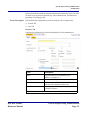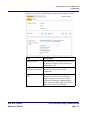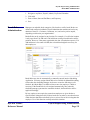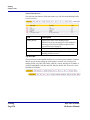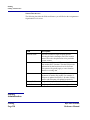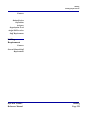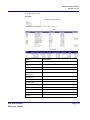
1
Feature Reference Manual Copyright 2008 MICROS Systems, Inc. Columbia, MD USA All Rights Reserved MD0015-024 Table of Contents Table of Contents Preface .................................................................................................................iv Declarations ....................................................................................................................... iv Document Overview ............................................................................................................v Product Overview.................................................................................................1 myLabor...............................................................................................................................1 System-wide Features ..........................................................................................................2 Basic Administration............................................................................................4 Overview..............................................................................................................................4 Locations..............................................................................................................................4 Reporting Hierarchies ..........................................................................................................6 Managing Users ...................................................................................................................9 myLabor Privileges............................................................................................................10 myLabor Reports ...............................................................................................................17 Questions?..........................................................................................................................19 Human Resources Administration .....................................................................20 Description.........................................................................................................................20 Features ..............................................................................................................................20 Organization Configuration ...............................................................................................21 Template Setup ..................................................................................................................23 Template Assignment ........................................................................................................24 Reason Codes.....................................................................................................................26 Employee Change Tracking...............................................................................................32 Skill Levels ........................................................................................................................34 Job Definitions ...................................................................................................................35 Child Labor Laws ..............................................................................................................42 Wage and Tip Laws ...........................................................................................................45 Employee Availability .......................................................................................................47 Store Work Hours ..............................................................................................................51 School Districts..................................................................................................................53 Payroll Banks .....................................................................................................................58 Job Category Master ..........................................................................................................61 Labor Category Master ......................................................................................................64 Human Resources Configuration .......................................................................68 Description.........................................................................................................................68 Page i of iii Table of Contents myLabor Feature Reference Manual Table of Contents Searching for Employees ...................................................................................................69 Employee Configuration Overview ...................................................................................69 Configuring Employees .....................................................................................................87 Human Resources Interface ...............................................................................92 Description.........................................................................................................................92 Screen Description .............................................................................................................94 Payroll Preprocessing Administration................................................................99 Description.........................................................................................................................99 Features ............................................................................................................................100 Organization Configuration .............................................................................................100 Labor Pay Rules...............................................................................................................102 Labor Pay Overtime Rules...............................................................................................109 Premium Pay....................................................................................................................112 Pay Period Calendars .......................................................................................................120 Break Rules Administration.............................................................................................121 Break Rules Location Assignment ..................................................................................123 Employee Privilege Administration.................................................................................127 Location Assignment .......................................................................................................130 Location Configuration....................................................................................................132 Work Rules ......................................................................................................................134 Premium Pay Rule Location Assignment ........................................................................135 Payroll Deductions...........................................................................................................136 Payroll Deduction Assignment ........................................................................................138 Payroll Preprocessing.......................................................................................141 Description.......................................................................................................................141 Time Cards.......................................................................................................................141 Time Card Summary........................................................................................................148 Close Labor Period ..........................................................................................................149 Reopen Closed Labor Period ...........................................................................................150 Enterprise Time Clock Application .................................................................151 Description.......................................................................................................................151 Download the TCA ..........................................................................................................152 TCA Portal Setup & Configuration .................................................................................154 TCA POS Configuration..................................................................................................154 Program the TCA Printer for RES 3700 ..........................................................................173 myLabor Feature Reference Manual Page ii of iii Table of Contents Table of Contents Enterprise TCA Functions ...............................................................................................176 Forecasting .......................................................................................................177 Description.......................................................................................................................177 Forecast Administration...................................................................................................178 Forecasting.......................................................................................................................193 Events...............................................................................................................................211 Staffing .............................................................................................................225 Description.......................................................................................................................225 Staffing Profiles ...............................................................................................................225 Staffing Administration ...................................................................................................228 Staffing Requirements .....................................................................................................229 myLabor Reports..............................................................................................231 Overview..........................................................................................................................231 Standard myLabor Reports...............................................................................232 Employee Phone List .......................................................................................................232 Employee Turnover .........................................................................................................232 HR Employee Master.......................................................................................................234 HR Employee Master Pay Rate .......................................................................................234 HR Document Expiration Report ....................................................................................236 Employee Job Summary Report ......................................................................................236 Employee Earnings Summary Report..............................................................................238 Job Code Summary Report ..............................................................................................238 Tip Exception Report.......................................................................................................240 Appendix A: Configuration Directory ..................................................................i Appendix B: Employee Change Tracking Options............................................ iii Index....................................................................................................................vi Page iii of iii Table of Contents myLabor Feature Reference Manual Preface Declarations Preface Declarations Warranties Although the best efforts are made to ensure that the information in this manual is complete and correct, MICROS Systems, Inc. makes no warranty of any kind with regard to this material, including but not limited to the implied warranties of marketability and fitness for a particular purpose. Information in this manual is subject to change without notice. No part of this manual may be reproduced or transmitted in any form or by any means, electronic or mechanical, including photocopying, recording, or information recording and retrieval systems, for any purpose other than for personal use, without the express written permission of MICROS Systems, Inc. MICROS Systems, Inc. shall not be liable for errors contained herein or for incidental or consequential damages in connection with the furnishing, performance, or use of this manual. Trademarks Acrobat Reader® and FrameMaker® are registered trademarks of Adobe Corporation. Microsoft®, SQL Server™, Excel®, Windows® are either registered trademarks or trademarks of the Microsoft Corporation on the United States and/or other countries. Design and Production This manual was written with Adobe FrameMaker. Printing History New editions of this manual incorporate new and changed material sine the previous edition(s). Minor corrections and updates may be incorporated into reprints of the current edition without changing the publication date or the edition number. myLabor Feature Reference Manual Edition Month Year Software Version 1st 2nd October Jun 2007 2008 1.5 4.0 iv Preface Document Overview Document Overview The following document discusses the features and functionality for the MICROS myLabor Product for labor management: 1. myLabor Human Resources Application (Configuration & Administration) Payroll Preprocessing Application (Configuration & Administration) Human Resource Interface 2. Enterprise Time Clock 3. Forecasting Module 4. Staffing Application MICROS has made its best effort to organize these three applications in the most logical manner. For more information on any MICROS eBusiness products, please speak to your Account Manager, a MICROS Regional Representative, or a Sales Manager. v myLabor Feature Reference Manual Product Overview myLabor Product Overview myLabor myLabor is an integrated human resources application designed to support the recurrent requirements of employee data management. The application operates via the Enterprise Information Portal (EIP) and is a virtually entirely web-based application. Its comprehensive modules help control your restaurants labor costs and maximizes productivity. myLabor allows you to maintain human resources employee files, support Payroll Preprocessing, generate staff scheduling, and has an enterprise time clock. It’s key features include: Integrated Human Resources Manages centralized employee information, including personal data, I-9 documents, tax filing data for federal, state, and local agencies, and other HR information Facilitates employee reviews and evaluation Maintains schedule availability and reports Complete Payroll Preprocessing Allows edits to time cards Supports vacation, sick, and other earnings information Considers minor employee specifications with respect to wages HR Interface Quickly migrate your existing Human Resources information by downloading the myLabor HR Template. Enter all existing HR data and import it back into the system in a matter of a few, convenient steps. Enterprise Time Clock Use the Enterprise Time Clock to communicate clock in and clock out information directly from the POS level to the Web Services Application. Located on the POS, time clock information is temporarily cached and, during preset intervals, is uploaded to the Internet. Time clock information is immediately uploaded to the Internet for better, more accurate time keeping functionality. In the event the storelevel cache is unavailable, the Enterprise Time Clock can open a channel to myLabor using an Internet connection and upload crucial time clock information. myLabor Feature Reference Manual Page 1 Product Overview System-wide Features Forecasting Forecasting is an intelligent business tool that assists you in the critical planning of your staffing, inventory, and production needs. Forecasts are created from many key historical inputs such as gross or net sales, discounts, cover counts, and menu item sales quantities, just to name a few. Forecasting provides high level visibility throughout the enterprise by displaying ‘rolled-up’ forecast values to the highest levels within the organization. Likewise, the tool provides ultimate enterprise control through definable rules limiting forecast deviation, “Forecast Score Cards”, and the approval process, to name a few. Forecasting is specifically designed to catapult your sales by eliminating product waste and streamlining your operational tasks. The Forecasting application allows users to apply historical data information to forecast future sales for the Scheduling application. Users can create, store, displays, and edit forecasts as the situation demands. Forecast inputs are derived from the POS historical data that is uploaded to the web-based Forecasting application. Forecasting allows the user to: maintain historical information based upon pre-determined intervals (usually System-wide Features 15 or 30 minutes) apply current week’s data and last year’s historical data aggregate forecasts for like historical types, such as bar sales vs. restaurant sales edit incorrect or inexact historical data prior to generating a forecast define historical information about events that affect business trends such as holiday, cultural/local events, or weather edit generated forecasts for a particular day part (ex. brunch or evening), day, or week by adjusting monetary values or percentages review the source data from which the forecast was generated control approval of forecasts by security access to the application The following section describes some standard features and tools that are available or applied throughout the myLabor application. Enterprise Information Portal (EIP) The Enterprise Information Portal (EIP - also referred to as mymicros.net) is the web-based Reporting and Data-Warehouse solution. It allows an owner/operator to review restaurant information through a browser over the Web in near real-time, with restaurants posting sales information every 15 minutes. This functionality has been applied toward the myLabor application. Labor management information will be uploaded to the web in 15 minute intervals, just as information from the web will be downloaded to the POS every 15 minutes. Page 2 myLabor Feature Reference Manual Product Overview System-wide Features Online Help myLabor has built in help on many of its pages throughout the portal. On many page there is a top menu bar: When you come to a page that has a Help button, clicking on it will open a pop-up window with the features and fields for that page defined. Help pages are not available on every page throughout the myLabor application, since many pages are self-explanatory. Security External security is provided by a number of industry-standard safeguards, including 128-bit SSL encryption of transmissions, Cisco Pix firewalls, and Oracle database security features. Also, MICROS uses Symantec Anti-Virus Software in addition to Symantec Anti-Virus Hardware. Remote Transfer Agent The Remote Transfer Agent (RTA)1 i which is sometimes referred to as the .Connect Agent, is the hardware used to transfer information from the POS level to the myMicros.net data warehouse and vice versa. The RTA works in typical clientserver fashion, providing information through the portal as requested by the user. The RTA must be downloaded and installed. If myLabor is being added on to an existing myMicros, iCare, or myInventory customer, chances are the RTA is communicating appropriately and there is no need to re-download the RTA. However, MICROS upgrades information and jobs sent via the RTA periodically and sometimes a new RTA is required for a system to continue running optimally. MICROS will inform users if and when new RTAs are required. Error Messages Throughout the configuration in myLabor, myTasks, and Forecasting, when incorrect actions are taken, you may receive an error message. These error messages have been provided to ensure the integrity of the system information. Messages appear due to some information entered that violates any system or business rules. Usually these error messages are received due to a required field being left empty. 1. The RTA is sometimes referred to as the .Connect Agent. These terms are used synony- mously. In this document, the term RTA will be used myLabor Feature Reference Manual Page 3 Basic Administration Overview Basic Administration Overview The myLabor System Administrator’s Guide is designed to assist and guide the organization’s System Administrator with all common tasks. There are tasks that are specific to myLabor just as there are tasks that are general to the MICROS eBusiness Product Suite. It is important that a System Administrator not only know his or her area of expertise, but also that they are well versed and fluent in the dayto-day administrative tasks. Common MICROS mymicros.net tasks include creating locations, establishing the reporting hierarchy, creating/modifying users and user roles, and assigning user privileges and reports. The following Basic Administration information is meant purely as an overview, not as step-by-step procedures. For information on setting up and configuring any of these in detail, please refer to the mymicros System Administrator’s Guide. Locations Generally, any System Administrator, or any appropriately privileged user, will be able to create new locations. However, any locations added after the initial implementation performed by the mymicros Implementation Group will be at an additional cost. Therefore, adding a new location in the portal does not mean that a new location will begin posting totals. There are two general steps required to creating new locations: 1. adding the location and 2. establishing the organizational hierarchy. The procedures mentioned here are described in detail in the mymicros System Administrator’s Guide. Please refer to it for further assistance. Basic Administration Page 4 myLabor Feature Reference Manual Basic Administration Locations Usually, the mymicros Implementation Group has already configured the enterprise with the locations and hierarchy as specified upon initial setup. However, if you need to add locations, you will be able to do so by navigating to Admin | Portal | Organizational Structure myLabor Feature Reference Manual Basic Administration Page 5 Basic Administration Reporting Hierarchies Reporting Hierarchies The Reporting Hierarchy is used to determine how locations will be grouped for reporting purposes. Locations can exist in more than one reporting hierarchy. This is because different users and user groups may have different reporting needs. For example, the ACME Corporation has fifteen table service style locations. However, within the ACME Corporation exists an Italian restaurant, a seafood restaurant, and a barbeque restaurant; also, these restaurants are spread out over 2 states, Kentucky and Tennessee. There are five of each type of concept (i.e., 5 Italian, 5 seafood, and 5 barbeque). Examine the following diagrams to understand how different reporting hierarchies might be needed to suit the ACME Corporation’s needs. 1. By Region/State - this diagram organizes the restaurants by their respective states (Kentucky vs. Tennessee. Basic Administration Page 6 myLabor Feature Reference Manual Basic Administration Reporting Hierarchies 2. By Concept/Style - this diagram shows locations sorted by concept, specifically, Italian locations grouped together, seafood locations grouped together, and barbeque grouped together. 3. By Concept and Region - this diagram takes the reporting hierarchies above and combines them. This is helpful in determining, for example, if the barbeque locations in Kentucky are more prosperous than the barbeque restaurants in Tennessee. myLabor Feature Reference Manual Basic Administration Page 7 Basic Administration Reporting Hierarchies All of the Reporting Hierarchies above show both the various reporting styles, as well as the various levels that can be used. For example, in the diagram above, some users will only be able to see the individual location reports, whereas others may only be able to see the Kentucky seafood restaurants, whereas yet another user will be able to see all the Kentucky locations. Only System Administrators, or appropriately privileged users, will be able to complete this task. There are three general steps that must be completed in order to create the most basic of Reporting Hierarchies. 1. Establish the Hierarchy Name - usually this is the enterprise name; 2. Create Reporting Levels - these are the levels that will be reporting to the Hierarchy created in Step 1; 3. Assign Levels/Locations - this step specifies which locations are reporting to which levels and which levels are reporting to the created hierarchy. When all levels and locations have been assigned, you will be able to use the filters on the overview page to sort and organize locations and levels: Basic Administration Page 8 myLabor Feature Reference Manual Basic Administration Managing Users Reporting Hierarchies can be created and modified by navigating to Admin | Warehouse | Reporting Hierarchies. The mymicros Implementation Group initially configures the reporting hierarchy to reflect basic reporting structure. The System Administrator, or an appropriately privileged user for the organization, is responsible for creating additional reporting hierarchies. For detailed instructions on how to create and maintain a reporting hierarchy, please refer to the mymicros System Administrator’s Guide. Managing Users After mymicros has configured the organization to be ready for use, four default user roles will be sent to the new myLabor customer. These user roles are: System Administrator - enterprise level user with full portal access; this user typically sets up users and user’s privileges Enterprise Manager - enterprise level user with portal access limited by the System Administrator (i.e., similar to the Sys Admin, but with less privileges) Store Manager - store-level user with access to limited number of store(s) information Download User - minimum access account for installation of the RTA After the myLabor piece is implemented for an organization/location, the organization will receive the passwords and information about these roles. From there it is recommended that these roles be assigned to new users as they are created. For example, an organization has Mike, Susan, and Lisa, all of whom have been assigned the role of Store Manager. All three users have different usernames and passwords, but possess the same user rights dictated by the Store Manager user role. myLabor Feature Reference Manual Basic Administration Page 9 Basic Administration myLabor Privileges Users can be created by navigating to Admin | Portal | Users | Users. The steps to create users can be found in the mymicros System Administrator’s Guide. User Roles User Roles can be created to manage users. User Roles are categories of users. User roles can be used as a shortcut for assigning privileges and user rights. Instead of having to assign individual user rights, a properly configured user role can be created and assigned when new users are added to the systems. For example, an “Employee” role can be created to provided limited user privileges, such as, only being able to see one’s own schedule. User Roles can be created by navigating to Admin | Portal | Roles | Roles. The steps to create user roles can be found in the mymicros System Administrator’s Guide. myLabor Privileges User rights must be restricted from both an overall portal perspective, as well as from a myLabor point of view. This section provides instruction for setting up the Enterprise Information Portal to use the myLabor Application. Included in this section are the steps to set up and assign myLabor-specific privileges and reports. The following privilege sets will be discussed in this area: Human Resources - specify what rights and abilities will be available to users in the Human Resources module Payroll Processing - specify what rights and abilities will be available to users in the Payroll Preprocessing module Forecasting - specify what rights and abilities will be available to users in the Forecasting module myLabor Privileges are administered the exact same way as General Privileges. Administration of myLabor Privileges are significant for a number of reasons. For example, labor management deals with sensitive information, like Social Security Numbers. Privileges can be established to determine which individuals will have access to that type of information and which individuals will absolutely not be able to see that type of data. Usually Portlet Administration is a task carried out by the System Administrator, however any appropriately privileged user will be able to perform this function. Basic Administration Page 10 myLabor Feature Reference Manual Basic Administration myLabor Privileges HUMAN RESOURCES PRIVILEGES Note myLabor Feature Reference Manual You will notice that when certain privileges are selected, others auto-select and gray out. This is because some privileges are eclipsed by others. Right/Privilege Description Can Add Employee Records Enable this option if the user/user role will be permitted to add employee records Can View Employee Records Enable this option if the user/user role will be able to view employee records Can Modify Employee Records Enable this option if the user/user role will be able to modify employee records Can Assign Employee to Another Store Enable this option if the user/user role will be able to assign an employee at one location to work at an alternate location Can Add Pay Rates Enable this option if the user/user role will be able to add hourly employee pay rates Can Modify Pay Rates Enable this option if the user/user role will be able to modify hourly employee pay rates Can View Pay Rates Enable this option if the user/user role will be able to view hourly employee pay rates Basic Administration Page 11 Basic Administration myLabor Privileges Right/Privilege Description HR Administrator Enable this option if the user/user role will have HR Administrative rights, i.e, be able to perform the functions in HR | Admin Can View Salaried Pay Rates Enable this option if the user/user role will be able to view pay rates for salaried employees PAYROLL PREPROCESSING PRIVILEGES Basic Administration Page 12 Right/Privilege Description Can View Employee Time Card Records Enable this option to allow the user/user role to view employee time card records Can Modify Time Card Records for Home Store Employees Enable this option to allow the user/user role to modify time card records for home store employees only Can Modify Time Card Records for non-Home Store Employees Enable this option to allow the user/user role to modify time card records for non-store employees only Can Add Employee Time Card Records Enable this option to allow the user/user role to add employee time card records Can Add Employee Other Pay Enable this option to allow the user/user role to add other pay to employees Can Close Labor Periods Enable this option to allow the user/user role to close open labor periods myLabor Feature Reference Manual Basic Administration myLabor Privileges Right/Privilege Description Can Reopen Closed Labor Periods Enable this option to allow the user/user role to reopen closed labor periods PP Administrator Enable this option to assign the user/user role as a Payroll Preprocessing Administrator FORECASTING PRIVILEGES There are three portlets which may have privileges configured in the Forecasting Module. You may configure privileges for Administrative tasks, Events, and general Forecasting tasks. Forecasting - Admin myLabor Feature Reference Manual Right/Privilege Description Use Basic Editor Enable this option to allow the user/user role to use the basic view as the forecast editor Use Advanced Editor Enable this option to allow the user/user role to use the advanced view as the forecast editor Can Generate Manual Forecast Enable this option to allow the user/user role to generate manual forecasts Can Approve/Reject Forecast Enable this option to allow the user/user role to the ability to approve/reject a generated forecast Basic Administration Page 13 Basic Administration myLabor Privileges Forecasting - Forecast: Basic Administration Page 14 Right/Privilege Description View Forecast Profiles Enable this option if the user role will be permitted to view forecast profiles Automatically enabled if Add, Edit, Delete Forecast Profiles is enabled Add, Edit, Delete Forecast Profiles Enable this option to allows user roles to add, edit, and delete forecast profiles Causes the View Forecast Profile privilege to enable and grey out View Assignments to Org Level Enable this option to allow user roles to view assignments to organization levels Automatically enabled if Add, Edit, Delete Assignments to Org Level is enabled Add, Edit, Delete Assignments to Org Level Enable this option to allows user roles to add, edit, and delete assignments to organization levels Causes the View Assignments to Org Level privilege to enable and grey out View Forecast Performance Enable this option to allow user roles to view forecast performances Automatically enabled if Add, Edit, Delete Forecast Performance is enabled Add, Edit, Delete, Forecast Performance Enable this option to allows user roles to add, edit, and delete forecast performances Causes the View Forecast Performance privilege to enable and grey out myLabor Feature Reference Manual Basic Administration myLabor Privileges Right/Privilege Description Access Role-based Edit Configuration Allows user roles the abiliyt to access role-based edit configuration Can define the Number of Weeks to retain the Forecast Enable this option to allow the user role the ability to specify the number of weeks a forecast will be kept for reference in th system Forecasting - Events:: Right/Privilege Description View the Events Definition Enable this option to give the user/user role read only permissions to events definition Add, Edit, Delete from Events Definition Enable this option to give the user/user role the ability modify the entries within events definition. The option View the Events Definition will automatically enable if this option is selected View the Events Calendar Enable this option to give the user/user role read only permissions to the events calendar Add, Edit, Delete from Events Calendar Enable this option to give the user/user role the ability read only permissions to the events calendar The option View the Events Calendar will automatically enable if this option is selected DEFINE MYLABOR USER PRIVILEGES 1. Navigate to Admin | Portal | Roles | Portlets myLabor Feature Reference Manual Basic Administration Page 15 Basic Administration myLabor Privileges 2. Select the appropriate user role (or user name) and click Configure 3. Select the Employees and click Edit Note Only one set of privileges may be modified at a time. 4. Modify the appropriate check boxes next to the portlet privileges according to the table below and click Save from the top menu 5. Repeat Step 3 for Payroll and the three portlets within the Forecast Module Basic Administration Page 16 myLabor Feature Reference Manual Basic Administration myLabor Reports myLabor Reports By now, the enterprise has probably already been established with the core mymicros reports. However, myLabor System Administrators will be able to assign myLabor Reports to users on an “as needed” basis. Note Please note that some myLabor Reports contain potentially sensitive information, such as employee Social Security Number, phone number, address, etc. Although efforts have been taken to “mask” sensitive material from unauthorized users, please be cautious report content when assigning reports to users/user roles. Available Reports The following reports are available for use with the myLabor Application: Employee Earnings Summary Job Earnings Summary Employee Phone List Employee Turnover Employee Job Summary HR Employee Master HR I9 Renewals HR Employee Master Pay Rate Job Summary Tip Exceptions For a detailed description of the myLabor Reports, please refer to the myLabor Reports Manual. The general steps to assign a report to a user or user role can be found in the mymicros System Administrator’s Guide. However, the steps to add myLabor Reports will be included here. ASSIGN REPORTS 1. Navigate to Admin | Warehouse | Reports | Report Roles 2. Select a user/user role and click the Select button 3. Click Add myLabor Feature Reference Manual Basic Administration Page 17 Basic Administration myLabor Reports 4. Use the Filter by Category list to view only myLabor Reports 5. Select the reports to be added to this user/user role - you may select more than one at a time 6. When you have selected all the reports you wish to assign to that user role, click Save 7. Repeat steps 2-5 for all user/user roles who require myLabor Report assignment Basic Administration Page 18 myLabor Feature Reference Manual Basic Administration Questions? Questions? myLabor Feature Reference Manual If any of the material discussed in this chapter is unclear to you, please check the mymicros System Administrator’s Guide. For further assistance, you may wish to contact your MICROS Account Representative. Basic Administration Page 19 Human Resources Administration Description Human Resources Administration Description In the Human Resources Administration module, the rules that govern the employment of individuals are configured. From labor laws to store hours, this module is your Human Resources “one-stop-shop”. These settings are generally considered “one-time” configurations and are usually established by the System Administrator. However, as the rules that govern employees change, the System Administrator reserves the right to modify and tweak existing rules as needed. It is generally recommended that these configurations be the responsibility of an experienced user(s). Note Features Depending on User Rights and Privileges, the topics in this section may be unavailable to you. If you have questions, please see your System Administrator for more information on these topics. Employees are restricted and managed by a group of rules and settings: Organization Configuration Template Setup Template Assignment Human Resources Administration Page 20 Wage and Tip Laws Employee Availability Store Work Hours myLabor Feature Reference Manual Human Resources Administration Organization Configuration Reason Codes Employee Change Tracking Skill Levels Job Definitions School Districts Payroll Bank Job Category Master Labor Category Master Child Labor Laws The following sections discuss these features in detail. Organization Configuration myLabor Feature Reference Manual In Organization Configuration, you determine how the organization behave with respect to information transferred from the POS and to the POS. In addition to this, you are specifying how employee information is interpreted and the rules that govern whether or not an employee will be accepted within the organization as a whole. Field Description Transmit to POS Enabling this option will transfer the social security number entered through web services down to the POS level PC Application Password Prefix Exclusion Entering a value in this field will prohibit users with that prefix from logging in to the web services application PC Application Password Must be Numeric Enabling this option will insist that any PC Application Password configured must be of a purely numeric format Administer POS Password Centrally Enabling this option will enforce the POS Password is administered from a central location Human Resources Administration Page 21 Human Resources Administration Organization Configuration Field Description Validate Payroll ID Before Uploading Employee An employee’s payroll identification number will be validated before any employee information will be uploaded from the POS if this option is enabled. Allow User Defined Payroll ID Enter a non-system generated payroll ID in this field. Ex. 3rd-party payroll companies with existing payroll ID numbers. Hire Date Maximum Number of Days in Past Define the number of days in the past an employee may be hired. For instance, an individual was hired on a date that falls one day after the end of a pay week. The the hire date may be set to a day before so that the new employee is included the pay cycle. Hire Date Maximum Number of Days in Future Define the number of days in the future an employee may be hired. For instance, an individual was hired on one day, but cannot start working until after his current job ends. The hire date may be set to a day in the future so that the employee’s status is recorded. Enabling CONFIGURE AN ORGANIZATION 1. Navigate to myLabor | Human Resources | Admin | Organization Configuration 2. Modify/Enable the fields as necessary according to the table information above 3. Click Save Human Resources Administration Page 22 myLabor Feature Reference Manual Human Resources Administration Template Setup Template Setup Deciding what employees see when in the Human Resources Configuration screens is determined by the organization. Template Setup works in conjunction with the Template Assignment functionality. A System Administrator may have the ability to see and manipulate all fields, whereas other fields may be greyed out or readonly by a store manager. Templates may be created and assigned to certain user roles in order to specify these fields. Essentially, a template or raw xml data can be downloaded, modified, and then uploaded back into the application. After the template has been modified and uploaded, it is then assigned to certain user roles. Screen Description The screen is comprised of only a few functions. Download Template - selecting this option will allow you to download the raw xml where you can make changes; you will need to specify a working folder on your hard drive as the template’s destination Browse - enter the path to the saved and modified template; use the button to open up an Windows Explorer window to search for the correct file; when you are finished, you will need to select the Upload Template option Upload Template - select this option if you have a modified template that you would like to upload back into the myLabor Application; you will need to have navigated to the folder on your hard drive where you saved your modified template by using the Browse option Cancel - select this option if you would like to quit your current action Help - select this to open a help page within the myLabor Application Enabling DOWNLOAD A TEMPLATE 1. Click Download Template myLabor Feature Reference Manual Human Resources Administration Page 23 Human Resources Administration Template Assignment 2. Click Save 3. Enter the path where the template will be saved on your computer 4. Open the template and make any adjustments 5. Save the template UPLOAD A TEMPLATE 1. Enter the path to where the template has been saved on your computer or use the Browse button to open a Windows Explorer window where you can manually search for your template 2. Click Upload Template Template Assignment Template Assignment works in conjunction with the Template Setup functionality. After the downloading, modifying, saving, and uploading the template, it then needs to be assigned to certain user roles. This action takes place in the Template Assignment module. Human Resources Administration Page 24 myLabor Feature Reference Manual Human Resources Administration Template Assignment Screen Description The Template Assignment screen is a relatively straightforward screen. User roles will be listed and the System Administrator will be able to use the drop-down lists to specify which template will be in effect at that user’s home store versus what template will be in effect at that user’s away store. Typically, a user role like System Administrator would have the most functionality provided to him/her based on template settings. The System Administrator should be able to modify and adjust every field. Store Managers, on the other hand, might not need as many fields, therefore a specially configured template might be better for them. If no template is assigned, then an error will be produced when the user attempts to view the portal. This is because the system cannot determine what type of information that user/user role is supposed to see. myLabor Feature Reference Manual Human Resources Administration Page 25 Human Resources Administration Reason Codes Reason Codes Reasons are sets of predetermined descriptors. There are two types of Reasons Codes. Reasons in the Payroll Administration portion of the myLabor application handle time card adjustments, availability requests, etc. Reason Codes in the Human Resource portion of the myLabor application deal with termination and leave of absence. When an employee performs an operation that might require a reason, like going on break or being late for a shift, a reason might need to be selected. Another example is a time card adjustment. Employees might have to select from a list of reasons, like Late, Early, On Paid Break, Forgot to Clock-In/Out, etc. These reason codes are generated at the myLabor web-based level and then transferred down to the POS for employee selection. Whatever the employee chooses will be uploaded to the system, and recorded on his or her time card. Reason Code Types Reason Code Types are used to categorize Reason Codes. Reason Types are hard coded into the system and can be used to classify Time Card Adjustments, Leave of Absence, Termination, Forecasting, Availability Requests, and Pay Rate Changes. TIME CARD ADJUSTMENTS Create the reasons why a time card might need to be adjusted, like late from break or left early due to illness. These justifications help explain why the System Administrator or Store Manager had to enter an employee’s time card record and update it manually. Human Resources Administration Page 26 myLabor Feature Reference Manual Human Resources Administration Reason Codes EMPLOYEE TERMINATION When employees are terminated, it is suggested that a reason be provided. Sometimes terminations are under good, professional circumstances, and other times they ar not. Providing a reason or explanation as to why an employee no longer works at a location helps employers in the long run. For example, a restaurant has 6 locations in one county. The North County location hired Ted who shows up for his first week of shifts; Ted then decides to “No Call No Show” for 3 shifts, resulting in immediate termination. Ted, who doesn’t want to buy a new uniform to a different restaurant, drives across town to another location. When Kristin, the hiring manager, pulls up Ted’s records, she’ll see the “No Call No Show” reason code and think twice before hiring him. These reason codes do not necessarily need to be negative in nature. A reason code could be “Going Back to College” or “Moved Out of the Area”. For example, if a minor employee’s parents decide to move to another state, the minor employee might wish to continue working for the same restaurant when he gets to his new home town. When the hiring manager at the new restaurant pulls up the termination record and sees “Moved Out of the Area”, he or she may take that as a sign of a good worker and hire the minor employee on the spot. LEAVE OF ABSENCE (LOA) AND DAYS ALLOWED If an employee’s status changes (this takes place in the Employee Configuration module) to Inactive due to leave of absence, the need for an explanation might be necessary. It is in the Reason Codes module where the reasons are created and contained. When defining reasons to use with leaves of absences, you must also indicate the maximum time an employee can be given based on the law or company policies. For example, one company may offer 5 days of bereavement off for an immediate family member, while another company might offer 7 days off. However, if a national chain has a maximum of 3 days, but is in a state where the minimum is 5 days, then the company must defer to the state law. AVAILABILITY REQUEST Availability Requests are intended to be used with the Employee Self Service feature. The Employee Self Service feature allows employees the means by which to provide their work availability, check their schedules, request time off, and exchange shifts with other employees. Employers can set up reasons for employees to classify time off requests, like Out of Town, Sick, etc. When employees are unavailable, the data will be available in the Scheduling Application. At this time, both the Scheduling Application and Employee Self Service is still under development. myLabor Feature Reference Manual Human Resources Administration Page 27 Human Resources Administration Reason Codes PAY RATE CHANGE From time to time it may be necessary for a manager to modify the pay rate for an employee. For example, if an employee is not scheduled to work, but the manager agrees to $1.00 extra per hour if the employee works on a day off. Again, this reason is used to track, justify, help explain why an employee’s pay rate was manually changed. FORECASTING These Reason Codes are used for the Forecasting Application. The Forecasting Application is able to generate forecasts for scheduling, staffing, sales, etc. based on data provided to the system. OTHER PAY TYPE Other Pay Types Reason Codes are used to explain why an individual may be receiving a pay tha is not his/her typical or usual wage rate. Other Pay is added directly to employees via Payroll Preprocessig | Time Cards. When creating an Other Pay Type reason code, you will be able to specify options to better define the reason code. These options are: Require Number of Hours - enable this option if quantity of hours must be entered when adding other pay to an employee’s earnings Include in Labor Calculation - enable this option if the cost of other pay should be factored into labor costs for the location Note If this option is not selected, then, when labor is calculated, there will be a variance between schedule labor costs and actual labor costs. Require Amount Entry - enable this option if a monetary amount must be entered when adding other pay to an employee’s earnings Default Rate to Selected Job - enable this option if other pay wage rate is the same the hourly rate for the job Allow Rate Override - enable this option if the other pay rate may be overriden. For example, if the Default Rate to Selected Job is selected and the rate is $8.00, then $8.00 6.00 will populate the Pay Rate. However, this field will be editable. If Allow Rate Override is not selected, then the pay rate will not be editable. Enabling CREATE A TIME CARD ADJUSTMENT 1. Navigate to myLabor | Human Resources | Admin | Reason Codes 2. Select Time Card Adjustment and click Select 3. Click Add from the top menu bar Human Resources Administration Page 28 myLabor Feature Reference Manual Human Resources Administration Reason Codes 4. Enter the name for the Time Card Adjustment Reason Code 5. Enable the Default option if necessary 6. Save CREATE AN EMPLOYEE TERMINATION CODE 1. 2. 3. 4. Navigate to myLabor | Human Resources | Admin | Reason Codes Select Employee Termination and click Select Click Add from the top menu bar Enter the name of the Reason Code in the field provided 5. Save CREATE LOA AND DAYS ALLOWED REASON CODE 1. 2. 3. 4. Navigate to myLabor | Human Resources | Admin | Reason Codes Select Leave of Absence and click Select Click Add from the top menu bar Enter the name of the Reason Code and the maximum number of days allowed off in the fields provided 5. Save CREATE AVAILABILITY REQUESTS 1. Navigate to myLabor | Human Resources | Admin | Reason Codes 2. Select Availability Requests and click Select 3. Click Add from the top menu bar myLabor Feature Reference Manual Human Resources Administration Page 29 Human Resources Administration Reason Codes 4. Enter the name of the Availability Request 5. Save CREATE A PAY RATE CHANGE 1. 2. 3. 4. Navigate to myLabor | Human Resources | Admin | Reason Codes Select Pay Rate Change and click Select Click Add from the top menu bar Enter the name of the Pay Rate Change 5. Save CREATE FORECASTING REASON CODE 1. 2. 3. 4. Navigate to myLabor| Human Resources | Admin | Reason Codes Select Forecasting and click Select Click Add from the top menu bar Enter the name of the Reason Code and specify the Reason Category (see below) from the drop-down list 5. Save CREATE FORECASTING REASON CATEGORY If no Forecasting Reason Categories exist, follow the instructions below: 1. Navigate to myLabor | Human Resources | Admin | Reason Codes 2. Select Forecasting and click Select Human Resources Administration Page 30 myLabor Feature Reference Manual Human Resources Administration Reason Codes 3. Select the Reason Categories 4. Click Add and enter the name of the reason category 5. Save These Forecasting Reason Categories will appear in the Forecasting Reason Code drop-down list. CREATE OTHER PAY TYPE REASON CODE 1. Navigate to myLabor | Human Resouces | Admin | Reason Codes 2. Select Other Pay Type and then click Select from the top menu bar 3. Select Add from the top menu bar myLabor Feature Reference Manual Human Resources Administration Page 31 Human Resources Administration Employee Change Tracking 4. Enter the name of the Other Pay Type reason code and enable the check boxes next to the appropriate options 5. Save Employee Change Tracking Employee Change Tracking is used to monitor changes made to employee records. When employee information is modified, a record is generated and is used to populate a report. This report details the change itself, as well as the date of the change and the individual who made the change. This feature can be used in many situations. For instance, Chrissy Smith has recently married and decided to take her new husband’s last name of Peters. The manager accesses the record, but accidentally updates Christy Smith’s last name. If changes to last name are being monitered, then the report will show the update to Christy Smith’s record rather than Chrissy’s Smith’s record. Another example of when this may be useful is if a disgruntled manager accesses the system with the intent of destroying human resources information, like social security numbers or banking information. If these fields are being monitered, then a record of the change is preserved. The data can be reverted back to its accurate state. This information will be viewable on the Employee Change Tracking Report. Within the Employee Change Tracking Module, you will be required to select a table, or “category”, as well as specify what the field name from that table will be. Table/Category options include: Job Rate Employee POS Configuration A number of field names exist for the Tables listed above. For the list of available options for the tables, please refer to “Appendix B: Employee Change Tracking Options” . Human Resources Administration Page 32 myLabor Feature Reference Manual Human Resources Administration Employee Change Tracking INACTIVE EMPLOYEE CHANGE TRACKING RECORDS There are three states for Employee Change Tracking records: (1) Active, (2) Deleted, or (3) Inactive. If an Employee Change Tracking record is tracking modifications, then it is considered Active. If an Employee Change Tracking record has never collected information, nor posted that information to the database, then that Employee Change Tracking record may be deleted using the Delete option from the top menu bar. However, once an Employee Change Tracking record has posted any type of information to the database, the record may only be set to Inactive. To see Inactive records, you may push the Toggle Display Inactive Records button. Otherwise, the overview page will only display Active records. Screen Overview Below is an example of how the typical Employee Change Tracking screen will appear: Note myLabor Feature Reference Manual If you elect to edit an existing Change Code, you will only be able to update the name; table and field name become uneditable fields. Field Description Change Code Displays the “code” or “common description” of the component being monitered. 36-character alphanumeric limit Table Displays the name of the table or category of fields is being monitored Options include Job Rates, Employee, or POS Configuration Field Name Displays the field name or the component being monitored Options are dependent on selected table Human Resources Administration Page 33 Human Resources Administration Skill Levels Field Description Inactive Date Displays the inactive date of the employee change tracking record (if any) Toggle Display Inactive Records Push this button to view any inactive records Enabling ESTABLISH AN EMPLOYEE CHANGE TRACKING RECORD 1. 2. 3. 4. 5. 6. Skill Levels Navigate to myLabor | Human Resources | Admin | Employee Change Tracking Select Add from the top menu bar Enter a Change Code Select a Table (category) Select a Field Name (component) to be monitored Select Save from the top menu bar Skill Levels rate how well an employee performs at job. Employee advancement is often based on attainment of a particular job skill level.Skill Levels are assigned to employees during Employee Configuration to rate an employee’s proficiency at a particular job. For example, skill levels might be Trainee, Novice, Proficient, Expert. Within those categories there may be sub-categories of 10-1, 10 being the least proficient and 1 being expert. Therefore, it’s possible to have a Level 1 Novice whose next “promotion” would be a Level 10 Proficient. Human Resources Administration Page 34 myLabor Feature Reference Manual Human Resources Administration Job Definitions Enabling DEFINE A RESTAURANT’S SKILL LEVELS 1. 2. 3. 4. 5. 6. Navigate to myLabor | Human Resources | Admin | Skill Level Click Add from the top menu bar Enter a name for the Skill Level Enter an integer for the Skill Level (1-10) Define a Skill Level Value Save MODIFY AN EXISTING EMPLOYEE’S SKILL LEVEL The following procedure is used when configuring employees from within the Human Resources Employee Configuration screen. Further information on this step may be found in the myLabor User Manual. 1. 2. 3. 4. 5. 6. Job Definitions Navigate to myLabor | Human Resources | Employee Configuration Search for and select the appropriate employee Navigate to the Location Configuration Tab | Job Rates Sub Tab Select the correct Job Code Name from the drop-down list Select the new Skill Level from the Skill Level drop-down list Save Jobs are defined in the Employee Administration module and assigned to employees in Employee Configuration. Each employee is assigned one or more jobs and have one primary job per location. A job is an accounting entity that enables the system to track the labor activity of a group of employees by their work category. Jobs are used for linking hourly employees to a specific wage rate when they are clocked in, and for grouping labor hours and costs into job categories for reports on labor cost analysis. At this time, users are required to specify the revenue center when creating job definitions. If revenue center were permitted to be left blank, then, when myLabor totals are synched to the RES database, a mismatch would exist and . To resolve this, revenue center specification is mandatory. myLabor Feature Reference Manual Human Resources Administration Page 35 Human Resources Administration Job Definitions Job Types Hourly jobs are paid by the hour, typically at the prevailing minimum wage or above. Salaried jobs provide employees with pay that does not fluctuate regardless of how many hours the employee works. For example, a dishwasher earning $9.50/ hr who works an 35 hours a week will make $332.50, whereas a manager who makes a salary of $29,000/yr. will make $557.69 a week, regardless if he/she works 10 hours or 50 hours. Pay Rates These options allow for the setting of the appropriate pay rates for the job. For example, the minimum wage for a hostess might be $5.75/hr. in the state of Maryland. However, a location may choose to set the default pay rate at $7.50, which means that starting hostesses will always make $1.75 more than the Maryland minimum wage. Assign to Locations After jobs are created, they should be assigned to locations. Since not every location may have the same needs, not all jobs necessarily need to be assigned to all locations. This is, however, always an option to assign job rates on a total organizational level. Human Resources Administration Page 36 myLabor Feature Reference Manual Human Resources Administration Job Definitions For example, a small chain of restaurants offering alcoholic beverages is unable to acquire a liquor license at one of their locations, so the owners decide to install a coffee bar instead. The organization can therefore choose to not have the jobs of bartender, bar back, or cocktail waitress assigned to the location without the liquor license and can create and substitute a job like “baristas” (a.k.a. coffee bar server). Since none of the other restaurants have this coffee bar, it seems unlikely that the other locations would want to assign the job role of barista. Therefore, the job role of barista only exists at the one, special location. Also, jobs can be configured by location, which means that default specifications need not necessarily be applied. For instance, two locations may both have the job of “line cook”. At one location, the age requirement for line cook is 16 years and the pay rate is $6.00/hr. At another location, the age requirement for the same line cook is 18 years and the pay rate is $6.50/hr. Both of these locations use the same enterprise-wide job definition, line cook, but configure it differently at their locations. When assigning certain jobs to locations, special pay rates for hourly employees may also be assigned. Like the example of our liquor-less coffee bar above, baristas might not require the same amount of experience versus that of a well-trained bartender; therefore, the owners may decide that the barista should only make $7/ hr. as opposed to the liquor bartenders who make $9/hr. Screen Description GENERAL TAB On the General Tab, you will establish the Job Name, the Job Category, the Labor Category, if there is an Overriding Employee Class, define a Revenue Center, determine Clock-In Privilege, as well as specify the minimum age required to perform this job. You will also specify how the employee will declare their tips, if the position is a tipped position. myLabor Feature Reference Manual Human Resources Administration Page 37 Human Resources Administration Job Definitions Field Description Job Name Each job is identified by the name (ex. Salaried Manager, Bartender, Hostess, Line Cook, etc.). Job Category This field provides a means for grouping several jobs together for reporting purposes. For example, dishwashers, chefs and cooks may be grouped together in a job category called Kitchen Staff. Job Categories are uploaded from the POS. Labor Category This field of for the labor category for reporting the hours worked at this job (ex. Tipped Employees, Non-Tipped Employees). Overriding Employee Class This field allows you to select an employee class whose privileges will override an employee’s normal class when working this job. Options for this field are uploaded from mymicros. For example, Maggie, the assistant manager is off on Monday evenings. Chris, the head waiter, works as the assistant manager on those nights. Christ is a member of the “Waiters” employee class, which allows him a limited set of privileges. On Monday evenings though, Chris clocks in and selects the job “Asst Mgr”. When he does, that job overrides his employee class and links him to the employee class “Managers”. As long as he is clocked in as Asst Mgr, Chris is able to use the privileges of theManager employee class Revenue Center This field is the Revenue Center in which the job is effective. Clock-In Privilege This is the privilege that an employee must have in order to clock-in for this position. Clock-in privileges are assigned to employee classes in Employee Configuration module in the POS Configuration section under the Location Configuration Tab. Human Resources Administration Page 38 myLabor Feature Reference Manual Human Resources Administration Job Definitions myLabor Feature Reference Manual Field Description Minimum Age If there is a minimum age require for this job (ex. bartender must be 21 years old to pour alcohol), then it should be entered here. Entering it here will restrict the job from being assigned to employees who are not old enough to perform those tasks. Check Box Options Declare direct tips on clock out - this option applies if this job requires declaration of direct tips on clock out. Employees working this job will be prompted to declare their direct tips when clocking out. Direct tips are tips received from guests. Declare indirect tips on clock out - this option applies if the job requires declaration of indirect tips on clock out. Employees in this job will be prompted to declare their indirect tips when clockout out. Indirect tips are tips received from other employees. Allow early or late clock out - this option allows employees working this job to clock out early or late, even when their employee class is not privileged to do so. Print tips declared on clock out - this option causes a tips declared chit to print when an employee working this job clocks out. The chit shows the total amount of tips declared by the employee for that shift. Subject to Tipped Credit - this option defines tipped jobs for calculating the tip credit. Select this option if an employee in this job receives direct or indirect tips. Human Resources Administration Page 39 Human Resources Administration Job Definitions TYPE TAB New jobs must be associated with a job type. On this tab you will specify whether the job is hourly or salary. If the job is hourly, the rates should be entered. Overtime levels as well as effectivity dates are also established in this module. HOURLY RATES Default Regular Rate - the default pay rate is the normal starting pay for this position. This can be overridden by the override regular rate. Pay rate changes apply to future time clock entries. Current and past time clock entries remain at the rates that were in effect when the occurred. Minimum Regular Rate - this field defines the minimum pay rate. It is the lowest starting pay for this position. Maximum Overtime Rate - this field defines the maximum overtime rate. It is the highest overtime pay for this position. Maximum Regular Rate - this field defines the maximum pay rate. It is the highest non-overtime pay for this position. OVERTIME LEVELS These options are used to determine which overtime levels apply toward this job. A location may have up to four overtime levels. Note These labels can and will change as overtime levels are defined. For example, if you create overtime level 1 and call it “Time and a Half”, then the label “Time and a Half” will appear next to these check boxes. Enabling CREATE A JOB DEFINITION 1. Navigate to myLabor | Human Resources | Admin | Job Definitions 2. Click Add 3. On the General Tab: Human Resources Administration Page 40 myLabor Feature Reference Manual Human Resources Administration Job Definitions (Required) Enter the job name, job category, and labor category (Optional) Specify overriding employee class, revenue center, minimum age, clock-in privilege, and any checkbox options 4. On the Type Tab: (Required) Specify Hourly/Salary and enter an effectivity date (if Hourly, enter default regular rate) (Optional) Specify Overtime Levels and/or any other rate information (Hourly only) ASSIGN TO A LOCATION 1. Navigate to myLabor | Human Resources | Admin | Job Definitions 2. Search for and select the jobs to be assigned and click Assign to Location from the top bar menu 3. Select the location(s) where the Job will be assigned from the left pane and specify minimum age, effectivity dates, overtime levels, and/or rate changes that may override the default enterprise level settings on the right 4. Save Note myLabor Feature Reference Manual This task can only be performed after jobs have been created. Human Resources Administration Page 41 Human Resources Administration Child Labor Laws Child Labor Laws When accessing the Child Labor Laws module, you are able to add a child labor law by clicking Add from the top menu bar. The page you are directed to has three tabs: General, Overtime, and Work Restrictions. On these tabs, you can set up multiple age ranges (ex. 14-15, 16-17) using the minimum and maximum age fields to parallel the laws of your state. These tabs also allow you to define the maximum consecutive days that a minor is allowed to work, assign overtime rules, exclude minors from Sunday work, and require a Work Permit and/or Age Certificate. Screen Description GENERAL TAB On the General Tab, the functions include entering the name of the Child Labor Law, setting minimum and maximum ages, requiring Work Permit and/or Age Certificate, enabling the Sunday exclusion, as well as setting effectivity dates for the Child Labor Law. Human Resources Administration Page 42 myLabor Feature Reference Manual Human Resources Administration Child Labor Laws Work Permits & Age Certificates Some jurisdictions require a Work Permit and/or Age Certificate for each minor that is employed. Although Work Permits & Age Certificates vary from jurisdiction to jurisdiction, generally they are issued by a representative of local government (ex. school official, high school guidance counselor, etc.). These permits/ certificates validate the minor’s age and delineate the scope of duties that the employee may (or may not) be allowed to perform. Age requirements may also differ between jurisdictions. For example, some stores may require any employee under the age of 18 to possess a Work Permit and/or Age Certificate, while others may require permits/certificates for only 16 and under. Since Work Permits & Age Certificates apply only toward some employees, configuring the Work Permit requirement occurs on the General Tab of the Child Labor Laws module. If this option is selected, the Work Permit number and expiration date must be entered the Employee Configuration module for any employee whose birth date (which is also entered in Employee Configuration) falls within the age range. OVERTIME TAB On the Overtime Tab, you can specify which Overtime Pay Rules apply to the Child Labor Law being created. Only Overtime Pay Rules specifically created for minor employees or employees subject to work restriction will appear on this page Overtime Rules Overtime rules define when and how much overtime pay an employee receives. For example, state labor law may require that employees be paid time-and-a-half for working over 40 hours a week. Overtime rules are defined in the Payroll Administration portion of the myLabor Application. However, they are assigned to Child Labor Laws in the Child Labor Laws module. myLabor Feature Reference Manual Human Resources Administration Page 43 Human Resources Administration Child Labor Laws WORK RESTRICTIONS TAB Use this tab to specify any restrictions that apply to work arrival and departure times, maximum daily and weekly hours, and maximum days per week for employees who are affected by Child Labor Laws. These restrictions may be extended further to include non-school days vs. school days. Enabling DEFINE A CHILD LABOR LAW 1. Navigate to myLabor | Human Resources | Admin | Child Labor Laws 2. Click Add from the top menu bar 3. On the General Tab: Enter the name for the Child Labor Law (ex. Kentucky Child Labor Law) Specify Minimum and Maximum Age Ranges Enable the Age Certificate Reqd option (to require an Age Certificate) Enable the Work Permit Reqd option (to require a Work Permit) Enable Sunday Exclusion (if minor employee is not eligible to work Sundays) Assign Effectivity Dates (you do not necessary need an end date) 4. On the Overtime Rules Tab, enable any/all overtime rules that have been created for this Labor Laws 5. On the Work Restrictions Tab, use the available drop-downs to establish arrival/departure times, min/max hours per day and per week, and max consecutive days of work for both school and non-school days (if applicable) 6. Save Human Resources Administration Page 44 myLabor Feature Reference Manual Human Resources Administration Wage and Tip Laws Wage and Tip Laws Wage and Tip Laws define the parameters that reflect the requirements pertaining to minimum wages and tip credits. Use Wage & Tip Law options to ensure compliance with federal and state laws when hiring, scheduling, or calculating employee pay. Note Minimum Wage Tip Credit Child Labor Laws are configured in a separate module of the myLabor Application. Child Labor Laws are labor laws in the general sense of the term; however, they have been broken out to ensure proper attention is given to them. Overtime Pay Rules are defined in the Payroll Administration portion of the myLabor Application. The prevailing state or federal minimum wage law that favors the employee becomes the basis for wages throughout myLabor. When the minimum wage is changed in this module, all wages that fall below the new minimum wage will be updated. This applies to the job rate and employee override functionality. Tip credit is a percentage or monetary amount (set by federal or state law) that may be deducted from the minimum wage of a tipped employee (i.e., employees who receive tips). The law that favors the employee is honored. For example, in one state, the allowed tip credit is 50% or $3.09. This means that an employee may pay an employee $3.08/hr. (rather than the $6.15 minimum wage) as long as the employee receives enough tips during a payroll period to earn the minimum wage for each hour worked. If the employee’s combined earnings (i.e., wage, as adjusted by the tip credit, plus tips) average out to below minimum wage, the employer must make up the difference. A Tip Exception report may be run to show any employees whose wages and declared tips are less than minimum wage. myLabor Feature Reference Manual Human Resources Administration Page 45 Human Resources Administration Wage and Tip Laws Since tip credits are determined on a state-by-state basis, it is necessary to refer to relevant state documentation on this issue, or you may refer to the Department of Labor Website information regarding tip credits at www.dol.gov. Screen Description There are only two screens in the Wage & Tip Credit module, and it is relatively straight forward. The first tab is an overview page. The second screen is the add/ edit screen. On the Add/Edit Wage & Tip Law tab, you will be required to enter a name as well as the minimum wage in the entry field labeled “Minimum Wage”. Other fields are optional, and your needs will determine which fields should have data in them. Please notice the red arrows next to the names of the Wage & Tip Names: When clicked, the Wage & Tip Name will expand showing more detail: Human Resources Administration Page 46 myLabor Feature Reference Manual Human Resources Administration Employee Availability Enabling SET MINIMUM WAGE AND/OR TIP CREDITS 1. Navigate to myLabor | Human Resources | Admin | Wage & Tip Credit 2. Click Add from the top menu bar 3. On the General Tab: Enter Name in the field provided (suggested) (Required) Enter a Minimum Wage in the field provided (Optional) Enter a Maximum Tip Credit Amount in the field provided (refer to state requirements) (Optional) Enter a Maximum Tip Credit Percentage in the field provided (refer to state requirements) Enter Effectivity Dates (only “From” is required) 4. Save Employee Availability myLabor Human Resources provides an area in which to configure employee availability. Availability works hand-in-hand with the Scheduling Application for the generation of schedules. When accurate employee availability exists, the Scheduling Application is able to take the data in the system and create a comprehensive schedule at the click of a button. Availability is based on both the employee’s provided availability, as well as the organization’s work hours and work rules applicable to that location. Availability is classified by one of three categories (labeled as Time Segments in the UI): 1. Preferred Time - the times/shifts the employee has requested to work 2. Unavailable Time - the times/shifts the employee will not work and has designated as unable to work 3. On Call Time - the times/shifts the employee will not typically work, but is available for scheduling is need be myLabor Feature Reference Manual Human Resources Administration Page 47 Human Resources Administration Employee Availability For employees who have regimented schedules for various reasons, like needing the coincide with child care or other jobs, the Employee Availability feature helps to alleviate the stress surrounding schedules. Employee Availability, which has traditionally been provided to scheduling managers on scraps of paper, is a potentially error filled job. Since myLabor is able to save availability, creating a schedule is simpler, quicker, and a lot less stressful. .Availability times do not need to be configured for every minute of every day. If nothing has been entered for that employee, then that employee will neither be considered available or unavailable for certain shifts and will be scheduled randomly. Availability “Time Segments” for Preferred Time and On Call Time must not overlap Unavailable Time. If an overlapping time is entered into the system, an error message will appear and the data will not be saved. For example, an employee may not have a Preferred Time set as Monday 4:00 PM until 9:59 PM and an Unavailable Time configured as Monday 12:00 PM until 4:59 PM Screen Description The following describes the various screen elements on Employee Availability screen: Human Resources Administration Page 48 myLabor Feature Reference Manual Human Resources Administration Employee Availability The Employee Availability screen has two panes: 1. Employee Work Rules 2. Employee Availability EMPLOYEE WORK RULES As mentioned, work rules also play a part in determining an employee’s schedule. Work rules, which can be configured in myLabor | Payroll Preprocessing | Admin | Work Rules, create guidelines for number of hours worked per day and per week. However, on the Employee Availability screen, these values are meant solely as a guideline. If, an employee needs to work more hours or less hours per day/week, then those updates can be made on this page and saved for that individual employee. EMPLOYEE AVAILABILITY The following table describes the fields on the right side of the screen: Field Description Add Button Click this button to add a new availability record for the employee Delete Button Highlight a row to be deleted and click this button Cancel Button Click this button to delete any newly added rows that do not have values specified Time Segment Select the category of employee availability (Preferred Time, Unavailable Time, On Call Time) Start Day of Week Specify the start day for this employee’s time segment From Time Specify the start time for this employee’s time segment End Day of Week Specify the end day for this employee’s time segment To Time Specify the end time for this employee’s time segment Enabling CONFIGURE EMPLOYEE AVAILABILITY 1. Navigate to myLabor | Human Resources | Admin | Employee Availability 2. Search for and select the employee to be configured myLabor Feature Reference Manual Human Resources Administration Page 49 Human Resources Administration Employee Availability 3. Click the Add button to reveal the drop-down lists for availability configuration 4. Use the drop-down lists to specify Time Segment, Start Day of Week, From Time, End Day of Week, To Time - all fields are required 5. Click Add to add the next record and repeat step 4 for all other employee availability specifications 6. Save Human Resources Administration Page 50 myLabor Feature Reference Manual Human Resources Administration Store Work Hours Store Work Hours myLabor Feature Reference Manual The Store Work Hours module allows you to set up and enter the hours and days of operation for you restaurant. Not all locations in an organization might have the exact same hours. For example, a stand alone coffee shop might stay open until 9:00 PM, but a coffee shop in an office building might close at 4:000 PM. Therefore, in this area, you can establish all the store hours necessary, days of operation (some stores might be closed for special holidays or Sundays), and organize them by location. Human Resources Administration Page 51 Human Resources Administration Store Work Hours Screen Description GENERAL TAB The General Tab is relatively straight forward. On this tab, you use the drop-down lists to establish start and end times for the organization for each day of the week. You will also be required to enter a name for the work hours. ASSIGN LOCATIONS TAB On the Assign Locations Tab, you can select the locations where the store hours that have been configured will be assigned. At only these locations will this feature take effect. Human Resources Administration Page 52 myLabor Feature Reference Manual Human Resources Administration School Districts Enabling SETUP STORE WORK HOURS 1. 2. 3. 4. Navigate to myLabor | Human Resources | Admin | Store Work Hours Click Add from the top menu bar Enter a name for the Store Work Hours Use the drop-down lists provided to specify start/end times for every day of the week 5. Save ASSIGN STORE WORK HOURS TO LOCATIONS 1. 2. 3. 4. 5. School Districts Navigate to myLabor | Human Resources | Admin | Store Work Hours Select the Store Work Hours to be assigned and click Edit Select the Assign to Locations Tab Use the checkboxes to select the location(s) Click Save from the top menu bar School Districts can be entered into the myLabor Application to track the districts that employees may live in or attend school. By tracking school districts, managers know what tax rules are associated with each district. School districts are displayed in the Employee Configuration module where managers can link employees to them. Just like Job Definitions, School Districts can be assigned to a location. Unless an organization is a 1-2 location store, not all school districts will apply to all locations. myLabor Feature Reference Manual Human Resources Administration Page 53 Human Resources Administration School Districts Also, a School District Calendar is available to help determine work availability for employees who are enrolled in high schools in and around the vicinity of the establishment. The information is used toward generating Scheduling restrictions in bulk for all students during regular school hours, rather than on an individual basis. For example, if a school calendar is known, then any employee who is a student in that district will be unavailable during typical school hours, such as Monday Friday 7:30AM until 3:30 PM. In addition to standard school hours, calendar information may help reveal when students are not in session for holidays, like Christmas, Spring Break, or Veteran’s Day. Since school districts vary, usually on a county-by-county or state-by-state basis, this information can be extremely valuable toward achieving the goal of having a well staffed restaurant. Screen Description GENERAL TAB You will enter the enter the name, county, state and country for the School District on the General Tab. Human Resources Administration Page 54 myLabor Feature Reference Manual Human Resources Administration School Districts ASSIGN LOCATIONS TAB On the Assign Locations Tab, you have the option of selecting specific locations for this feature to be assigned to. At only these locations will this feature take effect. SCHOOL DISTRICT CALENDARS Establish a school district calendars for every possible school district created. School calendars can be used toward the generation of accurate schedules. Once a school calendar is established, various vacation days can be entered into that school calendar. myLabor Feature Reference Manual Human Resources Administration Page 55 Human Resources Administration School Districts Enabling ENTER A SCHOOL DISTRICT 1. 2. 3. 4. Navigate to myLabor | Human Resources | Admin | School Districts Click Add from the top menu bar Enter the Name, County, State, and Country of the School Click Save ASSIGN A SCHOOL DISTRICT TO A LOCATION 1. Navigate to myLabor | Human Resources | Admin | School Districts 2. Select the School District and click Edit 3. On the Assign to Locations Tab, enable the checkboxes next to the location names where this School District will be in effect 4. Save Note This step can only be performed after the school districts and location have been created. This step can be completed in conjunction with creating a new school district. CREATE A SCHOOL CALENDAR 1. 2. 3. 4. 5. 6. 7. Navigate to myLabor | Human Resources | Admin | School Districts Select a school district and click Edit from the top menu bar Select the School District Calendars tab Click Add from the top menu bar Enter the name for the school district calendar Enter a School Year Start Date and a School Year End Date (mandatory) Enter School Day Start Time and a School Day End Time (optional) 8. Save Note This step can only be performed after the school districts have been created. This step can be completed in conjunction with creating a new school district. ADD A VACATION DAY TO A SCHOOL CALENDAR 1. 2. 3. 4. 5. Navigate to myLabor | Human Resources | Admin | School Districts Select a school district and click Edit from the top menu bar Select the School District Calendars tab Select a School District Calendar and click Edit Select the Vacation Days tab and click Add from the top menu bar Human Resources Administration Page 56 myLabor Feature Reference Manual Human Resources Administration School Districts 6. Enter a Name for the Vacation Day (Ex. Winter Break, Columbus Day) 7. Enter a Vacation Start Date and a Vacation End Date (mandatory) 8. Enter a Vacation Start Time and a Vacation End Time (optional) 9. Save Note This step can only be performed after the school districts have been created. This step can be completed in conjunction with creating a school district calendar. LINK A SCHOOL DISTRICT TO AN EMPLOYEE 1. 2. 3. 4. 5. myLabor Feature Reference Manual Navigate to myLabor | Human Resources | Employee Search for and select the appropriate employee Navigate to the Contact Information Tab Select the appropriate school district from the School District drop-down list Save Human Resources Administration Page 57 Human Resources Administration Payroll Banks Payroll Banks The Payroll Bank feature allows you to enter information about banks that employees will use for direct deposit. This feature can speed up the overall paper work involved in setting up direct deposit for employees. Usually, direct deposit is reserved for salaried employees; however, an organization may choose to provide this service for their employees. Configuring Payroll Banks is very similar to configuring School Districts, in that after the Bank is set up, it can then be assigned to the appropriate locations. Again, a small-town bank in Garden City, Kansas probably wouldn’t need to be available to any employees in a Milwaukee, Wisconsin location. Human Resources Administration Page 58 myLabor Feature Reference Manual Human Resources Administration Payroll Banks Screen Description GENERAL TAB On this tab, you should enter, at a minimum, the name, state/province, postal code, and country for the banking institution. Keep in mind that the more specific you are, the more organized and concise your records will be. myLabor Feature Reference Manual Field Description Name Enter the name of the banking institution Address Line 1-2 Enter the address for the bank in these fields City Enter the city for the bank in this field County Enter the county for this bank in this field State/Province Use the drop-down list to specify the state or province for this bank Postal Code Enter the postal code for the bank in this field Country Enter the country for this bank in the field Building Society Roll Number Enter the Building Society Roll Number for this banking institution in this field. A building society is afinancial institution, owned by its members, that offers banking and financial services. This field is generally reserved for individuals in the United Kingdom. It acts similarly to a bank routing number in the United States Alpha-Numeric Field Use this field for any additional alpha/numeric information that might be relevant Human Resources Administration Page 59 Human Resources Administration Payroll Banks ASSIGN TO LOCATIONS TAB The Assign to Locations tab acts the same as all other Assign to Locations tabs, in that you will select the location(s) that the banking institution will be linked to and click Save: Enabling CREATE PAYROLL BANKS 1. 2. 3. 4. Navigate to myLabor | Human Resources | Admin | Payroll Banks Click Add from the top menu bar (Mandatory) Enter the Name of the banking institution (Optional) Enter Address 1, Address 2, City, County, State/Province, Postal Code, Country, Building Society Roll Number, and/or Alpha Numeric field 5. Save ASSIGN A PAYROLL BANK TO LOCATION 1. Navigate to myLabor | Human Resources | Admin | Payroll Banks Human Resources Administration Page 60 myLabor Feature Reference Manual Human Resources Administration Job Category Master 2. Select a Banking Institution and click Edit 3. On the Assign Locations Tab, select the checkboxes next to the locations where these payroll banks will be in effect 4. Save Note This step may only occur after locations and payroll banks have been configured. This step can be completed in conjunction with creating payroll banks. LINK AN EMPLOYEE TO A PAYROLL BANK The following procedure is used when configuring employees from within the Human Resources Employee Configuration screen. Further information on this step may be found in the myLabor User Manual. 1. 2. 3. 4. 5. Navigate to myLabor | Human Resources | Employee Search for and select the appropriate employee Navigate to the Payroll Information Tab Select the Banking Institution from the drop-down list Enter any additional information necessary (account number, routing number, etc.) 6. Save Job Category Master myLabor Feature Reference Manual Job categories are any user-defined grouping, such as service, operational, or management. When job categories are selected in the Scheduling application, the manager has the option to select a job within the category to schedule employees. Human Resources Administration Page 61 Human Resources Administration Job Category Master Job categories are established and linked to jobs. They are used to categorize the different jobs in the restaurant. Job categories let managers create schedules and report on certain areas of the restaurant. For example, servers, bartenders, and hosts might fall in the Front of House job category. A manager can then schedule the Front of House separate from the Kitchen. By selecting a job category in the Scheduling application, only the jobs that fall into the selected category display in the job field. Managers can then schedule all employees in the selected job category or they can narrow the selection by selecting a job and schedule employees within the job. Screen Description One tab exists in Job Master Categories for establishing a Job Master Category. Field Description Name Enter the name of the job category master Report Enable this option if the job category is to be used to reporting purposes Human Resources Administration Page 62 myLabor Feature Reference Manual Human Resources Administration Job Category Master Field Description Active Enable this option if the job category is to be considered active (as opposed to inactive) Enterprise Managed Enable this option if the job category is subject to Enterprise Management POS REFERENCE NUMBERS On the Job Category overview page, you will see a field labeled POS Reference. This field is not modifiable. In the past, POS Reference numbers were generated from the POS Level and added to these categories. When Categories are created using the myLabor Application, the POS Reference number is automatically assigned. Enabling CREATE JOB CATEGORY 1. 2. 3. 4. Login as Sys Admin Navigate to myLabor | Employees | Admin | Job Category Master Click Add from the top menu bar Enter the name of the Category and enable the options as needed LINK A JOB CATEGORY TO A JOB DEFINITION 1. Login as Sys Admin 2. Navigate to myLabor | Employees | Admin | Job Definition 3. Search for and select the appropriate employee and click Edit from the top menu bar myLabor Feature Reference Manual Human Resources Administration Page 63 Human Resources Administration Labor Category Master 4. On the General Tab, use the Job Category drop-down list to specify the appropriate values Note Job Categories are often assigned at the same time as Labor Categories. You may use the Labor Category drop-down list at this time. For more information on Labor Categories, please see the Labor Category Master section (below). 5. Make any other necessary modifications 6. Save Labor Category Master Labor Categories are used for reporting the number of hours worked and the associated labor costs. For example, separate categories can be established for tipped and non-tipped employees to track and analyze the impact of tip credit upon labor costs. Within the “Tipped” Labor Category, Job Definitions like server, bartender, food runner, and bus boy might be included. Job Definitions like hostess, line cook, dishwasher, and food prep might be included in the “Non-Tipped” Labor Category. Note how for both Tipped and Non-Tipped, the category included employees from both front of house and back of house. Human Resources Administration Page 64 myLabor Feature Reference Manual Human Resources Administration Labor Category Master Labor Category Masters usually tend to be more “generic” than Job Category Masters in order to encompass as many differ Job Definitions as possible. However, it is up to the enterprise to determine how Labor Categories should collect employees. Screen Description One tab exists in Labor Master Categories for establishing a Labor Master Category. myLabor Feature Reference Manual Field Description Name Enter the name of the labor category master Report Enable this option if the labor category is to be used to reporting purposes Active Enable this option if the labor category is to be considered active (as opposed to inactive) Enterprise Managed Enable this option if the labor category is subject to Enterprise Management Human Resources Administration Page 65 Human Resources Administration Labor Category Master POS REFERENCE NUMBERS On the Labor Category overview page, you will see a field labeled POS Reference. This field is not modifiable. In the past, POS Reference numbers were generated from the POS Level and added to these categories. When Categories are created using the myLabor Application, the POS Reference number is automatically assigned. Enabling CREATE A LABOR CATEGORY 1. 2. 3. 4. Login as Sys Admin Navigate to myLabor | Employees | Admin | Labor Category Master Click Add from the top menu bar Enter the name of the Category and enable the options as needed LINK A LABOR CATEGORY 1. Login as Sys Admin 2. Navigate to myLabor | Employees | Admin | Job Definition 3. Search for and select the appropriate employee and click Edit from the top menu bar Human Resources Administration Page 66 myLabor Feature Reference Manual Human Resources Administration Labor Category Master 4. On the General Tab, use the Labor Category drop-down list to specify the appropriate values Note Labor Categories are often assigned at the same time as Job Categories. You may use the Job Category drop-down list at this time. For more information on Job Categories, please see the Job Category Master section (above). 5. Make any other necessary modifications 6. Save myLabor Feature Reference Manual Human Resources Administration Page 67 Human Resources Configuration Description Human Resources Configuration Description Employee Configuration is one of the most powerful tools the myLabor Application has to offer. In this area of the User Interface (UI), all human resource information pertaining to employees can be maintained on an enterprise level. Availability to users is determined by specifying user roles (ex. Sys Admin, Store Manager, etc.). Human Resources maintains vital data about each employee and defines individual tax, wage/salary, performance, related skill levels, and scheduling availability information. Configuring employees is a standard task performed, typically carried out whenever a new employee is hired. It may also be used for updating existing employees. It is important that all possible users of this user interface are properly trained. It is generally carried out at the store level; however, higher level users have the ability to access the employees and make modifications as necessary. Because if its nature, store managers and other users with similar privilege levels should be able to enter and configure employees as they are hired or terminated, as well as if changes in any of their personal information were to take place. For example, an employee who recently marries should not have to contact the System Administrator for a change in their exemption status. It seems more likely that these types of changes would be handled within the store. Human Resource information is used by and affected by settings configured in other sections of the myLabor application. For example, the pay rate for an employee’s position, although assigned to the employee in these screens, is configured elsewhere in myLabor. Likewise, banking institutions, payroll deductions, employee privileges, etc., are all created and defined elsewhere. Human Resources Configuration Page 68 myLabor Feature Reference Manual Human Resources Configuration Searching for Employees Searching for Employees Employee Records can easily be located by accessing the first employee configuration screen. This search function offers a number of criteria by which to search, including employee name (first or last), payroll ID number, home store, etc. You may also determine how specific the search criteria needs to be (starts with, equals, contains). You may search by multiple search functions by using the Add button. The page functionality is dependent on both the Find and Cancel buttons as well as the top menu bar:. You will click Add from the top menu bar to enter a new employee’s HR information, or you will search for an existing employee and click the Edit button from the top menu bar. Employee Configuration Overview Employee Configuration forms maintain critical information for each employee. Setting up an employee is a multi-step process and a good amount of information is gathered during the configuration. Standard information is entered and used throughout the myLabor application. There are seven tabs on the myLabor Employee Configuration screen. General Information Contact Information I9 Information Payroll Information Status Location Configuration Exemption General Tab The General Tab is where typical HR information is entered. General human resource information like name, age, social security number, etc. will be entered in these fields. myLabor Feature Reference Manual Human Resources Configuration Page 69 Human Resources Configuration Employee Configuration Overview SCREEN DESCRIPTION The following is the screen description of all the fields on the General Tab: Field Description Prefix Select an appropriate prefix (ex. Mr., Mrs., etc.) from the drop-down list (optional) First Name Enter the first name of the employee Middle Name Enter the middle name of the employee Last Name Enter the name of the employee Check Name Enter the name of the employee that will appear on all checks SSN Enter the employee’s social security number DOB Enter the employee’s date of birth If DOB qualifies the employee for minor status, the Work Permit and Age Certificate fields become active Gender Specify whether the employee is male or female Ethnicity Specify the employee’s ethnicity based on the options provided in the drop-down list (optional) Minor Enable this option if the employee is a minor - this allows the employee to be searched for by that criteria Human Resources Configuration Page 70 myLabor Feature Reference Manual Human Resources Configuration Employee Configuration Overview myLabor Feature Reference Manual Field Description Exclude from EU Directives Enable this option of the employee will be excluded from European Union Directives Veteran/Disabled Enable this option if the employee is a veteran and/or disabled individual Registered Disabled Number Enter the Registered Disabled Number for the employee (non-US only); this field will only become active if you have enabled the Veteran/Disabled option. Allow Sub Minimum Wage Enable this option if the employee will be eligible for wages less than the minimum wage standard Payroll ID Enter the employee’s existing payroll ID in this field. This field will not be present for all organizations. It is an option for organizations who already have payroll IDs established for their employees. If you see this field, then you must enter the employee’s payroll ID. If you do not see this field, then the system will autogenerate an employee ID. Language Assign the language for this employee in the dropdown list. This assignment dictates the language format of the Time Clock Application for the employee By default, the language value will be set to the default language of the organization, i.e., for the United States, France, and Portugal, the default languages will be US English, French, and Portugese, respectively. OT Exempt Enable this option if the employee will be exempt from overtime work/pay Is Salaried Enable this option if the employee is salaried (not hourly) Age Certificate Information If, when the DOB is entered, it triggers the need for minor employee information, enter the Age Certificate information in the corresponding fields Work Permit Information If, when the DOB is entered, it triggers the need for minor employee information, enter the Age Certificate information in the corresponding fields. Human Resources Configuration Page 71 Human Resources Configuration Employee Configuration Overview Field Description User Alpha 1-5 Use these optional fields for any alpha-values for reporting User Numeric 1-5 Use these optional fields for any numeric values for reporting Contact Information Employee contact information (address, phone number, emergency contact person) Tab will be entered on the Contact Information Tab. SCREEN DESCRIPTION The following is the screen description of all the fields on the Contact Information Tab: Field Description Address Line 1 - 2 Use these fields to specify the employee’s street address City Enter the name of the city of residence for the employee Country Enter the country of residence for the employee State This field is dependent on the Country field. Depending on what country is specified with either limit the possible options in a drop-down list or provide an input box for entering the state/province Human Resources Configuration Page 72 myLabor Feature Reference Manual Human Resources Configuration Employee Configuration Overview Field Description County Enter the county of residence for the employee Postal Code Enter the postal code for the employee’s street address School District Specify the school district in which the employee resides based on the options available from the drop-down list In City Limits Enable this option if the employee’s address falls within the city limits Lives on Property Enable this option if the employee’s address is where he/she physically resides (i.e., not a post office box) Phone Number Enter the employee’s phone number Extension Enter the extension at which the employee can be reached at the specified phone number Unlisted Enable this option if the employee’s phone number is to be omitted from the Employee Phone List Report Fax Number Enter the fax number for the employee Other Number Enter any alternate numbers where the employee might be reached (cell, pager, etc.) Email Enter the employee’s email address Emergency Contact Information Fields I9 Information Tab Emergency Name Enter the name of the employee’s emergency contact person Emergency Address Enter the address form the employee’s emergency contact person Emergency Number Enter the phone number for the employee’s emergency contact person Emergency Contact Relation Specify the relationship between the employee and the emergency contact person (mother, father, etc.) This tab contains information about an employee’s citizenship or immigration status, including details about documentation that is required to prove legal status to work in the United States of America. Note myLabor Feature Reference Manual The contents in this tab may or may not apply to organizations outside the United States of America. Human Resources Configuration Page 73 Human Resources Configuration Employee Configuration Overview Acceptable document types are continually updated. MICROS has done its best to ensure the most recent and up-to-date documentation options are available in the provided drop-down lists. To ensure your organization is using the most current information, please refer to the United States Citizenship and Immigration Services list of acceptable documents which can be found by navigating to www.uscis.gov. To configure an employee for I9 Information, you will be required to specify the INS Status (Citizen, Alien, Permanent Resident), as well as enter the expiration dates for any INS or Alien Admission Numbers. Then, select the document types the employee has provided to prove work eligibility. You may select None, List A, or List B and List C. Depending on which option is selected, the input boxes will become active. Additionally, the options in the Document Type drop-down lists is dependent on List A, B, C selection. SCREEN DESCRIPTION The following is the screen description of all the fields on the I9 Information Tab: Field Description INS Status Specify the employee’s INS Status (Alien, Citizen, Permanent Resident) Expiration Date If Alien or Permanent Resident is selected as INS Status, enter the expiration date of their document Alien Admission Number If Alien or Permanent Resident is selected as INS Status, enter the Alien Admission Number Human Resources Configuration Page 74 myLabor Feature Reference Manual Human Resources Configuration Employee Configuration Overview Exemptions Tab Field Description Document Type Specify the document type. For more information on acceptable document types, please refer to the most recent list of acceptable employment documents. List A - C Enter the necessary information in the provided fields for all document types provided. This tab contains information about an employee’s marital status, tax exemptions, withholding, and other tax data. Fields are available for Federal, State, County, and City information (if applicable). SCREEN DESCRIPTION The following is the screen description of all the fields on the Exemptions Tab: myLabor Feature Reference Manual Field Description Federal Specify marital status, exemptions, whether the employee is tax exempt, any additional withholdings, or if employee is eligible for earned income credit State Specify marital status, exemptions, whether the employee is tax exempt, or any additional withholdings Human Resources Configuration Page 75 Human Resources Configuration Employee Configuration Overview Field Description City Specify any additional withholdings and whether the employee is tax exempt (optional) County Specify any additional withholdings and whether the employee is tax exempt (optional) Payroll Information The Payroll Information Tab gives users the ability to deposit payroll funds directly Tab to a bank account and assign one-time and recurring payroll deductions to employee. Configuring Payroll Banks and Payroll Deductions are typically considered administrative functions, therefore only adequately privileged users will be able to access the area required to perform these tasks. Payroll Deductions can be created by navigating to Payroll Preprocessing | Admin | Payroll Deductions. The setup of banks and deductions can be examined in greater detail in the Payroll Preprocessing Administration section of this document. Human Resources Configuration Page 76 myLabor Feature Reference Manual Human Resources Configuration Employee Configuration Overview Please note, when you click on Add under Payroll Deductions, new fields will display with default values; these fields are editable. The following is the screen description of all the fields on the Payroll Information Tab: Field Description Bank Location Specify the location of the bank. Employees may have up to 2 banks assigned to them. Account Type Specify the type of account (checking, savings, etc.) Account Number Enter the employee’s account number Routing Number Enter the bank’s routing number that corresponds the employee’s account number Amount Type Determine whether a dollar amount or percentage amount will be directly deposited into the employee’s account Amount Specify what amount will be directly deposited into the employee’s account (100% or $35.00) Balance Specify if any balance will be leftover after the direct deposit takes effect Payroll Deductions Fields Add myLabor Feature Reference Manual Click this button to add a new recurring deduction (health insurance, garnished wages, etc.) Human Resources Configuration Page 77 Human Resources Configuration Employee Configuration Overview Field Description Edit Select an existing payroll deduction to edit and click this button Delete Select an existing payroll deduction to delete and click this button Name Select a payroll deduction from the drop-down list Type Depending on what type of deduction is selected in the Name drop-down list, this field will display either Amount or Percentage Deduction Type Use the drop-down list to specify deduction type, either “One Time” or “Recurring” Amount/Percentage This field will display the default value for the payroll deduction selected. You may edit the field. Effective From/To Denotes the range by which the deduction will be effective - Effective From date is a mandatory field Status Tab The Status Tab contains information on the employee’s current working status, such as hired, terminated, or leave of absence (LOA) as well as whether or not the employee is full time or part time. This information determines which employees appear on which reports. Please note that if Termination or Leave of Absence is selected as a Hire Status, then additional fields will display. Human Resources Configuration Page 78 myLabor Feature Reference Manual Human Resources Configuration Employee Configuration Overview SCREEN DESCRIPTION The following is the screen description of all the fields on the Status Tab: myLabor Feature Reference Manual Field Description Hire Date Enter the date the employee was hired or use the calendar button provided to open an interactive calendar from which you can select a date Temporary Enable this option if the employee is only working on a temporary basis (ex. seasonal work, summer vacation, etc.) Part Time Enable this option if the employee is part time Rehire Date If the employee is rehired, then a rehire date will be listed here Hire Status Specify the employee’s status: Hired Terminated Leave of Absence Human Resources Configuration Page 79 Human Resources Configuration Employee Configuration Overview Field Description Termination Fields If Terminated is selected as the hire status, additional fields will be displayed; you will need to enter Termination Date, whether the employee is Eligible for Rehire, Termination Status (quit, fired, etc.), and a termination note: Leave of Absence Fields If Leave of Absence is selected as the hire status, additional fields will be displayed; you will need to enter Star Date, End Date, Reason (maternity, death in the family, etc.) and a leave of absence note Location This tab allows an employee to be configured on a “by location” basis. An Configuration Tab employee could conceivably be a salaried manager at one location and an hourly chef at another location. Depending on where the employee is clocked in will determine what and how he will be paid. On the Location Configuration screen, the following settings may be configured: the store(s)/location(s) the employee works the job(s) the employee works at those store(s) how much the employee is paid for the job(s) location-specific POS settings EMPLOYEE STORES Employees may be assigned to work at more than one location. Regardless of how many locations the employee may be permitted to work, the employee must have one and only one home store. Human Resources Configuration Page 80 myLabor Feature Reference Manual Human Resources Configuration Employee Configuration Overview EMPLOYEE JOBS Employees may have more than one job assigned to them. Jobs may include hourly or salary jobs, depending on the needs of the employee. Jobs may vary from location to location. For instance, an employee may be a salaried employee at one location and a bartender at another location. Employees must have one and only one primary job per location. EMPLOYEE PAY RATES Although most job definitions have default pay rates, pay rates may nonetheless be configured per employee. For example, the default hourly rate for a hostess if $6.25. However, a hostess with multiple years of employment at the same establishment may be making $9.25/hr. It is in these fields where an override rate may be entered. Rate information must be entered for both hourly and salary employees. The information required, though is different. For hourly employees, management must decide if the employee will receive the Default Pay Rate or if an Override Rate will be applied. For salary employees, one of either hourly, daily, weekly, 4 weeks, monthly, or annual rate must be entered; the blank fields will automatically update with rates based on the value entered in any one of the fields. POS CONFIGURATION On the POS Configuration Tab, settings regarding the employees location-specific POS security settings can be established. These settings include Employee Class, cashier settings, Employee Privileges, etc. For example, an employee who is a manager at one location and is a line cook at another location will have different needs. As a manager, the employee may need access to cash drawers, but as a bartender, the same employee does not need those privileges. Typically, these settings would be performed at the POS. However, once an organization migrates to myLabor, these options will no longer be available at the POS. There are two different classifications of security settings: 1. Classic 2. Enhanced At this time, security type is determined by a RES setting. Currently, only Classic Security is fully supported. myLabor Feature Reference Manual Human Resources Configuration Page 81 Human Resources Configuration Employee Configuration Overview SCREEN DESCRIPTION The Location Configuration screen fields change based on the selections made from within that screen. The first page on the Location Configuration page looks similar to the following: Field Description Assign Employee to Another Location Use this button to display a drop-down list of other locations where the employee may be assigned to work Filter by Location Shows the location(s) where the employee works Home Store A check mark will be displayed next to the employee’s home store Human Resources Configuration Page 82 myLabor Feature Reference Manual Human Resources Configuration Employee Configuration Overview The Location Configuration has two sub-tabs: 1. Jobs Rates 2. POS Configuration JOB RATES TAB Field Description Upper Portion of Job Rates Tab Add Job Rates Click this button to add a new job rate to the employee Hide Inactive Click this button to not show any jobs that the employee is not listed as “active” for Show All Click this button to show all jobs, both active and inactive Lower Portion of Job Rates Tab myLabor Feature Reference Manual Update List Click this button once all configuration on the Job Rates tab has been completed Cancel Click this button to quit your current action; your updates will not be saved Human Resources Configuration Page 83 Human Resources Configuration Employee Configuration Overview Field Description Location Name Use the drop-down list to specify the location for the job rate the employee has been assigned Job Code Name Use the drop-down list to specify the job code name (server, cashier, dishwasher) for the employee at that location Seeing “H” after a job code denotes an hourly job. Seeing “S” after a job code denotes a salaried job. Skill Level Use this drop-down list to assign the employee’s skill level for the job code being added Effective From/To Displays the date range this job code is effective for the employee at that location Pay Rate Shows the pay rate for the job code for that employee at that location Primary Job A check mark in this column will specify if that job code is the employee’s primary job at that location; you may not have more than 1 primary job per location. Enable this option if the job rate being added is the employee’s primary job at that location Inactive A check mark in this column will denote that the job code is inactive for the employee at that location Enable this option if the job rate being added is a job that the employee will be considered inactive for. Exclude from Staff Requirements Enable this option if the employee will be excluded from staff requirements per this job code Hourly Job Rates Information Default Pay Rate Applies Enable this option if the employee will be subject to the default pay rate for this hourly job. Override Pay Rate If you do not enable Default Pay Rate Applies, you will be required to enter the Override Pay Rate in this field Minimum Regular Rate Displays the minimum regular rate for the job code selected Maximum Regular Rate Displays the maximum regular rate for the job code selected Human Resources Configuration Page 84 myLabor Feature Reference Manual Human Resources Configuration Employee Configuration Overview Field Description Default Regular Rate Displays the default regular rate for the job code selected Overtime Level 1-4 Rate Displays any applicable overtime levels for the job code selected Salary Job Rates Information Although all fields are required, entering a value in any one of the six fields will cause the other fields to auto-populate. myLabor Feature Reference Manual Hourly Rate Enter the employee’s hourly rate Daily Rate Enter the employee’s daily rate Weekly Rate Enter the employee’s weekly rate 4 Weeks Rate Enter the employee’s rate for every 4 weeks Monthly Rate Enter the employee’s monthly rate Annual Rate Enter the employee’s annual rate Human Resources Configuration Page 85 Human Resources Configuration Employee Configuration Overview POS CONFIGURATION TAB You can only set POS Configuration for an employee at a location. You must first have specified the location(s) where the employee works. Field Description Update List When configurations are complete, click this button to update the information Cancel If you decide to cancel and quit your current action, click this button; your edits will not be saved Location Name Specify the location name where the employee’s POS configuration will be effective (Classic) PC Application Password Enter the PC Application Password the employee will use (Classic) Employee Class Select the employee class (Classic) Choices for this field are uploaded from Definitions. There is no place in the portal to configure these. Enterprises must have installed mymicros in order for this data to populate. Human Resources Configuration Page 86 myLabor Feature Reference Manual Human Resources Configuration Configuring Employees Configuring Employees Field Description Back Office Class Select the back office class (Classic) Choices for this field are uploaded from Definitions. There is no place in the portal to configure these. Enterprises must have installed mymicros in order for this data to populate. Employee Privilege Select the Employee Privilege level at the POS (Classic) Cashier Select whether the employee has cashier functionality (Classic) Cash Drawer Select the cash drawer where the employee will have accessibility (“None” is the default, which specified no cash drawer) (Classic) LDS ID Enter the liquor dispensing ID number (if applicable) (Classic) User ID Enter the user ID (Enhanced) Password Enter the password the employee will be using to access the POS (Enhanced) Confirm Password Confirm the password the employee will be using to access the POS (Enhanced) User Account Disabled Enable this option if the user’s account will be disabled (Enhanced) HTML Displays any HTML page that is associated with the user’s login to the POS (Enhanced) Magnetic Card Number Swipe the card with the magnetic number to be assigned to this employee through the mag card reader. The number encoded on the back of the card will now be associated to the employee. User Alpha 6-8 Use these fields to specify any additional alpha values (Enhanced) User Numeric 6-8 Use these fields to specify any additional numeric values (Enhanced) The following steps are some common tasks when configuring employees. Some typical tasks include: Entering a New Employee Configuring a Transferred Employee myLabor Feature Reference Manual Human Resources Configuration Page 87 Human Resources Configuration Configuring Employees Updating an Employee’s Hire Status Updating an Employee’s Job Codes and Pay Rates ENTER A NEW EMPLOYEE This procedure will most likely be the most often performed function throughout the myLabor Employee Configuration screens. Please note that not all steps are required in order to successfully enter an employee into the myLabor Application. 1. Navigate to myLabor | Human Resources | Add 2. Select a Home Store from the home store drop-down list 3. On the General Tab, enter: Employee Name (first, last, and check name) SSN DOB Gender Payroll ID (if applicable) All other fields are optional 4. On the Contact Information Tab, all fields are options, however MICROS recommends entering as much information as known. 5. On the I9 Information Tab: a. Select INS Status: Alien, Citizen, or Permanent Resident b. Enter Expiration Date and Alien Admission Number (if applicable) c. Select a Document Type d. Use List A or List B and List C boxes to identify the Document Types, Document ID Numbers, and Expiration Dates. 6. On the Exemptions Tab, specify Federal, State, City, and/or County Exemptions 7. On the Payroll Information Tab, enter banking information for the employee, including account number, account type, amount to be deposited, etc. 8. On the Status Tab: a. Enter the hire date b. Specify temporary/part time c. Ensure Hire Status is set to Hired 9. On the Location Configuration Tab: a. On the Job Rates Tab, click Add Job Rate b. Specify the Location Name, Job Code Name, Effectivity From date c. Fill out the remaining fields based on the hourly/salary job code selection d. Click Update List e. Select the POS Configuration Tab Human Resources Configuration Page 88 myLabor Feature Reference Manual Human Resources Configuration Configuring Employees f. Select the Location Name - note the Location Name field will automatically update g. Configure the remaining fields on the POS Configuration Tab, including the Employe Security information fields 10. Click Save from the top menu bar ENTER A TRANSFERRED/BORROWED EMPLOYEE Since transferred or borrowed employees should already be in the system, you will only need to update their store location information. If, when you search for the employee and are unsuccessful, you will need to follow the same steps as outlined in the Enter a New Employee step. 1. Navigate to myLabor | Human Resources | Employees 2. Search for the appropriate employee and select Edit from the top menu bar 3. Select the Location Configuration Tab a. Click the Assign Employee to Another Store button - a drop-down list will appear from which an alternate location may be selected b. Select the new/updated store from the Select Store drop-down 3. Select the Job Rates Sub-Tab: a. Click Add Job Rate b. Use the drop-down list to select the new location from the Location Name field c. Fill out the remaining fields based on the hourly/salary job code selection d. Click Update List 4. Select the POS Configuration Sub-Tab a. Select the Location Name - note the Location Name field will automatically update b. Configure the remaining fields on the POS Configuration Tab, including the Employe Security information fields c. Click Update List 5. Click Save from the top menu bar UPDATE AN EMPLOYEE’S HIRE STATUS There are three hire status classifications that an employee may be classified as: 1. Hired 2. Terminated 3. Leave of Absence When an employee is initially hired, the status will equal Hired. However, throughout the course of employment, employee status may change. The following procedures detail how to modify employee status. myLabor Feature Reference Manual Human Resources Configuration Page 89 Human Resources Configuration Configuring Employees Terminated Employee 1. Navigate to myLabor | Human Resources | Employee 2. Search for the appropriate employee and select Edit from the top menu bar 3. On the Status Tab, set Hire Status to Terminated - the Termination box will become active 4. In the Termination Box: a. Enter the termination date b. Select a Termination Reason (optional) from the drop-down lists provided c. Define whether the employee is eligible for rehire - employee’s set to No may be rehired with a system administrator override. d. Select a termination status e. Add a termination note (optional) 5. Click Save from the top menu bar Leave of Absence (LOA) Employee 1. Navigate to myLabor | Human Resources | Employee 2. Search for the appropriate employee and select Edit from the top menu bar 3. On the Status Tab, set Hire Status to Leave of Absence - the Leave of Absence box will become active 4. In the Leave of Absence Box: a. Enter the LOA start/end dates Note Leave of Absence reasons have pre-specified periods of time allotted to them. For instance, if bereavement is 5 days, and the start and end dates are beyond the range (6 days), the LOA will not be accepted. b. Select a leave reason c. Add a LOA note (optional) 5. Click Save from the top menu bar Rehire a Terminated Employee Only employees whose status has been set to Eligible for Rehire = Yes will be able to be rehired, unless authorized approval is given. At this time, a System Administrator is required to enter the application and decide to permit and ineligible employee for reinstatement. 1. Navigate to myLabor | Human Resources | Employee 2. Search for the appropriate employee and select Edit from the top menu bar 3. Click Rehire from the top menu bar Human Resources Configuration Page 90 myLabor Feature Reference Manual Human Resources Configuration Configuring Employees 4. Update any information necessary on the various Employee Configuration pages 5. Click Save from the top menu bar UPDATE EMPLOYEE JOB CODES AND PAY RATES Employees may have multiple jobs and job codes. The longer an employee works for an organization, the more apt he or she is likely to need more than one job code. The following details how a manager might perform this update: 1. 2. 3. 4. Navigate to myLabor | Human Resources | Employee Search for the appropriate employee and select Edit from the top menu bar Select the Location Configuration Tab Select the Job Rates Sub-Tab: a. Click Add Job Rate b. Use the drop-down list to select the new location from the Location Name field c. Fill out the remaining fields based on the hourly/salary job code selection d. Click Update List 5. Select the POS Configuration Sub-Tab a. Select the Location Name - note the Location Name field will automatically update b. Configure the remaining fields on the POS Configuration Tab, including the Employe Security information fields c. Click Update List 6. Click Save from the top menu bar myLabor Feature Reference Manual Human Resources Configuration Page 91 Human Resources Interface Description Human Resources Interface Description The Human Resources (HR) Interface is where employee information can be entered in to a template an uploaded into the Data Warehouse of the myLabor Application. The HR Import allows you to take all your employee data, enter it into an easy-to-use Excel spreadsheet, and convert it all into the myLabor eBusiness Product. This significantly reduces the amount of time it would take to review multiple employee HR information and manually enter each and every employee into the myLabor UI. Typically, this is a one-time only procedure; however, it can be repeated if need be. MICROS suggests uploading all employee data in one action, but, if an organization decides to enter employee data one location at a time, the import process would remain the same. Note Human Resources Interface Page 92 Depending on User Rights and Privileges the topics in this section may be unavailable to you. If you have questions, please see your System Administrator for more information on these topics. myLabor Feature Reference Manual Human Resources Interface Description The HR Import process gives you the opportunity to download a simple spreadsheet, enter the data at your leisure, and upload it when you are ready. You can easily store a “work-in-progress” spreadsheet on your own PC and, when complete, transfer all the data into myLabor. myLabor Feature Reference Manual Human Resources Interface Page 93 Human Resources Interface Screen Description Screen Description The HR Import screen is simple to use. Instructions pertaining to how to download the template exist within the screen itself: You will need to specify the path to where you want the template to be downloaded. You may use the browse button to open an Windows Explorer to locate an appropriate folder on your hard drive. There are multiple pages within the Excel spreadsheet that are available when you download the template. The information found on the spreadsheet mirrors the information you would enter in to the HR Configuration screens. After the information is entered into the spreadsheet and uploaded in to myLabor, the data entered will populate the HR Configuration screens on a per employee basis. Note Human Resources Interface Page 94 For more information on the definition of the fields mentioned below, please refer to the myLabor Human Resources Configuration section of this document. myLabor Feature Reference Manual Human Resources Interface Screen Description Screen Description OPTIONS PAGE This page briefly describes the details of the other pages in the spreadsheet. It specifies that currently, you will be accumulating employee data for an initial upload. There are two Execution Modes: 1. Mode 1 - for inserting employees and configuring POS and job rates information 2. Mode 2 - for updating employees EMPLOYEES PAGE myLabor Feature Reference Manual Human Resources Interface Page 95 Human Resources Interface Screen Description On this page you will be required to enter the following information: Payroll ID/Data Home Store SSN Last Name First Name Gender Date of Birth Hire Date Ethnicity Middle Name is an optional field. Note This type of information may be derived from existing HR materials.Further instructions exist within the page of the spreadsheet. JOB RATES PAGE On this page you will be required to enter the following information: Human Resources Interface Page 96 myLabor Feature Reference Manual Human Resources Interface Screen Description Payroll ID/Data Location Job Regular Rate Effective From Date Primary Job Effective To Date is an optional field. Note Some fields only require a 0 (zero) or a 1 (one) to be valid. Further instructions exist within the page of the spreadsheet. POS CFG PAGE On this page, you will be required to enter the following information: myLabor Feature Reference Manual Payroll ID/Data Location Employee Class Employee Back Office Class Cashier Cash Drawer Human Resources Interface Page 97 Human Resources Interface Screen Description The POS Password and PC Application Password are optional fields. Note Much of this information may be derived from settings defined in the POS.Further instructions exist within the page of the spreadsheet. Download/Upload the 1. Navigate to myLabor | HR Interface Employee Enterprise 2. Save the Excel Spread Sheet to your hard drive (be sure to change the file Template extension to .xls) 3. Enter all appropriate Enterprise Employee Information and save the spread sheet 4. Navigate to myLabor | HR Interface (if not already there) 5. Click Browse 6. Search for the appropriate Excel spread sheet 7. Click Import Human Resources Interface Page 98 myLabor Feature Reference Manual Payroll Preprocessing Administration Description Payroll Preprocessing Administration Description In the Payroll Preprocessing Administration module, the rules that govern time cards and payroll for employees are configured. From break laws, pay rules, and payroll deductions, this module is where all the payroll configurations occur. These settings are considered “one-time” configurations and are usuallyestablished by the System Administrator. However, as the rules that govern payroll and time card distribution change, the System Administrator reserves the right to modify and tweak existing rules as needed. It is generally recommended that these configurations be the responsibility of an experienced user(s). Note myLabor Feature Reference Manual Depending on User Rights and Privileges, the topics in this section may be unavailable to you. If you have questions, please see your System Administrator for more information on these topics. Payroll Preprocessing Administration Page 99 Payroll Preprocessing Administration Features Features Payroll Pre-processing Administration includes a number of tasks that should be configured in order to experience the extensive reach of the myLabor Product: Organization Configuration Employee Privilege Labor Pay Rules Labor Pay Overtime Rules Premium Pay Location Assignment Location Configuration Premuim Pay Rule Location Pay Period Calendars Break Rule Administration Break Rule Location Work Rules Payroll Deductions Payroll Deduction Assignment Assignment Administration Assignment The following sections detail these features. Organization Configuration In the Organization Configuration module of Payroll Administration, you can determine whether or not some optional fields will display on the Employee Add/ Edit Time Card screens. You can also determine what labels will be displayed on certain reports by specifying new information in the Overtime Hour Levels 1-4 and Overtime Pay Levels 1-4. Note If you have enterprise labor, then you must have something in the Overtime Pay & Hours Labels 1-4. By default these fields are filled. You may modify them, but you may not leave them blank. Payroll Preprocessing Administration Page 100 myLabor Feature Reference Manual Payroll Preprocessing Administration Organization Configuration It may be necessary to have some of these fields available for table service restaurants, whereas some quick service restaurants. For instance, a QSR will does not typically need tip prompts. Screen Description The Organization Configuration screen is composed of a number of options and text fields for the entering Overtime Hour Labels 1-4 and Overtime Pay Labels 1-4. The text entered into these fields will be displayed on the Employee Time Card Add/Edit screen: myLabor Feature Reference Manual Field Description Hide Cash Sales Prompt Disable this option if you wish to be able to specify cash sales in the Employee Time Card Add/Edit screens Hide Charge Sales Prompt Disable this option if you wish to be able to specify charge sales in the Employee Time Card Add/Edit screens Hide Commission Total Prompt Disable this option if you wish to be able to specify commission totals in the Employee Time Card Add/ Edit screens Hide Service Charge Pay Prompt Disable this option if you wish to be able to specify charge tips in the Employee Time Card Add/Edit screens Payroll Preprocessing Administration Page 101 Payroll Preprocessing Administration Labor Pay Rules Field Description Hide Charge Tips Prompt Disable this option if you wish to be able to specify service charges pay in the Employee Time Card Add/Edit screens Hide Indirect Tips Prompt Disable this option if you wish to be able to specify cash tips in the Employee Time Card Add/Edit screens Hide Cash Tips Prompt Disable this option if you wish to be able to specify indirect tips in the Employee Time Card Add/Edit screens Enabling CONFIGURE THE ORGANIZATION FOR PAYROLL 1. Navigate to myLabor | Payroll | Admin | Organization Configuration 2. Enable/Disable any of the fields 3. Enter appropriate information in the Overtime Hour Levels 1-4 and Overtime Pay Levels 1-4 fields Note If you update these fields, you must log out and log back in to see the changes on the Time Card Add/Edit screen. 4. Save Labor Pay Rules Labor Pay Rules define the circumstances under which an employee is paid. For example, not all locations might be required to pay the same amount in hourly wages. For example, California law dictates that wait staff must receive the state minimum wage of $6.75/hour and that their wages may not be offset by any tip credit. However, in other states, where employers are able to take a tip offset into consideration, minimum wage can be anywhere between the $2.00 - $4.00 range. Payroll Preprocessing Administration Page 102 myLabor Feature Reference Manual Payroll Preprocessing Administration Labor Pay Rules Because of situations like these, myLabor has provided the ability to create Labor Pay Rules that can be assigned on a location-by-location basis. Certainly, organizations may find that creating one labor law works for them and therefore they can assign it to all locations. Weighted Average For some states, specifically California and New Jersey, overtime must be Overtime calculated differently than the standard “after ‘x’ hours per day/week/pay period, the employee receives some amount over their standard pay rate”. Some states require a Weighted Average Rate (WAR) calculation. Basically, overtime pay is determined by average pay rates when employees have more than one pay rate. For individuals with only one pay rate, the need to calculate the average is irrelevant the average will always be whatever the standard pay rate is designated to be. The best way to explain this is by offering an example. Let’s say that Chris worked 10 hours as a bartender and 32 hours as a Cook for a total of 42 hours in a week. The overtime wage multiplier is 1.5 times his pay rate. His regular rate of pay for both positions is: Bartender = $10/hr Cook = $12/hr At this rate, Chris will receive $100.00 for his bartending shifts ($10/hr x 10 hours = $100) and $386.00 for his kitchen shifts ($12/hr x 32 hours = $386). Therefore, for the entire week, Chris grossed $486.00. But since he has worked overtime by two hours, the system will need to calculate exactly how much more to give him in order to ensure he is fully compensated for his hard work. To calculate the WAR, we should divide the total pay by the total number of hours worked: Total Pay / Total Hours = WAR $486.00 / 42 = $11.57 This give us an average hourly pay rate is $11.57. To determine the overtime calculation, we should plug in $11.57 into our formula: [WAR x (wage multiplier - 1)] = overtime calculation [11.57] x (1.5 - 1)] = $5.79 myLabor Feature Reference Manual Payroll Preprocessing Administration Page 103 Payroll Preprocessing Administration Labor Pay Rules Since the employee worked 42 hours with 2 hours of OT, you will then multiply the overtime calculation by 2: 5.79hr x 2 hrs = 11.58 He should receive an additional $11.58. Therefore, the following should be true: $486.00 Reg Pay + $11.58 OT Pay = $497.58 Total Pay. Luckily for users of myLabor, this calculation can be configured to automatically run so that mulling through these equations is avoided and more time can be spent on customer service and guest satisfaction. Weighted Average Many employees who are tipped are subject to a tip credit. Briefly, a tip credit is a Overtime for Tipped monetary or percentage amount (established by US Federal or state government) Employees that may be deducted from the minimum wage. This is because many tipped employees primarily make their income on tips. However, when tipped employees work more than one job at more than one pay rate, and the organization uses weighted overtime averages to determine overtime rates, the organization must use the minimum wage before any applicable tip credits. For example, Beth works as a server and a bartender. Her server hourly wage is $2.38 per hour and her bartender wage is $11.00 per hour. The state minimum wage is $5.15 and at her job, anything more than 40 hours per week is considered overtime. She works as a server during the week, and as a bartender every Sunday afternoon (the last day of the week). If Beth works 35 hours as a server and 5 hours as a bartender, then (1) she is not eligible for overtime and (2) her weekly pay can be determined as follows: (hourly rate 1 x hrs worked) + (hourly rate 2 x hrs worked) = total pay ($2.38 x 35 hrs) + ($11.00 x 5 hrs) = (83.30) + (55) = 138.30 However, if Beth works 38 hours serving and 7 hours behind the bar, she has accumulated 5 overtime hours. Therefore, if the organization uses weighted average rates to determine overtime wages, Beth’s pay can be calculated as follows: Regular Pay + Overtime Pay = Total Pay. Regular Pay (hourly rate 1 x hrs worked) + (hourly rate 2 x hrs worked) = regular pay ($2.38 x 38 hrs) + ($11.00 x 7 hrs) = (90.44 + 77.00) = 167.44 Overtime Rate [(minimum wage x hrs worked) + (hourly rate 2 x hrs worked)] / Total Hours = Weighted Average Overtime Since $2.38 is lower than the minimum wage, $5.15 will be substituted. Payroll Preprocessing Administration Page 104 myLabor Feature Reference Manual Payroll Preprocessing Administration Labor Pay Rules [($5.15 x 38 hrs) + ($11.00 x 7 hrs) = (195.70 + 77.00)] / 45 = $6.06 After the weighted average overtime is calculated, it is that value (in our example, $6.06), which is applied to the overtime hours to determine a fair overtime wage. (# of OT hrs worked) x (weighted average overtime) = OT pay (5 hrs) x ($6.06) = 30.30 Therefore, to determine Beth’s entire weekly pay: Regular Pay + Overtime Pay = Total Pay 167.44 + 30.30 = 197.74 Screen Description When attempting to add or edit an existing Labor Pay Rule, a System Administrator will find a screen with 2 tabs, the Main tab and the Overtime Rules tab. MAIN TAB myLabor Feature Reference Manual Field Description Name Enter the name of the Labor Pay Rule Exclude Daily from Weekly Overtime Enable this option if this Labor Pay Rule will be excluded from weekly overtime rules Enable Weighted Average Enable this option if the Labor Pay Rule will be omitted from weighted averages Payroll Preprocessing Administration Page 105 Payroll Preprocessing Administration Labor Pay Rules Field Description Require Salaried Employees to Clock In Enable this option if salaried employees will need to clock in and their hours worked will be tracked Include Salaried Employees in Labor Costs Enable this option if salaried employees work hours and pay will be included when calculating labor costs Number of Hours is Salaried Week Enter the number of hours a salaried employee will be required to work, at a minimum. Minimum Interval Between Clock-Out and Clock-In Specify the number of hours/minutes from the drop-down list an employee must wait between clocking out and clocking back in Ex: If an organization has a 6 hour minimum between shifts and an employee clocks out at 2:00AM, the employee may not clock back in for another shift until after 8:00AM. If an employee attempts to clock in before the minimum number of hours has passed, manager authorization will be required to complete the clock in. Allocate to Clock-in Labor Date Enable this option if overtime will be applied to the date the employee clocked in. For instance, as in our example above, an employee works from 5:00 PM until 2:03 AM; if this option is enabled, all labor hours will be allocated to the Tuesday Shift. “End OT Accumulated At The End Of Labor Week” will be enabled by default. You may disable this selection if desired Payroll Preprocessing Administration Page 106 myLabor Feature Reference Manual Payroll Preprocessing Administration Labor Pay Rules Field Description Allocate to Clock-in Actual Date Enable this option if overtime will be calculated based on the actual date the employee worked. For instance, as our example above, an employee works from 5:00 PM until 2:03 AM; if this option is enabled, the the 5:00 PM until 1:00 AM shift will be allocated to Tuesday’s shift and the 1:00 AM to 2:03 AM portion of the shift will be allocated to Wednesday’s shift. Both the “End OT Accumulated At The End Of Labor Day” and the “End OT Accumulated At The End Of Labor Week” options will be enabled by default. You will not be able to deselect them End OT Accumulated at the End of Labor Day This option signifies that overtime is calculated on a daily basis End OT Accumulated at the End of Labor Week This option signifies that overtime is calculated on a weekly basis Effective From/To Specify the dates of effectivity of this labor pay rule OVERTIME RULES TAB Use this screen to select which Overtime Rules will be associated and applied toward the active Labor Pay Rules. Overtime Rules are configured at myLabor | Payroll | Admin | Labor Pay Overtime Rules. Enabling CREATE A LABOR PAY RULE & ASSIGN AN OVERTIME RULE 1. Navigate to myLabor | Payroll Preprocessing | Admin| Labor Pay Rules | Add myLabor Feature Reference Manual Payroll Preprocessing Administration Page 107 Payroll Preprocessing Administration Labor Pay Rules 2. On the Main Tab, enter/modify all the fields according to the information provided in the table 3. On the Overtime Rules Tab, select the Overtime Rule(s) that will be in effect for the Labor Pay Rule 4. Click Save CONFIGURE AN LABOR PAY OVERTIME RULE The following procedure discussed in greater detail in the Labor Pay Overtime Rules section of this document. 1. 2. 3. 4. Navigate to myLabor | Payroll | Admin | Labor Pay Overtime Rules | Add Enter Name, Overtime Rate, and Overtime Multiplier Modify any other fields as necessary Click Save Payroll Preprocessing Administration Page 108 myLabor Feature Reference Manual Payroll Preprocessing Administration Labor Pay Overtime Rules Labor Pay Overtime Rules Labor Pay Overtime Rules define how an employee will be paid after they have exceeded the number of normal work hours/consecutive days, etc. and have crossed the threshold into overtime pay. Overtime pay is generally mandated by either state or federal law and can be configured a number of different ways. It is up to the organization to determine how they will adhere to regulations and configure the Labor Pay Overtime Rules appropriately. One Labor Pay Overtime Rules are configured, they may be assigned to specific Child Labor Laws and in the Employee Administration module. Consecutive Days Enterprises may require individuals to work a certain number of hours per week Overtime and a certain number of consecutive days within that week before being eligible for overtime pay. For example, an organization may state that the overtime rule requires and individual to work 40 hours per week and 3 consecutive days. Therefore, if an employee works 15 hours between shifts on Monday and Tuesday, skips Wednesday, but then accumulates 30 hours amongst his Friday, Saturday, and Sunday shifts, he qualifies for overtime because [a] he has worked over 40 hours (15 + 30 = 45) and [b] he has worked at least 3 consecutive days in a row (Friday, Saturday, and Sunday). myLabor Feature Reference Manual Payroll Preprocessing Administration Page 109 Payroll Preprocessing Administration Labor Pay Overtime Rules Another method of configuration is as follows: an enterprise specifies that employee overtime is only eligible after 3 consecutive days per week are worked and must work at least 20 hours per week. So, an employee works Monday, Tuesday, and Wednesday, but only accumulates 10 hours (slow week). He has off on Thursday, and works 12 hours on Friday. According to the setup, he is eligible for 2 hours of overtime, starting the end of his shift on Friday, because he [a] worked 3 consecutive days (Mon, Tues, Wed) and [b] has accumulated more than 20 hours (10 + 12 = 22). Therefore, the 2 hours he has worked above the 20-hour threshold are his eligible overtime hours. Note Remember! Labor Pay Overtime Rules must be linked to Labor Pay Rules and Labor Pay Rules must be assigned to locations Screen Description You will be able to see all existing Labor Pay Overtime Rules, as well as their specifications on the first page. On the Add/Edit pages, you will be able to create new Labor Pay Overtime Rules and/or make modifications to existing Labor Pay Overtime Rules. Field Description Name Enter the name of the Labor Pay Overtime Rule Overtime Rate Use this drop-down list to specify the rate by which overtime will be calculated Payroll Preprocessing Administration Page 110 myLabor Feature Reference Manual Payroll Preprocessing Administration Labor Pay Overtime Rules Field Description Overtime Multiplier Enter the amount by which the starting hourly wage will be multiplied by in order to calculate the overtime wage Number of Hours Before Overtime Enter the number of hours the employee must work in order to be eligible for overtime pay Number of Days In Week Before Overtime Enter the number of days in one week an employee must work in order to be eligible for overtime pay Number of Consecutive Days Before Overtime Enter the number of consecutive days in one week an employee must work in order to be eligible for overtime pay Hours in a Day before Consecutive Overtime Enter the number of hours and employee must work in a day before employee is eligible for overtime pay Sun - Sat Hours Before Overtime Enter the number of hours an employee must work each day (Sun, Mon, Tues, etc.) before overtime kicks in for that day. Ex. Monday - Thursday: after 8 hours clocked in, employee is eligible for overtime pay; Saturday and Sunday: after 10 hours clocked in, employee is eligible for overtime pay Minor Rule Displays/Specify whether or not the Labor Pay Overtime Rule applies to minor employees Enabling CREATE A LABOR PAY OVERTIME RULE 1. 2. 3. 4. Navigate to myLabor | Payroll | Admin | Labor Pay Overtime Rules Click Add or select an existing Overtime Rule and click Edit Modify the fields according to the information provided above Save LINK A LABOR PAY OVERTIME RULE TO A LABOR PAY RULE The following procedure is discussed in greater detail in the Labor Pay Rules section of this document. 1. After the Labor Pay Overtime Rule has been set up, navigate to myLabor | Payroll | Admin | Labor Pay Rule 2. Create a new or select an existing Labor Pay Rule 3. On the Overtime Rules Tab, select the Labor Pay Overtime Rule that will apply toward the Labor Pay Rule 4. Save myLabor Feature Reference Manual Payroll Preprocessing Administration Page 111 Payroll Preprocessing Administration Premium Pay Premium Pay Premium Pay Types Premium Pay is additional pay that is administered at a higher rate. Premium Pay can be considered many things, from overnight work to holiday pay. For example, an employee who agrees to work Easter Sunday or Thanksgiving Day may earn pay at a rate that is higher than his or her normal pay rate. Premium Pay Types are used to define the format by which pay will be issued. There are three classifications of Premium Pay: 1. Amount 2. Hourly 3. Split Shift AMOUNT An Amount is a flat hourly rate amount or percentage of minimum wage, primary job, highest clocked in rate, or current clocked in rate may be awarded to the employee. If you select this type, MICROS recommends entering a Start and End Time. Also, you will need to specify the method by which hourly rates are increased. You may select a flat amount or a percentage increase. For example, an employee who is working on December 25 may receive an extra $50 in compensation for Holiday Work. This would be a Flat Amount. If you select Flat Amount, you will need to enter the amount by which to pay the employee. If you select Percentage, you will first need to identify the percentage of increase/decrease and then specify the basis of the increase/decrease, i.e., what existing rate is being increased/decreased by the percentage. HOURS Selecting the Hours type denotes that employees will be paid for the hours they worked and at a flat hourly rate amount or percentage of an existing wage. If you select this option, you will be required to specify how many additional hours will be paid at a premium rate. Additionally, you will be required to define how the premium pay will be administered - a flat amount or a percentage of an existing pay rate. SPLIT SHIFT State law may require that an employee be paid for an extra hour of work if the employee is scheduled to work two shifts in a day that are more than 1 hour apart. This extra hour is paid to the employee, but may not be included in overtime hours. If you select Split Shift, MICROS recommends entering the minimum and maximum number of hours between shifts that must pass before premium pay is eligible. For example, some states may have laws that dictate that if an employee is schedule to work a split shift, and the shifts are more than one hour apart, the employee must be compensated for that hour. Payroll Preprocessing Administration Page 112 myLabor Feature Reference Manual Payroll Preprocessing Administration Premium Pay In the same fashion as both the Amount and Hourly Premium Pay Types, you will be asked to specify how the premium pay will be administered - flat amount or percentage of existing pay rate. Screen Description The Premium Pay configuration screens are made up of two separate tabs: General Tab Type Tab GENERAL TAB Configure the parameters by which the Premium Pay will be administered: Field Description Name Enter the name for the Premium Pay (ex. Holiday, Overnight, etc.) Description Enter a brief description for the Premium Pay Include in Labor Costs Enable this option if Premium Pay will be included when calculating labor costs Include Minor Select this option for the premium pay to be available for minors Effective Days myLabor Feature Reference Manual Payroll Preprocessing Administration Page 113 Payroll Preprocessing Administration Premium Pay Field Description Days of Week Select this option if Premium Pay is only available on certain days. Enable the eligible days of the week (All, Sunday, Monday, etc.) Calendar Day Select this option if Premium Pay if only available on a certain day of the year (ex. July 4, December 25, etc.) You will be required so specify both the month and day. Calendar Day Range Select this option if Premium Pay is only available for a certain calendar range. (ex. Thanksgiving Weekend) From Time - Select the start “time” for Calendar Day Range by specifying month and day. To Time - Select the end “time” for Calendar Day Range by specifying month and day. Effective From/To Enter any effectivity dates which would affect these Premium Pay dates and/or ranges. Effective From is required. Payroll Preprocessing Administration Page 114 myLabor Feature Reference Manual Payroll Preprocessing Administration Premium Pay TYPE TAB Define the Premium Pay Type: Field Description Premium Pay Type Select the Premium Pay Type. Options include Amount, Hours, or Split Shift. Type selected determines hidden fields on screen. Start/End Time Specify the start and end times for the Premium Pay Types. Depending on what Premium Pay Type is selected, additional fields will appear below the Start/End Times. myLabor Feature Reference Manual Payroll Preprocessing Administration Page 115 Payroll Preprocessing Administration Premium Pay If Amount is selected, then the following will display below Start/End Times: Field Description Increase by Hourly Rate Specify how the hourly rate will be increased. Flat Rate - enter the hourly rate of the premium pay. For example, if default wage is $8/hr, then the premium pay would be something like $10/ hr; 10 would be entered in this field Percentage of Rate - enter a percentage of an existing wage. For example, premium pay rate is based on the default wage, then the premium pay rate would be something like Payroll Preprocessing Administration Page 116 myLabor Feature Reference Manual Payroll Preprocessing Administration Premium Pay If Hours is selected, then the following will display below Start/End Times: myLabor Feature Reference Manual Field Description Additional Hours Enter the number of additional hours that will be paid to an employee if the premium pay conditions are met Include additional hours in overtime calculations Enable this option to include any additional premium pay hours in the overtime calculations Pay Rate for Additional Hours Specify the amount for an employee’s hourly rate to be increased for the premium pay. Options Include: Flat Amount (required additional configuration), Minimum Wage Rate, Primary Job Rate, Highest Clocked In Rate, and Current Clocked In Rate Payroll Preprocessing Administration Page 117 Payroll Preprocessing Administration Premium Pay If Split Shift is selected, then hidden fields will appear both above and below Start/ End Times. The fields that appear below the Start/End Times area are the same fields that appear when Hours is selected as the Premium Pay Type. Field Description Minimum Hours Between Shifts Enter the minimum number of hours between each shift Maximum Hours Between Shifts Enter the maximum number of hours between each shift Additional Hours Enter the number of additional hours that will be paid to an employee if the premium pay conditions are met Payroll Preprocessing Administration Page 118 myLabor Feature Reference Manual Payroll Preprocessing Administration Premium Pay Field Description Include additional hours in overtime calculations Enable this option to include any additional premium pay hours in the overtime calculations Pay Rate for Additional Hours Specify the amount for an employee’s hourly rate to be increased for the premium pay. Options Include: Flat Amount (required additional configuration), Minimum Wage Rate, Primary Job Rate, Highest Clocked In Rate, and Current Clocked In Rate Enabling DEFINE PREMIUM PAY 1. Navigate to myLabor | Payroll Preprocessing | Premium Pay Rule 2. Select Add from the top menu bar 3. On the General Tab, provide a name for the Premium Pay Rule and define Effective Days 4. On the Type Tab, select a Premium Pay Type (Amount, Hourly, or Split Shift) 5. Enter the Start/End Times and the fields required based on the Premium Pay Type selecting in Step 4. 6. Save ASSIGN TO LOCATIONS For more information on assigning Premium Pay Rules to locations, please refer to “Premium Pay Rule Location Assignment” on page 135. 1. Navigate to Payroll Preprocessing | Admin | Premium Pay Rule Location Assignment 2. Select the location(s) to have the Premium Pay Rule assigned 3. Select the Job Code Name from the drop-down list 4. Select a Premium Pay Rule from the drop-down list 5. Enter any effectivity dates (Effective From is required) 6. Save myLabor Feature Reference Manual Payroll Preprocessing Administration Page 119 Payroll Preprocessing Administration Pay Period Calendars Pay Period Calendars Pay Period Calendars allow the user to specify the pay period cycles, or when pay periods begin and end. Pay Periods may vary, depending on organization, from weekly, bi-weekly, monthly, etc., and can be configured to operate on a weekly (biweekly, monthly, etc.) format for a determined period of time. Pay Periods may also be assigned to an enterprise as a whole, or on a location-by-location basis. Some locations of an organization may fall under different regulations, and therefore may be required to offer pay periods that differ from the enterprise standard. Screen Description Configuring a Pay Period Calendar is rather simple. All fields are easy to understand and provide a simple approach to establishing a pay period. Field Description Name Enter/Displays the name of the Pay Period Calendar Start Date Enter/Displays the start date of the pay period cycle End date Enter/Specify the end date of the pay period cycle Frequency Use the drop-down list to specify the frequency at which payroll periods will execute (weekly, bi-weekly, etc.) Enabling CREATE A PAY PERIOD CALENDAR Payroll Preprocessing Administration Page 120 myLabor Feature Reference Manual Payroll Preprocessing Administration Break Rules Administration 1. 2. 3. 4. Break Rules Administration Navigate to myLabor | Payroll | Admin | Pay Period Calendars Click Add Enter a Name, Start and End Dates, and Frequency Save Managers can schedule break categories, like lunch or a coffee break. Breaks are defined and configured within the Payroll Administration module and can be any duration of time (ex. 15 minutes, 30 minutes, etc.) and can be paid or unpaid, depending on what suits your organization’s. Breaks Rules can be assigned to any location. For example, if a coffee bar location is only open from 5:30 AM until 11:00 AM, then creating a lunch break would be pointless. However, if that same organization also has a location that opens at 5:30 AM and doesn’t close until 6:00 PM, then a lunch break might be necessary for their employees. Break Rules may also be automatically or manually entered into the Scheduling Application. Users may assign a Break Rule to be available for Manual Scheduling, so that when the scheduling manager sits down to create the following week’s schedule, this Break Rule is available to him to enter into employee’s shifts as necessary. If the Break Rule is to be assigned automatically, then when the scheduling manager generates the automatic schedule, the Break Rules will be applied accordingly. By law, employers are required to ensure that employees are given breaks at specified times during their shift. If these breaks are not taken, or are taken but not within the time that has been defined by law, a serious fine can be levied against the employer. Use of this function can help control this situation. myLabor Feature Reference Manual Payroll Preprocessing Administration Page 121 Payroll Preprocessing Administration Break Rules Administration Screen Description You will be able to see all existing Break Rules as well as their specifications on the first page of the Break Rule Administration page. you will be able to create new Break Rules and/or make modifications to existing Break Rules on the Add/Edit pages. Field Description Name The name of the Break Rule Break Duration Enter the amount of time in minutes for the break Paid Break Enable this option if the break will be paid; leaving it unchecked denotes unpaid break Minor Enable this option if the break rule applies to minor employees Grace In Enter/Displays the number of minutes before and after the break start the employee may clock in for the break Grace Out Enter/Displays the number of minutes before and after the break end time the employee may clock out of the break Auto-Schedule Breaks Enable this option if the break rule will be eligible for auto-scheduling within the Scheduling Application Available for Manual Schedule Enable this option if the break rule will be eligible for manual scheduling in the Scheduling Application MICROS recommends always enabling this option. Minimum Duration before Break This is the minimum amount of time in minutes the employee must work before eligible for a break Payroll Preprocessing Administration Page 122 myLabor Feature Reference Manual Payroll Preprocessing Administration Break Rules Location Assignment Field Description Maximum Duration before Break This is the maximum amount of time in minutes the employee can work before a break is needed Duration before Repeatable Pattern For breaks that are repeated throughout the day, you may set a period of time that must be fulfilled before the repeated break will/can be scheduled again. Enabling CREATE A BREAK RULE 1. 2. 3. 4. Break Rules Location Assignment Navigate to myLabor | Payroll | Admin | Break Rule Administration Click Add or select an existing Break Rule and click Edit Modify the fields according to the information provided above Save Break Rules must be associated to a location. When an employee clocks out, the Rule can be configured to prompt the employee for a reason for the clock out. These prompts can be applies toward both paid and unpaid breaks - it all depends on how the organization wishes to configure the Break Rule by location. By law, employers are required to ensure that employees are given breaks at specified times during their shift. If these breaks are not taken, or are taken but not within the time that has been defined by law, a serious fine can be levied against the employer. Use of this function can help control this situation. myLabor Feature Reference Manual Payroll Preprocessing Administration Page 123 Payroll Preprocessing Administration Break Rules Location Assignment Screen Description There are two panes on the Break Rules Location Assignment page. On the left, a location selection box exists from which all or some locations may be selected at where the Break Rule will be applicable. In the right pane, there are two tabs: 1. Rules 2. Config On the Rules tab, you will specify the rule you are assigning to the location. On the Config tab, you will determine the settings that will be in effect at the location(s) selected. RULES TAB Field Description Add Break Rule Click this button to display a new row for break rule specification Add Minor Break Rule Click this button to display a new row for minor break rule specification Cancel Click this button to cancel any discard any updates without saving Break Rule Use the drop-down list to specify the needed break rule Minor Break Rule Use the drop-down list to specify the needed minor break rule (if applicable) Effective From/To Enter the effectivity dates for this Break Rule (required for Effective From) Payroll Preprocessing Administration Page 124 myLabor Feature Reference Manual Payroll Preprocessing Administration Break Rules Location Assignment CONFIG TAB myLabor Feature Reference Manual Field Description Enforce Schedule Break Enabling this will ensure the employee is required to take his/her break when it is scheduled Prompt for Break Enabling this option will make the employee answer the “are you taking a break” message at the POS Prompt for Break Name Enabling this option will make the employee specify what type of break he/she is taking (if more than one exists) Authorization Required for Early from Paid Break If enabled, employees need management authorization for early clock in from a paid break. Only available of the option Prompt for Break is enabled Authorization Required for Late from Paid Break If enabled, employees need management authorization for Late clock in from a paid break. Only available of the option Prompt for Break is enabled Authorization Required for Early from Unpaid Break If enabled, employees need management authorization for early clock in from an unpaid break. Only available of the option Prompt for Break is enabled Payroll Preprocessing Administration Page 125 Payroll Preprocessing Administration Break Rules Location Assignment Field Description Authorization Required for Late from Unpaid Break If enabled, employees need management authorization for Late clock in from an unpaid break. Only available of the option Prompt for Break is enabled Authorization Required for Early to Paid Break If enabled, employees need management authorization for early clock out to an paid break. Only available of the option Prompt for Break is enabled Authorization Required for Late to Paid Break If enabled, employees need management authorization for late clock out to an paid break. Only available of the option Prompt for Break is enabled Authorization Required for Early to Unpaid Break If enabled, employees need management authorization for early clock out to an unpaid break. Only available of the option Prompt for Break is enabled Authorization Required for Late to Unpaid Break If enabled, employees need management authorization for late clock out to an unpaid break. Only available of the option Prompt for Break is enabled Enabling ASSIGN A BREAK RULE TO A LOCATION 1. Navigate to myLabor | Payroll | Admin | Break Rule Location Assignment 2. In the left pane, select the organization level(s) or location(s) to configure 3. On the Rules Tab of the right pane, select the Add Break Rule button; a group of drop-down lists will appea 4. Use the drop-down lists to select the Break Rule and establish an Effective From date 5. Select the Config Tab and specify the options for Break Rules at the location Note The settings on the Config Tab are for the selected organization level/location. They do not need to be configured every time a new break rule is assigned. 6. Save Payroll Preprocessing Administration Page 126 myLabor Feature Reference Manual Payroll Preprocessing Administration Employee Privilege Administration Employee Privilege Administration Within myLabor, the ability to configure time clock privileges to employees based on employee privilege levels exist. This eliminates the need to assign a time clock privilege to each employee, and, rather, it allows employees to be grouped in privilege levels that control when an employee can and cannot clock in. Privilege groups can be set up as collectives within which employees fall, like Front of the House or Back of the House. Therefore, the Privilege Group is assigned to the employees. Screen Description The following fields are available to be configured via the Employee Privilege Administration screen: myLabor Feature Reference Manual Field Description Name Enter the name of the Employee Role to whom the Employee Privileges will apply Clock In/Out Outside Schedule Enable this option to allow employees in this class to clock in or out outside the times set in the time clock schedule. Employee Groups with this privilege will be able to clock in/out users outside of their schedule who cannot clock in/out outside of their schedule for themselves. Payroll Preprocessing Administration Page 127 Payroll Preprocessing Administration Employee Privilege Administration Field Description Override Clock In/ Out Grace Enable this option to allow employees in this class to override the established grace period for clocking in or out and authorize non-privileged employees to do the same. Employee Groups with this privilege will be able to override clock in/out grace periods for users who cannot override clock in/out grace periods for themselves Override Scheduled Jobs Enable this option to allow employees in the selected class to clock into a job which they were not scheduled to perform. If this option is not selected, when an employee attempts to clock in to a job they were not scheduled to perform, a authorization is required. Employee Groups with this privilege will be able to override scheduled jobs for users who cannot override scheduled jobs for themselves. Authorize Clock Ins Select a privilege level for employees in this class for authorizing clock in. This checks against the Clock in Privilege level assigned to the job the employee is clocking in for. Valid options are 0-3, with 0 being the lowest. Perform Clock In Select a privilege level for employees in this class for clocking in to the system. This checks against the Clock in Privilege level assigned to the job the employee is clocking in for. Valid options are 0-3, with 0 being the lowest. Authorize ID Assignment Enable this option to allow this employee group the ability to assign an magnetic card (magCard) to an employee Clock Out with Open Checks Enable this option if the employee will be permitted to clock out while having open checks without authorization. Employee Groups with this privilege will be able to clock out users who cannot clock out with open checks for themselves. Payroll Preprocessing Administration Page 128 myLabor Feature Reference Manual Payroll Preprocessing Administration Employee Privilege Administration Field Description Clock Out with Open Tills Enable this option if the employee will be permitted to clock out while having open tills without authorization. Employee Groups with this privilege will be able to clock out users who cannot clock out with open tills for themselves. Reprint Time Card Enable this option if the employee will be able to reprint his/her time card. Employee Groups with this privilege will be able to reprint time cards for users who cannot reprint time cards for themselves. Authorize Clock Out with Open Checks Enable this option if the employee will be able to clock out while having open checks with proper authorization/permission. Authorize Clock Out with Open Tills Enable this option if the employee will be able to clock out while having open tills with proper authorization/permission. Authorize Clock In Out Outside Schedule Enable this option if the employee will be able to clock in/out outside of his/her scheduled shift with proper authorization/permission. Enabling CREATE EMPLOYEE PRIVILEGES 1. 2. 3. 4. 5. Navigate to myLabor | Payroll | Admin | Employee Privilege Administration Select Add Enter an employee role/position in the Name field Select the appropriate privileges for that name Save ASSIGN EMPLOYEE PRIVILEGE GROUP TO AN EMPLOYEE The following procedure is used when configuring employees from within the Human Resources Employee Configuration screen. Further information on this step may be found in the myLabor User Manual. 1. 2. 3. 4. myLabor Feature Reference Manual Navigate to myLabor | Human Resources | Employees Create a new employee or search for and select an existing employee Navigate to the Location Configuration Tab Select the POS Configuration Sub-Tab Payroll Preprocessing Administration Page 129 Payroll Preprocessing Administration Location Assignment 5. Use the Employee Privilege drop-down list to select the Employee Privilege Group to which this employee will belong 6. Click Update List from within the POS Configuration Sub-Tab 7. Click Save from the top menu bar Location Assignment Restrictions and rules that govern specific locations may be configured within the Location Assignment module. From here, you can assign regulations that will apply toward all or some of an organization’s location. Within this module, you can assign the following parameters: 1. 2. 3. 4. 5. 6. 7. 8. Work Rules Labor Week Start Day Forecast Week Start Day Store Work Hours Labor Share Level Schedule Week Start Day Start Business Day Fixed Period Start Labor Hour Some of the options in the drop-down lists are established in other areas of the myLabor Application. Work Rules may be configured via myLabor | Payroll Preprocessing | Admin | Work Rules. Store Work Hours may be configured via myLabor | Human Resources | Admin | Store Work Hours. Payroll Preprocessing Administration Page 130 myLabor Feature Reference Manual Payroll Preprocessing Administration Location Assignment Screen Description The screen shown above allows the user to select the locations from the left pane and use the various drop-down lists to determine which rules, levels, etc. will be applicable at those selected locations. Field Description Work Rules Specify the work rules that apply at this location. Work Rules are the number of hours an employee can work per day/week. Labor Week Start Day Use this drop-down to specify the start days for labor week for the selected location(s) This field is required. Forecast Start Week Day Use this drop-down to specify the start days for forecast week for the selected location(s) Store Work Hours Specify the work hours (the established “open” hours for the business) from this drop down. Labor Share Levels Use this drop-down to specify the Labor Share Levels that will take affect at the selected location(s) Schedule Start Week Day Use this drop-down to specify the start days for schedule week for the selected location(s) Start Business Day Fixed Period Use this drop-down to specify the start time for the business fixed period for the selected location(s) This field is required. Start Labor Hour Specify the time the daily labor cycle will begin. For example, if the start labor hour = 4:00AM, then if someone clocks in at 1:00AM Tuesday morning, that labor (from 1AM - 4AM) will be associated with Monday’s pay. Anyone clocking in then anyone clocking in at 4:30 Tuesday morning will be associated with Tuesday’s labor. This field is required. Enabling ASSIGN LOCATIONS USING LOCATION ASSIGNMENT 1. Navigate to myLabor | Payroll | Admin | Location Assignment 2. Select the location(s) that will be configured 3. Use the various drop-down lists to select the appropriate information that will be applied toward the selected location(s) 4. Save myLabor Feature Reference Manual Payroll Preprocessing Administration Page 131 Payroll Preprocessing Administration Location Configuration Location Configuration Within the Location Configuration module, you are modifying and assigning the various “time sensitive attributes” that will be enforced at specified locations. These laws and rules are essentially only in effect for a certain time period. This feature allows you to only assign that which is necessary to the appropriate locations. This helps clearly organize which locations are governed by local, state, and federal laws and regulations. For example a Pay Period Calendar may be configured for the year 2008 and established on a bi-weekly cycle. However, days “bleed” over from 2007 and into 2009; the last few days of 2007 may show up on the first pay cycle of 2008 and the last few days of 2008 might overlap into 2009. Therefore, when the Par Period Calendar expires, another one will need to be established. A Child Labor Law is another example of a time sensitive attribute in that, if an employee is bound by a child labor law, eventually he or she will reach an age where the law is no longer applicable. If a child labor law only affects individuals aged 15-17, then, when the employee turns 18, the law no longer applies. Within this module, you have the ability to determine which locations will be affected by which laws. Other time sensitive attributes include Labor Pay Rules and Wage and Tip Laws. Payroll Preprocessing Administration Page 132 myLabor Feature Reference Manual Payroll Preprocessing Administration Location Configuration Screen Description The Location Configuration screen is relatively straightforward and works similarly to a typical Assign to Locations page. You will select the locations on the left side of the page and then select the various laws and regulations that will be effect at those locations from the drop-down lists provided and specify applicable effectivity dates. As you enable the check boxes next to the law name, the corresponding fields become required. All of the time sensitive attributes on this page are configured elsewhere in the myLabor Application. Labor Pay Rules can be configured at myLabor | Payroll Preprocessing | Admin | Labor Pay Rules. Pay Period Calendars may be configured at myLabor | Payroll Preprocessing | Admin | Pay Period Calendars. Wage and Tip Laws can be configured at myLabor | Human Resources | Admin | Wage and Tip Laws. Child Labor Laws may be configured at myLabor | Human Resources | Admin | Child Labor Laws. You may only have one Labor Pay Rules, Pay Period Calendars, and Wage and Tip Laws per location. You may have more than one Child Labor Law per location. Enabling ASSIGN A TIME SENSITIVE ATTRIBUTE TO A LOCATION 1. Navigate to myLabor | Payroll Preprocessing | Admin | Location Configuration 2. Select a location(s) from the left side of the page 3. Enable the checkboxes next to the laws/rules to be assigned to the selected location(s) 4. Use the drop-down lists to specify the necessary laws/rules 5. Enter any appropriate effectivity dates myLabor Feature Reference Manual Payroll Preprocessing Administration Page 133 Payroll Preprocessing Administration Work Rules 6. Save Work Rules General Work Rules, which determine default availability and work hours, can be configured in the system. This is to help limit the number of hours employees can work, for whatever reason. An organization may decide that an employee should not work more than 6 hours a day and nomore than 40 hours a week. These settings will then carry over into the Employee Availability screens as a scheduling guideline, as well as into the Scheduling Application to help limit the number of hours employees are scheduled. Screen Description On the Work Rules screen, you will be expected to configure the following: Field Description Name Enter the name of the Work Rules Min Hours Per Week Specify the minimum number of hours per week an employee may work (0-168) Max Hours Per Week Specify the maximum number of hours per week an employee may work (0-168) Min Hours Per Day Specify the minimum number of hours per day the employee may work (0-24) Max Hours Per Day Specify the minimum number of hours per day the employee may work (0-24) Enabling ASSIGN WORK RULES TO A LOCATION 1. Navigate to myLabor | Payroll Preprocessing | Admin | Work Rules | Add 2. Enter the name of the Work Rules Payroll Preprocessing Administration Page 134 myLabor Feature Reference Manual Payroll Preprocessing Administration Premium Pay Rule Location Assignment 3. Enter values in the Min Hours Per Week, Max Hours Per Week, Min Hours Per Day, and Max Hours Per Day 4. Click Save Premium Pay Rule Location Assignment Premium Pay Rules are to be assigned to locations. This screen behaves similarly to other “Assign to Locations” pages. You will be required to specify the location(s) in the left pane and then select and apply the Premium Pay Rules on the pane to the right. Premium Pay Rules are configured via Payroll Preprocessing | Admin | Premium Pay. For more information on configuring Premium Pay Rules, please refer to “Premium Pay” on page 112. Screen Description The following screen shot displays how a typical Premium Pay Rule Location Assignment screen looks: Field Description Job Code Name Select the Job Code name that will be governed by the Premium Pay Premium Pay Rule Select the Premium Pay Rule to be applied to the Job Code at this location. Effective From/To Enter effectivity dates Effective From is required. Enabling ASSIGN A PREMIUM PAY RULE TO A LOCATION 1. Navigate to Payroll Preprocessing | Admin | Premium Pay Rule Location Assignment 2. Select the location(s) to have the Premium Pay Rule assigned myLabor Feature Reference Manual Payroll Preprocessing Administration Page 135 Payroll Preprocessing Administration Payroll Deductions 3. 4. 5. 6. Payroll Deductions Select the Job Code Name from the drop-down list Select a Premium Pay Rule from the drop-down list Enter any effectivity dates (Effective From is required) Save Deductions allow you to specify what is being deducted from an employee’s payroll and why it is being deducted. Deductions can be anything, like employee meals, health benefits, or 401ks. This feature allows organizations to accurately account for what employees are to be receiving, as well as what is to be allocated elsewhere. Deductions can be based on two separate calculations: 1. Percentage or 2. Amount If using percentage, you will enter a percentage that will be deducted from the salary/hourly pay. As pay is increased or decreased, the percentage amount will adjust accordingly. For example, an employee has 3% of his weekly paycheck deducted toward his 401k. His current weekly paycheck is $1250.00, before taxes. Therefore, every week, $37.50 is removed from his paycheck and applied directly toward his 401k. The employee has recently received a pay increase and now makes $1375.00 weekly, before taxes. When the percentage recalculates, the employee has $41.25 deducted from his weekly paycheck and applies toward his 401k. Payroll Preprocessing Administration Page 136 myLabor Feature Reference Manual Payroll Preprocessing Administration Payroll Deductions If using the amount method, you will specify a certain monetary amount that will be deducted from salary/hourly with every pay cycle. As pay is increased or decreased, the deduction amount will always stay the same. For example, the same employee from above also has health benefits through the organization. Every week, the employee has $52.93 deducted from his paycheck, which goes toward his health benefits. When the employee’s salary is increased from $1250.00 weekly to $1375.00 weekly, the same amount, $52.93, is deducted. Or, perhaps an enterprise requires new hires to purchase their uniform. The uniform price can be configured as a one-time deduction from the new hire’s first pay check. These scenarios described can be configured as either of the two available deduction types: 1. One Time 2. Recurring Although configuring these deductions, whether one-time or recurring, can be created using the Payroll Deduction module, recurring deductions may only be assigned to employees in the Human Resources Employee Configuration page. This can be accomplished by navigating to Human Resources | Employee | Employee Configuration and selecting the Payroll Information Tab. One time configurations are set up in the Payroll Preprocessing Payroll Deduction Assignment page. Screen Description Recurring Payroll Deductions are simple to create. The user interface is straight forward. There is one tab on the Recurring Payroll Deductions configuration screen. myLabor Feature Reference Manual Field Description Name Enter/Displays the name of the recurring payroll deduction (ex. vision insurance, employee meal program) Payroll Preprocessing Administration Page 137 Payroll Preprocessing Administration Payroll Deduction Assignment Field Description Type Specifies the type of deduction: Percentage Amount Default Amount/ Percentage Enter the default amount or percentage to be deducted from the paycheck; depending on which type is selected from the Type drop-down will determine whether this field displays Default Amount or Default Percentage Enabling CREATE A PAYROLL DEDUCTION 1. 2. 3. 4. Navigate to myLabor | Payroll | Admin | Payroll Deductions | Add Enter the name of the deduction Use the drop-down list to specify Percentage or Amount Enter an appropriate numeric value in the Default Percentage/Default Amount field 5. Save Payroll Deduction Assignment Now that you have set up payroll deductions, you may assign one-time deductions to employees using the Payroll Deduction Assignment feature. You will be able to search for and select employees individually and assign these one-time deductions on an as needed basis. The steps required to assign a one-time deduction are very similar to those required for assigning recurring deductions. Recurring payroll deductions are still assigned in the Human Resources Administration area. Screen Description The following is an example of what the Payroll Deduction Assignment overview page might look like: Payroll Preprocessing Administration Page 138 myLabor Feature Reference Manual Payroll Preprocessing Administration Payroll Deduction Assignment The overview page displays a list of deductions that have already been assigned to the employee. In the example above, the employee already has a recurring deduction associated to him. The recurring deduction data is only displayed for information purposes; you may not edit recurring deductions in this module. You can use the Add/Edit/Delete buttons to initiate tasks for new or existing one-time payroll deductions. Below is a sample of what the add/edit page for a one-time deduction will look like: Field Description Save Select this button after you have specified the onetime deduction Cancel Select this button to cancel and discard changes to this form Name Use the drop-down list to select from preconfigured payroll deductions Type This field displays the “type” of deduction - amount or percentage Amount/Percentage Enter the value in the appropriate format to be deducted from the employee’s pay Effective Date Specify an effectivity date for this one-time deduction Pay Period Displays the pay period from which the one-time deduction will be withdrawn. Enabling ASSIGN A ONE-TIME PAYROLL DEDUCTION 1. Login as Sys Admin 2. Navigate to Payroll Preprocessing | Admin | Payroll Deduction Assignment 3. Search for the employee who will be assigned the deduction and click Edit myLabor Feature Reference Manual Payroll Preprocessing Administration Page 139 Payroll Preprocessing Administration Payroll Deduction Assignment 4. Click the Add button Note Recurring Deductions are displayed at the bottom of the page for information purposes only. You may not edit these. 5. Select the payroll deduction to be assigned, update the value in the Amount/ Percentage field (if necessary), and enter an effectivity date 6. Click the Save button - not the Save button in the top menu bar 7. When you have finished all assignments, then select Save from the top menu bar Payroll Preprocessing Administration Page 140 myLabor Feature Reference Manual Payroll Preprocessing Description Payroll Preprocessing Description Payroll Preprocessing allows managers to view, modify, and create detailed payroll information. It is composed of two general categories: 1. Employee Time Cards - this includes reviewing and modifying existing time cards and viewing time card summary information 2. Labor Pay Periods - this includes opening and closing pay periods as required Payroll Preprocessing is a simple-to-use tool. It gives users the ability to make corrections to existing time cards as well as monitor for any time card abuse. With easy, one-click actions, Payroll Pre-processing quickly and efficiently minimizes the amount of man-hours lost calculating the payroll information that inevitably needs to be transferred to the payroll department. Time Cards Employee Time Cards allows the user to create new time cards and to modify existing POS time card “punches”. Employee Time Cards also displays an employee’s hours, pay sales, and tips. Note myLabor Feature Reference Manual Time clock records cannot be added to a closed pay period, nor can adjustments be made. However, pay periods can be reopened if necessary. Payroll Preprocessing Page 141 Payroll Preprocessing Time Cards For example, use the Time Cards module to make an adjustment if an employee forgot to clock in/out or clocked in late from a break. After searching for an employee whose time card must be adjusted, the Time Card Detail page for that employee appears. On this screen, an overview of all the employee’s time card information for the current pay period can be seen. From there, three functions that can be performed on these screens: 1. Edit Existing Time Card Entry 2. Add Time Card 3. Add Other Pay - adding other pay allows a user to enable a different job code for the employee that is governed by a different set of pay rules Screen Description The Time Card Detail page for the employee has a number of fields on it. Similar fields are found on both the Edit Time Card screen as well as the Add Time Card screen. The Add Other Pay screen has different fields. Payroll Preprocessing Page 142 myLabor Feature Reference Manual Payroll Preprocessing Time Cards TIME CARD DETAIL PAGE There are a few different types of hours listed in the hours section of this detail page: Total Hours - Displays all total hours worked (regular + overtime) Regular Hours - Displays all regular hours worked OTH1 - Displays all hours worked at the first level of overtime hours; this label is configurable and can be modified via Payroll Preprocessing | Admin | Organization Configuration. OTH2 - Displays all hours worked at the second level of overtime hours; this label is configurable and can be modified via Payroll Preprocessing | Admin | Organization Configuration. There are a few different types of pay listed in the pay section of this detail page: Regular $- Displays all regular pay earned OTP1 - Displays all pay earned at the first level of overtime hours; this label is configurable and can be modified via Payroll Preprocessing | Admin | Organization Configuration. OTP2 - Displays all pay earned at the second level of overtime hours; this label is configurable and can be modified via Payroll Preprocessing | Admin | Organization Configuration. Delinquent Status - If the employee has a time card record that could be considered delinquent, then a red check mark will appear in this column. ADD/EDIT TIME CARD myLabor Feature Reference Manual Payroll Preprocessing Page 143 Payroll Preprocessing Time Cards Payroll Preprocessing Page 144 Field Description Employee Name Displays the employee name for whom the time card record is being added/edited Location Select the location where the employee worked that time card record from the drop-down list Revenue Center Select the revenue center for where the employee worked from the drop-down list Job Name Select the job name worked for that time card record for that employee from the drop-down list Clock In Date Specify the date of activity Clock In Time Specify the clock-in time for this time card entry from the drop-down list Clock Out Time Specify the clock-out time for this time card entry from the drop-down list Clock In Status Specify the clock in status (late, early, etc.) for this time card entry Clock Out Status Specify the clock out status (late, early, etc.) for this time card entry Reason This field is only available if you are editing an existing time card. You are required to enter a reason for the revisions, such as late from break, forgot to clock out, etc. When time cards are edited, a record is made on the time card itself that specifies the date the time card was modified, who modified it, the reason given, clock in/out date and time, the job name, and the revenue center affected. This is to ensure proper time keeping is kept and that those capable of changing time cards are kept accountable. Reason Codes are created in the Payroll Administration | Reason Codes module. myLabor Feature Reference Manual Payroll Preprocessing Time Cards If the employee is a tipped employee, you may find additional fields on the Add/ Edit Time Card screen: myLabor Feature Reference Manual Field Description Direct Tips Enter all direct tips for the employee in this field. This field is mandatory; no entry will result in a zero (0) value. Indirect Tips Enter all indirect tips for the employee in this field. This field is mandatory; no entry will result in a zero (0) value. Charged Tips Enter all charge tips for the employee in this field. This field is mandatory; no entry will result in a zero (0) value. Total Tips Displays all total tips for the employee; this field will calculate based on the values entered in the direct, indirect, and charge tips fields Cash Sales Enter all cash sales for the employee in this field. This field is mandatory; no entry will result in a zero (0) value. Gross Sales Enter all gross sales for the employee in this field. This field is mandatory; no entry will result in a zero (0) value. Payroll Preprocessing Page 145 Payroll Preprocessing Time Cards Field Description Charged Sales Enter all charge sales for the employee in this field. This field is mandatory; no entry will result in a zero (0) value. Service Charges Enter all service charges for the employee in this field. This field is mandatory; no entry will result in a zero (0) value. Commission Pay Enter all commission pay for the employee in this field. This field is mandatory; no entry will result in a zero (0) value. ADD OTHER PAY Use this option to enter information about other pay, such as salary or non-clock pay for meetings, vacation, sick pay, etc. In order to add another pay to the employee, you will need to specify the location where the other pay will be effective (only locations available to the employee will be visible in the drop-down list), the job name (only jobs available to the employee will be visible in the drop-down list), a brief description, the date of effectivity, as well as pay hours, pay amount, pay rate. Payroll Preprocessing Page 146 Field Description Employee Displays the name of the employee who is having other pay added to him/her Location Select the location where the other pay will apply from the drop-down list provided myLabor Feature Reference Manual Payroll Preprocessing Time Cards Field Description Job Name Select the job name the other pay will apply towards from the drop-down list provided Description Provide a brief description of why the employee is receiving other pay Date Specify the date of the activity which requires the other pay Pay Hours Enter the number of hours by which the employee should be paid at the other pay Pay Amount Enter the amount by the employee should receive based on the hours worked at the other pay Pay Rate Enter the pay rate the employee is receiving for all hours worked at other pay This can be useful if an employee stops by the location to pick up their pay check, but when he gets there, he is asked to go to another location to acquire a product that their home store has run out of. The payroll manager can enter a miscellaneous job code for the employee so that he gets paid for his time. Enabling EDIT AN EXISTING TIME CARD 1. 2. 3. 4. Navigate to myLabor | Payroll Preprocessing | Time Cards Search for and select the appropriate employee Select a time card record and click Edit Make all the necessary modifications (revenue center, job name, clock-out time, etc.) 5. Enter a Reason 6. Save ADD A NEW TIME CARD 1. Navigate to myLabor | Payroll Preprocessing | Time Cards 2. Search for and select the appropriate employee 3. Click Add Time Card from the top menu bar 4. Make all the necessary modifications (revenue center, job name, clock-out time, etc.) 5. Save myLabor Feature Reference Manual Payroll Preprocessing Page 147 Payroll Preprocessing Time Card Summary ADD OTHER PAY 1. Navigate to myLabor | Payroll Preprocessing | Time Cards 2. Search for and select the appropriate employee 3. Click Add Other Pay from the top menu bar 4. Make all the necessary modifications (location, description, pay rate, etc.) 5. Save Time Card Summary Time Card Summary allows a user to view worked hours by employees sorted by date and location. This is different from the Employee Time Card in that you are looking at the location and/or organization as a whole. From the first page of the Time Card Summary you are able to drill-down in one of two directions. You may either drill-down on the date, which would show you any and all employees who worked on that date at that location, or you may drill-down on the location itself and view every single employee who has a valid, open time card at that location. Time Card Summary consolidates and summarizes payroll information for a single pay period by employee and by job (ex. hourly, salary, and non-clock jobs). It displays the employee’s total and overtime hours and pay., Drilling-down on any of the employee’s names will allow you to edit their time card. This same task is accomplished through the Employee Time Card module. Screen Description Screen Elements on these pages are relatively straight forward: Location - displays the location where time cards exist Payroll Preprocessing Page 148 myLabor Feature Reference Manual Payroll Preprocessing Close Labor Period Total Hours - displays total hours of all employees at that location Regular Hours - displays all regular hours worked by all employees at that location OTH1/OTH2 - displays all overtime hours worked by all employees at overtime hours level 1 and 2 at that location Total $- displays all salaries earned to all employees at that location Reg $ - displays all regular salaries earned to employees at that location OTP1/OTP2 - displays all overtime salaries earned by employees at overtime pay levels 1 and 2 at that location The drill-down reports will display the same information, but include extra information, like the employee’s job name and clock in/out times. Enabling There are no configurations that take place in this module. This module is meant to view current, existing time card summaries across locations and organizations. However, if you drill-down into an employee’s name, you will be taken to the Add/ Edit Employee Time Card page. For information on how to add or edit an existing time card, please refer to the Employee Time Card portion of this Feature Reference Manual. Close Labor Period The Close Labor Period feature allows a user the ability to close an open or existing labor period. Depending on how many locations need the labor period closed, you may have to specify the locations. Screen Description The Close Labor Period screen displays any and all open labor periods. You may select a location and then close it out. The screen shows Pay Periods and Pay Period Calendars. Enabling CLOSE A LABOR PERIOD 1. 2. 3. 4. myLabor Feature Reference Manual Navigate to myLabor | Payroll Preprocessing | Close Labor Period Select a labor period to reveal the locations Select the location(s) for which this labor period will be closed Click Close Period(s) Payroll Preprocessing Page 149 Payroll Preprocessing Reopen Closed Labor Period Reopen Closed Labor Period Reopen Labor Period allows a user to reopen a previously closed labor period. This is useful for when updates or changes need to be made to a closed labor periods. No modifications may be performed on a closed labor period - you will first need to reopen it. Time Cards may only be updated for open and existing pay periods. You may only reopen and update the latest pay period. Screen Description The Reopen Closed Labor Period screen displays any and all closed labor periods. You may select a labor period and reopen it. The screen shows Pay Periods and Pay Period Calendars. Enabling REOPEN A CLOSE LABOR PERIOD 1. 2. 3. 4. Payroll Preprocessing Page 150 Navigate to myLabor | Payroll | Reopen Closed Labor Period Select the Labor Period to reveal the locations Specify which locations will have this labor period reopened for them Click Reopen Period(s) myLabor Feature Reference Manual Enterprise Time Clock Application Description Enterprise Time Clock Application Description The Enterprise Time Clock Application (TCA) is one of the most revolutionary items in the myLabor Product. The Enterprise Time Clock communicates directly to the online myLabor Application. When the employee clocks-in at the POS, the information is immediately uploaded to the web services application. Payroll and Time Keeping is quickly and efficiently handled with data transfers. An organization also has the option of using an in-store cache. This will allow clock-in/out information be stored, and inevitably upload it to the myLabor application. The diagram below shows how the Enterprise Time Clock will use the cache in order to transfer the information to the web services: In the event of clock-in/out information not reaching the cache, the system will open an Internet connection and transfer the information directly. The information stored in the cache consists of typical time clock transactional data like employee name/number, job codes, schedules, day punches, clock in/out times, tips, sales, etc. This data will be uploaded to the web services when the Internet connection is restored. Note myLabor Feature Reference Manual Depending on User Rights and Privileges, the topics in this section may be unavailable to you. If you have questions, please see your System Administrator for more information on these topics. Enterprise Time Clock Application Page 151 Enterprise Time Clock Application Download the TCA The Employee Clock will retain the similar look and feel that current POS users are already familiar with; it is its behind the scenes functionality that has been altered. Download the TCA The Enterprise Time Clock Application must be downloaded to the site.This enables the TCA to be accessed at the POS. Until this step is performed, your organization will be unable to use any of the TCA functions. In order to perform this task, you will need your Restaurant ID and Restaurnat Password. The ID and Password are the same ID and Password that was sent during the initial download and installation of the RTA and provided via the Installation Email from the mymicros.net Implementation Group. If you have lost or forgotten your Restaurant ID and/or Password, you may refer to the Download Report. The Download Report may be accessed via Reports | More Reports... | Admin Reports | Download Report. 1. Login to the portal as Sys Admin 2. Navigate to myLabor | TCA Download Enterprise Time Clock Application Page 152 myLabor Feature Reference Manual Enterprise Time Clock Application Download the TCA 3. Enter the Restaurant ID and Restaurant Password in the fields provided and click Next 4. Verify the correct site name is displayed on the following page myLabor Feature Reference Manual Enterprise Time Clock Application Page 153 Enterprise Time Clock Application TCA Portal Setup & Configuration 5. If the site information is correctly, click the Download MICROS Timeclock link to begin the download process TCA Portal Setup & Configuration TCA POS Configuration The POS must be configured in order to support and launch the Time Clock Application. Depending on whether or not a location is using Enterprise Maintenance (EM), procedures will vary. POS Configuration The following configuration steps outline the process for supporting the TCA for for Non-EM Non-EM Locations. Locations SETTING UP THE POS KEYS Note Although these steps are similar to the steps for EM locations, there are some distinct differences. Please pay close attention to the steps listed here. 1. In POS Configurator, navigate to Systems | External Programs Enterprise Time Clock Application Page 154 myLabor Feature Reference Manual Enterprise Time Clock Application TCA POS Configuration 2. Insert a new External Program named myLabor Time Clock 3. Set the Working Directory to the directory where the TimeClock.exe is located myLabor Feature Reference Manual Enterprise Time Clock Application Page 155 Enterprise Time Clock Application TCA POS Configuration 4. Set the Command Line to the executable file TimeClock.exe Note The Working Directory should be set as the directory where the time clock executable file is located. The Command line should be set to the time clock executable No User Interface or Run Style are required. 5. Click the green check to save your configuration Note MICROS recommends using MICROS Macros to set your directory; this ensures that, if you have Windows CE clients, all directory paths will be the same. Neither User Interface nor Run Style are required. 6. In POS Configurator, navigate to Devices | Touchscreen Designer | Sign In Touchscreen Enterprise Time Clock Application Page 156 myLabor Feature Reference Manual Enterprise Time Clock Application TCA POS Configuration 7. For the clock in/out button, update the Category to External Program and Program to the myLabor Time Clock 8. Repeat Step 6 for all other screens with clock in/out functionality ADD AN EXIT TIME CLOCK BUTTON You can add the additional button for Exit Time Clock to allow you to close the Timeclock.exe if a problem arises. 1. Repeat steps 1 -2 above and set the Working Directory as the directory where the time clock executable file is located 2. In the Command line, add a /e to the end of the time clock executable file myLabor Feature Reference Manual Enterprise Time Clock Application Page 157 Enterprise Time Clock Application TCA POS Configuration Example: TimeClock.exe /e 3. Create a new button on the Touchscreen to correspond with this new function 4. Click the green check to save updatesRepeat for all additional screens with clock in/out functionality. REMOVING ACCESS TO AREAS MANAGED BY MYLABOR The functionality of myLabor requires some areas in the POS to be turned over for myLabor access. 1. In the POS Configurator, navigate to Employees | Employee Access 2. For every employee class, configure No Privileges for the following forms: a. Employees b. Jobs c. Time and Attendance d. Time Clock Schedule Enterprise Time Clock Application Page 158 myLabor Feature Reference Manual Enterprise Time Clock Application TCA POS Configuration e. Overtime Levels 3. In POS Configurator | Employees | Back Office Classes 4. Set the following options to None for all employee classes: a. Employee Maintenance b. Payroll Processing c. Scheduling d. Forecasting e. System Configuration | Labor f. System Configuration | LM Security & Privileges g. System Configuration | Forecasting myLabor Feature Reference Manual Enterprise Time Clock Application Page 159 Enterprise Time Clock Application TCA POS Configuration h. System Configuration | Restaurant & Regional Settings | School Districts 5. In the POS Configurator, navigate to System | Restaurant | Options and enable the Suppress changes in RVC Clk Out/In option 5. When all updates have been made, click the green check mark at the top of the page to save your changes Enterprise Time Clock Application Page 160 myLabor Feature Reference Manual Enterprise Time Clock Application TCA POS Configuration POS Configuration The following configuration steps outline the process for supporting the TCA for for EM Locations EM Locations. UNSUBSCRIBE FROM MICROS ENTERPRISE CONFIGURATION UTILITY (MECU) 1. Navigate to Start | Programs | MICROS Applications | EM | Enterprise Management and login 2. Select the Subscription Section myLabor Feature Reference Manual Enterprise Time Clock Application Page 161 Enterprise Time Clock Application TCA POS Configuration 3. Select the Product Item Labor Management Subscription 4. Use the drop-down list to select a store Enterprise Time Clock Application Page 162 myLabor Feature Reference Manual Enterprise Time Clock Application TCA POS Configuration 5. Under Labor Management, be sure Forecasting, States and Countries, and User Defined Domains are unsubscribed; click Apply to save changes 6. Under Employee, be sure Labor Change Tracking and Employee are unsubscribed; click Apply to save changes myLabor Feature Reference Manual Enterprise Time Clock Application Page 163 Enterprise Time Clock Application TCA POS Configuration 7. Under Labor Settings, be sure School Districts and Work Rules are unsubscribed; click Apply to save changes 8. Under Payroll, be sure Payroll Banks and Deductions are unsubscribed; click Apply to save changes Enterprise Time Clock Application Page 164 myLabor Feature Reference Manual Enterprise Time Clock Application TCA POS Configuration 9. Under Scheduling, be sure Breaks are unsubscribed; click Apply to save changes 10. When you have completed all the steps, exit MECU SETTING UP THE POS KEYS Note Although these steps are similar to the steps for non-EM locations, there are some distinct differences. Please pay close attention to the steps listed here. 1. In POS Configurator for Enterprise Maintenance, navigate to Systems | External Programs myLabor Feature Reference Manual Enterprise Time Clock Application Page 165 Enterprise Time Clock Application TCA POS Configuration 2. Insert a new External Program named myLabor Time Clock 3. Set the Working Directory to the directory where the TimeClock.exe is located Enterprise Time Clock Application Page 166 myLabor Feature Reference Manual Enterprise Time Clock Application TCA POS Configuration 4. Set the Command Line to the executable file TimeClock.exe Note The Working Directory should be set as the directory where the time clock executable file is located. The Command line should be set to the time clock executable No User Interface or Run Style are required. 5. Click the green check to save Note MICROS recommends using MICROS Macros to set your directory; this ensures that, if you have Windows CE clients, all directory paths will be the same. Neither User Interface nor Run Style are required. 6. From the EM POS Configurator, navigate to Devices | Touchscreen Designer | Sign In Touchscreens myLabor Feature Reference Manual Enterprise Time Clock Application Page 167 Enterprise Time Clock Application TCA POS Configuration 7. Click the Version folder icon and create a new version of that screen for myLabor 8. For the clock in/out button, update the Category to External Program and Program to the myLabor Time Clock 9. Repeat Step 7 for all other screens with clock in/out functionality Enterprise Time Clock Application Page 168 myLabor Feature Reference Manual Enterprise Time Clock Application TCA POS Configuration ADD AN EXIT TIME CLOCK BUTTON You can add the additional button for Exit Time Clock to allow you to close the Timeclock.exe if a problem arises. 1. Repeat steps 1 -2 above and set the Working Directory as the directory where the time clock executable file is located 2. In the Command line, add a /e to the end of the time clock executable file Example: TimeClock.exe /e 3. Create a new button on the Touchscreen to correspond with this new function 4. Click the green check to save updatesRepeat for all additional screens with clock in/out functionality. Repeat for all additional screens with clock in/out functionality. REMOVING ACCESS TO AREAS MANAGED BY MYLABOR The functionality of myLabor requires some areas in the POS to be turned over for myLabor access. 1. In the POS Configurator for Enterprise Maintenance, navigate to Employees | Employee Access 2. For every employee class, configure No Privileges for the following forms: a. Employees b. Jobs c. Time and Attendance myLabor Feature Reference Manual Enterprise Time Clock Application Page 169 Enterprise Time Clock Application TCA POS Configuration d. Time Clock Schedule e. Overtime Levels Note To prevent these changes from affecting non-myLabor sites, some additional configuration is required. Please refer to “Preventing Updates to Non-myLabor Sites” on page 172. 3. In POS Configurator for Enterprise Maintenance, navigate to Employees | Back Office Classes 4. Set the following options to None for all employee classes: a. Employee Maintenance b. Payroll Processing c. Scheduling d. Forecasting e. System Configuration | Labor f. System Configuration | LM Security & Privileges g. System Configuration | Forecasting Enterprise Time Clock Application Page 170 myLabor Feature Reference Manual Enterprise Time Clock Application TCA POS Configuration h. System Configuration | Restaurant & Regional Settings | School Districts Note To prevent these changes from affecting non-myLabor sites, some additional configuration is required. Please refer to “Preventing Updates to Non-myLabor Sites” on page 172. 5. In the POS Configurator for Enterprise Maintenance, navigate to System | Restaurant | Options and enable the Suppress changes in RVC Clk Out/In option myLabor Feature Reference Manual Enterprise Time Clock Application Page 171 Enterprise Time Clock Application TCA POS Configuration 5. When all updates have been made, click the green check mark at the top of the page to save your changes Note To prevent these changes from affecting non-myLabor sites, some additional configuration is required. Please refer to “Preventing Updates to Non-myLabor Sites” on page 172. Preventing Updates To prevent Non-myLabor sites from receiving changes that are specific to to Non-myLabor myLabor, the UCTConf.exe can be configured to prevent these updates from being Sites received at the Non-myLabor sites. For the areas dropped, no future updates will be receive from the specified tables. PREVENT UPDATES TO NON-MYLABOR SITES 1. Navigate to the UTCConf.exe file on the EM Server. This file is located in the \micros\RES\EM\BIN directory 2. Select the Create New Configuration option or, if you have an existing configuration in use at both myLabor and non-myLabor sites, Copy Configuration 3. For the following areas, perform the functions on the tables as listed below: a. Back Office Classes: drop the table EMP_BO_CLASS_DEF b. Configurator Access: drop the table EMP_CLASSS_CONFIG_ACCESS in Labor Management c. External Programs: leave as is d. Suppress changes in RVC Clk Out/In: drop by selected drop column for ob_supress_rvc_clk_out from Core Technologies | REST_DEF Note Enterprise Time Clock Application Page 172 If you intend to use this feature at all sites, then there is no need to drop this column myLabor Feature Reference Manual Enterprise Time Clock Application Program the TCA Printer for RES 3700 Program the TCA Printer for RES 3700 POS Printers must be configured to support the myLabor Enterprise Time Clock Application (TCA). The following instructions detail the steps required to create a printer for the TCA for RES 3700. Follow the steps below to configure the RES 3700 Printer to use myLabor. Enabling CONFIGURE THE PRINTER 1. Access POS Configurator and navigate to Devices | Devices 2. On the General Tab, select the blue plus sign to add a device for the myLabor Printer with the following specifications: Name: myLabor Printer Device Type: PosAPI Web Service Network Node: 99 Server (set to network node of the server) Leave all other Tabs/Fields blank 3. Click the green check mark to save the Printer ASSIGN THE MYLABOR PRINTER 1. In POS Configurator, navigate to Devices | User Workstations | General Tab 2. Select the blue plus symbol to add a new device myLabor Feature Reference Manual Enterprise Time Clock Application Page 173 Enterprise Time Clock Application Program the TCA Printer for RES 3700 3. Select the recently created myLabor Printer from the drop-down list 4. Leave all other fields blank Note No License Code is needed to use the myLabor Printer. 5. Click the green check mark to save the changes Enterprise Time Clock Application Page 174 myLabor Feature Reference Manual Enterprise Time Clock Application Program the TCA Printer for RES 3700 UPDATE THE TIME CHITS By default, time chits will print to the device selected for the Time Chit Printer. Therefore, if someone clocks in or out on PCWS01, the time chit will print on Epson Thermal 1. However, if you need the chit to print on a different printer, change the Time Chit Printer to the desired device. 1. Navigate to Devices | User Workstations | Printer Tab 2. Select an alternate printer from the Time Chit Printer drop-down list (shown above) 3. Click the green check mark to save your updates. SPECIFY THE TRANSACTION CODE For organizations running RES 3.2, a Transaction Services code is required for printing purpose. Conversely, RES 4.0 and later users will not need this code. 1. In License Manager, navigate to POS 3700 Tab | Product / Features Tab myLabor Feature Reference Manual Enterprise Time Clock Application Page 175 Enterprise Time Clock Application Enterprise TCA Functions 2. Enter the Transaction Services code in the Transaction Services field: Enterprise TCA Functions The following functions can be performed at the TCA: Clock In/Out (for shifts and breaks) Assign Mag Card Declaring Tips Enterprise Time Clock Application Page 176 myLabor Feature Reference Manual Forecasting Description Forecasting Description Forecasting is a “forecast generation” application that will create and produce accurate forecasts based on historical data, such as Gross and Net Sales, Discounts, Sales Quantities, etc., from a location and will apply defined algorithms to arrive at the values of that Forecast. Forecasts can be especially helpful when dealing with inventory and labor management. For example, a typical weekend dinner shift at a busy restaurant may require the need for 8 servers, 2 bartenders, and 2 hostesses for the front of the house. However, the restaurant is facing a holiday weekend. Based on previous years’ net sales for that same holiday weekend, Forecasting can generate a helpful suggestion that the restaurant will need 10 servers, 3 bartenders, and 3 hostesses in order to survive the projected busy weekend. Forecasting then takes this information and applies it toward the generation of staff requirements as well as toward the administration of the Scheduling Application. With respect to inventory, suppose our same restaurant sells an average of 25 hamburgers, 14 salmon dinners, and 22 grilled chicken entrees on a typical weekend dinner shift. But, when historical sales are reviewed, they show an increase of 25% for all of those menu items. Forecasting can generate a report to tell the kitchen staff to prep 32 hamburgers, 18 salmon filets, and 28 chicken breasts to compensate for the increased sale of those menu items. If calibrated correctly, inventory projections can be made for every area of the enterprise, from bar sales to the amount of paper towels will need to be ordered to stock the rest rooms. Note It is critical that Day Parts be set up to cover all hours of every day for the Forecasting Module to accurately generate Forecasts. To configure Day Parts, please navigate to Admin | Warehouse | Miscellaneous | Day Parts. There are three areas in the Forecasting module: 1. Forecast Administration 2. Forecast Functionality 3. Events myLabor Feature Reference Manual Forecasting Page 177 Forecasting Forecast Administration Forecast Administration Administer Forecasting specifications using this module. You will be able to set up and configure Forecast Profiles which can be used as the basis for generating accurate and correct forecasts for locations and revenue centers. You will be able to establish variance margins for forecasts, as well as for users, in this area. Note Depending on User Rights and Privileges, the features and functionality of Forecasting may be unavailable to you. If you have questions, please see your System Administrator for more information on these topics. Features The Forecasting Administration module is divided into three sections: 1. Forecast Configuration - develop complex algorithms upon which comprehensive and complete forecasts may be generated; choose for what type of information will be more heavily weighted toward generating forecasts 2. Performance Configuration - specify the amount of variance and ratings that will be permitted forecasts before requiring an explanation; this module can be considered “checks and balances” 3. Forecast Edit Restrictions Forecasting Page 178 myLabor Feature Reference Manual Forecasting Forecast Administration Forecast In Forecast Configuration, users have the ability to create forecast profiles which Configuration can then be assigned to locations and revenue centers. This is useful since not all locations are subject to the same rules and operating procedures. From a revenue center point of view, often times there are organizations with many locations who do not share the same types of revenue centers. Therefore, it would be unnecessary to have all locations possessing all locations, and generating forecasts for those non-existent revenue centers. For instance, perhaps some locations have full-service bars, other locations have retail shops, and even some others offer “curb-side carry-out”. All three of these revenue centers could have its own Forecast Profile created to define it and assigned only to those locations who needed it. Each location and revenue center may have up to four profiles assigned to them. For more on this, refer to “Assignment to Organization Level” on page 187. Forecast Configuration is divided into two sections: 1. Forecast Profiles 2. Assignment to Organization Level Create Forecast Profiles and then assign the profile to the levels across the organization. Forecast Profiles A Forecast Profile is a collection of definitions which can be applied to one or many locations/revenue centers. It can, from one perspective, be compared to a template. All locations/revenue centers with this template assigned to it will generate forecasts with the same weights and percentages applied to its various components. Typically, Forecast Profiles are created and developed for organizational levels that behave in a similar fashion. myLabor Feature Reference Manual Forecasting Page 179 Forecasting Forecast Administration When you select the Forecast Profiles module, the first page you will see is the Forecast Profiles List. This is a list of any existing forecast profiles: SCREEN DESCRIPTION There are three sections to the Add/Edit Forecast Profile page: 1. Workflow Behavior 2. Forecast Algorithm 3. Forecast Components Forecasting Page 180 myLabor Feature Reference Manual Forecasting Forecast Administration You may enter the Profile Name, a brief Profile Description, and specify whether the profile will be the default profile for the entire enterprise in the top banner of the page. Although you may only have one default profile per location, you may update or change the default profile at any time. Since this page contains a great deal of information, we will examine the page section-by-section WORKFLOW BEHAVIOR A Workflow is a set of forecast related rules. Essentially, the rules listed within the workflow govern how forecasts will be generated. Depending on the needs of the organization, it may be necessary to select one, none, or any of the options. Options include: Enable Auto Submit Enable Auto Approval Enable Manual Forecast to Overwrite Auto-Generated Forecast Enable Partial Forecast Generation If Enable Partial Forecast Generation, then the system will calculate the forecast based on whatever past data is available. If the system identifies complete data, it will still generate a complete forecast. However, incomplete data will not stop the forecast from generating, based on the available information. For example, if Number of Past Weeks Average = 10, but only 6 weeks of actual data exists, the forecast to be generated based on that 6 weeks, or “partial” information. The following specifications may be established in workflow: If you do not select any options, you will need to manually submit and approve forecasts for every period. myLabor Feature Reference Manual Forecasting Page 181 Forecasting Forecast Administration Field Description Enable Auto Submit Automatically submit generated forecasts without authorization Ex: the manager is out, and a forecast needs to be generated; the system will automatically generate a forecast. If this option is enabled, you will be required to specify the number of hours before the start of the next business week to auto-submit the forecast. Enable Auto Approval Automatically approve submitted forecasts without authorization Ex: the approving manager is out, and the forecast needs to be approved; the system will automatically approve the forecast. If this option is enabled, you will be required to specify the number of hours before the start of the next business week to auto-approve the forecast. Forecasting Page 182 Enable Manual Forecast to Overwrite AutoGenerated Forecast Enable this option to allow an individual to overwrite an auto-generated forecast manually. Enable Partial Forecast Generation Enable this option to generate partial forecasts. If not enough weeks of past week's average exist (see Number of Past Weeks to Average field below), then the forecast will be generated based on the amount of available data. myLabor Feature Reference Manual Forecasting Forecast Administration FORECAST ALGORITHM Forecast Algorithms are mathematical formulas that are used to generate forecasts. These forecasts are based on both historical data, as well as information input directly into the system. Users may decide the value, or “weight” of historical data versus input data when generating a forecast. Moving history allows you to take the “same day last year” data and apply it toward generating new forecasts. If you decide to enable a moving history, then you will be required to specify the Moving Percentage Weight. Moving Average is the percentage of significance of moving history data. For example, if you want 25% of your data to be determined by last year’s data, then you would enter 25 in the Moving Percentage Weight field. The remaining 75% of the forecast will be generated based on the data from the number of weeks specified. myLabor Feature Reference Manual Field Description Moving History Enable this option to apply “last year's” historical data toward generating forecasts Enabling this option will cause the Moving Percentage Weight field to display Moving Percentage Weight Define the percentage weight of the moving history. Number of Weeks to Forecast Enter the number of weeks to generate a forecast for. You may forecast for 1-8 weeks in the future. Number of Past Weeks to Average Enter the number of past weeks to use towards generating forecasts. You may select 1-14 weeks. Ignore Lowest Enable this option to drop the lowest weekly data from the generated forecast Ignore Highest Enable this option to drop the highest weekly data from the generated forecast Forecasting Page 183 Forecasting Forecast Administration FORECAST COMPONENTS Forecast Components are the building blocks of the Forecast Profile. Based on the values generated/entered for the components determines the projected values for the generated forecasts. In its simplest form, this section of the page works like a simple matrix. The data entered in one cell directly corresponds to a value in another cell. **Note: the image above has been cropped to show greater detail** There are quite a few Forecast Components that may be updated or modified in order to create the most accurate forecast possible. Forecast Components include, but are not limited to, Net Sales, Discounts, Checks, Guest Counts, etc. You may enter different values in the fields if need be. Forecasting Page 184 myLabor Feature Reference Manual Forecasting Forecast Administration For Forecast Components, there are no mandatory fields. Please note that the Default View option and the View option are linked. Default View causes the Forecast Components to automatically be displayed on the View or Adjust Forecast page. Forecast Components with View status will be accessible on the View or Adjust Forecast page, however will only be displayed if the Forecast Component area is expanded. Therefore, if Default View is selected, then the Forecast Component must also have the View option enabled (this happens automatically). But, having the status of View does not cause Default View to automatically enable itself. myLabor Feature Reference Manual Field Description Enable Item Level Forecast Enable this option to use Sales Quantity of menu items for generating forecasts Enabling this will display the Sales Quantity field. View Enable this option to view these fields in expanded view of forecast. Default View Enable this option to see these fields on a generated forecast. These fields are displayed regardless of your “view status”. Any component enabled with default view will automatically posses “view” status. Allow Manual Adjustment Enable this option to allow manual adjustments for this component after it has been generated Precision Enter the number of decimal points to display (ex. 2 = 5.99. 3 = 5.999, etc.) Forecasting Page 185 Forecasting Forecast Administration Field Description Auto Adjustment Linking If this option is enabled, then, if one component is modified, any other components will update accordingly Forecast Components Establish relationships amongst forecast components. When adjustments are made to one component, any “linked” components will also be modified, depending on the percentage of association. For example, if Net Sales and Discounts have a 1-to-1 relationship, then if Net Sales are adjusted by 25%, Discounts will also be adjusted 25%. Gross Establish relationships with/for Gross Sales Net Sales Establish relationships with/for net sales Discounts Establish relationships with/for discounts Checks Establish relationships with/for checks Table Turns Establish relationships with/for table turns Average Check Establish relationships with/for average check Open Check Guest Count Establish relationships with/for open check guest count Closed Check Guest Count Establish relationships with/for closed check guest count Guest Present Establish relationships with/for guests present Sales Quantity Establish relationships with/for sales quantity Only available if Enable Item Level Forecast is selected Enabling CREATE A FORECAST PROFILE 1. Navigate to Forecasting | Admin | Forecast Configuration | Forecast Profiles 2. Click Add 3. Enter a Name, Description, Number of Weeks to Forecast, and Number of Past Weeks to Average (required) 4. Modify/Enable all other option as needed 5. Save Forecasting Page 186 myLabor Feature Reference Manual Forecasting Forecast Administration Assignment to After Forecast Profiles have been created, they may be assigned to Organization Organization Levels. Levels may be assigned based on location or on revenue center. This means Level that an organization could have levels at the location level that are not the same as the levels assigned to the revenue centers existing within that location. You may assign up to four levels per location/revenue center. This means that each location may have at least four Forecast Profiles, and any revenue centers may have up to four Forecast Profiles each. For example, enterprise has an organization in Boston. This Boston location has a Primary Profile of Massachusetts Locations assigned to it. However, it also has the profile Northeast Division assigned to it. It could also, it need be, have two more profiles assigned, like US locations or another descriptive profile: In addition to the Forecast Profiles assigned to the location, any and all revenue centers may have up to four profiles. Therefore, the bar at this restaurant has both chairs at the bar and table service; therefore, it could be assuaged a Primary Profile called “Full Service Bar”. If need be, up to three more profiles could be assigned to that revenue center. Note myLabor Feature Reference Manual You must assign a profile to a location/revenue center. If no profile is assigned, then no forecast will be generated. Forecasting Page 187 Forecasting Forecast Administration HISTORICAL SEED DATA New locations will not have the ability to forecast data based on their data since no data exists for them. To resolve this issue, Forecasting allows users to assign data from other stores to be used toward generating accurate forecasts. For example, a chain of restaurants have free-standing locations and locations within shopping malls. If they decide to open a new location inside a shopping mall, they can assign the type of sales and revenue generated from a similar location, i.e., another mall location, to the new location. The organization will be able to assign as many weeks necessary until the new location generates enough data to create location-specific forecasts. To assign historical seed data, you will be required to specify store providing the data (Referring Location), number of weeks to apply, and any possible effectivity dates. Forecasting Page 188 myLabor Feature Reference Manual Forecasting Forecast Administration LINKING As a profiles is updated, organizations have the ability to update profiles across a location/revenue center. By selecting the Link icon, when one profile is revised or updated, all other profiles associated with that location/RVC will be also be updated. For example, a location has the primary profile of Airport Locations assigned to it, with a profile 2 as Domestic Locations and has the Linked status associated to it. Both the Airport Locations profile and the Domestic Locations profile have been configured to generate forecasts for three weeks. The organization decides to update the Airport Locations profile to generate forecasts for only two weeks. When the Airport Locations number of weeks to forecast is updated, the Domestic Locations profile will also be updated to only generate forecasts for two weeks. myLabor Feature Reference Manual Forecasting Page 189 Forecasting Forecast Administration SCREEN DESCRIPTION The following describes the fields and features you will find on the Assignment to Organization Level screen: Field Description Location Name Select the location to begin assigning profiles. Selecting the little red triangle next to the location name will reveal a drop-down list of any available revenue centers. Seed Click this icon if you would like to assign the data from another RVC/Location. This data will provide information for that location to base its forecasts. This option will typically apply to a new location that has no existing data. Link Enable this option to update all profiles when an adjustment is made to one profile. For example, if discounts is updated for Profile 3, all other existing profiles with discounts will updated respectively. Primary Profile Assign a Primary Profile to the RVC/Location Profile 2-4 Assign a profile to the RVC/Location (optional) ASSIGN FORECAST PROFILE 1. Navigate to Forecasting | Admin | Forecast Configuration | Assignment to Organization Level 2. Select the location/revenue center Forecasting Page 190 myLabor Feature Reference Manual Forecasting Forecast Administration 3. Use the drop-down lists to specify a Primary Profile Note You must assign at least one profile in order for forecasts to be generated. 4. Assign any other additional profiles (optional) 5. Enable the Link button to link additional profiles (optional) 6. Save ASSIGN HISTORICAL SEED DATA 1. Navigate to Forecasting | Admin | Forecasting Configuration | Assignment to Organization Level 2. Click the Seed icon next to the location to receive historical data 3. Click Add from the top menu bar 4. The New Location and Revenue Center will already be listed on the page. Specify the Referring Location, the Revenue Center (optional), an Effective From date, and the Number of Historical Weeks To Use 5. Click Save from the top menu bar Performance Forecast Performance allows users to assign a rating based on the amount of Configuration forecast variance with respect to actual amounts. Users can then determine that if a rating below a pre-defined integer exists, an explanation or reason must be provided. Depending on what types of issues are most critical to you and your organization, variances may have any number of possible percentage combinations. SCREEN DESCRIPTION The Performance Configuration page is laid out with an area that can be modified and some instructional text to the right of that input box. There are three columns and then a “Reason Required” check box which corresponds to every row. This check box should be enabled if users will be required to provide an explanation as to why the variance between forecasted totals vs. actuals are outside the range. myLabor Feature Reference Manual Forecasting Page 191 Forecasting Forecast Administration Enabling CONFIGURE FORECAST PERFORMANCE 1. Navigate to Forecasting | Admin | Forecast Performance 2. Enter values in the Minimum Percentage, Maximum Percentage and Rating fields 3. Enable Reason Required (optional) 4. Click Add to create a new entry row 5. After entering all data, click Save Forecast Edit Since many users might have the ability to edit a generated forecasts, organizations Restriction can restrict the degrees to which forecasts may be edited. For example, enterprises may want their store managers to have limited editing power, whereas a regional or district manager might need greater editing capabilities. In Edit Forecast Description, percentages of variance may be established for all users and user roles. For instance, you may want to assign users who should not have the ability to edit a forecast the percentage of zero (0), meaning that they will not be able to edit the forecast at all. However, a percentage of 5% would allow the user the ability to edit the forecast above and below the generated value by 5%. Leaving the field blank allows the user role the ability to edit a generated forecast between -100% to +1000%. Exercise discretion when assigning this privilege. Enabling EDIT FORECAST DESCRIPTIONS 1. Navigate to Forecasting | Admin | Edit Forecast Descriptions 2. Enter the appropriate percentage to the corresponding user/user role 3. Save Forecasting Page 192 myLabor Feature Reference Manual Forecasting Forecasting Forecasting Now that Forecast Profiles have been set up, generated forecasts based on those Forecast Profiles will need to be submitted and approved. These tasks can be accomplished through the Forecasting module. Note Depending on User Rights and Privileges, this section may be unavailable to you. If you have questions, please see your System Administrator for more information on these topics. Features Standard functionality module is divided into three sections: 1. View or Adjust Forecast 2. Other Forecast Functions 3. Forecast Approval/Rejection View or Adjust Forecast myLabor Feature Reference Manual You may view or adjust forecast for the current week or for the upcoming week in the View or Adjust Forecast section. The screen layout for the current week and the upcoming week are the essentially the same, save for differentiating between “current” vs. “upcoming” week. Forecasts can be displayed in either Basic View or Advanced View. Forecasting Page 193 Forecasting Forecasting BASIC VIEW The basic view allows the most minimal amount of information to be displayed for a store. Note If more than one profile is assigned to location/revenue center, then the Advanced View must be used. SCREEN DESCRIPTION - BASIC VIEW You may use the top menu bar to carry out the following functions (some of the functions are identical to those in the Advanced View): Submit - select this button to submit the forecast for approval Forecast Information - select this button to view the data used to generate the Forecasting Page 194 forecast Set Default View - select this button to set the current view as the default view; this view will be displayed to you every time you access this area Save - select this button to save the current configuration Cancel - select this button to cancel/quit your tasks without saving myLabor Feature Reference Manual Forecasting Forecasting Help - select this button to launch the help file The Basic View page is organization in five areas: 1. 2. 3. 4. 5. Select Parameters View All Component Add Adjustments General Information Events Log Due to the amount of information on this page, the Basic View will be examined based on the sections listed above. SELECT PARAMETERS Specify the parameters for the generated forecasts: myLabor Feature Reference Manual Field Description Location Specify the location for the forecast you would like to view/adjust Revenue Center Specify the revenue center for the forecast you would like to view/adjust Week Specify the week for the forecast you would like to view/adjust Display After all configurations have been made, click this button to see the generated forecast Forecasting Page 195 Forecasting Forecasting VIEW ALL COMPONENTS You may use this area to view information for days of the week or day parts: Forecasting Page 196 Field Description Days Tabs Select the day tabs to see/adjust day-specific forecast information Day Part Tabs Select the day part tabs to see/adjust day partspecific forecast information Forecast Component Lists the Forecast Component (ex. Net Sales, Discounts, etc.) Forecast Displays the forecasted values for the forecast component Adjusted Forecast Displays the adjusted forecast (if any) Cumulative Adjustment Percent +/- Shows the percentage of adjustment. Increases are shown with a plus (+) symbol; decreases are shown with a minus (-) symbol. Cumulative Adjustment Amount +/- Shows the monetary amount of adjustment. Increases are shown with a plus (+) symbol; decreases are shown with a minus (-) symbol. Actual Displays the actual amount of the forecast component. (ex. if Net Sales was forecasted as $5750 and Net Sales was $7,000. $7000 is the “Actual”) Rating Displays the rating, based on the configuration of percentages in the Forecast Performance section of Forecasting Admin Reason Displays a reason if the rating displayed requires a reason. myLabor Feature Reference Manual Forecasting Forecasting ADD ADJUSTMENTS Add adjustments to the generated forecast. Field Description Reason Category Select a reason category for the adjustment. Reason categories are configured via Human Resource | Admin | Forecasting. The reason category selected will be shown in the display area. Reason Select a reason for the adjustment. Reasons are configured via Human Resource | Admin | Forecasting The reason selected will be shown in the display area. Adjustment % Adjustment Enter a percentage amount or a monetary amount by which to adjust the component. Enter a minus sign before Adjustment %/Adjustment to produce a decreased forecast These fields are connected; if you enter a value in the Adjustment % field, the Adjustment Amount will update, and vice versa. Any adjustments will be shown in the display area. NOTE: If you adjust one component, any components with a linked relationship will also update; for example, if Net Sales and Discounts have a 1-to-1 relationship, meaning that whatever amount/percentage Net Sales is adjusted, Discounts will be adjusted by the same, then, when you enter a 15% adjustment for Net Sales, Discounts will also be adjusted by 15%. This relationship is established in Forecast Profiles. If there is no relationship(s), then only the one forecast component will update. myLabor Feature Reference Manual Comment Enter a comment to explain the adjustment if necessary. Any entered comments will be shown in the display area. Save Select this button to save an adjustment to a forecast component Component Displays any forecasting component that has been updated/adjusted. Forecasting Page 197 Forecasting Forecasting Field Description Scope Displays the date a forecasting component was updated Delete Select this button to delete an adjustment to a forecast component. GENERAL INFORMATION Any information pertaining to forecast generation will appear in this area: EVENTS LOG Events information will appear in this area: Enabling VIEW/ADJUST A FORECAST (BASIC VIEW) 1. Navigate to Forecasting | Forecast | View or Adjust Forecast 2. Select Current Week Forecast or Next Week Forecast Note Adjusting a forecast has the same steps for current week and next week. 3. Use the filters to locate the day/week that needs to have the forecast adjusted 4. Select the forecast component to be adjusted from the View All Components are 5. Select a Reason Category, Reason, enter Adjustment %/Adjustment and click Save 6. Select Submit from the top menu bar to wait for Approval VIEW FORECAST INFORMATION (BASIC VIEW) 1. Navigate to Forecasting | Forecast | View or Adjust Forecast Forecasting Page 198 myLabor Feature Reference Manual Forecasting Forecasting 2. Select Current or Next Week 3. Modify all the parameters and filters as needed 4. Select Forecast Information from the top menu bar; a page similar to the following will appear: myLabor Feature Reference Manual Forecasting Page 199 Forecasting Forecasting You may select the forecast components to see the data used to generate the forecast. Forecasting Page 200 myLabor Feature Reference Manual Forecasting Forecasting The Advanced view shows more information than the Basic View. On the Advanced page, you will see Note If more than one profile is assigned to location/revenue center, then the Advanced View must be used. SCREEN DESCRIPTION - ADVANCED VIEW You may use the functions on the top menu bar to carry out the following actions (some of the functions are identical to those in the Basic View): Submit - select this button to submit the forecast for approval Forecast Information - select this button to view the data used to generate the myLabor Feature Reference Manual forecast Set Default View - select this button to set the current view as the default view; this view will be displayed to you every time you access this area Save - select this button to save the current configuration Forecasting Page 201 Forecasting Forecasting Revert - select this option to revert back to the original, unedited forecast (ex. if you update the Discounts component, but then change your mind, you may select this option to reset the changes back to the original) View Event - select this option to view any events that will affect the forecast in a separate pop-up window Audit Log - select this option to open a log of any audits/changes that may have been applied to the generated forecast Cancel - select this button to cancel/quit your tasks without saving Help - select this button to launch the help file The Advanced View page is divided into three sections: 1. Select Parameters area 2. Select Filters 3. View All Components Due to the amount of information on this page, the Basic View will be examined based on the sections listed above. SELECT PARAMETERS Specify the search parameters to locate the desired forecast: Forecasting Page 202 Field Description Week Enter/Specify the week for the forecast you want to view/adjust Location Select the location for the forecast you want to view/adjust Revenue Center Specify the Revenue Center for the generated forecast you want to view/adjust Forecast Profile Select the Forecast Profile for the generated forecast you want to view/adjust Display After all configurations have been made, click this button to see the generated forecast myLabor Feature Reference Manual Forecasting Forecasting SELECT FILTERS Further define the generated forecast you would like to see by selecting filters: myLabor Feature Reference Manual Field Description Forecast Component Select a forecast component from the drop-down list (ex. Net Sales, Discounts, etc.) Order Type Specify the order type (dine in, carry out, etc.) Major Group/Family Group/Menu Item Specify the Major Group/Family Group/Menu Item for the generated forecast you would like to view/ adjust Display After all configurations have been made, click this button to see the generated forecast Forecasting Page 203 Forecasting Forecasting VIEW ALL COMPONENTS You will be able to view/adjust the forecast based on the criteria entered in the Parameters and Filters section. You may “drill down” on Component Types to see day parts, hours, and fixed periods: Forecasting Page 204 Field Description Adjust Absolute Value Enable this option to edit fields in the forecast display grid to change/update values. The values in the fields will be displayed as whole values. You will be required to save updates when moving from grid to grid. Adjust Percentage Value Enable this option to edit fields in the forecast display grid to change/update percentages. The values in the fields will be displayed in their percentage format. You will be required to save updates when moving from grid to grid. Forecast Component Displays the name of the forecast component. You may drill down on the forecast type to reveal day part, hours, and fixed period information myLabor Feature Reference Manual Forecasting Forecasting Field Description Days of the Week Forecast component information is displayed by day first. You may drill-down on the forecast components to see day part, hour, and fixed period information. Total Displays the total for the forecast component for the entire week. Enabling VIEW/ADJUST A FORECAST (ADVANCED VIEW) 1. Navigate to Forecasting | Forecast | View or Adjust Forecast 2. Select Current Week Forecast or Next Week Forecast Note 3. 4. 5. 6. 7. Adjusting a forecast has the same steps for current week and next week. Select the parameters to locate the appropriate generated forecast Modify the filters to further locate the appropriate generated forecast Specify Adjust Absolute Value or Adjust Percentage Value Modify the fields of the forecast as needed Select Submit from the top menu bar to wait for Approval VIEW FORECAST INFORMATION Follow the same steps for View Forecast Information for a Basic View, only select Advanced View. Other Forecast Functions Generate Manual Forecast In Other Forecast Functions, you have the ability to manually generate a forecast. Organization’s may want to enable this option so that in the event of an emergency, a manual forecast can still be generated. When a forecast is generated manually, it may only be generated for a 7-day period. For example, an organization do allows for automatically submitted forecasts, but does not allow for automatic approval. This same organization permits manual forecast generation (all these options are configured in Forecast Profiles). The business week for this location runs from Monday through Sunday, and typically forecasts for the upcoming business week are generated the Thursday, before the start of the business week. The manager in charge of generating the forecast has been sick and the forecast never got approved. On Tuesday, when the manager returns, he sees that the forecast is in “Generated” status. When the manager attempts to approve the forecast, he will only be approving the forecast for the myLabor Feature Reference Manual Forecasting Page 205 Forecasting Forecasting remaining days of the business week since the business week has already started and he cannot go back and “un”generate past information. The forecast will only be manually generated for the remaining days of the business week, Wednesday through Saturday, overwriting the old auto-generate forecast; therefore, both an automatic and manual forecast will exist for this week. Manual forecasts can be generated for any week in the future. For example, a forecast may be generated manually from March 1, 2012 for 8 weeks. The data used to generate the forecast, however, will be based on the current available fixed period data of the business week/day, be if for inventory, staffing, or scheduling purposes. SCREEN DESCRIPTION The following is an overview of the features and functionality you will find on the Generate Manual Forecast page: Forecasting Page 206 Field Description Location Select the location to generate a manual forecast Revenue Center Select the revenue center to generate a manual forecast Number of Weeks to Generate Forecast for Enter the number of weeks to generate this manual forecast Forecast Start Week Specify the start week for this manually generated forecast myLabor Feature Reference Manual Forecasting Forecasting Enabling GENERATE A MANUAL FORECAST 1. Navigate to Forecasting | Forecast | Other Forecast Functions | Generate Manual Forecast 2. Select the Location, Revenue Center, specify Weeks to Generate For, and the Forecast Start Week 3. Generate Forecast Forecast Approval and Rejection is critical to the Forecasting Application. From Approval/ this section, users will have the ability to review forecasts by status and determine Rejection whether the forecast should become effective or if it needs to be reviewed and updated. There are four possible statuses that can be assigned to a forecast: 1. Generated - a generated forecast is one that has been generated by the system, but has yet to have been approved/rejected 2. Pending - pending implies that part of the forecast has been approved and the total approval/rejection is pending, or “almost completed” 3. Approved 4. Rejected Whenever a forecast is approved or rejected for a location, all revenue centers beneath that location will reflect the same status. If, within an organization, multiple revenue centers exist and one revenue center’s forecast is approved before another revenue center’s forecast is approved, then the yet-to-be-approved forecast will be assigned “Pending” Status. Users with high privilege levels may have hundreds of locations and RVCs with forecasts which they must maintain. myLabor has made the process of locating forecasts which have yet to be reviewed. You can quickly identify forecasts which need to be addressed since, unless all RVCs under a location level have the same status assigned, the location’s status will display “Pending”. If a location with twelve RVCs has nine RVCs “approved” and three “rejected”, manager can quickly locate these RVCs and inspect them to determine what the possible problem may be. This means that you will not need to expand every tree level searching for overlooked forecasts. Rather, you can display the unresolved forecasts quickly and easily. The approval/rejection is not available at a forecast component level, nor is it applicable at an organizational level. Approved forecasts will be “locked”, meaning it is only able to be edited by an appropriately privileged user. If this forecast would need to be edited, an appropriately would need to update the status from Approved to Rejected, and then edit the forecast as usual through the View or Adjust Forecast option. Once all updates have been made, the forecast can be re-submitted for approval. myLabor Feature Reference Manual Forecasting Page 207 Forecasting Forecasting Rejected forecasts will be “kicked back” so that they may be updated and resubmitted. Use the View or Adjust Forecast option edit the forecast. SCREEN DESCRIPTION When you first access the Approve/Reject a Forecast page, depending on your privileges, you may have the ability to select the date, component, and status. In the top menu bar, you will see Apply and Save functions. When you are working with multiple forecasts, it is a good idea to save your updates. When you are ready to process your Approvals/Rejects, then you should click Apply. Forecasting Page 208 myLabor Feature Reference Manual Forecasting Forecasting On the screen shown above, select the component and the status. Possible statuses include Pending, Approved, or Rejected. Select the Display button to reveal the following: myLabor Feature Reference Manual Field Description Locations/Revenue Centers Displays the names of all locations and revenue centers; select the red triangle to the left of the name to expand the location/RVC tree structure. Only those locations/revenue centers for which the user has rights will be displayed. Days of the Week Displays each day of the week Weekly Total Display the weekly total of that location/revenue center for that component. Adjust % Displays the total percentage of adjustment applied to the weekly total. Status Use this drop-down list to assign the appropriate status to the forecast: Pending Approved Rejected Forecasting Page 209 Forecasting Forecasting Forecasts for locations and RVCs which have had manual adjustments applied to them may be evaluated on this page as well, . If you ever notice any values next to the locations/revenue centers which are displayed as links, you may click them to display adjustments: Highlighting the row will enable the Edit Adjustment link to the right and direct the user to the basic forecast view screen where, barring appropriate privilege levels, he/she may update the forecast. Enabling APPROVE/REJECT A FORECAST 1. Navigate to Forecasting | Forecast | Forecast Approval/Rejection 2. Use the available filters to locate forecasts in need of approval/rejection 3. Using the drop-down list in the column closes to the right, approve or reject the forecast: 4. Select Apply from the top menu bar Forecasting Page 210 myLabor Feature Reference Manual Forecasting Events Included with the module is a scalable Events tool that allows corporate operations and marketing managers to plan promotions and events at an enterprise wide level or for a single location with impact analysis reporting. Events are occurrences that might affect business trends. By scheduling events, restaurant managers can plan for and incorporate unique happenings into forecasts to calculate their impact upon business trends.The Events feature analyzes data from years gone by or from selected days with the intent of generating an accurate forecast for a non-standard day. Events Features From within Events, you have the ability to establish Event Definitions, as well as assign those Event Definitions to an Event Calendar: Event Definition In Event Definition, you are creating the types of events that may affect an organization. In a way, they are similar to Forecast Profiles. Many times the same events affect the sales for a location. For example, there is no need to set up a profile to indicate that New Years Eve suffer from decreased sales every year. Perhaps a location has decided to have a special New Years Eve celebration and offers food and drink at a discounted price, with a champagne toast at midnight the Event Definition could be created and applied to all locations offering this special. Or perhaps a national chain offers free ice cream desserts to kids under 12 for the month of May, with the caveat “at participating locations”. If all the Pennsylvania locations decide to not offer this promotion, the Event Definition could be configure to not apply at Pennsylvania locations. When creating an event definition, event definitions must be classified as one of the following: 1. Open/Close Location 2. Other 3. Promotional OPEN/CLOSE LOCATION Open/Close Location Events are able to identify the amount of revenue a location may incur based on the opening or closing of another location. For instance, an organization of quick service restaurants has three locations in a busy metropolitan area. They decide to open another location, bringing their location to a total of four restaurants. The Open/Close Location Event Type can be used to forecast the myLabor Feature Reference Manual Forecasting Page 211 Forecasting Events amount by which the three existing location’s revenue might decrease as the result of a new location. This same Event Type can be used for closing locations as well. For the same organization, they decide to close one of their four restaurants. The Open/Close Location Event Type can be used to predict the amount by which the revenue of the remaining new locations may increase. OTHER “Other Event Types” has been designed for events that do not tend to be considered Open/Close or Promotional. Sometimes they can be regular events, like sporting events or holidays. For example, Christmas Eve, which might have a very busy early dinner, but tend to drop off early since many families are settling in for the evening and partaking in traditional Christmas Eve activities, like trimming a Christmas tree or attending an evening church service. Events like these can drastically affect what type of sales a location might incur, as well as whether or not too much (or not enough) labor hours have been accounted for. Christmas Eve is a regular event and will occur every year on December 24. Of course, Christmas Eve during the day may account for increased sales, with last minute shoppers out-and-about, stopping in for a quick bite to eat before continuing on to finish their shopping. Likewise, generated forecasts can take both the day as well as the day parts into consideration when trying to create the most accurate forecast. PROMOTIONAL Promotional events can be any type of event the location or the organization is advocating to bring in business. Promotions include items like coupons, 15% senior discounts, all you can eat specials, happy hour specials, etc. Organizations and locations can decide for themselves what types of promotions they will be supporting. For example, an organization may have recently opened a new location. As a promotion, the organization has created a coupon that gives a guest 1 free cup of coffee, regardless of which location he or she goes to for redemption. Promotions like this can seriously affect forecasts. CALCULATION TYPES When creating events, users have the ability to specify how historical or actual data will affect the outcome of the event. These options are: Use Historical Impact to determine Future Impact Use Historical Impact only if event is same day of week Use Estimated Impact for All Future Events Forecasting Page 212 myLabor Feature Reference Manual Forecasting Events These options are located on the Add/Edit page: USE HISTORICAL IMPACT TO DETERMINE FUTURE IMPACT This option states that the actuals generated from the first or previous application of this event should be used to determine the forecast for the “next time” the event is applied. For example, a county basketball championship is being played the first week of March and a pizzeria is running a promotion where attendees of the event can present their ticket and receive half off on a large pizza. On the first date, March 1, no modifications are applied to that day’s forecast at the pizzeria. Games ended at 6:00PM; afterward, the pizzeria experienced a significant increase in sales. On March 3, the Forecasting engine refers to the historical data, i.e., the March 1, to identify variances between actuals and forecasted data for every forecasted component. The Forecasting Engine identifies that the forecasted net sales was $200, but the actual net sales ended up being $240, an impact of +20%. Therefore, for March 3, the Forecasting Engine “predicts” that net sales will be up 20%. For the next day, March 7, the Forecasting Engine will apply the same calculations to generate a forecast. However, for March 3, the forecast will be generated using data from both March 1 and March 3. If, on March 3, the net sales dropped off a bit; rather than the forecasted $240, the actuals came in at $228, which is a decrease in percentage sales by 5%. Therefore, when the Forecasting Engine generates the forecast for March 3, it will take the March 1 and March 3 and create a forecast based on both day’s date. Therefore, the forecasted net sales for March 7 would be $230. USE HISTORICAL IMPACT ONLY IF EVENT IS SAME DAY OF WEEK If Use Historical Impact to Determine Future Impact is enabled, users may also enable Use Historical Impact only if Event is Same Day of Week. This will cause the event information affect forecasted data, so long as the event shares the same day of the week. For example, a location may run a promotion during the summertime offering 2 lb. steamed lobsters for 9.99 every Tuesday. Since myLabor Feature Reference Manual Forecasting Page 213 Forecasting Events Historical Impact to Determine Future Impact is enabled, the forecast will always take the event information and build upon itself to generate as accurate a forecast as possible.By stipulating “Historical Impact only if Event is Same Day of Week”, causes forecasted information to only generate increase/decrease in Forecast Components for Tuesdays, the day the event promotion is configured to run. The event information will only be applied to those Tuesdays. USE ESTIMATED IMPACT FOR ALL FUTURE EVENTS Enabling the Use Estimated Impact for All Future Events gives the user the ability to estimate and establish the percentage by which selected Forecast Components will be affected. This option allows you to specify the percentage of increase/decrease to adjust a selected Forecast Component. This option ignores historical data and simply applies the amount entered into the field. For example, a restaurant defines the net sales component to increase by 10%. Typical net sales on a Friday night are $2500. The forecasted amount will be the $2500 plus the 10%, ergo $2750. The restaurant’s actuals for Friday night were $3000, higher than the forecasted amount. The following week, the restaurant would like to apply the same 10% fixed amount to the net sales component. However, this time, although the same 10% is being applied, it is being applied to the $3000; thus, the projected net sales for the evening is $3300. This event can be interpreted as a “one time only” event. Although you may configure and re-apply the event as often as you would like, it is designed to impact a forecast once and then become inactive. This is why there is no expiration date associated with the option. Also, you may add/delete as many Forecast Components as necessary to generate an accurate forecast SCREEN DESCRIPTION The first page of the Event Definition module is an overview page. You may use this page to search for and filter results in order to locate and view Event Definitions. After clicking Add from the top menu bar or selecting an Event Definition and clicking Edit, you will be able to input/view detailed information on the second page of the Event Definition module. Forecasting Page 214 myLabor Feature Reference Manual Forecasting Events EVENT DEFINITION OVERVIEW PAGE EVENT DEFINITION ADD/EDIT PAGE myLabor Feature Reference Manual Field Description Event Name Enter the name of the event Description Enter a brief description of the event Event Type Select one of the three event types to classify this event Hierarchy Specify the hierarchy Options are populated from mymicros. Forecasting Page 215 Forecasting Events Field Description Category Specify the category Options are populated from mymicros. Sub Category Specify the sub-category (optional) Calculation Type Specify the calculation type Use Historical Impact to determine Future Impact Enable this option to use the actual data when this event was initially launched to calculate the data for the proposed event Use Historical Impact only if event is same day of week If you have selected “Use Historical Impact to determine Future Impact”, you may select this option to only generate event forecasts for events falling on the same day of the week. Expiration Date Use the calendar icon to enter an expiration date if “Use Historical Impact only if event is same day of week” has been selected (optional) Use Estimated Impact for All Future Events Enable this option to define a percentage of increase/ decrease to components to estimate outcomes Add If “Use Estimated Impact for All Future Events” has been selected, click this button to begin adding forecast components and their estimated impact percentage of -100% to +1000. Delete Delete Forecast Components assigned using “Use Estimated Impact for All Future Events”. This option only appears if there are Forecast Components that have been modified. SCHEDULE EVENTS PAGE The Schedule Events page is used to assign Event Definitions to existing locations and revenue centers. There are three tabs on the Schedule Events page: 1. Assign to Location 2. Select Dates and Times 3. Events Calendar Forecasting Page 216 myLabor Feature Reference Manual Forecasting Events Assign to Locations Tab You may select the locations to which the Event Definition will be assigned. You may use the Select View drop-down to view by Locations or Revenue Centers. You may want to assign a promotion to only a revenue center (ex. Happy Hour in the “Bar” only): myLabor Feature Reference Manual Forecasting Page 217 Forecasting Events Select Dates and Times Tab After locations/revenue centers have been selected, you may set up the dates and times for the Event Definition to take place using the Select dates and Times Tab. Forecasting Page 218 Field Description Start/End Time Specify the start and end times for the Event Definition to be effective at this location/revenue center Start/End Date Enter a start and end dates for the Event Definition to be effective at this location/revenue center Start Date must be some time in the future All Day Event Enable this option if the Event Definition will be effective for the entire day Recurrence Pattern Specify the recurrence pattern, or “how often” this Event Definition will be in effect: Daily, Weekly, Monthly, Yearly. Depending on recurrence pattern selected, additional frequency information will need to be entered. myLabor Feature Reference Manual Forecasting Events EVENTS CALENDAR You may select the Events Calendar tab to see how the event will appear on a monthly view calendar. You may save, edit, or delete entries on this calendar. You may also access the Events Calendar by navigating directly to it using Forecasting | Events | Event Calendar. For more information on the Event Calendar, please refer to “Event Calendar” on page 220. Enabling CREATE AN EVENT DEFINITION 1. Navigate to Forecasting | Events | Event Definition | Add 2. Enter the Event Name, specify the Event Type, Hierarchy, Category, and Calculation Type 3. Save SCHEDULE AN EVENT DEFINITION You may schedule an existing Event Definition or a newly created Event Definition. For existing Event Definitions: 1. Navigate to Forecasting | Events | Event Definition 2. Search for and highlight an Event Definition myLabor Feature Reference Manual Forecasting Page 219 Forecasting Events 3. Click Schedule Event 4. Assign the Event Definition to a Location/Revenue Center and configure the Frequency information Note You may select the Event Calendar tab to view your event in monthly calendar format. 5. Click Save from the top menu bar To schedule a new event: 1. Navigate to Forecasting | Events | Event Definition | Add 2. Enter the Event Name, specify the Event Type, Hierarchy, Category, and Calculation Type 3. Click the Schedule Event button 4. Assign the Event Definition to a Location/Revenue Center and configure the Frequency information Note You may select the Event Calendar tab to view your event in monthly calendar format. 5. Click Save from the top menu bar Event Calendar You can decide how you would like to be able to view your events. Forecasting offers the ability to view events in a calendar like format or in a list format. When viewing events via the calendar format, you will be able to see the ranges by which an event is intended to last. The Events Calendar offers the user a place to view all regular and promotional events in a calendar like format. Filters can be used to reduce the number of shown on the calendar, by giving you the ability to view events by Event Definition. The Events Calendar provides the ability to glance quickly at an upcoming month and be able to prepare accordingly. The Event Calendar may be displayed one of two ways, either creating an Event Definition, then move to the Event Calendar using the Schedule Button, or accessing the Events Calendar using the link from the Main Menu. For more information on scheduling an Event Definition, please refer to “Event Definition” on page 211. Forecasting Page 220 myLabor Feature Reference Manual Forecasting Events Within the Events Calendar feature, you will be able to add new events to the calendar for you or others to see. SCREEN DESCRIPTION On the surface, this calendar looks relatively straightforward. However, you my perform scheduling tasks to help streamline the Event Forecasting process. There are two basic section to the Event Calendar screen: 1. Event Filter 2. Days of the Month EVENT FILTER In the Event Filter, you can perform simple functions to filter Event Definitions on the Calendar: myLabor Feature Reference Manual Field Description Event Use this drop-down list to select only one event to see Location/Revenue Centers Click the Select button to open a pop-up window where you can select how you wish to view the event Forecasting Page 221 Forecasting Events Field Description View button This button becomes active only after you have filtered your selections. It will display the location(s) being viewed. Arrow Buttons Use these arrow keys to go forward and backward in the calendar Action After selecting events on the calendar, you may use this drop-down list to edit or delete events DAYS OF THE MONTH The days of the month show individual days and the events that occur on them. You may select events for editing and deletion by checking the box next to the event name and then selecting Edit (updating start/end time) or Delete from the Action drop-down list: Note Forecasting Page 222 You may only edit one type of Event at a time. You may delete more than one type of Event at a time. myLabor Feature Reference Manual Forecasting Events Days of the month with many events may not be able to display all events. You may click the “more...” link to see all events on the day of the week by 15-minute fixed periods: **this image has been cropped to show page detail** Enabling EDIT AN EVENT You may edit events in either of the two Event Calendar screen layouts. To edit an event from the month view: 1. Navigate to Forecasting | Events | Event Calendar 2. Select the checkbox next to the event to be edited Note Remember! You may only edit one type of event at a time. 3. Specify new start/end times for the event 4. Click Save from the top menu bar from the pop-up window The Event Definition will be updated with the new times. To edit the Event from a fixed period screen layout: 1. Navigate to Forecasting | Events | Event Calendar 2. Select the “more...” link to access the fixed periods for that days events 3. Select the checkbox next to the event to be edited Note Remember! You may only edit one type of event at a time. 4. Specify new start/end times for the event 5. Click Save from the top menu bar from the pop-up window myLabor Feature Reference Manual Forecasting Page 223 Forecasting Events DELETE AN EVENT You may edit events in either of the two Event Calendar screen layouts. To edit an event from the month view: 1. 2. 3. 4. Navigate to Forecasting | Events | Event Calendar Select the checkbox(es) next to the event(s) to be deleted Use the Action drop-down list to select delete Select OK from the confirmation dialog box The Event Definition will be deleted. To delete the Event from a fixed period screen layout: 1. 2. 3. 4. 5. Navigate to Forecasting | Events | Event Calendar Select the “more...” link to access the fixed periods for that days events Select the checkbox(es) next to the event(s) to be deleted Use the Action drop-down list to select delete Click OK from the confirmation dialog box USING THE VIEW BUTTON 1. Navigate to Forecasting | Events | Event Calendar 2. Select the Select button next to Location/Revenue Center, a page similar to the following will appear: 3. Select the view, then select appropriate locations/revenue centers; click Apply You will then be able to use the View button to see the locations/revenue centers being displayed on the calendar: Forecasting Page 224 myLabor Feature Reference Manual Staffing Description Staffing Description Staffing Profiles Features Within the Staffing Profiles sections, you can define as many staffing profiles as needed and assign those profiles to the appropriate organization level: Staffing Profile Creating a complete Staffing Profiles is a 2-step process. Firstly, the profile itself Creation must be defined. Secondly, jobs must be assigned to the staffing profile. myLabor Feature Reference Manual Staffing Page 225 Staffing Staffing Profiles SCREEN DESCRIPTION The following describes the fields and features you will find on the Staffing Profile Overview screen: Field Description Staffing Profile Displays the name of the Staffing Profile When selected, any assigned jobs will be displayed. Selecting a job will cause different options on the top menu bar to be displayed. Description Displays a breif description of the Staffing Profile Active A check in this columns signifies the status of the Staffing Profile as Active. Top Menu Bar The top menu bar on the Staffing Profiles Overview screen has a number of options that are greyed out, depending on which option is selected. For creating a new staffing profile, only Add, Edit, Delete, Add Job, Cancel, and Help are available. If you have highlighted a job, then Add Job, Edit Job, Delete Job, View Job, Cancel, and Help are available. Staffing Page 226 myLabor Feature Reference Manual Staffing Staffing Profiles The following describes the fields and features you will find on the Add Job, Edit Job, and View Job screens of the Staffing Profile module. Note the Staffing Profile information displayed at the right of the screen:. Field Description Job Category Use this drop-down list to specify the job category Labor Category Use this drop-down list to specify the labor category Method Use this drop-down list to define the parameters by which this job’s needs will be determined. Options include General Step, Productivity, Shift, Fixed Resource, and Recipe. Job Code Use this drop-down list to specify the job code Labor Description Enter a brief description of this job with respect to the Staffing Profile. Staffing Profile Details This information is displays the Staffing Profile being added/modified Assign Profile to Organization Level myLabor Feature Reference Manual Staffing Page 227 Staffing Staffing Administration SCREEN DESCRIPTION The following describes the fields and features you will find on the Assignment to Organization Level screen: Field Description Location Name Select the location to begin assigning profiles. Selecting the little red triangle next to the location name will reveal a drop-down list of any available revenue centers. Seed Click this icon if you would like to assign the data from another RVC/Location. This data will provide information for that location to base its forecasts. This option will typically apply to a new location that has no existing data. Link Enable this option to update all profiles when an adjustment is made to one profile. For example, if discounts is updated for Profile 3, all other existing profiles with discounts will updated respectively. Primary Profile Assign a Primary Profile to the RVC/Location Profile 2-4 Assign a profile to the RVC/Location (optional) Staffing Administration Staffing Page 228 myLabor Feature Reference Manual Staffing Staffing Requirements Features Station/Section Definitions Assign to Organization Level Assign Skill Levels to Staff Requirements Staffing Requirements Features General Manual Staff Requirements myLabor Feature Reference Manual Staffing Page 229 Staffing Staffing Requirements Staffing Page 230 myLabor Feature Reference Manual myLabor Reports Overview myLabor Reports Overview myLabor Reports show human resources and general earnings information. Report availability is dependent on user privilege. For example, a user with system administrator privilege level could be able to view all employee phone listings from the Employee Phone List, but a store manager privilege level could see only those employees who worked at the store where the manager has access. Generally, all myLabor users have access to myLabor Reports. myLabor Reports can be accessed and viewed by navigating to Reports | More Reports... | myLabor Reports. myLabor Feature Reference Manual Page 231 Standard myLabor Reports Employee Phone List Standard myLabor Reports Employee Phone List This report creates a list of employee phone numbers, but leaves out otherwise sensitive human resources information, such as Social Security Number or address. This report displays alphabetically by the employee's last name and only active employees will be included on the list (i.e., leave of absence status or terminated employees will not be displayed). This report is sortable by location. An employee with an unlisted number is displayed by a string of X's. TEMPLATE EmpPhoneList.xml EXAMPLE Employee Turnover Field Description Payroll ID Displays the employee payroll identification number Employee Name Shows the employee name, last name first, then first name Phone Number Displays the employee phone number - note the X's where no phone number is entered Home Store Location displays the home store location This report provides information about employees length of employment as well as all new hires and terminations. This report can be used by managers to evaluate turnover rate. TEMPLATE June 12, 2008 Page 232 myLabor Feature Reference Manual Standard myLabor Reports Employee Turnover EmpTurnOver.xml EXAMPLE Field Description Quit Layoff Discharged Transferred Average Tenure of Employees Payroll ID Employee Name Primary Job Hire Date Rehire Date Termination Date Status Reason myLabor Feature Reference Manual Page 233 Standard myLabor Reports HR Employee Master HR Employee Master The HR Employee Master Report displays an overview of all employee information. Employees are listed alphabetically by last name as default. The list may be resorted by using the arrow that appears when hovering the mouse over one of the column titles. TEMPLATE HREmpMaster.xml EXAMPLE Field Description Payroll ID Employee Name Phone Number SSN/SIN Job Code Location Primary Job HR Employee Master Pay Rate This report generates a listing of employees with social security number, payroll ID, jobs and pay rates. TEMPLATE HREmpMasterPayRate.xml June 12, 2008 Page 234 myLabor Feature Reference Manual Standard myLabor Reports HR Employee Master Pay Rate EXAMPLE myLabor Feature Reference Manual Field Description Payroll ID Displays the payroll ID number Employee Name Displays the employee name; format: last name, first name Phone Number Displays the employee’s phone number SSN/SIN Displays the employee’s social security number or social insurance number DOB Displays the employee’s date of birth Job Code Displays all job codes the employee has ever worked Location Displays the location where the employee works; since multiple locations may be added to one employee, multiple locations can be shown here Primary Job Specifies which job is considered the employee’s primary job by displaying “Yes”; it is possible for an employee to have more than 1 primary job if it is differentiated by location Regular Pay Rate Displays the regular pay rate for the employee Overtime Pay 1 Displays the first level of overtime pay based on the employee’s regular pay rate Shown as Time and a Half in example above Overtime Pay 2 Displays the second level of overtime pay based on the employee’s regular pay rate Shown as Doube Time in example above Page 235 Standard myLabor Reports HR Document Expiration Report HR Document Expiration Report Field Description Overtime Pay 3 Displays the first level of overtime pay based on the employee’s regular pay rate Shown as Overtime Pay 3 in example above Overtime Pay 4 Displays the first level of overtime pay based on the employee’s regular pay rate Shown as Overtime Pay 4 in example above This report is used to anticipate and plan for updating employee I-9 forms, Driver information, Job Certification, Evaluation, Age Certificate and Work Permit information. It prints alphabetically by the employee's last name. TEMPLATE EXAMPLE Employee Job Summary Report Field Description Payroll ID This field displays the employee payroll ID number Name This field displays the employee’s name Alien Admission Number This field displays the Alien/Admission Number Expiration Date This field displays the date the employee’s I-9 information expires Home Store Location This field displays the employee's home store The information on this report allows a user to analyze scheduling and wages of employees. For example, by reviewing this report, it could be discovered that too many employees have been scheduled in one labor classification and not enough in another. This report can be filtered by location, date, and revenue center. To use this report, you must first select a location for which you want the information to appear. The maximum number of locations you can search is one. TEMPLATE June 12, 2008 Page 236 myLabor Feature Reference Manual Standard myLabor Reports Employee Job Summary Report EmployeeJobSummary.xml EXAMPLE Field Description Employee/Job Code Displays the name and number for the job position Payroll ID Displays all regular hours worked for the specified job code Hours Worked Regular Hours Displays all regular hours worked for the specified job code Overtime Hours Displays all overtime hours worked for the specified job code Total Hours Displays all hours (regular hours + overtime hours) % of Total Hours Calculates the percentage of net sales with respect to the amount spent on labor Labor Cost myLabor Feature Reference Manual Regular Pay Displays all regular pay for regular hours worked Overtime Pay Displays all overtime pay for regular hours worked Total Pay Displays the total amount the employee was paid (regular pay + overtime pay) % of Total Pay This percentage is the ratio of pay the employee received with regard to all pay that was distribute by that location to its employees Page 237 Standard myLabor Reports Employee Earnings Summary Report Employee Earnings Summary Report The Employee Earnings Summary report allows managers to view labor information such as hours worked, labor costs, and commissions by employee on a weekly basis. TEMPLATE EmpEarningsSummary.xml EXAMPLE Job Code Summary Report The Job Code Summary report combines all hourly work and labor costs by job codes. So, rather than sorting employee hours and pay information by employee, this report organizes its information by the actual job. It also summarizes total along the bottom of the report. TEMPLATE JobSummary.xml June 12, 2008 Page 238 myLabor Feature Reference Manual Standard myLabor Reports Job Code Summary Report EXAMPLE Field Description Job Code Displays the name and number for the job position Hours Worked Regular Hours Displays all regular hours worked for the specified job code Overtime Hours Displays all overtime hours worked for the specified job code Total Hours Displays all hours (regular hours + overtime hours) Labor Cost Regular Pay Displays all regular pay for regular hours worked Overtime Pay Displays all overtime hpay for regular hours worked Total pay Displays all pay (regular pay + overtime pay) % of Total Calculates the percentage of net sales with respect to the amount spent on labor Labor/Sales Calculates the total pay with respect to the sales Avg Hourly Pay Displays the average hourly pay by job code Bottom Section myLabor Feature Reference Manual Net Sales Displays total net sales for the location(s) Total labor Displays the total amount spent on labor for the location(s) Page 239 Standard myLabor Reports Tip Exception Report Tip Exception Report Field Description Total Time Displays the total number of hours worked by all job codes at the location(s) Avg Hourly Pay Displays the overall average hourly pay for all job codes Labor Cost (% Net Sales) Displays the calculation of amount spent on labor with respect to net sales Sales per Labor Hour Displays how much product was sold in comparison to all labor hours worked In restaurants with tipped employees, where combined earnings average out to below minimum wage during a single payroll period, the employee must make up the difference. The Tip Exception Report shows instances where the employer must compensate employees who have fallen below minimum wage. TEMPLATE TipExceptions.xml EXAMPLE June 12, 2008 Page 240 Field Description Payroll ID Displays the employee’s Payroll ID number Employee/Job Code Displays the employee name, last name + first name. Job Code information is displayed below the employee’s name. myLabor Feature Reference Manual Standard myLabor Reports Tip Exception Report myLabor Feature Reference Manual Field Description SSN/SIN SSN/SIN - Displays the employee’s social security number. Non-privileged users will see this field displayed with a series of asterisks (*). Hours Shows the number of hours worked per job Pay Shows the amount compensated to the employee for the hours worked Service Charge Displays any service charges applicable to the employee Tips Shows how much the employee has claimed in tips (indirect and direct) Minimum Wage Displays the current minimum wage for that employee for the job code worked Short Shows how much “short” the employee is from earning the equivalent to the minimum wage per hours worked. This amount is the amount the employer owes to the employee. Page 241 Appendix A: Configuration Directory Basic Administration Appendix A: Configuration Directory Search for a myLabor Configuration below. Topics are arranged by module. Basic Administration Define myLabor User Privileges .............. 15 Assign Reports .......................................... 17 Human Resources Administration Configure an Organization........................ 22 Download a Template ............................... 23 Upload a Template .................................... 24 Create a Time Card Adjustment ............... 28 Create an Employee Termination Code.... 29 Create LOA and Days Allowed Reason Code.................................................... 29 Create Availability Requests..................... 29 Create a Pay Rate Change......................... 30 Create Forecasting Reason Code .............. 30 Create Forecasting Reason Category ........ 30 Create Other Pay Reason Code ................. 31 Establish an Employee Change Tracking Record................................................. 34 Define a Restaurant’s Skill Levels ........... 35 Modify an Existing Employee’s Skill Level ................................................... 35 Create a Job Definition ............................. 40 Assign to a Location ................................. 41 Define a Child Labor Law ........................ 44 Set Minimum Wage and/or Tip Credits ... 47 Configure Employee Availability ............. 49 Setup Store Work Hours ........................... 53 Assign Store Work Hours to Locations .... 53 Enter a School District .............................. 56 Assign a School District to a Location ..... 56 Create a School Calendar.......................... 56 Add a Vacation Day to a School myLabor Feature Reference Manual Calendar .............................................. 56 Link a School District to an Employee..... 57 Create Payroll Banks................................. 60 Assign a Payroll Bank to Location ........... 60 Link an Employee to a Payroll Bank ........ 61 Create Job Category .................................. 63 Link a Job Category to a Job Definition ............................................ 63 Create a Labor Category ........................... 66 Link a Labor Category .............................. 66 Employee Configuration Enter a New Employee ............................. 88 Enter a Transferred/Borrowed Employee . 89 Update an Employee’s Hire Status ........... 89 Terminated Employee ............................... 90 Leave of Absence (LOA) Employee......... 90 Rehire a Terminated Employee................. 90 Update Employee Job Codes and Pay Rates.................................................... 91 Human Resources (HR) Interface Download/Upload the Employee Enterprise Template ............................................. 98 Payroll Preprocessing Administration Configure the Organization for Payroll .. 102 Create a Labor Pay Rule & Assign an Overtime Rule................................... 107 Configure an Labor Pay Overtime Rule . 108 Create a Labor Pay Overtime Rule ......... 111 Link a Labor Pay Overtime Rule to a Labor Pay Rule ................................. 111 Define Premium Pay ............................... 119 Page i of ii Appendix A: Configuration Directory Payroll Preprocessing Define Premium Pay ............................... 119 Assign to Locations................................. 119 Create a Pay Period Calendar ................. 120 Create a Break Rule ................................ 123 Assign a Break Rule to a Location ......... 126 Create Employee Privileges .................... 129 Assign Employee Privilege Group to an Employee .......................................... 129 Assign Locations using Location Assignment ....................................... 131 Assign a Time Sensitive Attribute to a Location ............................................ 133 Assign Work Rules to a Location ........... 134 Assign a Premium Pay Rule to a Location ............................................ 135 Create a Payroll Deduction ..................... 138 Assign a One-Time Payroll Deduction... 139 Payroll Preprocessing Edit an Existing Time Card .................... 147 Add a New Time Card ............................ 147 Add Other Pay......................................... 148 Close a Labor Period............................... 149 Reopen a Close Labor Period ................. 150 Assign the myLabor Printer .................... 173 Update the Time Chits ............................ 175 Specify the Transaction Code ................. 175 Forecasting Create a Forecast Profile ......................... 186 Assign Forecast Profile ........................... 190 Assign Historical Seed Data ................... 191 Configure Forecast Performance............. 192 Edit Forecast Descriptions ...................... 192 View/Adjust a Forecast (Basic View)..... 198 View Forecast Information (Basic) ......... 198 View/Adjust a Forecast (Advanced) ....... 205 View Forecast Information (Advanced) . 205 Generate a Manual Forecast.................... 207 Approve a Forecast ................................. 210 Create an Event Definition...................... 219 Schedule an Event Definition ................. 219 Event Calendar: Edit an Event ................ 223 Event Calendar: Delete an Event ............ 224 Event Calendar: Using the View Button . 224 Enterprise Time Clock Setting Up the POS Keys........................ 154 Add an Exit Time Clock Button ............. 157 Removing Access to Areas Managed by myLabor............................................ 158 Unsubscribe from MICROS Enterprise Configuration Utility (MECU)......... 161 Setting Up the POS Keys........................ 165 Add an Exit Time Clock Button ............. 169 Removing Access to Areas Managed by myLabor............................................ 169 Prevent Updates to Non-myLabor Sites . 172 Configure the Printer............................... 173 myLabor Feature Reference Manual Page ii of ii Appendix B: Employee Change Tracking Options Appendix B: Employee Change Tracking Options Below is the list of available Field Name options available for selection in the Human Resources Administration Employee Tracking Options module. You may access the Employee Change Tracking via Human Resources | Admin | Employee Change Tracking. Job Rate Default Pay Rate Applies Default Regular Rate Effective From Effective To Exclude from Staff Requirements Job Code ID Job Code Pay Type Location ID Primary Job Skill Level POS Configuration Back Office Class Back Office Class Cash Drawer Cash Drawer Cashier Cashier ID Employee Class Employee Class Name Employee POS Configuration ID Employee Privilege ID Employee Privilege Name HTML LDS ID Location ID Location Name Password PC Application Password POS Password User Account Disabled User Alpha 6 User Alpha 7 User Alpha 8 User Numeric 6 User Numeric 7 User Numeric 8 Employee Address Line 1 Address Line 2 Age Certificate Expiration Date Alien/Admission Number Allow Sub Minimum Wage Bank 1 Account Number myLabor Feature Reference Manual Page iii of v Appendix B: Employee Change Tracking Options Employee Bank 1 Account Type Bank 1 Amount Bank 1 Amount Type Bank 1 Balance Bank 1 Location Bank 1 Routing Number Bank 2 Account Number Bank2 Account Type Bank 2 Amount Bank 2 Amount Type Bank 2 Balance Bank 2 Location Bank 2 Routing Number Certificate Number City City Additional Withholdings City Tax Exempt Confirm SSN Country County County Additional Withholdings County Tax Exempt Date of Birth Earned Income Credit Effective From Effective To Eligible for Rehire Email Emergency Address Emergency Contact Relation Emergency Name Emergency Number Ethnicity Exclude from EU Directives Extension Fax Number Federal Additional Withholdings Federal Exemptions Federal Tax Exempt Federal Marital Status First Name Full Time Foreign Student Gender Hire Date Hire Status Home Store ID Identity Document Type In City Limits Inactive From Inactive Reason Code Inactive To NS Expiration Date INS Status Is Salaried Last Name Leave End Date Leave of Absence Note Leave Reason Leave Start Date List A/B Document ID List A/B Document Type List A/B Document Expiration Date List C Document ID List C Document Type List C Document Expiration Date Lives on Property Middle Name Minor OT Exempt Other Eligible Veteran Part Time Part Time Foreign Student Payroll ID Payroll ID Phone Number Postal Code Prefix Registered Disabled Number Rehire Date Salary Salary Type School District Special Disabled Person SSN State State Additional Withholdings State Exemptions State Marital Status State Tax Exempt Suffix Temporary Temporary Date Temporary Note myLabor Feature Reference Manual Page iv of v Appendix B: Employee Change Tracking Options Employee Termination Date Terminal Note Termination Reason 1 Termination Reason 2 Termination Reason 3 Termination Reason 4 Termination Status Transfer from Store Transfer to Store Unlisted User Alpha 1 User Alpha 2 User Alpha 3 User Alpha 4 User Alpha 5 User Alpha 6 User Alpha 7 User Alpha 8 User Numeric 1 User Numeric 2 User Numeric 3 User Numeric 4 User Numeric 5 User Numeric 6 User Numeric 7 User Numeric 8 Veteran/Disabled Vietnam Era Veteran Work Permit Expiration Date Work Permit Number Page v of v myLabor Feature Reference Manual Index Index B Basic Administration 4 Forecasting Privileges 13 Human Resources Privileges 11 Payroll Preprocessing Privileges 12 Break Rules Administration 121 Break Rules Location Assignment 123 Config Tab 125 Rules Tab 124 C Child Labor Laws 42 General Tab 42 Overtime Tab 43 Work Restrictions Tab 44 Close Labor Period 149 Configuring Employees 87 Consecutive Days Overtime 109 E Edit Forecast Description 192 Employee Availability 47 Employee Availability 49 Employee Work Rules 49 Employee Change Tracking 32 Inactive Employee Change Tracking Records 33 Employee Privilege Administration 127 Enterprise TCA Program the TCA Printer for RES 3700 173 Enterprise TCA Functions 176 Enterprise Time Clock Application (TCA) Administration 151 Event Calendar 220 Days of the Month 222 Event Filter 221 vi Event Definition Open/Close Location 211 Other 212 Promotional 212 Use Estimated Impact for All Future Events 214 Use Historical Impact Only if Event is Same Day of Week 213 Use Historical Impact to determine Future Impact 213 Events 211 Event Calendar 220 Event Definition 211 F Forecast Approval/Rejection 207 Forecast Configuration 179 Assignment to Organization Level 187 Forecast Profiles 179 Forecast Profiles Forecast Algorithm 183 Forecast Components 184 Workflow Behavior 181 Forecasting 193 Add Adjustments (Basic) 197 Basic View 194 Events Log (Basic) 198 General Information (Basic) 198 Select Filters (Advanced) 203 Select Parameters (Advanced) 202 View All Components (Advanced) 204 View All Components (Basic) 196 View or Adjust Forecast 193 Forecasting Administration 177 H Hourly Rates 40 Human Resources Administration 20 myLabor Feature Reference Manual Index Human Resources Configuration 68 Contact Information Tab 72 Exemptions Tab 75 General Tab 69 I9 Information Tab 73 Location Configuration Tab 80 Payroll Information Tab 76 Status Tab 78 Human Resources Interface 92 Employees Page 95 Job Rates Page 96 Options Page 95 POS Cfg Page 97 M Minimum Wage 45 myLabor Reports 17 Available Reports 17 O Organization Configuration 21, 100 Other Forecast Functions 205 Overtime Level 40 Overtime Rules 43 P J Job Category Master 61 POS Reference Numbers 63 Job Definitions 35 Assign to Locations 36 General Tab 37 Job Types 36 Pay Rates 36 Type Tab 40 L Labor Category Master 64 POS Reference Numbers 66 Labor Pay Overtime Rules 109 Labor Pay Rules 102 Main Tab 105 Overtime Rules Tab 107 Location Assignment 130 Location Configuration 132 Employee Jobs 81 Employee Pay Rates 81 Employee Stores 80 Job Rates Tab 83 POS Configuration 81 POS Configuration Tab 86 myLabor Feature Reference Manual Pay Period Calendars 120 Payroll Banks 58 Assign to Locations Tab 60 General Tab 59 Payroll Deduction Assignment 138 Payroll Deductions 136 Payroll Preprocessing 141 Payroll Preprocessing Administration 99 Performance Configuration 191 Premium Pay 112 Premium Pay Types 112 Premium Pay Rule Location Assignment 135 Premium Pay Types 112 Amount 112 Hours 112 Split Shift 112 Preventing Updates to Non-myLabor Sites 172 vii Index R Reason Codes 26 Availability Request 27 Employee Termination 27 Forecasting 28 Leave of Absence (LOA) and Days Allowed 27 Other Pay Types 28 Pay Rate Change 28 Time Card Adjustments 26 Reopen Closed Labor Period 150 Weighted Average Overtime for Tipped Employees 104 Overtime Rate 104 Regular Pay 104 Work Permits & Age Certificates 43 Work Rules 134 S School Districts 53 Assign Locations Tab 55 General Tab 54 School District Calendars 55 Searching for Employees 69 Skill Levels 34 Store Work Hours 51 Assign Locations Tab 52 General Tab 52 T TCA Portal Setup & Configuration 154 TCA POS Configuration 154 POS Configuration for EM Locations 161 POS Configuration for Non-EM Locations 154 Template Assignment 24 Template Setup 23 Time Card Summary 148 Time Cards 141 Add Other Pay 146 Add/Edit Time Card 143 Time Card Detail Page 143 Tip Credit 45 W Wage and Tip Laws 45 Weighted Average Overtime 103 viii myLabor Feature Reference Manual