1
1.2 Workflow
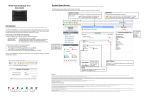
The following workflow describes how to use the Paradox Insight™ app.
Download and
install Insight app.
from Google Play
Store
ConĮgure
CommunicaƟon
Seƫngs: DNS /
StaƟc IP address
and Push
EŽƟĮĐĂƟŽŶƐ
Select Language
ConĮgure Site
Seƫngs
Arm/Disarm the
System
Record live video
streaming (ROD,
ROA, ROT)
ReporƟng
OpƟons:
Emergency
Services/ CMS/
Other Users
Control White
LEDs
View Live
Streaming (VOD)
View System
NoƟĮcaƟons
View Media Files/
Events
Open app.>tap
Add icon
Add a Site
ConĮgure Users
Log-on to a Site
Use the App.
1.3 Downloading and Installing Paradox Insight App.
To download and install the Paradox Insight™ app:
Download and install the Paradox Insight™ app. from Google Play Store.
Figure 2 – Google Play Store
3
Figure 3 – Paradox Insight App Icon
Insight Application User Manual
Workflow