1
Raspberry Pi Home Automation
with Arduino
Automate your home with a set of exciting projects for
the Raspberry Pi!
Andrew K. Dennis
BIRMINGHAM - MUMBAI
Raspberry Pi Home Automation with Arduino
Copyright © 2013 Packt Publishing
All rights reserved. No part of this book may be reproduced, stored in a retrieval
system, or transmitted in any form or by any means, without the prior written
permission of the publisher, except in the case of brief quotations embedded in
critical articles or reviews.
Every effort has been made in the preparation of this book to ensure the accuracy
of the information presented. However, the information contained in this book is
sold without warranty, either express or implied. Neither the author, nor Packt
Publishing, and its dealers and distributors will be held liable for any damages
caused or alleged to be caused directly or indirectly by this book.
Packt Publishing has endeavored to provide trademark information about all of the
companies and products mentioned in this book by the appropriate use of capitals.
However, Packt Publishing cannot guarantee the accuracy of this information.
First published: February 2013
Production Reference: 1290113
Published by Packt Publishing Ltd.
Livery Place
35 Livery Street
Birmingham B3 2PB, UK
ISBN 978-1-84969-586-2
www.packtpub.com
Cover Image by William Kewley ([email protected])
Credits
Author
Andrew K. Dennis
Reviewer
Stefan Sjogelid
Acquisition Editor
Erol Staveley
Commissioning Editor
Ameya Sawant
Project Coordinator
Joel Goveya
Proofreader
Stephen Swaney
Indexer
Hemangini Bari
Graphics
Valentina D'silva
Aditi Gajjar
Technical Editors
Veronica Fernandes
Worrell Lewis
Production Coordinator
Shantanu Zagade
Nitee Shetty
Cover Work
Shantanu Zagade
About the Author
Andrew K. Dennis is an R&D software developer at Prometheus Research.
Prometheus Research is a leading provider of integrated data management for
research and is the home of HTSQL, an open source navigational query language
for RDMS.
Andrew has a Diploma in Computing, a BS in Software Engineering, and is currently
studying for a second BS in Creative Computing in his spare time.
He has over 10 years experience working in the software industry in the UK, Canada,
and the USA. This experience includes e-learning courseware development, custom
CMS and LMS development, SCORM consultancy, web development in a variety
of languages, open source application development, blogging about the integration
of web technologies with electronics for home automation, and punching lots of
Cat5 cables.
His interests include web development, e-learning, 3D printing, Linux, the
Raspberry Pi and Arduino, open source projects, home automation and the use
of web technology in this sphere, amateur electronics, home networking, and
software engineering.
Acknowledgement
I would like to thank my wife Megen for supporting me throughout this project and
putting up with the piles of electronics and computer hardware dotted around the
house. My parents, for their support with my interest in technology while growing
up and over the subsequent years.
The Cooking Hacks team, for their great new Raspberry Pi to Arduino Bridge shield
and the various contributors over on the Cooking Hacks forum for their insights.
The people at Prometheus Research, for making this a great and interesting place
to work. Partyka Chevrolet, for giving me some experience on the hardware side
of networking.
I would also like to thank Joel Goveya and Ameya Sawant at Packt Publishing for
their guidance throughout this process, and Stefan Sjogelid for his technical insights
and reviews.
About the Reviewer
Stefan grew up in the 1980s with the C64 and the Amiga home computers. The
ambitious goal of the Raspberry Pi Foundation, bringing fun programming back
to today's youth, resonated strongly with Stefan who immediately ordered his
Raspberry Pi on the launch day itself. After much tinkering and learning a
great deal about the unique properties of the Pi, he launched the "PiLFS"
(http://www.intestinate.com/pilfs) website, which teaches readers
how to build their own GNU/Linux distribution and applications that are
particularly useful on the Raspberry Pi.
www.PacktPub.com
Support files, eBooks, discount offers and more
You might want to visit www.PacktPub.com for support files and downloads related to
your book.
Did you know that Packt offers eBook versions of every book published, with PDF and
ePub files available? You can upgrade to the eBook version at www.PacktPub.com and
as a print book customer, you are entitled to a discount on the eBook copy. Get in touch
with us at [email protected] for more details.
At www.PacktPub.com, you can also read a collection of free technical articles, sign up
for a range of free newsletters and receive exclusive discounts and offers on Packt books
and eBooks.
TM
http://PacktLib.PacktPub.com
Do you need instant solutions to your IT questions? PacktLib is Packt's online digital
book library. Here, you can access, read and search across Packt's entire library of books. Why Subscribe?
• Fully searchable across every book published by Packt
• Copy and paste, print and bookmark content
• On demand and accessible via web browser
Free Access for Packt account holders
If you have an account with Packt at www.PacktPub.com, you can use this to access
PacktLib today and view nine entirely free books. Simply use your login credentials for
immediate access.
Table of Contents
Preface1
Chapter 1: An Introduction to the Raspberry Pi, Arduino,
and Home Automation
7
What we will explore in this book
7
History and background of the
Raspberry Pi
8
Raspberry Pi hardware specifications
9
Dimensions10
3.5mm analog audio jack
10
Composite RCA port
10
Two USB 2.0 ports plus one micro USB
10
HDMI port
11
SD card port
11
256 MB/512 MB SDRAM shared with GPU
11
CPU11
GPU11
Ethernet port
12
GPIO pins
12
History and background of Arduino
12
Raspberry Pi to Arduino shield connection bridge
13
Shield specifications
13
XBee socket
14
Power source selector
14
UART14
Digital GPIO pins
14
Serial Peripheral Interface (SPI) pins15
In Circuit Serial Programmer (ICSP) connector15
Power pins
15
Analog inputs
15
Raspberry Pi GPIO connector
15
Table of Contents
Soldering15
Writing software for the Arduino
16
What home automation is
17
A history of home automation
17
X10 – a standard is born
18
The dot.com boom and open source – a new set of technologies
19
Commercial products
20
Arrival of the Raspberry Pi
21
Summary21
Chapter 2: Getting Started Part 1 – Setting up Your Raspberry Pi
The SD card – our Raspberry Pi's storage device
Pre-installed SD card versus a blank one
Setting up the SD card
Formatting our card
Formatting instructions for Windows 7
Formatting instructions for Mac OS X
Formatting instructions for Linux
BerryBoot – our tool for installing an operating system
Downloading the BerryBoot zip
23
23
24
24
25
25
26
27
28
28
Windows28
Mac28
Linux
29
Hooking up the Raspberry Pi
Downloading the right operating system
Installing Raspbian
Installation complete
Windows users
Mac and Linux users
29
30
31
34
35
36
Summary37
Chapter 3: Getting Started Part 2 – Setting up Your
Raspberry Pi to Arduino Bridge Shield
Raspberry Pi to Arduino bridge shield
Checking which version of the Raspberry Pi we have
Setting up the Raspberry Pi to Arduino shield and LED
Installing the software
The Arduino IDE
A quick look at the language
arduPi – a library for our Raspberry Pi and Arduino shield
Installing arduPi
Leafpad – a text editor
[ ii ]
39
39
40
41
42
42
43
45
45
46
Table of Contents
Blinking LED application
48
A guide to the code
Compiling and running our application
49
50
Summary51
Chapter 4: Our First Project – A Basic Thermometer
Building a thermometer
Setting up our hardware
53
54
54
An introduction to resistors
55
Thermistor55
10K Ohm resistor
56
Wires56
Breadboard56
Connecting our components
Software for our thermometer
Geany IDE
56
58
58
Installing the IDE
58
An introduction to Makefiles
59
Thermometer code
61
Writing our application
61
Compiling and testing
68
What if it doesn't work
69
Up and running
70
Summary70
Chapter 5: From Thermometer to Thermostat – Building upon
Our First Project
71
Safety first
72
Introducing the thermostat
72
Setting up our hardware
73
Relays74
Connecting the relay
74
Setting up our software
75
A program to test the relay
75
Installing screen
77
cURL
79
Thermostat code
79
Testing our thermostat and fan
85
Attaching the fan
86
Starting your thermostat application
86
Debugging problems
87
Summary87
[ iii ]
Table of Contents
Chapter 6: Temperature Storage – Setting up a Database to
Store Your Results
SQLite
Installing SQLite Version 3.x
Creating a database
A table to record our temperature
A table to record our rooms
89
89
90
91
91
92
Writing some SQL
Apache web server
Setting up a basic web server
WSGI
92
94
94
97
Setting up WSGI
98
Creating a Python application to write to our database
100
Conclusion104
HTSQL104
Download HTSQL
105
Configuring HTSQL
106
Testing our Arduino shield with our database
108
Summary
109
Chapter 7: Curtain Automation – Open and Close the
Curtains Based on the Ambient Light
111
Photoresistors112
Motor shield and motors
112
Setting up the photoresistor
112
Wiring up the components
113
Testing the photoresistor with software
114
Debug117
Setting up the motor shield
117
Wiring up the components
117
Curtain control application
119
Pulse Width Modulation
119
Threads
119
Writing our code
120
Debugging problems
125
Connecting to your blinds/curtains
125
Setting the timing
125
Attaching the hardware
126
Debugging problems
126
Summary127
[ iv ]
Table of Contents
Chapter 8: Wrapping up
A brief review of what we have learned
Next steps
Prototyping Pi Plate
The wiringPi library
The Gertboard
Introduction to the Gertboard components
GPIO PCB expansion board
GPIO Pins
Motor controller
Open collector driver
Buffered I/O
Atmel ATmeg chip microcontroller
Convertors – analog to digital and digital to analog
Writing software for the Gertboard
129
130
130
131
133
134
134
135
135
136
136
136
137
137
137
Ideas for next step projects
138
Expanding the curtain automation tool to include temperature sensing
138
Changing the motor on the curtain automation project to a
stepper motor
139
Switching lights on with a photoresistor
139
Holiday lights from LEDs
139
The future of home automation
139
3D printing
139
RFID chips
140
EEG headsets
140
Summary141
Appendix: References143
Raspberry Pi
143
Raspberry Pi to Arduino bridge shield
144
Linux144
Python145
C/C++145
Arduino145
SQL146
HTSQL146
Apache146
Electronics147
Packt Publishing titles
147
Home automation technology
147
[v]
Table of Contents
3D printing
EEG headsets
Miscellaneous resources
148
148
149
Index151
[ vi ]
Preface
The world of home automation is an exciting field that has exploded over the past
few years with many new technologies in both the commercial and open source
worlds. This book provides a gateway for those interested in learning more about
the topic and building their own projects.
With the introduction of the Raspberry Pi computer in 2012, a small and powerful
tool is now available to the home automation enthusiast, programmer, and electronic
hobbyist that allows them to augment their home with sensors and software.
Combining the Raspberry Pi with the power of the open source Arduino platform,
this book will walk you through several projects for building electronic sensors and
introduce you to software that will record this data for later use.
What this book covers
Chapter 1, An Introduction to the Raspberry Pi, Arduino, and Home Automation, introduces
you to the technologies used in this book and provides a background to the world
of home automation.
Chapter 2, Getting Started Part 1 – Setting up Your Raspberry Pi, teaches you about the
Raspberry Pi and how to set it up, ready to use on your projects.
Chapter 3, Getting Started Part 2 – Setting up Your Raspberry Pi to Arduino Bridge Shield,
provides you with a guide to setting up your Raspberry Pi to Arduino bridge
shield and downloading the necessary libraries.
Chapter 4, Our First Project – A Basic Thermometer, helps you to build a thermometer
and introduces you to a variety of electronic components.
Preface
Chapter 5, From Thermometer to Thermostat – Building upon Our First Project, expands upon
our Thermometer project, turning it into a working thermostat that can switch relays
on and off.
Chapter 6, Temperature Storage – Setting up a Database to Store Your Results, explores
storing data output from your Thermostat, and then accessing it via a web browser.
Chapter 7, Curtain Automation – Open and Close the Curtains Based on the Ambient Light,
teaches you how to integrate motors into your projects for opening and closing
blinds and curtains, using the skills learned in previous chapters.
Chapter 8, Wrapping up, provides an overview of other technologies you can use in
your project and a look towards the future of home automation.
Appendix, References, lists a collection of links pointing you towards the resources used
in this book and other interesting information.
What you need for this book
For this book, you will need the following components and software:
•
•
•
•
•
•
•
•
•
•
•
•
•
•
•
•
•
•
•
A computer running Mac OS X, Windows, or Linux
A Raspberry Pi computer
An SD card
HDMI cable
Access to an HDMI television or HDMI computer monitor
A USB keyboard and mouse
USB power supply for the Raspberry Pi
Cooking Hacks Raspberry Pi to Arduino bridge shield
Electronics breadboard
10K resistor
Thermistor
Photo resistor
Jumper wires with male connectors
An LED
9V DC motor
9V battery with connector for screw terminals
Arduino Motorshield
A soldering iron
A desoldering iron/gun
[2]
Preface
Other software required for the projects in this book will be downloaded from the
Internet with step-by-step instructions in the relevant chapters.
Who this book is for
This book is aimed towards the amateur home automation enthusiast who has
some basic skills in programming and is looking for some simple projects to
get started with. An in-depth knowledge of electronics is not required, and the
book provides a step-by-step guide to setting up components and software in
each chapter.
No prior knowledge of the Linux operating system or the Raspberry Pi is needed,
although exposure to these technologies will certainly be helpful.
Conventions
In this book, you will find a number of styles of text that distinguish between
different kinds of information. Here are some examples of these styles, and an
explanation of their meaning.
Code words in text are shown as follows: "The previous program contains two
functions, void setup() and void loop()."
A block of code is set as follows:
void setup(void) {
printf("Starting up thermometer \n");
Wire.begin();
}
Any command-line input or output is written as follows:
mkdir arduPi
cd arduPi
New terms and important words are shown in bold. Words that you see on the
screen, in menus or dialog boxes for example, appear in the text like this: "Select
the Accessories option from the menu".
[3]
Preface
Warnings or important notes appear in a box like this.
Tips and tricks appear like this.
Reader feedback
Feedback from our readers is always welcome. Let us know what you think about
this book—what you liked or may have disliked. Reader feedback is important for
us to develop titles that you really get the most out of.
To send us general feedback, simply send an e-mail to [email protected],
and mention the book title via the subject of your message.
If there is a topic that you have expertise in and you are interested in either writing
or contributing to a book, see our author guide on www.packtpub.com/authors.
Customer support
Now that you are the proud owner of a Packt book, we have a number of things to
help you to get the most from your purchase.
Downloading the example code
You can download the example code files for all Packt books you have purchased
from your account at http://www.PacktPub.com. If you purchased this book
elsewhere, you can visit http://www.PacktPub.com/support and register to
have the files e-mailed directly to you.
[4]
Preface
Errata
Although we have taken every care to ensure the accuracy of our content, mistakes
do happen. If you find a mistake in one of our books—maybe a mistake in the text or
the code—we would be grateful if you would report this to us. By doing so, you can
save other readers from frustration and help us improve subsequent versions of this
book. If you find any errata, please report them by visiting http://www.packtpub.
com/support, selecting your book, clicking on the errata submission form link, and
entering the details of your errata. Once your errata are verified, your submission
will be accepted and the errata will be uploaded on our website, or added to any list
of existing errata, under the Errata section of that title. Any existing errata can be
viewed by selecting your title from http://www.packtpub.com/support.
Piracy
Piracy of copyright material on the Internet is an ongoing problem across all media.
At Packt, we take the protection of our copyright and licenses very seriously. If you
come across any illegal copies of our works, in any form, on the Internet, please
provide us with the location address or website name immediately so that we
can pursue a remedy.
Please contact us at [email protected] with a link to the suspected
pirated material.
We appreciate your help in protecting our authors, and our ability to bring you
valuable content.
Questions
You can contact us at [email protected] if you are having a problem with
any aspect of the book, and we will do our best to address it.
[5]
An Introduction to the
Raspberry Pi, Arduino, and
Home Automation
This chapter provides an introduction to the Raspberry Pi, Arduino, and the subject
of home automation.
We'll look at the history of the Raspberry Pi and how it came to be, as well as the
Arduino platform – an open source microcontroller that provides developers with a
means to interact with their surroundings, through a variety of sensors and motors.
Finally, we will wrap up the chapter by covering home automation and how
technologies such as the Raspberry Pi have put the ability to build complex
sensor based systems in the hands of the open source community.
Let's start by looking at what we will be covering in the coming chapters.
What we will explore in this book
We have a number of exciting projects ahead that will slowly introduce you to
home automation via the technologies of the Raspberry Pi and Arduino. These
projects include:
• Writing software to control hardware
• Building a thermometer using a thermistor
• Turning the thermometer into a thermostat using relays
• Controlling electric motors using a motor shield
• Writing software for storing sensor data generated by your projects
An Introduction to the Raspberry Pi, Arduino, and Home Automation
By completing each chapter in the book, you will gain a basic knowledge of building
circuits and hardware for home automation projects. You will learn about writing
software to both control your projects and record the data generated by them.
Finally, we will look towards future projects you can build with your new skills.
Our next step is to learn a little about the background of the technologies we are
going to be using. We will start with the Raspberry Pi.
History and background of the
Raspberry Pi
From the first vacuum tube computers, to the tape and punch card machines of the
'60s, and the first microprocessor mainframes of the '70s, computing had very much
been the preserve of large businesses and university research departments. However,
by the late '70s, with the release of the Apple II and earlier seeds planted by such
technology as the TV Typewriter and Apple I, this was rapidly changing.
As the '80s rolled into view, the public saw low-cost home computers such as the ZX
Spectrum and Commodore 64 hit the mass market and subsequently give birth to a
whole generation of amateur programmers. By the '90s, these programmers, brought
up on tinkering with their home computers and writing BASIC, were heading into
academia and the computer industry, and helping to forge the dot.com boom with
game, web, open source, and business technologies.
The genesis of the Raspberry Pi is in many ways linked to this. A group of computer
scientists lead by Eben Upton at the University of Cambridge's Computer Laboratory
in 2006 struck upon the idea of producing a cheap educational micro-computer
geared towards the amateur computer enthusiast, budding students, and children.
The aim was to help to provide the skills to future Computer Science undergraduate
applicants that many of those applying in the '90s possessed, thanks to the home
computers of the '80s.
However it would be another two years before the project became viable, and not
until 2012 before the Raspberry Pi was being shipped out to the public.
The 2000s saw a huge growth in mobile computing technologies, a large segment
of this being driven by the mobile phone industry. By 2005, ARM – a British
manufacturer of CPU core components and a by-product of the '80s home computer
company Acorn, had grown to where 98 percent of mobile phones were using their
technology. This translated into around 1 billion CPU cores. ARM technology would
later end up being featured on the Raspberry Pi with the ARM ARM1176JZF-S
processor core being used.
[8]
Chapter 1
During the same period, Ebon Upton designed several concepts for the Raspberry Pi
and by 2008, thanks to a by-product of the increasing penetration of mobile phone
technology, the cost of building a miniature, portable microcomputer with many of
the multimedia functions that the public were accustomed to was becoming viable.
Thus the Raspberry Pi foundation was formed and set about the task of developing
and manufacturing the Raspberry Pi computer.
By 2011, the first Alpha models were being produced and tested, and the public
finally got to see what the Raspberry Pi was capable of.
Demos of Quake III Arena and full HD/1080p video showed that the tiny computer
could pack a big punch for low cost.
Finally in 2012, the Raspberry Pi was ready for public consumption. Two versions of
the Raspberry Pi were scheduled to be manufactured, namely models A and B, with
B being released first.
The model A board which will not include an Ethernet port and will consume
considerably less power than the model B was given a price tag of $25.
The model B that includes an Ethernet port was given a target price of $35 USD
and manufacturing in China started. This would later be moved to the UK with
Sony taking over the process.
After several setbacks, including the wrong Ethernet port being attached to the
early batches and several compliance regulations having to be passed, the Raspberry
Pi was making its way into the hands of tech enthusiasts across the globe to a
great reception.
So what exactly does the Raspberry Pi Model B you're holding include?
Raspberry Pi hardware specifications
We will briefly go over some of the core components that make up the Raspberry Pi
to give you a better feel for what it is capable of.
The Raspberry Pi is built off the back of the Broadcom BCM2835. The BCM2835 is a
multimedia application processor geared towards mobile and embedded devices.
On top of this, several other components have been included to support USB, RCA,
and SD card storage.
[9]
An Introduction to the Raspberry Pi, Arduino, and Home Automation
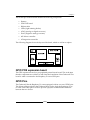
We will now look at some of the core-components of the Raspberry Pi board.
The following figure highlights some of these with a description of each provided:
GPIO Pins
SD card
port
Micro
USB
Power
RCA
CPU/GPU
HDMI
Audio
USB
Ethernet
Dimensions
The Raspberry Pi is a small device coming in at 85.60mm x 53.98mm x 17mm and
weighing only 45g. This makes it perfect for home automation, where a small device
can be placed in a case and mounted inside an electrical box, or replace an existing
thermostat device on a wall.
3.5mm analog audio jack
The 3.5mm analog audio jack allows you to connect headphones and speakers to the
Raspberry Pi. This is especially useful for audio and media player based projects.
Composite RCA port
You are probably familiar with the composite cables used to hook up your DVD
player to the TV. They usually come in the red, white, and yellow plug variety.
The Raspberry Pi has a port for attaching the yellow video cable from your TV
to it, allowing you to use your TV as a monitor.
Two USB 2.0 ports plus one micro USB
USB is one of the most common methods for connecting peripherals and storage
devices to a computer. The Raspberry Pi comes equipped with two of them, allowing
you to hook up a keyboard and mouse when you get started and a micro USB port
for powering your device.
[ 10 ]
Chapter 1
HDMI port
The High Definition Multi-media Interface (HDMI) port allows the Raspberry
Pi to be hooked up to high-definition televisions and monitors that support the
technology. This provides an additional option to the composite RCA port for
video and additionally supports audio.
Should you wish to stream video and audio from the web to your TV, this is the
port you would want to use.
SD card port
The main storage mechanism of the Raspberry Pi is via the SD card port. The SD card
will be where we install our operating system and will act as our basic hard disk. Of
course, this storage can be expanded upon using the USB ports.
256 MB/512 MB SDRAM shared with GPU
The Raspberry Pi comes equipped with 256 MB of SDRAM on older versions of the
model B and 512 MB on the newer revisions. This isn't a huge amount, and much less
than you would expect on a PC, where RAM is available in gigabytes. However, for
the type of applications we will be building, 256 MB or 512 MB of RAM will be more
than enough.
CPU
Early in this chapter we touched upon ARM – the British manufacturers of central
processor unit (CPU) cores. The Raspberry Pi comes equipped with a 700 MHz,
ARM1176JZF-S core – part of the ARM 11 32-bit multi-processor core family.
The CPU is the main component of the Raspberry Pi, responsible for carrying out the
instructions of a computer program via mathematical and logical operations.
The Raspberry Pi is in good company using the ARM 11 series and has joined the
ranks of the iPhone, Amazon Kindle, and Samsung Galaxy.
GPU
The graphics-processing unit (GPU) is a specialized chip designed to speed up the
manipulation of image calculations.
In the case of our Raspberry Pi, it comes equipped with a Broadcom VideoCore IV
capable of hardware accelerated playback and support for OpenGL.
[ 11 ]
An Introduction to the Raspberry Pi, Arduino, and Home Automation
This is especially useful if you want to run games or video via your Raspberry Pi,
or work on 3D graphics in an open source application such as Blender.
Ethernet port
The Ethernet port is the Raspberry Pi's main gateway to communicating with
other devices and the Internet. You will be able to use the Ethernet port to plug
your Raspberry Pi into a home router such as the one you currently use to access
the Internet, or a network switch if you have one set up.
GPIO pins
The General Purpose Input/Output (GPIO) pins on the Raspberry Pi are the main
way of connecting with other electronic boards such as the Arduino.
As the name suggests, the GPIO pins can accept input and output commands and
thus can be programmed on the Raspberry Pi.
The Arduino shields will be attached to the GPIO via a bridge shield allowing us to
transfer data from sensors soldered to the device back to the Raspberry Pi. This is
especially useful in home automation projects, where we may wish to store sensor
data or manipulate motors based upon a program running on the Raspberry Pi's
operating system.
Having touched upon the technical capabilities of the Raspberry Pi, we will now
look at the Arduino and the Raspberry Pi to Arduino shield, a way to connect the
two technologies via the GPIO pins.
History and background of Arduino
One of the most popular open source hardware products to have hit the market
is the Arduino platform – a branch off of the earlier open-source Wiring platform.
Developed in Italy by Massimo Banzi and David Cuartielles in 2005, Arduino is an
open source hardware technology coupled with a programming language and an
Integrated Development Environment (IDE).
The Arduino platform allows the user to create custom hardware and applications
to control it via its namesake programming language.
[ 12 ]
Chapter 1
Currently, there are several board models on the market ranging in size and
components. For example, the Lilly Pad allows enthusiasts to attach an Arduino
board to clothing for electronic textile-based projects. These boards support a wide
range of "shields" – Arduino compatible electronic boards that can be plugged into
it and expand its functionality. One particular extension has been the introduction
of Ethernet shields and wireless Xbee devices to allow communication with home
networks and the Web.
The benefit of the Arduino for amateur enthusiasts has been that little or no
knowledge of how electronics are soldered together is required to use the pre-built
shields. However, as the user becomes more comfortable with the technology, he/
she can progress to building his/her own projects using the numerous kits and
sensors available on the market.
This easy adoption has helped to contribute to the number of websites and books
dedicated to home automation projects using the technology.
In this book, we will not be using one of the Arduino microcontroller boards, the
Raspberry Pi will fulfill this role. However we will be using the Raspberry Pi to
Arduino shield. This will allow us to connect shields and other components to
the Raspberry Pi and control them via the Arduino programming language.
Raspberry Pi to Arduino shield connection
bridge
For our project, the particular Raspberry Pi to Arduino shield we will be using is
produced by Cooking Hacks, an offshoot of the Libelium wireless communications
company based in Spain.
Their website can be found at http://www.cooking-hacks.com.
The Cooking Hacks shield is connected to the Raspberry Pi's GPIO pins, and with
the inclusion of the arduPi software, you will be able to communicate between your
electronic devices, the Raspberry Pi's operating system, and web-based projects.
Let's take a quick look at the shield and its components.
Shield specifications
The Raspberry Pi to Arduino shield is a credit card sized electronics board that
mimics an Arduino microcontroller in its layout. The Raspberry Pi connector is
under the board, and the top of the board contains typical pins and connectors
you would find on an Arduino board such as the Uno.
[ 13 ]
An Introduction to the Raspberry Pi, Arduino, and Home Automation
The following figure highlights some of the key components of interest and a
description of each is also listed:
XBee socket
The two Xbee sockets on the shield provide support for Xbee wireless radio
communication modules. Our Raspberry Pi comes equipped with an Ethernet
port, so we will not need to use these for any of our home automation projects.
If, however, you wish to switch out Ethernet for Xbee devices instead, these are
the connectors you can use.
Power source selector
The power source selector is a small switch located on the side of the shield that can
be used to enable an external power source.
UART
The Universal Asynchronous Receiver/Transmitter (UART) is the serial input and
output port for your bridge shield and is marked with Rx and Tx. This can be used
to transmit serial data, such as text and is useful for debugging code, for example.
Digital GPIO pins
The digital I/O pins provide a place where you can hook up other electronic
components. For example, you can solder a temperature sensor to pin 2 and
then, via the Arduino programming language, read the data transmitted from it.
[ 14 ]
Chapter 1
Serial Peripheral Interface (SPI) pins
SPI pins can be used to connect a peripheral device to your Arduino shield. The SPI
includes the SCK (Serial Clock), MISO (Master In Slave Out), and MOSI (Master
Out Slave In) pins.
In Circuit Serial Programmer (ICSP) connector
The ICSP allows us to program the Arduino microcontroller. For our project,
we will not need this, as the Raspberry Pi will be taking the place of the Arduino
microcontroller.
Power pins
The power pins can be used when hooking up a device to the shield. For example,
a device drawing power from the shield and writing data back to it will need to use
one of the power options (5V or 3.3V) and also the grounding pin.
Analog inputs
The analog inputs can be used to hook up devices such as potentiometers (commonly
found as twisting knobs for changing things such as volume), which send an analog
signal to the shield.
This is the analog counterpart of the digital GPIO pins described earlier.
Raspberry Pi GPIO connector
The Raspberry Pi GPIO connector can be found on the bottom of the shield. This is
where you will connect your Raspberry Pi to Arduino bridge shield to the Raspberry
Pi's GPIO pins.
Soldering
Soldering is the process of attaching electronic components together using a heated
metal filler (the solder), in order to allow the electrical current to flow between them.
At this point, it is worth mentioning that practicing some soldering before you start
building the projects in this book is worth the effort, but not strictly necessary. If you
are a novice, do not worry as there will be minimal soldering.
[ 15 ]
An Introduction to the Raspberry Pi, Arduino, and Home Automation
Also if you have any old PC hardware sitting around, like a graphics card no longer
in use, you can practice un-soldering and re-soldering the components until you
get comfortable with the process. These will also help you get used to handling the
soldering iron and de-soldering tool.
Writing software for the Arduino
After you set up the Arduino shield and plug it into the Raspberry Pi, you will
probably be wondering how to interact with it. After all, it has sensors and LEDs,
but these are nothing without applications to control them in a meaningful manner.
Many software languages are available on the Raspberry Pi and we are interested
in four. These are the Arduino programming language, Python, SQL, and HTSQL.
The Arduino programming language – a subset of C++ – provides us with a tool
for programming Arduino compatible shields and the components connected to
them. One benefit of using this technology is that there is a wealth of programs and
libraries online that can be used for future projects. You will be using this language
in the Geany IDE for writing the core applications that will be reading data from
sensors attached to your projects.
The next language we will be using is Python. Python is a high-level programming
language developed in the late '80s by Guido Van Rossum named after the popular
comedy show Monty Python's Flying Circus.
This language allows you to build web and database applications that can be used
to process the output of Arduino programs. We will be using Python to build a web
application that can process data sent to it and then insert it via SQL (Structured
Query Language) into an SQLite 3 database.
We will also use SQL for building the database that our Python script connects
to. In conjunction with the SQLite database management system we will construct
a repository for storing some of the results from our projects, for example,
temperature data.
Finally we will also be using HTSQL (Hyper Text Structured Query Language) to
provide a web interface to our database that is easy to query via the web browser.
HTSQL allows us to set up a server pointed to our database and then query it
without having to write further server-side code.
Now that we have looked at our tools for building home automation systems,
the Raspberry Pi and Arduino, lets look at what home automation is.
[ 16 ]
Chapter 1
What home automation is
Having picked up this book, you may already have an idea of what home
automation is, but just in case, we'll give you a quick overview of the subject
and the open source technology that is driving many projects out there today.
Home automation is more than just a remote control for your TV! Examples include
programming your DVR to record your favorite shows, setting the AC unit to come
on when it reaches 76 degrees Fahrenheit, and installing a fancy alarm system that
contacts the police in the instance of a break-in.
Also known as domotics (a portmanteau between domestic and informatics), home
automation can be summed up as the mechanism of removing as much human
interaction as technically possible and desirable in various domestic processes, and
replacing them with programmed electronic systems—essentially the automation of
the home and housework.
A history of home automation
Concepts for home and building automation were around for decades before
becoming reality and featured in the writing of the 19th century sci-fi author
HG Wells, comics, and cartoons such as the Jetsons. American industrialist
George Westinghouse helped to pioneer the AC (Alternating Current) electrical
system – which the X10 home automation standard would later run over – and
in 1966, the company that bears his name, Westinghouse Electric, employed an
engineer who developed what could arguably be called the first computerized
home automation system – the ECHO IV.
The Electronic Computing Home Operator (ECHO) was featured in the April 1968
edition of Popular Mechanics and had been expanded from a set of spare electronics
- both in the physical and literal sense, to include computing its founder Jim
Sutherland's family household finances and storing their shopping lists, amongst
an array of other tasks.
You can still read the original Popular Mechanics article online at Google books
(http://books.google.com/books?id=AtQDAAAAMBAJ&pg=PA77&source=gbs_toc
_r&cad=2#v=onepage&q&f=false).
The ECHO never went commercial and through the '60s, hobbyists and a number of
large companies such as Honeywell toyed with the idea of computerizing the home,
however it was the '70s, much as with personal computing, that saw the birth of the
modern era of home automation technology.
[ 17 ]
An Introduction to the Raspberry Pi, Arduino, and Home Automation
X10 – a standard is born
The beginning of modern home automation technology can be argued to be found
with the introduction of the X10 technology standard. Conceived in 1975 by Pico
Electronics, who later partnered with Birmingham Sound Reproducers, X10 laid out
the framework for allowing remote control access of domestic appliances. The X10
standard was designed to allow transmitters and receivers to work over existing
electrical wiring systems by broadcasting messages such as "turn off" and "turn on"
via radio frequency bursts.
Three years later in 1978, X10 products began to make their way into stores geared
towards electronics enthusiasts and shortly after, in the '80s, the CP-290 computer
interface made its way into the market for the Mattel Aquarius computer.
The CP-290 unit allowed computers to communicate with X10 compatible
appliances in the home. Over the years, support for Windows and Mac has been
included, and gave those interested in home automation the ability to program
their lighting systems, thermostats, and garage doors from their home computers.
As revolutionary as X10 has been, it unfortunately had a number of flaws.
These included:
• Wiring and interference issues
• Commands getting lost in transmission
• Limited scope of products supporting X10
• Limited scope of commands available
• Slow speed of signal transmission
• Lack of encryption
• Lack of confirmation message without expensive two way devices
By the late '90s, home automation still hadn't penetrated the home market on a
truly wide scale, however the technological advancements of the dot-com boom
were providing a whole new set of tools, protocols, and standards that addressed
many of the flaws that the X10 standard has been limited by.
[ 18 ]
Chapter 1
The dot.com boom and open source – a new
set of technologies
With the explosion of technologies that followed the birth of the web in the '90s,
home computing and networking technologies were now available to the public
and could easily and cheaply be installed at home. These technologies would later
provide ideal candidates for pushing the boundaries of what could be achieved by
home automation enthusiast, and provide the industry with the tools for building
smart home appliances and systems.
It was only a small step from PC to PC communication to appliance to PC communication.
Home networks running on Ethernet and later WiFi provided a mechanism that
could allow computers and electronic appliances to communicate with one another
across a home without needing to use the existing electrical wiring. In the case of
WiFi, no extra cabling was required.
As protocols such as FTP and HTTP became the norm for accessing information
across the Internet, hardware developers saw the opportunity to leverage these
communications technologies in open source hardware devices. Where as X10
appliances had no way of knowing if a signal had been successfully sent without
the purchase of costly "two-way" devices, web technologies provide a whole
framework for returning error codes and messages.
At approximately the same time as the Arduino platform we introduced earlier was
being developed, the first tablet computers were beginning to be released. From 2005
until now, there has been an explosion in mobile, tablet, and smartphone devices.
This growth has been commonly referenced to as the "post-PC" era.
These devices have provided mobile computing platforms that can run complex
software and be small enough to fit in the user's pocket. As a result of this,
applications have been developed for the iPhone and Android that allow
the user to control consumer electronics such as the TV.
Due to their size, portability, and in some cases, low cost, they have provided the
perfect platform for interfacing with home appliances and devices, and provided
an extension to a medium the user is familiar with.
Along side the explosion in hardware, there was also an equivalent explosion in
software. One particular product of interest that we will look at is the open source
Android operating system.
[ 19 ]
An Introduction to the Raspberry Pi, Arduino, and Home Automation
The Android OS is a Linux-based operating system geared towards mobile devices.
As part of the Open Handset Alliance – a consortium of 84 companies operating in
the mobile sphere, Google backed and eventually purchased the Android mobile
operating system.
The aim has been to create an open source operating system that can compete with
companies such as Apple, and provide a robust system that can work across multiple
manufacturer devices.
As a result of this, commercial manufacturers of home appliances have begun
to embed the technology and software into their products, and a generation of
"smart-devices" has started to appear in stores around the world.
Commercial products
If you are interested in a smart refrigerator that can tell you the weather and keep
track of your groceries, or an oven that can be controlled via your smartphone, then
you are in luck.
Products such as the Samsung RF4289HARS refrigerator running Android and the
LG smart washing machine are paving the way for smart homes by embracing open
source and web-based technologies.
It is also not just appliances that are getting the makeover. Thermostat systems such
as the Nest – a company founded by ex-Apple employees-are re-thinking how smart
thermostats work.
Barcodes and QR codes on products now allow the consumer to scan them with
their smartphone and download information directly from the web providing details
on the item. This can be extended to allow scanning and inventory management of
products in the home, recording data such as consume – by dates of products in the
refrigerator, and dynamically generating shopping lists.
This combination of hardware, software, and information now provides the potential
for the home to become part of "an Internet of Things" to quote Kevin Ashton.
Thanks to the open source and open-standard technology being used in these
devices, it is easy to combine home-brew projects built with the Raspberry Pi and
commercial products by companies such as LG, to build a smart home that creates a
network of devices that can communicate with one another to combine the execution
of tasks.
As we mentioned, home-brew systems such as the Raspberry Pi can form part of this
network; let's now look at the effects of the arrival of the Raspberry Pi on the world
of home automation.
[ 20 ]
Chapter 1
Arrival of the Raspberry Pi
With the arrival of the Raspberry Pi and the Raspberry Pi to Arduino shield, a
set of open source technologies now exist that combine the power of the PC, the
communication and multimedia technologies of the web, the ability to interact
with the environment of a microcontroller, and the portability of a mobile device.
This provides the perfect set of factors allowing us to build cheap devices for our
homes that can interface with commercial devices, but can be tailored for our own
needs while also providing a great tool for learning about technology.
For those familiar with Arduino devices, the Raspberry Pi combined with its shields
provide an all-in-one medium for creating devices without the need for a separate
PC or Mac—giving us an alternative to solutions that currently exist.
Also, thanks to the Raspberry Pi's mission of providing an educational tool for
those interested in programming, the addition of the Arduino shield will provide
a mechanism for those who wish to move from writing software that manipulates
the Raspberry Pi, to software that manipulates their environment and provides
a pathway for learning about electronics. This could have the positive effect of
bolstering the ranks of home-brew and Maker clubs with an eye towards home
automation and lead to an ever-greater diversity of tools being produced for
the public.
Summary
In this chapter, we have familiarized ourselves with the Raspberry Pi and Arduino.
We have also looked at some of the existing technologies used in home automation
and their history.
Where as Sutherland's ECHO IV filled a room in his house, the Raspberry Pi fills a
space not much larger than a credit card.
Home automation now seems to be taking the next step to becoming widely
adopted, and the Raspberry Pi neatly fits into this world by providing those
who want to customize control of their devices with an easy and a cheap tool for
achieving it, and by also expanding what can be done with Arduino technology
currently out in the market place.
With this in mind, we will get started on our first project– setting up the
Raspberry Pi.
[ 21 ]
Getting Started Part 1 –
Setting up Your Raspberry Pi
In this chapter, we will look at setting up the Raspberry Pi. In order to use your
device you will need to start by installing an operating system onto an SD card.
Once this is in place, you can then install extra software for writing code and for
controlling devices which you connect to the GPIO pins.
There are several steps needed to get you up and running:
• Deciding whether to purchase an SD card with a pre-installed OS or a
blank card
• Formatting the SD card
• Choosing the right version of Linux
• Installing the operating system
• Operating system configuration
Once we have completed these steps, we will be ready to get started with our home
automation projects.
The SD card – our Raspberry Pi's storage
device
An SD (secure digital) card is a form of portable high performance storage medium
available for electronic devices ranging from cameras to PCs.
The Raspberry Pi comes equipped with an SD card slot allowing us to insert an
SD card and use it as our devices' main storage mechanism, much like a hard disk
on a PC.
Getting Started Part 1 – Setting up Your Raspberry Pi
While you can use other storage mechanisms such as a USB drive or USB external
hard drive, the SD card is small and thus lends itself better to embedded devices
such as those found in home automation projects.
There are a variety of brands of SD cards on the market, and they come in a range of
sizes. The Raspberry Pi supports larger SD cards such as those with 64 GB of storage
space. For the projects in this book, you should be using an SD card with a minimum
of 2 GB storage.
We will now look at the options available with regards to purchasing an SD card
pre-installed with the operating system and formatting and installing it ourselves.
Pre-installed SD card versus a blank one
Since the Raspberry Pi has been released, a number of websites are offering
preloaded SD cards that come installed with one of the operating systems that
are available for the Raspberry Pi.
These are a good option for amateur enthusiasts looking to get started with the
Raspberry Pi, who do not want to go through the setup process and are happy
with a pre-loaded single operating system.
For our project though, we are going to suggest that you purchase a blank SD card
and follow the instructions in this chapter. After you have finished formatting the
card, you will be introduced to an application called BerryBoot. BerryBoot allows
you to choose which operating system you would like to install. This will set you up
for future projects when you may wish to install more than one operating system or
choose one, other than the option that comes on a pre-loaded card.
With this in mind though, if you do not have a home PC or Mac to use in order to
format a blank SD card, we would recommend purchasing a pre-formatted card.
This should come loaded with the Debian Wheezy Raspbian OS, as this is the
version of Linux we will be using throughout the book.
Setting up the SD card
Before we can install our operating system, we need to set up the SD card. This
involves formatting it to the FAT filesystem format first.
FAT (File Allocation Table) is a method used for recording which sectors of a disk
files are stored in and which sectors are free to be written to. It has its origins in the
1970s where Bill Gates and Marc McDonald developed it for use on floppy disks. Due
to its robustness and simplicity, it is still found on SD cards today and is the format
we will need in order to run our operating system selection application.
[ 24 ]
Chapter 2
After formatting the SD card, we will then install a program called BerryBoot. This
allows us to install our operating system onto the SD card, which the Raspberry Pi
will use.
So take your card and insert it into the SD cart port on your laptop or PC and we will
begin by formatting it.
Formatting our card
As explained in the preceding section, in order to install BerryBoot, we first need to
format the SD card to FAT format. This is a fairly simple task and can be performed
on your PC or Mac.
When purchasing an SD card, you may find it is already formatted to FAT as this
format is popular with devices such as digital cameras. Many manufacturers ship
the card so it is ready to go out of the box and no further formatting is required.
However, we have provided the following instructions for Windows 7, Mac OS X,
and Linux so you can re-format the card if it is pre-formatted or currently has data
on it, or format it for the first time if necessary.
As newer versions of operating systems are released, sometimes menus are moved
around. In such instances, you can usually find out where the SD card formatting
instructions are online via Google or via the operating system's help menu.
Formatting instructions for Windows 7
The instructions that follow will guide you through formatting your SD card
under the Windows 7 operating system. Once complete, you will be ready to
install BerryBoot onto your SD card.
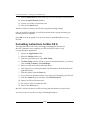
1. Click on the Start button on the Windows taskbar.
2. From the Start menu, click on Computer.
3. You will now be presented with a window containing a left-hand panel
listing items such as Favorites, Libraries, Computer, and Network.
The right-hand panel will show your PCs storage devices.
4. From the list of devices in the right-hand panel, right-click on your SD card.
5. From the pop-up menu, left-click on Format.
6. You will now see the Format Removable Disk popup.
7. From the File system drop-down, select FAT32 (Default) if not
already selected.
8. You can leave the other settings dropdowns as they are.
[ 25 ]
Getting Started Part 1 – Setting up Your Raspberry Pi
9. In the Volume label text entry field, type your SD card name as RASPBERRYPI.
10. Check the Quick Format checkbox.
11. You are now ready to format the card.
12. Click on the Start button.
Windows will now format your SD card using the preceding settings.
Once successfully formatted, you will be presented with a popup informing you
that the process is complete.
Select OK to close the popup. You are now ready to install BerryBoot on your
SD card.
Formatting instructions for Mac OS X
The steps that follow will walk you through formatting the SD card on a
Mac OS X machine. Once complete, your SD card will be ready to copy
over the BerryBoot application.
1. Open your Applications folder.
2. Select the Utilities folder icon.
3. From the open folder, now select Disk Utility.
4. The Disk Utility window will now open. On the left-hand side, you will see
a list of Disks, Volumes, and Disk Images.
5. Select your SD card from the left-hand menu.
6. Once selected, you will be presented with information about the disk in the
right-hand panel.
7. From this panel, select the Erase tab.
8. You will now be presented with a set of options for formatting your SD card.
9. From the Format drop-down menu, select MS-DOS (FAT).
10. Name your SD card RASPBERRYPI.
11. We are now ready to format the card.
12. Click on the Erase button.
Mac OS X will now format your SD card using the specifications you provided.
You can now move onto the next step of installing BerryBoot.
[ 26 ]
Chapter 2
Formatting instructions for Linux
For formatting an SD card in Linux, we are going to use the mkdosfs program via the
terminal window.
There are a number of tools available for formatting and partitioning disks in Linux.
The mkdosfs program formats a device to use an MS-DOS filesystem, for example
FAT16 or FAT32.
For our project, we need the SD card formatted in FAT to install BerryBoot, so this
tool is perfect for the job.
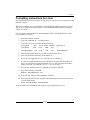
1. Load the terminal window.
2. Type the command df –h at the prompt.
3. You will now see a list similar to the following:
Filesystem
/dev/disk1
/dev/mmcblk0p2
Size
465G
7.3G
Used
Avail Capacity
Mounted on
119G
345G
26%
/
671M
6.3G
10%
/media/SDcard
4. Find the filesystem name of your SD card and note it down.
5. Also note down the directory it's mounted on.
6. If you are not logged in as root, switch user to root using su.
7. In order to format the SD card, you will need to un-mount it. In order to do
this, you will need to use the command unmount and pass it the filesystem
name you noted, for example, unmount /dev/mmcblk0p2.
8. We can now use the mkdosfs command to format the SD card.
9. Type the following command:
mkdosfs /dev/mmcblk0p2 –F32
10. Your SD card will now be formatted to FAT(32).
11. Now remount the SD card using the filesystem name and mounted on name
you recorded earlier.
mount /dev/mmcblk0p2 /media/SDcard
Your SD card is now formatted and ready for copying BerryBoot onto it.
[ 27 ]
Getting Started Part 1 – Setting up Your Raspberry Pi
BerryBoot – our tool for installing an
operating system
There are several ways of installing the OS onto the SD card, but by far the easiest of
them is BerryBoot.
BerryBoot is a Mac, Windows, and Linux compatible boot loader. It works by being
unzipped onto a formatted SD card and then when the Raspberry Pi is powered up,
it launches.
Once loaded it allows you to choose the operating system you would like to install
and walks you through the process. The BerryBoot application also helps you to
install multiple operating systems on a single SD card.
Downloading the BerryBoot zip
Our first task is will be to download the BerryBoot zip file. This can be found at
http://www.berryterminal.com/doku.php/berryboot.
Find the download link on the page and download the zip file. The file is
around 21.3 MB.
Depending on the operating system you have installed your PC/Mac, you may
already have a zip/unzip application included.
If you do not have a zip/unzip application you can download the following for
Mac, Windows, and Linux.
Windows
The following two applications are GUI-based unzip and zipping tools that can be
installed on Windows:
• 7-zip: http://www.7-zip.org/
• WinZip: http://www.winzip.com/
Mac
For Mac OS X, you can use one of the following two applications. The popular
Windows zip tool WinZip also has a Mac version.
• WinZip for Mac: http://www.winzip.com/mac/
• Archiver: http://archiverapp.com/
[ 28 ]
Chapter 2
Linux
For Linux, one of the best tools for unzipping files is unzip. Depending on your
Linux distribution, you can use the following command to install the unzip package.
For Red Hat Linux, Fedora, and RPM compatible versions of Linux:
yum install unzip
For Debian GNU/Linux versions:
apt-get install unzip
Once you have installed your unzip application, extract the contents of the BerryBoot
zip file you downloaded to your SD card. Contained within the zipped file are the
files that will be used when the Raspberry Pi boots up for the first time.
When the preceding process is complete, we are ready to connect up the Raspberry
Pi and peripherals so we can install the operating system.
Hooking up the Raspberry Pi
We are now going to set up our Raspberry Pi's hardware. You will need to complete
the following steps before attempting to power up the Raspberry Pi:
1. Eject the SD card from your PC/Mac and place it into the SD card port on
your Raspberry Pi.
2. Plug your Raspberry Pi into your monitor.
3. Attach your keyboard and mouse to the Raspberry Pi via the USB ports.
4. Using a Ethernet cable, attach your modem/router to your Raspberry Pi's
Ethernet port.
Once these steps are complete you can now power up your Raspberry Pi by
connecting the power unit to it.
On your monitor, you should now see the BerryBoot Welcome screen. This tells us
that we have successfully copied over the files to the SD card and can now configure
our operating system selection.
[ 29 ]
Getting Started Part 1 – Setting up Your Raspberry Pi
Downloading the right operating system
We now need to choose from the variety of operating systems that are available to
install the Raspberry Pi. For the purposes of our home automation project, we are
going to use the operating system called Raspbian. There are several reasons for
choosing this over another operating system.
Raspbian is based upon the Debian Wheezy Linux operating system and has been
optimized for use with Raspberry Pi. Mike Thompson and Peter Green of raspbian.
org developed it and while not an official product of the Raspberry Pi foundation,
is the operating system the foundation recommends for beginners on their website.
For those of you not familiar with Linux, it is a group of open source operating
systems that uses the Linux Kernel and provides an alternative to applications
such as Windows.
Mac OS X users may be familiar that they are using a Unix-like operating system that
gives them many of the command-line functionalities that Linux users are familiar
with. They will also find some similarities with the Raspbian operating system,
which we are installing on the Raspberry Pi.
There are several reasons for deciding to go with the Raspbian operating system that
are listed as follows:
• Raspbian has a desktop environment similar to Windows and Mac called
LXDE, so it provides an easy transition for those not familiar with Linux
command line.
• It comes pre-installed with software that will be useful for writing code for
the Raspberry Pi and Arduino such as Python. It also includes other software
that you may be interested in exploring that has an educational bent. One
example is Scratch, a tool for introducing programming to children.
• The operating system has been tailored to run on the Raspberry Pi. The code
compilation is optimized for on-chip floating-point calculations (hard-float)
rather than a slower software-based method.
• There is wide spread community support for the operating system, meaning
that as you move forward with projects beyond this book, there will be
plenty of resources as well as help available to you.
Next up is a walk through of the process of installing Raspbian and configuring
some important settings.
[ 30 ]
Chapter 2
Installing Raspbian
Once the Raspberry Pi is powered up, you will see the BerryBoot Welcome screen.
Follow the steps to install Raspbian.
From the Welcome popup, select the following settings:
1. If you have green borders at the top and bottom of your monitor, select the
radio button titled Yes (disable overscan).
2. From the Network connection option, select the Wired radio button.
3. From the Locale settings, select the appropriate options for the Timezone
and Keyboard layout fields.
4. Once complete, select the OK button.
5. Once you have clicked on OK, you will be taken to the Disk selection
screen. Here you will choose which storage device you want to install
your operating system on.
If you have other storage devices beyond your SD card connected to the Raspberry
Pi, you will also be given the option of using these. However we are going to use
the SD card.
1. Select your SD card from the list and then change the File system select box
to ext 4 (no discard). Like FAT, ext4 is a filesystem and in this instance is
geared towards Linux.
2. Now select the Format button.
3. Once the formatting is complete, we are presented with the Install operating
system screen from which we can choose Raspbian.
[ 31 ]
Getting Started Part 1 – Setting up Your Raspberry Pi
4. Click on the Debian Wheezy Raspbian option.
This download is around 430 MB and depending on the speed of your Internet
connection, will take a few minutes.
Once complete, you will be presented with the BerryBoot menu editor. This is
a screen with a menu and a list of operating systems currently installed on your
SD card.
Providing you haven't previously added any operating systems on your SD card,
there should be the one you just installed called Debian Wheezy Raspbian followed
by the version number.
There are a number of options at the top of the BerryBoot menu editor screen.
These are as follows:
• Add OS
• Edit
• Clone
• Export
• Delete
[ 32 ]
Chapter 2
• Make default
• Exit
• And the [ ] icon, which will take you to the advanced settings option
For the purposes of this installation, we are only interested in the Make default and
Exit options.
1. Select the operating system you installed and click on Make default. This
will mean that the Raspbian operating system we installed is launched as
the default option when the Raspberry Pi is started up.
2. Then select Exit.
You will now see the Raspi-config screen.
The Raspi-config screen is a menu that allows you to assign some values to the
settings of your Raspberry Pi. You can navigate the screen using the arrows keys
and use the Enter key to select an option.
The menu on this screen consists of the following:
• Info: Information about this tool
• Overscan: Change overscan
• configure_keyboard: Set keyboard layout
• change_pass: Change password for ‘pi' user
• change_locale: Set locale
• change_timezone: Set timezone
• memory_split: Change memory split
• overclock: Configure overclocking
• ssh: Enable or disable SSH server
• boot_behaviour: Start desktop on boot?
• Update: Try to upgrade raspi-config
• <Select>: Select an option
• <Finish>: Finish using menu
[ 33 ]
Getting Started Part 1 – Setting up Your Raspberry Pi
From this menu, we are going to change the password, enable SSH, and start the
desktop environment on loading.
1. First navigate to and select the change_pass menu option, and enter and
re-enter your new password.
The default password for the Raspberry Pi is raspberry. If
you plan on opening up your Raspberry Pi to the Internet to
allow connections from outside your home network, then it
is advisable to change the password to something strong.
After this, we need to set up SSH so that it allows us to connect to the
Raspberry Pi remotely via the command line on a different machine.
2. Select the ssh option and enable the ssh server.
3. Finally, we want to change the boot behavior of the Raspberry Pi so that the
desktop environment is started when the operating system boots up. To do
this, change the boot_behaviour option to start desktop on boot.
4. We have now finished configuring the settings we need to on the
Raspi-config screen and can exit, so now navigate to the <Finish>
option and press the Enter key to complete your setup.
Installation complete
You have now successfully completed the Raspberry Pi setup and will see the
Raspbian Linux desktop. This desktop contains a number of icons which will load
the programs installed by default, including Midori, a fast and light web browser,
and the Python IDE (integrated development environment), both of which we will
be using.
Also of note is the LXTerminal. This icon launches the Linux terminal window,
which allows us to run applications via the command line.
One optional final test you can perform is to connect to your Raspberry Pi via SSH.
There are several ways of getting the IP address assigned to your Raspberry Pi, one
of which is to check the DHCP table on your home modem/router. However, an
easier method is to check it on the Raspberry Pi itself.
To do this load up the LXTerminal again and type the following command:
ip addr show eth0
[ 34 ]
Chapter 2
You can find your IP address after the word inet. For example:
Inet 192.168.1.22/24 brd 192.168.1.255 scope global eth0
You need the portion before the / that reads 192.168.1.22.
An IP address is a way of assigning a unique identifier to a computer
or device on a local network or Internet. The most common form of IP
address at the moment is IPv4, which takes the format 192.168.1.0.
You may also encounter the newer IPv6 which has the 2001:0ab1:25b9
:0047:0000:8a2e:0110:7444 format.
Once you have the IP address for your Raspberry Pi, you can try connecting to it
from your other machine.
Mac and Linux users can use the terminal that comes shipped with their operating
system. Windows users can download a terminal executable file called PuTTY from
http://www.chiark.greenend.org.uk/~sgtatham/putty/download.html.
PuTTY provides Windows users with a terminal style window that they can use to
connect to Linux machines.
Windows users
Follow the steps to set up PuTTY on your Windows machine:
1. Double-click on the putty.exe file to load the PuTTY configuration screen.
2. In the Host Name (or IP address) text entry field, add the IP address of your
Raspberry Pi.
3. Enter 22 into the Port field and under Connection type, select SSH.
4. Finally click on Open.
5. You may see a pop-up box with the title PuTTY Security Alert and a
message explaining the server's host key is not cached in the registry.
6. You can select the Yes button.
7. In the terminal window, you will now see the following message:
Login as:
8. Enter your Raspberry Pi user name, that is, pi.
[ 35 ]
Getting Started Part 1 – Setting up Your Raspberry Pi
9. You will now see another message asking for the password, for example:
[email protected]'s password:
10. Enter the password and press the Enter key.
You will now be logged into the Raspberry Pi.
Mac and Linux users
Once you have your Terminal application ready, you can connect via SSH to your
Raspberry Pi using the following command:
ssh [email protected]
You will be asked to enter your password and may see a message suggesting that the
authenticity of the host can't be established, for example:
The authenticity of host ‘192.168.1.122 (192.168.1.122)' can't be
established.
RSA key fingerprint is f6:4a:38:4a:8b:c6:04:a9:bc:51:c3:af:fe:cb:78:e6.
Are you sure you want to continue connecting (yes/no)?
Type yes into the command line and press the Enter key.
You will then see the following message:
Warning: Permanently added ‘192.168.1.122' (RSA) to the list of known
hosts.
Once you have completed this and entered your password, you should see the
command line for your Raspberry Pi.
You have now successfully tested the SSH server and if you wish, can now control
your Raspberry Pi remotely from your second machine.
[ 36 ]
Chapter 2
Summary
In this chapter, we have looked at what an SD card is, setting it up for use with the
Raspberry Pi, installing an operating system, and loading up our Raspberry Pi for
the first time.
There are many resources available online if you wish to explore the Raspbian
operating system further. These include the following:
• http://www.raspberrypi.org/: The Raspberry Pi's official homepage
• http://www.raspberrypi.org/phpBB3/: The official Raspberry Pi forum
• http://www.raspbian.org/: Home of the Raspbian version of Linux
• http://www.linux.org/: A Linux education dedicated website
Now that we have the operating system in place, we can take a look at the Arduino
to Raspberry Pi shield and getting it setup ready to use with the Raspberry Pi.
So grab your Cooking Hacks shield and let's get started.
[ 37 ]
Getting Started Part 2 –
Setting up Your Raspberry Pi
to Arduino Bridge Shield
In this chapter, we will look at the Raspberry Pi to Arduino shield. We will discuss
identifying your Raspberry Pi model and installing the correct software library for
it. Once you have followed these steps, we will briefly touch on the Arduino IDE to
give you an idea of what the language looks like.
After this, we will write an application that turns an LED on and off, and then
compile and run our application.
Raspberry Pi to Arduino bridge shield
In order to use the Raspberry Pi to Arduino shield, we will need to set it up. This
is a two stage process involving the connection of our hardware and installing our
software. In the process of setting up the hardware, we will also connect up an LED
to a breadboard with two wires. This will act as our first test project to ensure that
everything is working correctly.
For this chapter you will need the following components:
• Your connected up Raspberry Pi
• The Cooking Hacks Raspberry Pi to Arduino shield
• An electronics breadboard
• An LED
• Two wires for connecting the breadboard to the shield
Getting Started Part 2 – Setting up Your Raspberry Pi to Arduino Bridge Shield
Checking which version of the Raspberry Pi
we have
In order to install the correct software package for our Cooking Hacks shield, we
need to identify the version of the Raspberry Pi we have. The quickest and easiest
way of doing this is to examine the Raspberry Pi board.
Version 2 Raspberry Pis have two mounting holes located on them and Made in
the UK printed on the board. The earlier versions of the board have neither of
these two items.
The Cooking Hacks website includes a guide to examining which version of the
board you have. It can be found at http://www.cooking-hacks.com/index.php/
documentation/tutorials/raspberry-pi-to-arduino-shields-connectionbridge#step3.
It is also possible to check the revision number via the command line, which in turn
can be used to work out the board version. Typing the following command will
show the hardware details of the Raspberry Pi:
cat /proc/cpuinfo
Look for the revision entry where you will see the revision number; in the preceding
screenshot, this is 0002.
You can cross-reference the revision number with the Raspberry Pi documentation
located on the Element 14 website (http://www.element14.com/community/docs/
DOC-42993/l/raspberry-pi-single-board-computer).
Here you will find a table with a document link titled Revision Note. Clicking on
this will take you to a document with the latest revision numbers present. This will
then allow you to identify the board version.
[ 40 ]
Chapter 3
Now that we have noted which version of the Raspberry Pi board we have, let's set
up our hardware.
Setting up the Raspberry Pi to Arduino shield
and LED
We will now walk through the process of connecting up the shield to the Raspberry
Pi and hooking up the LED components.
Un-pack your shield and locate the black connector on the bottom of the board.
Attach the shield via this to the GPIO pins on your Raspberry Pi. If you are unsure
what these are, you can refer to the figure in the Raspberry Pi hardware specifications
section in Chapter 1, An Introduction to the Raspberry Pi, Arduino, and Home Automation.
With the shield firmly attached to the Raspberry Pi, you can now hook up the LED.
Take two wires and attach one to the grounding pin and the second to the
digital pin 2.
Place each of these into your breadboard. Now insert the LED into the breadboard so
that the wire running from digital pin 2 is connected to the longer of the two legs on
the LED and the ground pin is connected to the shorter of the two.
The following figure provides a guide to this setup:
There is no need to solder any of the components at this time, as the LED application
we are writing is purely to test that our setup is working correctly.
[ 41 ]
Getting Started Part 2 – Setting up Your Raspberry Pi to Arduino Bridge Shield
Once you have completed the hardware setup, we can then install the software
needed to control our Raspberry Pi to Arduino shield.
Installing the software
In order to allow our Raspberry Pi to communicate with our Arduino shield, we will
need to install the arduPi library.
The arduPI software is a set of custom C++ files written by the Cooking Hacks team
that allows our applications written on the Raspberry Pi to interact with the shield
via the functions commonly found in Arduino applications.
You will also be given the choice to install the Arduino IDE, although this is not
necessary for any of the applications in this book. While we will not use the IDE
for compiling programs, it will provide a useful resource for exploring existing
programs. For those of you with an Arduino microprocessor, you will be able to
use this in conjunction with your Raspberry Pi.
You will also use Leafpad to write your first application, and a simple method to
compile and run your sketches from the command line.
The Arduino IDE
The optional step of installing the Arduino IDE can be performed using apt-get.
Open up your terminal window and run the following command to ensure apt-get
is up-to-date:
sudo apt-get update
You should now see any packages that need updating being downloaded to your
Raspberry Pi.
To download and install the IDE type the following command:
sudo apt-get install arduino
You will be prompted that the IDE will use several MB of disk space. You can select
yes to this to complete the install.
The Arduino IDE will now be available via the start bar in Raspbian under the
Electronics option. Navigate to the IDE link and open it on your Raspberry Pi. You
should be presented with a window containing an empty pane. This empty pane is
where you can write code and load examples. In the Arduino world, this is known
as a sketch.
[ 42 ]
Chapter 3
You will notice on the top menu a small play button with a triangle in it. When using
the IDE to upload code to an Arduino board, this button is used to compile the code
and upload it to the microcontroller.
Since we are using the Raspberry Pi instead of an Arduino, we will use a C++
compiler on the command line that will perform the role that the play button
does in the IDE. We will cover this in more detail when we come to write our
first application.
For experienced developers, there are a number of other tools available for
creating and running Arduino applications. A list of them can be found at
http://arduino.cc/playground/Main/DevelopmentTools.
If you own a Windows machine, there is also a plug-in for Visual Studio that
allows you to modify the Arduino IDE skin and add your own buttons to it. You
could therefore expand the IDE toolbar to run custom commands that build your
Arduino sketch with the arduPi library.
In this chapter, we will use Leafpad to write our application and then compile it via
the command line. In Chapter 4, Our First Project – A Basic Thermometer, we will look
at the Geany IDE and Makefiles, which combine these functions.
A quick look at the language
We are going to quickly take a look at a simple program written in the
Arduino language.
If you have installed the Arduino IDE, you can find the example using the
following steps:
1. From the Main menu, select File.
2. Then select Examples from the examples menu.
3. Select 1.Basics.
4. From this menu, select Blink.
The Blink example will now load.
If you have not installed the IDE, you can use the following code located in
Blink.ino:
/*
Blink
Turns on an LED on for one second, then off for one second,
repeatedly.
[ 43 ]
Getting Started Part 2 – Setting up Your Raspberry Pi to Arduino Bridge Shield
This example code is in the public domain.
*/
void setup() {
// initialize the digital pin as an output.
// Pin 13 has an LED connected on most Arduino boards:
pinMode(13, OUTPUT);
}
void loop() {
digitalWrite(13, HIGH);
delay(1000);
digitalWrite(13, LOW);
delay(1000);
}
//
//
//
//
set the LED on
wait for a second
set the LED off
wait for a second
Downloading the example code
You can download the example code files for all Packt books you have
purchased from your account at http://www.PacktPub.com. If you
purchased this book elsewhere, you can visit http://www.PacktPub.
com/support and register to have the files e-mailed directly to you.
The Arduino language is a subset of C++, so we will be using Arduino specific
functions that form the core of the language, in conjunction with standard C++
code in order to build our applications.
The previous program contains two functions, void setup() and void loop().
Within void setup(), we can see the statement pinMode(13, OUTPUT). This tells
the application to set the pin labeled 13 on the Arduino board to output mode. If a
device such as an LED is connected to pin 13, then it can be switched on and off.
The second function we can see is void loop(). The function executes continuously
so any statements located within it will run in an infinite loop. Within this function
you can see digitialWrite(13, High) and digitalWrite(13, LOW). These two
commands switch the LED on and off creating a blinking effect. The delay(1000)
statement causes a 1 second pause between each statement, so the LED does not
blink too fast.
The Arduino programming language supports many features; you can see a full list
of these in the Arduino documentation located online at http://arduino.cc/en/
Reference/HomePage.
[ 44 ]
Chapter 3
Now that we have briefly looked at the Arduino blink code, we will take this
example and demonstrate how it works with our Raspberry Pi shield and the
LED we connected to it.
arduPi – a library for our Raspberry Pi and
Arduino shield
In order for the previous blink example to work with our Arduino shield, we need
to install the arduPi library by Cooking Hacks. This library will allow us to write
Arduino applications and use them on the Raspberry Pi without needing a separate
microcontroller such as an Uno board.
So lets install the library and take a look at its contents.
Installing arduPi
Earlier in this chapter, we took note of which version of the Raspberry Pi board we
are using. Based upon that version number, we are going to download one of two
files, which contain the arduPi library.
Remember you can always run cat /proc/cpuinfo to get the
version number.
Open the terminal window on your Raspberry Pi and create a new directory in
which to install the library and navigate to it.
mkdir arduPi
cd arduPi
If you have a Version 1 board, run the following command:
wget http://www.cooking-hacks.com/skin/frontend/default/cooking/
images/catalog/documentation/raspberry_arduino_shield/
arduPi_rev1.tar.gz
If you have Version 2, you will need the revision 2 gzip file.
wget http://www.cooking-hacks.com/skin/frontend/default/cooking/
images/catalog/documentation/raspberry_arduino_shield/
arduPi_rev2.tar.gz
After wget has run, a tar.gz file will be saved into the current directory.
[ 45 ]
Getting Started Part 2 – Setting up Your Raspberry Pi to Arduino Bridge Shield
From the terminal, run the following command, the <revision version> will be
specific to the tar.gz you downloaded:
tar xzf arduPi_<revision version>.tar.gz
For example, if you downloaded revision 1, then you would type the
following command:
tar xzf arduPi_rev1.tar.gz
Once the file has finished extracting, you will find three new files in the directory.
Type the following command to list the directories contents:
ls
You will now see the files arduPi.cpp, arduPi.h, and arduPi_template.cpp. The
files arduPi.cpp and arduPi.h contain the code that will be used to provide support
for interacting with your Arduino to Raspberry Pi shield. The arduPi_template.cpp
provides a basic template file that you can use to create applications. The arduPi.
cpp file will need to be compiled into an object file in order for us to use it. For this
task, we will be using a C++ compiler.
From the command line, type the following command:
g++ -c arduPi.cpp -o arduPi.o
This command invokes the g++ compiler, takes the arduPI.cpp as an input file,
and outputs an object file called arduPi.o.
Now that we have the code compiled, lets take a look at the template files.
Leafpad – a text editor
Leafpad is a simple open source text editor similar to Notepad on Windows or
TextEdit on the Mac. It is already installed in Raspbian, so is ready to use without
any further setup.
To load Leafpad, you can access it via the following steps:
1. Click on the start button located on the bottom left of your Raspbian task bar.
2. Select the Accessories option from the menu.
3. Select the Leafpad icon from the list of applications.
Leafpad will now open, presenting you with a blank document.
Using the Open option under the File menu, load the arduPi_template.cpp file.
[ 46 ]
Chapter 3
You will see the following in the arduPi_template.cpp file:
//Include ArduPi library
#include “arduPi.h”
//Needed for Serial communication
SerialPi Serial;
//Needed for accesing GPIO (pinMode, digitalWrite, digitalRead,
I2C functions)
WirePi Wire;
//Needed for SPI
SPIPi SPI;
/*********************************************************
* IF YOUR ARDUINO CODE HAS OTHER FUNCTIONS APART FROM *
* setup() AND loop() YOU MUST DECLARE THEM HERE
*
* *******************************************************/
/**************************
* YOUR ARDUINO CODE HERE *
* ************************/
int main (){
setup();
while(1){
loop();
}
return (0);
}
Looking at this file, we can see some similarities to the Blink.ino file we opened
earlier. One main difference though is the inclusion of the int main(){} function.
It is within this function that we reference the Arduino functions that are used to run
an application. As you can see in the preceding code snippet, there is a reference to a
setup() function and a loop() function.
The top of the file contains arduPi specific code that is needed to use the standard
Arduino function calls such as the digitalWrite() function we saw in the
Blink program.
When writing your own code, you can take a copy of the template file and insert
your own setup and loop functions, as well as any other custom functions you wish
to run.
[ 47 ]
Getting Started Part 2 – Setting up Your Raspberry Pi to Arduino Bridge Shield
We are now going to demonstrate this by combining the Blink example with the
arduPi template.
Blinking LED application
Our next step is creating a custom application that combines the template code and
the blink code, with some modifications to work with the LED we wired up earlier.
You can think of the blinking LED test as the electronics equivalent of the
simple “Hello World” application you learn to write when starting a new
programming language.
Open Leafpad and enter the following code in Blink_test.cpp:
//Include ArduPi library
#include “arduPi.h”
//Needed for Serial communication
SerialPi Serial;
//Needed for accessing GPIO (pinMode, digitalWrite, digitalRead,
I2C functions)
WirePi Wire;
//Needed for SPI
SPIPi SPI;
int main (){
setup();
while(1){
loop();
}
return (0);
}
void setup(){
pinMode(2,OUTPUT); //set pin 2 on the shield as an output
}
//This function will run in an infinite loop
void loop(){
digitalWrite(2,HIGH); //turn the LED on
delay(1000); //wait a second
digitalWrite(2,LOW); // dim the LED
delay(1000); //wait another second
}
Now lets walk through this code to see what our application is doing.
[ 48 ]
Chapter 3
A guide to the code
We will briefly go over the syntax we have used to create the blinking
LED application. It should be familiar to you from looking at the
arduPi_template.cpp and the Blink example.
First lets cover comments. Comments are notes in the code that will not be run by the
compiler and are prefixed with two slashes // or enclosed in /* and */. For example:
//Include ArduPi library
We can use these to document our code and note what each function is doing. These
can be found located throughout the code, and we recommend that you include
them when writing your own applications. They can be useful as a reminder when
you revisit some code you haven't worked on for a while.
Next look at the top of the file. Here you can see an include statement:
#include “arduPi.h”
This tells the compiler to include the code located in the arduPi.h header file
when we run the g++ compiler and output our application. After this, we see some
statements that allow the application to use the Arduino functions. An example of
this being:
//Needed for accessing GPIO (pinMode, digitalWrite, digitalRead, I2C
functions)
WirePi Wire;
This block of code allows us to invoke functions that read and write to the digital
pins on the shield. We will be using this in our LED example in order to write to pin
2 on the shield. Following this is the main function which calls setup() and then
places the loop() function into a infinite while loop.
Our setup function contains a single statement that initializes pin 2 on the shield and
sets it to output. When we set up our hardware at the beginning of the chapter, you
will remember we connected via the breadboard the long leg of the LED to pin 2 on
the shield.
Next we have the loop() function. This is called from inside the while loop
located in the main() function. Inside the loop function, like we saw with the
Blink example, there are four statements. Two of these are responsible for turning
the LED on and off and the other statements creates a 1 second delay, so the LED
has a blinking effect.
Now that we have an application we can use to control our LED, we need to compile
and run it.
[ 49 ]
Getting Started Part 2 – Setting up Your Raspberry Pi to Arduino Bridge Shield
From the Leafpad file menu, select File then Save As. Save the file with the name
blink_test.cpp to the same directory as your arduPi library and template. Exit
Leafpad and via the terminal window, navigate to the arduPi directory you created.
Inside this directory you should see the file you created called blink_test.cpp.
Now that we have saved our test application, we can compile and run it.
Compiling and running our application
If not already open, launch another terminal window.
In the window ,make sure you are located in the arduPi directory and run the
following command:
g++ -lrt -lpthread blink_test.cpp arduPi.o -o blink_test
The g++ compiler will now compile our blink_test.cpp file and link it with the
arduPi.o file, finally outputting a binary file called blink_test.
So we have created our file and compiled it. The next and final test is to run it. In the
terminal window, type the following command:
sudo ./blink_test
You should now see the LED on the breadboard start to blink on and off with a one
second interval.
Pressing Ctrl + C at any time in the terminal will exit the application.
If the LED starts blinking, then the compilation and setup of your hardware has
been successful!
Congratulations! You have written your first application using the Arduino
programming language, compiled it, and ran it.
Now that the basics are out of the way and you have explored outputting to a pin on
the shield, we can move onto more complex projects.
[ 50 ]
Chapter 3
Summary
In this chapter, we have set up our Raspberry Pi to Arduino shield.
The software library for interacting with the Arduino shield is installed and ready
for further projects. You have also been introduced to the Arduino programming
language and C++ and learned how to compile code.
Following from this, you have written an application that turns an LED on and off.
Now that we have the basics of controlling components attached to our Raspberry Pi
to Arduino shield, we can move onto our first home automation project – building
a thermometer.
[ 51 ]
Our First Project – A Basic
Thermometer
Now that we have our Raspberry Pi to Arduino shield set up, we can start to build
projects using it.
In this chapter, we are going to build our first project with the Raspberry Pi and
Arduino shield – a thermometer.
You will need the following hardware items for this chapter:
• Raspberry Pi
• The Raspberry Pi to Arduino shield
• A thermistor
• The breadboard and wires we used to test the LED
• A 10k resistor
From a software standpoint, you will also be introduced to the Geany IDE and the
Linux make command. Using these tools, we will write an application that converts
the resistance returned from the circuit into three types of temperature, namely
Celsius, Kelvin, and Fahrenheit.
The key concepts we will be covering will form a basis that will be expanded upon
in the next chapter, Chapter 5, From Thermometer to Thermostat – Building upon Our
First Project.
Our First Project – A Basic Thermometer
Building a thermometer
A thermometer is a device used for recording temperatures and changes
in temperatures.
The origins of the thermometer go back several centuries, and the device has evolved
over the years. Traditional thermometers are usually glass devices that measure
these changes via a substance such as mercury, which rises in the glass tube and
indicates a number in Fahrenheit or Celsius.
The introduction of microelectronics has allowed us to build our own digital
thermometers. This can be useful for checking the temperature in parts of your
house such as the garage or monitoring the temperature in rooms where it can
affect the contents, for example, a wine cellar.
Our thermometer will return its readings to the Raspberry Pi and display them in
the terminal window.
Lets start by setting up the hardware for our thermometer.
Setting up our hardware
There are several components that you will need to use in this chapter. You can
solder the items to your shield if you wish or use the breadboard if you plan to
use the same components for the projects in the chapters that follow.
Alternatively, you may have decided to purchase an all-in-one unit that combines
some of the following components into a single electronic unit.
We will make the assumption that you have purchased separate electronic
components and will discuss the process of setting these up.
We recommend that you switch Raspberry Pi off while connecting the components,
especially if you plan on soldering any of the items.
If your device is switched on and you accidently spill hot solder onto an
unintended area of the circuit board, this can short your device, damaging
it. Soldering while switched off allows you to clean up any mistakes using
the de-soldering tool.
[ 54 ]
Chapter 4
An introduction to resistors
Let's quickly take a look at resistors and what exactly these are.
A resistor is an electronic component with two connection points (known as
terminals) that can be used to reduce the amount of electrical energy passing
through a point in a circuit. This reduction in energy is known as resistance.
Resistance is measured in Ohms (Ω). You can read more about how this is calculated
at the Wikipedia link http://en.wikipedia.org/wiki/Ohm's_law. You will find
resistors are usually classified into two groups, fixed resistors and variable resistors.
The typical types of fixed resistor you will encounter are made of carbon film with
the resistance property marked in colored bands, giving you the value in Ohms.
Components falling into the variable resistance group are those with resistance
properties that change when some other ambient property in their environment
changes. You will be exploring some of these throughout the book.
Let's now examine the two types of resistors we will be using in our circuit - a
thermistor and a 10K Ohm resistor.
Thermistor
A thermistor is an electronic component which, when included in a circuit, can be
used to measure temperature. The device is a type of resistor that has the property
whereby its resistance varies as the temperature changes. It can be found in a variety
of devices, including thermostats and electronic thermometers.
There are two categories of thermistors available, these being Negative Thermistor
Coefficient (NTC) and Positive Thermistor Coefficient (PTC). The difference
between them is that as the temperature increases the resistance decreases in the
case of a NTC, or increases in the case of a PTC.
There are two numerical properties that we are interested in with regards to
using this device in our project. These are the resistance of the thermistor at room
temperature (25 degrees Celsius) and the beta coefficient of the thermistor. The
coefficient can be thought of as the amount the resistance changes by as the ambient
temperature around the thermistor changes. When you purchase a thermistor, you
should have been provided with a datasheet that lists these two values. If you are
unsure of the resistance of your thermistor, you can always check it by hooking it up
to a voltage detector and taking a reading at room temperature. For example, if you
bought a 10K thermistor, you should expect a reading of around 10K Ohms. For this
project, we recommend purchasing a 10K thermistor.
[ 55 ]
Our First Project – A Basic Thermometer
10K Ohm resistor
A 10K Ohm resistor, unlike a thermistor, is designed to have a constant resistance
regardless of temperature change. This type of device falls into the fixed resistor
category. You can tell the value of a resistor by the colored bands located on its body.
When you purchase resistors, you may find they come with a color-coding guide,
otherwise you can check the chart on Wikipedia (http://en.wikipedia.org/
wiki/Electronic_color_code#Resistor_color_coding) in order to ascertain
what the value is.
As part of the circuit we are building, you will need the 10K resistor in order
to convert the changing resistance into a voltage that the analog pin on your
Raspberry Pi to Arduino can understand.
Wires
For this project, you will require three wires. One will attach to the 5V pin on your
shield, one to the ground, and finally, one to the analog 0 pin.
In the wiring guide, we will be using red, black, and yellow wires. The red will
connect to 5V pin, the black to ground, and the yellow to the analog 0 pin.
Breadboard
Finally, in order to connect our component, we will use the breadboard as we did
when connecting up the LED.
Connecting our components
Setting up our components for the thermometer is a fairly easy task. Once again,
at this point, there is no need to attempt any soldering if you plan on re-using the
components.
Follow these steps in order to connect up everything in the correct layout.
1. Take the red wire and connect it from the 5V pin on the shield to the connect
point on the bus strip corresponding to the supply voltage.
There are often two bus strips on a breadboard. These can be
found on either of the long sides of the board and often have a
blue or red strip indicating supply voltage and ground.
[ 56 ]
Chapter 4
2. Next take the black wire and connect it from the ground pin to the ground on
the breadboard.
3. We are now going to hook up the resistor. Connect one pin of your 10K
resistor to the supply voltage strip that your red wire is connected to and
take the other end and connect it to a terminal strip.
Terminal strips are the name given to the area located in
the middle of the breadboard where you connect your
electronic components.
4. Now that the resistor is in place, our next task will be to connect
the thermistor.
5. Insert one leg/wire of the thermistor into the ground on the bus strip,
and place the second leg into the same row as you placed the resistor.
6. The thermistor and resistor are daisy-chained together with the supply
voltage. This leaves us now with the final task, which is connecting up
the analog pin to our daisy chain.
7. Finally connect one end of your yellow wire from the analog 0 (A0) on your
shield to the terminal strip you selected for the preceding components.
Sanity check
The setup of your circuit is now complete. However, before switching on your
Raspberry Pi check that you have connected up everything correctly. You can
compare your setup to the following diagram:
[ 57 ]
Our First Project – A Basic Thermometer
Our thermometer circuit is now complete, and you can now boot up your
Raspberry Pi.
Of course, without any software to return readings to the screen, the circuit is little
more than a combination of electronic components!
So let's get started on the software portion of our project.
Software for our thermometer
Now that we have the hardware for our thermometer, we will need to write some
code that is capable of converting the values returned from the thermistor into a
readable temperature in Celsius and Fahrenheit.
First up, we are going to look at a new code editing application. This IDE allows you
to develop code in the Raspberry Pi X Window System environment and compile the
code via a Makefile. We will start by looking at the Geany IDE.
Geany IDE
Geany is a lightweight Linux integrated development environment. It can be
installed onto Raspbian and then used for writing code in the Arduino/C++
programming language. An added benefit of using this IDE is that we can set
up a custom Makefile with the commands we have been using to compile
arduPi-based projects.
By combining the Makefile and Geany, we have an IDE that mimics the functionality
we would use in the Arduino IDE, but with the added benefit we can save files
without renaming them and compile our applications with one click.
Installing the IDE
We are going to use the apt-get tool to install Geany on to your Raspberry Pi.
1. Start off with loading up your Terminal window. From the prompt, run the
following command:
sudo apt-get install geany
2. You'll get the prompt alerting you to the fact that Geany will take up a
certain amount of disk space. You can accept the prompt by selecting Y.
3. Once complete, you will now see Geany located under the Programming
menu option.
[ 58 ]
Chapter 4
4. Select the Geany icon from the previous menu to load the application.
5. Once loaded, you will be presented with a code-editing interface.
6. Along the top of the screen, you can find a standard toolbar. This includes
the File menu where you can open and save files you are working on, and
menus for Edit, Search, View, Document, Project, Build, Tools, and Help.
7. The left-hand side of the screen contains a window that has a number of
features including allowing you to jump to a function when you are editing
your code.
8. The bottom panel on the screen contains information about your application
when you compile it. This is useful when debugging your code, as error
messages will be displayed here.
Geany has an extensive number of features which are out of the scope of discussion
for this book. However, you can find a comprehensive guide to the IDE at the Geany
website http://www.geany.org/.
For our application development at this stage, we are only interested in creating a
new file, opening a file, saving a file, and compiling a file.
The options we need are located under the File menu item and the Build menu item.
Feel free though to explore the IDE and get comfortable with it.
In order to use the make option for compiling our application under the Build menu,
we need to create a Makefile – we will now take a look at how to achieve this.
An introduction to Makefiles
The next tool we are going to use is the Makefile. A Makefile is executed by the
Linux command make. Make is a command-line utility that allows you to compile
executable files by storing the parameters into a Makefile and then calling it as
needed. This method allows us to store common compilation directives and re-use
them without having to type out the command each time.
As you are familiar with, we have used the following command in order to compile
our LED example:
g++ -lrt -lpthread blink_test.cpp arduPi.o -o blink_test
Using a Makefile, we could store this and then execute it when located in the same
directory as the files using a simpler command.
make
[ 59 ]
Our First Project – A Basic Thermometer
We can try out creating a Makefile using the code we wrote in the previous chapter.
Load up Geany from the programming menu if you don't currently have it open. If
you don't have a new document open, create a new one from the File menu. Now
add the following lines to Blink_test/Makefile, making sure to tab the second
line once:
Blink: arduPi.o
g++ -lrt -lpthread blink_test.cpp arduPi.o -o blink_test
If you don't tab the second line containing the compilation instructions,
then the Makefile won't run.
Now that you have created the Makefile, we can save and run it with the
following steps:
1. From the File menu, select Save.
2. From the Save dialog, navigate to the directory where you saved your
blink_test.cpp and save the file with the title Makefile.
3. Now open the blink_test.cpp file from the directory where you saved
your Makefile.
You should see the code we wrote in Chapter 3, Getting Started Part 2 – Setting
up Your Raspberry Pi to Arduino Bridge Shield. We can test our Makefile by
selecting the Build option from the menu and selecting Make.
In the panel at the bottom of the IDE, you will see a message indicating that
the Makefile was executed successfully.
4. Now from the Terminal window, navigate to the directory containing your
blink_test project. Located in this directory, you will find your freshly
compiled blink_test file.
5. If you still have your LED example at hand, hook it up to the shield
and from the command line, you can run the application by typing the
following command:
./blink_test
The LED should start blinking.
Hopefully, you can see from this example that integrating the Makefile into the IDE
allows us to write code and compile it as we go in order to debug it. This will be very
useful when you start to work on projects with greater complexity.
[ 60 ]
Chapter 4
Once we have written the code to record our temperature readings, we will
re-visit the Makefile and create a custom one to build our thermometer
application via Geany.
Now that you have set up Geany and briefly looked at Makefiles, lets get started
with writing our application.
Thermometer code
We will be using the arduPi library for writing our code as we did for the LED test.
As well as using standard Arduino and C++ syntax, we are going to explore some
calculations that are used to return the results we need.
In order to convert the values we are collecting from our circuit and convert them
into a readable temperature, we are going to need to use an equation that converts
resistance into temperature. This equation is known as the Steinhart-Hart equation.
The Steinhart-Hart equation models the resistance of our thermistor at different
temperatures and can be coded into an application in order to display the
temperature in Kelvin, Fahrenheit, and Celsius. We will use a simpler version of this
in our program (called the B parameter equation) and can use the values from the
datasheet provided with our thermistor in order to populate the constants that are
needed to perform the calculations.
For a simpler version of the equation, we only need to know the following values:
• The room temperature in Kelvin
• The co-efficient of our thermistor (should be on the data sheet)
• The thermistor resistance at room temperature
We will use Geany to write our application, so if you don't have it open, start it up.
Writing our application
From the File menu in Geany, create a new blank file; this is where we are going to
add our Arduino code. If you save the file now, then Geany's syntax highlighting
will be triggered making the code easier to read.
Open the File menu in Geany and select Save. In the Save dialog box, navigate to the
arduPi directory and save your file with the name thermometer.cpp. We will use
the arduPi_template.cpp as the base for our project and add our code into it.
[ 61 ]
Our First Project – A Basic Thermometer
To start, we will add in the include statements for the libraries and headers we
need, as well as define some constants that will be used in our application for storing
key values. Add the following block of code to your empty file, thermometer.cpp,
in Geany:
//Include ArduPi library
#include "arduPi.h"
//Include the Math library
#include <math.h>
//Needed for Serial communication
SerialPi Serial;
//Needed for accessing GPIO (pinMode, digitalWrite, digitalRead,
//I2C functions)
WirePi Wire;
//Needed for SPI
SPIPi SPI;
// Values need for Steinhart-Hart equation
// and calculating resistance.
#define TENKRESISTOR 10000 //our 10K resistor
#define BETA 4000 // This is the Beta Coefficient of your thermistor
#define THERMISTOR 10000 // The resistance of your thermistor at room
//temperature
#define ROOMTEMPK 298.15 //standard room temperature in Kelvin
//(25 Celsius).
// Number of readings to take
// these will be averaged out to
// get a more accurate reading
// You can increase/decrease this as needed
#define READINGS 7
You will recognize some of the preceding code from the arduPi template, as well
as some custom code we have added. This custom code includes a reference to the
Math library.
The Math library in C++ contains a number of reusable complex mathematical
functions that can be called and which would help us avoid writing these from
scratch. As you will see later in the program, we have used the logarithm function
log() when calculating the temperature in Kelvin.
[ 62 ]
Chapter 4
Following are a number of constants; we use the #define statement here to
initialize them:
• TENKRESISTOR: This is the 10K Ohm resistor you added to the circuit
board. As you can see, we have assigned the value of 10,000 to it.
• BETA: This is the beta-coefficient of your thermistor.
• THERMISTOR: The resistance of your thermometer at room temperature.
• ROOMTEMPK: The room temperature in Kelvin, this translates to 25
degrees Celsius.
• READINGS: We will take seven readings from the analog pin and average
these out to try and get a more accurate reading.
The values we have used previously are for a 10K thermistor with
a co-efficient of 4000. These should be updated as necessary to
reflect the thermistor you are using in your project.
Now that we have defined our constants and included some libraries, we need to
add the body of the program.
From the arduPi_template.cpp file, we now include the main function that kicks
our application off.
/*********************************************************
* IF YOUR ARDUINO CODE HAS OTHER FUNCTIONS APART FROM *
* setup() AND loop() YOU MUST DECLARE THEM HERE
*
* *******************************************************/
/**************************
* YOUR ARDUINO CODE HERE *
* ************************/
int main (){
setup();
while(1){
loop();
}
return (0);
}
Remember that you can use both // and /* */ for
commenting your code.
[ 63 ]
Our First Project – A Basic Thermometer
We have our reference to the setup() function and to the loop() function, so we
can now declare these and include the necessary code.
Below the main() function, add the following:
void setup(void) {
printf("Starting up thermometer \n");
Wire.begin();
}
The setup() function prints out a message to the screen indicating that the program
is starting and then calls Wire.begin(). This will allow us to interact with the
analog pins.
Next we are going to declare the loop function and define some variables that will be
used within it.
void loop(void) {
float avResistance;
float resistance;
int combinedReadings[READINGS];
byte val0;
byte val1;
// Our temperature variables
float kelvin;
float fahrenheit;
float celsius;
int channelReading;
float analogReadingArduino;
As you can see in the preceding code snippet, we have declared a number of
variables. These can be broken down into:
• Resistance readings: These are float avResistance, float resistance,
and byte val0 and byte val1. The variables avResistance and
resistance will be used during the program's execution for recording
resistance calculations. The other two variables val0 and val1 are used to
store the readings from analog 0 on the shield.
• Temperature calculations: The variables float kelvin, float fahrenheit,
and float celsius as their names suggest are used for recording
temperature in three common formats.
[ 64 ]
Chapter 4
After declaring these variables, we need to access our analog pin and start to read
data from it.
Copy the following code into your loop function:
/*******************
ADC mappings
Pin Address
0 0xDC
1 0x9C
2 0xCC
3 0x8C
4 0xAC
5 0xEC
6 0xBC
7 0xFC
*******************/
// 0xDC is our analog 0 pin
Wire.beginTransmission(8);
Wire.write(byte(0xDC));
Wire.endTransmission();
Here we have code that initializes the analog pin 0. The code comment contains the
mappings between the pins and addresses so if you wish, you can run the thermistor
off a different analog pin.
We are using pin 0, so we can now start to take readings from it. To get the correct
data, we need to take two readings of a byte each from the pin. We will do this using
a for loop.
The Raspberry Pi to Arduino shield does not support the
analogRead() and analogWrite() functions from the
Arduino programming language. Instead we need to use the
Wire commands and addresses from the table provided in the
comments for this code.
[ 65 ]
Our First Project – A Basic Thermometer
Add the following for loop below your previous block of code:
/* Grab the two bytes returned from the
analog 0 pin, combine them
and write the value to the
combinedReadings array
*/
for(int r=0; r<READINGS; r++){
Wire.requestFrom(8,2);
val0 = Wire.read();
val1 = Wire.read();
channelReading = int(val0)*16 + int(val1>>4);
analogReadingArduino = channelReading * 1023 /4095;
combinedReadings[r] = analogReadingArduino;
delay(100); }
Here we have a loop that grabs the data from the analog pin so we can process it.
In the requestFrom() function, we pass in the declaration for the number of bytes
we wish to have returned from the pin. Here we can see we have two – this is the
second value in the function call. We will combine these values and then write them
to an array; in total, we will do this seven times and then average out the value.
You will notice we are applying a calculation on the two combined bytes. This
calculation converts the values into a 10-bit Arduino resolution. The value you will
see returned after this equation is the same as you would expect to get from the
analogRead() function on an Arduino Uno if you had hooked up your circuit to it.
After we have done this calculation, we assign the value to our array that stores each
of the seven readings.
Now that we have this value, we can calculate the average resistance. For this, we
will use another for loop that iterates through our array of readings, combines them,
and then divides them by the value we set in our READINGS constant.
Here is the next for loop you will need to accomplish this:
// Grab the average of our 7 readings
// in order to get a more accurate value
avResistance = 0;
for (int r=0; r<READINGS; r++) {
avResistance += combinedReadings[r];
}
avResistance /= READINGS;
[ 66 ]
Chapter 4
So far, we have grabbed our readings and can now use a calculation to work out the
resistance. For this, we will need our avResistance reading, the resistance value of
our 10K resistor, and our thermistor's resistance at room temperature.
Add the following code that performs this calculation:
/* We can now calculate the resistance of
the readings that have come back from analog 0
*/
avResistance = (1023 / avResistance) - 1;
avResistance = TENKRESISTOR / avResistance;
resistance = avResistance / THERMISTOR;
The next part of the program uses the resistance to calculate the temperature. This
is the portion of code utilizing the simpler version of the Steinhart-hart equation.
The result of this equation will be the ambient temperature in degrees Kelvin.
Next add the following block of code:
// Calculate the temperature in Kelvin
kelvin = log(resistance);
kelvin /= BETA;
kelvin += 1.0 / ROOMTEMPK;
kelvin = 1.0 / kelvin;
printf("Temperature in K ");
printf("%f \n",kelvin);
So we have our temperature in degrees K and also have a printf statement that
outputs this value to the screen. It would be nice to also have the temperature in
two more common temperature formats, those being Celsius and Fahrenheit.
These are simple calculations to perform. Let's start by adding the Celsius code.
// Convert from Kelvin to Celsius
celsius = kelvin -= 273.15;
printf("Temperature in C ");
printf("%f \n",celsius);
Now that we have the temperature in degrees Celsius, we can print this to the screen.
Using this value we can convert Celsius into Fahrenheit.
// Convert from Celsius to Fahrenheit
fahrenheit = (celsius * 1.8) + 32;
printf("Temperature in F ");
printf("%f \n",fahrenheit);
[ 67 ]
Our First Project – A Basic Thermometer
Great! So now we have the temperature being returned in three formats. Let's finish
up the application by adding a delay of 3 seconds before the application takes
another temperature reading and close off our loop() function.
// Three second delay before taking our next
// reading
delay(3000);
}
So there we have it. This small application will use our circuit and return the
temperature. We now need to compile the code so we can give it a test.
Remember to save your code now so that the changes you have added are included
in the thermometer.cpp file.
Our next step is to create a Makefile for our thermometer application. If you saved
the blink_test Makefile into the arduPi directory, you can re-use this or you can
create a new file using the previous steps.
Place the following code into your Makefile:
Thermo: arduPi.o
g++ -lrt -lpthread thermometer.cpp arduPi.o -o thermometer
Save the file with the name Makefile.
We can now compile and test our application.
Compiling and testing
When discussing Geany earlier, we demonstrated how to run the make command
from inside the IDE. Now that we have our Makefile in place, we can test this out.
1. From the Build menu, select Make.
You should see the compilation pane at the bottom of the screen spring to
life and providing there are no typos or errors in your code, a file called
thermometer will be successful output.
The thermometer file is our executable that we will run to view
the temperature.
2. From the terminal window, navigate to the arduPi directory and locate your
thermometer file.
3. This can be launched using the following command:
sudo ./thermometer
[ 68 ]
Chapter 4
The application will now be executed and text similar to the following in the
screenshot should be visible:
Try changing the temperature by blowing on the thermometer, placing it in
some cold water if safe to do so, or applying a hair dryer to it. You should see
the temperature on the screen change.
If you have a thermostat or similar in the room that logs the temperature, try
comparing its value to that of your thermometer to see how accurate it is.
You can run an application in the background by adding an & after the
command, for example, sudo ./thermometer &. In the case of our
application, it outputs to the screen, so if you attempt to use the same
terminal window your typing will be interrupted! To kill an application
running in the background, you can type fg to bring it to the foreground
and then press Ctrl + C to cancel it.
What if it doesn't work
Providing you had no errors when compiling your code, then the chances are that
one of your components is not connected properly, is connected to the wrong pin,
or may be defective.
Try double-checking your circuit to make sure everything is attached and hasn't
become accidently dislodged. Also ensure that the components are wired up as
suggested at the beginning of this chapter.
If everything seems to be correct, you may have a faulty component. Try substituting
each item one at a time in the circuit to see if it is a bad wire or faulty resistor.
[ 69 ]
Our First Project – A Basic Thermometer
Up and running
If you see your temperature being output successfully, then you are up and running!
Congratulations, you now have a basic thermometer. This will form the basis for our
next project, which is a thermostat.
As you can see, this application is useful. However, returning the output to the
screen isn't the best method, it would be better for example, if we could see the
results via our web browser or an LCD screen.
Now that we have a circuit and an application recording temperature, this opens up
a wide variety of things we can do with the data, including logging it or using it to
change the heat settings in our homes.
This chapter should have whetted your appetite for bigger projects.
Summary
In this chapter, we learned how to wire up two new components – a thermistor and
resistor. Our application taught us how to use these components to log a temperature
reading, and we also became familiar with Makefiles and the Geany IDE.
Let's move on to a more complex project using the skills we have gained from
building your thermometer. In the next chapter, you will be using the same
components you used previously and also expanding upon the application
you wrote.
[ 70 ]
From Thermometer to
Thermostat – Building upon
Our First Project
In this chapter, we look at building a thermostat device. This will build upon our
previous chapter where we learned how to use a thermistor.
We will cover how to use the temperature data to switch relays on and off. Relays
are the main component that you can use to interact between your Raspberry Pi
and high voltage electronic devices.
Our example project will involve switching on an electric fan when the temperature
rises above a set point of 15 degrees Celsius and then switching it off when the
temperature drops. We can use an ice cube and a hair dryer, or a similar device
to stimulate the thermistor.
Upon completion of this chapter, you will have a thermostat device that you can use
in your home to control a variety of devices beyond the fan example.
Finally, we will also write some code that will be ready to send data to the database
that we will create in Chapter 6, Temperature Storage – Setting up a Database to Store
Your Results.
For this chapter, you will need:
• Your Raspberry Pi and Arduino shield
• The thermometer device you built in Chapter 4, Our First Project – A
Basic Thermometer
• Arduino compatible relay shield/component
From Thermometer to Thermostat – Building upon Our First Project
• A small low voltage electric desktop fan
• Some wire cutters and strippers
• A way of stimulating the thermistor for both cold and hot temperatures,
for example, some ice and a hair dryer.
Safety first
In this chapter, we will be using a device plugged into mains electricity (usually
AC)—the fan. We will also be cutting the cable that connects the fan to the plug
socket. This cable will be run through our relay circuit.
It is important to remind you at this point that working with mains electricity is
dangerous. You should only attempt the fan portion of this project if you feel 100
percent confident in your ability to safely attach the thermostat device to the mains.
Also it is important that you select the correct relays for your electrical system.
Attempting to use a 130 V AC relay on a 240 V AC electrical system, for example,
can result in melting your device or worse.
Depending on your country of residence, the mains voltage can be between 110 V
and 240 V. Before attempting this project, we recommend you read up on your
electric system. Wikipedia provides an overview of mains electricity that you
can use as a starting point:
http://en.wikipedia.org/wiki/Mains_electricity
Feel free to build the thermostat device and stop when it comes to the final steps of
wiring it up if you do not feel comfortable with your ability. You can always revisit
this project at a later date if you wish.
With that said, let's explore what a thermostat does.
Introducing the thermostat
A thermostat is a control device that is used to manipulate other devices based upon
a temperature setting. This temperature setting is known as the setpoint. When the
temperature changes in relation to the setpoint, a device can be switched on or off.
For example, let's imagine a system where a simple thermostat is set to switch an
electric heater on when the temperature drops below 65 degrees Fahrenheit.
[ 72 ]
Chapter 5
Within our thermostat, we have a temperature-sensing device such as a thermistor
that returns a temperature reading every few seconds. When the thermistor reads a
temperature below the setpoint (65 degrees Fahrenheit), the thermostat will switch a
relay "on", completing the circuit between the wall plug and our electric heater and
providing it power. Thus, we can see a simple electronic thermostat can be used to
switch on a variety of devices.
Warren S. Johnson, a college professor in Wisconsin, is credited with inventing the
electric room thermostat in the 1880s. Johnson was known throughout his lifetime
as a prolific inventor who worked in a variety of fields including electricity. These
electric room thermostats became common features in homes across the course
of the twentieth century as larger parts of the world came to be hooked up to the
electricity grid.
Now with open source electronic tools such as the Raspberry Pi and Arduino
available, we can build custom thermostats for a variety of home projects. They
can be used to switch on baseboard heaters, control heat lamps, and turn on air
conditioner units. It can also be used for the following:
• Fish tank heaters
• Indoor gardens
• Electric heaters
• Air conditioning
• Fans
Now that we have explored the uses of thermostats, let's take a look at our project.
Setting up our hardware
This project builds up on our last project by reusing the thermometer we created.
The thermometer is a key component of our thermostat as we use this to test the
ambient temperature and switch the device connected to our Raspberry Pi on/off
based upon this.
We will start by explaining the relay device.
[ 73 ]
From Thermometer to Thermostat – Building upon Our First Project
Relays
A relay is a type of switch controlled by an electro-magnet. It allows us to use a small
amount of power to control a much larger amount, for example using a 9 V power
supply to switch 220 V wall power. Relays are rated to work with different voltages
and currents; for example, the Seeed Arduino shield's relays can work with up to 130
V of AC power.
A relay has three contact points; these are Normally Open, Common Connection,
and Normally Closed. Two of these points will be wired up to our fan. In the context
of an Arduino project, the relay will also have a pin for ground, 5 V power and a
data pin that is used to switch the relay on and off.
Connecting the relay
Depending on the relay device you purchased for your Raspberry Pi, there are
several ways to connect the relays to the Arduino shield. The method that follows
relies on your relay being connected to a digital input, the 5 V power, and ground.
For those of you using a relay shield in the thermostat program, we have moved the
connection of the thermistor from analog 0 to analog 7, as this pin is located on an
area of the board not used by a third-party shield.
Carry out the following steps to connect your relay:
1. Connect a wire from your Arduino to Raspberry Pi shield's 5 V power to the
power pin on your relay's board.
2. If necessary you can use the breadboard and connect the wire from the
supply voltage strip to the board. If you are using a relay shield, then the
pin will automatically be connected to the 5 V power pin.
3. Take another wire and connect this from the ground on your shield to
the ground on your relay. Once again, you can use the breadboard as an
intermediary, or if you are using a shield, this is automatically taken care
of by a header pin.
4. We will now connect the data pin. Run a wire from a digital data pin, for
example 4, to the relay. If you are using a shield, then all of the data pins
will be connected.
5. If your thermometer is not already connected, reconnect it to the shield,
this time running the data wire to analog 7 instead of analog 0.
[ 74 ]
Chapter 5
Finally, if your relay requires an external power supply, connect this. Your circuit,
when connected, should look similar to the following diagram:
This circuit makes up the core of our thermostat. For the moment, we will not
connect the fan to the relay but work on the software needed to run the thermostat.
We will also quickly test our relay to make sure everything is connected correctly.
Setting up our software
Let's start with writing a simple program that opens and closes a relay connected
to the Raspberry Pi. Once we have confirmed this works we can then modify the
application we wrote in the previous chapter to switch the relays on and off and
construct a URL to post the data to the web.
A program to test the relay
Load up Geany and add the following program to a file called Relay.cpp in the
same directory as your arduPi library:
//Include ArduPi library
#include "arduPi.h"
//Needed for Serial communication
[ 75 ]
From Thermometer to Thermostat – Building upon Our First Project
SerialPi Serial;
//Needed for accesing GPIO (pinMode, digitalWrite, digitalRead,
I2C functions)
WirePi Wire;
//Needed for SPI
SPIPi SPI;
/*********************************************************
* IF YOUR ARDUINO CODE HAS OTHER FUNCTIONS APART FROM *
* setup() AND loop() YOU MUST DECLARE THEM HERE
*
* *******************************************************/
/**************************
* YOUR ARDUINO CODE HERE *
* ************************/
int main (){
setup();
while(1){
loop();
}
return (0);
}
void setup(){
pinMode(4,OUTPUT);
}
void loop()
{
digitalWrite(4,HIGH);
delay(1000);
digitalWrite(4,LOW);
delay(1000);
}
As you can see, this program uses the arduPi_template.cpp file that you should be
familiar with by now.
You may notice that this program is the same as blink_test.cpp using
pin 4 instead of 2
[ 76 ]
Chapter 5
Within the setup() function, we declare digital pin 4 as an output. Following this in
the loop() function, we switch the relay on and then off with a second between each
command. Save this file and now create a new empty file. We will use this for our
Makefile. To the new file you created, add the following:
Relay: arduPi.o
g++ -lrt -lpthread
Relay.cpp arduPi.o -o Relay
Save this file with the name Makefile and then run it from the Build menu.
Once completed, you can then run the application from the command line in
the arduPi directory.
./Relay
If you listen to the relay, you should hear a "clicking" sound. This is the relay
opening and closing. This indicates that the relay is hooked up correctly and
ready for us to write the thermostat program. Next up, we are going to install
an application onto Raspbian called screen. Screen allows us to run multiple
"windows" within a terminal session that are not shut down when we close this
session down.
For example, if you now close the terminal window running your relay application,
then you will hear the "clicking" sound of the relay stop. Ideally, we would like
to be able to close down a terminal window or end a shell session and leave our
application running.
Installing screen
Screen can be installed via apt-get. From the command line, run the following:
sudo apt-get install screen
Once screen has completed installing, we are going to change a few settings to make
it easier to use.
Open up a new file in Geany and add the following configuration:
hardstatus
hardstatus
hardstatus
defmonitor
shelltitle
on
alwayslastline
string "%{B}%-Lw%{c}%50>%n%f*%t%{-}%+Lw%<"
on
w # Rename with ctrl-a A
This configuration allows us to give a title to each of the "windows" we create in a
screen session and display this title at the bottom of the terminal window. We will
now see this in action.
[ 77 ]
From Thermometer to Thermostat – Building upon Our First Project
Save this file to the root of your home directory with the name .screenrc. In the
terminal window, type the following command:
screen
You will now see the screen welcome message. You can press Space bar to exit.
We can now rename this window session from within screen by performing the
following key command:
Ctrl + A then Shift + A
Name this window Test screen. Now perform the following command:
Ctrl + A, C
This will create a second window. Name this window Thermostat. Your screen
session should look similar to the following screenshot:
Pressing Ctrl + A, N will help you switch between the two windows. You've now
seen how we can create windows, rename them, and switch between them. Finally,
let's close the Test screen that we created. Switch to this window and then type exit.
This window will now close, and you will be taken back to the thermostat window.
Pressing Ctrl + A, D will detach you from an existing screen session.
If you need to reconnect to an existing screen session, type: screen –r in the
command line. There is an extensive manual for screen that can be accessed
via the man screen command.
[ 78 ]
Chapter 5
If you need to load multiple applications, you can create a new screen for each and
run them from within it, allowing you to switch between them and close them as
necessary. When we launch our thermostat application, we will demonstrate how
to leave the application running when exiting the terminal session.
cURL
We are now going to briefly look at cURL. Originally standing for "Client for URLs",
this technology allows us to craft URLs in our code and then execute them.
For example, if we want to connect to a Python application from our script and pass
it some of the values of the variables we have generated such as our temperature
reading, we can use cURL by installing the libcurl developer headers.
In fact, this example is exactly what we will be doing with our code in Chapter 6,
Temperature Storage – Setting up a Database to Store Your Results when we build a
database application to accept the data we generate.
Raspbian comes with cURL installed by default, however, we will need to add the
development library – libcurl4-openssl-dev via apt-get. Load up your screen
window and navigate to the directory where you are developing your code and
follow these steps:
1. Type the following command into your terminal:
sudo apt-get install libcurl4-openssl-dev
2. When prompted that the install will use disk space, type Y and press Enter
to continue.
Now we have libcurl developer headers installed, we can build our thermostat
code. Make a copy of your thermometer code and name it thermostat.cpp.
Thermostat code
We will now modify the thermostat code to switch our relay on and off when the
temperature changes and to create a URL with the temperature data located in it.
Modify your new thermostat.cpp file as follows:
//Include ArduPi library
#include "arduPi.h"
//Include the Math library
#include <math.h>
//Include standard io
#include <stdio.h>
//Include curl library
#include <curl/curl.h>
[ 79 ]
From Thermometer to Thermostat – Building upon Our First Project
In the preceding block of code, we have included the stdio.h file and the curl.h
file. The stdio.h file provides us with some tools for string manipulation.
//Needed for Serial communication
SerialPi Serial;
//Needed for accessing GPIO (pinMode, digitalWrite, digitalRead,
I2C functions)
WirePi Wire;
//Needed for SPI
SPIPi SPI;
// Values need for Steinhart-Hart equation
// and calculating resistance.
#define TENKRESISTOR 10000 //our 10K resistor
#define BETA 4000 // This is the Beta Coefficient of your thermistor
#define THERMISTOR 10000 // The resistance of your thermistor at
room temperature
#define ROOMTEMPK 298.15 //standard room temperature in Kelvin (25
Celsius).
// Number of readings to take
// these will be averaged out to
// get a more accurate reading
// You can increase/decrease this as needed
#define READINGS 7
// Relay Pin
#define RPIN 4
// Setpoint
#define SETPOINT 15.0
We have added two new constants to our code – RPIN and SETPOINT. RPIN 4 is the
digital pin that our relay is connected to. The SETPOINT constant is the value we will
use as a base for switching the fan on and off.
/*********************************************************
* IF YOUR ARDUINO CODE HAS OTHER FUNCTIONS APART FROM *
* setup() AND loop() YOU MUST DECLARE THEM HERE
*
* *******************************************************/
/**************************
[ 80 ]
Chapter 5
* YOUR ARDUINO CODE HERE *
* ************************/
boolean running = false; // A flag to let us know if the thermostat
is running
The running variable is a flag that we will switch to true or false depending on
whether the fan is running or not.
int main (){
setup();
while(1){
loop();
}
return (0);
}
void setup(void) {
printf("Starting up thermostat \n");
The message output has been updated to read "thermostat" rather than "thermometer".
Wire.begin();
pinMode(RPIN,OUTPUT);
We now switch the RPIN (4 in our example) to the OUTPUT mode. This means the
digital pin will be writing data to the relay.
}
void loop(void) {
float avResistance;
float resistance;
int combinedReadings[READINGS];
byte val0;
byte val1;
// Our temperature variables
float kelvin;
float fahrenheit;
float celsius;
int channelReading;
float analogReadingArduino;
// Our cURL variables
CURL *curlInst;
CURLcode result;
[ 81 ]
From Thermometer to Thermostat – Building upon Our First Project
To the original thermometer code, we now add two cURL related variables. The
curlInst variable will be where we initialize our cURL instance. The second
variable—result—will be used to store the output of the cURL request.
/*******************
ADC mappings
Pin Address
0 0xDC
1 0x9C
2 0xCC
3 0x8C
4 0xAC
5 0xEC
6 0xBC
7 0xFC
*******************/
// 0xFC is our analog 7 pin
Wire.beginTransmission(8);
Wire.write(byte(0xFC));
Wire.endTransmission();
As we mentioned earlier in this chapter, we have updated the analog pin to 7.
The code for this is 0xFC.
/* Grab the two bytes returned from the
analog 7 pin, combine them
and write the value to the
combinedReadings array
*/
for(int r=0; r<READINGS; r++){
Wire.requestFrom(8,2);
val0 = Wire.read();
val1 = Wire.read();
channelReading = int(val0)*16 + int(val1>>4);
analogReadingArduino = channelReading * 1023 /4095;
combinedReadings[r] = analogReadingArduino;
delay(100);
}
[ 82 ]
Chapter 5
// Grab the average of our 7 readings
// in order to get a more accurate value
avResistance = 0;
for (int r=0; r<READINGS; r++) {
avResistance += combinedReadings[r];
}
avResistance /= READINGS;
/* We can now calculate the resistance of
the readings that have come back from analog 0
*/
avResistance = (1023 / avResistance) - 1;
avResistance = TENKRESISTOR / avResistance;
resistance = avResistance / THERMISTOR;
// Calculate the temperature in Kelvin
kelvin = log(resistance);
kelvin /= BETA;
kelvin += 1.0 / ROOMTEMPK;
kelvin = 1.0 / kelvin;
printf("\nTemperature in K ");
printf("%f \n",kelvin);
// Convert from Kelvin to Celsius
celsius = kelvin -= 273.15;
printf("Temperature in C ");
printf("%f \n",celsius);
// Convert from Celsius to Fahrenheit
fahrenheit = (celsius * 1.8) + 32;
printf("Temperature in F ");
printf("%f \n",fahrenheit);
We are now going to add the code that switches the thermostat on and off depending
on whether the temperature is higher or lower than our setpoint.
if(celsius > SETPOINT && running == false)
{
printf("Switching fan on ");
digitalWrite(RPIN,HIGH);
[ 83 ]
From Thermometer to Thermostat – Building upon Our First Project
running = true;
}
else
{
if(celsius < SETPOINT && running == true)
{
printf("Switching fan off ");
digitalWrite(RPIN,LOW);
running = false;
}
}
Our code here checks to see if the fan is off and the temperature has risen above the
setpoint. If these conditions are met, then we set the RPIN (4) to HIGH and set the
boolean flag running to true.
Setting the digital pin 4 to HIGH changes the switch in the relay and completes the
circuit turning our fan on.
If, however, the fan is running and the temperature drops below the setpoint, then
we set the digital pin to LOW; this switches the relay to the off position and breaks
the circuit from the plug to the fan. After this, the running flag is set to false. The
portion of our code that sets the relay on and off based upon the temperature is
now complete.
We will now finish the modifications to our code by creating a URL with the
temperature data we recorded stored in it. Add the following block of code:
// Call to the temperature database
curlInst = curl_easy_init();
if(curlInst) {
char url[40];
//The IP address below should be the IP address of your
Raspberry Pi
sprintf(url, "http://192.168.1.72/addtemperature?temperature=
%f&room=1", celsius);
curl_easy_setopt(curlInst, CURLOPT_URL, url);
result = curl_easy_perform(curlInst);
//If our request fails output the errors.
if(result != CURLE_OK)
fprintf(stderr, "curl_easy_perform() failed: %s\n",
curl_easy_strerror(result));
curl_easy_cleanup(curlInst);
}
[ 84 ]
Chapter 5
Here we initialize cURL and then create a new variable called url which will store
the HTTP address we are going to call. Following this, we use the sprintf function
to create a URL string containing the Celsius reading from the thermistor.
The curl_easy_setopt function is then responsible for telling libcurl how
to behave. Here we are setting the option for the URL; this will be the value we
stored in the url variable given previously. We then fire off the URL using the
curl_easy_perform function. The result of this call is stored in the result variable.
Next, we check if there was an error in executing the URL and if the request failed,
we output an error message. Finally, we run the curl_easy_cleanup function to
close the connection.
// Three second delay before taking our next
// reading
delay(3000);
}
This completes the modifications to the thermometer code needed to switch the relay
on and off and write the temperature data in a URL format. We can now create a
new Makefile to compile our new code.
From within Geany; create the new file and add the following:
Thermo: arduPi.o
g++ -lrt -lpthread -lcurl thermostat.cpp arduPi.o -o thermostat
Once you have saved the Makefile, you can try running it from the Build menu.
If you have any compilation errors, fix these and then try building again. Once
complete, you can now test the code with your fan.
Testing our thermostat and fan
We have our hardware setup and the code ready. Now we can test the thermostat
out and see it in action. First, we will attach the fan and then run the application
generated by our previous Makefile.
[ 85 ]
From Thermometer to Thermostat – Building upon Our First Project
Attaching the fan
Make sure that your Raspberry Pi is powered down and that the fan is not plugged
into the wall. Using a wire stripper and cutters, cut one side of the cable connecting
the plug to the fan body. Take the end of the cable attached to the plug and attach
it to the COM point on the relay. Use a screwdriver to ensure that it is fastened
correctly. Now, take the other portion of the cut cable that is attached to the fan body
and attach this to the NO point. Once again, use a screwdriver to ensure it is fastened
securely to the relay. Your connection should look as follows:
Relay
No
Com
Nc
Plug
Fan body
You can now power up your Raspberry Pi, relay, and fan.
Starting your thermostat application
From the command line, launch screen, create a new tab, and label this Thermostat.
Then from within this screen session, start your application:
./thermostat
Your application will be launched in the screen session. When you log out of your
Raspberry Pi or close you SSH session, it will continue to run in the background.
You can reconnect to it by typing screen –r in the terminal window when
logging back in.
Now that our application is running, you should see that when the temperature of
the thermistor passes the setpoint the fan switches on. You can test this by warming
up the thermistor if the room temperature is not greater than the setpoint. In order
to test if it switches off correctly, try cooling down the thermistor.
If using ice to cool down the thermistor avoid placing the ice directly near
the circuitry to avoid accidents. Instead, use the ice to cool your hand
down and then place this over the thermistor. Ensure you hand is dry
before touching it.
[ 86 ]
Chapter 5
If the fan switches off and on as the temperature changes, then you have successfully
built your first thermometer.
Debugging problems
If the fan does not switch on there could be one of several problems. You can then try
the following steps:
1. Check that the code compiled without any errors and started correctly.
2. If your application was not running in screen and you logged out of the shell
session, then it probably shut down. Try launching the thermostat program
in screen.
3. Make sure that you are applying enough of a change in temperature to the
thermistor in order to exceed the setpoint.
4. If none of the above works, power down your Raspberry Pi and unplug the
fan. Check that the fan's wires run to the correct points on the relay and are
secured correctly. Completely power your Raspberrry Pi back up, reconnect
the fan, and then try rerunning the thermostat application.
5. If your relay needs an external power supply, check if this is plugged in
and connected.
Always remember to unplug the power when adjusting the connections
to the relay to avoid an electrical shock.
Summary
In this chapter, we learned about relays and how they work. We modified our
existing code to expand its functionality. This enabled it to switch the relay on and
off based upon our temperature readings. We also set our program up ready to write
the temperature data to a database. We launched this program in a screen session so
that we can log out of our Raspberry Pi without terminating it.
Finally, we connected the fan and used the relay to switch it on and off. Now that
you have a thermostat device, you can try out other projects with it. For example,
you could use it to switch on a small heater when the temperature drops.
With our hardware and software complete, we will move onto our next project. This
will involve creating a database that can store the values output by our application
and then installing some tools to view the stored data via our web browser.
[ 87 ]
Temperature Storage –
Setting up a Database to
Store Your Results
In this chapter, we will cover setting up a database on your Raspberry Pi using
SQLite. This SQL-based database will be used for storing the results from the
temperature readings that we captured in the previous chapter. We will also look
at HyperText Structured Query Language (HTSQL), a language that allows you to
query your database via HTTP requests.
Along with these technologies, we will set up an Apache web server running Python
via WSGI—a server-side programming language that we can use to run SQL queries
against our database.
Let's get started, our first step will be to install SQLite Version 3.x and set up our
temperature database.
SQLite
SQLite Version 3.x is the latest version of the SQLite series of database technologies.
Written in the C programming language, SQLite is a relational database management
system that has continued to support more of the SQL standard as it has progressed
through several versions.
This means that many of the features you may be familiar within SQL are available
to use when creating an SQLite database.
Temperature Storage – Setting up a Database to Store Your Results
SQLite has many uses, which include creating databases for embedding in applications
such as web browsers or for creating lightweight databases for embedded systems
running on hardware such as the Raspberry Pi. It is also practical for small projects
that do not require a more complex and maintenance-heavy RDMS such as Oracle
or MS SQL and for those looking for a free and easy solution for storing data.
You can read more about the technology and the latest features it supports on
its website:
http://www.sqlite.org/
Installing SQLite Version 3.x
We will now walk through the process of installing SQLite on our Raspberry Pi.
Either log in to your Raspberry Pi via SSH, or connect over the desktop and open
LXTerminal. Once logged in, we are going to run apt-get to install SQLite3.
From the command line, type the following command:
sudo apt-get install sqlite3
If you run sudo apt-get install sqlite, this will only install
SQLite Version 2.x. Version 2.x does not support some of the commands
we will be using such as ALTER TABLE. So make sure you use sqlite3
when using apt-get.
The terminal will show you feedback as it installs SQLite. Once complete, navigate to
your home directory—if not already there—and then create a new directory within
which we will work. Type the following commands into your terminal window:
cd /home/pi/
mkdir database
cd database
This database directory will be used to store our temperature database for testing
and for demonstrating how to use SQLite. Once we set up our web server, we will
copy the database to a directory where the Apache can access it.
[ 90 ]
Chapter 6
If you are already proficient with Linux and SQLite or as you
gain experience with this technology, you may wish to change the
configuration of where your databases are stored and not keep it
located with the website. For the purposes of this project and to get
you up and running with the technology, we will keep the files in the
same directory structure under the www folder; however, feel free to
change this if you wish.
Creating a database
To load SQLite, you simply type the command line name sqlite3 followed by the
database name and the extension .db. If it does not exist, SQLite3 will create this
database for you, for example, mydatabase.db.
For our project, we will name the database temperature. On the command line, type
the following:
sqlite3 temperature.db
You will now be dropped into the SQLite3 shell. From the SQLite shell, we can
type commands that will create tables in the database and assign columns to them
within which we will store data. Before creating anything in our database, we should
consider what tables and columns we are going to need.
For this project, we only need a simple database, and two tables should be enough
to record the data we want to store. One table will be responsible for storing the
temperature data and the other for recording the details of the room the Raspberry
Pi is located in.
Let's look at the temperature table first.
A table to record our temperature
The temperature table will be responsible for storing the data written back from the
Arduino shield. We will need the following columns:
• Id: This will be the unique ID for each temperature reading written to the
database. With each new value added, it should auto increment, and should
also be the Primary Key for our table.
• Roomid: The roomid will serve the purpose of linking the temperature
reading to a table containing information about the room it was taken from.
For example, in our project, we will store the name of the room here.
[ 91 ]
Temperature Storage – Setting up a Database to Store Your Results
• Temperaturec: This column will be used to store our temperature reading in
Celsius. This value will have been calculated by the Arduino shield and sent
back ready to be inserted into the database.
• Datetime: We will calculate a time stamp for each reading when inserting
data into the table. This can be useful when querying the database and trying
to find out, for example, which time periods are coldest in a given room.
A table to record our rooms
The second table we will create will store the name of the room in it. This table can
then be expanded in the future to include extra details about the room. To start with,
though, we will only need two columns:
• Id: This will be a unique ID for the room and will be incremented with each
room added. When we add data to the temperature table, we will insert
this room ID. This way if we decide to rename the room, we only have to
make an update to a single value in one table, rather than replace multiple
instances, which would be the case if we had recorded the room name next
to each temperature reading in the temperature table.
• Roomname: The second column we are adding is for storing the room name.
Here we can store a value such as bathroom or kitchen.
Writing some SQL
Now that we have mapped out our two tables, we can create them using SQL.
From the SQLite3 shell, enter the following SQL command:
CREATE TABLE roomdetails (id INTEGER PRIMARY KEY AUTOINCREMENT, room
VARCHAR(25));
This command creates a new table called roomdetails, it adds an ID column that
takes integer values, it is the primary key of the table and with each new value that
is added, the ID is incremented by one. Next we will create the temperature table.
Type the following SQL command into the SQLite3 shell:
CREATE TABLE temperature (id INTEGER PRIMARY KEY AUTOINCREMENT, roomid
INTEGER, FOREIGN KEY(roomid) REFERENCES roomdetails(id));
The preceding command has now created our second table called temperature.
This table will be used to store each of our temperature readings. The SQL command
has created two columns, the first being the ID that like the roomdetails table is an
integer and auto incremented.
[ 92 ]
Chapter 6
The second column created will be used to store the room IDs. This column
references roomdetails and creates a foreign key link to it. Now that we have
the temperature table, we can add the other two columns to it, those being
temperaturec and datetime.
For this task, we can use the SQL command ALTER TABLE in order to add a new
column to an existing database.
From within the SQLite3 shell, enter the following SQL command:
ALTER TABLE temperature ADD COLUMN temperaturec FLOAT(8);
We have now updated our temperature table and added the column for storing the
temperature readings from the sensor on the Arduino shield. This column accepts
numeric float values eight characters long, which means we can store decimal
numbers such as 52.3, 48.4, and so on.
Finally, let's add the date stamp column to our database so we can check when our
temperature readings were stored. Using the shell, execute the following command:
ALTER TABLE temperature ADD COLUMN datetime DATETIME;
We have now added our final datetime column to the table, this column takes a
date-formatted value in the following format YYYY-MM-DD HH:MM:SS.
Now we have our two tables in place, let's add a room to the roomdetails table.
This could be the room that you have your Raspberry Pi thermostat running in. In
the following example, we have used Kitchen as the value. From within the SQLite3
shell, execute the following command:
INSERT INTO roomdetails (room) VALUES ('Kitchen');
Now you can check to see if our room is present by using:
SELECT * FROM roomdetails;
This command selects all values from the roomdetails table and displays them.
If you added Kitchen as your room, you should see:
1|Kitchen
So we now have a room in our database with an ID of 1 that we can use when
writing data back from the Arduino application.
[ 93 ]
Temperature Storage – Setting up a Database to Store Your Results
In Chapter 5, From Thermometer to Thermostat – Building upon Our First Project, you
may remember that we included the value 1 as the room ID parameter when
executing Arduino code. Also you may remember that we included a reference to
a URL called addtemperature. We will now set up a web server and create a script
with this name that accepts that room ID parameter so that the Arduino shield can
communicate with our new database. From the shell, type the following command to
exit SQLite3:
.quit
Apache web server
The Apache web server was first developed in 1995. It sprung out of a project at the
National Center for Super Computing Applications developed by Rob McCool called
the HTTP daemon (httpd), which provided a method for Linux servers to deliver
content over the HTTP protocol.
After support for the HTTP daemon waned following Rob McCool's departure
from NCSCA, several users of the daemon came together and combined their
patches using httpd Version 1.3 as a base. This combination of patches into a single
open source web server became known as Apache. Apache provided a free open
source alternative to the other web servers on the market.
We will be using Apache Version 2.x to host web-based applications on our
home network. These applications can then be used to perform tasks such as
write data to a database or provide a web interface to the data generated by
our temperature sensors.
Now we have briefly looked at Apache and why we are interested in using it.
Let's get started with setting it up.
Setting up a basic web server
If you are not already in a shell session after exiting SQLite3, open up the terminal
window. In the command line type the following.
sudo apt-get install apache2
This will install Apache Version 2.x via the apt-get tool. While installing, you will
be prompted to continue, a message will be displayed noting how much disk space
will be used on your SD card by the installation process:
After this operation, 4,990 kB of additional disk space will be used.
Do you want to continue [Y/n]?
[ 94 ]
Chapter 6
You can type Y to continue. The installation process will complete and you will then
see a message similar to that shown in the following screenshot:
This message informs us that our web server has been assigned its local loopback
IP address 127.0.1.1 as its server name. If you wish, you can access Apache
from the Midori browser on your Raspberry Pi via http://127.0.0.1/ or
http://localhost/.
In turn, we can access the web server on our home network using the IP address
assigned to our Raspberry Pi by our router.
You can always check your Raspberry Pi's IP address using the ip addr
show command and looking for the value located next to inet
There are several commands that are useful for starting, stopping, and restarting
your web server. These are:
• apachectl start: This command starts the Apache web server. If the server is
already running you will be presented with an error message.
• apachectl stop: As the command suggests, running this stops the web server.
• apachectl restart: This command will restart an existing running web server
and if none exists, will start a new one.
[ 95 ]
Temperature Storage – Setting up a Database to Store Your Results
• apachectl graceful: Like the restart command, graceful also restarts an
existing server and starts a new one if none exists. However, unlike the
restart command, currently existing connections to the web server are
not aborted.
• apachectl graceful-stop: This command also stops the web server, but like
the graceful command, does not abort existing connections.
The Apache web server is run under the www-data user. You may
need to add a www-data group and the www-data user to this
group in order for Apache to start. You can do this by using the
commands, sudo addgroup www-data and sudo usermod -a
-G www-data www-data.
Further commands and help can be found in the manual (man page) for
Apache Version 2.x. To access this document, type in the terminal the
following command:
man apache2
To exit, you can press Q. Now that we have Apache Version 2.x installed and know
how to access the manual, let's try restarting the server.
You will need to prefix your commands with sudo in order to
perform tasks such as restarting the Apache server. If you do not
wish to do this, you can switch user to root using sudo su root.
In the command line, type the following command:
sudo apachectl restart
You should now see the Apache server restarting. Once complete we can check that
it is indeed running by seeing if the test index.html page located in /var/www is
available via our browser.
Using your web browser, navigate to either the IP address assigned to your
Raspberry Pi by your router, for example http://192.168.1.122, or navigate from
the browser on your Raspberry Pi (for example, Midori) to http://localhost/.
[ 96 ]
Chapter 6
You should now see in your browser a web page similar to that in the
following screenshot:
Congratulations! You have successfully set up a web server capable of serving
HTML and other content on your home network.
For our home automation projects however, we would also like to be able to do more
than serve static content such as the index.html page packaged with Apache.
In order to do this, we will need to be able to run server-side code such as Python.
Python will allow us to not only serve up static content, but also allow us to connect
to our database to read and write data from it.
To gain this functionality, we will need to expand the capabilities of Apache by
including WSGI.
WSGI
Web Server Gateway Interface (WSGI) is a Python standard used by web servers
to allow communication between Python web applications and themselves.
For the Apache web server that we installed, its functionality can be expanded to
serve Python applications by including a module that provides support for WSGI.
With this installed, we can then build server-side applications accessible via a web
browser that can write data to our SQLite database.
[ 97 ]
Temperature Storage – Setting up a Database to Store Your Results
Setting up WSGI
The copy of Apache installed on the Raspberry Pi does not include WSGI by default.
Therefore, we will need to use apt-get to install the module onto Raspbian. Open
up the terminal and run the following command:
sudo apt-get install libapache2-mod-wsgi
Once the process has completed, you will now have the necessary code on your
machine to support Python web applications.
However, before we can serve these applications, Apache will need to be configured
to let it know which directory the files are located in, where the WSGI module is
located, and which URL to serve them on. From the command line, navigate to the
following directory:
cd /var/www/
Within this directory, add a new folder with the following name:
sudo mkdir wsgi-scripts
This is the directory where we will store our Python WSGI scripts. Using the
command line or whichever tool you are using to edit text files, navigate to the
following directory:
/etc/apache2/sites-available
Open the file called default.
When working from the Raspbian desktop, you can open a
terminal window and launch Leafpad with the command:
sudo leafpad. This will allow you to edit the files located
in /etc/apache2 and /var/www/.
This file contains the settings for our website and is where we will need to add the
additional configuration for allowing Python applications to be run on it. Navigate
to the bottom of the file and add the following line:
WSGIScriptAlias /addtemperature /var/www/wsgi-scripts/addtemperature.
wsgi
[ 98 ]
Chapter 6
This tells Apache to take a Python script called addtemperature.wsgi, located in
the /var/www/wsgi-scripts/ directory you just created, and make it available via
the browser with the URL /addtemperature; for example, http://192.168.1.122/
addtemperature. After this, add the next block of configuration code below the
WGIScriptAlias:
<Directory /var/www/wsgi-scripts>
Order allow,deny
Allow from all
</Directory>
This defines a directory /var/www/wsgi-scripts and tells Apache to accept traffic
to it. This tag is responsible for defining configuration options for the directory listed
and subdirectories below it. Then save and exit your text editor and navigate back up
to the apache2 directory:
cd /etc/apache2
In this directory we need a file called httpd.conf. This file provides additional user
configuration for Apache. If this file does not exist, use your text editor to create it,
otherwise open the existing one.
We need to add a single line of configuration to this that tells Apache where it can
find the WSGI module that is needed to load our site configuration that we created
previously. If we do not add this to the httpd.conf file, then Apache will not know
what to do with the configuration we added to the default file and will throw an
error and not start.
So with the httpd.conf file open, if the file already existed, look for other references
to modules in the file these will take the following format:
LoadModule <module_name> modules/<module_reference>.so
If you created a new httpd.conf file, or no LoadModule references already exist,
then you can paste the following configuration into the empty file, otherwise add this
under the existing LoadModule references:
LoadModule wsgi_module modules/mod_wsgi.so
Save the file and exit your text editor. Now restart Apache using the restart command.
sudo apachectl restart
[ 99 ]
Temperature Storage – Setting up a Database to Store Your Results
Finally, before we write our web application to add temperature recordings to our
database, let's copy it over to the www directory. Using the command line, navigate
to the web directory using the code:
cd /var/www
From within this directory, create a new folder to store your database in and change
directory into it:
sudo mkdir database
cd database
Let's take a copy of the database we created earlier and used to test SQLite, and copy
it to our new database directory:
cp /home/pi/database/temperature.db .
We now have Apache set up with a directory to add our new Python scripts to and a
database located locally which we can write data to.
When we added our configuration to the default file for Apache, we included a
reference to a script called addtemperature.wsgi.
Our next step is to create this script.
Creating a Python application to write to our
database
In order to write data to our SQLite database, we will need a server-side
application capable of connecting to the database and running SQL queries
against it. For this task, we are going to use the Python programming language
and use the WSGI module we configured to serve this application. Navigate to
the directory you created in the preceding section to store WSGI scripts in by
using the following command:
cd /var/www/wsgi-scripts
This will be where we will create our Python script capable of running SQL queries.
Using your text editor, create a new file called addtemperature.wsgi.
We are now going to add our Python code to this file.
[ 100 ]
Chapter 6
In the Python language, indentation and white spaces are important.
When typing in the code or copying and pasting, make sure that you
follow the indentation format in the examples.
With addtemperature.wsgi open, add the following lines to the top of your script:
import sqlite3
from cgi import escape, parse_qs
These two lines tell our script to include a library that supports SQLite3 and to also
import some useful tools from the CGI library that we can use to escape user input
and parse incoming query strings received by our script.
Once you have added them, let's add a function that is capable of processing the data
sent to the script and then use that data to populate our sqlite3 database.
Copy the following block of code into your file below the previous two lines
you added:
def application(environ, start_response):
connection = None
my_response = ""
params = parse_qs(environ['QUERY_STRING'])
room = escape(params.get('room',[''])[0])
temperature = escape(params.get('temperature',[''])[0])
The first line of our code defines a function called application. When a WSGI
request comes in, Apache will look for the application function and then execute
the code located within it. The function takes two default parameters, environ
and start_response.
Following from the function declaration, we then define five variables that are used
for storing data in our program.
The first of these is connection, this is where we will store the database connection
object when we connect to the sqlite3 database.
my_response is an empty string which we will assign our response message to
and display in the browser.
[ 101 ]
Temperature Storage – Setting up a Database to Store Your Results
The params variable is used to capture the values passed to the script in the URL
query string and makes them available to the Python function for use. You may
notice here that the parse_qs was included from the CGI library at the top of
our script.
The room and temperature variables use values from the params variable we
created previously. The escape function is responsible for providing some sanitizing
on the user input. Since only our Raspberry Pi on the home network will be using
this script, there isn't a big risk of SQL injection attacks; however, it is good practice
to code with this in mind.
These two variables take the values of specific parts of the query string, which in this
case have the same name as the variable. We can then use these two variables in the
SQL query we are going to write.
Next up, we will write the code that creates a query and uses the value of the room
and temperature variables.
After the variable declarations, paste the following code:
my_query = 'INSERT INTO temperature(roomid,temperaturef,datetime)
VALUES(%s,%s,CURRENT_TIMESTAMP);' %(room,temperature)
try:
connection = sqlite3.connect('/var/www/database/temperature.db'
,isolation_level=None)
cursor = connection.cursor()
cursor.execute(my_query)
query_results = cursor.fetchone()
my_response = 'Inserted %s for room %s' % (temperature, room)
except sqlite3.Error, e:
my_response = "There is an error %s:" % (e)
finally:
connection.close()
In the Python script you added, we start by creating a variable called my_query and
into this variable, we add our SQL query string.
The query string inserts into the temperature table in our database the values from
our room variable and temperature variable.
Following from this, we then use our try except block to create a connection to our
database. The database connection is stored in the connection variable if successful.
You will notice that we have included the path to the temperature.db file when
creating the connection object. You should make sure that this path matches
your own.
[ 102 ]
Chapter 6
Once we have a connection to the database, we can run our query against it; we
achieve this by creating a cursor object and then executing the SQL stored in the
my_query variable.
The results from the query are then stored in the query_results variable. While we
do not use this at the moment, you can expand your script in the future to use this
variable in the values returned to the browser. For example, if your query used a
SELECT statement to return a value, it would be stored here.
The my_response variable that we declared earlier is now assigned a string
containing the message that the values we sent to the script were inserted into
the database. Finally, we close the connection to the database.
The except statement will return an error to the browser if a connection could not be
established. This could be because the path you declared in the connection variable is
wrong, or because your script does not have permission to open the database.
If you have problems with connecting to the temperature.db file from
your WSGI script, these may be permissions related.
The database directory needs to be owned by the user: www-data.
Try setting the directory ownership to the www-data user with the
following command:
chown –R www-data /var/www
You can also try using the chmod command and changing the
permissions on the file. While we would not normally recommend
using this setting for a database file in general, you can try the following
command to see if it fixes the error:
chmod 777 temperature.db
If this turns out to be the case, try changing the files read/write settings
to something more secure that works.
You can read more about chmod on its man page by typing man chmod.
Now we have added data to our database and created some text information to
return to the browser, we need to wrap up the script by sending a response back.
Below the lines you added previously, paste in the following code
status = '200 OK'
response_headers = [('Content-Type', 'text/plain'),
('Content-Length', str(len(my_response)))]
start_response(status, response_headers)
return [my_response]
[ 103 ]
Temperature Storage – Setting up a Database to Store Your Results
This final block of code returns a successful HTTP response with our text string
located in it. This response is then interpreted by our web browser, and the string
is displayed on the screen.
So we have reached the end of our Python script and while it is pretty simple,
it demonstrates what is possible.
Save this script and we can now test it. Using your browser, go to http://<your
Raspberry Pi's IP address> /addtemperature?temperature=85&room=1.
For example, http://192.168.1.122/addtemperature?temperature=85&room=1.
If the request is run successfully, you should see Inserted 85 for room 1 in
your browser:
If you have problems with your script, you can check the Apache error
logs at /var/log/apache2/error.log.
Congratulations! You have written your first WSGI Python script for inserting data
into the temperature database.
Conclusion
Of course, the script is fairly simple and does not do any validation on the data
we pass in to see if it is in the correct format, nor does it use the query_results
variable. You can expand upon this script to add more functionality to it once you
are confident with how everything works.
Now we are writing data to our database, we need a method to view this data via
the web and without having to log in to SQLite3 and write queries. The tool we are
going to use for this is HTSQL.
HTSQL
Hyper Text Structured Query Language (HTSQL) is a technology that allows us to
write queries on the fly for our database and execute them via a URL.
Developed by Clark Evans and Kirill Simonov of Prometheus Research, HTSQL is
built upon the Python programming language and provides a HTTP-based query
language that is translated into SQL. This allows complex queries to be written via
the web browser, and queries to be embedded in client-side AJAX code without the
need for writing server-side applications.
[ 104 ]
Chapter 6
Rather than having to learn SQL and a server-side programming language such as
Java, a database with an HTSQL server running on it can be accessed via JavaScript
or a web browser such a Midori.
The benefit of using this technology is that it cuts down on the amount of server-side
code such as Python we have to write and also provides us with a simpler syntax
than SQL for querying a database.
You may remember we wrote the following SQL query for returning the values in
our roomdetails table:
SELECT * FROM roomdetails;
In order to execute this, we had to be connected to our database via the SQLite3
shell, or we would have to write a Python application with the query in and access
it via WSGI.
To access the same data via HTSQL, we would simply use /roomdetails in
the URL bar of our browser, after the URL of our Raspberry Pi, for example,
http://localhost:8080/roomdetails
An HTSQL server is very simple to set up on our Raspberry Pi, so let us get started
by installing the necessary packages.
Download HTSQL
We are now going to install HTSQL; however, first we will need to install
Python-pip. Pip is a Python based package management system that we will
be using to install HTSQL.
sudo apt-get install python-pip
A message will be displayed informing you that the installation will take 14.5 MB of
disk space. You can select Y and press Enter to continue with the installation process.
Once installation is complete, we can use pip to install HTSQL. Type the following in
the command line:
sudo pip install HTSQL
The HTSQL installation process will kick off and once complete, we can check that it
was successful. In the command line type:
htsql-ctl version
[ 105 ]
Temperature Storage – Setting up a Database to Store Your Results
You should see the terminal window text similar to that in the following screenshot:
The version number in this example, 2.3.2, will be whatever version you downloaded,
which in the case of pip will be the latest.
Configuring HTSQL
The next step is to configure HTSQL and to point it to our database and then set up a
server to allow us to query the database via our web browser.
We can test our connection to the temperature database we created as follows:
htsql-ctl shell sqlite:path/temperature.db
This creates a shell similar to the SQLite3 one on the database we created. In the
preceding example, SQLite is the database type and the path follows this, completed
by the database file name.
Once you can log in to the database via the HTSQL shell, then you can proceed with
running a server.
Quit the HTSQL shell and then from the command line, create a HTSQL server
as follows:
htsql-ctl server 'sqlite:path/temperature.db'
As with the preceding shell connection, the path should be replaced with the path to
the database that we added to the folder /var/www/database or if you decided to
use another directory, use that one instead.
[ 106 ]
Chapter 6
Once the server has started, you will see the following message on the command line:
Starting an HTSQL server on raspberrypi:8080 over ../database/temperature.db
We can now check that HTSQL is running as expected. Load up your web browser
either on the Raspberry Pi or remotely, and in the URL bar, type: http://<ip of
raspberry pi>:8080. You should now see the following message:
Welcome to HTSQL!
Please enter a query in the address bar.
[ 107 ]
Temperature Storage – Setting up a Database to Store Your Results
You can then display the room table we created by typing
http://<ip of raspberry pi>:8080/roomdetails
The database is now viewable via the web browser and the data can be seen in the
temperature table as it gets added.
In order to query the data, we can use the /roomdetails{id} syntax:
You can place column IDs from your database between the braces separated by
commas and only these columns will be returned when you execute the query:
/roomdetails?id='1'
Placing a question mark after the table name or the braces allows us to provide
conditional statements, such as, show all of the data located in all of the columns
where the ID is equal to one. In the case of our database, this should return a single
result, and all of the column values for that result.
HTSQL has an expansive syntax and allows you to write complex queries for
returning data in a variety of formats, including JSON, XML, CSV, text, and YAML.
You can read more about these at the HTSQL website and get a better idea of other
methods of querying the data in your temperature database:
http://www.htsql.org
Testing our Arduino shield with our
database
Now that we have a way to write data to our database, we can now start taking and
storing readings from our Raspberry Pi to Arduino hardware.
From the command line, run the thermostat application located in the arduPi
directory. Once this is running, the shield will start to take temperature readings.
In turn, the Arduino code references the Python script we have just written and will
start to send the temperature data to it for the room you associated with the ID 1.
Make sure that both Apache and the HTSQL server are running!
[ 108 ]
Chapter 6
The Python script will then generate a connection to the SQLite database and execute
the query inserting the temperature data, timestamp, and the room ID.
We can test that our data has made its way through the system by querying the
temperature database via HTSQL. If for example, we wanted to see the room,
temperature, and time stamp, we could use the http://<ip of raspberry
pi>:8080/temperature{room,temperaturec,datetime}?roomid='1' query.
You should now see an HTML table listing the room data, temperature, and time
stamp. You have now successfully set up your Raspberry Pi to store data from the
Arduino shield and made it accessible to other machines on your home network.
Summary
We have now demonstrated a simple method for writing data to a database and
to then be able to read it via our web browser.
This combination of technologies opens itself up to all sorts of interesting
possibilities. We could expand the SQLite3 database to hold more information
about each of the rooms we plan to store data on. We could expand our Python
program to check that the data being written back to it is in the format we expect.
HTSQL opens up a variety of ways for writing interesting queries that we can use
in our web browser to check our temperature readings, and one of the benefits is
we can save these queries as bookmarks in our browser and use them whenever
we need.
Hopefully this chapter has provided you with an interest in learning more
about Python, HTSQL, and SQLite so that you can expand your home
thermostat project further.
[ 109 ]
Curtain Automation – Open
and Close the Curtains
Based on the Ambient Light
In this chapter, we will be looking at how to use a photoresistor and a motor shield
in conjunction with your Raspberry Pi. Once these are combined into a single device,
it can be used to open and close blinds or curtains.
In previous chapter, we used temperature to change a relay's settings and in this
chapter, we will use the same concepts, however, we will use a photoresistor to turn
a motor on and off.
What you will need for this chapter:
• Raspberry Pi
• Raspberry Pi to Arduino bridge shield
• Breadboard
• Wires
• 10 K resistor
• Photoresistor
• Arduino Motor Shield
• 9 V battery and battery connector
• Flat-head screwdriver
• A flashlight
• 9 V DC motor and an optional 12 V DC motor
• 12 V wall wart if you use a 12 V motor
Curtain Automation – Open and Close the Curtains Based on the Ambient Light
Photoresistors
A photoresistor is similar to the thermistor in that the device's resistance changes
as some ambient property of the room changes. With the thermistor, this was
temperature and with the photoresistor, it is light.
The most common application of these that you see in everyday life is in street
lamps, which switch on when it starts to get dark outside.
We can use a photoresistor as part of our circuit to tell when it is getting dark in
a room and send this information back to the Raspberry Pi. The Raspberry Pi can
then process this data and use it to control an electric motor.
Motor shield and motors
For this project, we have chosen the official Arduino Motor Shield. This is a device
we can connect to our Raspberry Pi to Arduino shield and then use it to attach and
drive DC motors. The specifications for the shield can be found on the following
Arduino website:
http://arduino.cc/en/Main/ArduinoMotorShieldR3
The shield has an operating voltage of 5 V to 12 V and for our project we will connect
a 9 V battery to the screw terminal power connectors. This will provide enough
power to drive the single 9 V motor that we are going to connect to it.
For testing purposes, we will use a 9 V battery, however if you wish to
install the motor shield based device, you may wish to consider attaching
it to a wall wart or wiring it into the mains. A 9 V battery in constant use
will not last very long and will not power a 12 V motor.
It is recommended that you disconnect the power pins on the shield if you connect
devices that require more than 9 V. For this project, we start by using a 9 V motor;
you can always upgrade to a 12 V once you have your application and circuit up
and running.
Depending on the type of blinds you have, using a motor in the 9 V to 12 V range
should provide enough torque.
Setting up the photoresistor
We are going to start by wiring up our photoresistor and testing it with some
software. Once we have tested it, we can then hook it up to the motor shield
and use the values it returns to turn the motor on and off.
[ 112 ]
Chapter 7
Wiring up the components
Our first task is to set up our circuit. This process is very similar to when you created
the thermistor circuit in Chapter 3, Our First Project–A Basic Thermometer.
You'll need your resistor, photoresistor, three wires (black, red, and yellow are used
in the explanation), and the breadboard.
1. Take the red wire and connect it from the 5 V pin on the shield to the supply
voltage on the breadboard.
2. Next take the black wire and connect it from the ground pin on the
Raspberry Pi to the Arduino bridge shield to the ground on the breadboard.
3. As we did with the thermistor before, we will now connect a resistor to
the breadboard. Connect one pin of your resistor to the supply voltage
strip that your red wire is connected to and then connect the other end
to a terminal strip.
4. We can now connect our photoresistor. Insert one leg of the photoresistor
into the ground on the bus strip and place the second leg into the same row
as you placed the resistor.
5. Finally connect one end of your yellow wire from the analog 7 (A7) on your
shield to the terminal strip you selected.
Your completed layout should look similar to the following image:
[ 113 ]
Curtain Automation – Open and Close the Curtains Based on the Ambient Light
Now that we have the hardware in place, we can write an application to test
our setup.
Testing the photoresistor with software
As with our earlier programs, we will use the arduPi template to create our test code.
Open up Geany and create a new file. Add the following code to the file:
//Include ArduPi library
#include "arduPi.h"
//Include the Math library
#include <math.h>
//Needed for Serial communication
SerialPi Serial;
//Needed for accessing GPIO (pinMode, digitalWrite, digitalRead, I2C
functions)
WirePi Wire;
//Needed for SPI
SPIPi SPI;
#define TH 690
Here we have the standard template header, but we have also added a new constant
called TH. This will represent the threshold. Like the setpoint constant we declared
for the thermostat, the threshold is used to calculate whether to perform an operation
based upon the room getting lighter or darker.
/*********************************************************
* IF YOUR ARDUINO CODE HAS OTHER FUNCTIONS APART FROM *
* setup() AND loop() YOU MUST DECLARE THEM HERE
*
* *******************************************************/
/**************************
* YOUR ARDUINO CODE HERE *
* ************************/
int main (){
setup();
[ 114 ]
Chapter 7
while(1){
loop();
}
return (0);
}
void setup(void) {
Wire.begin();
}
void loop(void) {
byte val0;
byte val1;
int channelReading;
float analogReadingArduino;
/*******************
ADC mappings
Pin Address
0 0xDC
1 0x9C
2 0xCC
3 0x8C
4 0xAC
5 0xEC
6 0xBC
7 0xFC
*******************/
// 0xFC is our analog 7 pin
Wire.beginTransmission(8);
Wire.write(byte(0xFC));
Wire.endTransmission();
Wire.requestFrom(8,2);
val0 = Wire.read();
val1 = Wire.read();
channelReading = int(val0)*16 + int(val1>>4);
analogReadingArduino = channelReading * 1023 /4095;
[ 113 ]
Curtain Automation – Open and Close the Curtains Based on the Ambient Light
The preceding code will be familiar to you from the thermostat project. Here we
are setting up analog pin 7 so we can read the values returned by the photoresistor.
Next, let's add some code that displays a message if the photoresistor is recording
more light or less:
if(analogReadingArduino > TH ){
printf("Getting lighter\n");
}
else
{
printf("Getting darker\n");
}
delay(3000);
}
As you can see in the if statement, we check if the light is greater than the threshold
value and if it is, then the program displays the message Getting lighter. Otherwise,
we display the message Getting darker.
Save the file as LightSensor.cpp and then create the following Makefile:
Photo: arduPi.o
g++ -lrt -lpthread LightSensor.cpp arduPi.o -o lightsensor
Once the Makefile is complete save the file, run the make from the build menu and
then return to the terminal window. From the command line, we can now test the
code by running:
./lightsensor
Now that the application is running, we can try out our photoresistor. Depending
on the ambient light in the room you will see the message Getting lighter or
Getting darker
If you see the Getting darker message, try shining your flashlight on the sensor,
once the threshold is passed, the message will change to Getting lighter.
If however, you see the message Getting lighter, you can try placing a finger
over the sensor and once the threshold is passed, the message will change to
Getting darker.
[ 116 ]
Chapter 7
Debug
Experiment with the photoresistor; if you have any problems with the sensor not
working, try the following steps:
• Check if the components are connected securely on the breadboard
and shield
• Try changing the threshold in the application to ensure that you are
providing enough variance between the darkness and light being
applied to the photoresistor
Setting up the motor shield
The first part of the circuit is complete; we have a device that can record the change
in light and send this back to our application via an analog pin.
We now need to connect our photoresistor to the motor shield. Once these are
combined, we will then have a device that can be used to control curtains or blinds.
Let's start by setting up our hardware.
Wiring up the components
Unlike previous steps, we will be making some small modifications to an Arduino
shield. Our motor shield uses pins 11 through 13; however, the Raspberry Pi already
has these pins set aside for SPI so we will need to disable some of the current pins on
the motor shield. You will also need to use your flat-head screwdriver for some of
these steps:
1. Unplug the red, black, and yellow wires connecting your breadboard to the
Raspberry Pi to Arduino shield.
2. Bend the metal legs out on digital pins 4, 5, 6, 11, 12, and 13. You do not need
to remove the legs, just ensure that they will not connect with the header on
the bridge shield.
3. You can connect the motor shield to the Raspberry Pi to Arduino shield. We
will now run some jumper wires to connect digital pins 11, 12, and 13 on the
motor shield to digital pins 4, 5, and 6 on the Raspberry Pi to Arduino shield.
Take your jumper wires and connect 11 to 4, 12 to 5, and 13 to 6.
[ 113 ]
Curtain Automation – Open and Close the Curtains Based on the Ambient Light
4. Our two shields are now wired together. Next, connect two wires to the
"A" terminal on your shield; you will need a small flat-head screwdriver in
order to open and close the connection. Once these are in place, connect your
battery connector to the ground and power connectors. Ensure that the black
wire connects to negative and the red to positive.
5. Next connect your electric motor to the two wires connected to the "A"
terminal. This completes the motor shield setup.
6. We can now reconnect our photoresistor. Connect the red wire into a 5 V
power pin, the black back into a ground pin, and finally, the yellow wire
to the analog 7 pin.
7. Our circuit is now complete. The following diagram should aid you in seeing
what the final configuration looks like:
[ 118 ]
Chapter 7
Curtain control application
We will now write an application that leverages the photoresistor and uses this to
control the motor. There are a few concepts we will cover quickly before we write
the application, in order to provide you with a better understanding of how our
software works.
Pulse Width Modulation
Pulse Width Modulation (PWM) is a method that leverages the digital pins to create
an analog result. If a digital pin is switched on, it has a value of 5 V and if switched
off, it has a value of 0 V; PWM allows us to simulate a value between these two ends.
Using our software, we can create what is known as a square wave. This method
involves switching a pin on and off to create a steady signal to the device connected
to the digital pin. In our project, this is a DC motor, so varying the modulation, that
is, changing the number of milliseconds that the pin is switched off versus on will
result in a steady voltage being applied to the motor. This results in a change of
speed in the DC motor.
In order to create PWM in our application, we will need to use "threads". We will
look at these next.
Threads
You may have noticed that when running our Makefile, the compilation directives
include a reference to -lpthread.
The pthread library allows us to create threaded applications. A thread is essentially
a fork in the program that can continue to run while the application performs
other tasks.
In the context of our program, this allows us to generate PWM outside of the loop()
function that will run continuously until we tell it otherwise.
For example, in the setup()function, we can create a thread that generates PWM on
pin 3 of the shield. In the loop function, we can perform other tasks and then "pause"
the PWM thread, update the values used to generate PWM, and restart it. This new
value will then be used in the PWM thread.
You will see this concept in action next in our curtain control application.
[ 113 ]
Curtain Automation – Open and Close the Curtains Based on the Ambient Light
Writing our code
Let's take the light sensor code we wrote and expand it to start controlling the
motor shield.
Start up Geany and create a new file called CurtainControl.cpp. Add the following
code into this file:
//Include ArduPi library
#include "arduPi.h"
//Needed for Serial communication
SerialPi Serial;
//Needed for accesing GPIO (pinMode, digitalWrite, digitalRead, I2C
functions)
WirePi Wire;
#define TH 690
#define DIRECTION 5
#define PWMPIN 3
Here we have our standard template headers, as well as the threshold we defined
in LightSensor.cpp. After this, we have added two new constants DIRECTION
and PWMPIN.
The constant DIRECTION stores the pin on the motor shield that is used to define
which way the motor is running, that is, clockwise or counterclockwise.
We use the PWMPIN constant to store the pin number of the pin on which we create
a square wave (PWM) on. Now add the following code:
pthread_t pwmthread;
pthread_mutex_t pwmmutex = PTHREAD_MUTEX_INITIALIZER;
These declarations are used for the thread that we will generate when we create
PWM on pin 3. The thread is stored under the variable name pwmthread. Next we
add in two Boolean variables that act as flags:
boolean off_on;
boolean open_state;
[ 120 ]
Chapter 7
One is used to store whether the motor is switched on or off and the second records
the open/closed state of our blinds.
/*********************************************************
* IF YOUR ARDUINO CODE HAS OTHER FUNCTIONS APART FROM *
* setup() AND loop() YOU MUST DECLARE THEM HERE
*
* *******************************************************/
/**************************
* YOUR ARDUINO CODE HERE *
* ************************/
void* pwm(void *args)
{
while(1){
if(off_on == true)
{
digitalWrite(3, HIGH);
delayMicroseconds(100);
digitalWrite(3, LOW);
delayMicroseconds(1000 - 100);
}
else
{
digitalWrite(3, LOW);
} }
return NULL;
}
This function is concerned with the process of generating Pulse Width Modulation.
The while loop runs indefinitely and the code within it is tasked with switching pin
3 between HIGH and LOW with a pause between each command to control speed.
[ 113 ]
Curtain Automation – Open and Close the Curtains Based on the Ambient Light
There is a conditional statement that checks whether the motor should be switched
on or off. If the variable is set to false, then this means the curtain is either fully
open or shut, thus we switch the voltage applied to pin 3 to 0 (LOW).
We next need a function to control the motor's state. This function "pauses" the
thread, updates the on/off state, and then "restarts" the thread.
void controlMotor(boolean state)
{
pthread_mutex_lock( &pwmmutex );
off_on=state;
pthread_mutex_unlock( &pwmmutex );
}
This allows us to switch off the PWM at any point in our application, that in turn
stops the motor.
int main(void)
{
setup();
while(1){
loop();
delay(100);
}
return 0;
}
void setup(){
pthread_create(&(pwmthread), NULL, &pwm,
pinMode(DIRECTION, OUTPUT);
Wire.begin();
NULL);
}
To the setup() function we have added two new statements. One creates the new
PWM thread and the second sets the direction pin stored in the DIRECTION constant
to OUTPUT.
void loop(){
byte val0;
byte val1;
int channelReading;
float analogReadingArduino;
[ 122 ]
Chapter 7
/*******************
ADC mappings
Pin Address
0 0xDC
1 0x9C
2 0xCC
3 0x8C
4 0xAC
5 0xEC
6 0xBC
7 0xFC
*******************/
// 0xFC is our analog 7 pin
Wire.beginTransmission(8);
Wire.write(byte(0xFC));
Wire.endTransmission();
//GET PHOTORESISTOR READING
Wire.requestFrom(8,2);
val0 = Wire.read();
val1 = Wire.read();
channelReading = int(val0)*16 + int(val1>>4);
analogReadingArduino = channelReading * 1023 /4095;
Next we need to add some code that uses the data generated from the photoresistor
on A7:
if(analogReadingArduino > TH && open_state == false){
controlMotor(true);
digitalWrite(DIRECTION, HIGH);
delay(5000);
open_state = true;
controlMotor(false);
}
else{
if(analogReadingArduino < TH && open_state == true){
controlMotor(true);
digitalWrite(DIRECTION, LOW);
[ 113 ]
Curtain Automation – Open and Close the Curtains Based on the Ambient Light
delay(5000);
open_state = false;
controlMotor(false);
}
}
Here we have a conditional statement that checks the light readings against the TH
(threshold) constant. If the curtains are shut and the light exceeds the threshold,
then we do the following:
1. Call the controlMotor() function and pass the Boolean value of true.
2. Switch pin 5 to HIGH which sets the direction to clockwise.
3. Allow the motor to run for 5 seconds in order to open the curtain.
4. Call the controlMotor()function and pass in the Boolean value of false
which turns the motor off.
Let's now look at the next part of the if statement.
Here we are checking if the reading from A7 is less than the threshold and the
curtains are open. If this is true, it means the room is darkening and the blinds
need to be closed:
1. Once again, we call the controlMotor() function and switch the motor on.
2. Next the direction is set to counterclockwise by writing LOW to the digital
pin 5.
3. Next we apply a 5 second delay to allow the blinds to close fully.
4. Finally we switch the motor off.
This wraps up the application. We can now test it against our circuit.
Create a Makefile for the curtain control application in Geany and add
the following directives:
Curtain: arduPi.o
g++ -lrt -lpthread CurtainControl.cpp arduPi.o -o curtaincontrol
Run the make command from the build menu and then return to the command line.
Start the application up:
./curtaincontrol
Your curtain control application should now be running. If you try changing the
light on the photoresistor, you will notice that the motor changes direction and
eventually will stop.
[ 124 ]
Chapter 7
Applying less and more light will cause the values returned by the photoresistor to
pass the threshold and thus switch the motor on and off.
Debugging problems
If the application is not working, try the following steps to debug:
1. Recheck the steps involving rewiring the pins with jumper wires.
2. Check that all of the wires on the breadboard and the shield are
connected firmly.
3. Ensure that you have enough power supplied to the motor shield. You can
test it by using a 9 V battery hooked up to the power connectors.
4. Try changing the threshold value in the script to adjust for the ambient light
in the room where your Raspberry Pi is located.
Connecting to your blinds/curtains
The final step is to connect your motor up to your blind/curtain hardware.
This will largely depend on the product you are using. Remember as well that
heavy curtain and blind hardware will require a higher torque motor, and you
may wish to consider switching over to a 12 V motor at this point.
If you connect the 12 V power supply and motor, remember to disconnect
the power pins on the motor shield.
Let's now look at the delay values we set in the loop() function.
Setting the timing
Our application has a delay of 5 seconds in the conditional statement that opens and
closes the blinds. This was an arbitrary amount we set when creating our application.
When you attach your motor to the blinds/curtains you will need to calculate the
number of seconds required to open/shut the blinds. You can also adjust the values
in the pwm()function to either speed up or slow down your motor.
Once you have set up the hardware, try experimenting with these values until you
adjust the settings to your preference. For example, you may decide you never want
the blinds fully closed or open and can adjust the setting so that the closed and open
state is 75 percent of the open and closed state of the physical curtain.
[ 113 ]
Curtain Automation – Open and Close the Curtains Based on the Ambient Light
Attaching the hardware
At this point, you will need to attach the DC motor to the curtain drawstring.
The preferred method for doing this is via a pulley wheel.
A variety of grooved pulley wheels can be found online or in hardware and craft
stores. Select one that fits the profile of your hardware.
Make sure you are not running the curtain control application
while attempting to attach the wheel and blinds as this may make
things difficult.
Attach the wheel to the axle on your DC motor; it should fit snuggly so it does
not fall off when the motor is switched on. Try testing your configuration out by
launching the curtaincontrol program.
Once you are sure this works, you can now attach the drawstrings of your curtains
or blinds to the wheel. This setup will largely depend on how the blinds are opened
or closed. Commonly, there is a drawstring loop that can be pulled to open or close
the blinds. This loop should be attached around the groove in the pulley wheel and
fit tightly.
Now try changing the delay value in your application to 1 second. Next run the
make again to recompile the application.
Our application will now run the open/close cycle for 1 second. Execute the
application via the command line and note how far the curtain/blind will
open/close in 1 second.
With this information, you should be able to estimate how many seconds are
required to open and close your hardware. At this point, you can try refining
the numbers until you reach the desired result.
Debugging problems
If the curtains aren't opening and shutting, there could be one of several
problems here:
• Check that the pulley wheel is attached tightly to the axle.
• Make sure that the drawstring is attached to the pulley wheel and is
tight enough to have grip when the motor starts.
[ 126 ]
Chapter 7
• If the motor is having problems opening the blinds and you are using a 9 V
motor, try upgrading to the 12 V motor.
• If the curtains are opening or shutting too quickly, adjust the delay as
described earlier in the chapter.
You now have an application and circuit that can control your curtains or blinds
based upon the ambient light in the room. Remember to check the tension of the
drawstring as they may change over time and affect the accuracy of your open
and close settings.
Summary
This chapter introduced us to several new concepts, including Pulse Width
Modulation and using threads in our application. We also learned how to
use a photoresistor and read the values from it.
Another important step we performed was modifying our motor shield. This
provided an introduction to doctoring off-the-shelf Arduino shields to work
with the Raspberry Pi.
Next we will wrap things up by reviewing what we have learned so far and looking
at future projects that build upon the knowledge you have gained in building the
various projects in this book.
[ 113 ]
Wrapping up
Throughout the previous chapters, we have looked at various tools and technologies
in order to build devices to help automate our homes. The previous chapter should
have given you a good introduction to the Raspberry Pi and Arduino technologies
that you can now expand upon.
In this chapter, we will review what we have learned and then look at how you can
grow your skills and start to design your own shields for the Raspberry Pi.
We will look at a Raspberry Pi prototyping shield and then following this, we will
explore the GPIO pins of the Raspberry Pi so that you can interact with them via the
shield. Next we will look at the wiringPi library and the Gertboard, both of which
can be used for home automation projects. Following this, we suggest some next step
projects that use the techniques you have learned in this book, and in some cases,
build upon previous projects. Finally, we wrap up with an eye to the future.
In order to complete the prototype board task you will need:
• Raspberry Pi
• Adafruit Raspberry Pi prototyping shield
• An LED
• A soldering iron
• Protective glasses
• Solder
The Gertboard is available via Newark/Element14 at http://www.newark.com/.
Let's start by recapping on what we have covered so far.
Wrapping up
A brief review of what we have learned
Chapter 1, An Introduction to the Raspberry Pi, Arduino, and Home Automation and
Chapter 2, Getting Started Part 1 – Setting up Your Raspberry Pi, provided us with
some background on the Raspberry Pi and on the Cooking Hacks shield. We saw
that we can take a third-party shield and attach it to the Raspberry Pi. This provided
us with the ability, via the Raspberry Pi's GPIO pins, to control devices hooked up to
the shield.
Chapter 3, Getting Started Part 2 – Setting up Your Raspberry Pi to Arduino Bridge Shield
and Chapter 4, Our First Project – A Basic Thermometer, covered connecting up devices
via a breadboard and writing this data back to Raspberry Pi. We covered writing
applications that leverage this data and using a third-party library to mimic many
of the functions found in the Arduino programming language.
In Chapter 5, From Thermometer to Thermostat – Building upon Our First Project,
we covered using the data that the Raspberry Pi had recorded to control another
device, in this instance, a relay. We also looked at how to use our device to control
mains electricity.
So far, these chapters covered the basics of interacting with our environment,
controlling it, and tapping into our home's power supply.
Following this, in Chapter 6, Temperature Storage – Setting up a Database to Store Your
Results, we set up some technologies to record our data and store it.
Chapter 7, Curtain Automation – Open and Close the Curtains Based on the Ambient Light,
brought together some of our techniques from earlier chapters and using an Arduino
Motor Shield, allowed us to control a DC motor.
You should see from the preceding part, we slowly built up a set of techniques
that use similar ideas but are transferable to devices that have different applications
at home.
We can now use these methods to build custom devices, which we will look at now.
Next steps
We have refreshed ourselves on the subjects covered so far. Let's look at the future
projects that you can try.
First, we review the Prototyping Pi Plate. We will then look at the Gertboard and
provide some background on it. Finally, we'll provide some ideas for future projects
that can use either the Cooking Hacks shield, the Gertboard, or the Prototype shield.
[ 130 ]
Chapter 8
Prototyping Pi Plate
The Raspberry Pi Prototyping Pi Plate shield is a kit provided by Adafruit industries
and can be accessed from the following URL:
http://learn.adafruit.com/adafruit-prototyping-pi-plate/overview
It allows you to create a prototyping shield that connects to the GPIO pins on the
Raspberry Pi. You will be familiar with this principle from the Cooking Hacks shield
you used to build your previous projects. Unlike the Raspberry Pi to Arduino shield,
this is a kit that needs to be soldered together.
By building this shield, you will provide yourself with a platform that you can use
for custom projects.
The Prototyping Pi Plate consists of a single board, which is divided up between
perfboard style and breadboard style pins.
Access to the Raspberry Pi GPIO pins is located around the edge of board where a
number of screw terminals are fixed and also doubled up with standard pins located
further in on the board.
The shield allows you to solder individual components to it, and also place a
miniature breadboard between the screw terminals for prototyping.
Using an example from Chapter 4, Our First Project – A Basic Thermometer, we could
solder our thermometer components directly to the prototype shield and thus have
a compact device that uses a single shield.
A comprehensive guide to soldering the shield can be found at the following URL:
http://learn.adafruit.com/adafruit-prototyping-pi-plate/solder-it
Remember to wear protective eyewear when soldering to avoid risk of
injury to your eyes. Also make sure to solder in a well-ventilated area.
Let's look at the GPIO pin arrangement and naming convention on the Raspberry
Pi so you can cross-reference these with the Prototyping Pi Plate when you come
to wire up your projects.
[ 131 ]
Wrapping up
This layout is based upon looking at the Raspberry Pi with the GPIO pins located at
the top-right corner of the board. The pin arrangement is as follows:
The pins are located in two columns with each pin labeled with its role. For example,
location 1 is the 3.3v pin.
You will notice that a number of these are labeled as Not used. These
pins are currently not used and are set aside for future expansions of the
Raspberry Pi's architecture.
With this information, we can write a custom code to interact with the pins or use
other generic libraries that allow us to read and write data. The wiringPi library
that we will now look at provides some software tools that we can use with our
Raspberry Pi Plate.
[ 132 ]
Chapter 8
The wiringPi library
The wiringPi library, written by Gordon Henderson, interacts with the Raspberry Pi
in a similar fashion to the arduPi library. This provides an alternative to the software
library you are currently using and can be explored for future projects.
You will find in wiringPi support for many of the Arduino functions you are
familiar with, as well as custom support for PWM.
A comprehensive guide to the available functions is accessible on the wiringPi
webpage at https://projects.drogon.net/raspberry-pi/wiringpi/.
The library is available on github and can be accessed via the following link:
https://github.com/WiringPi/WiringPi
The following steps will guide you through the installation process via the Raspbian
command line.
Open up a terminal window and type the following command to install git version
control software:
sudo apt-get install git-core
Git is a version control software application. It allows you to check out
software code from github, which acts as a repository for various projects.
Once git is installed, you can then clone the library from github. In the terminal
window, type the following command:
git clone git://git.drogon.net/wiringPi
This will create a copy of the wiringPi library on your machine.
You will find a makefile located in the wiringPi directory that will install the library
on your system.
Once complete, there are a number of examples you can try out. One that may be of
interest to you is test2.c in the example directory. This program simulates PWM,
and if you connect a LED up to pin 2, you will see the LED slowly fade on and off.
The Prototyping Pi Plate and wiringPi library provide you with an interesting
alternative to the Cooking Hacks shield. Let's now look at another technology
that is available for the Raspberry Pi – the Gertboard.
[ 133 ]
Wrapping up
The Gertboard
The Gertboard is a device that connects to the Raspberry Pi's GPIO pins like we have
seen with the previous shields and provides the user with a variety of tools they can
use to interact with electronic components.
The Gertboard was developed and named after Gert Van Loo.
Gert Van Loo, while working with Ebon Upton at Broadcom took, on the challenge
of building a stripped down computer. Using a multimedia optimized processor,
the BCM2835, he developed the prototype of the Raspberry Pi's alpha hardware.
Following from the success of the Raspberry Pi, Gert Van Loo worked upon a
project that would expand what the Raspberry Pi could do further – the Gertboard.
The Gertboard is a printed circuit board (PCB) with a combination of components
that can be soldered together and connected to the Raspberry Pi, thus extending its
capabilities via its GPIO pins.
Like its counterparts, it allows electronic components to be controlled via
applications written on the Raspberry Pi.
While not an official product of the Raspberry Pi foundation, it has been given
support by its members and distributed along side the Raspberry Pi through
Newark/Element 14.
Much like the Raspberry Pi to Arduino shield, you will now be able to build
embedded systems for your home that can perform a range of tasks from recording
temperatures and controlling your thermostat, to using ambient light sensors that
open and close your blinds.
Thanks to the combination of components that come as part of the kit, you will have
sensors, LEDS, DACS, and motors available for home projects. This allows you to
record analog data and convert it to digital, as well as move physical objects via
motors and communicate error codes and states via LEDs.
Introduction to the Gertboard components
The first wave of Gertboards was shipped as a kit of separate components that
needed soldering together. An updated kit, which comes pre-soldered, is being
re-released at end of 2012.
[ 134 ]
Chapter 8
The kit and pre-soldered board includes the following components:
• Buttons
• GPIO PCB board
• Ribbon cable
• LEDs (Light emitting diodes)
• ADCs (Analog-to-digital convertor)
• DACs (Digital to analog convertor)
• 48V Motor controller
• ATmega microcontroller
The following diagram shows the layout of the board, which we will now explore:
GPIO PCB expansion board
The GPIO expansion board is a pre-populated printed circuit board. This is the item
that the components are soldered to and forms the foundation of the Gertboard. This
board is what is connected to the Raspberry Pi via its GPIO pins.
GPIO Pins
The Gertboard, like the Raspberry Pi, comes equipped with its own set of GPIO pins.
The ribbon cable provided in the Gertboard kit is used to hook the Raspberry Pi up
to some of the GPIO pins in order to provide a physical communication medium
between the two devices.
[ 135 ]
Wrapping up
Motor controller
A motor controller can be used to control an electronic motor hooked up to it. Some
examples of its functionality include switching a motor on and off, controlling its
speed, and changing the torque and direction
The Gertboard's motor controller supports hooking up a DC (direct current) electric
motor, which can be controlled via the motor controllers pins.
It also comes equipped with a fuse for current protection and internal temperature
protection to help prevent overheating.
This removes the need to use a separate motor shield as we did in Chapter 7, Curtain
Automation – Open and Close the Curtains Based on the Ambient Light.
Open collector driver
The open collector drivers are used to turn devices connected to the Gertboard on
and off. This is especially useful when the device connected requires a higher voltage
than available via the Gertboard.
One common application of the OC driver is to hook up devices for displaying visual
data such as a Vacuum Fluorescent Display (VFD). These are types of display you
commonly find on home appliances such as your cooker or microwave, and are used
to communicate information such as cooking time and temperature.
Buffered I/O
The input/output ports on the Gertboard are where you will connect up your
buttons and LEDs. These are controlled via jumpers which set the port to input
or output mode.
The button, for example, is an input mechanism and the LED an output. Switching
on an LED will result in sending the command from the Raspberry Pi via an output
to the Gertboard as an input.
A push button works opposite to this, whereby an input from the button is sent
to the Gertboard, and an output from the Gertboard is received as an input to the
Raspberry Pi.
When using jumpers, it is important to think of the above in the following terms.
An input jumper means an input to the Raspberry Pi, and an output jumper means
an output from the Raspberry Pi.
[ 136 ]
Chapter 8
Atmel ATmeg chip microcontroller
This device is the microcontroller for the Gertboard. The microcontroller is a single
integrated computer that controls input and output of the devices on the Gertboard.
The development language for the Arduino can be used with the Gertboard. Once
you have this installed, you can re-use Arduino-specific applications with a few
changes or write new ones to control the Gertboard's microcontroller.
Convertors – analog to digital and digital to analog
ADC (Analog to Digital Convertor) and DAC (Digital to Analog Convertor) are
used to convert data from one format to the other. They have applications in music
recording and video, as well as being useful for converting analog readings from
thermostats into digital readings.
You will be familiar with this concept from the projects you worked on in Chapter 4,
Our First Project – A Basic Thermometer, Chapter 5, From Thermometer to Thermostat –
Building upon Our First Project, and Chapter 7, Curtain Automation – Open and Close the
Curtains Based on the Ambient Light.
For those interested in a more in-depth look at the Gertboard, the user manual is
located on the Element14 website. The Gertboard user manual provides an in-depth
look at the electronic components that come as part of the kit and is available at the
following URL:
http://www.element14.com/community/servlet/JiveServlet/
downloadBody/48860-102-3-256002/Gertboard_User_Manual_Rev_1%200_F.pdf
The Gertboard assembly manual is also available online at Element14 and provides
an easy step-by-step guide to assembling the kit. You can view the assembly manual
at the following URL:
http://www.element14.com/community/servlet/JiveServlet/
downloadBody/48916-102-1-256003/Gertboard_Assembly_Manual_Rev1.1_F.pdf
Writing software for the Gertboard
There are several example programs written for the Gertboard in C that you may
be interested in checking out. These can be downloaded from Element14 at the
following URL:
http://www.element14.com/community/solutions/6438/l/gertboardapplication-library-for-gertboard-kit-linux
These applications can be opened in Geany and compiled via a makefile.
[ 137 ]
Wrapping up
Gordon Henderson's website also provides a guide to installing the Arduino
IDE onto the Raspberry Pi and configuring it to work with the Gertboard.
The instructions can be found at the following URL:
https://projects.drogon.net/raspberry-pi/gertboard/
So with two new boards to explore and some different libraries, let's look at some
future projects that can leverage your existing hardware or use one of the other
shields we have looked at.
Ideas for next step projects
This book has provided you with a variety of projects that provide tools for sensing
and automating your home environment.
Armed with the knowledge from completing these projects, you are now equipped
with the skills to expand your existing projects and create exciting new devices.
This list provides some potential projects for the future.
Expanding the curtain automation tool to
include temperature sensing
Your current application from Chapter 7, Curtain Automation – Open and Close the
Curtains Based on the Ambient Light, uses light to decide when to open and close the
blinds/curtains.
You can now try combining the thermometer from Chapter 4, Our First Project
– A Basic Thermometer with curtain-control device and re-write the software to
incorporate temperature data.
Using the thermistor, you can decide to open and close your blinds if the
temperature changes in order to conserve heat.
By expanding the database written in Chapter 6, Temperature Storage – Setting up a
Database to Store Your Results, we can also record the times when the curtains are
opened or closed, to give us an idea of how many hours of sunlight we received
across a day in a certain month of the year.
This project would need no further components than those used in Chapter 4, Our
First Project – A Basic Thermometer and Chapter 7, Curtain Automation – Open and Close
the Curtains Based on the Ambient Light.
[ 138 ]
Chapter 8
Changing the motor on the curtain automation
project to a stepper motor
We currently use a small DC motor in Chapter 7, Curtain Automation – Open and Close
the Curtains Based on the Ambient Light, in order to control the blinds in the project.
We can replace the regular DC motor with a DC stepper motor.
A stepper motor is a motor that divides a full revolution into steps. This allows
greater control over the revolutions of the motor when it is operating and thus
a greater point of accuracy when controlling the drawstring.
Switching lights on with a photoresistor
We learned how to switch on a fan using relays and a thermistor. The principles
used in this project can be applied to a desktop lamp or similar lighting device.
Using the relay shield and the photoresistor, we can change out thermostat
application to switch on the lighting device when the room gets dark.
Holiday lights from LEDs
One application of the PWM code we wrote in Chapter 7, Curtain Automation – Open
and Close the Curtains Based on the Ambient Light, is to cause LEDs to fade in and out.
This provides us with the technology to make holiday lights that can blink and fade
along to a pattern. To build on this project, you can time the lights to switch on and
off in synchronization with music to provide an even more interesting experience.
The future of home automation
The Raspberry Pi and Arduino have provided us with two great technologies to
create home automation projects. As the technology continues to grow, the tasks
we will be able to achieve at home using homebrew devices will grow ever larger.
Lets take a look of some of the other tools that will become increasingly available to
home enthusiasts.
3D printing
Rapid prototyping, commonly known as 3D printing, is a method of taking a 3D
image and then printing it out in a substance such as plastic or metal.
[ 139 ]
Wrapping up
The advent of cheaper 3D printing is providing home automation enthusiasts with
a new tool in their arsenal. 3D printing's ability to create custom cases and brackets
for devices and to then print these out in plastic provides a gateway to a whole new
world of exciting designs.
Printers such as the Makerbot have opened up 3D printing to the home market.
For those who can't afford a 3D printer at home, services such as Shapeways at
www.shapeways.com/ provide a service that allows the customer to upload a 3D
image to the website. Shapeways will then take this 3D image and print the object
in a variety of materials and then ship it.
Raspberry Pi cases are a popular offer on their website!
Check out the Makerbot at http://www.makerbot.com.
RFID chips
Radio Frequency Identification (RFID)is a method where microchips are embedded
into items such as passports. When these chips are read, they provide information
encoded in them.
Consumer goods are increasingly approaching the realm where embedded RFID
chips will become commonplace.
When this takes place, home automation devices will be able to read the frequencies
of products that enter the house and leave. Thus, a system can be built that reads the
signals and adds to an inventory the groceries you have brought home.
On throwing out the empty cans and packaging, the inventory system will be able to
track these leaving the kitchen and remove them from the database.
Therefore, inventory management of goods in the home will become an almost
seamless process.
EEG headsets
EEG headsets are devices that allow people to interact with their computers through
thought. This sounds like something from science fiction; however, products such as
the Emotiv headset (refer http://www.emotiv.com/) and the upcoming Interaxon
Muse (refer http://www.indiegogo.com/interaxonmuse) are carving the way for
home EEG devices.
[ 140 ]
Chapter 8
As software becomes widespread for EEG devices, it will only be a matter of time
before home automation projects are touched by this technology.
The ability to think the lights on is going to provide home automation enthusiasts
with plenty of exciting projects. A benefit of this will also be for the disabled, who
will be provided with ways to interact with their home.
With technologies such as these on the horizon, we believe there will be many great
opportunities to leverage the power of the Raspberry Pi and many exciting projects
for enthusiasts such as you.
Summary
The Raspberry Pi is an inexpensive computer with a lot of potential. By choosing
this technology, you have provided yourself with a fantastic tool to build home
automation projects.
In this book, we have aimed to provide you with examples that are useful and slowly
build up in difficulty, expanding your knowledge of the Raspberry Pi, Arduino,
Linux, and related technologies along the way.
Our projects have covered the application of the Raspberry Pi in home automation
and how we can leverage the existing Arduino toolset to augment the Raspberry Pi's
abilities. As newer and more powerful versions are released, we believe the future
for this technology is, indeed, very bright.
The Raspberry Pi community is growing by the day, and the best place to
share your projects and look for help is at the Raspberry Pi website forum
at http://www.raspberrypi.org/phpBB3/.
The Arduino community is well established and like the Raspberry Pi website, has a
lively forum where you can turn for help at http://arduino.cc/forum/.
We started the book by looking at the history of home automation, and finished by
looking at the future.
With this information, it is now over to you, the reader, to continue your journey.
[ 141 ]
References
In the appendix, we will cover some links and resources that will be useful for you
for future projects and will help you learn more about the technologies used in
this book.
These links cover a variety of sites, including commercial and open source. You
will also find URLs that provide further information on some of the commands
and programming languages we have used.
Raspberry Pi
The following links provide information and support for the Raspberry Pi and
Raspbian operating system:
• Official Raspberry Pi website: http://www.raspberrypi.org/
• Official Raspberry Pi forum: http://www.raspberrypi.org/phpBB3/
• Raspbian website: http://www.raspbian.org/
• BerryBoot: http://www.berryterminal.com/doku.php/berryboot
• WiringPi library:
https://projects.drogon.net/raspberry-pi/wiringpi/
• WiringPi downloads: https://github.com/WiringPi/WiringPi
• Gertboard user manual: http://www.element14.com/community/servlet/
JiveServlet/downloadBody/48860-102-3-256002/Gertboard_User_
Manual_Rev_1%200_F.pdf
• eLinux Raspberry Pi Hub: http://elinux.org/RPi_Hub
References
Raspberry Pi to Arduino bridge shield
Information on the Cooking Hacks Raspberry Pi to Arduino Bridge can be found at
the following locations:
• Cooking Hacks website: http://www.cooking-hacks.com/
• Raspberry Pi to Arduino tutorial: http://www.cooking-hacks.com/index.
php/documentation/tutorials/raspberry-pi-to-arduino-shieldsconnection-bridge
• arduPi library board revision 1: http://www.cooking-hacks.com/
skin/frontend/default/cooking/images/catalog/documentation/
raspberry_arduino_shield/arduPi_rev1.tar.gz
• arduPi library board revision 2: http://www.cooking-hacks.com/
skin/frontend/default/cooking/images/catalog/documentation/
raspberry_arduino_shield/arduPi_rev2.tar.gz
Linux
There are a wide range of resources available for Linux online. The following links
provide some overviews of commands and packages used in this book:
• Screen user's manual:
http://www.gnu.org/software/screen/manual/screen.html
• Raspbian package information: http://elinux.org/Raspbian
• apt-get user manual: http://linux.die.net/man/8/apt-get
• Wget user manual:
http://www.gnu.org/software/wget/manual/wget.html
• Linux Kernel Archive: http://www.kernel.org/
• Geany IDE: http://www.geany.org/
• Make command manual: http://linux.die.net/man/1/make
• Chmod manual page: http://linux.die.net/man/1/chmod
• Chown manual page: http://linux.die.net/man/1/chown
[ 144 ]
Appendix
Python
A variety of Python resources that are useful to you, including information on the
WSGI technology, are available at the following links:
• Official Python website: http://www.python.org/
• Python documentation: http://docs.python.org/
• WSGI homepage: http://www.wsgi.org/
• Python pip: http://pypi.python.org/pypi/pip
• Download Python: http://www.python.org/getit/
C/C++
The following collection of links provide further information on the C and C++
programming languages:
• C and C++ programming reference: http://www.cprogramming.com/
• POSIX threads: https://computing.llnl.gov/tutorials/pthreads/
• G++ compiler: http://linux.die.net/man/1/g++
Arduino
We have provided some useful resources on the Arduino hardware and software
that you can use to learn more about the open source technology:
• Official Arduino homepage: http://www.arduino.cc/
• Official Arduino forum: http://arduino.cc/forum/
• Official Arduino store: http://store.arduino.cc/
• Arduino IDE downloads: http://arduino.cc/en/Main/Software
• Arduino hardware:
http://arduino.cc/en/Main/Products?from=Main.Hardware
• Makezine Arduino blog: http://blog.makezine.com/arduino/
[ 145 ]
References
SQL
There are a variety of flavors of SQL. The following URLs are geared towards SQLite
that we used in this book for our temperature storage database:
• SQLite homepage: http://www.sqlite.org/
• SQLite downloads: http://www.sqlite.org/download.html
• SQLite Documentation: http://www.sqlite.org/docs.html
• W3 Schools SQL guide: http://www.w3schools.com/sql/default.asp
HTSQL
The following links provide an in-depth guide to HTSQL, as well as the HTRAF tools
you can use to interact with an HTSQL server via your website:
• Official HTSQL website: http://htsql.org/
• HTSQL tutorial: http://htsql.org/doc/tutorial.html
• HTSQL downloads: http://htsql.org/download/
• HTRAF toolkit: http://htraf.org
• HTSQL Python page: http://pypi.python.org/pypi/HTSQL
• HTSQL mailing list:
http://lists.htsql.org/mailman/listinfo/htsql-users
Apache
There are many resources on Apache available online; these resources provide
information on the web server, foundation, and common documentation:
• Apache foundation homepage: http://www.apache.org/
• Download apache: http://www.apache.org/dyn/closer.cgi
• Apache web server: http://httpd.apache.org/
• Apache documentation: http://httpd.apache.org/docs/
• Modwsgi: http://code.google.com/p/modwsgi/
[ 146 ]
Appendix
Electronics
You can order electronic components online from a variety of sources. These URLs
are for major suppliers who stock the components used in this book. We also provide
some links to basic electronic guides:
• Adafruit industries: http://www.adafruit.com/
• Cooking Hacks: http://www.cooking-hacks.com/
• Makeshed: http://www.makershed.com/
• Element14: http://www.element14.com/
• RS Components: http://www.rs-components.com
• Making Things introduction to electronics: http://www.makingthings.com/
teleo/products/documentation/teleo_user_guide/electronics.html
• Wikipedia article on electronic symbols: http://en.wikipedia.org/wiki/
Electronic_symbol
Packt Publishing titles
Packt Publishing has a variety of books on many of the technologies used in this
book. We provide links to titles that may interest you:
• Packt Publishing homepage: http://www.packtpub.com/
• Expert Python Programming:
http://www.packtpub.com/expert-python-programming/book
• Linux shell scripting cook book:
http://www.packtpub.com/linux-shell-scripting-cookbook/book-0
• CherryPy Essentials Rapid Python Web Application development:
http://www.packtpub.com/CherryPy/book
Home automation technology
For those interested in commercial and open source home automation applications
and technology, we have provided several resources including those related to X10.
• X10 knowledge base: http://kbase.x10.com/wiki/Main_Page
• X10.com: http://www.x10.com/homepage.htm
• Nest Learning Thermostat: http://www.nest.com/
• Android operating system: http://www.android.com/
[ 147 ]
References
• Android developer resources: http://developer.android.com/index.html
• Open source automation (Windows based):
http://www.opensourceautomation.com/
• Open Remote: http://www.openremote.org/display/HOME/OpenRemote
• Honeywell for your home: http://yourhome.honeywell.com/home/
• Hackaday blog: http://hackaday.com/
• Iris Smart Kit: http://www.lowes.com/cd_Products_1337707661000_
3D printing
3D printing will provide home automation enthusiasts with the tools to build custom
cases, brackets, gears, and other tools for their systems. The following links cover 3D
printers and 3D printing services:
• Makerbot 3D printers: http://www.makerbot.com/
• Thingiverse: http://www.thingiverse.com/
• Shapeways 3D printing on demand: http://www.shapeways.com/
• Stratasys 3D printers: http://www.stratasys.com/
• i.materialise: http://i.materialise.com/
• Next Engine 3D scanner: http://www.nextengine.com/
• David 3D scanner: http://www.david-laserscanner.com/
EEG headsets
EEG headsets are an upcoming technology. The following resources provide links to
devices that can be bought and developed against:
• Emotiv headset: http://www.emotiv.com/
• Neurosky: http://www.neurosky.com/
• Interaxon Muse: http://interaxon.ca/muse/faq.php
• EEG article on Wikipedia:
http://en.wikipedia.org/wiki/Electroencephalography
[ 148 ]
Appendix
Miscellaneous resources
We also provide a list of miscellaneous resources based on some of the topics
touched upon in this book, and other areas of interest:
• Popular mechanics back issues at Google books: http://books.google.
com/books?id=49gDAAAAMBAJ&source=gbs_all_issues_r&cad=1&atm_
aiy=1960#all_issues_anchor
• Wikipedia article on mains electricity:
http://en.wikipedia.org/wiki/Mains_electricity
• Wikipedia article on relays: http://en.wikipedia.org/wiki/Relay
• Wikibooks embedded systems:
http://en.wikibooks.org/wiki/Embedded_Systems
• Open Source Initiative: http://opensource.org/
• IO programming language: http://iolanguage.org/
• IO programming language Raspberry Pi binary: http://iobin.suspendedchord.info/linux/iobin-linux-armhf-deb-current.zip
[ 149 ]
Index
Symbols
3.5mm analog audio jack, Raspberry Pi 10
3D printing
about 139, 148
online resources 148
10K Ohm resistor
about 56
Wikipedia URL 56
256 MB/512 MB SD RAM shared with GPU,
Raspberry Pi 11
A
Adafruit industries
URL 147
ADC (Analog to Digital Convertor) 137
addtemperature.wsgi 100
analog inputs, Raspberry Pi to Arduino
shield 15
analogRead() function 66
Android developer resources
URL 148
Android operating system
URL 147
Apache
download link 146
online resources 146
apachectl graceful command 95
apachectl graceful-stop command 96
apachectl restart command 95
apachectl start command 95
apachectl stop command 95
Apache documentation
URL 146
Apache foundation homepage
URL 146
Apache Version 2.x
using 94
Apache web server
about 89, 94
commands 95
conclusion 104
setting up 94-97
URL 146
WSGI 97
apt-get user manual
URL 144
Arduino
background 12, 13
benefit 13
history 12
online resources 145
software, writing for 16
URL 43, 145
Arduino forum
URL 145
Arduino hardware
URL 145
Arduino IDE
Arduino language 43, 44
installing 42
Arduino IDE downloads
URL 145
Arduino language
about 16, 44
features 44
HTSQL 16
Python 16
SQL 16
Arduino shields
about 12
testing, with database 108
Arduino store
URL 145
arduPi
about 45
installing 45
arduPi library board revision 1
URL 144
arduPi library board revision 2
URL 144
arduPi software 13
Atmel ATmeg chip microcontroller 137
B
BerryBoot
about 24, 28
URL 143
zip file, downloading 28
BETA constant 63
blinking LED application
about 48
code 49
compiling 50
running 50
breadboard
using 56
buffered I/O 136
byte val0 variable 64
byte val1 variable 64
C
C/C++
online resources 145
programming reference 145
CherryPy Essentials Rapid Python Web
Application development
URL 147
Chmod manual page
URL 144
Chown manual page
URL 144
commands, Apache web server
apachectl graceful 95
apachectl graceful-stop 96
apachectl restart 95
apachectl start 95
apachectl stop 95
components, Gertboard. See Gertboard
components
composite RCA port, Raspberry Pi 10
constants
BETA 63
READINGS 63
ROOMTEMPK 63
TENKRESISTOR 63
THERMISTOR 63
contact points, relay
Common Connection 74
Normally Closed 74
Normally Open 74
controlMotor() function 124
Cooking Hacks
about 13
URL 13, 40, 144, 147
Cooking Hacks shield 13
core-components, Raspberry Pi
3.5mm analog audio jack 10
256 MB/512 MB SD RAM shared
with GPU 11
composite RCA port 10
CPU 11
dimensions 10
Ethernet port 12
GPIO pins 12
GPU 11
HDMI port 11
micro USB port 10
SD card port 11
USB 2.0 ports 10
CP-290 unit 18
CPU, Raspberry Pi 11
cURL 79
curlInst variable 82
curtain automation tool
expanding, for including temperature sensing 138
motor, changing to stepper motor 139
curtain control application
about 119
blinds/curtains, connecting to 125
code, writing 120-123
[ 152 ]
F
debugging 125
hardware, attaching 126
problems, debugging 126
PWM 119
threads 119
timing, setting 125
curtaincontrol program
launching 126
FAT 24
File Allocation Table. See FAT
flaws, X10 technology standard 18
float avResistance variable 64
float celsius variable 64
float fahrenheit variable 64
float kelvin variable 64
float resistance variable 64
D
DAC (Digital to Analog Convertor) 137
database, SQLite
creating 91
table, creating for recording rooms 92
table, creating for recording temperature 91
David 3D scanner
URL 148
digital I/O pins, Raspberry Pi to Arduino
shield 14
digitalWrite() function 47
dimensions, Raspberry Pi 10
domotics 17
E
ECHO 17
EEG article on Wikipedia
URL 148
EEG headsets
about 148
online resources 148
EEG Headsets 140, 141
Electronic Computing Home Operator. See ECHO
electronics
online resources 147
Element14
URL 147
eLinux Raspberry Pi Hub
URL 143
Emotiv headset
URL 140, 148
Ethernet port, Raspberry Pi 12
except statement 103
Expert Python Programming
URL 147
G
G++ compiler
URL 145
Geany IDE
about 58
installing 58, 59
URL 144
Gertboard
about 134
components 134
Gertboard components
about 134
ADC 137
Atmel ATmeg chip microcontroller 137
buffered I/O 136
DAC 137
GPIO expansion board 135
GPIO Pins 135
kit and pre-soldered board 135
motor controller 136
open collector drivers 136
software, writing 137
Gertboard user manual
URL 143
GPIO expansion board 135
GPIO pins 135
GPIO pins, Raspberry Pi 12
GPU, Raspberry Pi 11
H
Hackaday blog
URL 148
hardware components, thermometer
10K Ohm resistor 56
[ 153 ]
breadboard 56
connecting 56, 57
resistors 55
setting up 54
thermistor 55
wires 56
hardware components, thermostat
about 73
relay 74
HDMI port, Raspberry Pi 11
High Definition Multi-media Interface port.
See HDMI port
holiday lights
from LEDs 139
home automation
3D printing 139
about 17
commercial products 20
dot.com boom 19
EEG Headsets 140
future 139
history 17
online resources 147
open source technologies 19
RFID chips 140
X10 technology standard 18
Honeywell
URL 148
HTRAF toolkit
URL 146
HTSQL
about 16, 104
configuring 106-108
downloading 105
online resources 146
URL 146
HTSQL downloads
URL 146
HTSQL mailing list
URL 146
HTSQL Python page
URL 146
HTSQL tutorial
URL 146
Hyper Text Structured Query Language. See HTSQL
I
ICSP connector, Raspberry Pi to Arduino
shield 15
i.materialise
URL 148
include statement 49
installation
Geany IDE 58, 59
SQLite 90
Interaxon Muse
URL 140, 148
int main(){} function 47
Iris Smart Kit
URL 148
L
Leafpad
about 46
loading 46, 47
lights
switching on, with photoresistor 139
Linux
online resources 144
SD card formatting instructions 27
URL 37
URL, screen users manual 144
zipping tools, downloading 29
Linux Kernel Archive
URL 144
Linux shell scripting cook book
URL 147
loop() function 47, 68
LXTerminal
about 34
loading 34
M
Mac and Linux users
PuTTY, setting up 36
Mac OS X
Archiver, downloading 28
SD card formatting instructions 26
WinZip, downloading 28
make command manual
URL 144
[ 154 ]
Makefiles
about 59
creating 60
running 60
Makerbot
URL 140
Makerbot 3D printers
URL 148
Makeshed
URL 147
Makezine Arduino blog
URL 145
Making Things introduction to electronics
URL 147
micro USB port, Raspberry Pi 10
Midori 34
miscellaneous resources
reference link 149
Modwsgi
URL 146
motor controller 136
motor shield
components, wiring up 117
setting up 117
my_query variable 103
my_response variable 103
N
Negative Thermistor Coefficient (NTC) 55
Nest Learning Thermostat
URL 147
Neurosky
URL 148
Newark/Element14
URL 129
Next Engine 3D scanner
URL 148
O
Ohms 55
open collector drivers 136
Open Remote
URL 148
Open source automation
URL 148
P
Packt publishing homepage
URL 147
params variable 102
photoresistor
about 112
components, wiring up 113
debug 117
motor shield and motors 112
setting up 112
testing, with software 114, 116
using 112
Positive Thermistor Coefficient (PTC) 55
POSIX threads
URL 145
power pins, Raspberry Pi to Arduino shield
15
power source selector, Raspberry Pi to
Arduino shield 14
pre-installed SD card
versus, blank SD card 24
printed circuit board (PCB) 134
Prototyping Pi Plate
about 131, 132
building 131
reviewing 130
URL 131
pthread library 119
Pulse Width Modulation. See PWM
PuTTY
about 35
on Mac and Linux users 36
on Windows 35, 36
PWM 119
Python
about 89
download link 145
online resources 145
URL 145
Python application
creating, for writing database 100-103
Python documentation
URL 145
Python IDE 34
[ 155 ]
Python pip
URL 145
Python script 16
Q
query_results variable 103
R
Radio Frequency Identification. See RFID
chips
Raspberry Pi
arrival 21
background 8, 9
core-components 10
forum, URL 37
genesis 8
hardware specifications 9
history 8
hooking up 29
online resources 143
operating system, deciding 30
pre-installed SD card, versus blank SD
card 24
SD card 23
SD card, setting up 24
setting up 23
URL 37, 143
Raspberry Pi forum
URL 143
Raspberry Pi GPIO connector 15
Raspberry Pi Prototyping Pi Plate shield
about 131
guide to soldering, URL 131
Raspberry Pi to Arduino shield
about 13
analog inputs 15
digital I/O pins 14
ICSP connector 15
key components 14
online resources 144
power pins 15
power source selector 14
Raspberry Pi GPIO connector 15
specifications 13
SPI pins 15
UART 14
using 39
XBee socket 14
Raspberry Pi to Arduino shield connection
bridge 13
Raspberry Pi to Arduino shield set up
about 39
Arduino IDE, installing 42
arduPi, installing 45
blinking LED application 48
connecting up, to Raspberry Pi 41
LED, hooking up 41
Raspberry Pi version, checking 40
software, installing 42
Raspberry Pi to Arduino shield
specifications 13
Raspberry Pi to Arduino tutorial
URL 144
Raspbian
about 30
features 30
installing 31-34
URL 37, 143
Raspbian Linux desktop 34
Raspbian package
URL 144
READINGS constant 63
relay
about 74
connecting 74, 75
contact points 74
testing 75
requestFrom() function 66
resistance 55
resistance readings
about 64
byte val0 64
byte val1 variable 64
float avResistance 64
float resistance 64
resistors 55
RFID chips 140
ROOMTEMPK constant 63
room variable 102
RS Components
URL 147
[ 156 ]
S
screen
installing 77, 79
SD card
about 23
formatting 25
formatting instructions for Linux 27
formatting instructions for Mac OS X 26
formatting instructions for Windows 7
25, 26
setting up 24
SD card port, Raspberry Pi 11
setpoint 72, 114
setup() function 47, 119
Shapeways
URL 140
Shapeways 3D printing
URL 148
software
writing, for Arduino 16
software components, thermostat
cURL 79
program, adding to test relay 75, 77
screen, installing 77, 78
setting up 75
thermostat code 79
software, thermometer
about 58
application, writing 61, 62
Geany IDE 58
Makefiles 59
thermometer code 61
soldering 15
SPI pins, Raspberry Pi to Arduino shield 15
SQL
about 16
online resources 146
using 16
writing 92, 93
SQLite
about 89
database, creating 91
loading 91
SQL, writing 92
URL 146
SQLite documentation
URL 146
SQLite downloads
URL 146
SQLite Version 3.x
about 89
installing 90
square wave 119
Stratasys 3D printers
URL 148
Structured Query Language. See SQL
T
temperature calculations
about 64
float celsius 64
float fahrenheit 64
float kelvin 64
temperature table
datetime 92
id 91, 92
roomid 91
roomname 92
temperaturef 92
temperature variable 102
TENKRESISTOR constant 63
thermistor
about 55
beta coefficient 55
coefficient 55
THERMISTOR constant 63
thermometer application
about 54
building 54
compiling 68
components, setting up 56
hardware, setting up 54
hardware setup, verifying 57, 58
running 70
software 58
testing 69
writing 61-67
thermometer code 61
thermostat
about 72, 73
[ 157 ]
fan, attaching 86
hardware setting up 73
software, setting up 75
testing 85
thermostat application
problems, debugging 87
running 86
thermostat code
modifying 79-85
Thingiverse
URL 148
threshold 114
U
UART, Raspberry Pi to Arduino shield 14
USB 2.0 ports, Raspberry Pi 10
V
Vacuum Fluorescent Display (VFD) 136
void loop() function 44
void setup() function 44
W
W3 Schools SQL guide
URL 146
Web Server Gateway Interface. See WSGI
Wget user manual
URL 144
Wikipedia article on electronic symbols
URL 147
Windows
7-zip, downloading 28
PuTTY, setting up 35
SD card formatting instructions 25, 26
WinZip, downloading 28
WiringPi downloads
about 133
URL 143
WiringPi library
URL 143
wiringPi webpage
URL 133
wires 56
WSGI
about 89
setting up 98-100
WSGI homepage
URL 145
X
X10.com
URL 147
X10 knowledge base
URL 147
X10 technology standard
about 18
flaws 18
Xbee sockets, Raspberry Pi to Arduino
shield 14
Z
zip/unzip application
downloading, for Linux 29
downloading, for Mac OS X 28
downloading, for Windows 28
[ 158 ]
Thank you for buying
Raspberry Pi Home Automation
with Arduino
About Packt Publishing
Packt, pronounced 'packed', published its first book "Mastering phpMyAdmin for Effective
MySQL Management" in April 2004 and subsequently continued to specialize in publishing
highly focused books on specific technologies and solutions.
Our books and publications share the experiences of your fellow IT professionals in adapting
and customizing today's systems, applications, and frameworks. Our solution based books
give you the knowledge and power to customize the software and technologies you're using
to get the job done. Packt books are more specific and less general than the IT books you have
seen in the past. Our unique business model allows us to bring you more focused information,
giving you more of what you need to know, and less of what you don't.
Packt is a modern, yet unique publishing company, which focuses on producing quality,
cutting-edge books for communities of developers, administrators, and newbies alike.
For more information, please visit our website: www.packtpub.com.
Writing for Packt
We welcome all inquiries from people who are interested in authoring. Book proposals
should be sent to [email protected]. If your book idea is still at an early stage and you
would like to discuss it first before writing a formal book proposal, contact us; one of our
commissioning editors will get in touch with you.
We're not just looking for published authors; if you have strong technical skills but no writing
experience, our experienced editors can help you develop a writing career, or simply get some
additional reward for your expertise.
Linux Shell Scripting Cookbook
ISBN: 978-1-84951-376-0
Paperback: 360 pages
Solve real-world shell scripting problems with over
110 simple but incredibly effective recipes
1.
Master the art of crafting one-liner command
sequence to perform tasks such as text
processing, digging data from files, and
lot more
2.
Practical problem solving techniques adherent
to the latest Linux platform
3.
Packed with easy-to-follow examples to exercise
all the features of the Linux shell scripting
language
Raspberry Pi Media Center
ISBN: 978-1-78216-302-2
Paperback: 100 pages
Transform your Raspberry Pi into a full-blown media
center within 24 hours
1.
Discover how you can stream video, music, and
photos straight to your TV
2.
Play existing content from your computer or
USB drive
3.
Watch and record TV via satellite, cable, or
terrestrial
4.
Build your very own library that automatically
includes detailed information and cover
material
Please check www.PacktPub.com for information on our titles
BackTrack 5 Wireless Penetration
Testing Beginner’s Guide
ISBN: 978-1-84951-558-0
Paperback: 220 pages
Master bleeding edge wireless testing techniques
with BackTrack 5
1.
Learn Wireless Penetration Testing with the
most recent version of Backtrack
2.
The first and only book that covers wireless
testing with BackTrack
3.
Concepts explained with step-by-step practical
sessions and rich illustrations
Metasploit Penetration Testing
Cookbook
ISBN: 978-1-84951-742-3
Paperback: 268 pages
Over 70 recipes to master the most widely used
penetration testing framework
1.
More than 80 recipes/practicaltasks that will
escalate the reader’s knowledge from beginner
to an advanced level
2.
Special focus on the latest operating systems,
exploits, and penetration testing techniques
3.
Detailed analysis of third party tools based
on the Metasploit framework to enhance the
penetration testing experience
Please check www.PacktPub.com for information on our titles